


 Video Converter Ultimate
 Grabador de pantalla
 Reparación de vídeo
Cómo eliminar fácilmente las marcas de agua de TikTok en el escritorio, en línea, iOS y Android
TikTok se ha convertido en una de las aplicaciones para compartir vídeos que más rápido está creciendo y que puedes descargar en tu teléfono móvil. A diferencia de YouTube, TikTok suele utilizar vídeos cortos y, por ello, se ha convertido en tendencia usar esta app. Muchos usuarios se encuentran con un problema: siempre aparece una marca de agua cuando descargan sus vídeos de TikTok. Pero ¿sabías que puedes eliminarla? La pregunta es cómo quitarla. Si quieres saber cómo eliminar la marca de agua de TikTok, debes acompañarnos a lo largo de este recorrido para resolver este problema.

Parte 1. Cómo quitar fácilmente la marca de agua de TikTok en Windows y macOS
¿Necesita una forma efectiva de eliminar la marca de agua Tiktok? Bueno, Video Converter Ultimate está aquí y listo para ayudarte. Esta herramienta ya ha resuelto miles de problemas de usuarios, incluida la eliminación de la marca de agua. Con esta herramienta, puede eliminar fácilmente la marca de agua de todo el video y la marca de agua final. ¿Dudas de las capacidades de la herramienta? Al principio lo sospechábamos, pero descubrimos que esta es la forma más efectiva de eliminar la marca de agua en los videos descargados de Tiktok debido a un examen exhaustivo.
Entonces, si tiene el mismo pensamiento que hicimos antes, puede intentar leer y seguir los pasos a continuación y aprender cómo deshacerse de la marca de agua Tiktok lo más rápido posible. Primero deberá descargar y transferir los videos de Tiktok en la unidad de su computadora antes de seguir los pasos.

FVC Video Converter Ultimate
5,689,200+ Descargas- Es la mejor herramienta para eliminar la marca de agua de Tiktok en videos exportados en Tiktok.
- Admite funciones avanzadas como cortar, recortar, fusionar, comprimir y más.
- Admite múltiples formatos para cargar y exportar como MP4, MOV, MKV, AVI, MKV, FLV, etc.
- Es la mejor opción para los principiantes que desean un proceso sencillo y un toque profesional.
Descarga gratuitaPara Windows 7 o posteriorDescarga segura
Descarga gratuitaPara macOS 10.7 o posteriorDescarga segura
Cómo quitar la marca de agua de Tiktok recortando los bordes del video
Paso 1. Primero, descarga la herramienta en tu ordenador haciendo clic en el botón de descarga que aparece a continuación. Elige la plataforma que utilizas actualmente; podrás instalarla rápidamente después de descargarla y, tras todo este proceso, inicia la herramienta.
Descarga gratuitaPara Windows 7 o posteriorDescarga segura
Descarga gratuitaPara macOS 10.7 o posteriorDescarga segura
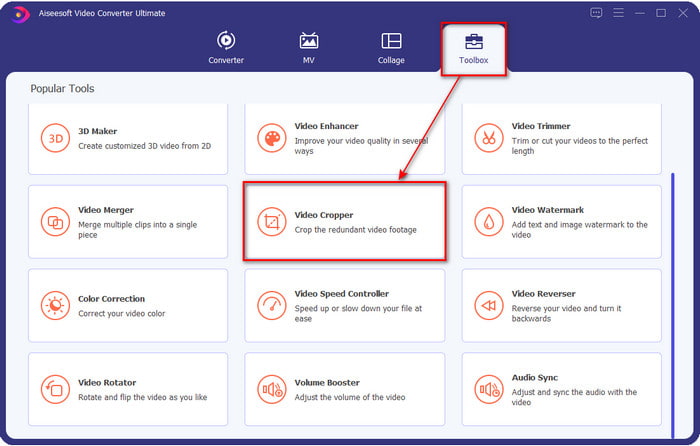
Paso 2. En la parte superior de la herramienta, haz clic primero en Toolbox y luego en Video Cropper.
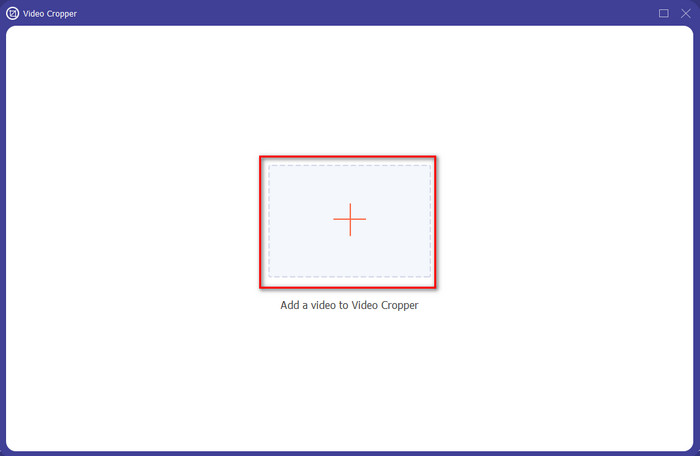
Paso 3. Pulsa el botón + para subir el vídeo de TikTok en la nueva ventana. Búscalo en la carpeta y haz clic en Open para continuar con el siguiente paso.
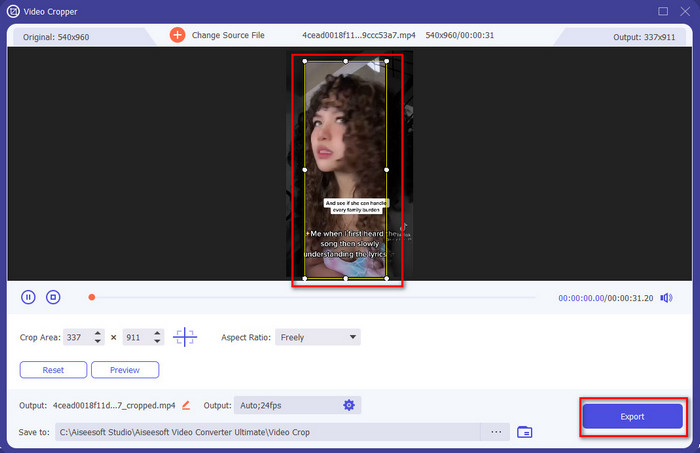
Paso 4. Ajusta el marco arrastrando los pequeños puntos y asegurándote de que la marca de agua no quede dentro del marco. Una vez hecho esto, haz clic en Export para descargar el vídeo de TikTok en tu ordenador.
Opcional: elimine la marca de agua final en los videos de Tiktok cortando el video
Una vez que haya eliminado la marca de agua a los lados del video de Tiktok recortando, ahora es el momento de eliminar la marca de agua al final del video cortando la duración del video. Además, enumeramos este paso para eliminar la marca de agua final. Aprendamos cómo eliminar la marca de agua de los videos de Tiktok que terminan sin más demoras.
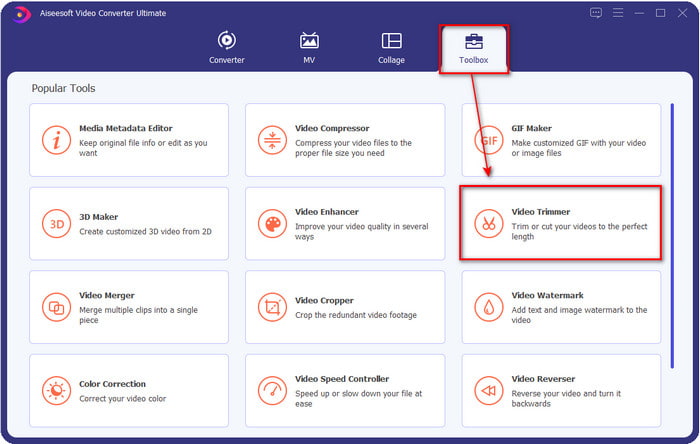
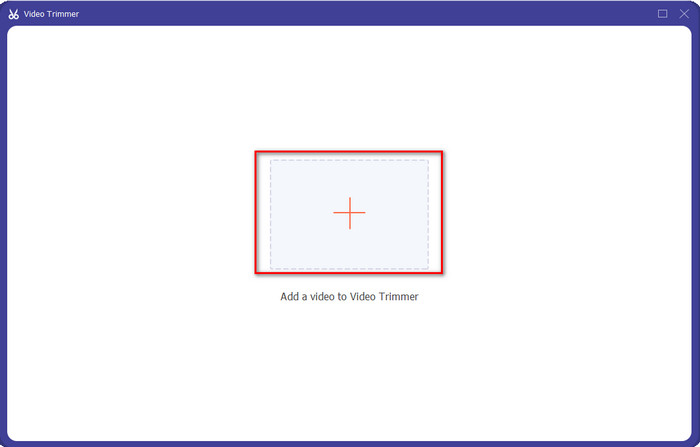
Paso 1. En la sección Toolbox, haz clic en Video Cutter.
Paso 2. Busca el archivo haciendo clic en el botón +; cuando ya hayas encontrado el vídeo que recortaste antes, haz clic en Open para continuar.
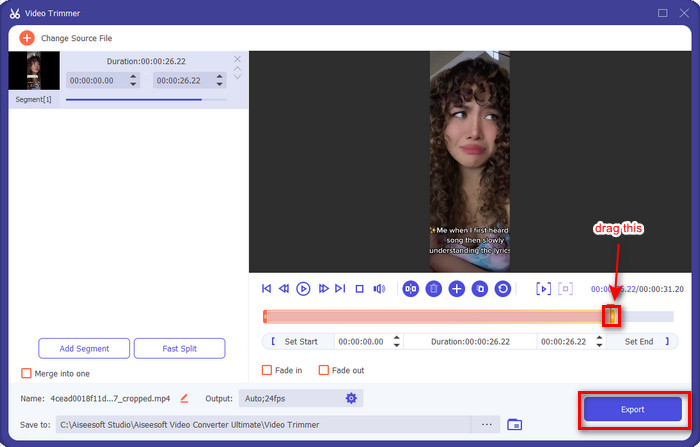
Paso 3. Mantén pulsado y mueve el playback in and out del vídeo para eliminar la marca de agua del final. El vídeo se guardará sin la marca de agua del final haciendo clic en el botón Export. Con esto, ya habrás eliminado correctamente la marca de agua del final.
Relacionado:
Cómo añadir subtítulos a un vídeo
Parte 2. Cómo eliminar el logotipo de TikTok en teléfonos iPhone y Android
Utilice el recortador integrado de Android
Si es un usuario de Android, puede eliminar la marca de agua Tiktok de forma gratuita utilizando el editor integrado en su teléfono. Aunque tiene un editor incorporado, la función de edición que admite es limitada. Pero si desea usarlo, puede ir a su galería y buscar primero el video de Tiktok. Además, no todos los teléfonos Android tienen estas características, pero puedes comprobarlo y, si tienes uno, sigue los pasos a continuación.
Paso 1. Haz clic en Edit y luego en Next.
Paso 2. Después de eso, haz clic en Crop & Rotate, elige la relación de aspecto que se muestra y pulsa check para continuar.
Paso 3. Pulsa Save para aplicar los cambios al resultado final.
Use el recortador incorporado de iOS.
Al igual que Android, también puede usar el recortador incorporado en su iOS y aprender cómo eliminar la marca de agua TikTok en su iPhone. Primero, descargue el video de TikTok en sus dispositivos iOS y ábralo en sus Fotos. Luego, siga los pasos a continuación.
Paso 1. Haz clic en Edit y luego en el icono de crop.
Paso 2. Ajusta el tamaño del marco moviéndolo según tus necesidades.
Paso 3. Haz clic en Done para guardar los cambios.
Parte 3. Cómo eliminar la marca de agua TikTok en la Web
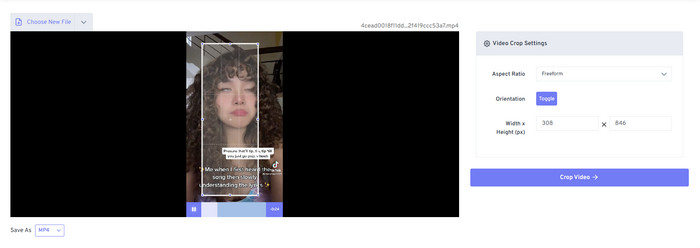
¿Quieres usar un método gratuito para eliminar la marca de agua de TikTok en línea? Si es así, puedes utilizar Free Video Convert – Video Cropper. Como indica su nombre, es gratuito y accesible para todos los usuarios; solo necesitas recortar la marca de agua del vídeo. Esta herramienta es perfecta para quienes no quieren descargar un eliminador de marcas de agua pero sí quieren quitarla. Sin embargo, si no tienes una excelente conexión a Internet, debes tener en cuenta que esta herramienta web no es la mejor opción.
Paso 1. Abre tu motor de búsqueda, busca el recortador de vídeo y haz clic en él.
Paso 2. Pulsa Choose File para añadir el vídeo de TikTok que quieras.
Paso 3. Mueve el marco y asegúrate de que la marca de agua no quede dentro. Después, pulsa Crop Video and Download para guardarlo en tu unidad.
Parte 4. Preguntas frecuentes sobre la eliminación de la marca de agua Tiktok
¿Por qué hay una marca de agua Tiktok?
Tiktok agregó una marca de agua en su video exportado para crear una forma simple pero efectiva de promocionar la aplicación entre los otros usuarios que no la han usado. De esta manera, Tiktok no le pagará a nadie para anunciar su aplicación si los usuarios la guardan, la publican en línea y otros la ven.
¿Hay alguna aplicación como Tiktok?
Hay algunas aplicaciones similares a Tiktok que te gustaría usar si ya te encanta Tiktok. Estos son Dubsmash, Clash, Lomotif y Cheez. Con estas aplicaciones, también puedes disfrutar creando videos mientras tienes una experiencia diferente o casi similar en Tiktok.
¿Cuánto tiempo puedo grabar videos en Tiktok?
En la última actualización, puede grabar una duración de video de 3 minutos si lo desea. De esta forma, los usuarios que deseen grabar un video largo pueden hacerlo en una sola toma en lugar de cortar el video y volver a tomarlo.
Conclusión
Ahora que te hemos enseñado cómo eliminar la marca de agua de TikTok, es hora de hacerlo. Las herramientas mencionadas en este artículo ofrecen un excelente rendimiento al quitar la marca de agua de cada vídeo exportado en TikTok. Aunque estas herramientas son la mejor opción, seguimos prefiriendo usar Video Converter Ultimate porque permite recortar la marca de agua de TikTok en los laterales, incluso en el borde del vídeo. Así que, si aún te preguntas qué deberías usar, debes leer la guía paso a paso que hemos proporcionado arriba.
-
 2 convertidores profesionales para convertir TRP a formato WMV [Guía]
 ¿Eres de los usuarios que lo está pasando mal con el archivo TRP? Si es así, sigamos leyendo este artículo para saber cómo convertir TRP a WMV y saber más.
-
 3 métodos asombrosos y probados para convertir FLV a MKV gratis
 ¿Busca una solución para convertir FLV a MKV? En ese caso, continúe leyendo los detalles completos a continuación para determinar cómo convertir archivos FLV y las herramientas disponibles.
-
 2 consejos de expertos para convertir 3GP a WMV en Windows y Mac [2022]
 ¿Quieres saber cómo convertir 3GP a WMV de forma experta? Si ese es el caso, leer lo siguiente lo ayudará a determinar qué convertidores 3GP puede usar.
