


 Video Converter Ultimate
 Grabador de pantalla
 Reparación de vídeo
Los 6 mejores controladores de velocidad de video para Windows/Mac/Android/iOS
Acelerar o ralentizar un vídeo puede crear un efecto increíble si estás cansado de usar siempre los mismos efectos. Esta técnica de edición de vídeo es sencilla pero efectiva. Si buscas en Internet, verás que hay muchos controladores de velocidad distintos en el mercado, y sabemos que es difícil elegir. Pero si lees este artículo, analizaremos la app de control de velocidad que puedes usar para cambiar la velocidad de reproducción. ¿Te interesan las mejores apps de control de velocidad? En ese caso, sigue leyendo para descubrir más sobre el controlador de velocidad de vídeo disponible en tus plataformas.

Parte 1. Los 6 mejores controladores de velocidad de video para Windows, Mac, Chrome, iOS y Android
Arriba 1. Video Converter Ultimate (Windows y Mac)
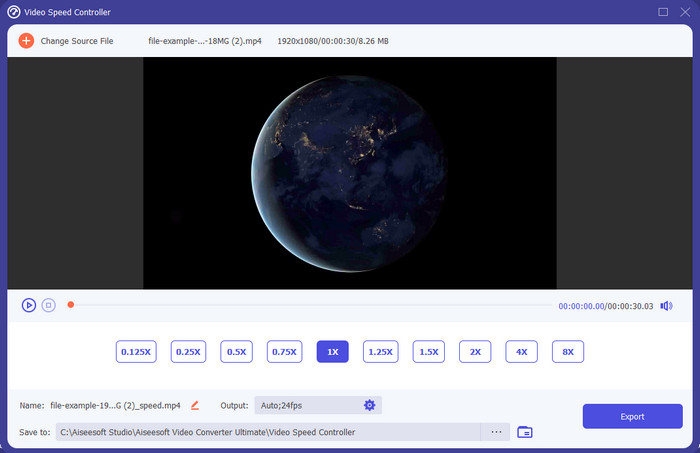
¿Necesitas un controlador de velocidad de vídeo que sea muy eficaz y eficiente para acelerar y ralentizar el vídeo? En ese caso, Video Converter Ultimate es la ayuda para este tipo de problema. Es la herramienta más accesible que puedes usar para cambiar la velocidad del vídeo sin esfuerzo, tanto si lo necesitas a alta velocidad como en cámara lenta. Aunque cambies la velocidad, la calidad original del vídeo se mantendrá, pero no el movimiento del vídeo, ya que estás modificando la velocidad.
Aparte de eso, puede hacer muchas cosas como convertir, fusionar, cortar y más; Básicamente, es una herramienta todo en uno. ¿Quieres conocer las otras ofertas que puedes tener con esta aplicación de aceleración de videos? Si es así, lea las funciones de la herramienta para obtener más información, o puede descargar el software en su escritorio ahora mismo para probarlo.

Video Converter Ultimate
5,689,200+ Descargas- Puede cambiar con precisión los cuadros de video hacia arriba o hacia abajo rápidamente en cualquier formato de video, como MP4.
- Numerosas funciones y efectos de edición de video están disponibles.
- Es flexible en todas las plataformas como Windows o macOS.
- El proceso ultrarrápido hace que el proceso de descarga o exportación se realice en un abrir y cerrar de ojos.
- Exportar o descargar el video que edites no tendrá marca de agua.
Descarga gratuitaPara Windows 7 o posteriorDescarga segura
Descarga gratuitaPara macOS 10.7 o posteriorDescarga segura
Pros
- Cambie el cuadro por cuadro del video, incluso si es un profesional o no.
- Opciones de reproducción de video fáciles de entender.
- Una excelente capacidad para compartir en las redes sociales.
- La descarga es gratuita, pero ofrece compras dentro de la aplicación.
Contras
- Necesita comprar si desea tener la capacidad completa de la herramienta.
Arriba 2. Clipchamp (Windows)
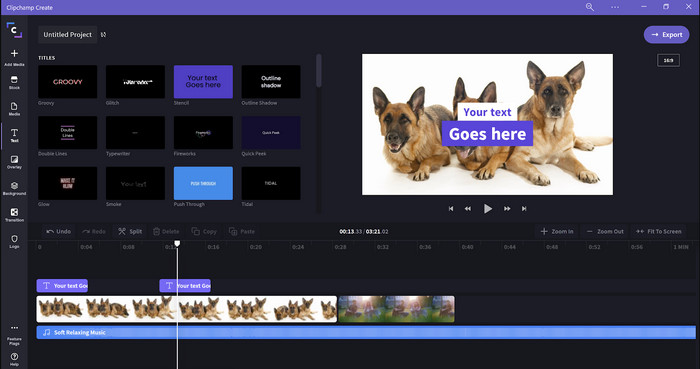
Clipchamp es un editor de velocidad de vídeo que puedes usar en Windows. Esta herramienta tiene una curva de aprendizaje poco pronunciada, así que puede interesarte probarla si eres nuevo en la edición. También ofrece varias funciones que te pueden resultar útiles. Sin embargo, un gran inconveniente de esta herramienta es la calidad de salida del vídeo. Solo puedes exportar el archivo en calidad de vídeo 480, que es baja comparada con otras herramientas gratuitas. Pero si necesitas que la herramienta exporte en 720 o 1080, puedes suscribirte pagando la cuota correspondiente. En definitiva, la herramienta es buena, pero sigue sin ser tan completa como el primer editor.
Pros
- GUI simple y fácil de usar.
- Ofrece características adicionales para la edición.
- Controla la reproducción de video fácilmente.
Contras
- Para la versión gratuita, la salida final es 480.
- A veces, la herramienta se volvió inflexible con la tarea.
Top 3. Controlador de velocidad de video (Chrome)

¿Quieres usar una extensión de controlador de velocidad de vídeo en Chrome? Entonces puedes usar Video Speed Controller. Esta herramienta está disponible en cualquier navegador Chrome para acelerar o ralentizar el vídeo que estés viendo. Es fácil de usar para todo el mundo y también es segura de acceder, ya que es una extensión para Chrome. Sin embargo, si exportas el vídeo, la reproducción seguirá siendo la misma aunque la cambies. Esto se debe a que la herramienta solo funciona en el vídeo que estás viendo en tu Chrome y no fuera de él. Información adicional: una vez que aceleres el vídeo con esta extensión, todos los vídeos que reproduzcas en Chrome estarán a la misma velocidad.
Pros
- Controlador de velocidad puntual que puedes usar en Chrome.
- Capaz de rebobinar o restablecer la velocidad de reproducción de video en Chrome fácilmente.
- Es compatible con el comando de teclas cortas.
Contras
- El panel del controlador de video no está visible.
- No puedes cambiar la velocidad del video fuera de Chrome.
Arriba 4. Accelerate para Safari (iOS y Mac)
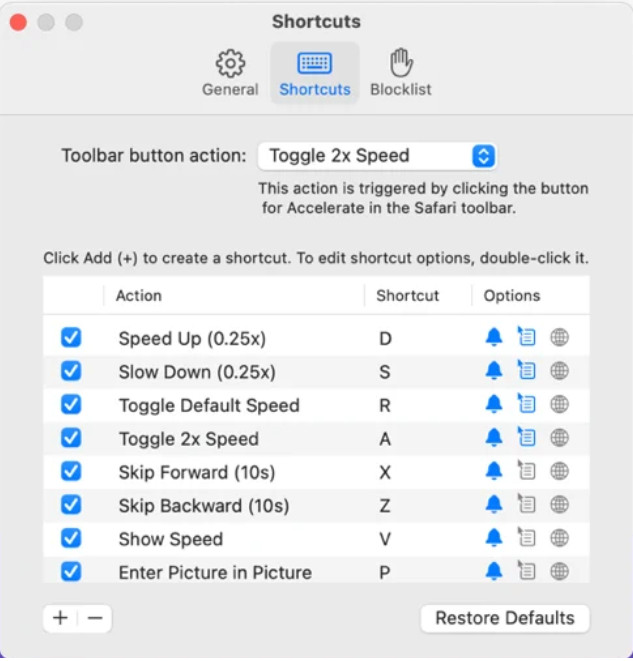
¿Necesitas un controlador de velocidad de vídeo en Safari? Accelerate for Safari está disponible en cualquier Safari de los dispositivos Apple. Esta herramienta puede cambiar la reproducción de todos los vídeos HTML5 en Safari. Igual que la extensión de Chrome anterior, está limitada a los dispositivos Apple. Así que, si eres usuario de Apple, quizá te interese usar esta extensión de control de velocidad para acelerar el vídeo o ralentizarlo. Además, puedes usar las teclas del teclado para indicar a la herramienta que cambie la reproducción del vídeo.
Pros
- Es seguro de usar en todos los Safari.
- También es compatible con Picture-in-Picture y AirPlay.
- Las teclas de acceso directo están disponibles para tomar el control de la herramienta.
Contras
- No es compatible con otro navegador web que no sea Safari.
- Limitado a videos HTML 5.
Arriba 5. Lento Rápido Lento - Controla la velocidad de tus videos (iOS)
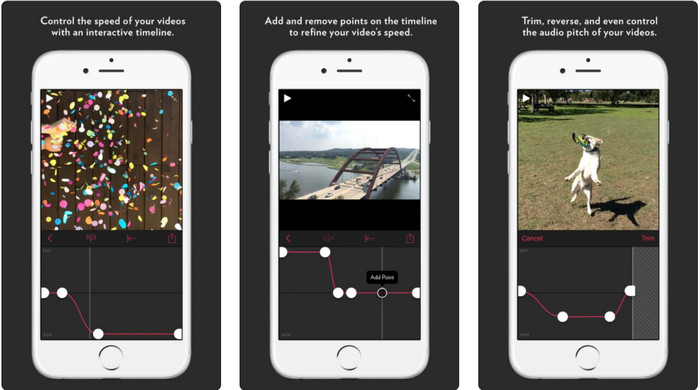
Para un controlador de velocidad de vídeo en iPhone, puedes usar Slow Fast Slow. Esta herramienta ayuda a los usuarios de iOS a manipular al instante la velocidad de reproducción del vídeo; funciona especialmente bien con la cámara lenta. Además, cuenta con una línea de tiempo integrada muy interactiva para ajustar la velocidad. También admite otras funciones como la alteración del tono y la inversión del clip. Sin embargo, esta herramienta requiere iOS 10, por lo que no puedes usarla si tu sistema no es la versión 10.
Pros
- Es compatible con otras características para su video.
- Fácil de usar.
- Puede ralentizar videos hasta 1/16 de velocidad.
Contras
- No es compatible con la salida 4k y la elección de FPS.
- No funciona en algunos de los nuevos dispositivos iOS.
Top 6. Controlador de velocidad de video Pro (Android)
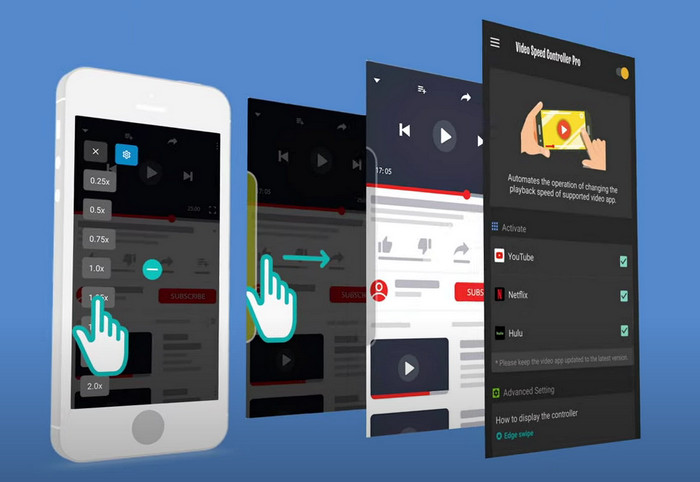
Si necesitas un controlador de velocidad de vídeo en Android, entonces, ¿adivina qué? Puedes usar Video Speed Controller Pro instalándolo desde Play Store. Con la ayuda de esta herramienta, puedes acelerar fácilmente cualquier vídeo que se esté reproduciendo en tu Android. Además, esta herramienta funciona como una extensión de control de velocidad en Android. Aunque la herramienta puede acelerar tu vídeo, la velocidad máxima que alcanza es solo 2x. No obstante, si necesitas acelerar la reproducción de vídeos, puedes usarla en YouTube, Netflix y otras plataformas de vídeo en Android.
Pros
- Es simple de usar.
- La herramienta en sí está en punto.
- Una barra de menú está disponible para revelar las opciones en su reproducción.
Contras
- Las opciones de velocidad de reproducción son limitadas.
- A veces no funciona bien.
Parte 2. Cuadro comparativo
| Características | Video Converter Ultimate (Windows y Mac) | Clipchamp (Windows) | Controlador de velocidad de video (cromo) | Acelerar para Safari (iOS y Mac) | Lento Rápido Lento: controle la velocidad de sus videos (iOS) | Controlador de velocidad de video Pro (Android) |
| Control de velocidad |  | | | | | |
| Salida de video de alta calidad | |  | | | | |
| Funciones de edición | | | | | | |
| Proceso de exportación ultrarrápido | | | | | | |
Parte 3. Preguntas frecuentes sobre el controlador de velocidad de video
¿Por qué necesito usar un controlador de velocidad?
En algunos casos, deberá ver un video a alta velocidad o más lento. Un gran ejemplo de ver un video acelerado es terminar el video que está viendo de inmediato, o similar. Acelerar videos es de gran ayuda para estos usuarios. Mientras que en cámara lenta, esto generalmente se usa en una repetición instantánea de los deportes de ritmo rápido como carreras, baloncesto, voleibol y más. Cualquiera de los dos, necesitará un controlador de velocidad efectivo para anular la velocidad normal según sus necesidades manualmente.
¿Puedo acelerar videos en Tiktok?
Sí, puedes grabar vídeos a mayor velocidad en TikTok. Sin embargo, no puedes ver vídeos en TikTok a alta velocidad. Así que, si necesitas la ayuda de una buena herramienta para acelerar, haz clic y lee este artículo para saber cómo acelerar un vídeo en TikTok.
¿Cómo ralentizar los videos?
Al contrario que acelerar vídeos, puedes crear cámara lenta en tus vídeos con la ayuda de los editores disponibles en el mercado. ¿Qué herramienta deberías usar? No te preocupes, porque presentamos el mejor software de vídeo en cámara lenta que puedes utilizar para ayudarte a crear un efecto de cámara lenta. Si necesitas saber más, puedes hacer clic en este enlace.
Conclusión
Hoy ya conoces las apps de pago y gratuitas para acelerar vídeos en diferentes plataformas. Los controladores de velocidad ofrecen una serie de funciones específicas para ayudar a distintos usuarios a acelerar vídeos. Si leemos todo con detenimiento, podemos ver que FVC Video Converter Ultimate lo ofrece todo para los usuarios que necesitan ayuda. Así que, si quieres descargar la herramienta definitiva en tu ordenador, puedes hacer clic en el botón de descarga y disfrutar de una experiencia completa con la herramienta.
-
 Cómo acelerar un video con los 5 mejores programas disponibles [Windows/Mac/Linux]
 ¿Quieres saber cómo acelerar el video fácilmente? Luego lea este artículo mientras explicamos cómo acelerar de manera efectiva en Windows, Mac y Linux.
-
 Formas más fáciles de acelerar un video en sus dispositivos Android [2021]
 ¿Sabías que puedes acelerar un video en tu Android? Entonces, si desea saber cómo acelerar un video en su teléfono Android, lea este artículo.
-
 Excelentes consejos de 2021: Cómo acelerar un video en iMovie
 Tu amigo te sugiere iMovie para ayudarte con tu problema de cómo acelerar un video usando el sistema operativo iOS, pero ¿no sabes qué hacer? Vea más sobre esto a medida que lea más a través de este artículo.
