


 Video Converter Ultimate
 Näytön tallennin
 Videon korjaus
 Suojattu lataus
Muunna PSD JPG/PNG:ksi: Merkittäviä tapoja, joita et voi missata
PSD on Adoben kehittämä tiedostomuoto. Jotkin käyttäjät voivat avata tämän kuvatiedoston Adobe Photoshopissa, Corelissa ja PaintShop Prossa. Näiden mainittujen ohjelmien lisäksi PSD‑tiedostoa ei kuitenkaan voi helposti avata muissa ohjelmissa. Tämä johtuu siitä, että osa ohjelmista/muokkaajista ei tue PSD‑muotoa. Tässä tapauksessa yksi parhaista ratkaisuista on muuntaa se toisiin tiedostomuotoihin. Onneksi JPG- ja PNG‑muodot ovat nykyään hyvin yleisiä. Lähes kaikki selaimet, ohjelmat ja editorit tukevat näitä kahta formaattia. Tässä oppaassa tarjoamme sinulle parhaat tavat muuntaa PSD JPG- tai PNG‑muotoon.

Osa 1. Vertaa PSD:tä, JPG:tä ja PNG:tä
| Tiedosto muoto | PSD | JPG / JPEG | PNG |
| Tiedostopääte | .psd | .jpg | .png |
| Koko nimi | Photoshop asiakirja | Yhteinen valokuvausasiantuntijaryhmä | Kannettava verkkografiikka |
| Kehittäjä | Adobe | Yhteinen valokuvausasiantuntijaryhmä | PNG-kehitysryhmä |
| Kuvaus | Adobe Photoshopin alkuperäistä tiedostomuotoa kutsutaan a PSD tiedosto. Todennäköisesti olet törmännyt tiedostoihin, joiden pääte on.psd. Varsinkin jos olet koskaan käyttänyt Adobe Photoshopia; voit huomata ne. Taiteilijat ja suunnittelijat käyttivät usein tätä tiedostomuotoa. | Kuvatiedostomuoto on a JPG tai JPEG-tiedosto. JPG-kuvatiedostot ovat samaa tiedostotyyppiä riippumatta siitä, onko niiden tiedostotunniste .JPG vai .JPEG. JPG-tiedostoja voidaan avata verkkoselaimilla, kuten Chrome tai Firefox, Viewer ja Paint. | Kannettava verkkografiikka (PNG) -tiedosto on yksi näistä. Pakkausmenetelmä on häviötön. Sitä pidetään yleensä GIF-kuvamuodon korvaajana. PNG-tiedostot eivät kuitenkaan tue animaatioita, kuten GIF-tiedostot voivat. |
| Puristus | Häviötön | Menetetty | Häviötön |
| Liittyvät ohjelmat/selaimet | Adobe Photoshop, GIMP, XnView, Google | IrfanView, Paint, Adobe Photoshop, GIMP, Microsoft, FastStone Image Viewer, Google Chrome, Internet Explorer | FastStone Image Viewer, Adobe Photoshop, GIMP, Microsoft, Paint, Google Chrome, Internet Explorer |
Osa 2. Erinomaisia tapoja muuntaa PSD JPG/PNG-muotoon verkossa
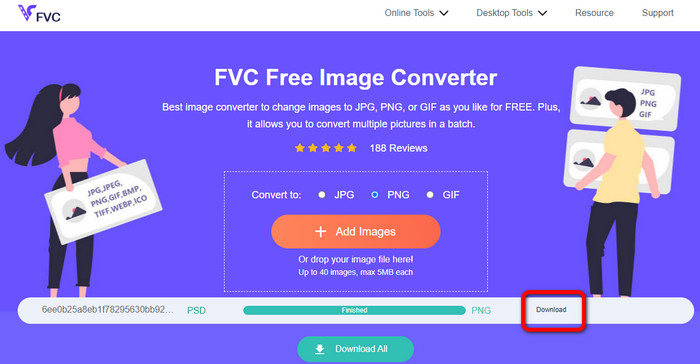
Kuinka muuntaa PSD JPG/PNG:ksi FVC Free Image Converterissa
FVC Free Image Converter on erinomainen verkkotyökalu, jolla voit muuntaa PSD:n JPG/PNG‑muotoon. Tämä verkkopohjainen kuvamuunnin osaa muuntaa PSD‑tiedostosi tarkasti JPG‑muotoon. Ohjelma tukee syötemuotoina muun muassa EPS-, JPG-, PNG-, TIFF-, BMP‑tiedostoja ja paljon muuta. Lisäksi siinä on helppokäyttöinen käyttöliittymä ja tarkat asetukset. Näin sekä kokeneet että aloittelevat käyttäjät voivat muuntaa kuvia tällä työkalulla. Sitä on myös helppo käyttää, koska kuvien muuntamiseen tarvitaan vain muutama vaihe. Kaikki käyttäjät voivat käyttää FVC Free Image Converter ‑työkalua, sillä se toimii kaikissa selaimissa. Lisäksi FVC Free Image Converter tarjoaa kuvamuunnoksia ilmaiseksi. Sovellus on verkkopohjainen, joten mitään ohjelmistoa tai liitännäisiä ei tarvitse ladata. Toisin kuin monissa muissa muuntimissa, ärsyttäviä mainoksia ei tule esiin kuvamuunnoksen aikana. Se takaa myös kuvan korkean laadun. Muunnetut kuvat säilyttävät alkuperäisten valokuvien ulkoasun. FVC‑kuvatiedostomuunnin tukee myös erämuunnosta. Voit muuntaa suuren määrän kuvia yhdellä kertaa. Tämä kuvamuunnin pystyy käsittelemään jopa 40 kuvaa.
Muunna PSD JPG:ksi
Vaihe 1. Siirry selaimellasi FVC Free Image Converter ‑sivustolle. Valitse formaattivaihtoehdoista JPG‑tiedostomuoto.
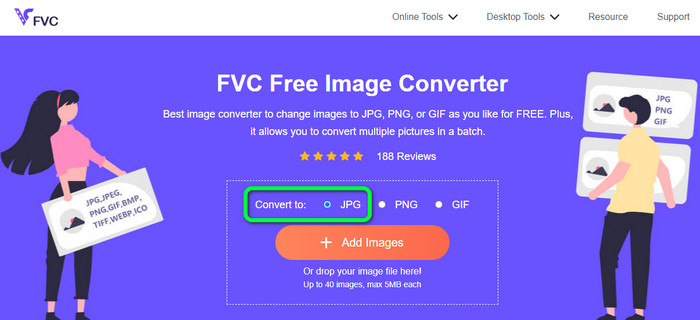
Vaihe 2. Kun olet valinnut halutun tulostusmuodon, napsauta Add Images ‑painiketta. Kun tietokoneen tiedostoikkuna avautuu, valitse PSD‑kuva ja avaa se. Kun lataus on valmis, PSD muunnetaan automaattisesti JPG‑muotoon.
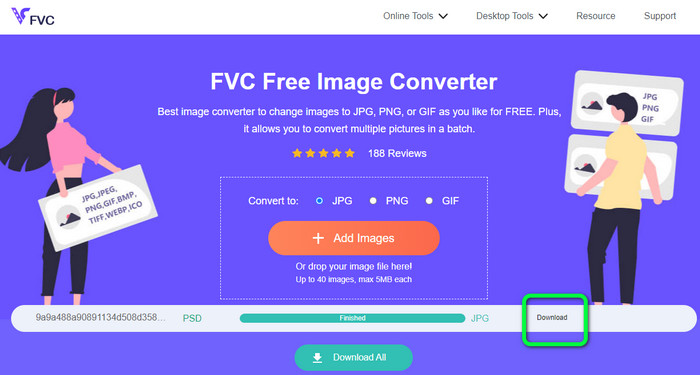
Vaihe 3. Muunnosprosessin jälkeen tallenna muunnettu kuva napsauttamalla Download‑painiketta.
Muunna PSD PNG:ksi
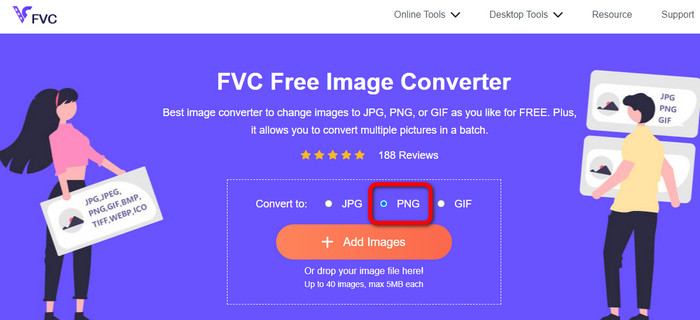
Vaihe 1. Kun olet FVC Free Image Converter ‑sivustolla, valitse PNG‑muoto.
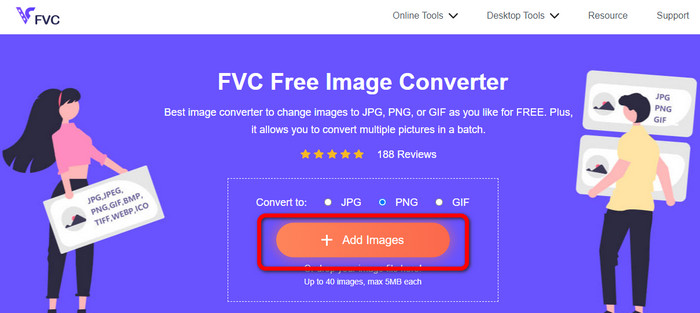
Vaihe 2. Napsauta Add Images ‑painiketta ladataksesi PSD‑kuvan. Voit myös pudottaa kuvatiedoston suoraan laatikkoon. Odota sitten lataus- ja muunnosprosessin valmistumista.
Vaihe 3. Viimeisessä vaiheessa napsauta Download‑painiketta tallentaaksesi lopputuloksen.
Kuinka muuntaa PSD JPG/PNG:ksi Zamzarissa
Zamzar on toinen erinomainen verkkopohjainen kuvamuunnin PSD:n muuntamiseen JPG/PNG‑muotoon. Mahdollisuus ladata jopa 50 Mt:n kokoisia kuvia on erinomainen ominaisuus. Voit myös ladata kuvatiedoston tietokoneelta. Lisäksi voit käyttää Dropboxia, Drivea tai muuta sivustoa antamalla sen URL‑osoitteen. Työkalussa on helppokäyttöinen käyttöliittymä, mikä lisää sen käytettävyyttä kaikille käyttäjille. Tällä ohjelmalla voit ladata kuvia CR2-, ARW-, PNG-, 3FR-, JPG-, GIF-, TIFF‑ ja muissa muodoissa. Kaikkien käyttäjien työn helpottamiseksi voit myös muuntaa kuvatiedoston useisiin eri muotoihin. Voit muuntaa sen esimerkiksi BMP-, EPS-, PDF-, PNG-, JPG- ja WBMP‑muotoihin. Muunnosprosessi on kuitenkin hyvin hidas. Myöskään muunnettuja kuvia ei voi tallentaa. Lisäksi jokaiseen istuntoon on rajattu vain kaksi kuvamuunnosta. Käytä alla olevia ohjeita muuntaaksesi PSD‑tiedoston JPG/PNG‑muotoon.
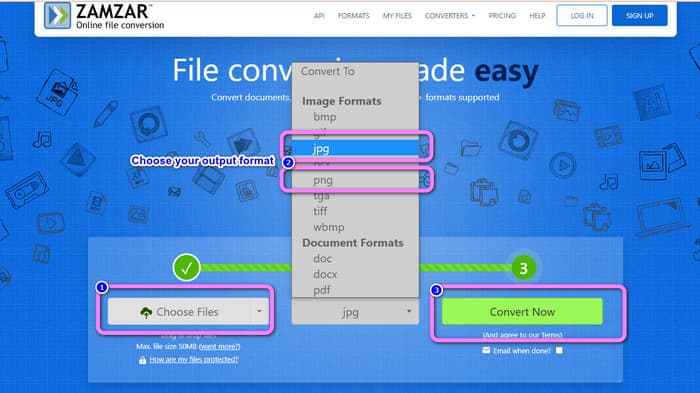
Vaihe 1. Siirry Zamzar‑sivustolle. Napsauta Choose Files ‑painiketta. Avaa PSD‑tiedosto tiedostokansiostasi.
Vaihe 2. Siirry Convert to ‑vaihtoehtoihin. Valitse haluamasi tulostusmuoto, kuten PNG tai JPG.
Vaihe 3. Viimeinen vaihe on napsauttaa Convert Now ‑painiketta. Odota muunnosprosessin valmistumista. Tämän jälkeen tallenna muunnettu tiedosto työpöydällesi. Napsauta tästä saadaksesi ohjeet, miten EPS muunnetaan JPG- tai PNG‑muotoon.
Osa 3. Hyödyllinen tapa muuntaa PSD JPG/PNG-muotoon offline-tilassa
Kuinka muuntaa PSD JPG/PNG:ksi Video Converter Ultimatessa
Video Converter Ultimate on tehokas ohjelma PSD‑tiedostojen muuntamiseen JPG/PNG‑muotoon. Ohjelmassa on helposti ymmärrettävä käyttöliittymä, mikä tekee siitä sopivan kaikille käyttäjille. Lisäksi siinä on yksinkertaiset vaiheet, joita voit seurata. Näin PSD‑kuvien muuntaminen JPG/PNG‑muotoon on helppoa kuin mikä. JPG- ja PNG‑muotojen lisäksi se tukee myös monia muita kuvatiedostomuotoja. Se tukee esimerkiksi BMP-, WEBP-, TIF-, EPS‑muotoja ja muuta, mikä on kätevää. Voit käyttää tätä sovellusta sekä Windows‑ että Mac‑tietokoneilla. Lisäksi erämuunnosominaisuuden avulla voit muuntaa useita tiedostoja yhdellä kertaa. Näin voit muuntaa niin monta kuvaa kuin haluat. Seuraa alla olevia yksinkertaisia ohjeita muuntaaksesi PSD‑tiedoston JPG/PNG‑muotoon.
Vaihe 1. Napsauta alla olevaa Download‑painiketta saadaksesi Video Converter Ultimate ‑ohjelman. Windows‑ ja Mac‑versiot ovat saatavilla. Käynnistä sitten sovellus asennuksen jälkeen.
Ilmainen latausWindows 7 tai uudempiTurvallinen lataus
Ilmainen latausMacOS 10.7 tai uudempiTurvallinen lataus
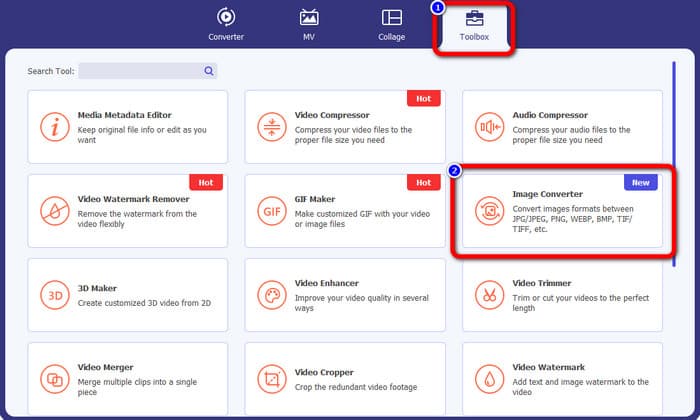
Vaihe 2. Siirry Toolbox‑välilehdelle ja napsauta Image Converter ‑työkalua.
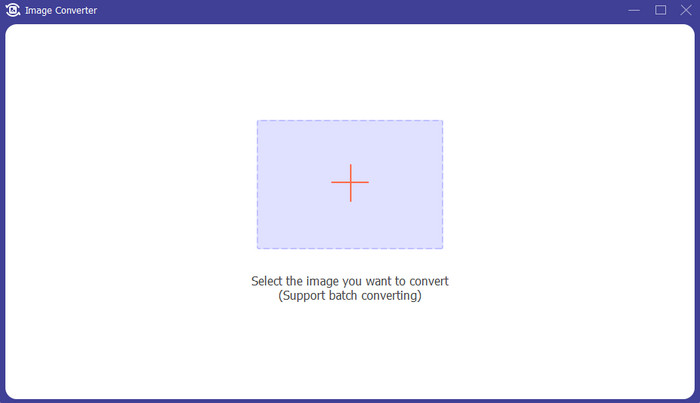
Vaihe 3. Napsauta +‑kuvaketta lisätäksesi PSD‑kuvatiedoston. Voit lisätä useampia kuvia kerralla.
Vaihe 4. PSD‑kuvien lisäämisen jälkeen siirry formaattivaihtoehtoihin ja valitse haluamasi tulostusmuoto.
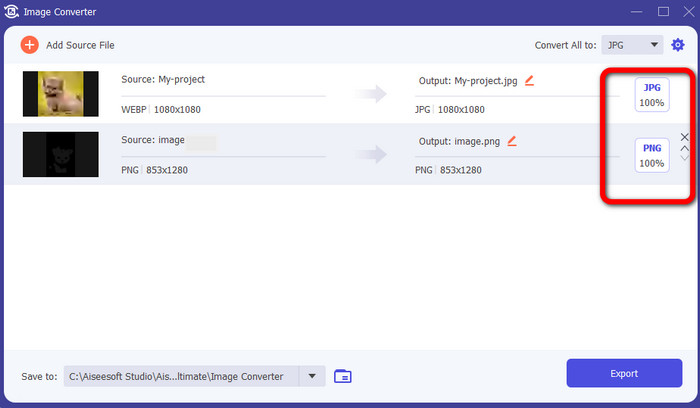
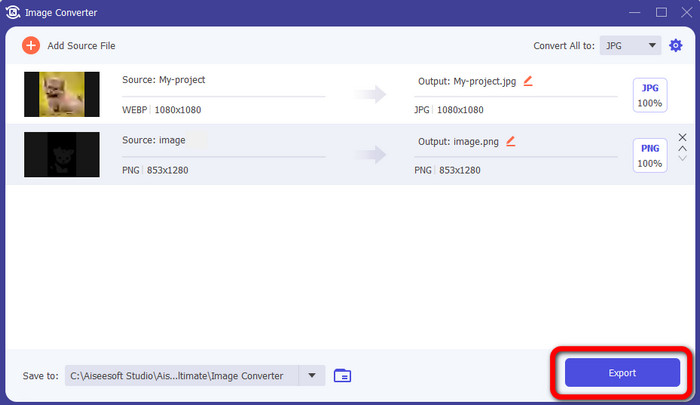
Vaihe 5. Napsauta lopuksi Export‑painiketta tallentaaksesi muunnetut kuvasi.
Kuinka muuntaa PSD JPG/PNG:ksi Photoshopissa
Photoshop on myös ohjelma, jota voit käyttää, jos haluat muuntaa PSD‑tiedostoja JPG- ja PNG‑muotoon. Se tarjoaa tehokkaita muuntomenetelmiä. Lisäksi Photoshop on saatavilla sekä Windowsille että Macille. Voit myös käyttää Photoshopia kuvien terävöittämiseen. Koska ohjelma kuuluu kuitenkin edistyneisiin kuvankäsittelytyökaluihin, se on ostettava, jotta pääset käsiksi kaikkiin ominaisuuksiin. Photoshop tarjoaa vain 7 päivän ilmaisen kokeilujakson. Lisäksi sen käyttöliittymä on vaikeaselkoinen.
Vaihe 1. Lataa Photoshop ja käynnistä se tietokoneellasi. Valitse nähdäksesi kuvasi File > Open tai napsauta tiedostonhallinnassa PSD‑projektitiedostoa hiiren oikealla ja valitse Open with > Photoshop.
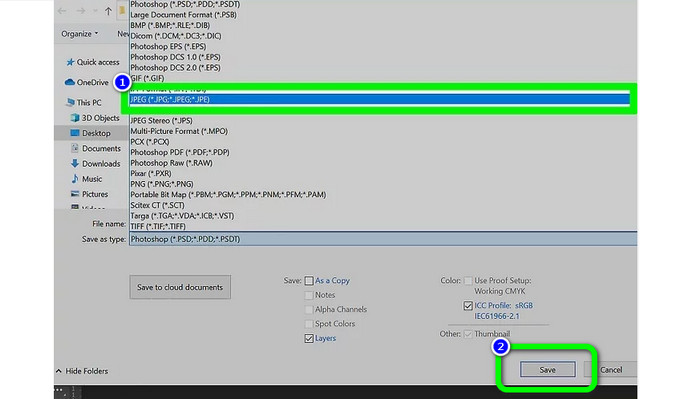
Vaihe 2. Napsauta sitten ikkunan vasemmassa yläkulmassa olevaa File‑välilehteä. Valitse sen jälkeen Save as ‑vaihtoehto.
Vaihe 3. Siirry Save as ‑vaihtoehtoon. Valitse sen jälkeen formaattivalikosta JPEG/JPG. Kun olet valinnut JPG/JPEG‑muodon, napsauta Save‑painiketta.
Osa 4. Usein kysyttyä PSD:n muuntamisesta JPG- tai PNG-muotoon
1. Milloin käyttäisit PSD:tä?
Monet käyttäjät käyttävät PSD-tiedostoja työskennellessään korkealaatuisten grafiikkatietojen kanssa. Se sisältää valtavia ja monimutkaisia kuvia tai muita korkearesoluutioisia grafiikoita ja taideteoksia.
2. Voitko tulostaa PSD-tiedoston?
Valitettavasti ei. Jos haluat tulostaa PSD-tiedoston, sinun on muunnettava se muihin muotoihin, kuten PDF.
3. Onko PSB PSD?
Suurempimuotoinen PSD-tiedosto on PSB-tiedosto. Photoshop Big tai PSB on lyhenne Photoshop-yhteensopivasta tiedostosta, joka voi sisältää enemmän tietoa kuin tyypillinen PSD.
Johtopäätös
PSD on hyvä kuvatiedostomuoto. Et kuitenkaan voi avata sitä muilla selaimilla tai ohjelmilla. Jos siis haluat avata sen, sinun on ensin muunnettava tiedosto yleisimmin käytettyihin muotoihin, kuten JPG ja PNG. Jos haluat muuntaa PSD:n JPG- tai PNG‑muotoon, käytä FVC Free Image Converter ‑työkalua. Sen yksinkertainen toimintatapa sopii sinulle erinomaisesti.
-
 Opi helpoimmat tavat muuntaa WebP nopeasti JPG-muotoon
 Oppikaamme kaikki tehokkaita tapoja muuntaa Web-kuvat JPG-muotoon helposti. Tämä artikkeli antaa sinulle erinomaiset kuvanmuuntimet, joita voit käyttää kuvatiedostojen muuntamiseen.
-
 Täydelliset menetelmät WebP:n muuntamiseksi PNG-muotoon vaivattomasti
 Ole tietoinen merkittävistä menetelmistä muuntamalla WebP PNG-muotoon. Tämä opas tarjoaa sinulle hyödyllisimmät kuvanmuuntimet, joita voit kokeilla.
-
 Äärimmäiset menetelmät kuinka muuntaa WebP täydellisesti GIF-muotoon
 Haluatko muuntaa WebP:n GIF-muotoon, mutta sinulla ei ole aavistustakaan siitä, mitä tehdä? Onneksi tämä viesti esittelee useita tapoja muuntaa WebP GIF-muotoon välittömästi.
