


 Video Converter Ultimate
 Näytön tallennin
 Videon korjaus
 Suojattu lataus
Opi Twitterin, Instagramin ja TikTokin videon pituusstandardit
Do you want to know the video length standard of each platform, like TikTok, Twitter, and Instagram? Then the best you can do is to read this informative post. We will provide all the details you can discover regarding the maximum video length for each platform. In addition, this post will provide the methods to cut the video length using video editing software. This way, you will know how to cut your videos before posting them on various social media platforms. To learn all the details, read this post from start to end.

Osa 1. Videon pituusstandardi Instagramille
Instagram on yksi yleisimmin käytetyistä sosiaalisen median alustoista nykyään. Se sopii kuvien, tarinoiden ja muiden lähettämiseen. Se on myös viestintäalusta, jonka avulla voit kommunikoida muiden käyttäjien kanssa. Tässä osassa opit kaikki yksityiskohdat Instagram-videon pituusstandardista. Katso lisätietoja alta.
IG Post Video Length
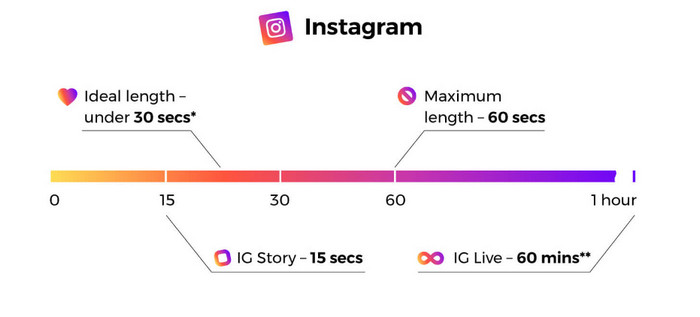
Kun puhumme in-feed-videopostauksesta, nämä ovat videoita, joita voit kohdata vierittäessäsi. Instagram-videon pituus on enintään 60 sekuntia tai 1 minuutti.
Instagram Stories
Jos haluat ladata tai julkaista videon Instagram-tarinasi, voit ladata sen videon enimmäispituudella 15 sekuntia. Jos haluat julkaista pidempiä videoita Instagram-tarinaasi, voit ladata useita 15 sekunnin videoleikkeitä. IG-tarinoihin voi myös laittaa erilaisia mainoksia, mutta videon pituus on silti 15 sekuntia.
Instagram Live Videos
Voit myös jakaa live-videoita Instagramissa. Instagram-livevideon pituus on jopa 1 tunti.
Instagram TV
Voit nyt käyttää Instagramin uusinta toimintoa, joka on. Instagram TV tai IGTV on alusta, joka korvaa perinteisen television. Siksi voit lähettää pitkiä, jopa 60 minuutin mittaisia videoita. Käyttäjät voivat aloittaa videoiden katselun heti, kun he käynnistävät alisovelluksen. Lisäksi kaikki IGTV:n videot ovat pystysuuntaisia, koska tämä muoto on tehokkain vain mobiilialustalle.
Nämä ovat Instagram-videon enimmäispituus tarinoissa, syötevideoissa, rivivideoissa ja IGTV:ssä.
Osa 2. TikTokin videon pituusstandardi
Aiemmin TikTok-videon keskimääräinen pituus oli vain 15 sekuntia. Sovelluksen varhainen vetoomus sisälsi lyhyen videon. He jatkoivat vierittämistä saadakseen lisää, koska se tarjosi nopeita, mukaansatempaavia videoita. 15 sekunnin aikaraja oli kuitenkin voimassa vain noin vuoden. ByteDance Companyn omistama sovellus nosti videon enimmäiskestonsa yhteen minuuttiin vuonna 2017 ja kolmeen minuuttiin vuonna 2021.
Nyt TikTokin videon enimmäispituus on 10 minuuttia. Tällä tavalla käyttäjät voivat ladata pidemmän videon. On kuitenkin monia asioita, jotka sinun on otettava huomioon. Muista aina, että käyttäjät pitävät pienestä sisällöstä. Se tarkoittaa, että lyhyen videon julkaiseminen on parempi kuin pidemmän videon.
Osa 3. Videon pituusstandardi Twitterissä
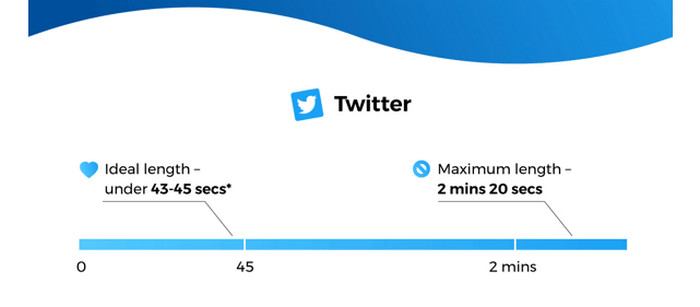
The Twitter application is the perfect platform if you prefer posting shorter videos. The maximum video length it can provide is up to 140 seconds or 2 minutes, and 20 seconds long. Posting video ads have the same duration. For additional information, the video will automatically loop when posting a video with less than 7 seconds. It means that your video will turn into GIF. One of the keys to audience minds and hearts is GIFs. Furthermore, the best video length for Twitter is around 44 seconds. It is enough time to grab viewers’ attention.
Osa 4. Videon pituuden leikkaaminen näille alustoille
After knowing the maximum length of each social media platform, you can already know the length requirement when posting a video. But the question is, how to cut a video to the desired length? We will introduce you to the Video Converter Ultimate if that concerns you. Video Converter Ultimate is a program to shorten a video for TikTok, Twitter, Instagram, and other platforms. It lets you cut or trim your video to your desired length. Also, the program allows you to cut videos with straightforward methods during the cutting process. This way, skilled and non-professional users can operate this video editing software. It also has an easy-to-understand interface, which is easier to comprehend.
Lisäksi Video Converter Ultimate on saatavilla kaikilla laitteilla, pääasiassa Windows- ja Mac-tietokoneilla. Joten, olitpa Mac- tai Windows-käyttäjä, voit helposti ladata ja käyttää sitä videoiden leikkaamiseen. Lisäksi ohjelma tukee erilaisia tulostusmuotoja. Voit tallentaa lopullisen tuotosi MP4-, MKV-, AVI-, MOV- ja muihin muotoihin. Voit myös säätää videosi resoluutiota ja laatua tehdäksesi siitä houkuttelevamman. Sen lisäksi, kun tallennat muokatun videon, ohjelma ei lisää videoosi häiritseviä elementtejä, kuten vesileimoja, logoja, tarroja ja muuta.
Step 1. Click the Download button below to access the Video Converter Ultimate on your Mac or Windows computers. After that, run the program when the installation process is done.
Ilmainen latausWindows 7 tai uudempiTurvallinen lataus
Ilmainen latausMacOS 10.7 tai uudempiTurvallinen lataus
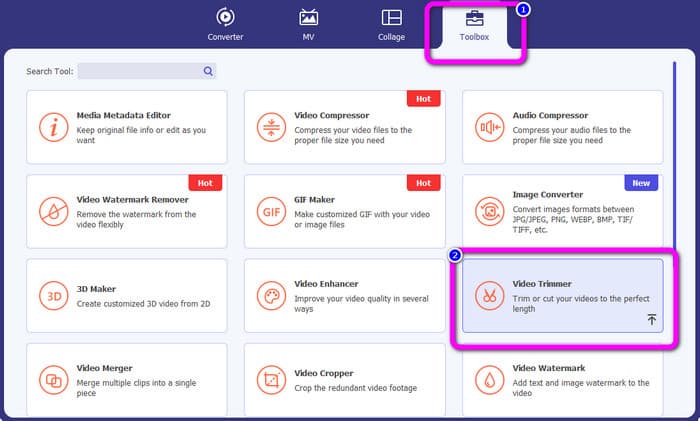
Step 2. Afterward, the main interface will pop up on the computer screen. Click the Toolbox option on the top part interface. Then, various tools will show up and select the Video Trimmer tool.
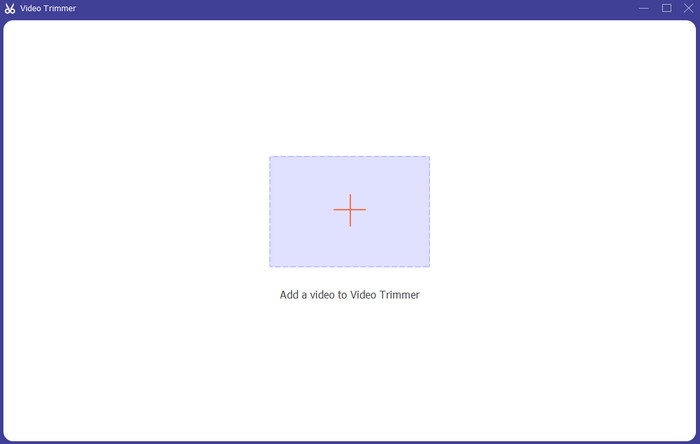
Step 3. Then, another interface will appear on the computer screen. To add the video you want to shorten, click the + icon. This way, the file folder will appear and select the video.
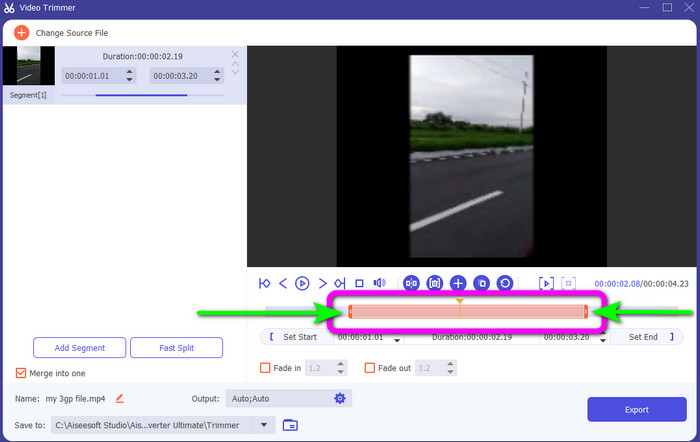
Step 4. You can freely cut your video by adjusting or dragging the video play head. Adjust the edge of the video based on your preference.
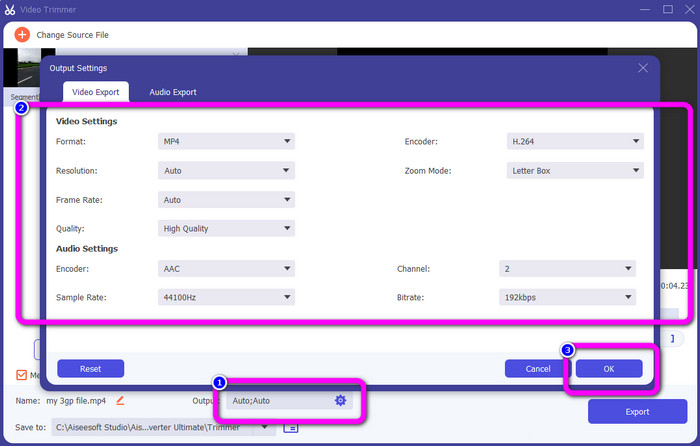
Step 5. To make other changes to the video, go to Output Settings. This setting allows you to change the video’s resolution, quality, frame rate, output formats, and other parameters. Then, click OK.
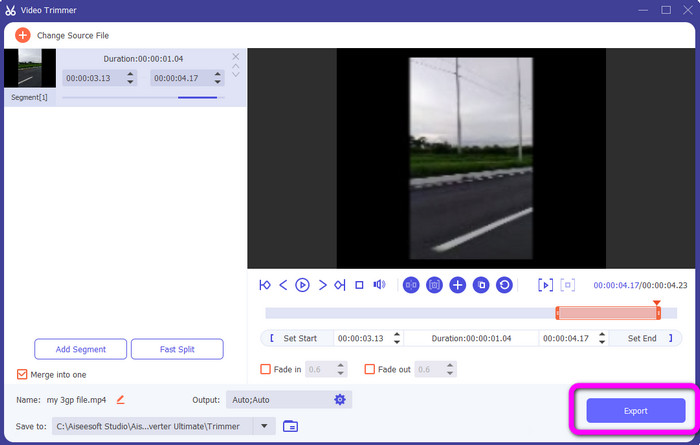
Step 6. When you are satisfied with your video, click the Export button. After the exporting process, you can save the video from this video trimmer on your computer. Then, you can use the video to post on various social media platforms.
Osa 5. Usein kysytyt kysymykset sosiaalisten verkostojen palvelualustojen videon pituudesta
1. Kuinka pitkä Snapchat-videon tulisi olla?
Jos viittaat tavalliseen viestiin, videon enimmäispituus on 10 sekuntia. Mutta jos haluat ostaa mainoksen, pisin video on 3 minuuttia.
2. Mikä on videon enimmäispituus Facebookissa?
Facebookin videon pituus mainokset mukaan lukien on 240 minuuttia (4 tuntia). Optimaalisen videon pituuden kannalta se on 15 sekuntia - 3+ minuuttia pitkä.
3. Mikä on paras pituus TikTok-videolle?
TikTok-videon ihanteellinen pituus on 10–15 sekuntia. Se riittää saamaan katsojien huomion.
Johtopäätös
With the help of this article, you have discovered the video length standard for each social network service platform. It includes TikTok, Twitter, and Instagram. In addition, the article taught you how to cut video length using Video Converter Ultimate. So, if you want to shorten the length of your video for social media, use this offline program. Its simple interface and steps will help you cut your videos easily and quickly.
-
 Videon leikkaaminen TikTokilla [Yksityiskohtaiset ohjeet]
 Haluatko tietää kuinka lyhentää videota TikTokilla? Sitten tarjoamme helppoja tapoja. Opit myös muita menetelmiä käyttämällä offline-sovelluksia/-ohjelmia.
-
 Videoiden leikkaaminen Snapchatilla ja sitä varten [askel askeleelta]
 Tämä informatiivinen viesti tarjoaa tapoja leikata videota Snapchatilla. Esittelemme myös merkittäviä sovelluksia videoiden leikkaamiseen Snapchatia varten. Lue lisää saadaksesi selville.
-
 Erinomaisia menetelmiä videoiden jakamiseen tehokkaasti
 Tässä artikkelissa kerrotaan, kuinka video jaetaan osiin. Joten jos olet kiinnostunut, napsauta tätä viestiä, koska tarjoamme sinulle yksinkertaisimmat tavat kokeilla.
