


 Video Converter Ultimate
 Näytön tallennin
 Videon korjaus
 Suojattu lataus
Nopeimmat tavat muuntaa FLAC ja WAV (offline/online)
Free Lossless Audio Codec, yleisesti tunnettu nimellä FLAC, on äänitiedostomuoto, joka muistuttaa huomattavasti MP3:ta. Se tarjoaa käyttäjille erinomaisen äänenlaadun ja vie samalla suhteellisen vähän levytilaa. Lisäksi tämä tiedostomuoto on häviötön, mikä tarkoittaa, että suurin osa äänidatasta säilyy pakkausprosessista huolimatta. Toisaalta on tilanteita, joissa sinun täytyy muuntaa FLAC-tiedostoja toiseen muotoon, kuten WAV, jos haluat kuuntelukokemuksestasi mahdollisimman optimaalisen ja huippulaatuisen. Pitäisikö sinun valita näiden kahden välillä? Alta näet, miten voit saada molemmat käyttämällä parhaita saatavilla olevia FLAC–WAV-muunnostyökaluja.

Osa 1. Muunna FLAC ja WAV offline-tilassa
Video Converter Ultimate on huippuluokan työkalu tiedostojen muuntamiseen mihin tahansa äänimuotoon, mukaan lukien WAV ja FLAC. Ohjelma tarjoaa erämuunnostoiminnon, jonka avulla voit muuntaa joukon äänitiedostoja yhdellä kertaa. Lisäksi voit maksimoida jokaisen kappaleen laadun, sillä ohjelma antaa käyttäjän säätää ulostulotiedoston teknisiä tietoja, kuten näytteenottotaajuutta ja bittinopeutta. Jos haluat muuntaa eränä WAV:sta FLAC:iin tai päinvastoin, lue alta lyhyt opas, jonka olemme valmistelleet.
Vaihe 1. Käynnistä ohjelma laitteellasi valitsemalla alla oleva sopiva Ilmainen lataus -painike. Seuraavaksi noudata näytöllä näkyviä ohjeita ohjelman avaamiseksi. Kun asennus on valmis, voit tutustua sen käyttöliittymään.
Ilmainen latausWindows 7 tai uudempiTurvallinen lataus
Ilmainen latausMacOS 10.7 tai uudempiTurvallinen lataus
Vaihe 2. Napsauta päänäkymässä Lisää-kuvaketta ja tuo äänitiedosto, jota haluat käsitellä. Tämän jälkeen sinut ohjataan tuodun tiedoston esikatseluun. Voit ladata myös kokonaisen kansion, jos haluat muuntaa useita tiedostoja kerralla. Valitse hakemistostasi kansio, joka sisältää kaikki tarvitsemasi äänitiedostot.
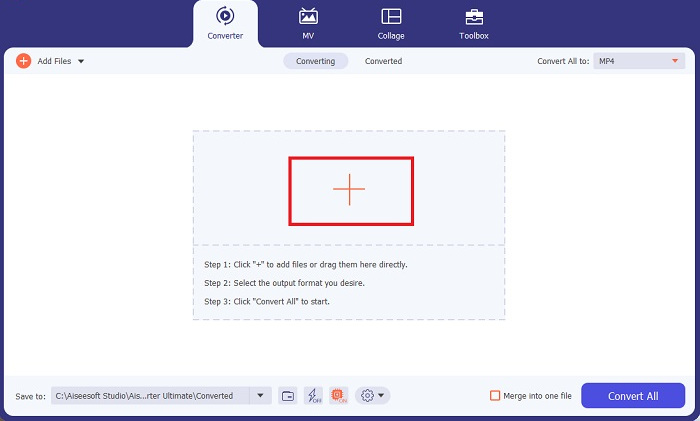
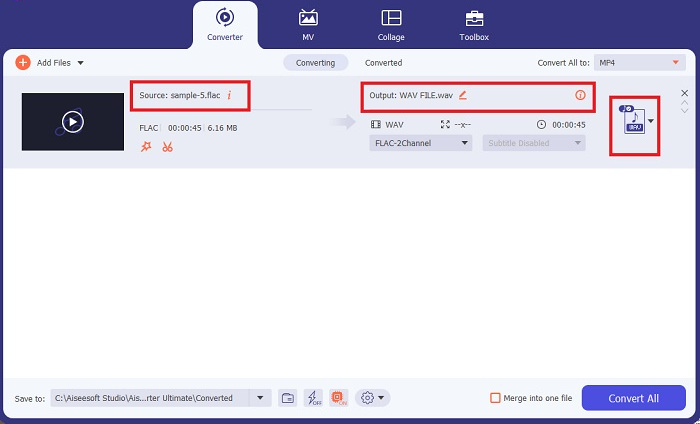
Vaihe 3. Nyt voit vaihtaa tulostusmuotoa napsauttamalla ohjelman näytön yläreunassa olevaa Muunrin-painiketta. Valitse sen jälkeen WAV Äänituloste-välilehdeltä. Samalla voit säätää ulostulotiedoston näytteenottotaajuutta ja bittinopeutta vastaamaan haluamaasi laatua.
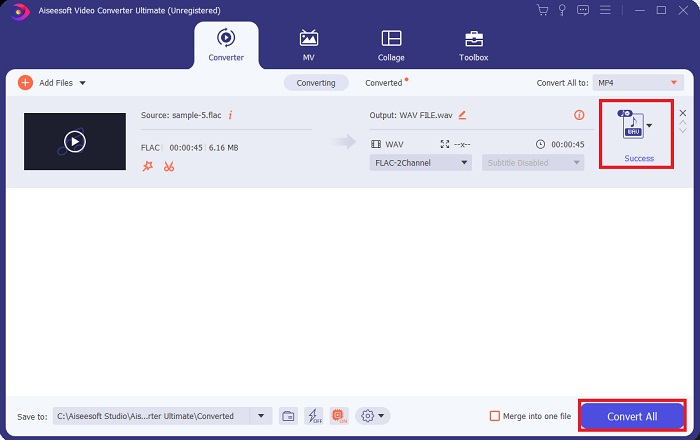
Vaihe 4. Viimeisessä vaiheessa käynnistä muunnosprosessi napsauttamalla alareunassa olevaa Muunna kaikki -painiketta. Tämän jälkeen ohjelma avaa automaattisesti tulostuskansion, jotta voit tarkistaa tiedostosi uuden muodon.
Plussat
- Se voi erämuuntaa FLACin WAV-äänitiedostomuotoon.
- Ohjelma toimii hyvin sekä Windowsin että Mac OS:n kanssa.
- Sillä on nopea muunnosnopeus.
Haittoja
- Se vaatii maksetun tilausmaksun ilmaisen kokeilun jälkeen.
- Ohjelma ei toimi Linux OS -laitteissa.
Osa 2. Muunna FLAC WAV:ksi tai WAV FLAC Onlineksi
Vaikka hakukoneesi näyttäisi lukuisia FLAC–WAV- tai WAV–FLAC-verkkokonverttereita, tässä on ratkaisu, jolla voimme helpottaa vaivaasi. Free Audio Converter Online on erinomainen vaihtoehto, jos haluat välttyä työpöytäohjelman asentamiselta. Tämä verkkopohjainen muunnin toimii sulavasti ja tarjoaa tietoturvaa sekä suojaa henkilötiedoillesi muunnoksen aikana. Lisäksi voit hyödyntää ohjelmiston erämuunnostoimintoa aivan kuin käyttäisitkin työpöytäohjelmaa.
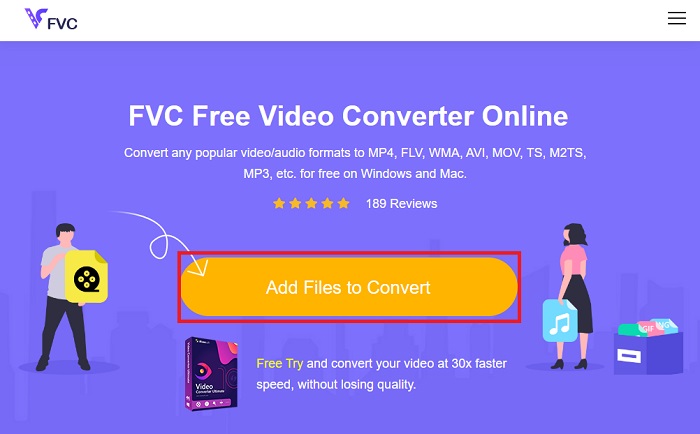
Vaihe 1. Napsauta yllä olevaa linkkiä siirtyäksesi Free Online Video Converter -palvelun pääsivulle. Valitse päänäkymästä Lisää tiedostoja muunnettavaksi ja lataa äänitiedostosi.
Vaihe 2. Alkuperäisen tiedostosi esikatselu näkyy näytöllä. Samasta paneelista siirry alaspäin ja valitse haluamasi tulostusmuoto.
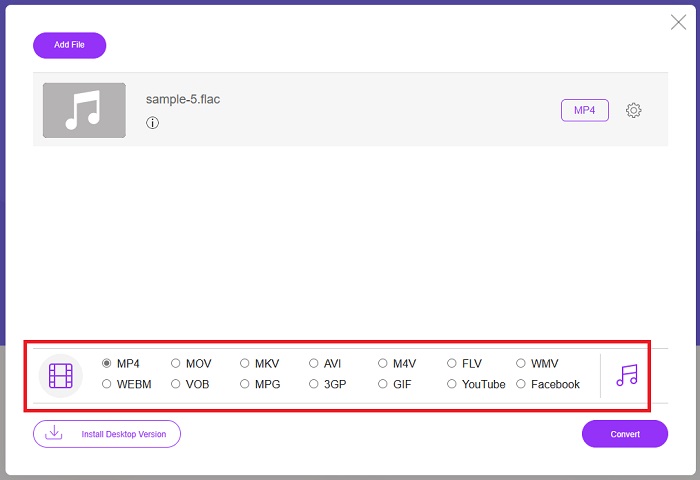
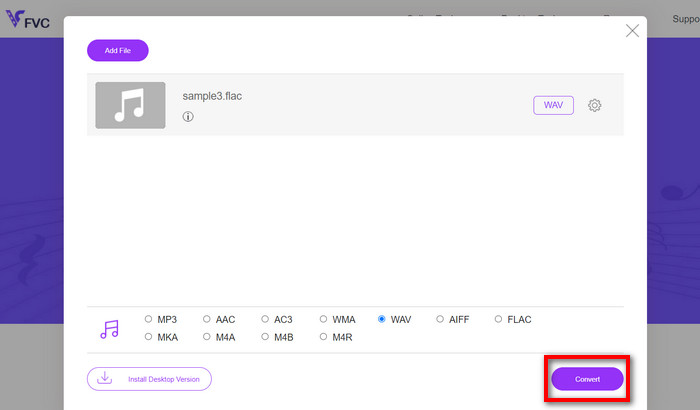
Vaihe 3. Napsauta Muunna-painiketta muuttaaksesi FLAC-muodon WAV-muotoon. Jos haluat muuntaa toisen tiedoston, toista tämä opas alusta alkaen.
Plussat
- Se toimii kaikilla hakukoneilla, kuten Google Chromella, Safarilla, Firefoxilla ja muilla.
- Se tarjoaa useita suosittuja äänitiedostomuotoja, kuten MP3, AAC ja WMA.
- Käyttäjät voivat nauttia rajattomasti konversioista päivässä.
Haittoja
- Muunnosnopeus riippuu Internet-yhteyden vahvuudesta.
Lisälukemista:
Muunna FLAC MP3:ksi äänenlaadun säilyttämiseksi
Helpot vaiheet WAV-tiedostojen muuntamiseen OGG-muotoon optimaalisen äänikoon saavuttamiseksi
Osa 3. Usein kysytyt kysymykset FLAC- ja WAV-muunnoksista
Heikkeneekö tiedoston muuntaminen FLACista WAV-muotoon laatua?
Äänitiedostojen muuntaminen FLAC-muodosta WAV-muotoon ei heikennä laatua, koska sen resoluutio on pakkaamaton. Oletetaan kuitenkin, että muunnat tiedoston WAV-muodosta FLAC-muotoon. Tällöin saatat huomata pieniä muutoksia, varsinkin niillä, joiden korvat ovat melko yksityiskohdissa. Jos tarvitset apua päättäessään, kumpi haluat säilyttää, tässä on pala perspektiiviä, jota voit tarkastella. FLAC-ääniformaatit ovat hyvä valinta kappaleiden tallentamiseen, kun taas WAV-tiedostot ovat suurempia, mutta sopivat äänen editointiin.
Onko WAV korkeimman resoluution äänimuoto?
WAV on IBM:n ja Microsoftin kehittämä Waveform Audio File Format -lyhenne. Tätä muotoa pidetään digitaalisen musiikkiteollisuuden korkeimman resoluution formaattina, koska se sisältää raakoja ja tinkimättömiä äänitaajuuksia.
Mikä on paras online-FLAC-WAV-muunnin?
Epäilemättä FVC Free Online Video Converter on paras ilmainen FLAC-WAV-muunnin verkossa. Sinun ei tarvitse hankkia teknisiä kykyjä muuttaaksesi video- ja äänitiedostoja ohjelmiston avulla. Se voi tehdä työsi tehokkaasti, koska se on käyttäjäystävällinen ja sillä on vertaansa vailla oleva muunnosnopeus. Lisäksi tämä online-ohjelma tarjoaa, elleivät kaikki, mutta useimmat tuntemamme suositut äänimuodot.
Johtopäätös
Muuntaaminen voi tapahtua kumpaan suuntaan tahansa FLAC:ista WAV:iin ja WAV:sta FLAC:iin. Koska molemmat tiedostomuodot ovat nykyisessä digitaalisessa musiikissa hyvin yleisiä, valinta niiden välillä riippuu usein käyttötarkoituksesta. Yllä mainittujen työkalujen avulla voit vaihtaa muotoja edestakaisin milloin tahansa. Seuraa edellä esitettyjä vaiheita FLAC–WAV- tai WAV–FLAC-muunnokseen, niin et törmää ongelmiin.
-
 Lue, miten voit muuntaa MP3 WAV -muotoon
 Haluatko tietää kuinka muuntaa MP3 WAV:ksi? Selvitä, mitkä työkalut tuottavat parhaan mahdollisen konversion.
-
 WAV Player - Top 5 WAV Player -sovellusta Androidille, iPhonelle, PC: lle ja Macille
 Kuinka toistaa WAV-tiedostoja Android-puhelimessa? Mikä pelaaja voi pelata WAVia? Tämä viesti jakaa 5 parasta ilmaista WAV-soitinta Androidille, iPhonelle, Macille ja PC: lle.
-
 3 parasta FLAC-metatietoeditoria Macissa ja Windowsissa [Päivitetty 2023]
 Haluatko muuttaa FLAC-metatietoja? Tässä tapauksessa sinun on luettava tämä artikkeli, koska tarjoamme riittävästi tietoa uusimmasta FLAC-metatietojen muokkausohjelmasta.
