


 Video Converter Ultimate
 Näytön tallennin
 Videon korjaus
 Suojattu lataus
PDF-tiedostojen pakkaaminen sähköpostia varten 3 tehokasta tapaa valita
Todellakin, suurten tiedostojen lähettäminen sähköpostitse voi olla hankalaa. Se voi itse asiassa aiheuttaa ongelmia tai viestiä ei ehkä toimiteta lainkaan. Lisäksi monet sähköpostipalvelut rajoittavat liitteiden enimmäiskokoa, mikä ylittyy helposti monimutkaisilla PDF-tiedostoilla. Tämä pätee erityisesti PDF-tiedostoihin, joissa on runsaasti kuvia tai jotka ovat hyvin pitkiä. Tämän vuoksi useimmat ihmiset turvautuvat tällaisessa tilanteessa tiedostonjakopalveluihin, kuten Dropboxiin tai Google Driveen. He kuitenkin lähes unohtavat kätevän niksin, nimittäin tiedostojen pakkaamisen. Monet ilmaiset verkkotyökalut pystyvät tähän, ja osa niistä on varsin suosittuja. Mutta miten pakata PDF-tiedosto sähköpostia varten tehokkaasti? Sen opit jatkamalla alla olevan sisällön lukemista.

Osa 1. Mikä on paras PDF-koko sähköpostille
Tässä on tosiasia: sähköpostien ihanteellista PDF-kokoa varten ei ole taikalukua. Varottava asia on sähköpostialustan liitetiedostorajoitus. Suositut palvelut rajoittavat noin 20 Mt:n liitetiedostoja, jotka voivat olla yllättävän helposti saavutettavissa, etenkin PDF-tiedostoissa, jotka sisältävät paljon kuvia tai ovat erittäin pitkiä asiakirjoja. Näin ollen, jos PDF-tiedostosi on suurempi kuin mainittu 20 Mt:n raja, sähköpostiasi ei todennäköisesti lähetetä ja saat virheilmoituksen. Sen sijaan, että tavoittelet tiettyä kokoa tai parasta PDF-kokoa sähköpostille, on parasta pelata varman päälle ja pitää se alle 20 megatavua. Tällä tavalla voit olla varma, että se liitetään ja lähettää onnistuneesti.
Osa 2. Yksi napsautus PDF-tiedostojen pakkaamiseen sähköpostitse
Tässä on loistava ja nopea tapa pakata sähköpostiliitteitä. Ota käyttöösi ilmainen työkalu nimeltä FVC Free PDF Compressor, joka pienentää kookkaita PDF-tiedostojasi sotkematta niitä. Koska useimmat sähköpostipalvelut sallivat liitteiksi vain noin 20 Mt:n kokoisia tiedostoja, kuvia tai paljon tekstiä sisältävät PDF:t voivat helposti saavuttaa tuon rajan. Tämä pakkaustyökalu voi pienentää PDF-tiedostosi huomattavasti, jopa alle 100 kilotavuun! Sinun ei tarvitse huolehtia siitä, miten se pystyy kutistamaan PDF-tiedostot sähköpostia varten näin rajusti, sillä se säilyttää silti tiedostojen laadun. Todellisuudessa et todennäköisesti edes huomaa eroa alkuperäisen ja pakatun version välillä.
Lisäksi tämä hämmästyttävä työkalu on erittäin helppokäyttöinen, ja kuka tahansa, jolla on asiantuntemusta, voi käyttää sitä. Sinun tarvitsee vain vetää ja pudottaa PDF-tiedosto ohjelmaan, ja se pienentää sen automaattisesti. Sitten voit tallentaa pienemmän PDF-tiedoston tietokoneellesi yhdellä napsautuksella. Tällä tavalla voit pakata PDF-tiedoston nopeasti sähköpostin kokoon verkossa kokoon, joka sopii täydellisesti sähköpostin lähettämiseen tai lataamiseen ilman vesileimoja lopullisessa asiakirjassa. Saadaksesi paremman käsityksen sen prosessista, katso yksityiskohtaiset ohjeet alla.
Vaihe 1. Napsauta pääkäyttöliittymässä välilehteä Add PDF File ja valitse PDF-tiedosto, jonka haluat pakata.
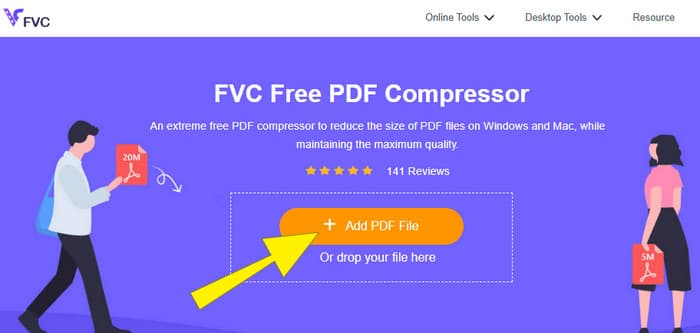
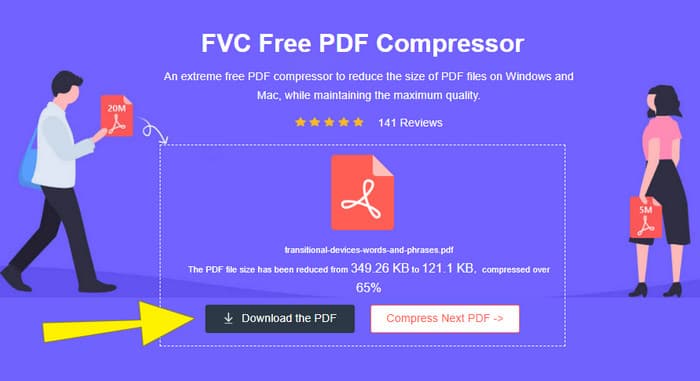
Vaihe 2. Kun PDF-tiedosto latautuu, työkalu suorittaa samalla sen pakkausta.
Vaihe 3. Kun pakkaus on valmis, napsauta Download the PDF -painiketta.
Osa 3. Pakkaa PDF-tiedostot sähköpostiin muokkausominaisuuksien avulla
Jos haluat työkalun, jossa on myös muokkausominaisuuksia, Adobe Acrobat on tähän tehtävään sopiva. Adobe Acrobat on ohjelma, joka tunnetaan PDF-tiedostojen luomisesta, muokkaamisesta ja hallinnasta. Se on kuin tehokas työkalupakki nimenomaan PDF-tiedostoja varten. Yksi sen kätevistä ominaisuuksista on PDF-pakkaus, jota voit käyttää silloin, kun sinulla on kookas PDF, joka ei mahdu sähköpostiin kokorajoitusten vuoksi. Adobe Acrobat, josta on sekä verkkoversio että työpöytäversio, auttaa pakkaamaan suuret PDF-tiedostot sähköpostia varten heikentämättä liikaa laatua. Se tekee tämän useilla tavoilla, kuten pienentämällä PDF:n sisällä olevien kuvien kokoa tai poistamalla turhia fontteja. Tunne kuitenkin Adobe ja sen ohjelmistopaketit – ei ole yllättävää, jos käyttöön opettelun koetaan olevan jyrkkä. Siksi alla on vaiheet, jotka helpottavat prosessia.
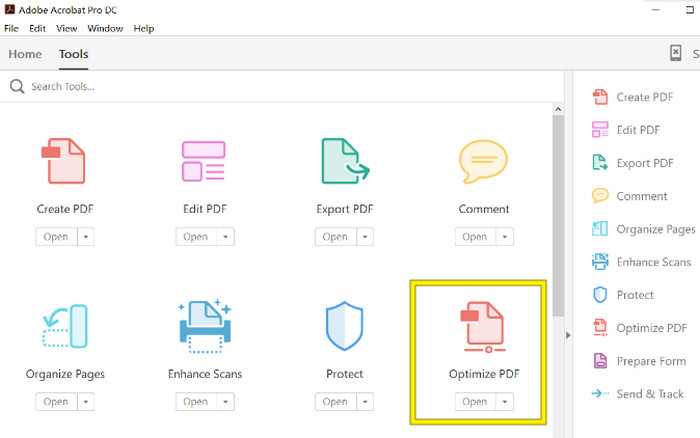
Vaihe 1. Käynnistä Acrobat ja avaa PDF-tiedosto, jota haluat käsitellä. Tee se siirtymällä kohtaan Tools-Optimize PDF-Open.
Vaihe 2. Kun olet avannut PDF-tiedoston, napsauta uuteen näkymään ilmestyvästä valikosta vaihtoehtoa Reduce File Size. Aseta tai käytä sitten tarjolla olevia muokkausvaihtoehtoja saavuttaaksesi halutun pakkaus- ja optimointitason.
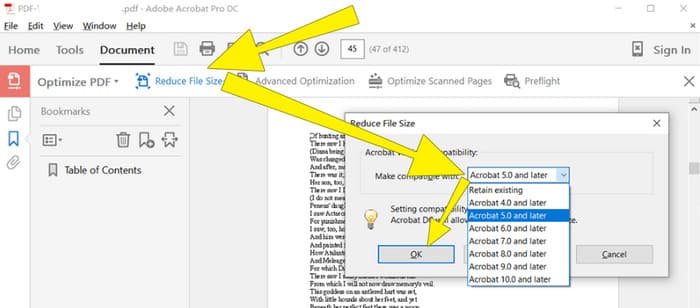
Vaihe 3. Tallenna sen jälkeen pakattu PDF-tiedosto.
Osa 4. Pakkaa PDF-tiedostot sähköpostitse muuntamalla
Haluatko oppia uuden niksin siitä, miten pakata PDF lähetettäväksi sähköpostilla? Muutetaan se JPG-muotoon. Tämän muunnostempun voi tehdä erinomaisesti PowerPointilla. PowerPoint on ohjelma, jota käytät todennäköisesti esitysten tekemiseen. Kuvittele diaesitys, jossa on tekstiä, kuvia ja ehkä videoita. PowerPointilla voit rakentaa tällaisia esityksiä yksittäisistä dioista, joita klikkaat eteenpäin yleisölle näytettäessä. Se on suosittu työkalu opettajille, opiskelijoille, liikemaailman edustajille ja kaikille, jotka haluavat jakaa tietoa visuaalisesti.
Nyt PDF-tiedoston lisääminen PowerPoint-esitykseen voi olla kätevää, mutta se ei ehkä ole intuitiivisin prosessi. Mutta kun teet niin, JPG-tiedoston tuottaminen on helppoa. Älä kuitenkaan huoli! Voimme opastaa sinut vaihe vaiheelta, jota sinun on noudatettava, jotta PDF upotetaan nopeasti.
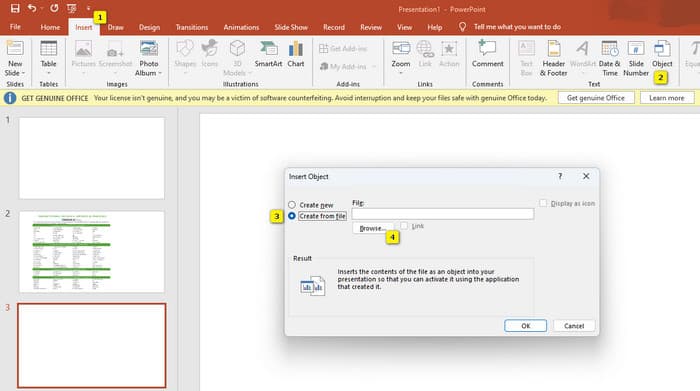
Vaihe 1. Käynnistä PowerPoint tietokoneellasi ja valitse oikea dia, johon voit avata PDF-tiedoston.
Vaihe 2. Siirry nyt Insert-välilehteen ja etsi Text-osiosta Object-vaihtoehto. Napsauta sitä, jolloin avautuu uusi ikkuna. Tässä ikkunassa valitse vasemmalta puolelta Create from File -vaihtoehto. Napsauta sitten Browse-painiketta, jolloin voit tuoda PDF-tiedoston dialle.
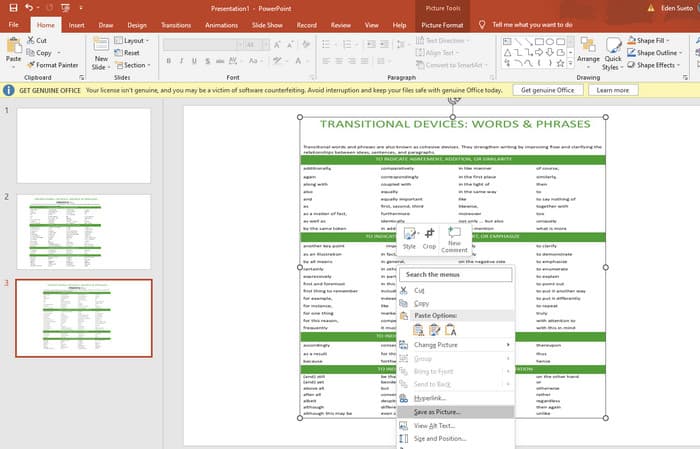
Vaihe 3. Kun PDF-tiedosto on ladattu, voit muuntaa sen JPG-muotoon. Tee tämä napsauttamalla PDF:ää dialla hiiren oikealla painikkeella, valitse Save As Picture ja tallenna se JPEG-muodossa.
Osa 5. Usein kysyttyä PDF:stä ja pakkaamisesta
Minkä kokoisen PDF-liitteen voi lähettää sähköpostitse?
Se riippuu sähköpostipalveluntarjoajasta, mutta useimmat rajoittavat liitteiden kokoa noin 20 megatavuun.
Mikä on paras ilmainen PDF-kompressori?
Saatavilla on ilmaisia PDF-kompressoreita, mutta paras riippuu aina käyttäjien mieltymyksistä. Toistaiseksi FVC Free PDF Compressor on suosituin ilmainen online-työkalu.
Kuinka pakata PDF-tiedostoja sähköpostiin?
Itse asiassa pakkaaminen toimii PDF-tiedostoissa, koska ne ovat jo pakattuja tiedostoja.
Johtopäätös
Tässä artikkelissa käsiteltiin parhaita tapoja siitä, miten pakata PDF-tiedostoja sähköpostia varten. Voit nyt varmistaa sujuvamman ja parempilaatuisen PDF-tiedostojen lähettämisen sähköpostilla, kunhan pienennät ne oikein niin, että ne noudattavat liiterajoituksia.
-
 3 parasta ratkaisua vesileiman poistamiseen videoista helposti
 Haluatko poistaa ärsyttävän vesileiman videosta? Tämän blogin avulla voit oppia erilaisia ideoita vesileiman poistamiseen videosta.
-
 4 parasta tapaa lisätä vesileimaa kaikkiin videoihin nopeasti
 Opitaan lisäämään vesileima kaikkiin videoihin Windowsissa, Macissa, Onlinessa, iOS:ssä ja Androidissa yksityiskohtaisten ohjeiden avulla, jos luet tämän artikkelin.
-
 3 helpointa tapaa lisätä vesileima GIF-tiedostoon verkossa ja offline-tilassa
 Vesileiman lisääminen GIF-tiedostoon voi olla yhtä helppoa kuin 1-2-3, jos käytät oikeaa työkalua oikein. Markkinoilla olevat työkalut ovat liian laajoja, mutta esittelemme kolme työkalua, joihin voit luottaa.
