


 Video Converter Ultimate
 Näytön tallennin
 Videon korjaus
 Suojattu lataus
Erinomainen sovellus kuvan koon muuttamiseen - FastStone Photo Resizer
Valokuvakoon muuttajan etsiminen internetistä on helppoa. Varsinkin nykyään on tarjolla paljon valokuvien muokkausohjelmistoja verkossa. Mitä tulee kuvien koon muuttamiseen ja muuntamiseen, löydät lukuisia erinomaisia työkaluja sekä verkosta että offline-käyttöön. Mutta jos sinun on vaikea valita niistä sopivaa, helpotamme päätöstä puolestasi. FastStone on kuvankäsittelyalusta, jota voit käyttää kuviesi koon muuttamiseen. Tässä artikkelissa kerromme yksityiskohtaisesti FastStonesta ja siitä, miten FastStone Photo Resizeria käytetään.

Osa 1. FastStone Photo Resizer Review
FastStone Photo Resizer on pakollinen kuvankäsittelysovellus. Voit käyttää sitä Windows-työpöydälläsi ja ladata sen helposti. Lisäksi siinä on puhdas ja helppokäyttöinen käyttöliittymä, mikä tekee siitä käyttäjäystävällisen työkalun. FastStone Photo Resizer tukee useita kuvamuotoja, kuten JPEG, BMP, PNG, TIFF ja GIF. Se sisältää myös monia muokkausominaisuuksia, joiden avulla voit muuntaa, nimetä uudelleen, rajata, lisätä tekstiä, muuttaa väriä, lisätä vesileimaa ja paljon muuta.
Lisäksi se tarjoaa eräkäsittelyn, jossa voit käsitellä kahta tai useampaa kuvaa samanaikaisesti. Ja jos haluat esikatsella tekemääsi muunnosa, FastStone antaa sinun tehdä sen. Voit ladata FastStone Image Resizerin ilmaiseksi Windows-tietokoneellesi, mutta sinun on ostettava sovellus, jotta voit käyttää sen eksplisiittisiä ominaisuuksia. Seuraa alla olevaa opetusohjelmaa, jos haluat tietää, kuinka kuvien kokoa voidaan muuttaa FastStonella.
Plussat
- Se tarjoaa erilaisia muokkausominaisuuksia ja työkaluja.
- Sillä on alhainen hinta.
- Siinä on suoraviivainen käyttöliittymä.
- Siinä on helppo tiedostojen jakoprosessi.
Haittoja
- Sillä on vain rajoitettu tuki- ja tukitoiminto.
- Sen käyttö ei ole ilmaista.
- Saatavilla vain Windows-ohjelmistoissa
Kuinka käyttää FastStone Photo Resizeriä kuvien koon muuttamiseen:
Vaihe 1. Lataa ja asenna ensin FastStone Photo Resizer Windows-työpöydällesi. Kun olet asentanut sovelluksen, käynnistä se työpöydälläsi. Napsauta sitten sovelluksen pääikkunassa Batch Convert -painiketta Valikko-kohdasta ladataksesi kuvan, jonka kokoa haluat muuttaa.
Vaihe 2. Kun olet tuonut kuvasi, ne näkyvät käyttöliittymässä. Napsauta sen jälkeen Tulostusmuoto-pudotusvalikon nuolta valitaksesi haluamasi tiedoston tulostusmuodon. Ja valitaksesi tulosteen kohdekansion, napsauta Selaa-painiketta Output Folder -kohdan vieressä.
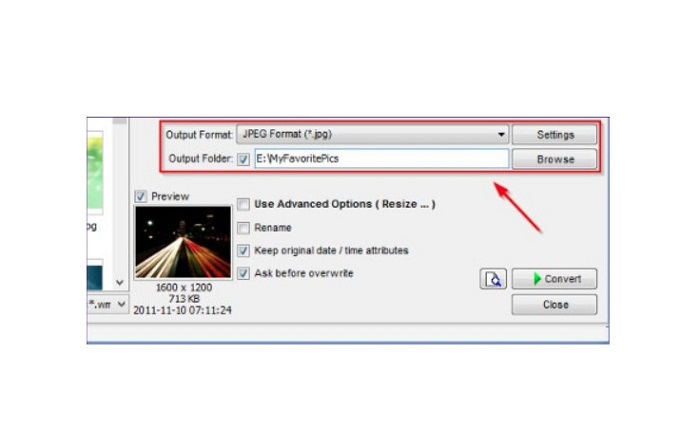
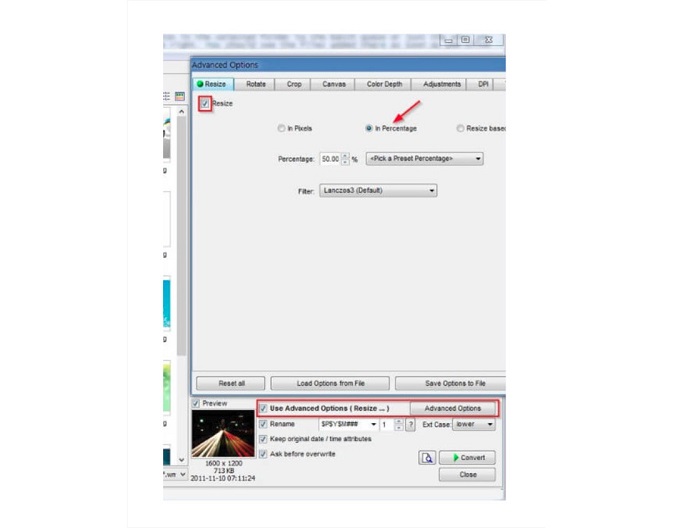
Vaihe 3. Napsauta seuraavaksi Advanced Options, jolloin avautuu uusi välilehti. Valitse sitten Resize-välilehdellä In Percentage -vaihtoehto muuttaaksesi kuvan kokoa prosentteina. Voit valita suotimen napsauttamalla pudotusvalikon nuolta Filter-kohdan vieressä.
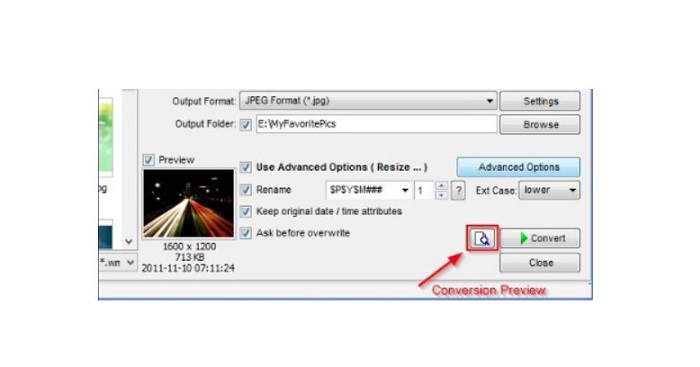
Vaihe 4. Sen jälkeen voit esikatsella kuvaasi ja verrata sitä alkuperäiseen tiedostoon napsauttamalla Preview-kuvaketta Convert-painikkeen vieressä.
Vaihe 5. Lopuksi napsauta Convert-painiketta käynnistääksesi koonmuutosprosessin. Sovellus muuntaa samalla kuvatiedostosi muotoon, jonka valitsit edellisessä vaiheessa. Kun FastStone on muuttanut kuvasi kokoa, avautuu uusi ikkuna, jossa näet tuloskuvat ja niiden koot.
Ja siihen FastStone Photo Resizer -opetusohjelma päättyy. Noudattamalla yllä olevia ohjeita voit helposti muuttaa kuvan kokoa FastStonella.
Osa 2. Vaihtoehtoja FastStone Photo Resizerille
FastStone Photo Resizer on käytettävissä vain Windows-työasemilla. Ja toinen takaisku on, että sinun on ostettava sovellus ennen kuin voit käyttää sen muita muokkausominaisuuksia. Joten jos haluat käyttää videotrimmerisovellusta, joka on saatavilla Windows-, Mac- tai Linux-laitteissa ja saatavilla verkossa, lue tämä osio huolellisesti.
FVC Free Image Upscaler
FVC Free Image Upscaler on yksi käytetyimmistä verkossa toimivista kuvan koon muuttajista, ja se on käytettävissä kaikilla selaimilla, kuten Google Chromella, Firefoxilla ja Safarilla. Tällä verkkotyökalulla voit myös korjata sumeita kuvia. Jos sinulla on epätarkka tai heikkolaatuinen kuva, voit käyttää tätä työkalua sen terävöittämiseen ja laadun parantamiseen. Lisäksi voit suurentaa kuvaasi 2x-, 4x-, 6x- ja 8x-kertaiseksi. Vaikuttavaa FVC Free Image Upscalerissa on se, että se hyödyntää tekoälyyn perustuvaa prosessia, joka tunnistaa automaattisesti kuvasi sumeat kohdat ja parantaa niitä.
Lisäksi se tukee kaikkia kuvamuotoja, kuten PNG, JPG, JPEG ja BMP. Sinun ei myöskään tarvitse rekisteröityä tai kirjautua sisään käyttääksesi tätä työkalua. Ja jos haluat tarkistaa tulosteesi esikatselun ennen sen tallentamista, voit tehdä sen käyttäessäsi tätä sovellusta. Lisäksi se on turvallinen ja kätevä käyttää. Ja siitä huolimatta, että se on Internet-riippuvainen sovellus, siinä on nopea käsittelyliittymä, jossa sinun ei ole vaikea ladata kuvia koon muuttamista varten.
Vaihe 1. Avaa selaimesi ja kirjoita hakukenttään FVC Free Image Upscaler. Napsauta annettua linkkiä siirtyäksesi suoraan etusivulle.
Vaihe 2. Käynnistä ohjelma työpöydälläsi napsauttamalla Upload Photo -painiketta. Kun olet käynnistänyt sovelluksen, napsauta Upload Photo -painiketta ladataksesi kuvan, jonka kokoa haluat muuttaa tai jonka haluat terävöittää.
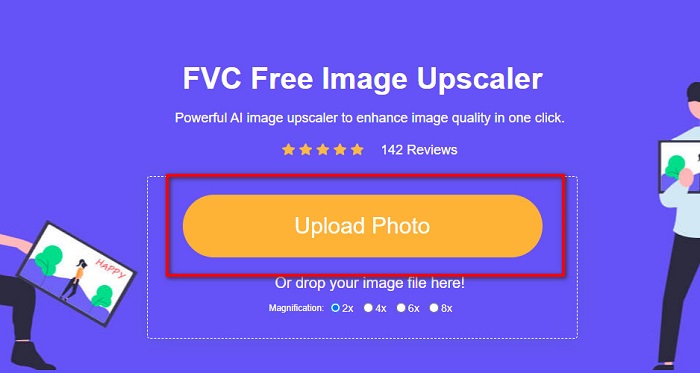
Vaihe 3. Seuraavaksi näet suurennosvalmiit asetukset, joista voit valita. Voit valita jonkin vaihtoehdoista 2x, 4x, 6x tai 8x.
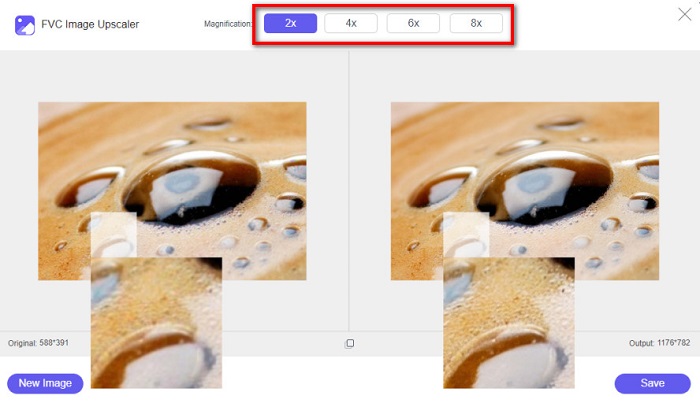
Vaihe 4. Liikuta hiirtäsi nähdäksesi kuvan esikatselun. Jos olet tyytyväinen tulokseen, napsauta Save-painiketta käyttöliittymän oikeassa alakulmassa.
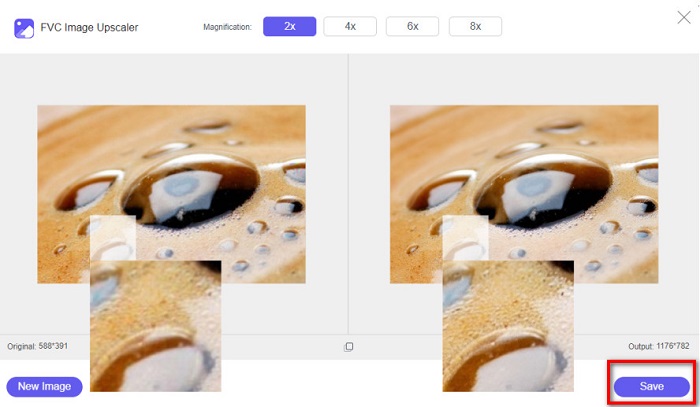
Image Resizer.com
Toinen erinomainen verkkopohjainen kuvan koon muuttaja, jota voit käyttää, on Image Resizer.com. Image Resizer.comin avulla voit muuttaa kuvasi kokoa säätämällä sen mittoja. Lisäksi siinä on toiminto kuvan rajaamiseen tai kääntämiseen. Työkalu sopii hyvin aloittelijoille, koska sen käyttöliittymä on helppokäyttöinen. Se sisältää kuitenkin paljon häiritseviä mainoksia, jotka voivat viedä huomiota.
Vaihe 1. Hae selaimessasi sivustoa Image Resizer.com. Napsauta pääkäyttöliittymässä Select Image -painiketta ladataksesi kuvan, jonka kokoa haluat muuttaa.
Vaihe 2. Seuraavalla sivulla voit muuttaa kuvan mittoja joko pikselimitoilla tai prosentteina. Kirjoita sitten kuvaasi haluamasi Width and Height -arvot.
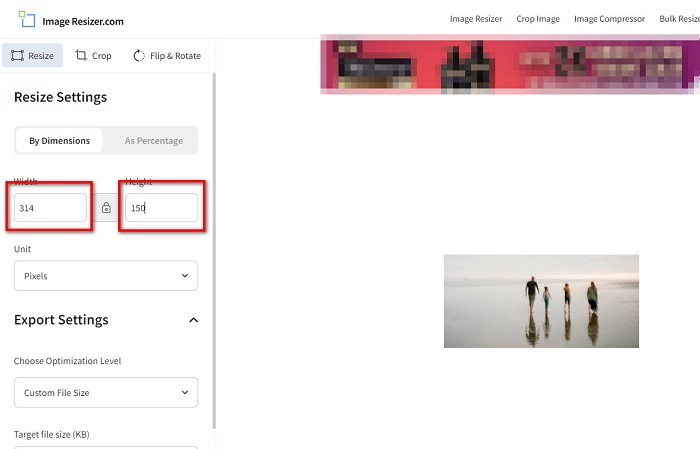
Vaihe 3. Kun olet saanut kuvan koon muutettua, napsauta Resize Image -painiketta viimeistelläksesi prosessin.
Osa 3. Usein kysyttyä FastStone Photo Resizerista
Kuinka paljon FastStone Photo Resizer maksaa?
Voit ostaa FastStone Photo Resizerin täyden version hintaan $19.95 (elinikäinen lisenssi)
Onko FastStone-katseluohjelma ilmainen?
FastStone Image Viewer on kuvankatseluohjelma, jota käytetään Microsoft Windowsissa. Voit käyttää FastStone Image Vieweria ilmaiseksi ja maksutta.
Pilaako FastStone Photo Resizer valokuvien laatua?
Ei. Kun optimoit kuvasi FastStone Photo Resizerilla, et menetä kuvasi laatua.
Johtopäätös
FastStone Photo Resizer on erinomainen sovellus, jos haluat muuttaa kuvan kokoa Windows-työpöydälläsi. Sen lisäksi siinä on monia muokkaustoimintoja, ja se on myös helppokäyttöinen työkalu. Mutta jos kysyt, onko FastStone Photo Resizerista versiota Macille, vastaus on ei. Jos siis haluat kuvankoon muuttajan, joka on käytettävissä kaikilla alustoilla, käytä FVC Free Image Upscaleria heti.
-
 Imglargerin täydellinen opas – ratkaisu valokuvasuunnittelijoille
 Imglarger on yksi merkittävimmistä kuvaratkaisutyökaluista. Napsauta tätä sivua saadaksesi selville Imglargerin täydelliset kuvaukset, edut ja haitat, hinnan ja vaihtoehdot.
-
 Paras Photo Resizer -sovellus verkossa, offline-tilassa, Androidissa ja iPhonessa
 Mitkä ovat parhaat valokuvien kokoa muuttavat sovellukset? Napsauta sivua saadaksesi tietoa viisi tehokkainta valokuvien koonmuutossovellusta, joilla voit parantaa tiedostoasi tai muuttaa sen kokoa.
-
 6 tapaa muokata kuvaa verkossa ja offline-tilassa [100% Working]
 Tässä lisäämämme opetusohjelman avulla voit nyt helposti muuttaa kuvan kokoa haluamasi koon mukaan. Opi tekemään se täältä!
