


 Video Converter Ultimate
 Näytön tallennin
 Videon korjaus
 Suojattu lataus
Korjaa pikselöity video verkossa ilmaiseksi: pikselien korjauksen hallitseminen
Pikselöitymistä esiintyy, kun yksittäiset pikselit tulevat näkyviin ja kuva muuttuu lohkomaiseksi ja vääristyneeksi. Yleisiä syitä ovat alhainen tarkkuus, pakkauksesta johtuvat häiriöt ja videon transkoodaus. Videon pikselöityminen voi olla turhauttava este, joka heikentää katselukokemusta ja laskee sisältösi laatua. Hyvä uutinen on, että sinun ei tarvitse olla videoeditoinnin asiantuntija tai investoida kalliiseen ohjelmistoon ratkaistaksesi pikselöitymisongelmia. Tässä artikkelissa opastamme, kuinka korjaat pikselöityneet videot ilmaiseksi verkossa, jotta opit hallitsemaan pikselikorjauksen taidon. Korjaa pikselöity video ja kokeile tänään kristallinkirkasta menetelmäämme ammattimaiseen lopputulokseen!

Osa 1. Mikä aiheuttaa pikselöidyn videon
Videoiden pikseloitumista voi aiheuttaa useat tekijät, ja näiden syiden ymmärtäminen on välttämätöntä ongelman tehokkaan ratkaisemisen ja ehkäisemisen kannalta. Tässä on joitain yleisiä syitä, miksi videoissa voi esiintyä pikseloitumista:
1. Matala resoluutio. Matalan resoluution videoista puuttuu yksityiskohtia, koska niissä on vähemmän pikseleitä. Pikselöitymistä ilmenee, kun tällaisia videoita venytetään tai katsotaan suuremmassa koossa, jolloin yksittäiset pikselit erottuvat selvemmin. (Lue täältä, miten voit muuttaa videon resoluutiota.)
2. Väärä koodekki tai formaatti. Pikselöitymistä voi ilmetä, kun videota tallennetaan tai viedään sopimattomalla koodekilla tai tiedostomuodolla. Joillakin koodekeilla pikselöityminen voi korostua, koska ne uhraavat kuvanlaatua pienempien tiedostokokojen saavuttamiseksi.
3. Huono bittinopeus. Bittinopeus on yhdessä sekunnissa käsiteltävän datan määrä. Liian alhainen bittinopeus videon pakkaamisen aikana voi johtaa pikselöitymiseen, erityisesti tilanteissa, joissa on paljon liikettä tai monimutkaisia yksityiskohtia.
4. Lähetys- ja latauspakkauksen vaikutus. Pikselöitymistä voi syntyä alustoilla, jotka pakkaavat videoita lähetyksen tai latauksen yhteydessä. Esimerkiksi sosiaalisen median palvelut käyttävät usein omia pakkausmenetelmiään.
5. Kameran laatu. Yksi tärkeä tekijä on videon kuvaamiseen käytetyn kameran laatu. Heikkolaatuisilla kameroilla kuvatuissa videoissa voi olla jo lähtökohtaisesti pikselöitymistä, joka näkyy entistä selvemmin suuremmilla näytöillä.
Osa 2. Korjaa pikselöidyt videot verkossa ilmaiseksi
Pikselöityjen elokuvien korjaaminen verkossa ilmaiseksi on mahdollista useilla työkaluilla ja alustoilla. Ilman kalliita ohjelmistoja voit parantaa pikselöityjen videoidesi laatua noudattamalla näitä ohjeita:
◆ Flixier Video Clearer
◆ Clideo Video Clearer
◆ VEED.IO Video Clearer
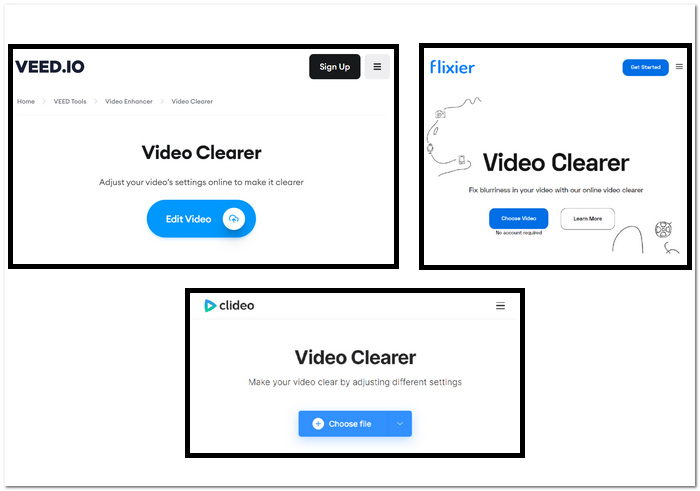
Vaiheet pikselöityneiden videoiden korjaamiseen verkkotyökaluilla:
Vaihe 1. Valitse yllä esitellyistä verkkotyökaluista ja siirry niiden verkkosivulle.
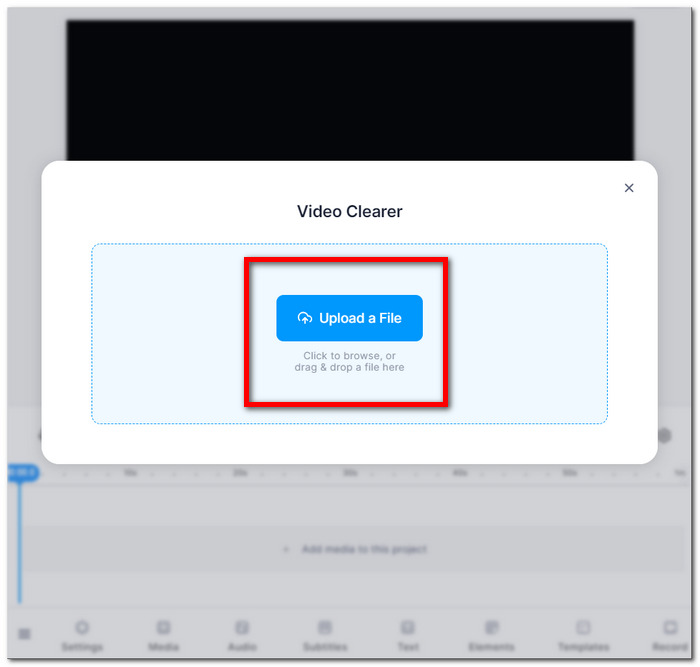
Vaihe 2. Vedä ja pudota MOV- tai MP4-videosi tai lataa se paikallisista kansioistasi.
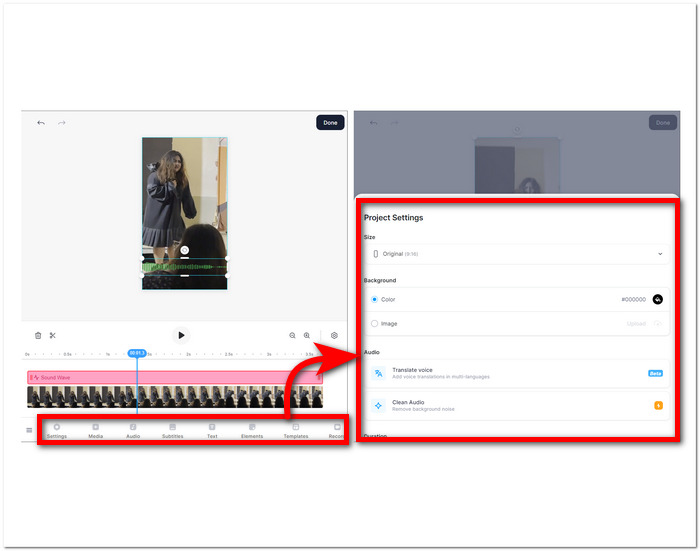
Vaihe 3. Säädä videon asetuksia, kirkkautta, kontrastia, kylläisyyttä jne.
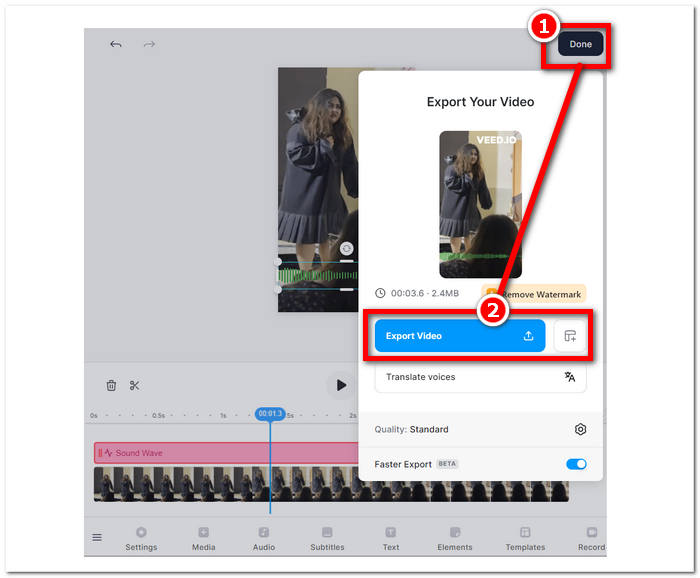
Vaihe 4. Kun olet tyytyväinen muokkauksiin, napsauta Done ja sen jälkeen Export- tai Download-painiketta tallentaaksesi videosi.
Nämä ohjeet auttavat sinua parantamaan pikselöityjen elokuvien laatua ilman, että maksat lisäohjelmistoista. Kokeile erilaisia tekniikoita nähdäksesi, mikä sopii parhaiten tavoitteisiisi parantaaksesi videoidesi laatua ja tarkkuutta.
Osa 3. Kuinka tehdä videosta vähemmän pikselöity Windowsissa ja Macissa
1. Video Converter Ultimate
Esittelemme Video Converter Ultimaten, kaiken kattavan videot työkalupakin, joka mullistaa multimedian käytön. Tällä tehokkaalla työkalulla voit saumattomasti muuntaa, parantaa, pakata ja muokata video- ja äänitiedostoja erittäin suurella nopeudella. Halusitpa sitten muuttaa videosi formaattia, parantaa kuva- ja äänenlaatua, pienentää tiedostokokoa ilman merkittävää laadun heikkenemistä tai lisätä ammattimaisen viimeistelyn sujuvan editoinnin avulla, monipuolinen työkalupakkimme kattaa tarpeesi. Koe kätevyyden tunne, kun käytössäsi on yksi monipuolinen alusta kaikkiin multimedian tarpeisiin – tehokkaasti ilman, että nopeudesta tai laadusta tingitään.
Vaiheet Video Converter Ultimaten käyttämiseen:
Vaihe 1. Asenna ohjelmisto ja käynnistä se tietokoneellasi.
Ilmainen latausWindows 7 tai uudempiSuojattu lataus
Ilmainen latausMacOS 10.7 tai uudempiSuojattu lataus
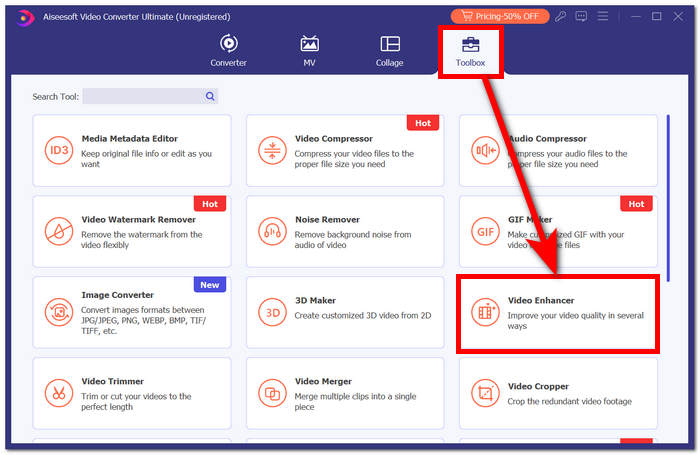
Vaihe 2. Etsi päänäkymästä Toolbox-osio ja napsauta sen alta Video Enhancer.
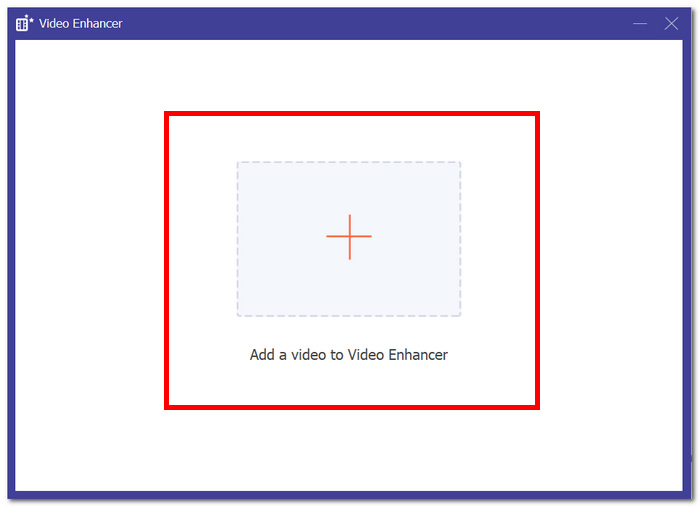
Vaihe 3. Napsauta +-painiketta lisätäksesi videon Video Enhancer -toimintoon.
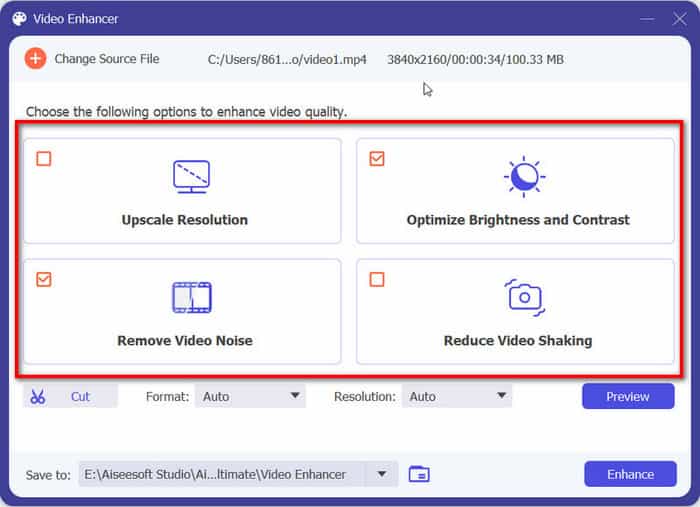
Vaihe 4. Viimeisessä vaiheessa säädä asetuksia videon parantamiseksi. Voit Upscale Resolution ja Preview-esikatsella tulosta. Kun olet tyytyväinen muutoksiin, napsauta Enhance-painiketta viedäksesi ja tallentaaksesi pikselöimättömän videosi tietokoneelle.
FVC Video Converter Ultimate -kokemuksen ansiosta yhden, monipuolisen alustan käyttömukavuus vastaa kaikkiin multimediatarpeisiisi ja varmistaa tehokkuuden nopeudesta tai laadusta tinkimättä.
2. Aiseesoft Video Repair
Aiseesoft Video Repair on tehokas ratkaisu videoiden palauttamiseen, kun niissä on kadonnutta tai vioittunutta dataa ja pikselöitymistä. Tämä monipuolinen ohjelma tarvitsee palautusta varten vain samassa formaatissa olevan esimerkkivideon. Ohjelmisto on helppokäyttöinen ja pystyy korjaamaan useita videotiedostomuotoja, kuten MP4, MOV, AVI, WMV ja FLV. Se kykenee myös korjaamaan videoita, joita ovat vaurioittaneet korruptoituminen, pikselöityminen, virusinfektiot ja tiedostojärjestelmävirheet. Aiseesoft Video Repair on erinomainen työkalu kaikille, jotka ovat vahingossa vioittaneet videon tai joiden tarvitsee korjata video, joka on vaurioitunut laitteisto- tai ohjelmisto-ongelman seurauksena.
Vaiheet Aiseesoft Video Repairin käyttämiseen:
Vaihe 1. Lataa ohjelmisto heidän verkkosivuiltaan ja asennuksen jälkeen käynnistä se tietokoneellasi.
Ilmainen latausWindows 7 tai uudempiSuojattu lataus
Ilmainen latausMacOS 10.7 tai uudempiSuojattu lataus
Vaihe 2. Lisää pikselöitynyt videotiedosto ohjelman käyttöliittymässä napsauttamalla punaista +-painiketta vasemmalla ja lisää sen jälkeen esimerkkivideo napsauttamalla violettia +-painiketta oikealla.
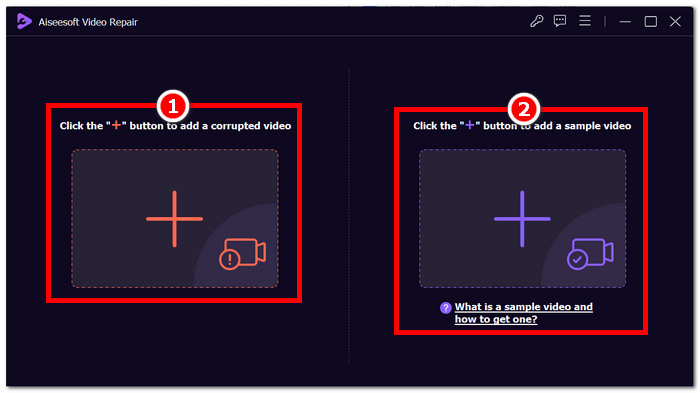
Vaihe 3. Kun olet lisännyt pikselöityneen videon ja esimerkkivideon, napsauta Repair aloittaaksesi prosessin ja sen jälkeen Preview tarkistaaksesi laadun.
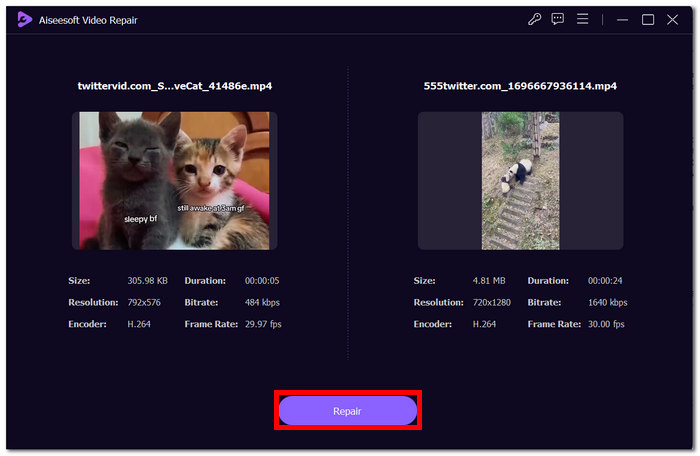
Vaihe 4. Kun olet tyytyväinen tulokseen, napsauta Save tallentaaksesi nyt korjatun videosi.
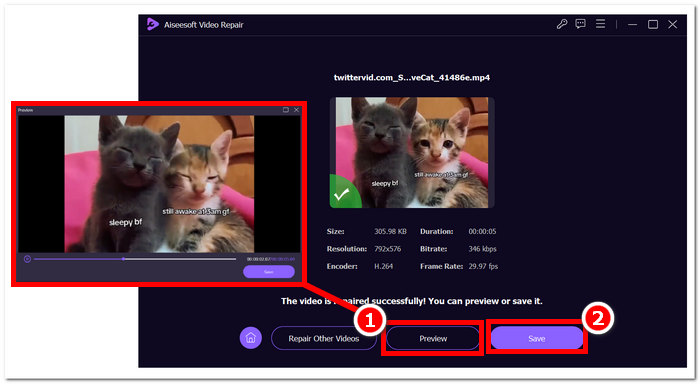
Sen käyttäjäystävällinen käyttöliittymä ja edistyneet ominaisuudet tarjoavat nopean ja tehokkaan tavan elvyttää vaarantuneet videot, mikä tekee siitä videon korjaustyökalun.
Osa 4. Usein kysyttyä pikselöidyn videon korjaamisesta
Voiko pikseloitumista korjata?
Kyllä, pikselointi voidaan usein korjata erilaisilla menetelmillä ja työkaluilla. On olemassa tapoja käsitellä pikselointia ja parantaa videon yleistä laatua käyttämällä verkkoalustoja, videonmuokkausohjelmistoja tai erikoisalgoritmeja. Ratkaisun tehokkuus voi riippua pikseloitumisen vakavuudesta ja perimmäisestä syystä.
Miksi pikseloitumista tapahtuu?
Pikseloituminen johtuu useista tekijöistä, mukaan lukien videoissa, joissa on pienempi resoluutio, vähemmän pikseleitä, mikä tekee yksittäisistä pikseleistä näkyvämpiä, etenkin venytettynä tai suuremmissa muodoissa katsottuna. Videoissa, joissa on pienempi resoluutio, on vähemmän pikseleitä, mikä tekee yksittäisistä pikseleistä näkyvämpiä, etenkin venytettynä tai suuremmissa muodoissa katsottuna. Videoiden muuntaminen eri formaattien tai koodekkien välillä voi johtaa pikselöitymiseen, jos sitä ei tehdä oikein, koska osa tiedoista voi kadota. Pikseloitumisen syyn ymmärtäminen on ratkaisevan tärkeää määritettäessä tehokkain tapa korjata se.
Korjaako videon laadun parantaminen videon pikselointia?
Kyllä, videon yleisen laadun parantaminen voi usein auttaa pikselöitymisen korjaamisessa. Kun puutut tekijöihin, kuten resoluutioon, pakkaukseen ja transkoodaukseen, voit parantaa kuvankirkkautta ja vähentää yksittäisten pikseleiden näkyvyyttä. Videon resoluution nostaminen, pakkausasetusten säätäminen ja laadukkaampien tallennuslaitteiden käyttäminen videon tuotannossa ovat kaikki tehokkaita tapoja parantaa videon laatua ja lieventää pikselöitymistä. Menetelmien onnistuminen riippuu kuitenkin videon alkuperäisestä laadusta ja pikselöitymisen asteesta.
Johtopäätös
Pikselöityjen videoiden korjaaminen verkossa ilmaiseksi on helppokäyttöinen taito, joka voi parantaa sisältösi laatua. Valitsetpa käyttäjäystävälliset alustat, kuten Google Photos, tai erikoistyökalut, kuten Fix. Videon masteroinnin pikselien korjaus antaa sinulle mahdollisuuden tuottaa videoita kristallinkirkkailla visuaalisilla kuvilla. Muista ymmärtää pikseloitumisen syyt, tutkia erilaisia verkkotyökaluja ja ottaa käyttöön manuaalisia tekniikoita optimaalisen videon laadun varmistamiseksi tulevissa projekteissa. Sano hyvästit pikseloitukselle ja tervetuloa sujuvampaan, nautinnollisempaan katselukokemukseen!
-
 7 parasta ilmaista videokorjausta: palauta vioittuneet videosi
 Löydä 7 parasta ilmaista videokorjausta verkossa korjataksesi vioittuneet tai vaurioituneet videotiedostot. Herätä arvokkaat muistosi henkiin näillä huippuluokan videokorjaustyökaluilla.
-
 Epäselvän videon korjaaminen: Kristallinkirkkaat videot odottavat
 Kuinka tehdä sumeasta videosta selkeä? Älä anna epäselvien videoiden tylsyttää sisältöäsi. etsi ratkaisuja kristallinkirkkaaseen katseluun ammattimaisen näköisen materiaalin saamiseksi.
-
 Opas videoiden korjaamiseen, joita ei toisteta Android -puhelimissa
 Haluatko tietää syyt, miksi videoita Android-laitteellasi ei voida toistaa? Jos näin on, voit korjata ongelman itse jatkamalla lukemista saadaksesi lisätietoja.
