


 Video Converter Ultimate
 Näytön tallennin
 Videon korjaus
 Suojattu lataus
Paras ASF Stream -tallennin, joka on saatavilla kaikilla alustoilla ASF-videon tallentamiseen
Microsoft manipulates the content of ASF, also known as Advanced System Format. In addition, mac users can use this type of format also. Likewise, it is a sort of repository with multiple independent or dependent audio-video content for Windows media. You may utilize ASF format to stream video and audio files. And some users find it tricky to choose the qualified ASF streaming recorder that will meet the standard of the user's interest. As we go more into details below, you will notice different tools that support your platform. In the list below are the finest ASF recorders that support ASF file format. Also, read carefully about the details and let us walk through the software and its unique capability.

Osa 1. Paras ASF-tallennin Windowsille ja Macille (rajoitettu ja ilmainen)
FVC Free Screen Recorder
A completely free from charge tool used as a recorder for live broadcast is the FVC Free Screen Recorder. It's okay to be inexpensive if you have the internet and want to record streams, news, and any live broadcast happening for the later to watch at no cost. You may as well use a webcam, mic, and other hardware to use it for your recording. This tool allows the users to record any live screening in the format of MP4 or WMV. Another outstanding feature of this tool is that there is no download needed. Just open your browser, launch it, and let the tool do the work. As we continue with a more detailed explanation, here are some steps to record a live ASF Streamer Recorder.
Step 1. Open your browser and visit the official site of FVC Free Screen Recorder. You can click the link then launch the app. Floating bar and red dotted line will appear on your screen.

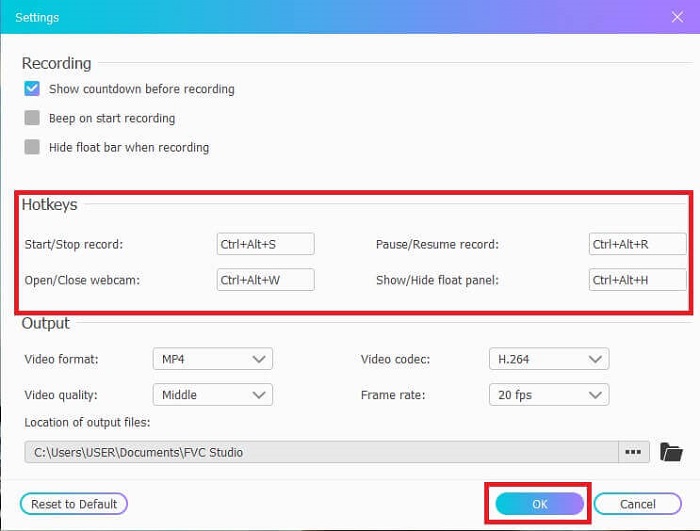
Step 2. Click the Settings icon below the REC. You may adjust the Hotkeys that will fit your needs. Click the OK below to save the changes.
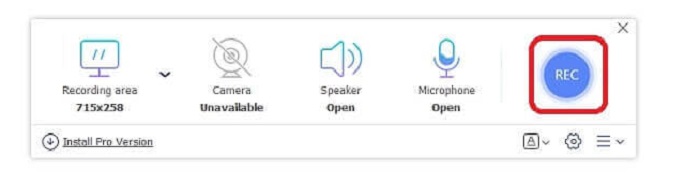
Step 3. Adjust the Frame size to change the aspect ratio if needed. Open the Speaker for the sound, Mic to add your voice, and Webcam to record yourself. Click the round REC button to start the ASF video recording.
Step 4. Wait for 3 seconds to start the record. Also, lists of the controls and hotkeys you set for your recording.
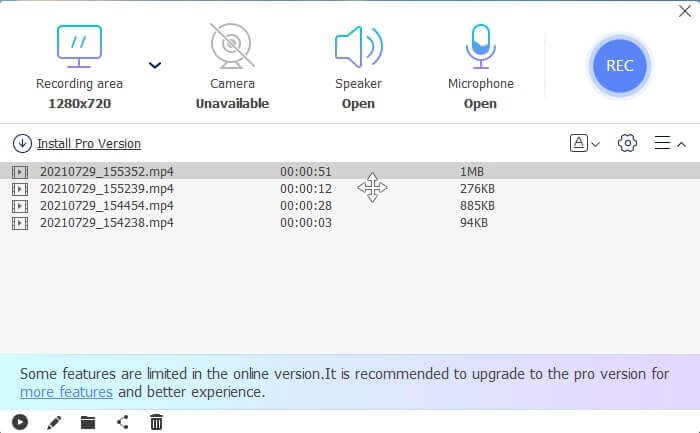
Step 5. Click the Square button to stop recording. Play the top video file for the latest record. After playing the video you may as well trim, draw or put it on a slow-mo by clicking the Pencil icon to edit. Save it and enjoy the recorded video.
Plussat
- Online ilmainen näytön tallennin. Lataamista ei tarvita, käynnistä vain sovellus.
- Käyttäjäystävällinen käyttöliittymä, jonka avulla käyttäjä voi käsitellä itse työkalua niin helposti.
- Tallennusystävällinen pakatun tiedon ansiosta. Tallennustilasta ei tarvitse huolehtia ollenkaan.
Haittoja
- Jos sinulla ei ole Internetiä, se ei ole paras valinta tietueiden seulomiseen. Koska tämä työkalu on Internet-riippuvainen.
Osa 2. Muut suositut ASF-tallentimet ASF-videoiden tallentamiseen (asiantuntija ja rajaton)
1. FVC -näytön tallennin
This screencast recorder is popular because it fits the demand of the user. FVC Screen Recorder is chosen by many users because of its user-friendly interface. It is a downloadable pay-to-use tool that captures every action on your screen, even online or offline. It supports all the platforms the users use. Choosing this tool is the best choice for the asf stream recorder because it features the top-of-the-line that you need to see in a screencast. Moreover, if you are looking for a low-budget screencast plus the expert video output. To provide you details about the tool follow this step and say it is easy-peasy to screen record with this tool.
Step 1. Click the Free Download button based on whether your operating system is Windows or Mac and then install. Adjust the preference that will suit your needs. Start the tool and this floating toolbar will pop up.
Ilmainen latausWindows 7:lle tai uudemmalleTurvallinen lataus
Ilmainen latausmacOS 10.7:lle tai uudemmalleTurvallinen lataus
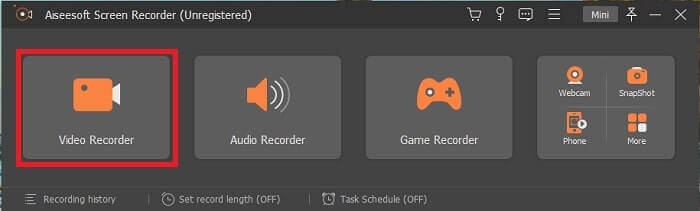
Step 2. Click the Video Recorder to record what is on your screen.
Step 3. Proceed by clicking the Record setting button then this will show up. On its interface click the Hotkeys. Set your preferred Hotkeys before starting. Don’t forget to click OK to save the adjustment.
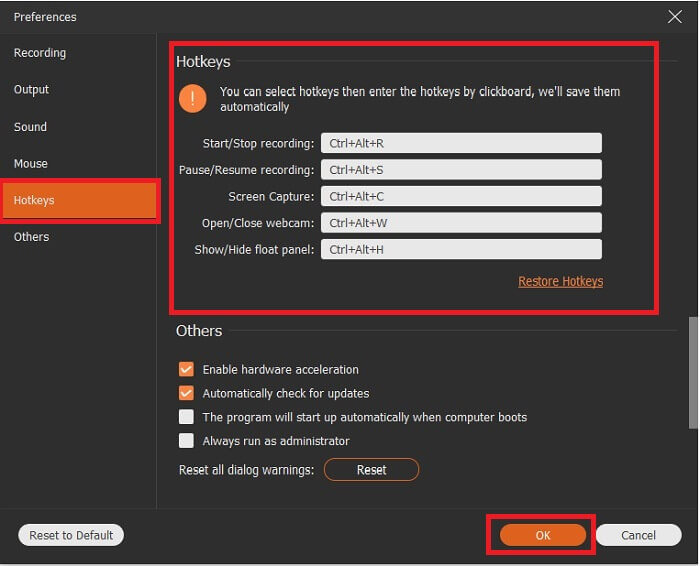
Step 4. Click the Custom under Display to record a certain region of your screen. Also, you may as well like to record the sound by turning on the Speaker. Take note this other tool will function if hardware is used. For recording your voice, open the Microphone or to record yourself on the screen you may also like to open the Webcam. After you are done, click the disk-shaped Rec button to start recording. After 3-seconds the video will start.
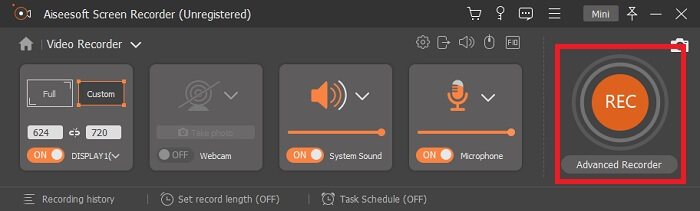
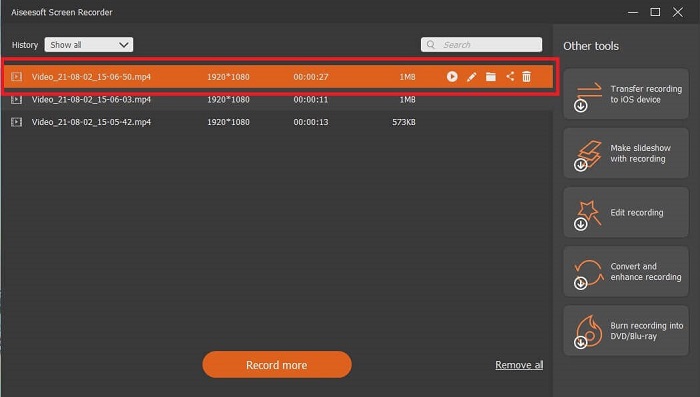
Step 5. If recording is finished, click the Red Square button to stop, click Save and Next to proceed. Click the Play button to watch the live stream you recorded.
Plussat
- Tämän työkalun ainutlaatuinen ominaisuus on, että siinä on lukitusnäyttöominaisuus, jotta se ei häiritse käyttäjiä.
- Edullinen ja joustava. Se on saatavilla kaikilla eri alustoilla, joten sinun ei tarvitse huolehtia, jos vaihdat alustaasi.
- Itse videolähtö on erinomaisempi kuin muut näytön tallentimet.
Haittoja
- Se maksaa rahaa, mutta ei ole kallista.
- Tarvitset 2,4 megatavua tallennustilaasi, jotta se voidaan ladata.
2. OBS Studio
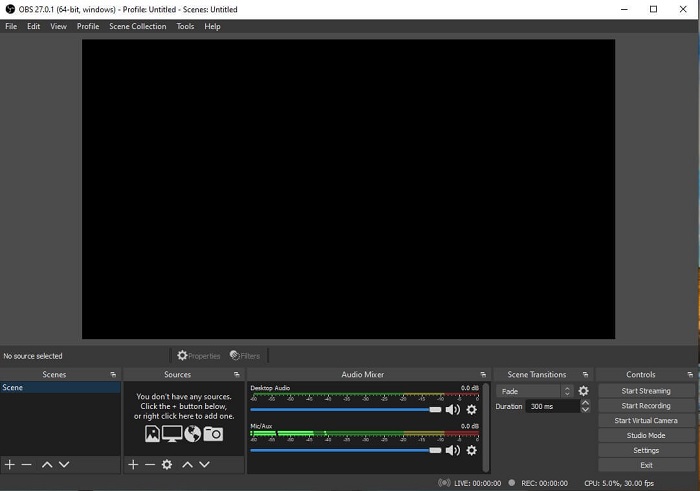
OBS Studio is a downloadable free file that makes your recording and streaming the best. Also, you may switch set up to an unlimited number of scenes via custom transition. But the file storage of the tool itself is kind of huge for an ASF recorder that functions the same as the other recorders. Too much display in the interface itself. Some details are kind of annoying because of the old setup. Not the best choice for a beginner because of the details.
Plussat
- Se on ladattavissa ilmaiseksi.
- Intuitiivinen äänimikseri VST-tuella.
- Tarkkaile jopa 8 erilaista kohtausta ja siirry helposti napsauttamalla sitä kahdesti.
- Aseta pikanäppäimet lähes jokaiselle toiminnolle.
Haittoja
- Sen lataaminen vaatii valtavan tiedoston.
- Liian paljon yksityiskohtia sen käyttöliittymässä.
3. Frapsit
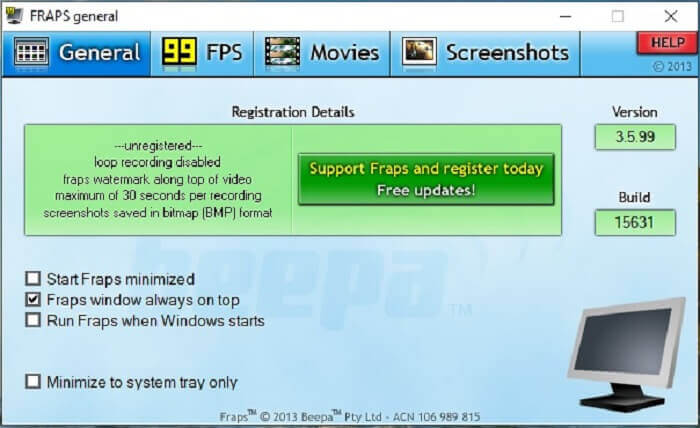
Share your most awesome montage and other videos with the help of Fraps. It provides high-quality output to its users. Also, because of the 120 fps, it became one of the best choices in ASF streaming. Regardless of that, the free version is only available to record 30 seconds.Next, fraps windows always on top will ensure that the program is still in progress. Lastly, run fraps when Windows starts to run the tool after you open your desktop.
Plussat
- Korkealaatuinen video 120 fps:n ansiosta.
- Vertailuohjelmisto antaa sinulle yksityiskohtaisia tietoja fps:stä näytön kulmassa.
- Sillä ei ole ongelmia videon alusta loppuun.
Haittoja
- Ilmainen versio on saatavilla vain 30 sekunnin tallennuksiin vesileimalla. Kuvakaappaukset ovat saatavilla vain BMP-muodossa.
- Massiivinen tallennustila videolle sen pakkaamattoman tiedostomuodon ansiosta. Ei paras valinta pienille tallennuspöytäkoneille.
4. ShareX
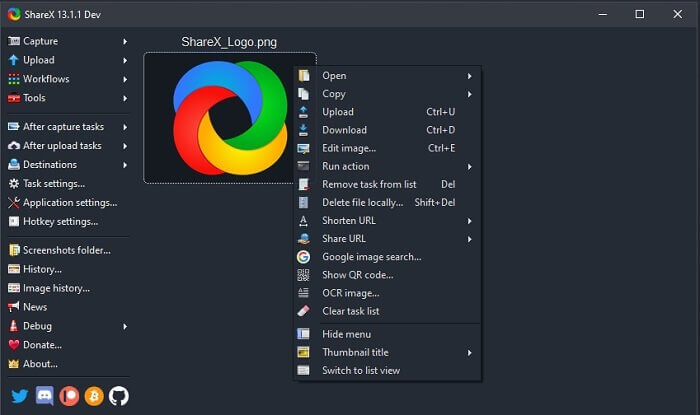
Another type of recorder is the ShareX. It performs very well in screen capturing, annotating, and uploading. The tool itself is hard to manage, it will take ample of your time to know the tool. You can choose from uploading images, text and other types of files to more than 80 supported destinations. Yet it is an unfriendly user. Instead of recording and streaming a video easily it will take your time to be able to use it.
Plussat
- Se on avoimen lähdekoodin ja ilmainen.
- Voit mukauttaa pikanäppäimen paremman ASF-stream-tallentimen saamiseksi.
- Voit yhtä hyvin tehdä näytön kaappaamisen, merkitä ne ja ladata ne helposti.
Haittoja
- Se on liian ylivoimaista uusille käyttäjille, ja vaikka olisit ammattilainen, tämä työkalu on paljon hyödyllistä.
- Haittaohjelmaongelmat.
Osa 3. Vertailukaavio
Jos et ole kiinnostunut artikkelin lukemisesta, tämä kaavio auttaa sinua päättämään.
| ominaisuudet | FVC Free Screen Recorder | FVC -näytön tallennin | OBS Studio | Fraps | ShareX |
| Video/Audio Screen Recording |  | | | | |
| Pikanäppäinten saatavuus | | | | | |
| Lukitusnäytön ominaisuus |  | | | | |
| Muokkaustyökalut tallennuksen aikana | | | | | |
| Haittaohjelmaturvallinen | | | | | Siinä on suoritettava tiedosto. Joissakin tapauksissa se voi vahingoittaa tietokonettasi. Mutta sen lataaminen on turvallista. |
| Käytettävissä oleva käyttöjärjestelmä | Kaikilla alustoilla | Kaikilla alustoilla | Kaikilla alustoilla | Windows XP, 2003, Vista ja Windows 7 | Windows |
| Tiedoston koko | Muutama kb kantorakettia varten ei latausta verkosta | 2,1 Mt | 85,8 mb | 2,4 Mt | 7,84 MB uusin. |
| Työkalun monimutkaisuus | Helppokäyttöinen ja erittäin suoraviivainen asennus. | Helppokäyttöinen ja erittäin suoraviivainen asennus. | Monimutkaista, mutta ei niin vaikeaa oppia. | Yksinkertainen työkalu, mutta siellä tapahtuu paljon. | Helppo käyttää, mutta ei kovin täsmällistä. |
| Käytettävissä oleva tulostusmuoto | ASF ja MP4 | WMV, MP4, MOV, F4V, TS, AVI, WMA, MP3, M4A, AAC, PNG, JPG / JPEG, BMP, GIF, TIFF | FLV ja MKV | AVI-muoto | MP4, WebM, MKV, AVI |
| Hintaluokka | Ilmainen avoimen lähdekoodin verkossa | 1 kuukausi: $25.00 Vuodelle: $31.20 Elinikäinen lisenssi: $55.20 | Ilmainen ladattava työkalu | Se on ilmainen, ja voit myös rekisteröityä $37:ään | IKUINEN SUUNNITELMA $59.99 VUOSIJÄRJESTELMÄ $39,99/vuosi KUUKAUSITIEDOT $7,99/kk |
Osa 4. Usein kysytyt kysymykset ASF-tallentimesta
Mitä ASF-tiedostossa on?
Tämä on jaettu ASF-tiedoston kolmeen osaan: Otsikko, tiedot ja yksinkertainen hakemisto.
Mitä muita laajennustietoja on tallennettu ASF-tiedostoon?
Tiedostotunnisteet, kuten .WMA, ovat äänihäviöllinen tiedostomuoto. Jossa se tuottaa laadukkaampaa ääntä kuin .mp3-äänimuoto. Toinen on .WMV, jota käytetään yleisesti suuren määrän videolähtöjen tallentamiseen Windowsissa. Se tarjoaa myös korkealaatuisia videoita ja säästää pienen levytilan tiedoillesi, jos käytät Windows-tabletteja, Lumiaa tai Windows PC:tä, joten käytä tätä muotoa paremmin.
Tukeeko VLC tämän tyyppistä muotoa?
Yes, the VLC media player supports this type of format. Because it can encode and decode. Other media players are GOM Player, Media PlayerLite, and PotPlayer, for windows. Also, QuickTime for Mac.
Johtopäätös
Lopuksi valitse yllä olevasta luettelosta paras tarpeisiisi sopiva ASF-tallennin. Vaikka jotkut ovat ilmaisia ja jotkut maksavat sinulle rahaa. Mutta ne tarjoavat sinulle parhaan audio-video-ulostulon, jonka haluat koskaan nähdä kuvalähetysnauhurilla.
If you're not sure about what to choose as your asf screencast recorder. Then, this piece of advice is for you, the tool that matches the work for a recorder will be the FVC Screen Recorder. Here are some reasons why you need to choose the FVC Screen Recorder over any other tools available in the list. Because it is user-friendly, has more features to offer, and is budget-friendly. No need to think twice, because FVC is the best among the rest.
-
 Debyyttinauhuri - paras arvostelu ja paras vaihtoehto
 NCH Debut Video Capture and Screen Recorder on loistava työkalu videoiden sieppaamiseen kaikesta, mitä lähetät tietokoneen näyttöön, mukaan lukien hiiren liikkeet.
-
 4 parasta ilmaista web-käynnistystallenninta näytön videon sieppaamiseksi
 Etsitkö parasta tapaa tallentaa näytön toimintaa työpöydällesi maksamatta senttiäkään? Tässä on 4 yleisimmin käytettyä ilmaista web-käynnistystallenninta.
-
 Puolueeton Cinch Review -äänitallennin ja paras vaihtoehto
 Cinch Audio Recorder on paras tapa ladata musiikkia suoratoistosivustoilta. Lue vain puolueeton arvostelu ja paras vaihtoehto artikkelista.
