


 Video Converter Ultimate
 Näytön tallennin
 Videon korjaus
Kattava katsaus äänentallennusohjelmistoon äänen tehokkaaseen tallentamiseen
Olitpa sitten ammattilainen tai harrastaja, sinun on käytettävä äänitysohjelmistoa äänitteiden muokkaamiseen ja viimeistelyyn tiettyä käyttötarkoitusta varten. Lisäksi sopivan äänitallentimen valitseminen laitteellesi voi olla hankalaa, koska markkinoilla on niin paljon vaihtoehtoja. Sen sijaan, että kokeilisit useita eri äänitysohjelmia, esittelemme neljä tallenninta, jotka olemme todenneet tarpeisiisi sopiviksi, jotta välttyisit haitallisten ohjelmistojen lataamiselta tai käyttämiseltä. Alla oleva äänitallentimien lista on seulottu huolellisesti, jotta tarjolla olisi vain parhaat vaihtoehdot, ei heikosti suoriutuvia tallentimia.

Osa 1. 4 parasta äänentallennusohjelmistoa Windowsissa ja macOS:ssä
1. FVC -näytön tallennin
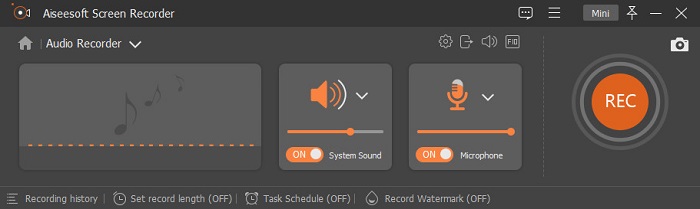
Tarvitsetko tietokoneen äänen tallentamista, mutta et tiedä mitä käyttäisit? Siinä tapauksessa esittelemme markkinoiden parhaan ja selvästi suosituimman tallentimen, FVC Screen Recorderin. Siinä on erinomainen käyttöliittymä, jonka ansiosta käyttäjät voivat käyttää ohjelmaa ilman monimutkaisia toimenpiteitä. Lisäksi käyttäjillä on usein ongelmia taustamelujen kanssa, joten uuden taustamelun vaimennustoiminnon avulla voit nauhoittaa ilman, että pienet taustahälyäänet aiheuttavat haittaa. Ohjelmassa on myös useita muita ominaisuuksia, jotka auttavat sinua tallentamaan tehokkaasti. Haluatko tietää, mitä ne ovat? Siinä tapauksessa käydään läpi FVC Screen Recorderin pääominaisuudet.

Näytön tallennin
4 988 518+ latausta- Se tallentaa ääntä erittäin korkealla äänenlaadulla.
- Tallenna ääntä 24/7 niin kauan kuin sinulla on tarpeeksi tallennustilaa tietokoneen asemassa.
- Voit tallentaa järjestelmän ääntä samanaikaisesti mikrofonilla.
- Saatavilla on mikrofonin lisäys, joka parantaa äänen tallennuskokemusta.
- Voit tarkistaa mikrofonin äänen tarvittaessa.
Ilmainen latausWindows 7 tai uudempiTurvallinen lataus
Ilmainen latausMacOS 10.7 tai uudempiTurvallinen lataus
Plussat
- Ohjelman avulla käyttäjät voivat kokea erittäin jännittävää äänen tallentamista Macissa tai Windowsissa.
- Perusmuokkausominaisuudet ovat käytettävissä, kuten äänen leikkaaminen tai trimmaus.
- Siinä on sisäänrakennettu tallennushistoria, jonka avulla voit löytää tallennetun äänen helposti.
Haittoja
- Se ei tue tehosteiden lisäämistä ääneen tallennuksen aikana.
- Osta ennen käyttöä.
2. Audacity
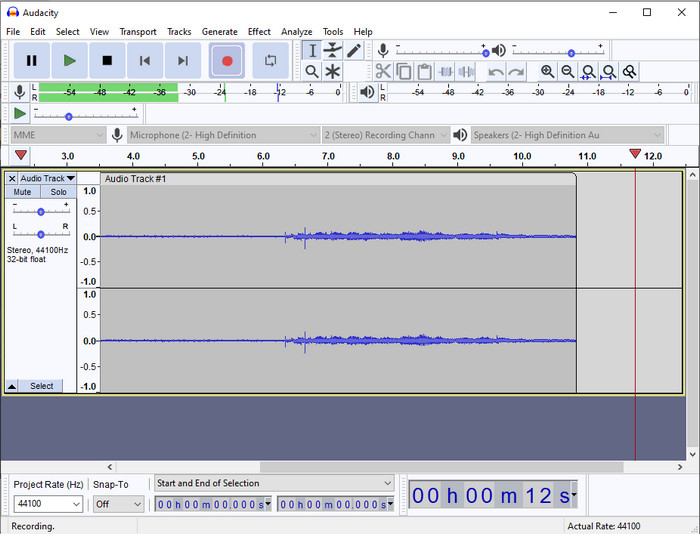
Jos tarvitset ammattilaistason työkalun äänityksen hoitamiseen, Audacity on hyvä apu. Tämä ammattimainen äänitallennin on jo auttanut miljoonia podcasteja tekeviä heidän äänitysmatkallaan. Jos tarvitset edistynyttä tallenninta ilmaiseksi, tämä ohjelma on yksi parhaista vaihtoehdoista. Vaikka siinä on paljon pro-tason tallennusominaisuuksia, sen käyttöön tottuminen on silti hankalaa heikon käyttöliittymän vuoksi. Vaikka ohjelma soveltuukin ammattimaiseen äänitykseen, jotkin sen ominaisuuksista, kuten taustamelun poisto, kaipaavat yhä parannusta. Siitä huolimatta Audacity tallentaa tietokoneen ääntä ammattimaisesti tavalla, johon kaikki tallentimet eivät pysty.
Plussat
- Ilmaiseksi ladattavissa kaikille työpöytäalustoille.
- Se tarjoaa asiantuntevia muokkausominaisuuksia ammattilaisille.
- Siinä on joitain edistyneitä ominaisuuksia, joita tarvitset podcastin luomiseen.
Haittoja
- Ohjelmiston graafinen käyttöliittymä on vanhentunut.
- Joitakin sen ominaisuuksia on päivitettävä.
- Ei paras valinta amatööreille ja niille, jotka eivät osaa äänittää.
3. QuickTime Player
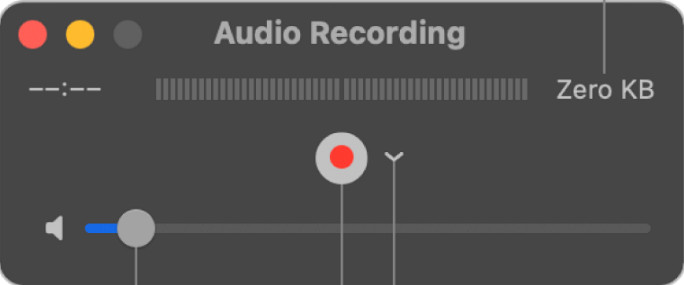
QuickTime Playeria voidaan Macilla käyttää myös äänitallentimena, jos tarvetta on. Vaikka soitin ei ole kovin riittävä eikä tehokas varsinaiseen tallentamiseen, voit kohdata viiveitä ja heikompaa äänenlaatua. Jos kuitenkin tarvitset Macilla nopean äänityksen, tämä on kelvollinen vaihtoehto, koska mitään ei tarvitse ladata ja ohjelman käyttäminen on varmasti turvallista. Mutta jos olet ammattilainen ja etsit parasta äänitysohjelmistoa, tämä ei ole sinulle täydellinen työkalu.
Plussat
- Se on jo saatavilla jokaiselle macOS:lle.
- Ilmainen, turvallinen ja helppokäyttöinen.
Haittoja
- Se ei ole yhtä tehokas kuin toinen tämän luettelon äänitallennin.
- Äänen lopputulos on heikko.
- Ei paras valinta ammattilaisten tallentamiseen ja editointiin.
Aiheeseen liittyvää:
Näin tallennat näytön ja äänen Macilla QuickTimen avulla
Miten muuntaa QuickTime MP4:ksi
4. Ocenaudio
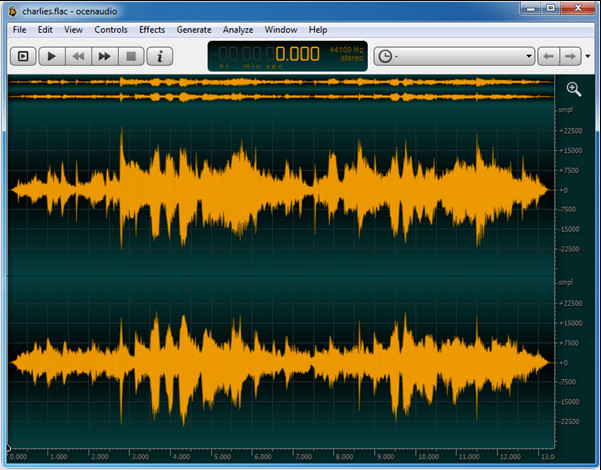
Jos tarvitset monipuolisen tallentimen äänittämiseen Windows 10:ssä tai uudemmassa, Oceanaudio auttaa sinua. Tämän työkalun käyttöliittymä on lähes samanlainen kuin Audacityssa, mutta sen GUI:ta on helpompi ymmärtää. Tarkemmin sanottuna tämä tallennin tarjoaa monipuolisuutta ja ominaisuuksia, joita tarvitset äänityksessä. Vaikka se onkin hieman hankala käyttää ja vaatii todennäköisesti opastusvideon katsomista, se on lopulta vaivan arvoinen. Jos siis tarvitset editorin, jonka käyttöliittymä on parempi kuin Audacityssa, tämä on hyvä valinta.
Plussat
- Se käyttää tallentamiseen kehittynyttä tekniikkaa.
- Äänitys on asiantuntijavalinta.
- Voit kuunnella ääntäsi tallennuksen aikana.
Haittoja
- Se ei ole käyttäjäystävällinen.
- Aloittelijat voivat hämmentyä käyttäessään tätä työkalua.
Osa 2. Vertailukaavio Audio Recorder -ohjelmistosta
| Ominaisuudet | FVC -näytön tallennin | Audacity | QuickTime Player | Oceanaudio |
| Äänitä järjestelmän ääntä ja mikrofonia |  | | | |
| Muokkaa nauhoitusta | | |  | |
| Laitteiston kiihdytys | | | | |
| Reaaliaikainen ennakkokuuntelu | | | | |
| Tallenna alkuperäinen laatu | | | | |
| Paras käyttöliittymä | | | | |
Osa 3. Usein kysyttyä Audio Recorder -ohjelmistosta
Onko Cinch Audio Recorder paras äänentallennin?
Meillä on tuore arvostelu Cinch Audio Recorderista. Jos siis haluat tietää tästä äänitallentimesta lisää, klikkaa tätä linkkiä ja lue tarkempia tietoja tallentimesta.
Mitkä ovat hyvän äänitallentimen ominaisuudet?
Sinun on tiedettävä perusstandardit ennen kuin valitset hyvän äänitallentimen. Ensinnäkin sen pitäisi pystyä kaappaamaan ääntä mikrofoniin helposti. Toiseksi se on turvallinen ja haittaohjelmavapaa. Kolmanneksi, jos sinun on ostettava työkalu, työkalun itsensä pitäisi tarjota käyttäjille huippuosaamista. Neljänneksi tehokkuusaste tarkoittaa, että työkalun on oltava erittäin tehokas tallennuksessa. Viidenneksi perus- tai lisäominaisuuksien on oltava käytettävissä, jotta käyttäjät voivat tallentaa. Ennen kuin valitset äänitallentimen avuksesi, voit luottaa näihin standardeihin.
Kuinka äänittää ääntä Windows 10:ssä?
Ennen äänittämistä Windows 10:ssä sinun on valittava paras tallennin, kuten FVC Video Recorder, lataamalla se työpöydällesi, asentamalla työkalu ja käynnistämällä se. Valitse seuraavaksi Audio Recorder -vaihtoehto ja napsauta sitä. Voit nyt helposti lisätä tallennukseen järjestelmä-äänen tai mikrofonin kytkemällä ne päälle kelluvasta työkalupalkista. Kun olet valmis aloittamaan tallennuksen, napsauta punaista pyöreää painiketta. Jos haluat lopettaa tallennuksen, napsauta neliönmuotoista painiketta; tämän jälkeen uusi näkymä näyttää listan tekemistäsi äänityksistä.
Johtopäätös
Nyt tunnemme tietokoneellesi saatavilla olevat äänitysohjelmistot. Kaikki tässä esitellyt työkalut auttavat sinua äänittämisessä. Jos kuitenkin etsit tallenninta, joka päihittää muut, FVC Screen Recorder on sinua varten. Epäröitkö yhä tämän äänitallentimen suhteen? Siinä tapauksessa ainoa tapa selvittää, toimiiko se kuten tässä artikkelissa kerromme, on ladata se ja kokeilla itse.
-
 Top 4 ilmaista AIFF -äänitallenninta, jotka tuottavat korkealaatuista ääntä
 Tässä artikkelissa puhutaan AIFF:stä ja joistakin suosituimmista työkaluista, joita voit käyttää korkealaatuisen AIFF-muodon tuottamiseen.
-
 3 parhaista tekniikoista äänen tallentamiseen iPhonessa
 Onko sinulla vaikeuksia, koska et voi tallentaa ääntä kunnolla iPhonella? Lue sitten tämä artikkeli tietääksesi kuinka äänittää ääntä iPhonessa ja mitkä ovat käytettävissä olevat työkalut.
-
 7 Magnificent Voice Recorderista, joka on käytettävissä kaikilla alustoilla
 Haluatko oppia äänittämään ääntä? Siirry sitten tähän artikkeliin, kun puhumme parhaasta äänitallentimesta, joka sopii tarpeisiisi.
