


 Video Converter Ultimate
 Näytön tallennin
 Videon korjaus
[Windows ja Mac] Opi leikkaamaan MP4: parhaat online- ja offline -työkalut
Videon rajaaminen on tavallinen tehtävä, jota teet, jos pidät videoiden muokkaamisesta. Koon muuttaminen on paras tapa korostaa yksityiskohtia, jotka haluat katsojan huomaavan. Sen sijaan, että zoomaisit sisään tai ulos kuvatessa – mikä on hieman vaivalloista ja jos kätesi tärisee, se on jo oma ongelmansa – mikset rajaisi videota vasta kuvaamisen jälkeen. Lisäksi, jos zoomaat videota sisään tai ulos, on vaarana, että videon uskottavuus kärsii. Tämän selityksen pohjalta tässä on luettelo parhaista työkaluista, joilla voi rajata videota ja oppia vaihe vaiheelta, miten rajata MP4-tiedosto. Keskity siis nyt alla olevien artikkelien lukemiseen; ne osoittavat, mitä sinun kannattaa käyttää saadaksesi käyttöösi täydellisen rajaustyökalun.

Osa 1. MP4 -videoiden rajaaminen offline -tilassa vaiheiden ja yksityiskohtien avulla
1. FVC Video Converter Ultimate (Window & Mac)
Haluatko oppia, miten videoita rajataan kuin Hollywoodissa? Vaikka olisit videon rajaamisessa uusi, voit silti saada erinomaisen lopputuloksen. Tämän saavuttamiseksi voit käyttää ohjelmaa FVC Video Converter Ultimate ja rajata MP4-videoita tarkkaan määritellyn leveyden ja korkeuden mukaan. Toisin kuin monet muut tässä luetellut työkalut, tämä ohjelmisto on kehitetty ratkaisemaan lähes kaikki muokkausongelmasi. Sen sijaan, että käyttäisit tai lataisit useita erilaisia ohjelmia työn viimeistelemiseksi, voit käyttää yhtä monipuolista työkalua, joka hoitaa kaiken. Haluatko tietää tarkemmin, miten tämä toiminto toimii? Siirrytään silloin vaiheisiin ja opitaan, miten rajataan kuin ammattilainen.
Vaihe 1. Lataa ja asenna FVC Video Converter Ultimate -ohjelma tietokoneellesi. Valitse versio, joka tukee pöytäkonettasi tai kannettavaasi. Tämän jälkeen voit säätää työkalun asetuksia ja napsauttaa Valmis tallentaaksesi muutokset.
Ilmainen latausWindows 7 tai uudempiTurvallinen lataus
Ilmainen latausMacOS 10.7 tai uudempiTurvallinen lataus
Vaihe 2. Käynnistä työkalu napsauttamalla ohjelman kuvaketta näytölläsi. Näytölle ilmestyy tämän näköinen käyttöliittymä, mikä tarkoittaa, että ohjelma toimii oikein.
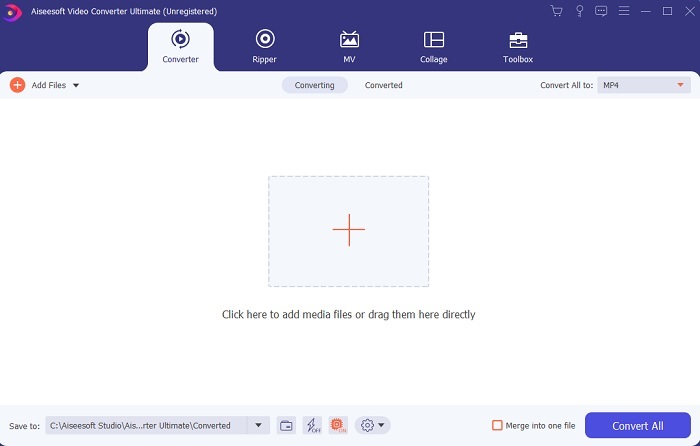
Vaihe 3. Napsauta Add Files lisätäksesi sen MP4-videon, jonka haluat rajata.
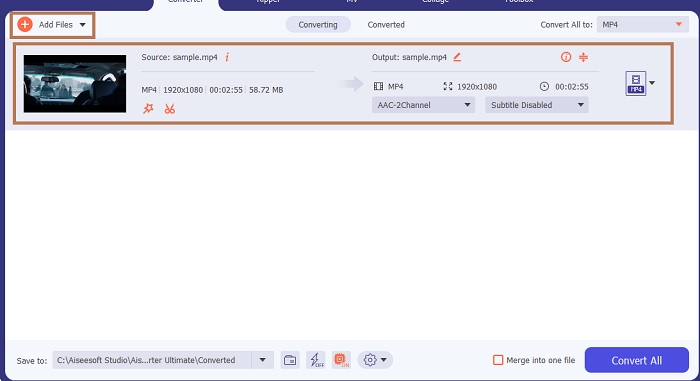
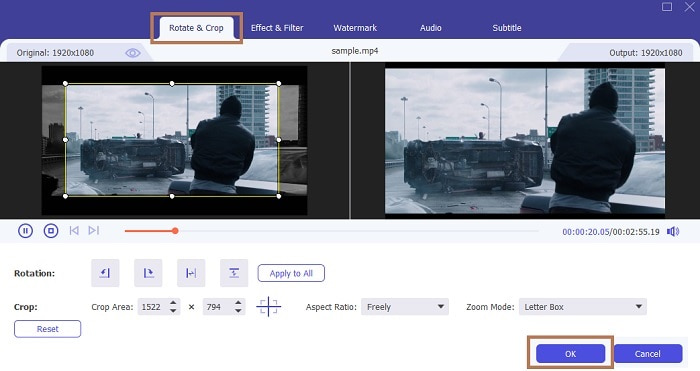
Vaihe 4. Tiedoston lisäämisen jälkeen paina taikasauvan muotoista painiketta lisätäksesi ”taikaa” videoosi ja siirry sitten välilehdelle Rotate & Crop. MP4-videon rajaamiseksi voit aloittaa raahaamalla pieniä pisteitä muuttaaksesi videon korkeutta ja leveyttä. Jos haluat videosta tietyn kokoisen, voit myös mennä kohtaan Aspect Ratio ja valita haluamasi kuvasuhteen. Kun olet valmis, napsauta OK tallentaaksesi ja jatkaaksesi.
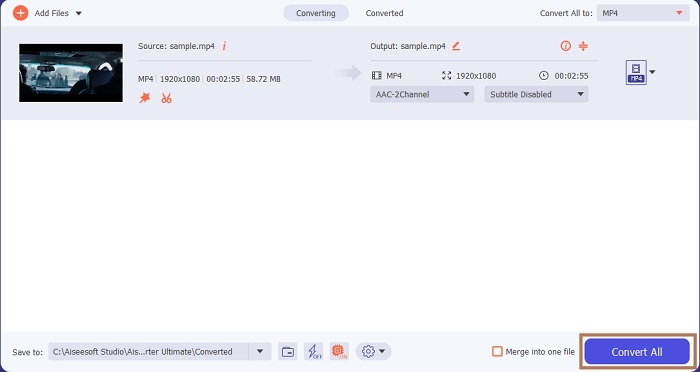
Vaihe 5. Työkalun käyttöliittymässä voit nyt vaihtaa tiedostomuotoa pudotusvalikosta. Jos et halua vaihtaa muotoa, sekin on täysin ok – napsauta vain Convert All. Odota hetki, kunnes muunnos on valmis, ja siinä kaikki.
Rajauksen lisäksi tällä työkalulla voit helposti myös yhdistää MP4-tiedostoja, pakata MP4-videoita pienempään kokoon ja paljon muuta.
2. iMovie (Mac)
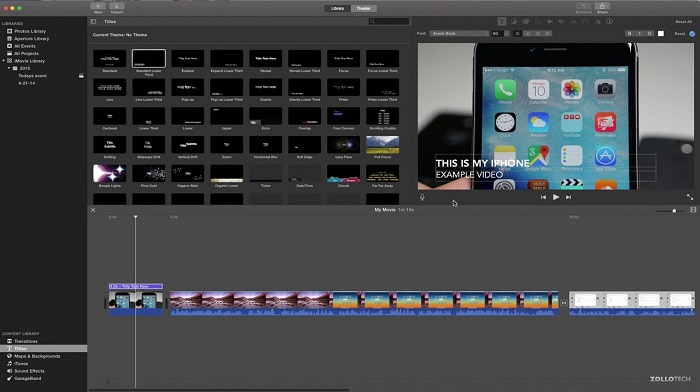
Haluatko tietää, miten rajata MP4-video Macilla? Siinä tapauksessa iMovie voi olla sopiva työkalu tähän työhön. Vaikka FVC Video Converter Ultimate tukee myös Macia, saatat haluta kokeilla jotakin muuta ohjelmaa. Se ei yllä aivan edellä mainitun työkalun tasolle, mutta sen tarjoamat muokkaustoiminnot ovat silti kokeilemisen arvoisia. Tällä työkalulla voit myös lisätä animaatioita videoiden väliin. Haluatko tietää, miten rajaat videoita iMoviella? Seuraa alla olevia ohjeita.
Vaihe 1. Lataa iMovie hakukoneesi kautta.
Vaihe 2. Asentamisen jälkeen napsauta Import Movie tuodaksesi videot, joita haluat rajata.
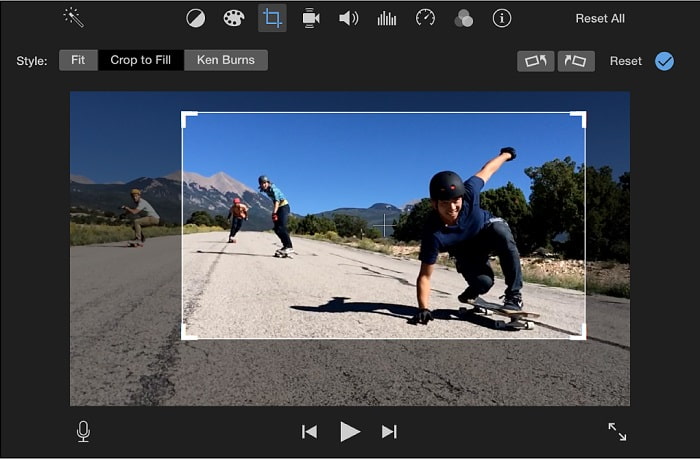
Vaihe 3. Valitse videolle tehtävä rajaustyyppi, Crop to Fill tai Ken Burns. Napsauta Apply Crop Adjustment ja olet valmis.
Osa 2. Valitse parhaat vaihtoehdot MP4: n rajaamiseen verkossa
1. VEED.IO
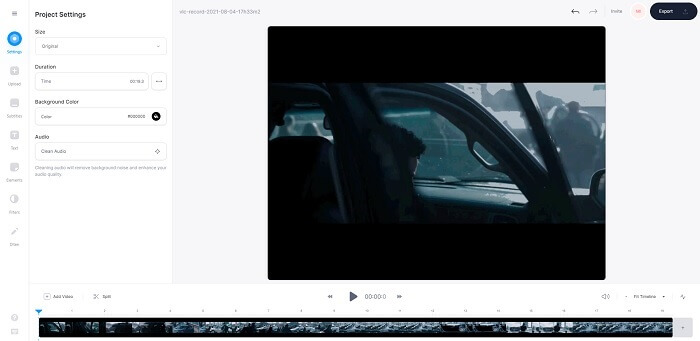
Rajaa MP4-videoita verkossa VEED.IO-työkalun avulla. Tämä verkkotyökalu tarjoaa joitakin samoja perusmuokkaustoimintoja, joita näet ensimmäisessä työkalussa. Toisin kuin monet ensin mainitut ohjelmat, tämä ja seuraava työkalu eivät vaadi lisätiedostojen lataamista toimiakseen, koska niitä käytetään suoraan verkossa – mikä on erinomaista. Miinuspuolena on, että sinun täytyy luoda tili käyttääksesi palvelua, mikä on hieman hankalaa varsinkin niille, jotka haluavat vain hoitaa rajauksen heti. Jos kuitenkin haluat kokeilla VEED.IO:ta, voit avata sen etsimällä sen hakukoneesi avulla.
2. Clideo
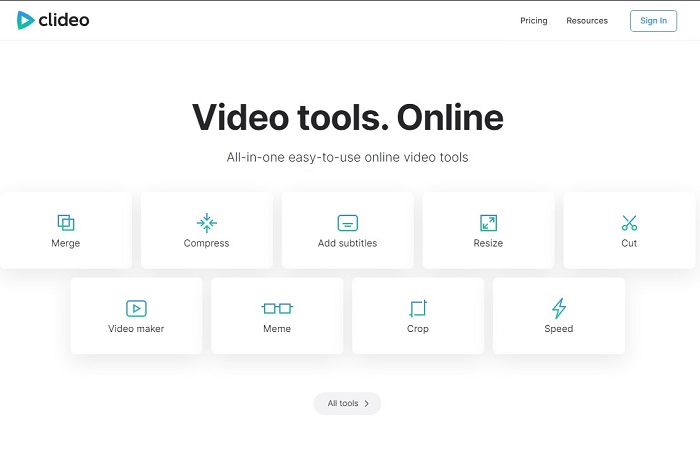
Toinen verkkopohjainen ohjelma, jolla voit rajata MP4-videon ilman uudelleenkoodausta, on Clideo. Tämä työkalu ei vaadi tiliä tai latausta toimiakseen, mutta sen toiminnot ovat hyvin rajalliset. Tarkennettuna: se tarjoaa vähemmän kuin kaikkein perusluonteisimmat muokkaustoiminnot. Jos siis haluat käyttää mielikuvitustasi ja luovuutta, tämä työkalu asettaa sinulle melko tiukat rajat. Lisäksi videoiden lähettäminen rajauksen aloittamiseksi voi viedä jonkin aikaa, ja kestoon vaikuttaa internet-yhteytesi nopeus. Huolta ei silti ole, työkalu on helppokäyttöinen, ilmainen ja tekee sen mitä lupaa. Voit siis kokeilla sitä joskus, jos haluat.
Osa 3. Usein kysyttyjä kysymyksiä Crop MP4: stä
Mitä tarkoittaa MP4?
MP4 on universaali mediatiedosto, joka sisältää tietoja äänen ja videon koodin sijasta. Se voi myös tallentaa tietoja tekstityksille ja still -kuville, jos haluat. MP4 tunnetaan nimellä MPEG-4 Osa 14.
Kumpi on parempi: MP3 vai MP4?
No, se riippuu tilanteesta. Esimerkiksi yleisin formaatti musiikin, ääninauhoitusten, äänileikkeiden ja muun vastaavan tallentamiseen on MP3. Vaikka MP4 voi sisältää myös pelkkää ääntä, koska se on monikäyttöinen säiliöformaatti, MP4 on silti ensisijainen formaatti videoiden ja klippien lataamiseen, tallentamiseen ja muuntamiseen. Jos haluat lisätietoa näistä kahdesta formaatista, lue artikkeli MP3 vs. MP4.
Voitko rajata MP4 VLC: llä?
Kyllä, voit rajata VLC: llä, vaikka sillä on hyvä mediasoittimen rajauskyky ja muuntaminen on yksi sen tarjoamista ominaisuuksista. Mutta se ei ole ihanteellinen valinta videon rajaamiseen, vaikka se on silti kokeilemisen arvoinen. Joten, jos et pidä VLC: stä leikkaajana, voit valita työkalun ylhäältä.
Johtopäätös
Nyt on helppo ymmärtää, että rajaaminen on yksi helpoimmista töistä, mutta myös epäonnistuminen on helppoa. Mutta kuten sanotaan, jos valitset oikean työkalun tehdäksesi työn, olet hyvä mennä. Joten mitä tarkoitamme oikealla työkalulla? FVC Video Converter Ultimate on mitä tarkoitamme. Sen sijaan, että tyytyisit toiseen työkaluun verkon yläpuolella tai sen yli, miksi et tyytyisi edellä mainittuun parhaaseen rajaustyökaluun. Se on listattu yläreunassa yhden tarkoituksen vuoksi ja tämä tarkoitus on hallita kaikkia työkaluja.
-
 4 parasta tapaa muuntaa MOV MP3-tiedostoiksi Windowsissa ja Macissa helposti
 Kun haluat purkaa MP3-äänitiedostot MOV-tiedostoista, voit oppia lisää 4 tehokkaimmasta MOV-MP3-muuntimesta saadaksesi haluamasi tiedostot artikkelista.
-
 WAV MP3 - Top 5 Free Converter muuntaa WAV MP3
 Tämä sivu on pitkä luettelo ilmaisista WAV-MP3-muuntimista (iTunes, Audacity, VLC, Windows Media Player ja Free Audio Converter), joiden avulla WAV voidaan muuttaa MP3: ksi tietokoneella.
-
 M4V to MP3 Converter - 4 parasta tapaa purkaa MP3 M4V-tiedostoista
 Kun haluat purkaa MP3-äänen M4V-videoista helposti, voit oppia lisää 4 parhaasta M4V-MP3-muuntimesta saadaksesi haluamasi äänitiedostot artikkelista.
