


 Video Converter Ultimate
 Näytön tallennin
 Videon korjaus
Yksinkertaistettu opetusohjelma äänen ja videon synkronoinnista Adobe Premiere Prossa
Jos olet ammattilainen, olet jo käyttänyt Adobe Premiere Pro -ohjelmaa videosi editointiohjelmana, joka suoriutuu tehtävästään todella hyvin. Monet Adoben käyttäjät pitävät tästä ohjelmasta, koska se tuottaa erittäin laadukasta jälkeä, jonka lisäät mielelläsi videoosi. Mutta tiesitkö, että voit käyttää tätä työkalua myös äänen ja videon synkronointiin? Jos sinulla ei ole aavistustakaan, miten se tehdään, tämä on yksi onnenpäivistäsi. Kokeilemme sitä itse ja näytämme, miten sen saa helposti synkronoitua. Nyt sinun ei siis tarvitse lukea käyttöohjetta, sillä tämä kirjoitus selittää yksinkertaisesti ja selkeästi, miten ääni synkronoidaan Premieren kanssa helposti ja tehokkaasti sekä toisen vaihtoehtoisen työkalun avulla.

Osa 1. Äänen ja videon synkronointi Adobe Premiere Prossa
Ennen kuin aloitamme, otetaan lyhyt katsaus Adobe Premiere Prohon. Kuten yllä mainittiin, tätä työkalua ovat jo pitkään käyttäneet ammattieditoijat, jotka haluavat tehdä upeita videoita. Tämä työkalu vaatii kuitenkin paljon aikaa oppimiseen, koska siinä on runsaasti edistyneitä ominaisuuksia, joita aloittelijoiden on vaikea ymmärtää. Vaikka sen käytön opettelu viekin varmasti paljon aikaa, sen hallitseminen kannattaa, jos sinulla on vapaa-aikaa. Lisäksi alla esitetyt vaiheet on yksinkertaistettu niin, että sinun on helpompi ymmärtää, miten ääni ja video synkronoidaan Premieren kanssa, kun seuraat alla olevia ohjeita.
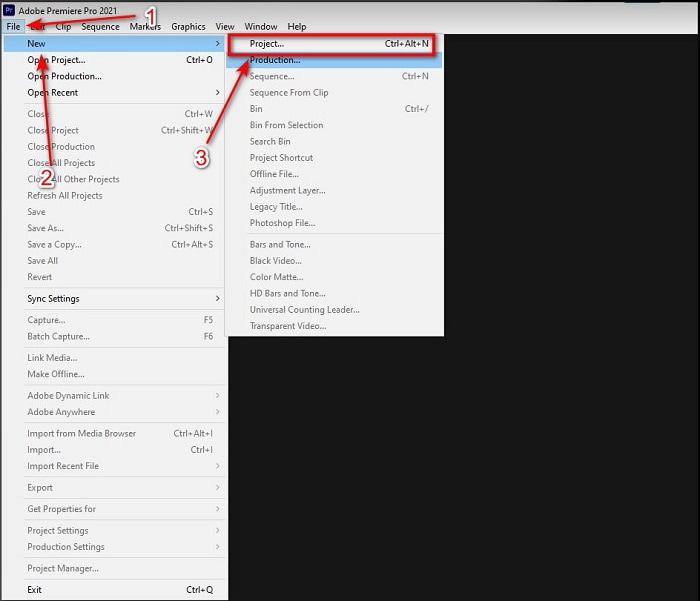
Vaihe 1. Osta ensin työkalu ja lataa se tietokoneellesi. Käynnistä se, kun latausprosessi on valmis. Napsauta sitten File (Tiedosto) ja sen alta New (Uusi), sitten Project (Projekti) jatkaaksesi ja paina lopuksi OK, kun uusi ikkuna tulee näkyviin.
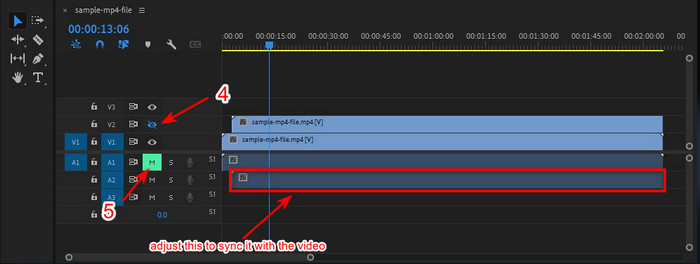
Vaihe 2. Lisää sama video ja ääni Timeline-aikajanalle kahdesti. Napsauta sitten toisen videoraidan Toggle Track Output -painiketta ja mykistä jälkimmäinen napsauttamalla Mute Track. Säädä ääniraitaa niin, että se varmasti on synkassa videon kanssa.
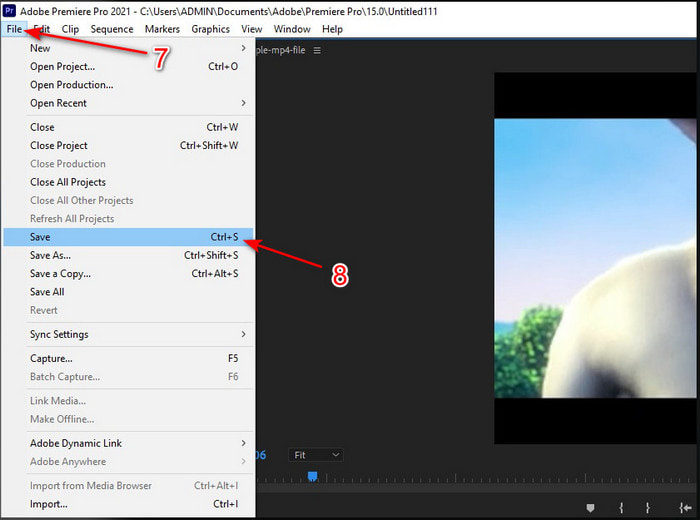
Vaihe 3. Napsauta uudelleen ylhäältä File (Tiedosto) ja etsi Save (Tallenna) viedäksesi lopullisen mediataitoston tietokoneellesi.
Plussat
- Tämä työkalu tarjoaa edistyneen muokkausominaisuuden.
- Huippuluokan editori, jonka voit ladata.
- Paras valinta ammattimaiseen tuotantoon.
Haittoja
- Ei paras valinta aloittajalle, jolla ei ole ideaa editoinnista.
- Ohjelmisto on täysin kallis verrattuna muihin editoreihin, jotka tarjoavat melkein saman ominaisuuden.
Osa 2. Helpoin tapa synkronoida ääni aloittelijoille ja ammattilaisille Video Converter Ultimaten kanssa
Aivan kuten Adobe Premiere Pro, myös tämä ilmiömäinen muunnin tarjoaa korkealaatuiset ja edistyneet muokkausominaisuudet, joista tulet pitämään. Mutta se on paljon helpompi käyttää kuin Premiere Pro. Video Converter Ultimate on sellaisten editoijien paras ystävä, jotka haluavat tehdä videoita, parannella, tehostaa, luoda gif-animaatioita ja paljon muuta. Tämä ohjelmisto ratkaisee lähes kaikki netinkäyttäjien yleiset ongelmat, myös synkronointiin liittyvät. Helppokäyttöisyytensä ansiosta sen on ladannut jo yli miljoona käyttäjää, jotka ovat ihastuneet siihen. Jos siis haluat tehdä elämästäsi helpompaa sen sijaan, että käyttäisit Premiere Pron äänen synkronointia, mikset kokeilisi tätä? Seuraa alla olevia ohjeita.
Vaiheet äänen ja videon synkronoimiseksi Video Converter Ultimatella:
Vaihe 1. Lataa ohjelmisto tietokoneellesi ja valitse, käytätkö PC:tä vai Macia. Asenna se, tee perusasetukset ja napsauta Start Now (Aloita nyt) jatkaaksesi.
Ilmainen latausWindows 7 tai uudempiTurvallinen lataus
Ilmainen latausMacOS 10.7 tai uudempiTurvallinen lataus
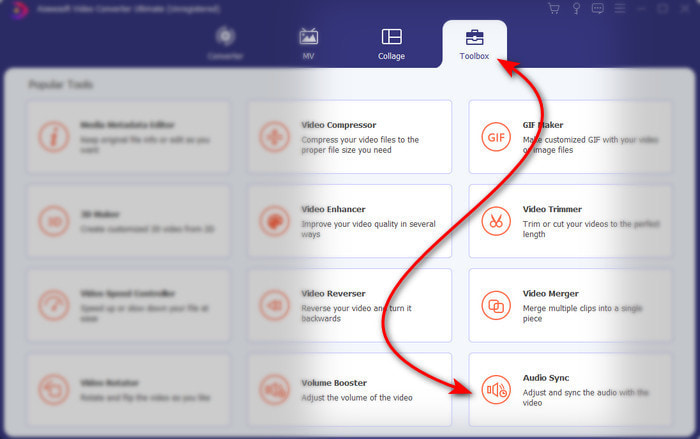
Vaihe 2. Käynnistä työkalu ensimmäisen vaiheen jälkeen, siirry Toolbox-osioon ja napsauta alareunasta Audio Sync.
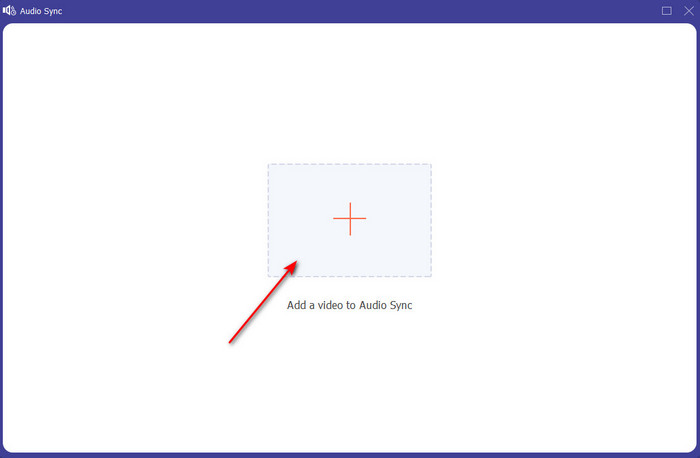
Vaihe 3. Paina +-painiketta lisätäksesi videon ja äänen, jotka haluat synkronoida. Kun olet löytänyt ne kansiosta, napsauta Open (Avaa) jatkaaksesi.
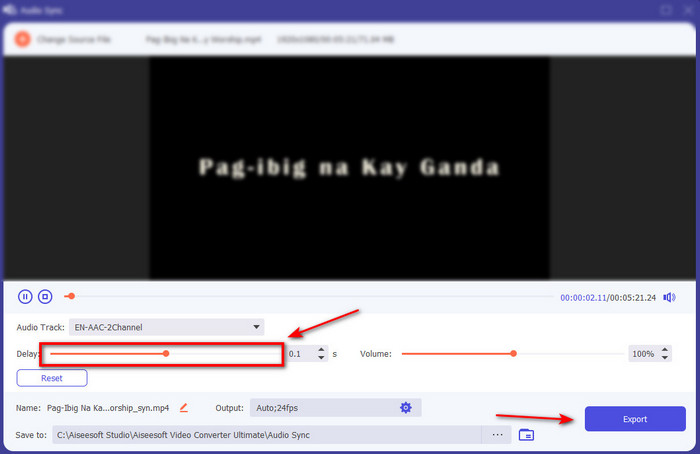
Vaihe 4. Jotta ääni olisi synkassa, säädä Delay slider -viivesäädintä niin, että se vastaa videota. Lisäksi voit myös tehostaa ääntä säätämällä äänenvoimakkuussäädintä. Kun kaikki on valmista, napsauta Export tallentaaksesi lopullisen tulosteen.
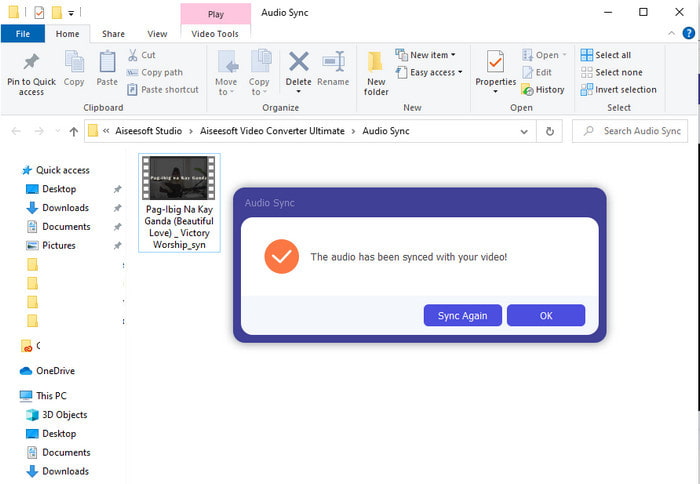
Vaihe 5. Kun prosessi on valmis, näytöllesi avautuu kansio, jossa on tekemäsi synkronoitu ääni ja video. Napsauta tiedostoa katsoaksesi, toistaaksesi ja nauttiaksesi synkronoidusta audio-videosta.
Plussat
- Paras valinta saada videosi näyttämään ilmiömäiseltä.
- Yleinen kokemus tämän työkalun käytön aikana on kirjaimellisesti äärimmäinen ja silti helppokäyttöinen.
- Se on saatavilla kaikilla alustoilla, olipa kyseessä PC tai Mac.
Haittoja
- Aivan kuten premiere pro, tämä työkalu on maksullinen, mutta se on paljon halvempi kuin premiere pro.
- Se on ladattava asemallesi ennen kuin voit käyttää sitä.
Osa 3. Usein kysytyt kysymykset Premieren äänen ja videon synkronoinnista
Voinko käyttää Premiereä näytön tallennuksena?
Jos yrität nauhoittaa näyttöä Premiere Prossa, sinun kannattaa luovuttaa heti, sillä se ei onnistu tässä ohjelmassa. Voimme kuitenkin kertoa sinulle eräästä salaisesta näytöntallentimesta, josta voit valita. Jos siis haluat tietää, mitkä ovat 5 parasta screencast-ohjelmaa, joita voit käyttää PC:llä, Macilla, verkossa, iOS:ssä ja Androidissa, tutustu arvosteluumme.
Onko Adobe Premiere Pro ilmainen?
Itse asiassa se on kyllä, voit ladata tämän työkalun ilmaiseksi, mutta voit käyttää tätä työkalua vain 7 päivän kokeilujakson ajan. Joten jos kokeilujakso on päättynyt, sinun on tilattava Adobe Premiere Pro uudelleen, jotta voit nauttia tämän premiere pron tarjoamista muokkausominaisuuksista.
Voinko ladata premiere pron käyttämällä toista verkkosivustoa?
Ei, koska kaikkien sovellusten lataaminen toiselta verkkosivustolta on laitonta. Lisäksi, jos käytät toista verkkosivustoa ladataksesi premiere pron, on mahdollista, että se sisältää vakoiluohjelmia, viruksia tai vielä pahempaa. Joten jos haluat varmistaa turvallisuutesi, lataa ohjelmisto vain virallisille pääsivustoille.
Voinko ostaa Adobe Premiere Pron elinikäisen käyttöoikeuden?
Vaikka voit ostaa kuukausittaisen käyttöoikeuden Adobe Premiere Prosta, et silti voi ostaa siihen elinikäistä käyttöoikeutta. Voit kuitenkin ostaa sen toiselta verkkosivustolta, joka on kuitenkin laiton, ja on mahdollista, että ladattava tiedosto on vioittunut, siinä on virus tai se on huijaus. Joten jos haluat käyttää ja ostaa Adobe Premiere Prota, suosittelemme kaikkia ostamaan sen sen pääsivustolta.
Johtopäätös
5 minuutin luettuamme tämän artikkelin tiedämme jo, kuinka käyttää Adobe Premiere Prota äänen synkronointiin videoon. On kuitenkin olemassa yksinkertaisempi tapa synkronoida se käyttämällä Video Converter Ultimatea. Koska tämä työkalu tarjoaa paljon nopeamman kuvan ja äänen synkronoinnin säätämisessä parhaan laadun. Joten nyt, jos sinulla on paljon rahaa, käytä Adobe Premiere Prota, mutta jos haluat säästää paljon samalla toiminnolla, sinun on valittava Video Converter Ultimate.
-
 Kuinka hidastaa videota: Täydellisiä vinkkejä [pöytäkone/matkapuhelin]
 Oletko kyllästynyt etsimään parhaita työkaluja, jotka auttavat hidastamaan videota verkossa? Lue tämä artikkeli, jotta saat tietoa alla luetelluista tiedoista.
-
 Windows Media Player | Opi nopeuttamaan videoita [todistettu]
 Haluatko hidastaa videoleikettä Windows Media Playerin avulla, mutta sinulla on vaikeuksia tehdä se? Tämä artikkeli on ihanteellinen luettavaksi ja voi valaista näkökulmaasi videoiden nopeuttamiseen Windows Media Playerin avulla.
-
 Kuinka muuttaa hidastettu video normaalinopeuteen [helppoa vaihetta]
 Haluatko tietää, kuinka voit palauttaa hidastetun videon, jonka olet ladannut Internetistä tai tallentanut vahingossa hidastettuna? Opi muuttamaan hidastettu video normaalinopeuksiseksi Macissa, Windowsissa, iOS:ssä ja Androidissa.
