


 Video Converter Ultimate
 Näytön tallennin
 Videon korjaus
Lyhyt analyysi saatavilla olevasta tekstistä videosovelluksissa Windows/Mac/Android/iOS
Projektisi suojaaminen on olennaista, varsinkin jos julkaiset sen verkossa, jotta vältät sen, että joku varastaa työsi. Kaikki verkkosivustot eivät kuitenkaan pysty turvaamaan työtäsi muiden mahdolliselta anastukselta. Siksi ennen kuin julkaiset projektisi verkossa, on ihanteellista lisätä vesileima. Vaikka vesileima ei aina pysty täysin suojaamaan työtäsi, voidaan silti sanoa, että se on yksi tapa suojata työsi mahdolliselta varkaudelta. Tämän artikkelin seurauksena esittelemme työkalut, joita voit käyttää; useimmat niistä ovat ilmaisia, mutta jotkin vaativat oston, jotta työkalun koko potentiaali saadaan käyttöön. Katsotaanpa siis nyt tarkemmin tämän vuoden 2022 tekstin lisäämistä videoon -sovelluksia.

Osa 1. 3 parasta tekstiä videosovelluksista, jotka voit ladata Windowsissa ja Macissa
FVC Video Converter Ultimate
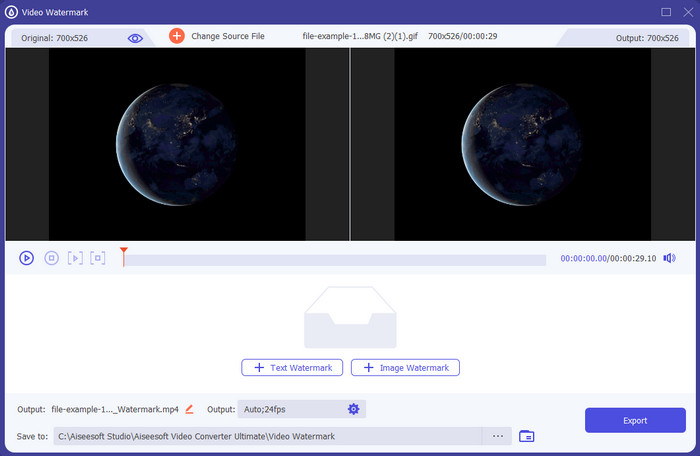
Hinta: Ilmainen kokeilu saatavilla, hinnat alkavat $39,50 vuodessa, $55,20 kertalisenssistä ja 2–5 laitteen kertalisenssi $119,00.
Tuetut alustat: Windows ja Mac.
Jos haluat sovelluksen, jolla voit lisätä tekstiä videoon, sinun kannattaa valita vuoden 2022 suosituin työkalu, FVC Video Converter Ultimate. Tämä työkalu tukee laajaa formaattivalikoimaa, joten videotiedoston lisääminen tänne ei aiheuta ongelmia; voit myös vaihtaa formaattia tarvittaessa. Ensisilmäyksellä käyttöliittymä näyttää siistiltä ja samalla ammattimaiselta. Vaikka kyseessä onkin ammattilaistyökalu, myös vähän tai ei lainkaan kokemusta omaavat käyttäjät voivat oppia nopeasti käyttämään sitä. Oppimiskäyrä ei ole yhtä jyrkkä kuin Adobe Photoshopissa.
Lisäksi työkalu tuo nimeään ylpeänä parhaana työkaluna, koska sillä on nopein lataus- ja latausprosessi, olipa kyseessä yksi, kaksi tai useampi tiedosto. Häviöllisen tai häviöttömän tiedostomuodon koodaus on nopeaa ja helppoa, jos käytät tätä työkalua. Vaikka työkalu on hieman kallis videotekstieditorin luettelosta, pidämme tätä työkalua silti helpoimmin käytettävänä mutta tehokkaimpana.
Ilmainen latausWindows 7 tai uudempiTurvallinen lataus
Ilmainen latausMacOS 10.7 tai uudempiTurvallinen lataus
Adobe Photoshop
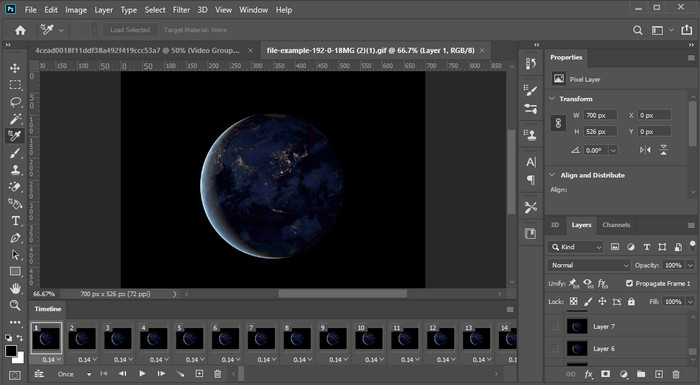
Hinta: Ilmainen 7 päivän kokeilu ja $20,99 kuukaudessa.
Tuetut alustat: Windows, Mac ja iPad.
Tarvitsetko ammattityökalun tehtävään? Adobe Photoshop on tämän vertailun ammattilaistyökalu. Sen monipuolinen käyttöliittymä ja ominaisuudet tekevät siitä ammattilaisten ykkösvalinnan, jonka he voivat ladata omalle alustalleen. Lisäksi työkalu tarjoaa kehittyneitä muokkaustoimintoja, joilla saat videon tekstin näyttämään entistä paremmalta.
Tämä työkalu ei kuitenkaan ole paras valinta, jos olet aloittelija editoinnissa, koska se on niin tekninen, että jopa joidenkin ammattilaisten on luettava joitain opetusohjelmia tietyn tehtävän suorittamisesta. Mutta jos haluat käyttää tätä, lisää tekstiä videosovellukseen. voit ladata sen Adoben viralliselta verkkosivustolta.
iMovie
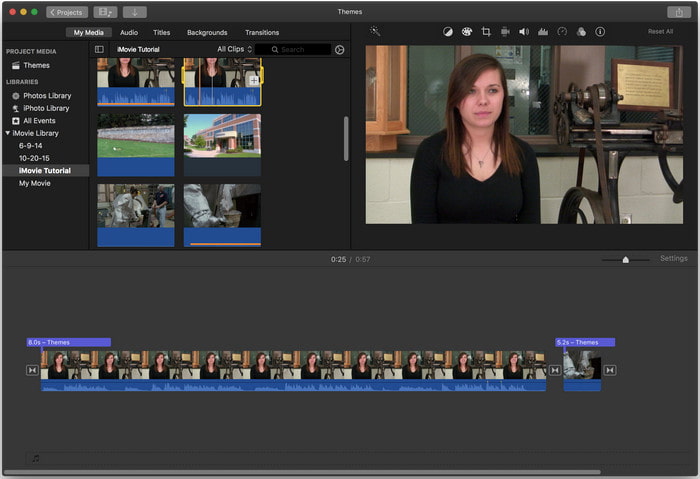
Hinta: Esiasennettuna ilmainen.
Tuetut alustat: Mac ja iOS.
Jos tarvitset ilmaisen työkalun Mac- tai iOS-laitteellesi ja haluat lisätä videoon vesileiman, voit käyttää iMovie-sovellusta tämän tehtävän hoitamiseen. Tätä työkalua ei voi ladata Windows- tai Android-laitteille, koska se on tarkoitettu vain Apple-laitteille. Vaikka tuetut alustat ovat rajalliset, sitä pidetään silti yhtenä parhaista vesileimaeditoreista, joita voit käyttää Macissa ja iOS:ssä. Useimmat aloittelijat pitävät sen käytöstä, koska se tarjoaa ilmaiseksi laajat editointimahdollisuudet. Joten jos sinulla on Mac tai iOS-laite, sinun kannattaa ensin kokeilla tätä tekstin lisääminen videon päälle -sovellusta ja katsoa, vastaako se tarpeitasi.
Osa 2. 3 Paras videotekstisovellus, joka on saatavilla kaikissa Androidissa ja iOS:ssä
Kaikki yllä mainitut työkalut ovat saatavilla Windowsissa ja Macissa, kun taas jotkut tukevat rajoitettuja mobiililaitteita. Entä jos sinulla on mobiililaite ja haluat lisätä tekstiä vesileimaksi videoon? Voitko silti tehdä sen? Voit tehdä sen alla esittelemällämme työkalulla. Lue se varoen, jotta tiedät, riittääkö tämä työkalu tarpeisiisi.
Videoeditori: Teksti videossa
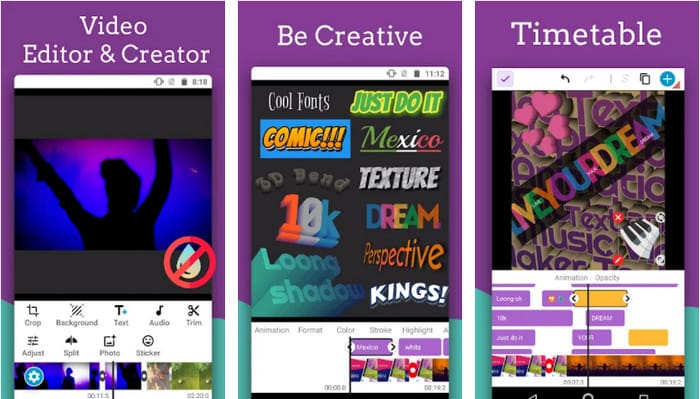
Hinta: Ilmainen lataus.
Tuetut alustat: Android.
Vaikka Androidille on saatavilla monia ilmaisia tekstin lisääminen videoon -sovelluksia, pidämme silti sovellusta Video Editor: Text on Video monella tapaa erinomaisena. Tämä Android-sovellus tarjoaa käyttäjille monia kehittyneitä editointiominaisuuksia, joiden avulla videosta saa näyttävän. Jos haluat käyttää sitä ja lisätä videoon vesileiman, siinä on myös teksti-animaatioita, joilla voit lisätä animoitua tekstiä videoon.
Vaikka työkalu on ladattavissa ilmaiseksi, tässä työkalussa on vielä paljon parannuksia ja korjauksia, kuten virheitä ja virheitä, joita jotkut käyttäjät kohtaavat. Lisäksi jotkut mainokset tulevat näkyviin, kun avaat sovelluksen puhelimessasi ja käytät sitä. Siitä huolimatta kehittäjä päivittää työkalua jatkuvasti tullakseen Androidin parhaaksi videoeditoriksi saavuttaakseen täyden potentiaalinsa.
Vont - Teksti videoissa 4+
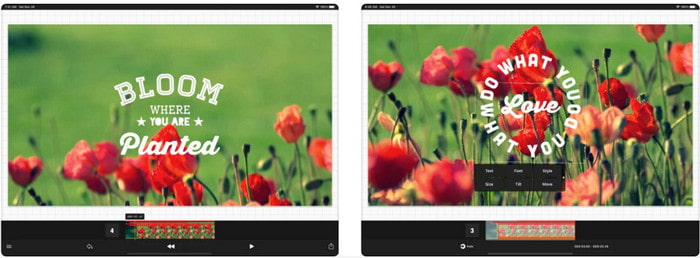
Hinta: Ilmainen lataus, sovellusensisisäiset ostot $2,99–$9,49.
Tuetut alustat: iPhone, iPad ja Android.
Vont - Text on Videos 4+ on yksi parhaista sovelluksista tekstin lisäämiseen videoon kaikilla mobiililaitteilla. Sovellus tukee sekä Android- että iOS-laitteita, joten on luonnollista, että se on saavuttanut mainetta ja suosiota molemmilla alustoilla. Jos kuitenkin vertaamme sitä sen mukaan, missä sovellus toimii paremmin, voidaan sanoa, että se on edullisempi iOS-laitteilla, koska se tukee useampia formaatteja ja tarjoaa paljon yksityiskohtaisemmat muokkausominaisuudet.
Vaikka työkalu on parempi iOS:ssä, voimme silti olla samaa mieltä siitä, että tämä työkalu on erinomainen käytettäväksi jopa Android-laitteissa vesileiman lisäämiseen nopeasti joihinkin videoihin.
Teksti videossa: Easy Vid Editor 4+
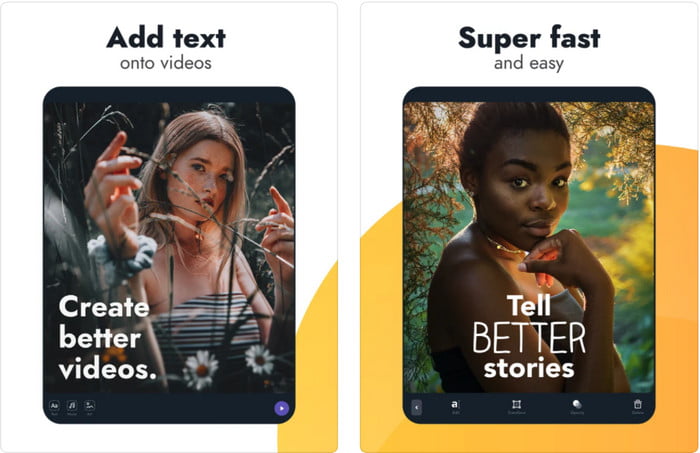
Hinta: Ilmainen lataus, sovellusensisäiset ostot $1,99–$49,99
Tuetut alustat: iPhone ja iPad.
Jos haluat tietää, mikä on paras tekstin lisääminen videoon -sovellus iOS:llä, niin epäilemättä se on Text On Video: Easy Vid Editor 4+. Tämä työkalu tukee useita muokkausominaisuuksia, joiden avulla voit helposti lisätä videoon tekstivesileiman eri fonttityyleillä.
Photoshopin tapaan tämä työkalu edistää 3D-tekstin vesileimaa, joka auttaa sinua käsittelemään tekstiä ja sijoittamaan sen minne tahansa ikään kuin se olisi paikalla, kun otat videon tai valokuvan. Vaikka pidämme sitä parhaana, uskomme silti, että se ei ole se ammattityökalu, jota tarvitset, jos olet ammattilaisen tarvitseman yksityiskohtaisen editoinnin parissa.
Aiheeseen liittyvää:
Osa 3. Usein kysytyt kysymykset Lisää tekstiä vesileimasovelluksia
Onko turvallista ladata tekstivesileimasovellus?
On turvallista, jos olet ladannut työkalun virallisista sivustoista tai latausohjelmasta. Se ei aiheuta ongelmia, jos lataat sen viralliselta verkkosivustolta. Kaikkia verkkosivustoja ei kuitenkaan ole suojattu, joten sinun on varottava lataamasta turvallisinta työkalua käyttöjärjestelmääsi ongelmien välttämiseksi.
Kumpi toimii tekstinä vesileimasovellus toimii paremmin, työpöydällä vai puhelimissa?
Ei ole epäilystäkään siitä, että työpöydän tekstivesileimasovellus toimii paremmin raskaassa käytössä, koska työpöydän prosessori on suurempi kuin puhelimessa. Mutta jos haluat puolipainotetun muokkauksen, puhelintekstin vesileima on sinun valintasi, sillä voit tuoda sen minne tahansa ja käyttää sitä milloin tahansa ilman työpöytää.
Onko ihanteellinen ostaa tekstivesileimasovellukselle?
Jos budjettisi on tiukka, suosittelemme ilmaisen työkalun käyttöä, mutta siinä on joitain rajoituksia, ja odotat sen, koska se on ilmainen. Mutta jos haluat saada parhaat ominaisuudet saatavilla premium-versiossa, suosittelemme, että ostat sen tai tilaat sen, koska et saa niitä ilmaisella versiolla.
Johtopäätös
Nyt kun olemme saaneet työkalujen analysoinnin päätökseen, on aika ladata sinulle sopivin. Toivomme, että tämä artikkeli auttaa sinua päättämään, mitä sinun kannattaa käyttää, mutta jos et silti osaa valita, suosittelemme valitsemaan FVC Video Converter Ultimate -työkalun. Se on kaiken kattava työkalu, jonka voit ladata Windowsille ja Macille, ja sen kaikki ominaisuudet on suunniteltu tukemaan sinua tietyissä tehtävissä. Siksi se on epäilemättä paras tekstivesileimasovellus, jonka voit ladata yllä esitetyistä vaihtoehdoista.
-
 Kuinka lisätä ääntä ja musiikkia videoihin ilmaiseksi tietokoneellasi / puhelimellasi
 Tässä artikkelissa on 4 helppoa tapaa lisätä ääntä videoihin ilmaiseksi. Riippumatta siitä, minkä ääniraidan haluat lisätä videoosi, voit saada tyydyttäviä tuloksia täältä.
-
 Muuta GIF videomuotoon: Muunna GIF-meemit videoiksi [2025]
 Selvitä, kuinka GIF muutetaan videomuotoon alla lueteltujen työkalujen avulla. Valitse niistä ja opi tekemään se, sillä keräämme niistä tarpeeksi todisteita.
-
 Upea GIF -videosovellus Android- ja iOS -laitteille
 Tiesitkö, että voit muuntaa GIF-tiedostoja mihin tahansa videomuotoon puhelimellasi? Valitse Android- tai iOS-laitteesi parhaat sovellukset.
