


 Video Converter Ultimate
 Näytön tallennin
 Videon korjaus
 Suojattu lataus
Mikä on värinkorjaus ja miten se suoritetaan
Oletko koskaan ollut tyytymätön tylsään tai epäsävyiseen materiaaliin, joka ei tee luovuutesi oikeutta? Sano hyvästit huolillesi! Tekoälyllä toimiva värinkorjaus on kehitetty tarkasti tuomaan videomateriaalisi tai elokuvasi henkiin ja varmistamaan, että jokainen väri, sävy ja sävy ponnahtaa haluamallasi tavalla. Tämä innovatiivinen tekniikka on huipputeknologiaa, joka antaa tekoälyn tehostaa videoitasi ja antaa niille värejä.
Olipa kyse sitten värivirheiden korjaamisesta, tietyn tunnelman luomisesta tai vain videon yleisilmeen hiomisesta, tekoälyyn perustuva videon värinkorjaus virtaviivaistaa prosessin ja tuottaa erinomaisia tuloksia. Herätetään videosisältösi eloon eloisilla, luonnollisen näköisillä väreillä, jotka vangitsevat yleisösi huomion ja jäävät mieleen. Valmistaudu maalaamaan maailmasi loistolla, kun sukellamme syvälle tähän artikkeliin.

Osa 1. Mikä on videon värinkorjaus?
Videon värinkorjauksen määritelmän ymmärtäminen on melko yksinkertaista. Se viittaa videon värien ja sävyjen parantamiseen ja muokkaamiseen halutun ulkoasun saavuttamiseksi tai tarkkuuden ja johdonmukaisuuden varmistamiseksi. Se on kuin valokuvan värien hienosäätöä, mutta liikkuvaa kuvaa varten. Kuvittele, että otat valokuvan ja värit näyttävät hieman epäselviltä, himmeiltä tai liian eloisilta. Tämä voi tapahtua myös videossa, mutta kehyksiä on usein tuhansia. Värinkorjaus auttaa korjaamaan nämä epäjohdonmukaisuudet varmistaen, että värit sopivat hyvin koko videossa. Jos kohtaus on kuvattu esimerkiksi pilvisenä päivänä, värit voivat näyttää tyyneiltä ja sinerviltä. Värinkorjaus voi lämmittää sävyjä saadakseen ne näyttämään luonnollisemmilta tai tehdä bluesista poksahtaen taiteellisen vaikutelman saavuttamiseksi. Se voi myös säätää kontrastia, kylläisyyttä, kirkkautta ja muita näkökohtia luodakseen tietyn tunnelman tai tyylin videoon.
Osa 2. Eri tilanteet värinkorjauksella
Värinkorjaus on erittäin tärkeää monissa videotuotannon tilanteissa. Tällä saavutetaan haluttu visuaalinen vaikutus ja säilytetään johdonmukaisuus. Alla on joitain tilanteita, joihin liittyy värinkorjaus videossa.
Vaihtelevat valaistusympäristöt – värinkorjaus on hyödyllinen kuvattaessa paikoissa, joissa on useita erilaisia valonlähteitä, kuten luonnonvalo, loisteputket ja hehkulamput. Värinkorjaus auttaa tasapainottamaan ja yhtenäistämään värit, jotta kuva näyttää luonnolliselta ja yhdenmukaiselta kaikissa otoksissa.
Valkotasapainon ongelmat – valkotasapainon korjaaminen varmistaa, että valkoiset näyttävät oikeasti valkoisilta eivätkä ole ei‑toivottujen värien sävyttämiä, mikä johtuu usein vääristä kamera-asetuksista tai vaihtelevista valaistusolosuhteista.
Valotuksen ongelmat – videon värinkorjauksella voidaan korjata ylivalottunutta (liian kirkasta) tai alivalottunutta (liian tummaa) materiaalia, tuoda yksityiskohtia esiin ja säilyttää tasapaino tummien ja vaaleiden sävyjen välillä.
Värimäärittely esteettistä ilmettä varten – värinkorjaukseen sisältyy myös värimäärittely (color grading), jossa videon värejä muokataan tietyn tunnelman tai tyylin luomiseksi. Tämä voi tarkoittaa esimerkiksi kontrastin ja kylläisyyden korostamista tai videolle luotua vintage‑tyylistä ilmettä.
Vuorokaudenajan jäljitteleminen – videon värien säätäminen on hyödyllistä, kun halutaan simuloida tiettyä ajankohtaa, kuten saada päiväkohtaus näyttämään sateiselta, auringonlaskun aikaan kuvatulta tai muuttaa värejä niin, että ne viestivät aamu‑ tai iltavaloa.
Osa 3. Kuinka tehdä värinkorjaus videossa?
Värinkorjaus videoeditoinnissa on olennainen vaihe, sillä se parantaa videosi kokonaisilmettä ja visuaalista laatua. Yksi parhaista työkaluista, johon voit luottaa, on Video Converter Ultimate. Tämä tehokas värinkorjauspalettityökalu mahdollistaa värien nopean korjaamisen videoissasi ja parantaa samalla niiden visuaalista vetovoimaa ja laatua. Tällä työkalulla voit kokeilla erilaisia värinkorjausvaihtoehtoja saavuttaaksesi videollesi halutun ilmeen. Sen muokkaustoiminnot antavat käyttäjien rajata, editoida, rajata (crop) ja lisätä tehosteita videoihinsa.
Lisäksi se mahdollistaa saumattoman muuntamisen eri videomuotojen välillä, mikä tekee videosisällön mukauttamisesta eri laitteille helppoa. Toinen kiitettävää tässä työkalussa on, että se on käyttäjäystävällinen. Video Converter Ultimaten avulla voit helposti säätää ja korjata värejä tehdäksesi videostasi houkuttelevamman. Tässä on vaiheittainen opas tämän työkalun käyttämiseen:
Vaihe 1: Lataa ja asenna Video Converter Ultimate
Jos sinulla ei vielä ole työkalua, voit ladata ja asentaa Video Converter Ultimate ‑ohjelman tietokoneellesi. Napsauta sitä varten jotakin alla olevista Free Download ‑painikkeista käyttöjärjestelmäsi mukaan ja seuraa asennusohjeita.
Ilmainen latausWindows 7 tai uudempiSuojattu lataus
Ilmainen latausMacOS 10.7 tai uudempiSuojattu lataus
Vaihe 2: Käynnistä Video Converter Ultimate
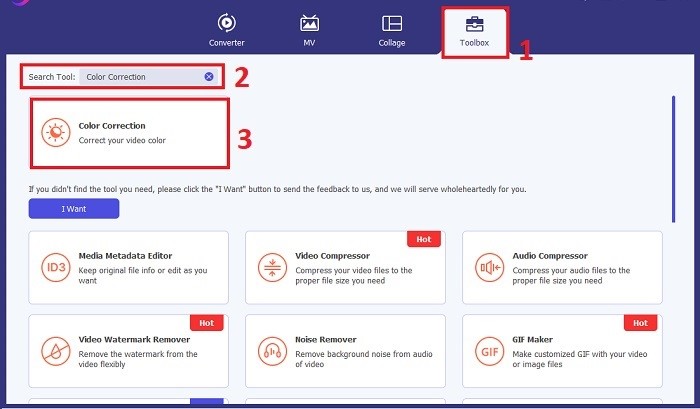
Kun asennus on valmis, käynnistä videon värinkorjaussovellus tietokoneellasi päästäksesi sen pääkäyttöliittymään. Siirry ylävalikosta kohtaan Toolbox. Etsi täältä työkalun Color Correction ‑ominaisuus tai hae sitä ja napsauta sitä.
Vaihe 3: Tuo värit korjattava video
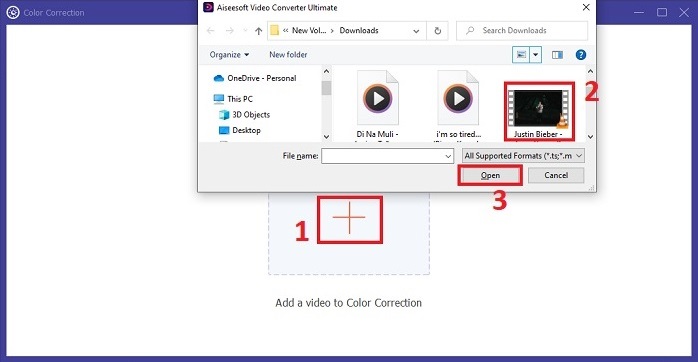
Napsauta Plus-painiketta tuodaksesi videon, jonka värejä haluat korjata. Paikanna videotiedosto tietokoneeltasi ja napsauta Open tuodaksesi sen ohjelmistoon.
Vaihe 4: Säädä videon väriasetuksia
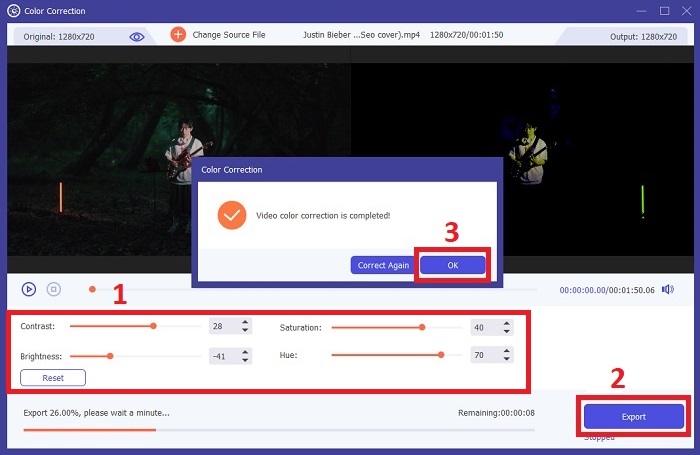
Kun video on tuotu, säädä asetuksia, kuten kirkkautta, kontrastia, kylläisyyttä ja sävyä (hue), saavuttaaksesi halutun värinkorjauksen. Videota muokatessasi työkalu näyttää muutokset reaaliajassa esikatselupaneelissa oikealla. Kun olet tyytyväinen säätöihin, napsauta Export. Anna työkalun käsitellä video ja tallenna tulos haluamaasi sijaintiin.
Lisälukemista:
Videofiltteri: Paranna videoitasi suotimilla ja tehosteilla tietokoneella
Mitä 3D on? Kaikki mitä sinun tarvitsee tietää 3D:stä ja sen tekemisestä
Osa 4. Usein kysytyt kysymykset videon värinkorjauksesta
Mistä tiedän, tarvitsenko värinkorjausta?
Etkö ole varma, tarvitseeko videosi värikorjausta? Värinkorjaus on tarpeen, jos värit näyttävät epätasaisista, oudoista tai eivät vastaa videomateriaalin haluttua tunnelmaa tai aihetta.
Onko värinkorjaus todella tarpeen?
Ehdottomasti! Tekoälyvideon värinkorjaus on välttämätöntä videotuotannossa, jotta voidaan taata, että värit ovat tarkkoja ja visuaalisesti houkuttelevia. Se parantaa visuaalista yhtenäisyyttä ja voi nostaa kunnollisen videon poikkeukselliseksi.
Mikä on värinkorjain filmissä?
Filmin värinkorjain on työkalu, joko laitteisto tai ohjelmisto, jota käytetään jälkituotannossa värien muokkaamiseen ja tasapainottamiseen. Se auttaa elokuvantekijöitä saavuttamaan tietyn ulkonäön, tunnelman tai tunnelman, mikä tekee visuaalisuudesta kiinnostavamman ja yhtenäisemmän tarinan sisällä.
Johtopäätös
Yhteenvetona voidaan todeta, että videon värinkorjaus on avain vaikuttavaan visuaaliseen katselukokemukseen. Siinä hienosäädetään värejä ja sävyjä luovan visiosti mukaisiksi, jotta jokainen ruutu välittää tarkoitetun loiston. Tekoälypohjainen värinkorjaus muuttaa videosi eloisiksi ja luonnollisen näköisiksi, jättäen pysyvän vaikutelman. Sekä vaihtelevan valaistuksen korjaamisesta että tiettyjen tunnelmien rakentamisesta tämä innovaatio nostaa tarinankerrontasi uudelle tasolle. Video Converter Ultimate on tässä vahva liittolainen: se yksinkertaistaa värinkorjausprosessia ja vapauttaa luovat mahdollisuutesi.
-
 Mikä on FPS? Kaikki mitä sinun tulee tietää siitä
 Mikä on FPS? Opi kaikki tarvitsemasi tiedot FPS:stä ja siitä, mitä se voi tehdä eri tilanteissa. Lue tämä artikkeli saadaksesi täydelliset tiedot.
-
 Suosituin Photo Color Enhancer -sovellus Android- ja iOS-laitteillasi ilmaiseksi
 Haluatko, että puhelimessasi on valokuvien värien tehostussovellus? Valitse, mitkä tehostajat mielestäsi sopivat tarpeisiisi parhaiten.
-
 Lopullinen opas videon resoluution muuttamiseen saatavilla eri alustoilla
 Tarvitseeko videon videoresoluutiota muuttaa? Jos näin on, tutustu erilaisiin tapoihin, joilla voit helposti muuttaa katsomasi videon videoresoluutiota.
