


 ממיר וידאו אולטימטיבי
 מקליט מסך
 תיקון וידאו
מדריך פשוט כיצד להמיר DV ל-WMV ב-Windows ובמחשב
קבצי DV הם פורמטים גולמיים סטנדרטיים לשידור, הנפוצים בשימוש במצלמות וידאו. לאחר שהוצג כפורמט הסטנדרטי למצלמות וידאו, סוני ופנסוניק הציגו פורמט מקצועי יותר, השונה מפורמט ה‑DV. על אף שקובץ DV מצוין לעריכה, כדי לנגן אותו ב‑Windows תצטרך להשתמש בתוכנה ייעודית לצפייה בווידאו. לכן, להלן אנו מציגים שני ממירים שתוכל להשתמש בהם כדי להמיר DV ל‑WMV ולצפות בו ללא כל טרחה.

חלק 1. השתמש בממיר הכי מדהים כדי להמיר DV ל-WMV
FVC Video Converter Ultimate יכול לעזור לך להמיר את הפורמט לגרסה חדשה. לכלי זה יש מגוון רחב של פונקציות מעבר להמרה בלבד. לכן, אם תשתמש בממיר הזה, תוכל לצפות שתוכל לעשות הרבה יותר מאשר רק להמיר. בנוסף, אם אתה זקוק לתהליך המרה מיידי, זהו הממיר הטוב ביותר להמרת DV ל‑WMV, AVI, MOV, MP4, MKV ועוד יותר מ‑200 פורמטי מדיה. רוצה להתנסות בדור חדש של ממיר שמספק תוצאה מקצועית ללא מאמץ? אם כן, ההדגמה הבאה תסייע לך להבין כיצד להמיר את הקובץ לפורמט WMV חדש.
שלבים להמרת DV ל‑WMV בעזרת FVC Video Converter Ultimate:
שלב 1. הורד את FVC Video Converter Ultimate לכונן המחשב שלך, לחץ על לחצן ההורדה, עקוב אחר שלבי ההתקנה ולאחר מכן הפעל את הכלי.
הורדה חינמיתל-Windows 7 ומעלההורדה מאובטחת
הורדה חינמיתל-MacOS 10.7 ומעלההורדה מאובטחת
שלב 2. לאחר שסיימת את ההתקנה, הכנס את הקובץ לממיר על‑ידי לחיצה על Add Files, מצא את קובץ ה‑DV השמור במחשב שלך בתיקייה שתיפתח, ולחץ על Open.
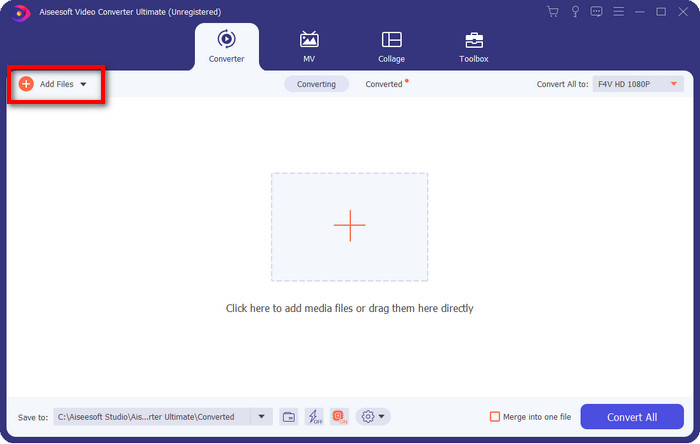
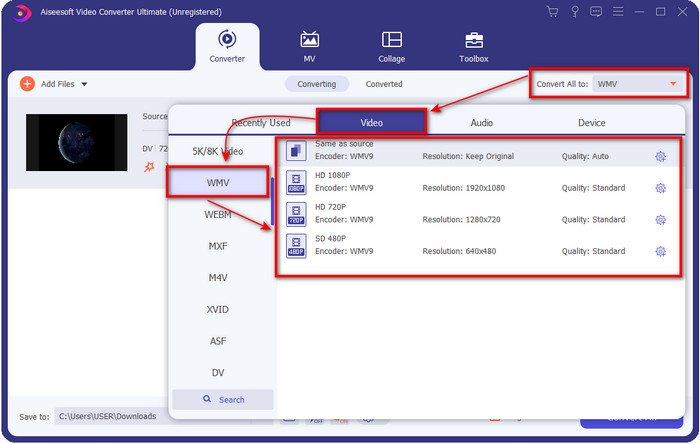
שלב 3. שנה את הפורמט על‑ידי לחיצה על לחצן הdrop-down בחלק העליון הימני של ממשק המשתמש. לאחר מכן בחר בפורמט WMV מהרשימה שתופיע, וכעת תוכל לבחור את איכות פלט הווידאו.
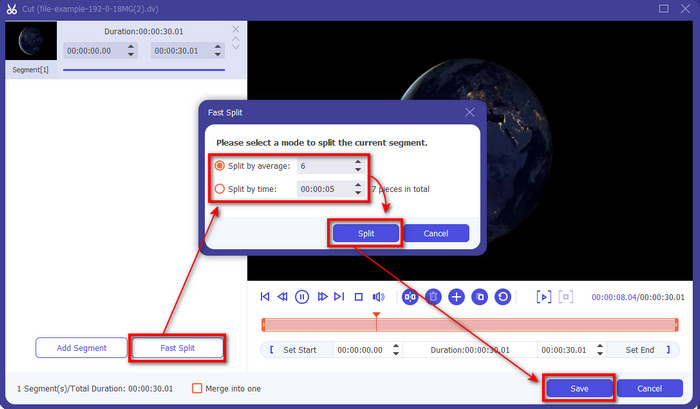
רוצה לפצל את הסרטונים שלך למקטעים שונים? אם כן, לחץ על לחצן מספריים, לחץ על Fast Split כדי להגדיר את מספר המקטעים הרצוי ואת משך כל מקטע, ולאחר מכן לחץ על Split להמשך. כדי לשמור את תוצאת הפיצול שביצעת, לחץ על Save.
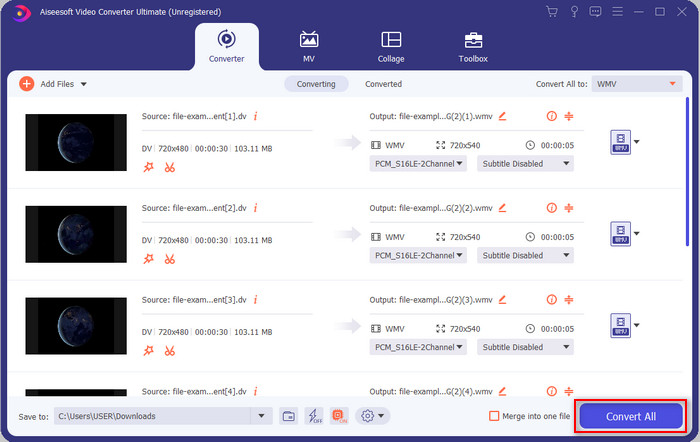
שלב 4. לחץ על Convert All כדי להתחיל בתהליך המרת קובץ ה‑DV. לאחר סיום התהליך, תיקייה חדשה תופיע על המסך ובה קובץ ה‑WMV החדש.
חלק 2. השתמש בממיר המקוון כדי להמיר DV ל-WMV באינטרנט
מחפש פתרון אונליין כדי להמיר DV ל‑WMV וללא שום טרחה? אז FVC נותן לך מענה עם FVC Free Video Converter Online. ממיר אינטרנטי זה יסייע לך בהמרה, אך יהיה עליך לגשת אליו דרך הדפדפן במקום להוריד תוכנה. בנוסף, הוא קל לשימוש, חינמי ובטוח, כדי לשפר את חוויית ההמרה שלך. רוצה לדעת כיצד להשתמש בכלי אונליין זה? עקוב אחר השלבים הבאים כדי ללמוד כיצד לבצע את ההמרה ברשת.
שלב 1. באפשרותך ללחוץ על קישור זה כדי לפתוח את ממיר האינטרנט, ולשונית חדשה תיפתח.
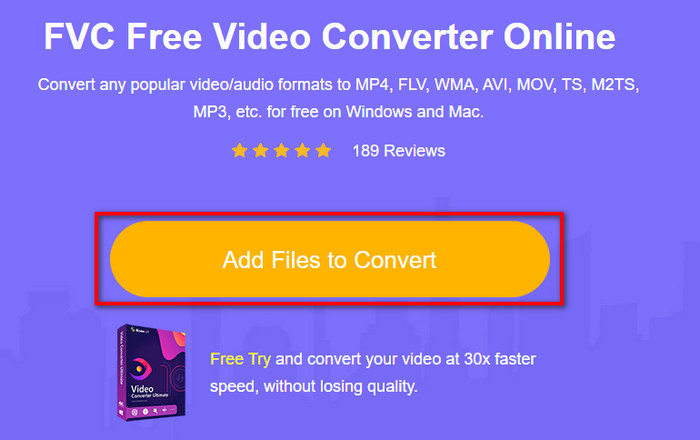
שלב 2. לחץ על Add Files to Convert באתר; תיקייה תופיע מיד על המסך, בחר את קובץ ה‑DV ולחץ על Open.
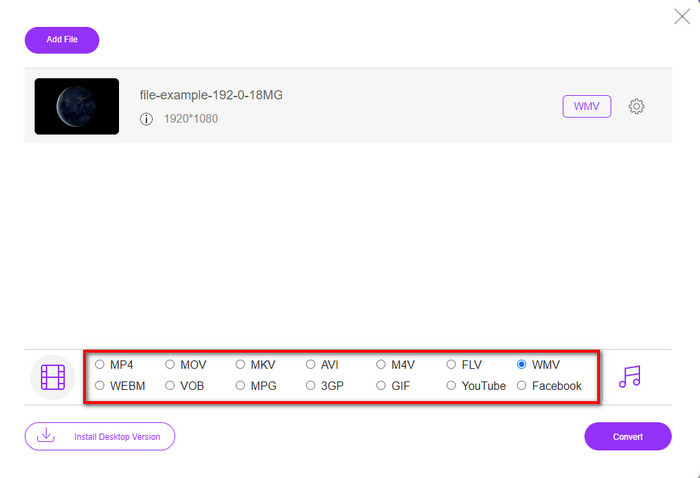
שלב 3. לאחר שהקובץ ייטען, בחר את הפורמט מתוך הקטלוג שמוצג למטה או לחץ על WMV כדי לשמור אותו כפורמט WMV.
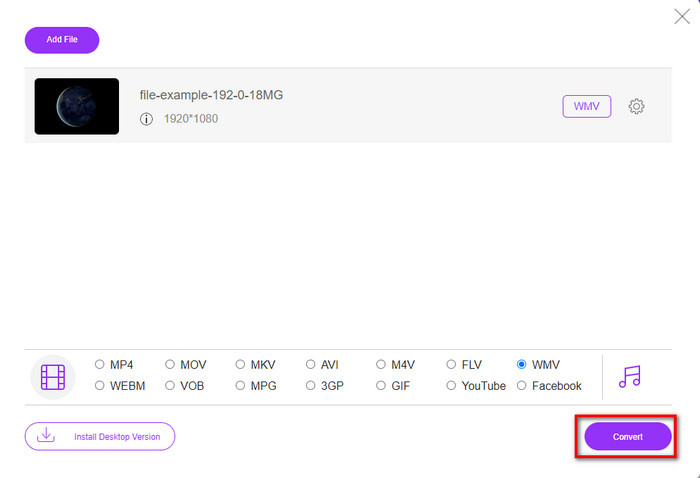
שלב 4. על‑ידי לחיצה על Convert תתחיל פעולת ההמרה. לאחר סיום התהליך, הקובץ יורד אוטומטית לכונן המחשב שלך.
חלק 3. מה ההבדל בין DV ל-WMV
קל להבין את ההבדל בין DV ל-WMV במובנים רבים. אז אם אתה רוצה לדעת מה הם, עליך לקרוא את המידע ברשימה למטה.
הקלטת וידאו במצלמת וידיאו, DV היא הבחירה הטובה ביותר מכיוון שהוא יכול לאחסן סוג זה של תוכן. כמו כן, פורמט זה יכול להכיל פרטים חיוניים כגון מטא נתונים, קוד משנה, קידוד זמן ותאריך. יתר על כן, פורמט זה משתמש בדחיסה תוך-פריים בתוך כל פריים, ובשל כך הוא אידיאלי לעריכה מפורטת. למרות שהפורמט מצוין ומאוחסן בקלטות DV, התאימות שהפורמט הזה מקבל ירודה, וגודל הקובץ שלו עצום בהשוואה ל-WMV. מצד שני, WMV הוא הפורמט הטוב ביותר לשימוש כהפעלת וידאו ב-Windows. ועכשיו הוא מתאים את פורמט גרסה 9 ל-HD DVD ו-Blu-ray Disc, הוא ידוע כעת כ-VC-1.
חלק 4. שאלות נפוצות לגבי המרת DV ל-WMV
למה אני לא יכול להשתמש ב-DV בתוכנת Mac?
פורמט DV אינו נתמך ב‑Mac, במיוחד ב‑iMovie וב‑QuickTime Player. אך ניתן להמיר את קובץ ה‑DV לפורמט MOV כדי שיפעל ב‑macOS. אינך יודע כיצד להמיר DV ל‑MOV? הקדש 5 דקות או פחות לקריאת מאמר זה כדי ללמוד כיצד לעשות זאת.
האם קבצי DV עדיין הפורמט הטוב ביותר לעריכה?
פורמטים של DV ידועים כאחד מהמכולות המובילות בעריכה. כי DV מאחסן וידאו באיכות גבוהה ומאחסן כל פריים למטרות עריכה נגישות יותר. אבל כיום, היכולת של הפורמט הזה כבר אומצה על ידי רוב הפורמטים. אז אם אתה שואל אם זה עדיין האידיאלי, אז התשובה היא לא בגלל התאימות הגרועה של פורמט זה.
איך להקטין את קבצי ה-DV שלי?
כבר ידוע שקבצי DV הם גדולים מאוד משום שפורמט זה משתמש בדחיסה ייחודית. לכן, זה לגמרי רגיל לחפש מכווץ קבצים שיקטין את גודל הקובץ כדי לחסוך מקום באחסון. מתקשה לבחור ולבצע כיווץ של קבצי DV? אם כן, לחץ על קישור זה.
סיכום
כל הממירים שהוצגו לעיל יסייעו לך במסע ההמרה של DV לפורמט WMV. כעת נסיים את המסע, מפני שזהו התחנה האחרונה, לאחר שכבר צברנו ידע מספק על אופן המרת קבצי ה‑DV שלך. כעת עליך לבחור איזה ממיר מתאים לך ביותר. הבחירה בידיך; באיזה ממיר שלא תשתמש, כלי FVC הללו בוודאות יבטיחו את הצלחתך. FVC Free Video Converter Online או FVC Video Converter Ultimate – שני הממירים הללו יהפכו את תהליך ההמרה שלך לפשוט וללא מאמץ.
-
 האסטרטגיה הטובה ביותר כיצד להמיר קובץ DV לפורמט AVI עם שלבים מפורטים
 האם אתה רוצה להמיר את קובץ ה-DV שלך ל-AVI? לאחר מכן קרא את המאמר הזה כדי להכיר את הכלי הייחודי שבו אתה יכול להשתמש כדי להמיר ונגן מדיה כדי להפעיל את ה-DV שלך במחשב האישי או ב-Mac.
-
 ממירי DV ל-FLV מועילים להמרת DV ל-FLV [2022]
 אם אתה מחפש את הכלים הטובים והקלים לשימוש בהמרת DV ל-FLV, הנה המאמר הטוב ביותר עבורך לקריאה. יש לך תובנה מצוינת, חופר בכל המידע של מאמר זה.
-
 3 הדרכים המובילות להמיר FLV ל- WMV ב- Windows ו- Mac
 מחפש את הדרך הטובה ביותר להמיר FLV ל- WMV מבלי לאבד את האיכות במחשב או ב- Mac? יש לך מזל מכיוון שכאן אנו חולקים שלוש שיטות לבצע את העבודה בקלות.
