


 ממיר וידאו אולטימטיבי
 מקליט מסך
 תיקון וידאו
 הורדה מאובטחת
7 דרכים קלות להמיר במהירות HEIC ל-PNG בשניות
רוצים להפוך את קובץ ה‑HEIC שלכם לכזה שיהיה תואם במגוון רחב יותר של מכשירים? יש לנו בדיוק מה שאתם מחפשים! במאמר הזה נציג לכם את הדרכים הטובות ביותר להמיר קובץ HEIC ל‑PNG בלי מאמץ. אז התחגרו, ונתעמק יחד בדרכים היעילות ביותר להמרת HEIC ל‑PNG בקלות.

חלק 1. למה להמיר HEIC לפורמט PNG
פורמט קובץ HEIC הוא פורמט תמונה שנוצר על ידי אפל. זהו פורמט תמונה שמכשירי אפל משתמשים בו בדרך כלל. למרות שיש לו רזולוציה איכותית, הוא לא לוקח יותר מדי מקום במכשיר שלך. עם זאת, קבצי HEIC אינם תואמים למכשירים שאינם של אפל. לעומת זאת, PNG, ראשי תיבות של Portable Graphics Format, הוא פורמט קובץ תמונה שנוצר כדי להחליף פורמטים של GIF.
זהו פורמט התמונה הנפוץ ביותר שאינו דחוס, מה שאומר שיש לו גודל קובץ עצום. עם זאת, כמעט כל המכשירים תומכים בפורמט קובץ תמונה זה. אז אם אתה רוצה לפתוח את תמונת ה-HEIC שלך במכשירים אחרים מלבד אפל, עדיף להמיר אותה לפורמט קובץ PNG.
חלק 2. 5 דרכים קלות להמיר את קובץ ה-HEIC שלך לקובץ PNG באינטרנט
זה די קשה לחפש את הדרכים הטובות ביותר להמיר HEIC ל-PNG. עם זאת, חיפשנו את השיטות הטובות והפשוטות ביותר עבורך לשנות את HEIC לפורמט קובץ PNG.
השתמש בממיר HEIC ל-PNG ללא FVC
הדרך הטובה ביותר להמיר HEIC ל‑PNG היא להשתמש בכלי המרה ייעודי. והכלי הטוב ביותר שמצאנו באינטרנט הוא FVC Free HEIC to PNG Converter. ממיר זה הוא כלי מקוון שממיר בנוחות את קובץ ה‑HEIC שלכם לפורמט קובץ PNG. בנוסף, אם תרצו להמיר קבצי HEIC רבים בבת אחת (Batch), לכלי הזה יש גם את האפשרות הזו עבורכם.
זה גם נגיש כמעט בכל הדפדפנים הנפוצים מה שהופך אותו לכלי ללא הגבלת דפדפן. יתר על כן, יש לו ממשק תוכנה פשוט ואין לו מגבלת גודל קובץ, כך שתוכל להמיר קבצי HEIC מבלי לחשוב על גודל הקובץ. לכן, עקוב אחר המדריך הפשוט למטה אם אתה מעוניין להשתמש בממיר HEIC ל-PNG מקוון זה.
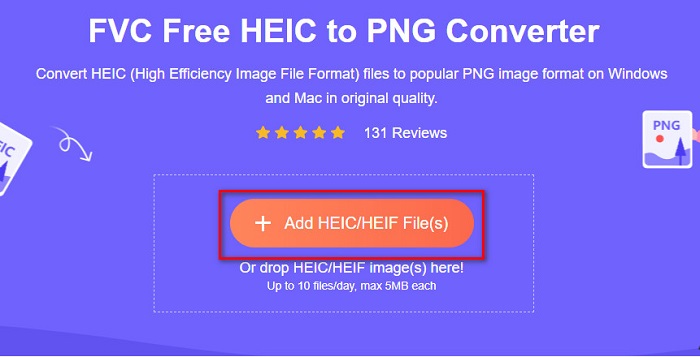
שלב 1. בדפדפן שלכם חפשו FVC Free HEIC to PNG Converter. תוכלו גם ללחוץ על קישור זה כדי לעבור ישירות לדף הבית שלהם. כך נראית הממשק הראשוני:

שלב 2. לאחר מכן לחצו על הכפתור Add HEIC/HEIF File(s). תיקיות המחשב שלכם ייפתחו, ושם תבחרו את קובץ ה‑HEIC שלכם.
שלב 3. אז תיקיות המחשב שלכם יופיעו, ושם תבחרו את קובץ ה‑HEIC. לחצו על Open. לאחר מכן תהליך ההמרה מ‑HEIC ל‑PNG יתחיל.

שלב 4. לבסוף, בממשק התוכנה לחצו על כפתור Download כדי להוריד את קובץ ה‑PNG שלכם.

פשוט, לא? אתה יכול להמיר את קובץ ה-HEIC שלך לקובץ PNG על ידי ביצוע השלבים הקלים הבאים.
השתמש ב-Xconvert.com
Xconvert הוא ממיר HEIC ל‑PNG מקוון וחינמי שממיר בקלות קובצי HEIC לקובצי PNG. לממיר מקוון זה יש ממשק תוכנה נוח לשימוש שמתאים במיוחד למתחילים. נוסף על כך, תוכלו לשנות את רזולוציית התמונה בעת ההמרה. עם זאת, מכיוון שמדובר בכלי התלוי בחיבור לאינטרנט, ייתכן שתהליך ההמרה יהיה איטי כאשר האינטרנט איטי. הוא גם כולל פרסומות שעלולות להפריע לכם.
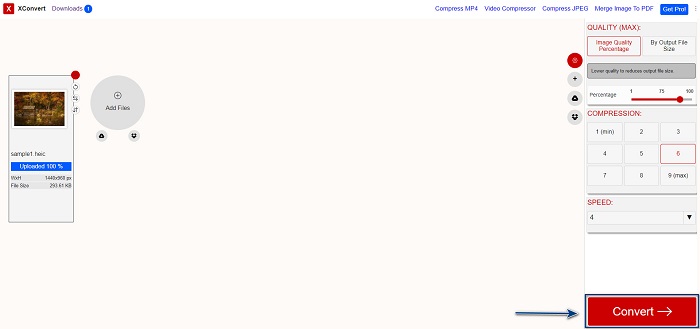
שלב 1. חפשו Xconvert.com בדפדפן שלכם. באתר, לחצו על הכפתור Add Files, תיקיות המחשב שלכם יופיעו ואז בחרו את קובץ ה‑HEIC שלכם.

שלב 2. התמונה שלכם תועלה לממשק התוכנה. לאחר ההעלאה, לחצו על כפתור Convert הממוקם בפינה הימנית התחתונה של ממשק התוכנה. לאחר מכן חכו עד שהקובץ יהיה מוכן להורדה, ואז עברו לשלב הבא.
שלב 3. כשהקובץ שלכם מוכן, לחצו על כפתור Download כדי להוריד את קובץ ה‑PNG שלכם. מעל כפתור ההורדה תוכלו גם לראות את גודל הפלט וכמה זמן ארכה ההמרה.

השתמש ב-Zamzar
דרך נוספת להמיר HEIC ל‑PNG באופן מקוון היא באמצעות הממיר המקוון Zamzar. סביר להניח שנתקלתם בממיר זה בעת שחיפשתם ממיר HEIC ל‑PNG. ממיר זה נגיש כמעט בכל הדפדפנים הקיימים. בנוסף, יש לו ממשק משתמש פשוט שהופך אותו לכלי ידידותי למשתמש. עם זאת, אם חיבור האינטרנט ייפסק במהלך תהליך ההמרה, הקובץ שלכם עלול להיפגם. למרות זאת, משתמשים רבים עושים בו שימוש כדי להמיר HEIC לקובץ PNG.
שלב 1. בדפדפן שבו אתם משתמשים, חפשו Zamzar. באתר שלהם לחצו על הכפתור Add Files. תיקיות המחשב שלכם יופיעו, ואז העלו את תמונת ה‑HEIC שלכם.

שלב 2. לאחר העלאת קובץ ה‑HEIC שלכם, לחצו על כפתור ה‑drop-down, ואז בחרו ב‑PNG כפורמט הפלט של הקובץ.

שלב 3. לבסוף, לחצו על הכפתור Convert Now כדי להמיר את קובץ ה‑HEIC שלכם לפורמט קובץ PNG. לאחר מכן הורידו את קובץ ה‑PNG שלכם. פשוט חכו כמה שניות, וזה הכול!

השתמש ב-Conversion Tools.io
Conversion Tool הוא ממיר HEIC ל‑PNG מקוון בעל ממשק משתמש פשוט. הוא יכול להמיר את קובץ ה‑HEIC שלכם ל‑PNG במהירות גבוהה. בנוסף, הוא כמעט לא מכיל פרסומות, בשונה מממירים מקוונים אחרים. אך החיסרון הוא שניתן להמיר בו רק עד עשרה קבצים ביום, ויש הגבלת גודל קובץ. אם אתם ממירים קובץ קטן, הכלי הזה יכול להתאים לכם.
שלב 1. חפשו Conversion Tools.io בדפדפן שלכם. לאחר מכן לחצו על כפתור Browse בממשק הראשי של התוכנה, או גררו ושחררו את קובץ ה‑HEIC שלכם על כפתור ה‑Browse.

שלב 2. לאחר מכן, לחצו על כפתור Run Conversion כדי להתחיל להמיר את קובץ ה‑HEIC שלכם לקובץ PNG. לאחר מכן חכו עד שתמונת הקובץ תיטען, ואז עברו לשלב הבא.

שלב 3. לסיום, לחצו על כפתור Download כדי להוריד את קובץ ה‑PNG שלכם.

השתמש ב-CDKM
הכלי האחרון שנציג לכם הוא CDKM. כלי זה מאפשר לכם להמיר קובצי HEIC ל‑PNG בכמה לחיצות בלבד. עם זאת, שימוש בממיר המקוון הזה עלול לקחת מספר שניות, בהתאם למהירות חיבור האינטרנט שלכם. הוא גם מכיל פרסומות שעלולות להיות מעצבנות. למרות זאת, אין בו מגבלת גודל קובץ, ולכן בהחלט שווה לנסות אותו.
שלב 1. בדפדפן שלכם חפשו את ממיר CDKM המקוון. בממשק הראשי של התוכנה לחצו על כפתור Choose Files. תיקיות המחשב שלכם יופיעו, ואז בחרו את קובץ ה‑HEIC שברצונכם להעלות.

שלב 2. לאחר מכן לחצו על כפתור Start Conversion כדי להתחיל את תהליך ההמרה.

שלב 3. לבסוף, גללו מעט מטה ותראו את כפתור ה‑Download. לחצו על כפתור Download כדי להוריד את קובץ ה‑PNG שלכם.

חלק 3. המר HEIC ל-PNG ב-Mac
מכשירי אפל תומכים בפורמטים של קבצים HEIC, ועל ידי שימוש ב-Mac, אתה יכול לפתוח קובץ HEIC באופן מקורי. אבל אם אתה רוצה להמיר את קובץ ה-HEIC שלך ל-PNG, אתה יכול לשנות אותו באמצעות אפליקציית הצילום ב-Mac. בהתאם לכך, אם אתה משתמש מק, כדאי לקרוא את החלק הזה.
שלב 1. ראשית, גררו ושחררו את קובץ ה‑HEIC שלכם אל אפליקציית התמונות (Photo App). לאחר מכן תצפו בתמונת ה‑HEIC שלכם ולחצו על File > Export > Export 1 Photo.

שלב 2. לאחר מכן, תחת Photo Kind, לחצו על פורמט הפלט הרצוי לכם. בחרו בפורמט קובץ PNG.

שלב 3. ואז לחצו על כפתור Export, ולאחר מכן בחרו את מיקום היעד של קובץ הפלט שלכם. תראו שקובץ ה‑HEIC שלכם הומר לפורמט קובץ PNG.

חלק 4. המרת קובץ HEIC ל-PNG באייפון
אם אתה משתמש באייפון, אתה יכול לפתוח קובץ HEIC במכשיר שלך. אבל אם אתה רוצה להמיר את קובץ ה-HEIC שלך ל-PNG באמצעות מכשיר אייפון, אז יש לנו דרך בשבילך. על ידי ביצוע השלבים הפשוטים והקלים הבאים, תוכל להמיר HEIC ל-PNG ללא מאמץ.
שלב 1. ב‑אפליקציית התמונות (Photo App) באייפון שלכם, הקישו על כפתור Select הנמצא בחלק העליון של המסך. לאחר מכן סמנו את קובץ ה‑HEIC שלכם, ואז הקישו על סמל ה‑Share.
שלב 2. החליקו את המסך כלפי מעלה; תראו את האפשרות Copy Photo, והקישו עליה.
שלב 3. לבסוף, עברו לאפליקציית Files, הקישו על כפתור browse ובחרו את מיקום הפלט הרצוי (לחצו על iCloud Drive או On My iPhone). לאחר מכן הדביקו שם את קובץ ה‑HEIC שלכם.

לאחר הדבקת הקובץ, תראה שהקובץ שלך יומר אוטומטית לקובץ PNG.
חלק 5. ידע מורחב על קובץ HEIC וקובץ PNG
אם אתה עדיין בספק אם אתה רוצה להמיר את קובץ ה-HEIC שלך ל-PNG, אנו מספקים לך טבלת השוואה כדי לעזור לך להבחין בין ההבדלים בין שני הקבצים הללו. יתר על כן, זה נותן לך סקירה ברורה של מאפייני HEIC ו-PNG. קרא בעיון כדי לדעת את ההבדל בין קבצי HEIC לקבצי PNG.
| HEIC | PNG | |
| תְאִימוּת | רק מכשיר אפל תומך בפורמט קובץ זה. | כמעט כל המכשירים תומכים בקובץ זה, כולל מכשירי אפל. |
| גודל הקובץ | גודל קובץ קטן. | יכול להגיע לגודל קובץ עצום. |
| איכות תמונה | איכות תמונה גבוהה. | יש איכות טובה, אבל לא טובה יותר מקובץ HEIC. |
| דחוס/לא דחוס | דָחוּס | לא דחוס |
| עֲרִיכָה | שומר על איכות התמונה בעת עריכה. | האיכות עלולה לרדת בעת העריכה. |
חלק 6. שאלות נפוצות לגבי המרת HEIC ל-PNG
האם המרת HEIC ל-PNG תשפיע על גודל הקובץ?
כן. כאשר אתה ממיר HEIC ל-PNG, זה יגדיל את גודל הקובץ, אם כי הוא לא יהיה גבוה.
האם אתה יכול לפתוח קבצי PNG ב-Adobe Photoshop?
בְּהֶחלֵט. אתה יכול לפתוח קובצי PNG ב-Adobe Photoshop מכיוון ש-Adobe Photoshop תומך בפורמט קובץ PNG.
האם אתה יכול לפתוח את פורמט הקובץ PNG במכשירי אפל באופן מקורי?
כן. כאשר אתה מצלם צילומי מסך מהאייפון שלך, הם יישמרו אוטומטית ב-camera roll כקובץ PNG.
סיכום
סוף‑סוף! הגענו לסיום המסע שלנו. מאמר זה מציג עבורכם את הפתרונות הטובים ביותר להמרת קובץ ה‑HEIC שלכם לפורמט PNG. כל ממירי HEIC ל‑PNG המקוונים שהוצגו למעלה מסוגלים להמיר את הקובץ שלכם ביעילות וללא מאמץ. בנוסף, קיימות גם אפשרויות נוספות שתוכלו להשתמש בהן אם אתם משתמשי Mac או iPhone. אבל אם אתם מחפשים את ממיר ה‑HEIC ל‑PNG הטוב ביותר עם תכונות מעולות לשימוש, אז הממיר FVC Free HEIC to PNG הוא הבחירה הטובה ביותר עבורכם.
-
 כיצד לפתוח קובץ HEIC ב-Windows, Mac ומקוון
 האם אתה מחפש דרך לפתוח קבצי HEIC? מאמר זה מספק לך את הפתרונות הטובים ביותר לפתיחת קבצי HEIC ב-Windows, Mac ומקוון.
-
 JPG VS GIF: 3 דרכים ללא מאמץ כיצד להמיר JPG ל-GIF
 האם אתה רוצה לדעת מה ההבדל בין JPG ל-GIF? או שברצונך להחליף JPG לפורמט אנימציה GIF? אז קרא את המאמר הזה כדי לקבל רעיון.
-
 5 הדרכים הטובות ביותר לשנות תמונה ל-GIF מונפש [עודכן 2022]
 צריך תמונת ממיר ל-GIF? מאמר זה יספק את חמשת הממירים הטובים ביותר שאנו יכולים למצוא בשוק. אז בואו נגלה את הכלים האלה על ידי קריאת מאמר זה.
