


 ממיר וידאו אולטימטיבי
 מקליט מסך
 תיקון וידאו
[חינם ובתשלום] שלט באומנות ההמרה עבור פורמט MKV ל-AVI
Matroska developed the MKV format to preserve files so that it can be used in the future. Basically, the file in this format is sealed individually with different codecs in it. But, in some cases they can't be played over the native media player in your PC or Mac. So, the best choice is to convert it into an AVI file format or to another feasible format. Do you want to know how to change the MKV file to AVI format? Then you must read carefully the detailed information below as we stated only the truth and nothing but the truth.

חלק 1. כיצד להמיר MKV ל-AVI בחינם באינטרנט ובאופן לא מקוון
1. ממיר וידאו מקוון חינם של FVC
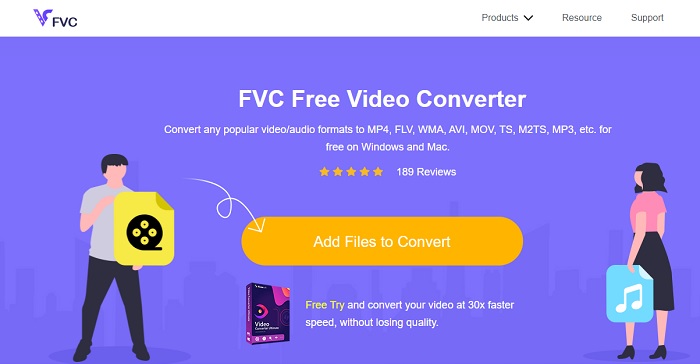
You can use this to convert MKV to AVI online with the help of the best. FVC Free Video Converter is intended to be user-friendly and no-cost as per user demand. Unlike any other tool mentioned here this tool provides a great compression on each file. You can also manipulate the bitrate, fps, codec and more in the file you want to be converted. On the contrary, all of the major features available in the premium version of this tool aren't available here. It only allows the user to have fewer formats, known as the basic format. As for now let's continue and see where the waves take us in converting videos. Follow the steps and let's start sailing the sea of conversion.
Step 1. Go to the link provided only for you to start on.
Step 2. To launch the tool, you must click the Add Files to Convert.
הורד את גרסת הדסקטופ כדי להמיר קבצים במצב אצווה.
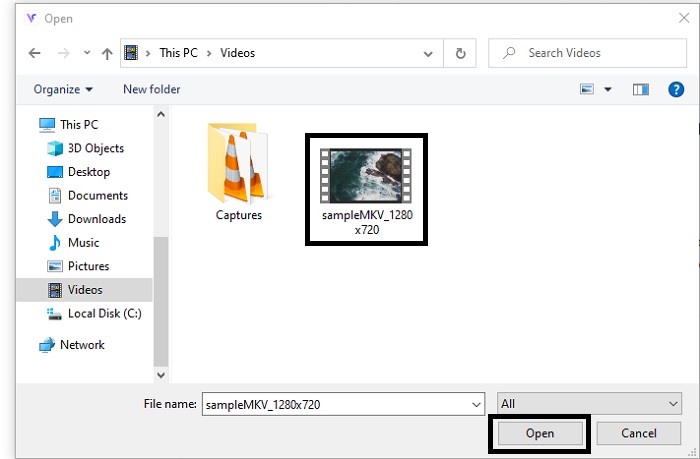
Step 3. Select the MKV file you want to be converted and click open to proceed.
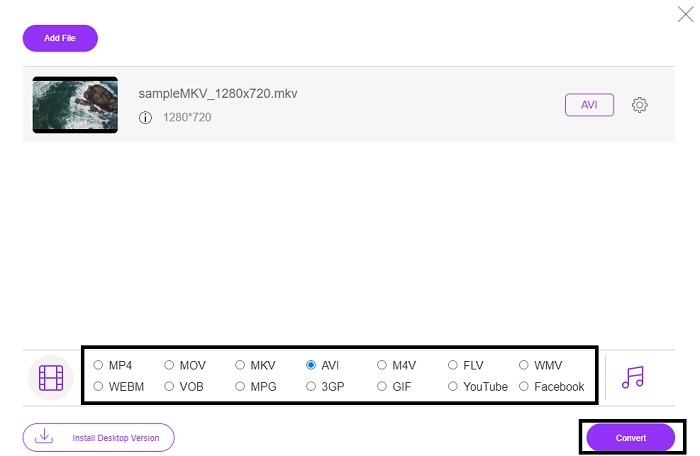
Step 4. In the interface, choose the AVI format below and select Convert to start the process.
Step 5. Wait until it is done. After a minute, clicking this folder to go to file manager will be displayed on your screen with the file you converted.

יתרונות
- אין צורך בהורדה כי אתה יכול לגשת אליו אל מנוע החיפוש שלך.
- זה מספק יותר פורמטים משני הכלים החינמיים האחרים למטה.
- נהדר גם בדחיסה.
חסרונות
- אינו מספק תכונות עריכה והפורמט הזמין מוגבל.
- אם החיבור אינו זמין, אינך יכול להשתמש בכלי זה.
2. נגן מדיה VLC
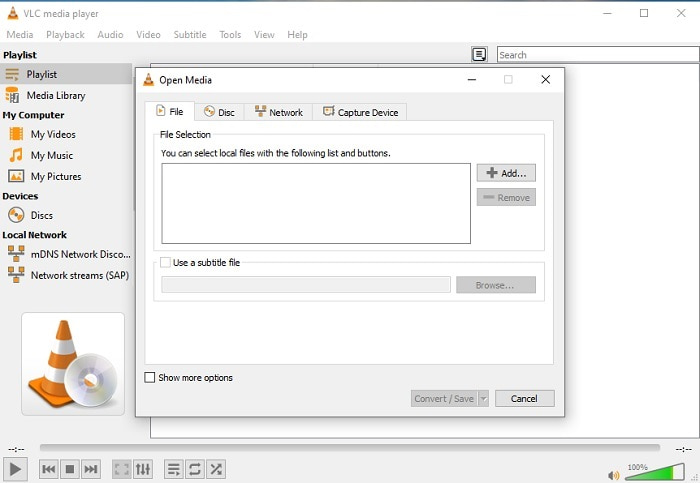
If you have a VLC then why don't you try and use it to convert. As being said, you can convert MKV to AVI on Mac using VLC. But it is not built to be the best on the job of conversion because of its limited format and other reasons. Although, this tool is infamous for being one of the outstanding media players you can use to watch and listen to. So, if you want to try using VLC as a converter then follow these steps below.
Step 1. Open VLC on your desktop.
Step 2. Click the file and locate the converter of the tool.
Step 3. Add the file you want to convert and start the process.
יתרונות
- אחד מנגני המדיה הגדולים ביותר שמציע תכונות המרה.
- חינם להורדה.
- תומך ברוב הקודקים.
חסרונות
- זו לא הבחירה למתחילים עבור חדשים להמרה
- קשה לקרוא ולהבין הוראות.
3. Freemake
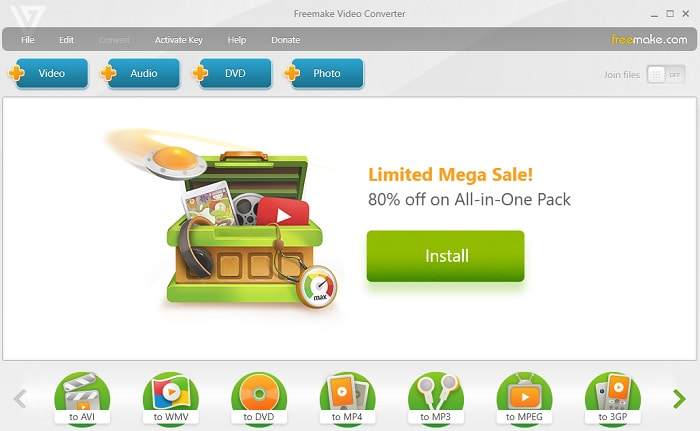
Freemake is one of the desktop tools you can use to convert MKV to AVI on Mac and PC. This tool is downloadable so you don't need internet connection to access it. The format it provides is very limited compared to the online FVC converter above. Another, the interface of the tool is outdated though it is easy to understand but boring to look at. Nevertheless, on the job of conversion you can depend on this tool. Learn how to use Freemake by following the step below.
Step 1. Download the Freemake into your computer and launch it.
Step 2. Choose the file format you want to convert.
Step 3. Wait for more than a minute to finish the conversion.
יתרונות
- אין צורך באינטרנט כדי להשתמש בו.
- ידידותי למשתמש.
- ממשק קל להבנה.
חסרונות
- שילוב הצבעים של הממשק קצת משעמם ויש לו גם אווירה ילדותית.
- מוגבל להציע פורמט ותכונות.
חלק 2. הדרך הטובה ביותר לשנות קובץ MKV לפורמט AVI עם שלבים מפורטים
If you want to take the converting a format to the next level then it is a must to know how to use this tool. Moreover, FVC Video Converter Ultimate provides the best conversion you want to do. Also, it allows the user to do multiple conversions at once. So, convert until you get tired of it but no need to worry because you won't get tired because of the special features it provides. For example, do you want to convert MKV to AVI and then enhance it later? By using the FVC Video Converter Ultimate you can do more. So, to know how majestic the tool is, here are the steps on how to use the unique converter feature it provides.
Step 1. Install the tool to your drive and follow the wizard setup to launch the tool.
הורדה חינמיתל-Windows 7 ומעלההורדה מאובטחת
הורדה חינמיתל-MacOS 10.7 ומעלההורדה מאובטחת
Step 2. Launch the tool after the installation. This is an example of the tool interface.
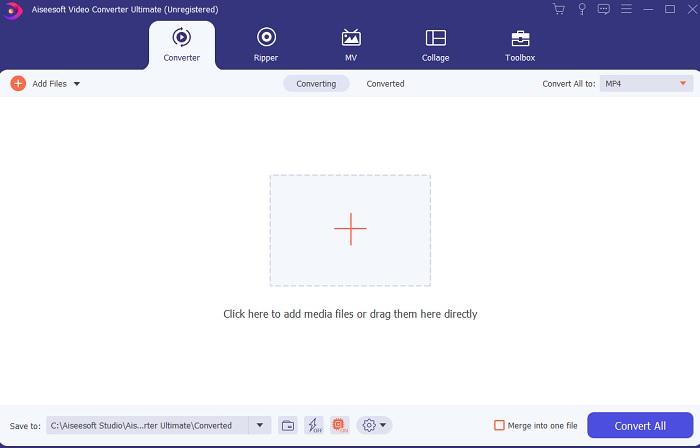
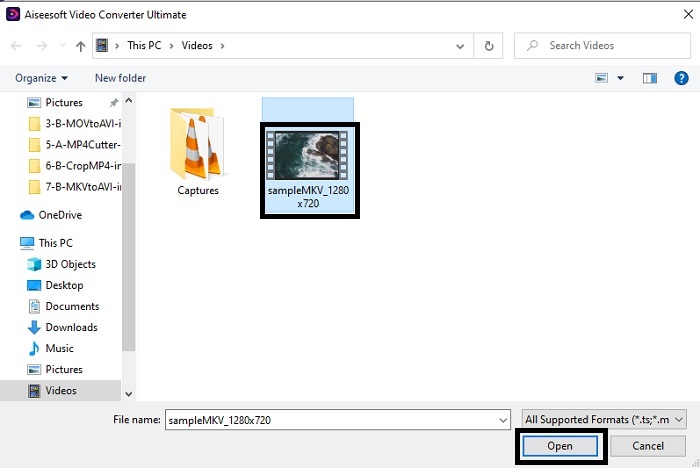
Step 3. Click the plus sign button to insert the MKV file you want to be converted. For example, if the file is more than two or three the best to insert, is to drag-and-drop it in the interface.
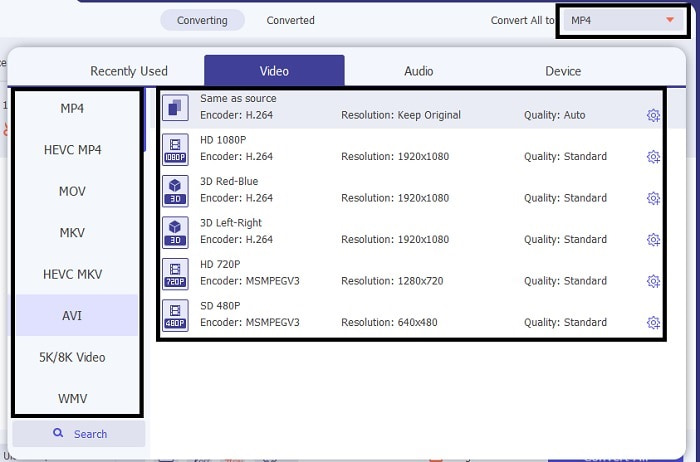
Step 4. On the drop-down menu choose what format you want it to be. Click the Convert All and wait for the conversion to be finished.
Step 5. The conversion will only take less than a second so waiting for it is not needed. After it is done, the file explorer will automatically be going to show into your screen with the file you converted. Click it and enjoy the newly converted file you just made.
יתרונות
- מספק תכונות עריכה עיקריות כדי לשפר את קובץ המדיה שלך.
- מהיר פי 30 בהמרה מהכלי המקוון. וזה טוב פי 100 בדחיסה מהכלי השני.
- קל כמו 1-2-3 לשימוש. אין צורך להיות מקצוען כדי להשתמש בכלי זה.
חסרונות
- זה צריך להיות משולם אבל זה לא מאוד יקר.
- אתה צריך להוריד את הכלי לשולחן העבודה שלך.
MKV לעומת AVI
פורמט מיכל המולטימדיה Matroska, שיצא בשנת 2002, הוא פורמט קוד פתוח שיכול לכלול מספר רצועות וידאו, אודיו, תמונה וכתוביות. אז אתה יכול להשתמש בו כדי לאחסן קטעי וידאו קצרים, תוכניות טלוויזיה וסרטים בקלות. זה די פופולרי עבור אוהדי אנימה.
בהתבסס על Resource Interchange File Format (RIFF), פורמט AVI הוצג על ידי מיקרוסופט בשנת 1992. הוא יכול לשמור וידאו/אודיו באיכות גבוהה מכיוון שהוא משתמש בפחות דחיסה. אבל זה גם גורם לגודל הקובץ הגדול של קובץ AVI, מה שעלול להוות בעיה כאשר יש מקום מוגבל.
חלק 3. שאלות נפוצות לגבי MKV ל-AVI
האם בלם יד יכול להמיר MKV ל-AVI?
כן, אתה יכול להשתמש ב-Handbrake כדי להמיר כל פורמט. אבל הכלי הזה מוגבל רק ל-Windows 10 ומעלה.
האם MKV אובדן או חסר אובדן?
MKV הוא סוג של דחיסה ללא הפסדים.
מהם החסרונות של MKV?
As MKV creates a new future for the format worldwide. This format is still in progress as it is mentioned earlier it can contain different codecs. So, it means it is much larger than an AVI format and more complicated as well. However, you can choose to convert MKV to MP4 to get a smaller file.
סיכום
As for now, learning how to convert is essential especially to those who love watching. There are times that our file format will not be playable into our default media player because the format or codec is not supported. So, the best we can do to solve this problem is to convert it into a new format. FVC Video Converter Ultimate is the ultimate tool that gives you the greatness you want. Instead of choosing a low quality tool why don't you try to use the ultimate tool that solves any converting, enhancing, joining, creating problem you ever have.
-
 MKV ל- MOV - כיצד להמיר MKV ל- MOV
 כיצד ניתן להמיר MKV ל- MOV ב- Mac? האם iMovie יכול לקרוא MKV? מה הפירוש של פורמט MOV? פוסט זה מספר שתי דרכים פשוטות לעזור לך להמיר MKV ל- MOV עם ממירי וידאו מקוונים ומקצועיים בחינם.
-
 כיצד להמיר קבצי MKV לנגן ב-PS3 בצורה חלקה [נפתר]
 רוצה לנגן סרטוני MKV ב-PS3 שלך? עם זאת, PS3 לא יכול לנגן קבצי MKV ישירות. מאמר זה יראה לך דרכים להמיר סרטוני MKV לפורמטי וידאו נתמכים ב-PS3 להפעלה ב-PS3 ללא כל טרחה.
-
 כיצד להמיר סרטי MKV ל- GIF מונפש ללא Photoshop/FFmpeg
 לאחר הורדה וצפייה של סרטי MKV במחשב שלך, ייתכן שתרצה לשתף כמה רגעים נפלאים עם חברים או באינטרנט כקבצי GIF. במאמר זה תוכלו ללמוד על 2 הדרכים הקלות ביותר להמיר MKV ל- GIF.

