


 ממיר וידאו אולטימטיבי
 מקליט מסך
 תיקון וידאו
 הורדה מאובטחת
שיטות יוצאות דופן להמרת MTS ל-M4V באופן מיידי
האם אתה רוצה ממיר יעיל עבור המכשיר שלך? אז תקבל מושג על‑ידי קריאת המידע המפורט במאמר זה. נציג בפניך שיטות שונות כיצד להמיר MTS ל‑M4V באמצעות Mac ו‑Windows. בנוסף, תכיר כלי מקוון שתוכל לנסות כדי להמיר עוד קבצים.

חלק 1: הבדלים בין MTS ל-M4V
כדי לראות את ההבדלים בין שני פורמטי הקבצים הללו, עיין בפרטים בטבלה למטה.
| MTS | M4V | |
| סיומת קובץ | סיומת שם הקובץ של קובץ וידאו Advanced Coding High Definition (AVCHD) היא MTS. יש לו סיומת שם קובץ .mts וכוללת וידאו HD MPEG שהוקלט עם יצרנים ודגמים ספציפיים של מצלמות וידיאו, כולל JVC, Sony, Canon ו-Sanyo. זה יכול להיפתח בתוכנות רבות ולתמוך בסרטוני HD עד 1080i x 720p. | Apple Inc. יצרה את פורמט מיכל הווידאו הדיגיטלי M4V. מבחינת מבנה, הוא דומה למדי ל-MP4 המוכר, אך ייתכן שקובצי M4V מגיעים עם DRM. פורמט הווידאו העיקרי לסרטונים ב-iTunes Store בימינו הוא M4V, שעשוי להכפיל יחד מספר נתוני אודיו ווידאו. |
| פותח על ידי | סוני/פנסוניק | אפל בע"מ. |
| תוכניות משויכות | נגן מדיה VLC אפל Final Cut Pro X Roxio Creator NXT Pro 7 | נגן מדיה קלאסי KMPlayer נגן מדיה VLC נגן זום |
| סוג MIME | וידאו/mp2t | וידאו/x-m4v |
חלק 2: שיטות מצוינות להמרת MTS מרובים ל-M4V באמצעות Mac
אם אתה רוצה להמיר MTS ל-M4V באמצעות Mac, אתה יכול לנסות את FVC Video Converter Ultimate. כלי לא מקוון זה יכול להמיר קבצים באופן מיידי מכיוון שיש לו מהירות המרה מהירה פי 30. בנוסף, כלי זה מציע המרת אצווה, מה שמאפשר המרת מספר פורמטים של קבצים בו-זמנית. כמו כן, ניתן להעלות כמעט את כל פורמטי הווידאו ביישום זה מכיוון שהוא תומך בפורמטים רבים של קבצים, כולל MKV, MOV, MP4, FLV, AVI, SWF ועוד. אתה יכול גם לערוך את קובץ הווידאו של MTS שלך. אתה יכול לסמוך על הכלי הזה אם יש לך מספר קבצי MTS ואתה רוצה שהם ישלבו כי הוא מציע כלי מיזוג וידאו. בדרך זו, אתה יכול למזג מספר סרטוני MTS ליצירה אחת. כמו כן, אם אתה רוצה להתאים את עוצמת הקול של וידאו MTS שלך, אתה יכול להשתמש בכלי להגברת עוצמת הקול. בעזרת יישום לא מקוון זה, אתה יכול לשנות בקלות את עוצמת הקול של הסרטון שלך. ישנן תכונות נוספות שתוכלו ליהנות בהן באמצעות Video Converter Ultimate.
תכונות
◆ זה יכול להמיר 100+ פורמטים של קבצי וידאו.
◆ מציע יוצר סרטוני מוזיקה עם ערכות נושא חינמיות רבות.
◆ יצירת קולאז' עם תבניות ומסנן בחינם זמינה.
◆ הוא מציע כלי עריכה כגון בקר מהירות וידאו, דחיסה וחתיכה (Crop).
◆ זה יכול להסיר סימני מים מסרטון.
בצע את השלבים הבסיסיים להלן כדי להמיר את קובץ הווידאו MTS שלך לפורמט M4V באמצעות FVC Video Converter Ultimate ב-Mac שלך.
שלב 1: במחשב ה‑Mac שלך, הורד את FVC Video Converter Ultimate על‑ידי לחיצה על כפתור Download שלמטה. לאחר מכן הפעל את התוכנה.
הורדה חינמיתל-Windows 7 ומעלההורדה מאובטחת
הורדה חינמיתל-MacOS 10.7 ומעלההורדה מאובטחת
שלב 2: במרכז הממשק, לחץ על סמל הPlus כדי לצרף את קובץ הווידאו MTS שלך. באפשרותך גם לגרור את הקובץ ישירות לתוך התיבה.
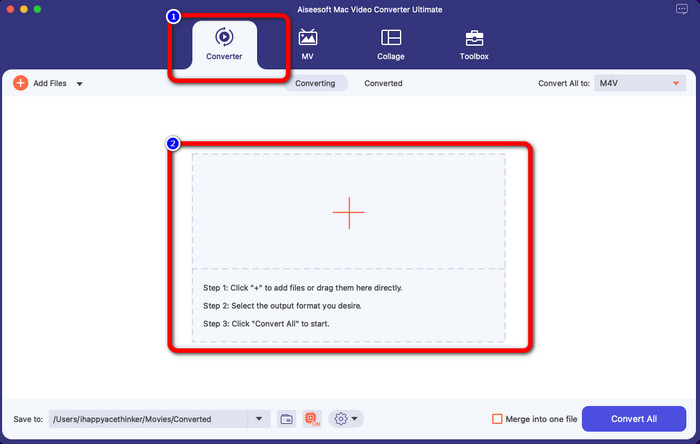
שלב 3: בשלב הבא תראה את כפתור Convert All To בפינה הימנית העליונה של הממשק. לחץ עליו כדי לראות את אפשרויות הפורמט, ואז בחר את פורמט הקובץ M4V. כדי להוסיף מספר קובצי MTS, לחץ על כפתור Add Files בחלק העליון‑שמאלי של הממשק.
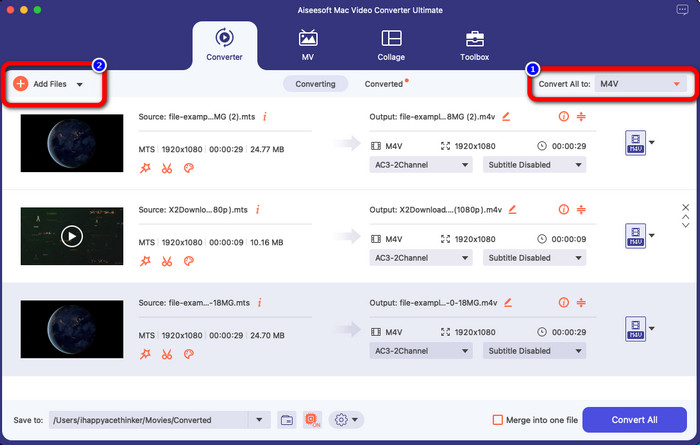
שלב 4: לאחר המרת כל קובצי ה‑MTS לפורמט M4V, לחץ על כפתור Convert All ושמור את הפלט הסופי במיקום הרצוי לך.
חלק 3: כיצד להמיר קבצי MTS מרובים ל-M4V ב-Windows בחינם
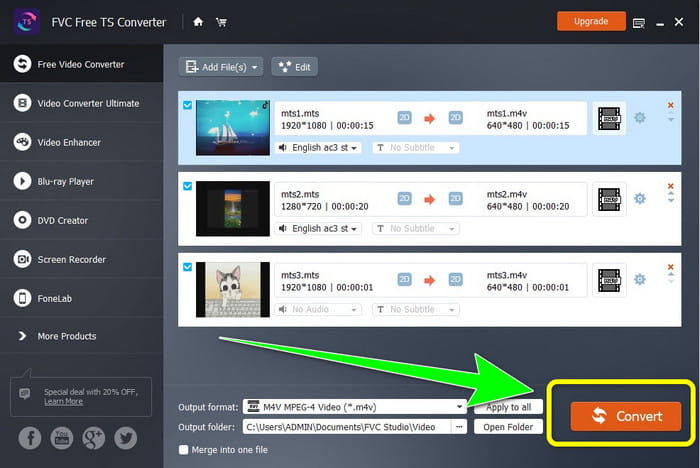
בחלק זה תגלה כיצד להמיר מספר קובצי MTS לקובץ M4V אחד באמצעות Windows. כדי להמיר קובצי MTS, תוכל להשתמש ב‑FVC Free TS Converter. הוא יכול להמיר את קובצי הווידאו שלך במהירות הגבוהה פי 10 ממהירות ההמרה הממוצעת. הוא מציע המרה באצווה, שבאמצעותה באפשרותך להמיר מספר קבצים בבת אחת. כך לא תשתעמם מהמרת קבצים אחד‑אחד. בנוסף, יש לו ממשק אינטואיטיבי עם פעולות בסיסיות, מה שהופך אותו למתאים יותר למשתמשים. אם ברצונך להמיר מספר קובצי MTS לפורמט M4V באמצעות FVC Free TS Converter ב‑Windows, השתמש בשלבים הפשוטים שלהלן.
תכונות
◆ המר פורמטים של קבצי וידאו, כגון AVI, MOV, MPEG, MP4, DIVX, XVID וכו'.
◆ מספק משפר וידאו.
◆ מסוגל להקליט מסך.
◆ יכול לנגן כל דיסק Blu-ray.
◆ מציע המרת אצווה.
שלב 1: הורד את FVC Free TS Converter למחשב ה‑Windows שלך על‑ידי לחיצה על כפתור Download שלמטה. הפעל את התוכנה לאחר סיום תהליך ההתקנה.
הורדה חינמיתעבור Windows 7 ומעלההורדה מאובטחת
הורדה חינמיתעבור MacOS 10.7 ומעלההורדה מאובטחת
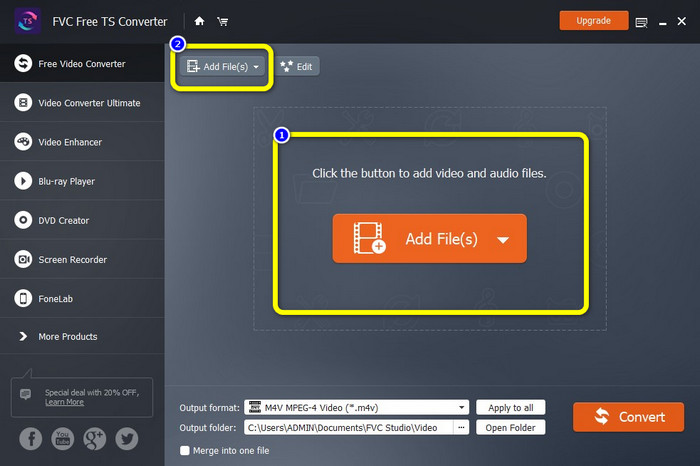
שלב 2: לאחר הפעלת התוכנה, לחץ על כפתור Add Files במרכז כדי להעלות קובצי MTS. באפשרותך גם ללחוץ על כפתור Add Files הנוסף בחלק העליון של הממשק כדי להוסיף עוד קובצי MTS שברצונך להמיר.
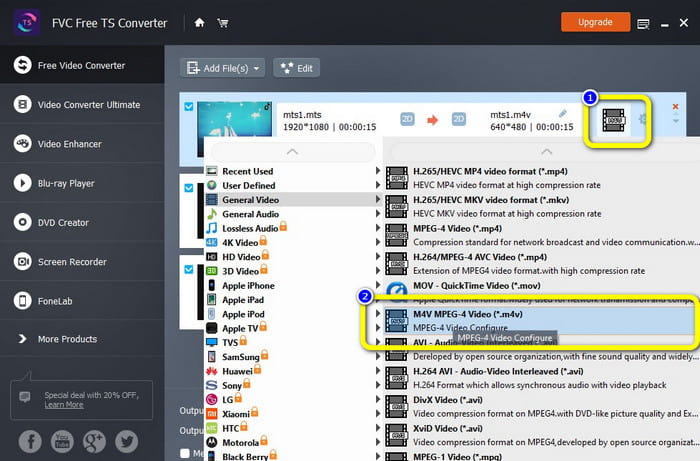
שלב 3: לחץ על אפשרויות הפורמט בחלק הימני של הממשק. לאחר מכן בחר את פורמט הקובץ M4V כפורמט הפלט שלך. בצע את אותה פעולה עבור קובצי ה‑MTS הנותרים.
שלב 4: לחץ על כפתור Convert כדי להמיר מספר קובצי MTS לפורמט M4V.
חלק 4: הדרכים הטובות ביותר להמיר MTS ל-M4V באמצעות יישום מקוון
כאשר ממירים MTS ל‑M4V באמצעות כלי מקוון, הממיר הטוב ביותר שבו תוכל להשתמש הוא FVC Free Video Converter Online. בעזרת כלי זה תוכל להמיר בקלות את קובץ ה‑MTS שלך ל‑M4V. נדרשים רק שלושה שלבים כדי להמיר קבצים. נוסף על כך, הכלי המקוון הזה הוא 100% חינמי. אז בלי להכביר מילים, בוא נתחיל להמיר את ה‑MTS שלך לפורמט קובץ M4V. עקוב אחר השלבים שסיפקנו לך!
תכונות
◆ המר מספר קבצים, כמו MP4, FLV, WMA, MOV, MTS, M4V וכו'.
◆ מאפשר המרת אצווה.
◆ נגיש גם ב-Mac וגם ב-Windows.
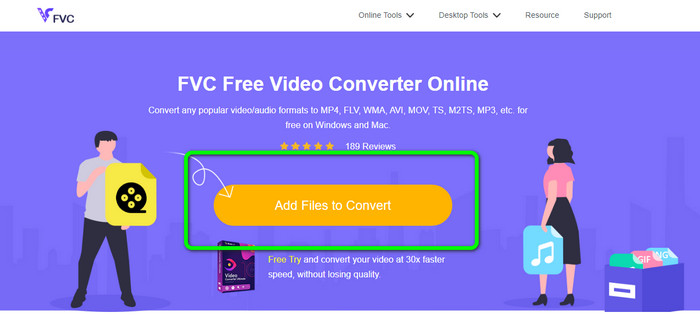
שלב 1: בקר באתר FVC Free Video Converter Online. לאחר מכן לחץ על כפתור Add Files to Convert כדי להעלות את סרטון ה‑MTS שלך.
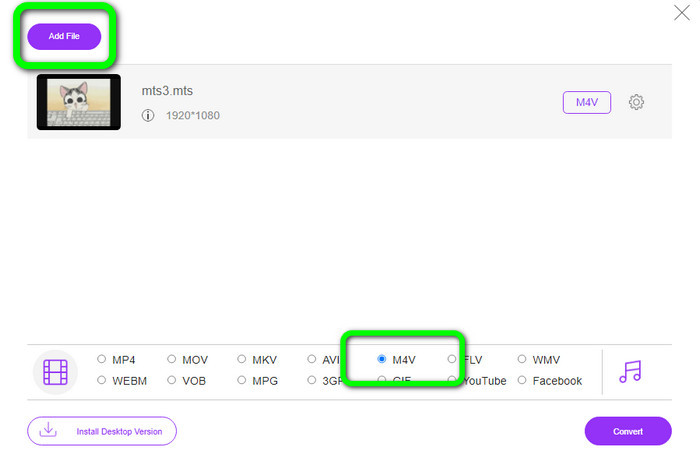
שלב 2: לאחר מכן בחר את פורמט M4V באפשרויות הפורמט בחלק התחתון של הממשק. תוכל גם ללחוץ על כפתור Add File כדי להמיר מספר קבצים.
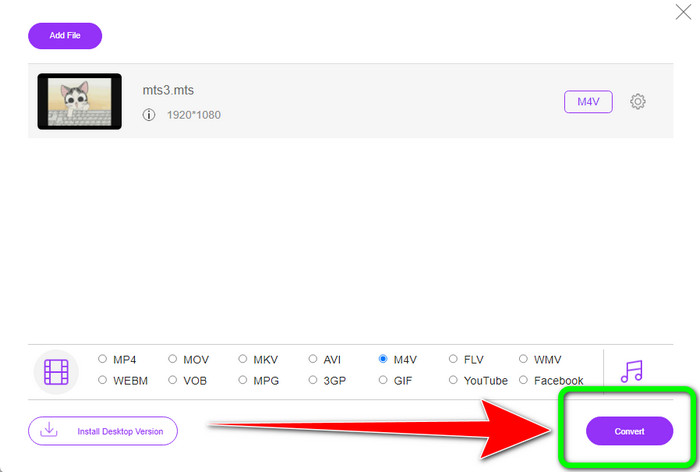
שלב 3: לאחר בחירת הפורמט הרצוי, ניתן ללחוץ על כפתור Convert כדי לשמור את הסרטון שלך בפורמט קובץ M4V.
חלק 5: שאלות נפוצות על המרת MTS ל-M4V
1. האם MTS הוא פורמט טוב?
כן. קודקים וידאו 720p ו- 1080i HD נתמכים על ידי MTS, MPEG בחדות גבוהה ופורמט וידאו של זרם תעבורה H.264. אנשים מתייחסים לעתים קרובות לקבצי MTS כ-AVCHD, שנוצרו במשותף על ידי סוני ופנסוניק ושוחררו בפורמט איכותי ב-2006.
2. איך אני יכול להמיר MTS ל-MP4?
תוכל להשתמש ביישומים שהוזכרו לעיל. ממירים אלה יעילים ושימושיים בעת המרת MTS ל‑MP4 ולפורמטים נוספים.
3. למה להשתמש ב-M4V?
לקבצי M4V יכולים להיות כתוביות רכות והגנת DRM כדי לעצור פיראטיות ולהקשות על הצרכנים להפיץ קבצים בין מכשירים.
סיכום
שלושת היישומים שלעיל הם הממירים הטובים ביותר שתוכל להשתמש בהם במכשירים שלך. אם אתה משתמש Windows, תוכל להשתמש ב‑FVC Video Converter Ultimate. אם אתה משתמש ב‑Mac, תוכל לנסות את FVC Free TS Converter. לבסוף, אם אתה מעדיף יישום מקוון, תוכל להשתמש ב‑FVC Free Video Converter Online. ממירים אלה יכולים להמיר MTS ל‑M4V בצורה חלקה.
-
 MTS VS M2TS - ההבדל בין MTS ל- M2TS
 מהו קובץ MTS או M2TS? מה ההבדל בין M2TS ל- MTS? כיצד אוכל לצפות בקובץ MTS או M2TS שהוקלט במצלמת הווידאו? מצא את כל התשובות בפוסט הזה
-
 עליכם להכיר את חמשת נגני ה- M4V המובילים עבור Windows / Mac / Android / iOS
 כאשר אינך יכול להפעיל את סרטוני ה-M4V שלך ב-QuickTime Player, עליך ללמוד עוד מחמשת נגני M4V המעולים עבור Windows, Mac, Android ו- iOS ממאמר זה
-
 [נפתר] כיצד להמיר MTS ל-MKV באיכות מקורית
 האם אתה תוהה איך אתה יכול להמיר MTS ל MKV בחינם? במאמר זה, פירטנו את מיטב ממירי MTS ל-MKV החינמיים
