


 ממיר וידאו אולטימטיבי
 מקליט מסך
 תיקון וידאו
 הורדה מאובטחת
ממיר FLV ל- WMA - כיצד לחלץ אודיו WMA מ- FLV Video בחינם
לאחר שהורדת קבצי וידיאו Flash מאתר YouTube, תוכל להמיר את ה- FLV לאודיו ללא אובדן WMA. WMA (Windows Media Audio) היא סדרה של רכיבי codec שמע ופורמטים מקודדים של קידוד שמע שפותחו על ידי מיקרוסופט. אודיו WMA תומך באודיו רב ערוצי וברזולוציה גבוהה. ממאמר זה תלמדו שתי שיטות להמרת קטעי הווידאו FLV לאודיו WMA ב- Windows וב- Mac.

חלק 1. הדרך הטובה ביותר לחלץ אודיו WMA מ- FLV בחינם
FVC Free FLV Converter הוא ממיר FLV ל‑WMA חינמי, פשוט ומהיר, שתומך בהמרת אצווה של קובצי FLV לפורמט WMA ב‑Windows וב‑Mac. במקביל, באפשרותך להמיר סרטוני FLV לפורמטי וידאו ואודיו נוספים כמו HD MP4, AVI, WMV, MKV, 3GP, MP3, AAC, AC3 ועוד. בעזרת פונקציית העריכה המובנית תוכל לערוך בחינם את נתוני המטא‑דטה בקובצי WMA.

ממיר FLV חינם של FVC
145000+ הורדות- המרת FLV ל- WMA ב- Windows 10/8/7 / Vista / XP ו- Mac OS X.
- דחוס, מיזוג, הוסף ערכות נושא וערוך מטא נתונים של קובץ ה- WMA.
- הוסף נושאים מיוחדים לקבצי ה- FLV שלך, כמו חג, משפחה, יום הולדת.
- אצווה להמיר FLV ל- WMA, MP3, AAC, FLAC, M4R, OGG, WAV.
הורדה חינמיתל-Windows 7 ומעלההורדה מאובטחת
הורדה חינמיתל-MacOS 10.7 ומעלההורדה מאובטחת
שלב 1. הוסף קובץ FLV
לאחר הורדה בחינם של FVC Free FLV Converter, ניתן להתקין ולהפעיל את התוכנה במחשב. לחץ על הכפתור Add File(s) כדי לייבא את קובץ ה‑Flash Video. באפשרותך גם לגרור ולשחרר כמה קובצי FLV לתוך התוכנה בו‑זמנית.

שלב 2. ערוך את קובץ ה- FLV
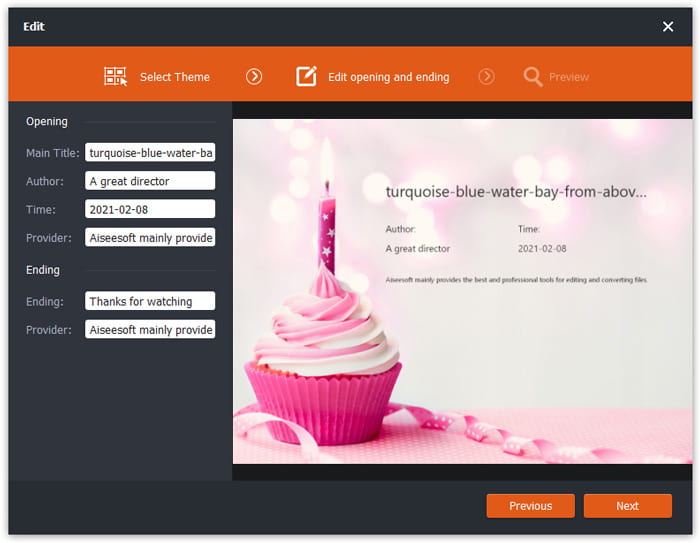
לחץ על כפתור Edit כדי להתחיל לערוך את קובץ ה‑FLV שלך. באפשרותך לבחור ערכת נושא מסוימת, לערוך פרטי נתונים כמו כותרת, מחבר, זמן פתיחה וסיום.
שלב 3. הגדר את WMA כפלט
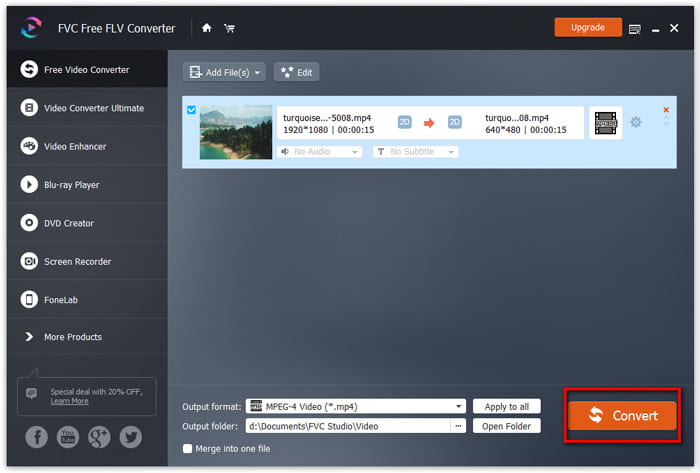
לאחר מכן עבור לאזור Output format והקלד WMA בתיבת החיפוש. כאן תוכל לבחור WMA - Windows Media Audio (*.wma) כפורמט הפלט.

שלב 4. המר FLV ל- WMA
עבור לאזור Output folder ובחר את היעד שבו יישמר קובץ ה‑WMA. אפשר ללחוץ על כפתור Convert כדי להתחיל להמיר FLV לקובץ אודיו WMA בחינם.
חלק 2. כיצד להמיר FLV ל- WMA באופן מקוון בחינם
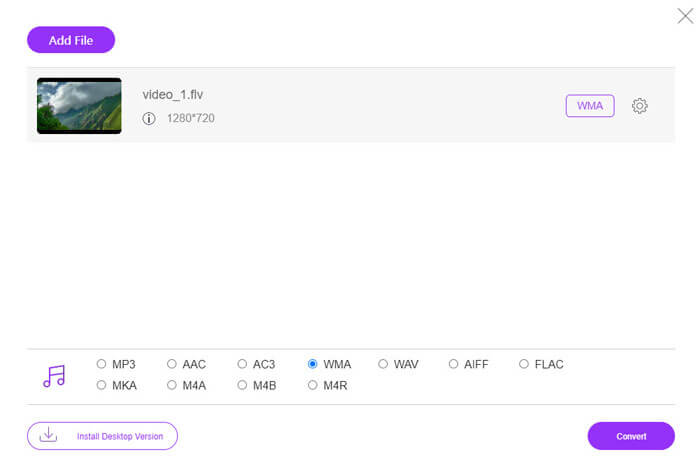
אם נמאס לך מהורדה של חבילות תוכנה כלשהן, תוכל לנסות את FVC Free Audio Converter. זהו ממיר FLV ל‑WMA מקוון ועוצמתי, המסייע להמיר כל קובץ וידאו/אודיו נפוץ ל‑WMA, MP3, AAC, FLAC, WAV ועוד. תוכל ללמוד בפירוט כיצד להמיר FLV ל‑WMA באמצעות FVC Free Audio Converter.
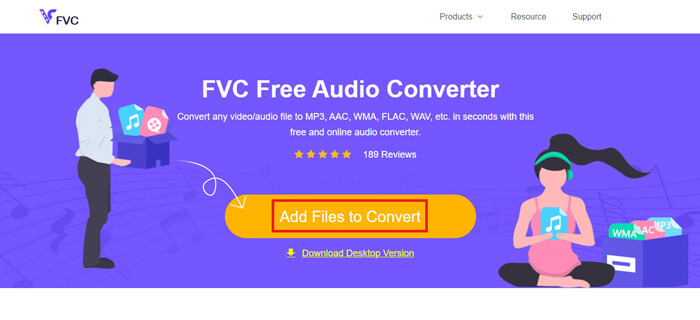
שלב 1. בקר באתר הרשמי של FVC Free Audio Converter (https://www.free-videoconverter.net/free-audio-converter/). לחץ על כפתור Add Files to Convert כדי להוריד ולהתקין את המשגר. תוכל להעלות את קובצי ה‑FLV מהמחשב המקומי.
שלב 2. סמן את WMA בתחתית והגדר אותו כפורמט הפלט. אם ברצונך להתאים עוד הגדרות, תוכל ללחוץ על סמל גלגל‑השיניים כדי להגדיר מקודד אודיו, ערוץ, קצב דגימה וקצב סיביות. לחץ על כפתור OK כדי לשמור את השינויים.
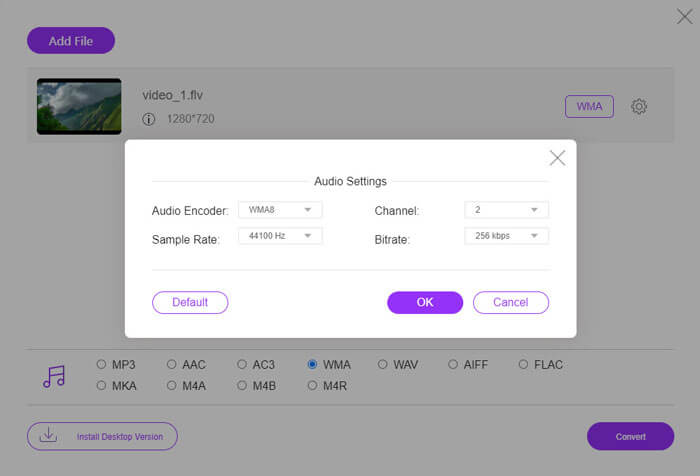
שלב 3. לבסוף, באפשרותך ללחוץ על כפתור Convert כדי להתחיל להמיר את קובץ ה‑FLV שלך ל‑WMA באופן מקוון ובחינם.
חלק 3. שאלות נפוצות על המרת FLV ל- WMA
מהו קובץ FLV וכיצד אוכל להפעיל אותו?
FLV הוא פורמט קובץ הווידאו הפלאש שפותח על ידי אדובי. זה יכול לאחסן וידאו, שמע, טקסט, מנוי ועוד. גם Windows Media Player וגם QuickTime אינם תומכים ב- FLV, לכן עליך להשתמש בנגן מדיה של צד שלישי כדי לפתוח FLV, כמו VLC.
למה משמש פורמט WMA?
WMA הוא פורמט שמע אבוד שנוצר על ידי מיקרוסופט כדי להתחרות ב- MP3. WMA משמש בעיקר להזרמת מוסיקה מקוונת. קובץ WMA עם סיומת .wma הוא Windows Media Audio. זה יכול להיות נתמך בצורה מושלמת על ידי Windows Media Player.
האם יש נגן מוזיקה מסוג WMA?
כן. ישנם נגני מוזיקת WMA שתוכל לבחור מהם, כגון FVC Free Video Player, KMPlayer, Elmedia Video Player, Macgo Free Mac Media Player, VOX Music Player, VLC Media Player, GOM Media Player, foobar2000, AIMP, Samsung Music ועוד.
סיכום
במאמר זה, דיברנו בעיקר על 2 דרכים חינמיות להמיר וידאו FLV ל- WMA ב- Windows 10 PC ו- Mac. מקווה שכל הפתרונות הללו יעזרו לך לפתור את הבעיה שלך. בפעם הבאה שתוריד סרטוני פלאש מהאתר, תוכל לנסות ממיר FLV חינם FLV להמיר את וידיאו FLV ל- WMA, MP3, AAC, MP4, AVI, VOB וכו '.
-
 FLV ל- WAV - המרת FLV ל- WAV באופן מקוון בחינם וב- Mac / PC
 כיצד ניתן להמיר קובץ FLV? האם VLC יכול להמיר את YouTube FLV ל- WAV? הודעה זו מציגה 3 דרכים חינמיות להמיר FLV ל- WAV ללא אובדן איכות.
-
 2 דרכים קלות להמיר קבצי MOV ל- FLV ב- Windows / Mac
 כיצד להמיר MOV ל- FLV בחינם? להלן ממירי הווידאו הטובים ביותר בשולחן העבודה ובאינטרנט כדי להמיר את קובץ ה- MOV שלך ל- FLV תוך שניות מבלי לשלם שקל.
-
 כיצד להמיר WMA ל- MP3 ב- Mac / Windows / Online
 האם ניתן להמיר WMA ל- MP3 באמצעות Windows Media Player? כיצד להמיר WMA ל- MP3 בחינם? פוסט זה משתף 4 שיטות פשוטות שיעזרו לך לבצע את המרת השמע מ- WMA ל- MP3 ב- Mac, Windows PC ובאינטרנט.
