


 ממיר וידאו אולטימטיבי
 מקליט מסך
 תיקון וידאו
 הורדה מאובטחת
3 דרכים חינם להמרת FLV למשחק ב- Xbox
FLV is widely used for news and video sharing sites. When you download some online videos from YouTube, Hulu or Facebook, you are more likely get FLV files. FLV format can be supported by many players, devices, platforms and browsers. But it can't be played on Xbox.
More than just a game console, Xbox also allows you to play videos and music through a USB flash drive or external drive. Xbox is compatible with many popular media files. But as it mentioned above, you can't directly play FLV on Xbox. When you want to view FLV files on Xbox, you have to convert FLV to Xbox supported format.

This post shares 3 free ways to convert FLV to Xbox. When you want to watch FLV files on your Xbox One, Xbox 360, new Xbox Series X or Xbox Series S console, you can rely on them to convert FLV to an Xbox supported file.
חלק 1. כיצד להמיר חינם FLV ל- Xbox Online
ממירי וידאו רבים יכולים לעזור לך להמיר FLV לפורמט נתמך Xbox כמו AVI או MP4. אם אתה מתמודד עם כמה קטעי וידיאו קטנים של FLV, תחילה עליך לנסות את ממיר ה- FLV המקוון בחינם ל- Xbox.
Free Online Video Converter is an easy-to-use video converter which enables you to convert FLV to MP4, AVI, WMV, MOV, or another Xbox console supported format. Compared with other online converters, it requires no account sign up or sign in. Moreover, there is no any file size limit for your FLV file conversion. The following guide will show you how to use it.
Step 1. This online FLV to Xbox converter is compatible with any web browser like Chrome, Safari, IE, and Firefox. You can open your browser and go to the Online FLV to Xbox converter site.
Step 2. When you get there, click Add Files to Convert and then Download button to install a launcher for the FLV converting. When the launcher is ready, there will be a pop-up window for you to add your FLV file.

Step 3. You can see some popular video formats including MP4, AVI, MOV, FLV, WMV, MKV, and more are listed under the loaded FLV file. You can pick a Xbox supported format like MP4 or AVI.
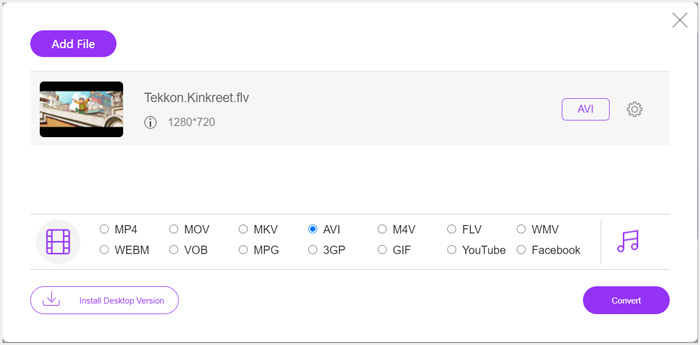
Step 4. If you want to custom more output video and audio settings, you can click the Settings icon next to the output format. After that, you can click the Convert button to start converting FLV to Xbox. The output video will be automatically saved on your computer as soon as the conversion is finished.
חלק 2. כיצד להמיר FLV ל- Xbox Online באמצעות FreeConvert
FreeConvert is another popular video and audio converter which can help you convert FLV to Xbox supported MP4, AVI, or WMV. It has a specific FLV to Xbox Video Converter for you to directly convert your FLV files to Xbox.
Step 1. Open your browser and go to this FLV to Xbox Video Converter page.
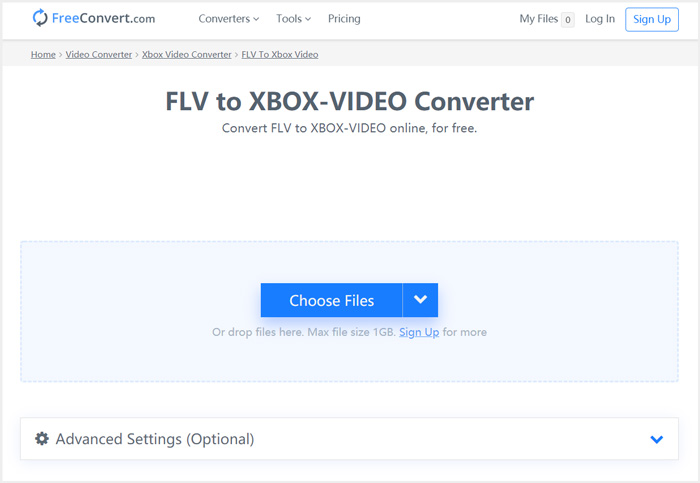
Step 2. Click Choose Files button to browse and upload your FLV file. You are also allowed to add file through URL, Google Drive and Dropbox.
Step 3. You can click Add More Files to upload other FLV files you want to convert. The target format will be set as XBOX by default. You can simply click on Convert to Xbox Video button to start the FLV to Xbox conversion.
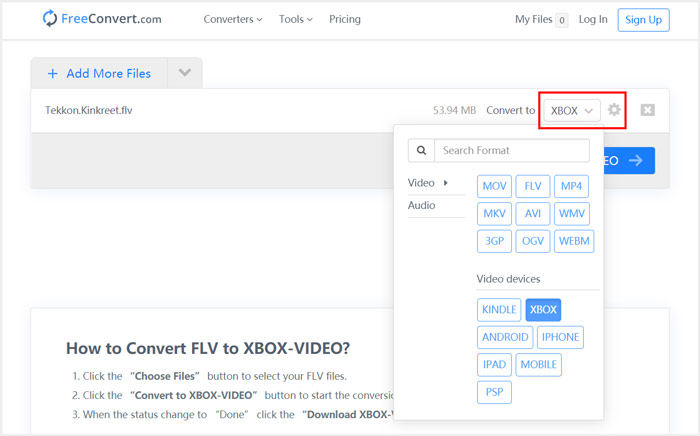
Follow the similar steps, and you can play any music on Xbox after converting them to Xbox compatible formats.
This FLV to Xbox Video Converter will start to upload and convert your video. After converting, you can click Download button to save it on your Mac or Windows PC. Or you can choose to save it on Google Drive and Dropbox. You will see some ads while using this free FLV to Xbox converter.
חלק 3. דרך טובה יותר להמיר FLV חינם ל- Xbox ב- Mac ובמחשב Windows
Besides online FLV converters, you can also rely other free video converters to convert and play your FLV files on Xbox game console. Here we introduce you with the powerful Free FLV Converter. It is specially designed to make various FLV conversions.

- המר כל FLV לפורמט הנתמך ב- Xbox כמו MP4, AVI, WMV, MOV ועוד.
- מציעים סדרה של ערכות נושא לעריכה והתאמה אישית של קובץ FLV.
- מעבדים מרובי ליבות ותאוצות GPU מתקדמות להמרת FLV ל- Xbox במהירות מהירה.
- המר קובץ FLV אחד או יותר ל- Xbox ללא כל אובדן תמונה או צליל.
הורדה חינמיתל-Windows 7 ומעלההורדה מאובטחת
הורדה חינמיתל-MacOS 10.7 ומעלההורדה מאובטחת
Step 1. First, you can double click on the download button to free install it on your computer. Open it and click Add Files to import your FLV file(s).

Step 2. Select MP4 or AVI as the target format from the drop-down list of Output format. For more settings, you can click the Settings icon next to the output format to enter the Profile Settings window.
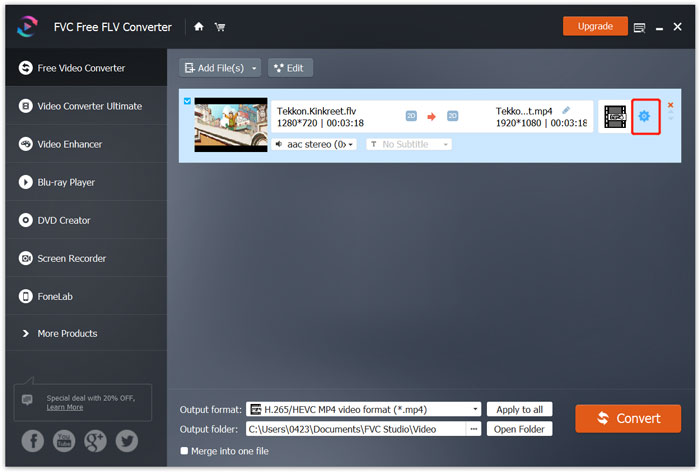
It also lists a specific Xbox category in the Output format for you to directly convert FLV to Xbox One or Xbox 360 supported file. But you need to upgrade it to a paid version.
Step 3. Click the Convert button to start the video conversion from FLV to MP4 or another Xbox supported video format.
חלק 4. שאלות נפוצות על הפעלת FLV ב- Xbox
שאלה 1. באילו פורמטים ניתן לתמוך ב- Xbox One?
כאחת מקונסולות המשחק הפופולריות ביותר, XBox תואם לפורמטים רבים של וידאו ושמע, לרבות MP4, AVI, M4V, MOV, WMV, MKV, H.264 AVCHD, WAV, WMA, 3GP וידאו, 3GP שמע, AAC , MP3, ועוד.
שאלה 2. איך מנגנים סרטונים ב- Xbox?
אם יש לך את אפליקציית הסרטים והטלוויזיה ב- Xbox One או ב- Xbox 360, כאשר אתה משדר וידאו ל- Xbox, או מחבר את הכונן החיצוני שלך ל- Xbox, אתה יכול להשתמש בו כדי לצפות בסרטונים בקלות.
שאלה 3. איזה נגן יכול לנגן קבצי FLV?
כאשר אתה רוצה לנגן קבצי FLV במחשב Mac, Windows PC או מכשיר iOS / Android נייד, VLC Media Player הוא תמיד אפשרות טובה לעשות זאת. הוא מציע יישומים שולחניים וניידים לנגן קבצי FLV במחשב או בטלפון.
סיכום
לא מצליחים להפעיל קבצי FLV במסוף המשחק שלך ב- Xbox? לשם כך עליך להמיר תחילה FLV לקובץ הנתמך ב- Xbox. אתה יכול למצוא 3 שיטות חינם להמיר ולהשמיע FLV ב- Xbox מהפוסט הזה.
-
 10 נגני ה- FLV המובילים עבור Windows, Mac, iOS ו- Android בשנת 2021
 נגן FLV עוזר לך לגשת בקלות לקבצי ה- FLV שלך במכשיר Windows, Mac, Android, iOS. בדוק את נגני הקבצים הטובים ביותר FLV שאתה יכול להוריד עכשיו.
-
 מדריך לדחיסת GIF ולהפחית את גודל הקובץ באיכות גבוהה
 להלן שתי דרכים פשוטות לדחיסת GIF במחשב או בטלפון הנייד שלך. אתה יכול להשתמש ב- FVC Free Video Compressor Online וב- Photoshop להפחית את גודל קובץ ה- GIF בהיבטים שונים.
-
 4 הדרכים המובילות בחינם להמיר קטעי וידאו FLV ל MP4 בשולחן העבודה ובאינטרנט
 מדריך זה חולק ארבע שיטות חינמיות להמרת קבצי הווידאו של ה- FLV לפורמט MP4 ב- Windows 10/8/7 / XP וב- Mac OS X, כך שתוכלו ליהנות מהסרטונים בכל המכשירים.
