


 ממיר וידאו אולטימטיבי
 מקליט מסך
 תיקון וידאו
ממיר MPG ל-GIF הטוב ביותר להמרת MPG ל-GIF [גרסת פרימיום ללא עלות]
הדרך הטובה ביותר להביע את רגשותיכם בפני יקיריכם היא ליצור מסר משמעותי. אבל האם אתה רוצה לדעת מה הרבה יותר טוב לבטא בצורה אחרת? אתה יכול להשתמש ב-GIF. ידוע גם בשם Graphics Interchange Format אלו התמונות שאתה שולח אבל הן משודרגות. תמונות נעות אלו נוצרות כדי להביע את הרגשות שלך כלפי מישהו באופן ישיר או עקיף. האם ידעת שרוב אפליקציות ההודעות תומכות ב-GIF כמו גם במסנג'ר המובנה שלנו? אבל בחלק מהגרסאות הישנות של הטלפון, הוא אינו מספק את הפורמט הזה. למרות ש-GIF זה כיף, לא כל הזמן יספק לך את הרגש שאתה רוצה להביע.
אז אתה כאן כדי לגלות מהי הדרך הטובה ביותר לשנות את פורמט ה־MPG ל־GIF. זה לא מרגש ליצור GIF משלך? במקום לחפש מה כדאי להשתמש, למה שלא תנסה ליצור GIF משלך תוך הוספת הנגיעה האישית שלך. הדרך הטובה ביותר לדעת איך לעשות זאת היא לקרוא את המאמר הזה, משום שהוא מספק מידע מספק, שלבים וכלים לביצוע. אז בלי להכביר במילים, בוא נעבור לפרטים החשובים במאמר זה. המשך לקרוא כדי ללמוד עוד על רשימת ממירי הקבצים האלה.

חלק 1. 4 הכלי הטוב ביותר להמרת MPG לפורמט GIF PC או Mac
1. ממיר וידאו FVC Ultimate
אם אתה רוצה לשתף הודעה הומוריסטית מבלי להקליד יותר מדי פרטים, הכלי הזה יעזור לך. כלי זה מאפשר לך להמיר MPG ל־GIF מונפש והוא פותח על ידי FVC. FVC Video Converter Ultimate מאפשר למשתמש להמיר כל סוג פורמט לפורמט הניתן לניגון שבו תרצה להשתמש. אולי אתה תוהה מדוע בחרת בכלי הזה. האם יש משהו מיוחד בכלי הזה? כן, זהו כלי רב־תכליתי. הוא יכול להיות הריפר האמין ביותר שלך, יוצר MV, קולאז' ועוד הרבה יותר. פירוש הדבר שהכלי הזה מסוגל לעשות יותר ממה שכל כלי אחר יכול להציע. מאפיין מדהים נוסף שלו הוא ההמרה האולטרה־מהירה, הממירה את הווידאו שלך בזמן קצר מאוד בעזרת כלי זה. כדי לדעת איך להשתמש בכלי הזה, עקוב בקפידה אחר שלבים אלה כדי שתוכל לבצע המרה מוצלחת לאיכות הפורמט שלך.
שלב 1. התקן את הכלי במחשב ה־PC או ה־Mac שלך. עקוב אחר ההוראות לאחר ההתקנה ולחץ על "סיום" כדי להפעיל את הכלי.
הורדה חינמיתל-Windows 7 ומעלההורדה מאובטחת
הורדה חינמיתל-MacOS 10.7 ומעלההורדה מאובטחת
שלב 2. לאחר סיום תהליך ההתקנה, ממשק קטן כמו זה יופיע על המסך שלך.
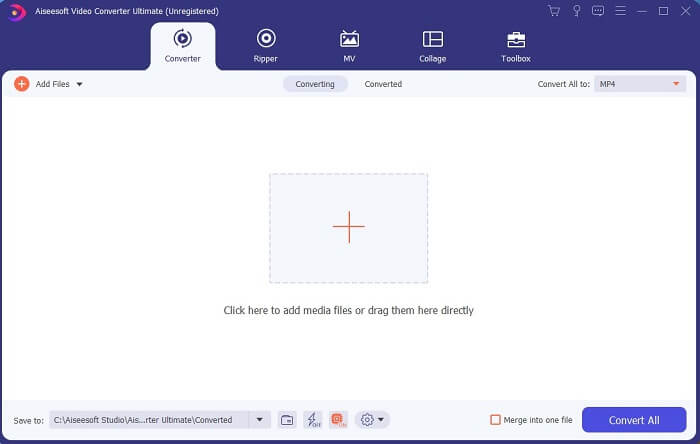
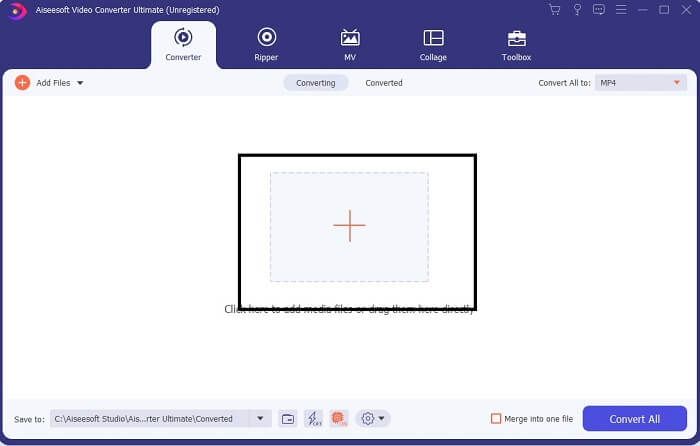
שלב 3. לחץ על סימן הפלוס כדי להוסיף את הקובץ ולחץ על "פתח" כדי להתחיל בהמרה, או שפשוט תוכל לגרור ולשחרר את קובץ הווידאו אל תוך הכלי. אורך הווידאו לא משנה כלל.
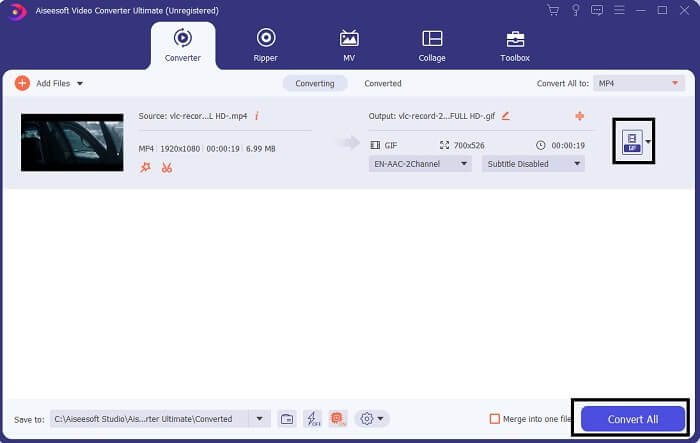
שלב 4. לחץ על כפתור ה־drop-down בצד הימני העליון של הממשק, גלול מטה ולחץ על פורמט GIF. בחר את הרזולוציה שברצונך; היא יכולה להיות גדולה, בינונית או קטנה. אם הכול מוכן, לחץ על Convert All כדי להתחיל בהמרה.
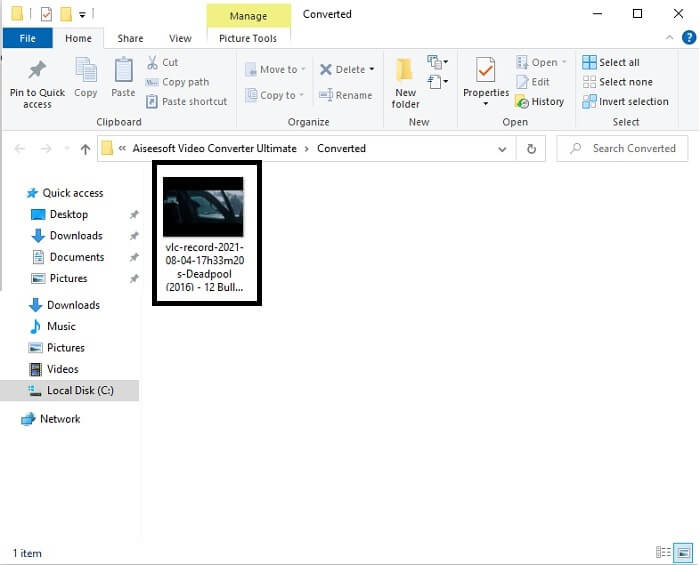
שלב 5. לאחר ההמרה, מנהל קבצים יקפוץ אליך ויציג את הפלט הסופי, וכעת תוכל ליהנות מפורמט ה־GIF שלך. אבל אתה יכול גם להמיר קובץ .gif לקובץ .mpg באותם שלבים, רק עם שינוי הפורמט.
2. FVC Free Online Video Converter
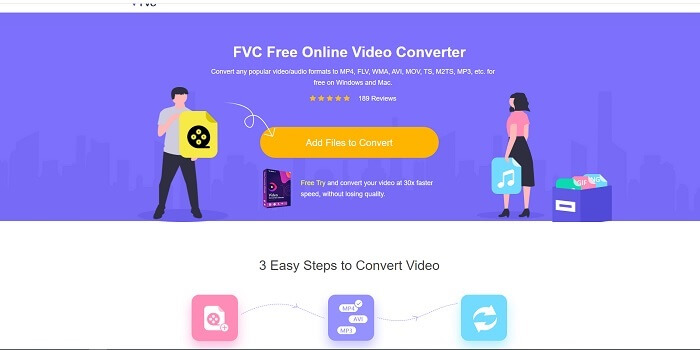
אולי אתה חושב, מה אם אין לך כסף האם אני עדיין יכול לחוות את אותה המרה כמו הראשונה? התשובה היא כן שמן גדול. FVC תמיד מספקת את החוויה הטובה ביותר ללקוחות שלה שאין להם כסף וגם למי שרוצה לנסות את הכלי שלהם. אמנם, כלי זה מבצע המרה פשוטה בלבד, אז אל תצפה ליותר מדי כפי שגרסת הפרימיום יכולה לספק. וזה לא יכול להמיר פורמטי וידאו ואודיו מרובים בצורה מהירה יותר.
אבל תהליך ההמרה שהוא מספק טוב בהרבה מזה של ממירי פרימיום אחרים וממירים חינמיים. FVC Free Online Video Converter כאן כדי להציל את היום שלך. כפי שנאמר בשמו, זהו כלי מקוון חינמי המאפשר לך להמיר ברמה המקסימלית. שלא כמו ממירים אחרים, לכלי זה אין פרסומות או תוכנות זדוניות, אין צורך ברישום, התחברות או מסירת מידע אישי לפני השימוש. אם אתה מחפש ממיר פשוט, זה הכלי המתאים לך. עקוב אחר שלבים אלה כדי לדעת איך הכלי הזה פועל כממיר.
שלב 1. עבור לאתר הרשמי על ידי לחיצה על קישור זה.
שלב 2. דף האינטרנט אמור להיראות כך. לאחר מכן לחץ על Add Files to Convert כדי להפעיל את הכלי המקוון.
הורד את גרסת הדסקטופ כדי להמיר קבצים במצב אצווה.
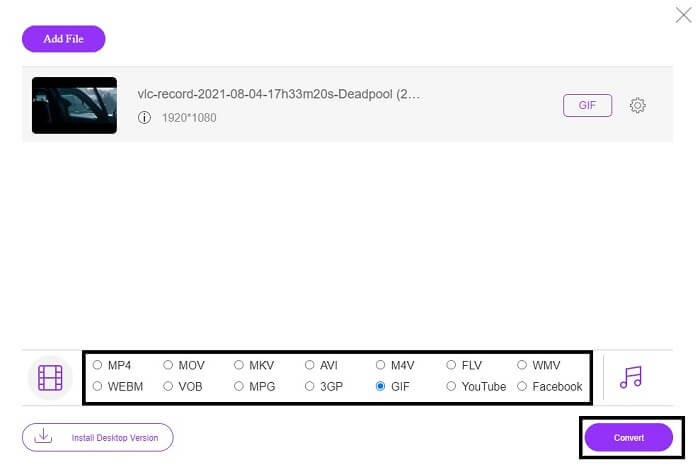
שלב 3. בחר את הווידאו שברצונך להמיר. לאחר בחירת הווידאו, בחר את פורמט הקובץ GIF. למידע נוסף, תוכל לבחור גם פורמטי וידאו ואודיו נוספים; תוכל לבדוק אותם אחר כך אם תרצה.
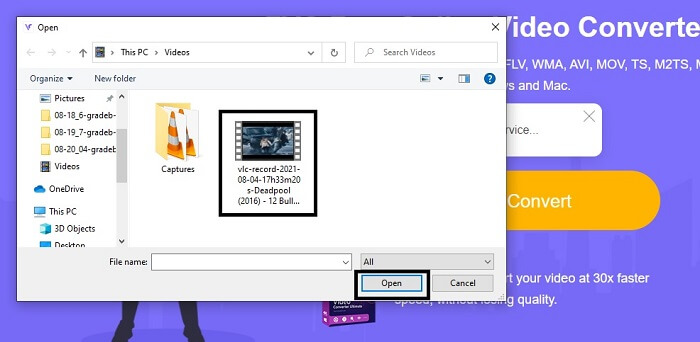
שלב 4. בחר היכן תרצה לשמור את הפלט הסופי. אם הכול מוכן, לחץ על Convert כדי להתחיל בהמרה. ההמרה תסתיים בתוך כמה שניות.
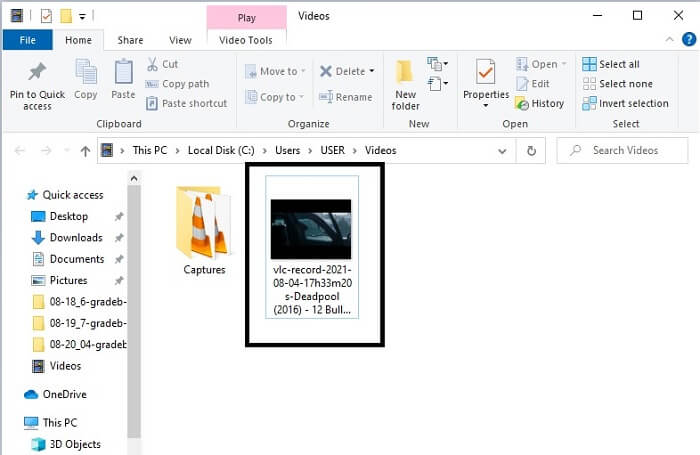
שלב 5. כדי לבדוק שההמרה הצליחה, תוכל לאתר את קובץ ה־GIF שהומר במנהל הקבצים או בסייר הקבצים שלך. לחץ עליו ותהנה.
3. נגן מדיה VLC
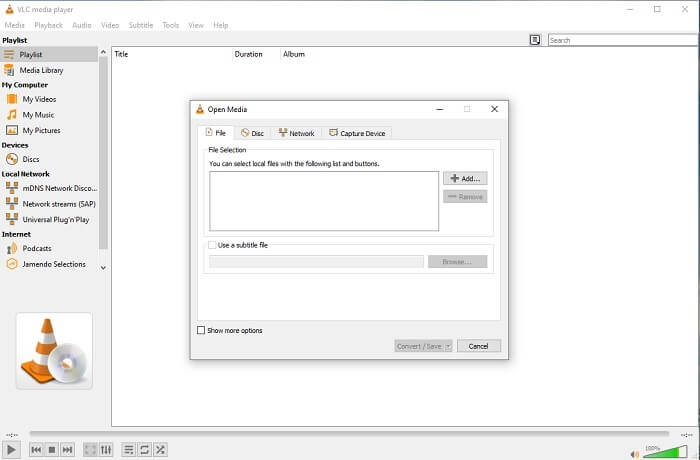
הכלי הזה ידוע כאחד מנגני המדיה החזקים ביותר. אבל האם ידעת ש־נגן VLC יכול גם להמיר MPG ל־GIF? עם זאת, הפורמטים שהוא מספק מוגבלים רק לפורמטים מוכרים. למרות שמדובר בנגן המדיה הטוב ביותר, יכולת ההמרה שלו אינה הבחירה הטובה ביותר עבורך. לכן, אם אתה רוצה ממיר טוב יותר, עליך לבחור ב־כלי המקוון לעיל במקום בכלי זה. אבל אם אתה רוצה לצפות בווידאו, אז VLC Media Player הוא הבחירה שלך, משום שהכלי האחר לא מספק נגן וידאו כי המטרה העיקרית שלו היא המרה.
4. זמזר
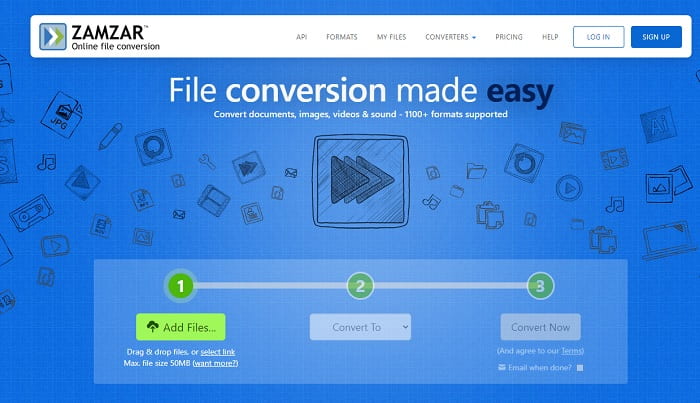
כלי מקוון נוסף שמספק המרה מצוינת הוא Zamzar. כמו כל ממיר מקוון אחר, הם חולקים את אותו ממשק, והוא גם מספק הנחיות נקודתיות כיצד להמיר אותו. אבל תהליך ההמרה וההורדה שונה. למרות הגרסה החינמית, אתה יכול רק להמיר גודל מקסימלי של 50 MB. כי אחרי שהמרת את הסרטון, עליך לעבור לשלב ההורדה שלו. זה הרבה טרחה למי שעוזב את ההמרה שלו ופשוט מחכה שהמוצר ישוחק.
חלק 2. טבלת השוואה
| תכונה/ים של הכלי | ממיר וידיאו אולטימטיבי | FVC Free Online Converter | נגן מדיה VLC | זמזר |
| מֵמִיר |  | | | |
| כלי עריכה | |  | | |
| ממיר רב עוצמה | | | | |
| יש צורך בהרשמה | | | | |
| פלטפורמות | אפליקציה מבוססת שולחן עבודה | אפליקציה מבוססת אינטרנט | אפליקציה מבוססת שולחן עבודה | אפליקציה מבוססת אינטרנט |
| טווח מחירים | $25.00 חודש אחד/מחשב אחד $55.20 רכישה חד פעמית עבור מחשב אחד $119.00 לכל החיים 5 מחשבים אישיים | זהו כלי מקוון בחינם | זהו כלי מקוון בחינם | כלי מקוון בחינם אבל זה גם מספק פרמיה חודשית. לבסיס: $9 למקצוענים: $16 לעסקים: $25 |
MPG לעומת GIF
מיוצר על ידי Moving Picture Experts Group (MPEG), MPG הוא פורמט וידאו דיגיטלי נפוץ לאחסון מידע וידאו, אודיו ומטא נתונים. זה די שימושי בעת יצירת סרטים לשיתוף באינטרנט. קבצים אלה ב-MPG מכילים בדרך כלל דחיסת וידאו/שמע MPEG-1 או MPEG-2.
GIF הוא פורמט תמונה נפוץ עבור גרפיקת אינטרנט. מלבד שמירת תמונות קטנות ותמונות המכילות טקסט, GIF יכול גם להכיל ולהציג אנימציות בסיסיות באתרי אינטרנט. זהו פורמט ללא אובדן, ודחיסת ה-GIF אינה פוגעת בבהירות התמונה.
חלק 3. שאלות נפוצות אודות MPG ל-GIF
האם יש דרך להשתמש בפוטושופ ולהמיר וידאו ל-GIF?
כן, ניתן להמיר MPG ל־GIF באמצעות Photoshop. אבל לא רק קובץ בפורמט MPG — אתה יכול גם לבחור פורמטים אחרים ולהמיר אותם ל־GIF. מאפיין מיוחד נוסף שלו הוא שתוכל גם לשפר את ה־GIF כדי שיהיה טוב יותר. לחץ כאן כדי ללמוד איך להמיר MP4 ל־GIF.
מהו הכלי הטוב ביותר להקלטת מסך להקלטת GIF?
כלי ההקלטה הטוב ביותר למסך שתוכל להשתמש בו למשימה זו הוא FVC Screen Recorder. הכלי הזה לא רק מצטיין בהקלטת וידאו; יש לו גם מקליט אודיו מובנה ומקליט משחקים לקבלת חוויית גיימינג איכותית יותר. עם זאת, כלי זה דורש תשלום לפני השימוש. אל תתאכזב, כי יש לו כלי מקוון שיכול לבצע את ההקלטה.
מדוע נוצר ה-GIF?
הוא נוצר כדי להציג תמונה תוך חיסכון בנפח אחסון. יוצר ה־GIF הוא סטיב וילהייט, מדען מחשבים אמריקאי, בעזרת ענקית הטכנולוגיה CompuServe בסוף 1987. לחץ כאן כדי ללמוד עוד מידע על קובצי GIF.
סיכום
סוף סוף, עכשיו כשאתה יודע איך לעשות GIF על עצמך כדאי שתנסה אותו ותהנה. רק על ידי שימוש בכלי הקל הזה, אתה יכול לעשות את ההבדל. במקום לחפש באינטרנט, אתה כעת יצרן GIF מוסמך. כמו כן, כעת תוכל לבטא את רגשותיך בדרכך שלך עם המגע האישי והמומחיות שלך שפותחו רק על ידי קריאת מאמר זה. מקווה שתוכל ליהנות מהחיים של GIF טוב יותר שאתה יוצר ולשתף את ה-GIF הטוב ביותר שלך לעולם.
-
 [מדריך] כיצד להמיר סרטוני M4V לקובצי GIF מונפשים ב-Windows/Mac
 אם אתה רוצה ליצור קובצי GIF מונפשים מסרטוני M4V המועדפים עליך, תוכל ללמוד על 2 דרכים פשוטות ויעילות להמיר קטעי וידאו M4V ל- GIF עם הגדרות מותאמות אישית.
-
 WebM ל- GIF - 3 ממירים WebM ל- GIF בחינם ליצירת קובצי GIF משלך
 האם WebM הוא קובץ GIF? כיצד להפוך סרטון ל- GIF? האם יש ממיר WebM ל- GIF בחינם? פוסט זה חולק 3 דרכים חינמיות לעזור לך להמיר WebM ל- GIF.
-
 כיצד להמיר סרטי MKV ל- GIF מונפש ללא Photoshop/FFmpeg
 לאחר הורדה וצפייה של סרטי MKV במחשב שלך, ייתכן שתרצה לשתף כמה רגעים נפלאים עם חברים או באינטרנט כקבצי GIF. במאמר זה תוכלו ללמוד על 2 הדרכים הקלות ביותר להמיר MKV ל- GIF.

