


 ממיר וידאו אולטימטיבי
 מקליט מסך
 תיקון וידאו
 הורדה מאובטחת
מהו ממיר HEIC בחינם של Apowersoft וממירי HEIC חלופיים לשימוש
מאז שאפל הציגה את פורמט התמונות המתקדם החדש HEIC, רבים מאיתנו אהבו אותו משום שהוא יכול להכיל תמונה ברזולוציה גבוהה יחד עם גודל קובץ מוקטן. למרות שהיכולת לדחוס את גודל הקובץ מרשימה, אסור לנו לשכוח שמדובר בפורמט תמונה חדש, וכל הפלטפורמות שאינן קשורות לאפל אינן תומכות בו. לכן, אם ברצונך שתיקיית ה‑HEIC תהיה מתאימה למקבל, יהיה עליך להמיר את הפורמט ל‑JPEG, במיוחד אם המקבל אינו משתמש ב‑iOS או במק אוֹ־אס. בעזרת Apowersoft Free HEIC Converter באפשרותך לבצע את המשימה במהירות, אך לפני ההורדה, לפניך סקירה של ממיר זה שכדאי לקרוא תחילה כדי לעזור לך להחליט מהר יותר.

חלק 1. השלם סקירת ממיר HEIC בחינם של Apowersoft
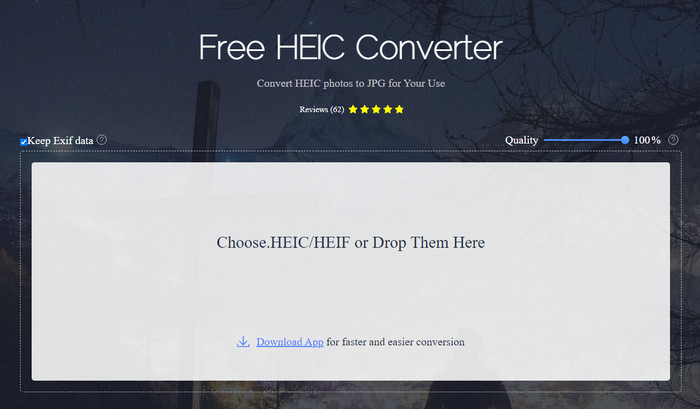
כפי שהשם מרמז, Apowersoft HEIC Converter מעניק לך אפשרות להמיר את קובץ ה‑HEIC שלך לפורמט JPEG תואם – בחינם. במקום להוריד ממיר לא אמין למחשב השולחני, באפשרותך להשתמש בכלי זה מיד, ללא הורדה או התקנה של משאבים נוספים. הגישה לכלי האינטרנט בטוחה מכיוון שהחיבור שלך מוגן בזמן שאתה באתר הרשמי שלהם. תוכל להעלות את קובץ ה‑HEIC בקלות באמצעות גרירה ושחרור לכאן. אבל מה הופך את הממיר המקוון לייחודי לעומת ממירים אחרים שניתן להשתמש בהם ברשת או על שולחן העבודה? הנה התכונות המרכזיות שתוכל ליהנות מהן אם תחליט להשתמש בו.
תכונות מרכזיות של Apowersoft Free HEIC Converter:
◆ אין צורך להוריד את הממיר מכיוון שאתה יכול לגשת לתוכנה באינטרנט.
◆ זה אכן תומך בהמרת קבצי HEIC באצווה או בנפרד לפורמט JPEG.
◆ בצע מניפולציות באיכות התמונה לפני שההמרה זמינה.
◆ לאחר ההמרה, ניתן לשמור את אותו קובץ EXIF בקובץ JPEG.
◆ המר את קובץ ה-HEIC באופן אוטומטי מבלי לבצע שלבים נוספים.
יתרונות
- ממשק כלי האינטרנט הוא די הגון והסתכלות כללית.
- תמונה באיכות גבוהה נשארת לאחר המרת הקובץ ל-JPEG.
- המרת קבצי אצווה קלה מכיוון שהיא תומכת בהמרת הקובץ בו זמנית.
חסרונות
- למרות שכתוב שהוא שומר את המטא נתונים, לפעמים המטא נתונים אובדים לאחר המרת הפורמט.
- פורמט הפלט מוגבל לאחד, וזה JPEG.
- הפונקציות מוגבלות.
חלק 2. 3 מהחלופות הטובות ביותר לממיר HEIC בחינם של Apowersoft באינטרנט ובאופן לא מקוון
ממיר HEIC ל- JPG ללא FVC
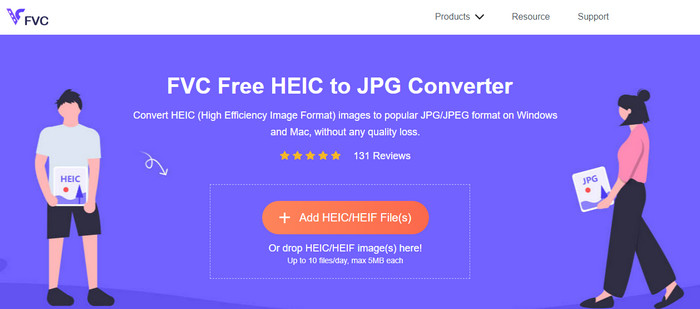
FVC Free HEIC to JPG Converter הוא התחליף הטוב ביותר ל‑Apowersoft free HEIC to JPG converter מפני שיש לו ממשק אינטואיטיבי שיעזור לך לסיים את המשימה בתוך שניות. עם ממיר מקוון כמו זה, אינך צריך להוריד את הכלי עצמו כדי להשתמש בו, אך תידרש להוריד את המשגר שלו. אף על פי שחובה להוריד את המשגר, לממיר זה עדיין יש יתרון במהירות ההמרה. גם אם אין לך ניסיון בהמרת HEIC ל‑JPG, בעזרת כלי זה תוכל לבצע את המשימה בקלות וביעילות ללא צורך במדריכי שימוש.
עד כה, כלי האינטרנט טיפל במשימה כמו שאף ממירים מקוונים אחרים. אבל אנחנו לא יכולים להתעלם מהעובדה שלכלי אינטרנט זה יש מגבלות, כמו גודל הקובץ של כל קובץ והקבצים המותרים שאתה יכול להעלות ביום. אבל אם אינך רוצה שיהיו לך מגבלות אלו, אנו ממליצים להוריד את גרסת שולחן העבודה שלו - Aiseesoft HEIC Converter. תוכנה זו זמינה עבור שתי מערכות ההפעלה, כגון Windows ו-Mac.
HEICtoJPEG.com
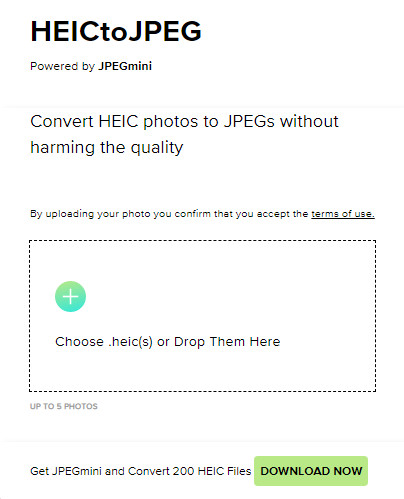
HEICtoJPEG.com הוא תחליף נוסף ל‑Apowersoft HEIC Converter שניתן לגשת אליו ברשת בחינם ובאופן בטוח. כמו הכלי שאותו אנו סוקרים, גם כאן תוכל להמיר את קובצי ה‑HEIC שלך ל‑JPEG בלבד. לכן, אם ברצונך להמיר ישירות את פורמט ה‑HEIC ל‑JPEG ללא התאמת האיכות, עליך להשתמש בכלי זה. לאחר פתיחת כלי האינטרנט, באפשרותך לגרור ולשחרר לכאן את הקובץ, ותהליך ההמרה יתחיל אוטומטית. בנוסף, ניתן לבצע המרת HEIC בכמות גדולה באמצעות כלי אינטרנט זה, והוא אף אינו מוגבל בשימוש יומי.
בסך הכל, כלי האינטרנט נהדר מכיוון שהוא תומך בהמרת אצווה לתהליך מהיר. עם זאת, אינך יכול לתמרן ידנית את ההגדרה המתקדמת לפני המרת הפורמט ל-JPEG כפי שהכלי המקוון האחר יכול לעשות. למרות שכלי האינטרנט אינו בחירה מקצועית, הוא עדיין הטוב ביותר למתחילים כמונו שרוצים לבצע המרה פשוטה ב-HEIC שלנו.
ממיר תמונה של Pixillion
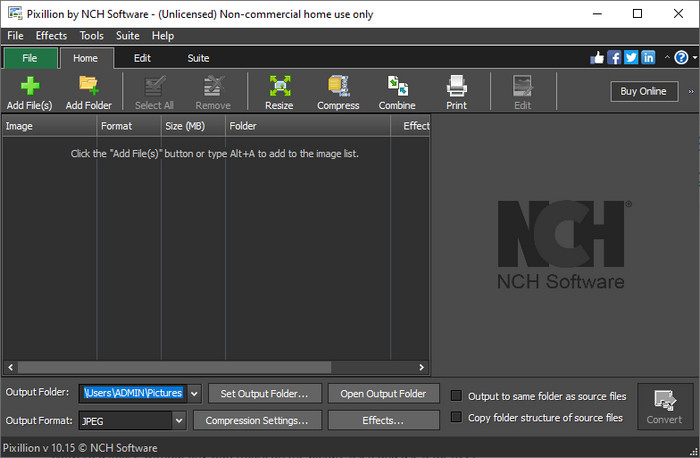
נניח שחיבור האינטרנט שלך אינו יציב, ולכן אינך יכול להשתמש ב‑Apowersoft Free HEIC Converter משום שהכלי מבוסס אינטרנט. האם עדיין ניתן להמיר? כן, באמצעות Pixillion Image Converter. תוכנה לא־מקוונת זו מאפשרת לך להמיר את התמונה שלך למגוון רחב של פורמטי פלט כגון JPG, BMP, PNG ועוד. עם כלי כזה, תוכל להתאים את תמונת ה‑HEIC לפני הייצוא; באפשרותך לשנות גודל, לדחוס, לערוך ועוד – הרבה מעבר למה שכלי האינטרנט שהצגנו יכול להציע לך.
לא משנה קובץ התמונה שאתה מעלה, אתה יכול בקלות להמיר את הפורמט לפלט הרצוי ולהפוך אותו לתואם למכשיר הנוכחי שלך. נהדר, לא? כן זה כן. אבל לפני שתוכלו להשתמש בו, תצטרכו להוריד את התוכנה ולהתקין אותה, וזה קצת בעייתי כי זה עוד שלב, במיוחד אם אתם רוצים להמיר קובץ HEIC בודד לפורמט JPG או אחר. עם זאת, הכלי נהדר, והוא בחינם להורדה במערכת ההפעלה Windows שלך.
קשור:
חלק 3. שאלות נפוצות על סקירת Apowersoft HEIC Converter
האם לייצוא קובץ ה-HEIC שהומר ב-Apowersoft Free HEIC Converter יש סימן מים?
למרבה המזל הקובץ שתמיר כאן לא ישאיר סימן מים על התמונה שלך. אז אתה יכול ליהנות מהתמונה המומרת ללא שום סימן מים על התמונה עצמה ולהשתמש בה בחינם.
האם אני צריך להתחבר כדי להשתמש בממיר Apowersoft HEIC?
אתה יכול להתחבר כדי לבדוק את חשבונך, אך לא תצטרך להתחבר אם תרצה להשתמש בממיר המקוון. אז אתה יכול להשתמש בו מיד על ידי גרירה ושחרור שלו באתר הרשמי של הכלי והמרתו אוטומטית.
סיכום
לאחר סקירת Apowersoft HEIC Converter, אנו יודעים כעת אם זה הממיר הטוב ביותר שאנו חייבים להשתמש בו כדי לפתור את בעיית ה-HEIC שלנו על ידי המרת הפורמט ל-JPG. למרות שהכלי האינטרנטי חופשי לשימוש ונגיש באינטרנט, אנו עדיין כוללים כמה חסרונות במאמר זה. אז אם אתה חושב שזה לא הכלי בשבילך, שלושת האלטרנטיבות עשויות למלא את החסר שתצטרך בממיר שלך שהממיר שאנו בודקים לא יכול לתת לך. אבל אם כל אלה לא מספיקים, אנו מציעים להוריד את הכלי האולטימטיבי שיכול להמיר את קובץ ה-HEIC שלך ל-JPEG או PNG. רוצה לדעת מה זה? לאחר מכן עליך ללחוץ על כפתור ההורדה שהוספנו למעלה כדי שיהיה לך בהישג יד בין אם אתה משתמש ב-Windows או ב-Mac.
-
 הדרכים הטובות ביותר לערוך מטא נתונים של MKV כמו מקצוען [קל]
 אין לך מושג איך לערוך מטא נתונים של MKV? חלק מהמשתמשים מתקשים לערוך את התגים ב-MKV, אם אתה אחד מהם אז קרא את המאמר הזה.
-
 3 עורכי המטא נתונים המובילים של FLAC ב-Mac ו-Windows [עודכן 2023]
 האם ברצונך לשנות מטא נתונים של FLAC? במקרה זה, עליך לקרוא מאמר זה מכיוון שאנו מספקים ידע מספיק על עורך המטא נתונים העדכני ביותר של FLAC שניתן להשתמש בו.
-
 הטכניקה הטובה ביותר כיצד לערוך מטא נתונים של WebM במהירות
 קרא את הפרטים המלאים שסיפקנו להלן בזמן שאנו מכניסים מדריך כיצד לערוך מטא נתונים של WebM. לחץ על קישור זה כדי לדעת יותר על זה.
