


 ממיר וידאו אולטימטיבי
 מקליט מסך
 תיקון וידאו
 הורדה מאובטחת
כיצד להמיר BMP ל-PNG ו-JPGU באמצעות ממירים מקוונים ולא מקוונים
תבנית מפת הסיביות (Bitmap או BMP) איננה אופטימלית עבור תמונות צבעוניות עם שילובים או מעברי גוון. כיום כמעט לא תראו בה הרבה תמונות. מבחינה טכנית, BMP היא תבנית מיושנת עם כמעט בלי דחיסה. לכן, אם ברצונכם לפתוח תמונות BMP בלי הגבלות, עליכם להמיר קבצי BMP לתמונות בפורמטים נפוצים. ניתן להמיר בין כמה פורמטי תמונה בדרכים רבות. במאמר זה נציג את הגישות הפשוטות והישירות ביותר. אם כן, אם אתם רוצים לדעת כיצד להמיר BMP ל‑JPG או PNG, קראו את המדריך הזה. נציג ממירי תמונה מצוינים שיכולים לעזור לכם.

חלק 1. BMP לעומת JPG מול PNG
| פורמט קובץ | BMP | JPG | PNG |
| סיומת שם קובץ | .bmp | .jpg | .png |
| פותח על ידי | מיקרוסופט | קבוצת מומחי צילום משותפת | קבוצת פיתוח PNG |
| תיאור | א BMP הקובץ הוא קיצור של מפת סיביות והוא מבוטא bump. מיקרוסופט יצרה את פורמט הקובץ BMP עבור מערכת ההפעלה Windows שלה. זה לשמור על הרזולוציה של תמונות דיגיטליות על מסכים וגאדג'טים שונים. ניתן לאחסן תצלומים דו מימדיים בצבע וגם בשחור לבן. קבצי BMP כבר לא תואמים רק למכשירים מבוססי Windows בזמנים המודרניים. כעת הם תואמים למספר רב של מכשירי Mac ו-Android. | ה JPG פורמט קובץ התמונה הוא הפורמט היעיל ביותר לדחיסת תמונה. משתמשים עושים שימוש נרחב בקובצי JPG. זה מכונה גם קבצי JPEG או JPG. קבוצת המומחים המשותפת היא השם המלא של JPEG. בנוסף, לרוב תמונות מפת הסיביות יש את סיומת הקובץ.jpg. המטרה העיקרית היא להקטין את הקבצים בגודלם. מכיוון ש-JPG הוא פורמט מאבד, לדחיסה מוגזמת יש השפעה על איכות התמונות. | גרפיקת רשת ניידת, א PNG הרחבה למשפחת הרסטר, המבצעת דחיסה ללא הפסדים. הוא פותח כדי להחליף את ה-GIF, פורמט ה-Graphics Interchange, ואינו מוגן בפטנט. הם יכולים להתבסס על לוח צבעים, ובדרך כלל תמונות בגווני אפור המציעות שקיפות. PNG הוא דחיסה ללא הפסדים. זה מרמז שהוא שומר על מידע, פרטים ואיכות. |
חלק 2. שיטות מקוונות להמרת BMP ל-JPG/PNG
המר BMP ל-JPG/PNG באמצעות FVC Free Image Converter
כדי להמיר BMP ל‑JPG אונליין בחינם, תוכלו להשתמש ב־FVC Free Image Converter. לכלי המקוון הזה יש תהליך המרה פשוט במיוחד להמרת BMP ל‑PNG או JPG. בזכות הממשק האינטואיטיבי שלו, גם משתמשים מתקדמים וגם משתמשים ללא ניסיון יכולים להיעזר בו. ניתן להמיר תמונות בשלושה צעדים בלבד. בנוסף, תוכלו להעלות תמונות בפורמטים שונים. הוא תומך בקלט בפורמטים כמו PNG, JPG, BMP, GIF, TIFF ועוד. נוסף על כך, ממיר קבצי התמונות של FVC תומך בהמרה באצוות. הוא מאפשר לכם להמיר מספר גדול של תמונות בבת אחת. זה יעיל ומעשי הרבה יותר מממירי תמונות אחרים בשוק. הוא נוח לכל המשתמשים, משום שניתן להמיר עד 40 קבצי תמונה בו־זמנית.
FVC Free Image Converter מבטיח תמונה באיכות גבוהה. לאחר ההמרה, התמונה עדיין תיראה זהה למקור. יתרה מכך, לא תראה מודעות מטרידות על המסך שלך, גם אם מדובר בממיר תמונות מקוון. בדרך זו, תוכל להתמקד יותר בהמרת התמונות שלך. ממיר זה זמין כמעט בכל הדפדפנים. הוא כולל את Chrome, Safari, Edge, Firefox ועוד. אתה יכול לבצע את השלבים הפשוטים שלהלן כדי להמיר BMP לפורמט JPG ו- PNG.
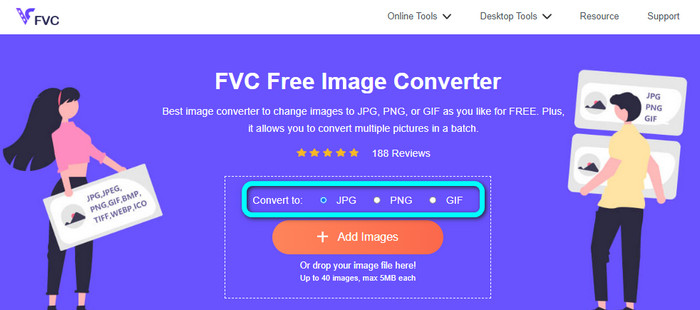
שלב 1: היכנסו לדפדפן ובקרו באתר FVC Free Image Converter. מצאו את האפשרות Convert to ובחרו את הפורמט הרצוי. תוכלו ללחוץ על JPG או על PNG.
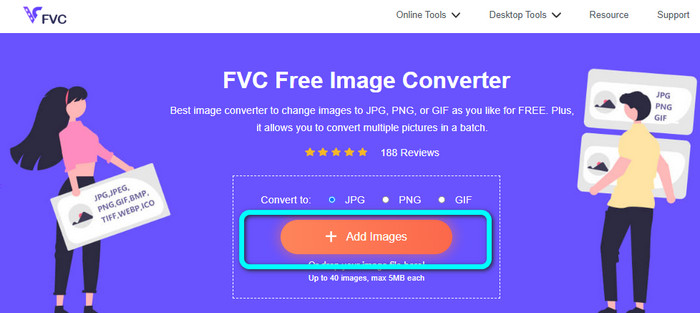
שלב 2: הוסיפו את תמונת ה‑BMP על‑ידי לחיצה על כפתור Add Images. חלון קבצי המחשב יופיע על המסך. בחרו את קובץ התמונה BMP שברצונכם להמיר.
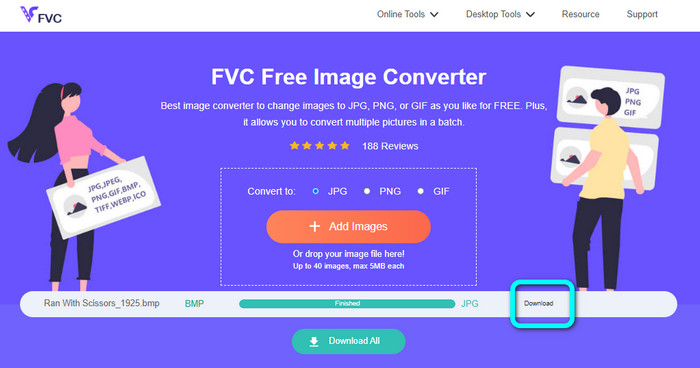
שלב 3: לאחר ההעלאה, הכלי ימיר את התמונה באופן אוטומטי. לכן, בשלב האחרון, לחצו על כפתור Download כדי לשמור את התמונה על שולחן העבודה שלכם.
המר BMP ל-JPG/PNG באמצעות Convertio
Convertio הוא כלי מקוון נוסף להמרת BMP ל־JPG או PNG. זהו ממיר קבצים שמאפשר לכם להמיר פורמטים שונים. הוא כולל BMP, JPG, PNG, GIF, SVG ועוד. בעזרת הכלי הזה, המרת מספר רב של תמונות נעשית קלה. הוא גם מציע תהליך המרה באצווה. כך תוכלו להמיר BMP ל‑JPG באצוות כדי לחסוך זמן. בנוסף, Convertio מבטיח את הפרטיות שלכם. לאחר המרת התמונות, הוא מוחק את הנתונים שלכם אוטומטית לאחר 24 שעות. כמו כן, ניתן לגשת לממיר הזה מדפדפנים שונים, כגון Google, Mozilla, Edge ועוד.
עם זאת, ל- Convertio יש חסרונות. אתה יכול להעלות תמונה עד 100MB בלבד. אם אתה רוצה להעלות גודל קובץ בלתי מוגבל, קנה תוכנית מנוי. אתה צריך גם חיבור לאינטרנט כדי להפעיל ממיר זה.
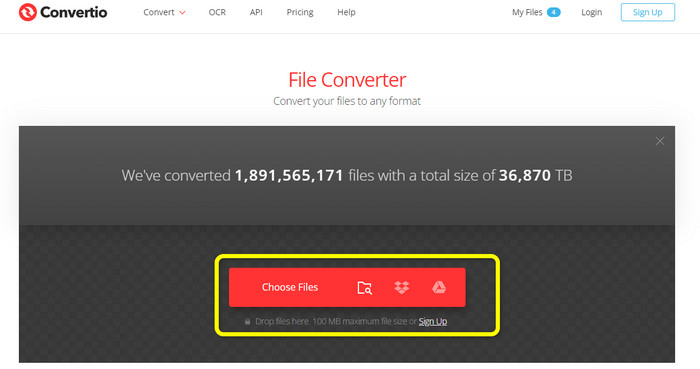
שלב 1: בקרו באתר Convertio. לחצו על כפתור Choose Files כדי להוסיף את קובץ תמונת ה‑BMP.
שלב 2: בחרו את פורמט הקובץ JPG או PNG מתוך אפשרויות הפורמט. אם ברצונכם להוסיף תמונות נוספות, לחצו על כפתור Add more files.
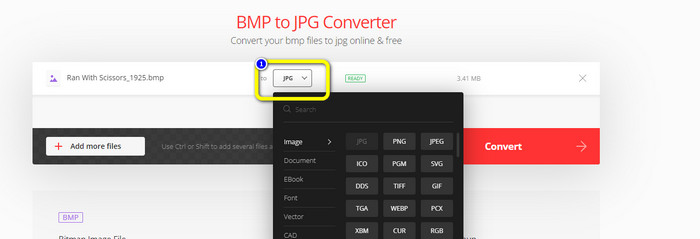
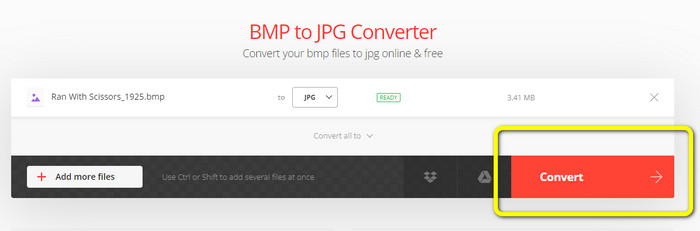
שלב 3: לאחר בחירת פורמט הקובץ הרצוי, לחצו על כפתור Convert. המתינו לתהליך ההמרה והורידו את התמונות למחשב שלכם.
חלק 3. שיטות לא מקוונות להמרת BMP ל-JPG/PNG
באפשרותכם גם להשתמש ב־Video Converter Ultimate כדי להמיר BMP ל‑JPG. לממיר הלא־מקוון הזה יש שיטת המרה ברורה להבנה. יש לו גם ממשק אינטואיטיבי, מה שהופך אותו למתאים לכל המשתמשים, במיוחד למתחילים. Video Converter Ultimate מציע תהליך המרה באצווה, כלומר תוכלו להמיר מספר תמונות בו־זמנית. הוא מציע גם תהליך המרה מהיר, כך שתוכלו להמיר קבצים רבים מידית. בנוסף, הוא תומך בפורמטי תמונה שונים, ביניהם JPG, BMP, PNG, GIF, TIFF ועוד. מעבר להמרה, ניתן גם לשנות את איכות התמונה מתוך הגדרות הפלט. כך תוכלו להתאים את איכות התמונה לפי ההעדפה שלכם. נוסף על כך, ניתן להשתמש בממיר להורדה זה גם במחשבי Mac וגם ב‑Windows. עקבו אחר ההוראות הבאות כדי להמיר את קובץ ה‑BMP שלכם לפורמט JPG או PNG.
שלב 1: הורידו את Video Converter Ultimate למחשב ה‑Mac או ה‑Windows שלכם. הפעילו את התוכנה לאחר סיום ההתקנה. אנו מספקים גם קישור לממיר על‑ידי לחיצה על כפתור Download למטה.
הורדה חינמיתל-Windows 7 ומעלההורדה מאובטחת
הורדה חינמיתל-MacOS 10.7 ומעלההורדה מאובטחת
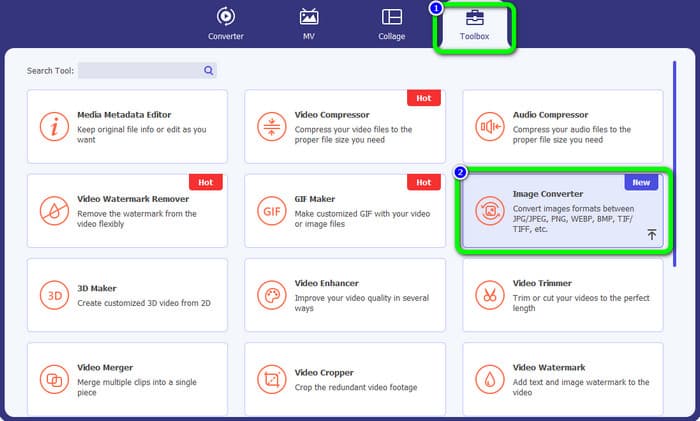
שלב 2: עברו ללשונית Toolbox ובחרו את הכלי Image Converter. ממשק נוסף יופיע.
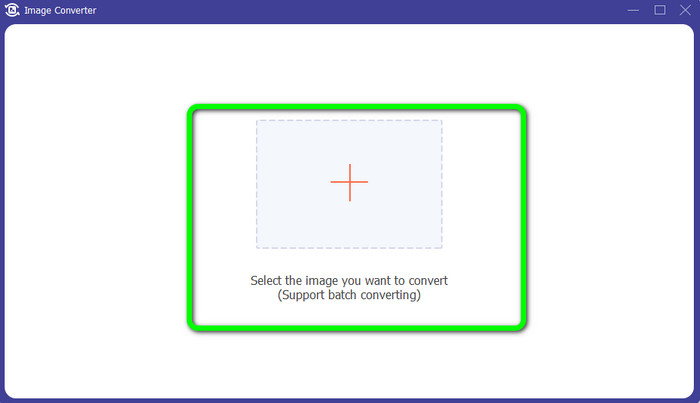
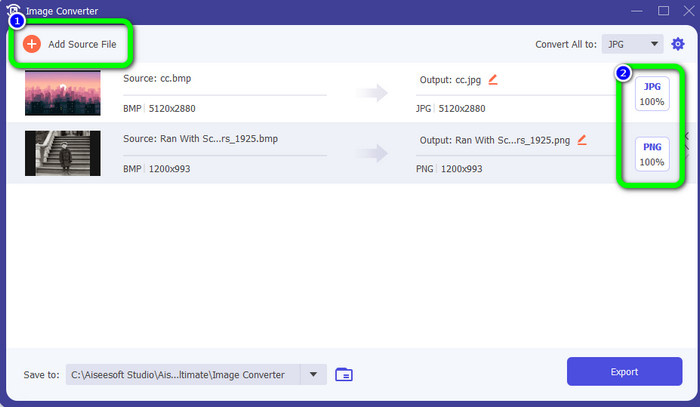
שלב 3: לחצו על סמל הPlus . לאחר מכן, בחרו מתיקיית הקבצים את תמונת ה‑BMP שברצונכם להמיר.
שלב 4: לחצו על כפתור Add Source File כדי להוסיף עוד קבצים. לאחר מכן, עברו לאפשרות הפורמט כדי לבחור את פורמט הפלט הרצוי. תוכלו לבחור בפורמטים PNG ו‑JPG.
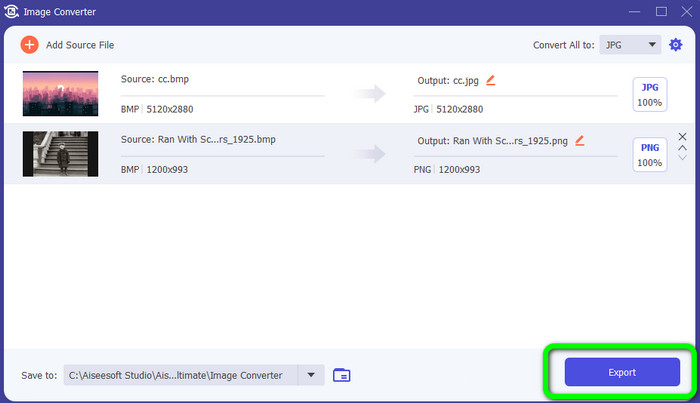
שלב 5: בשלב הסופי, לחצו על כפתור Export. המתינו לתהליך ההמרה. לאחר מכן פתחו את התמונות שהומרו מתוך התיקייה שלכם.
חלק 4. שאלות נפוצות לגבי המרת BMP ל-JPG/PNG
1. כיצד להמיר BMP ל-PNG?
אם ברצונכם לבצע המרה באצווה, השתמשו ב־FVC Free Image Converter. תחילה בחרו בפורמט PNG מתוך האפשרות Convert to. לאחר מכן, לחצו פשוט על כפתור Add Images. תוכלו להוסיף מספר קבצי תמונה. הכלי מאפשר להעלות עד 40 תמונות בבת אחת. לאחר תהליך ההעלאה, הכלי ימיר את קבצי התמונות שלכם באופן אוטומטי. לסיום התהליך, לחצו על כפתור Download All כדי לשמור אותם על שולחן העבודה שלכם.
2. האם ניתן להנפש קובץ BMP?
למרבה הצער לא. אנימציה לרוב אינה תואמת לקובצי BMP. במקום להשתמש ב-Flash, חשבו על שימוש בפורמט הקובץ GIF. זה יכול ליצור אנימציות קצרות ופשוטות שניתן לשתף ולשמור.
3. מה יותר גדול, קובץ BMP או קובץ JPEG?
BMP יהיה גדול יותר בהינתן תמונות דומות. אבל BMP יכול להיות רק עד 4GB בגלל מגבלות גודל. הגודל של JPEG אינו מוגבל. לדוגמה, תמונות לוויין מסוימות זמינות בפורמט JPEG.
סיכום
מכיוון שקובץ BMP גדול יותר בנפח שלו, חשוב להמיר אותו לפורמטים אחרים כמו JPG ו‑PNG. אפשר לשמוח על כך שהמאמר סיפק שיטות מצוינות ל־המרת BMP ל‑JPG ו‑PNG. אך אם אתם מעדיפים דרך קלה וחינמית להמיר תמונות, השתמשו ב־FVC Free Image Converter.
-
 דרכים בקנה מידה מלא להמרת JPG ל-PNG באופן מקוון ולא מקוון
 מחפש שיטות שימושיות להמרת קובץ JPG לפורמט PNG? לפוסט המדריך הזה יש את התשובה שאתה צריך. כדי לגלות את השיטות הללו, קרא את המאמר
-
 המר JPEG ל-JPG ביעילות [חמש שיטות מפורטות]
 בוא וקבל את המדריכים הפשוטים ביותר על המרת פורמט קובץ תמונה JPEG ל-JPG. לחץ על פוסט מדריך זה והתחיל ללמוד את השיטות המועדפות עליך
-
 5 הדרכות המובילות להמרת PNG ל-JPG במהירות
 אם אתה צריך להמיר את קובץ ה-PNG שלך לפורמט JPG, תוכל ללמוד את הדרכים הטובות ביותר כאן. תלמד גם את ההבדל בין פורמטים של קבצי PNG ו-JPG
