


 ממיר וידאו אולטימטיבי
 מקליט מסך
 תיקון וידאו
 הורדה מאובטחת
למד את השיטות המושלמות כיצד ליצור כתובת URL מתמונה
Nowadays, image file formats have become popular. These formats are one of the best ways to share and open images in different browsers and programs. However, there are some instances when you can’t share your images, no matter what extension you use. This situation might be troublesome for other people. But little did we know there was a solution to this type of struggle. If you want to share your photos everywhere and anywhere, the best way is to transcode the image into the URL. This way, you can share the photo to others without the help of any extensions. Fortunately, the article has an exceptional solution for you. Please read this post as we give you the best tutorials on how to turn your images into a link.

חלק 1. שיטות יעילות להפוך תמונה לקישור
המרת תמונה לקישור באמצעות i-Converter
Some image to URL converters online are not working well, so we want to introduce you to i-Converter. It is an online converter you can rely upon to change your image files into a URL link. You can access the online tool on different browsers. It includes Firefox, Chrome, Edge, Explorer, and more. It also has a simple process of converting files. This way, the tool is suitable for you whether you are a skilled user or a beginner. Additionally, it supports various image file formats. You can convert your images to JPEG, BMP, TIFF, PNG, GIF, DOC, and more. Moreover, the i-Converter is free. It means that you can convert your images without purchasing a subscription plan. However, the i-Converter is only exclusive to JPG image files. If your image doesn't have a .jpg file extension, you can't upload it on this online tool. Also, there are times when the tool is not performing well. Since it is an online tool, an internet connection is highly recommended.
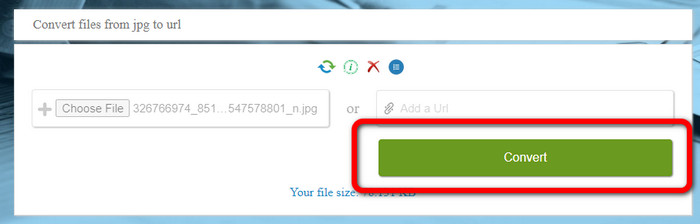
Step 1. Open any browser from your desktop and visit the i-Converter website. When you are already on the main webpage, click the Choose File button. When the computer file appears on the screen, open the image you want to turn into a URL.
Step 2. After uploading the image file you want to convert, click the Convert button. Then, wait for the conversion process. After a few seconds, the tool will give you the link. You can copy the link to the browser to open the image by clicking the Copy Code button.
כיצד להפוך תמונה לקישור באמצעות תמונה לקישור
Another online tool you can utilize to convert images to HTML is Image to Link. Compared to the first tool above, the tool supports various input formats like JPG, PNG, and GIF. Also, it offers straightforward methods. After uploading the image, the tool will convert the image automatically. The conversion process is fast so you can get the link quickly. Additionally, Image to Link is available on various web browsers. You can use it on Google, Mozilla, Explorer, and more. All users are capable of operating this tool because of its understandable options. The best thing is that you can convert multiple images at once. This way, converting more files is perfect when using the tool. However, when using the converter, some ads appear on the screen, making it frustrating for users. Also, when converting multiple files, you can only upload up to five images. You also need internet access to use the online image converter.
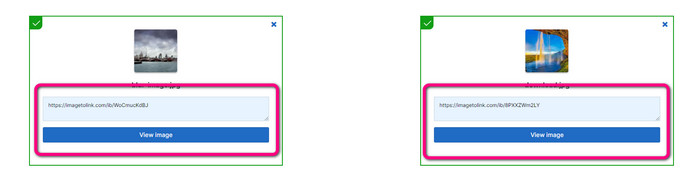
Step 1. Navigate to the Image to Link website from your browser. On the webpage, click the Start Uploading button. Then open the image file you want to convert from your computer file. You can upload up to five images when doing a batch conversion process.
Step 2. After uploading, the tool will automatically turn the image into a link. Afterward, the tool will provide a link that you can use to open the image. To open the image, copy the given link and paste it into your browser.
חלק 2. כיצד לשנות תמונות ל-JPG, PNG ו-GIF
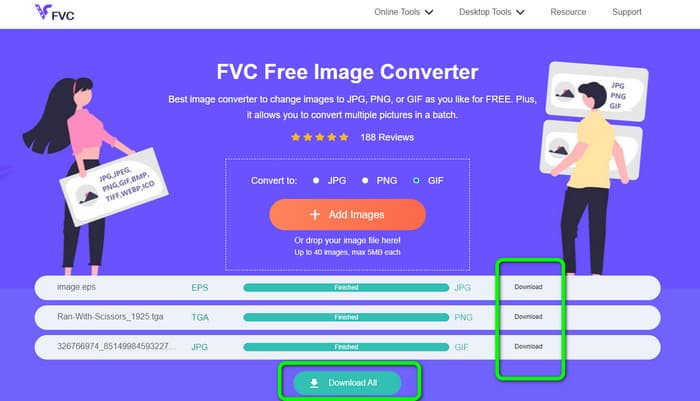
המר תמונות ל-JPG, PNG ו-GIF ב-FVC Free Image Converter
One of the leading online image converters you can use is the FVC Free Image Converter. The tool can transcode your image into various formats like JPG, PNG, and GIF. Also, it supports various input formats, including BMP, SVG, ICO, WebP, and more. You can convert images in just a simple method, which is perfect for users. Additionally, The image converter has great features you can enjoy. It is the batch conversion feature. It allows you to upload multiple images and convert them in a single click. Note that you can convert up to 40 image files. It also offers a fast conversion process wherein you can convert images in a few seconds.
יתר על כן, FVC Free Image Converter בכל הדפדפנים, כך שתוכל להפעיל אותו בכל מקום כל עוד יש לך חיבור לאינטרנט. הכלי גם מבטיח את פרטיותך. במהלך תהליך ההמרה, לעולם לא תיתקל במודעות מעצבנות על המסך שלך. לאחר שמירת התמונות שהומרו, הכלי ימחק את הנתונים שלך, כך שאף אחד לא יוכל לראות את התמונות שהעלית והומרת. השתמש בשיטות המפורטות למטה כדי להמיר תמונות ללא מאמץ לפורמט JPG, PNG או GIF.
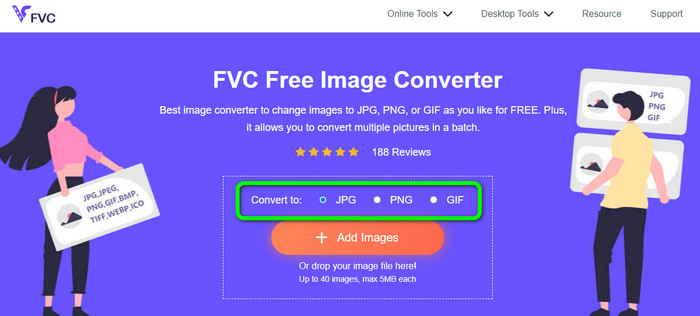
Step 1. Navigate to the official website of FVC Free Image Converter. You can access this online image converter on all browsers. After that, you can click the JPG, PNG, or GIF format from the format option.
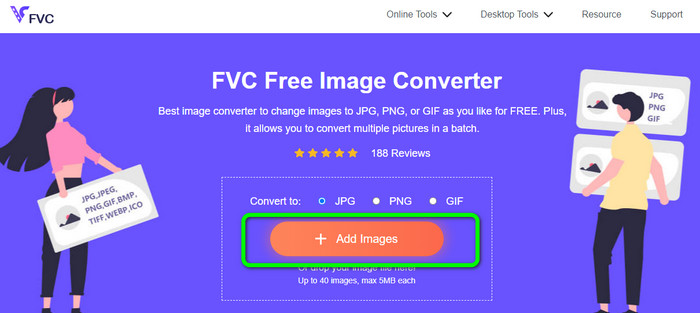
Step 2. Click the Add Images to upload the image file from your computer. You can also drop and drag the file into the box. Since the tool offers a batch conversion process, you can upload multiple files simultaneously.
Step 3. You will see that the image converter will convert the images automatically after the uploading process. When the conversion process is done, click the Download All button to save them in one click. But, if you prefer to save the image manually, click the Download button on the right.
חלק 3. שאלות נפוצות לגבי המרת תמונות לקישור
1. למה להפוך תמונה לקישור?
אתה יכול להשתמש בתמונה בתור כפתור אם יש לך אתר או בלוג. בדרך זו, משתמשים יכולים לגשת לדף הבית שלך או לדף מסוים. בנוסף, אפשר לקשר תמונות בפרסומים ברשתות חברתיות או בחתימות בדוא"ל. כמו כן, זו דרך נפלאה לפרסם את האתר או הבלוג שלך ולהגביר את התנועה. הנה רק כמה מההצדקות החשובות ביותר להמרת כתובת URL מתמונה.
2. מהם היתרונות של הפיכת תמונה לקישור?
זה עשוי להיות פשוט יותר עבור משתמשים ללחוץ על הקישור שלך אם אתה ממיר תמונה לקישור. אם אתה רוצה שהמבקרים ילחצו על תמונה קטנה, הפיכת התמונה לכתובת URL תיתן להם אזור נרחב יותר ללחוץ עליו. שיתוף החומר שלך עם אחרים עשוי לעשות את זה הרבה יותר פשוט לגלות מוצרים או שירותים חדשים.
3. איך אני מוצא את כתובת האתר של תמונה באתר?
לחץ לחיצה ימנית על התמונה ובחר העתק קישור תמונה כדי לקבל את כתובת האתר של תמונה באתר. לאחר מכן תוכל לפתוח את כתובת האתר בכרטיסייה חדשה כדי לשמור את התמונה או לשתף את כתובת האתר באמצעות דואר אלקטרוני, מדיה חברתית וערוצים אחרים.
סיכום
There you go! Now you have learned the best methods to convert images to links. In addition to that, you discovered the most straightforward ways of converting images to JPG, PNG, and GIF formats. Thus, if you want to change your images to URL links, see the effective methods above. On the other hand, if you want an outstanding image converter to convert images to other formats, use FVC Free Image Converter.
-
 שיטות כיצד להמיר תמונות ל-JPG באופן מקוון ולא מקוון
 האם אתה רוצה להמיר את הקובץ לפורמט JPG מסיבה כלשהי? אז המאמר הזה הוא בשבילך. אנו נלמד אותך את השיטה הטובה ביותר להמיר את התמונה שלך ל-JPG
-
 שיטות שימושיות להמרת תמונות בקלות לפורמט PNG
 האם אתה מחפש את הדרך הטובה ביותר לשמור את התמונה שלך כ-PNG? פוסט מדריך זה מציע פתרונות מצוינים עבורך להמרת תמונות ל-PNG באופן מקוון ולא מקוון
-
 מה זה JPEG/JPG: המר את התמונות שלך ל-JPG ללא מאמץ
 האם אתה סקרן לגבי המשמעות של JPEG? יש לנו תשובה בשבילך. כמו כן, תלמד כיצד להמיר פורמטים שונים של תמונה לקובצי JPG. קרא את הפוסט עכשיו.
