


 ממיר וידאו אולטימטיבי
 מקליט מסך
 תיקון וידאו
 הורדה מאובטחת
כיצד להמיר JPEG ל-JPG באמצעות ממירי תמונה מוכחים ובדוקים
יש אנשים שאומרים ש‑JPEG ו‑JPG הם אותו פורמט. ובכן, זה נכון. אבל יש תוכנות שמקבלות רק סיומת בת שלוש אותיות, ולכן במקום להשתמש ב‑JPEG משתמשים ב‑JPG. פורמט JPG הוא פורמט פופולרי בימינו. אם גם אתה רוצה להמיר קובץ תמונת JPEG לפורמט JPG, יש לך מזל. המדריך הזה יספק לך את הפתרון הטוב ביותר שתוכל לנסות. באפשרותך מיד להמיר JPEG ל‑JPG באמצעות ממירי JPEG ל‑JPG. ממירים אלה זמינים אונליין וגם במכשירים ניידים. אם ברצונך להכיר את היישומים הללו, נצל את ההזדמנות וקרא מאמר זה.

חלק 1. דרכים שימושיות להמרת JPEG ל-JPG באינטרנט
כיצד להמיר JPEG ל-JPG ב-FVC Free Image Converter
הדרך הטובה ביותר להמיר JPEG ל‑JPG היא להשתמש ב‑FVC Free Image Converter. זהו בחירה מצוינת עבורך להמרת JPEG ל‑JPG או לפורמטים אחרים, כמו PNG ו‑GIF. הוא יכול לטפל בכל פורמטי התמונה, כולל JPG, JPEG, PNG, SVG, BMP, TIFF ו‑GIF. כך אינך צריך לדאוג אם קובצי התמונה שלך אינם נפתחים בכלים או במכשירים מסוימים. הדרך הטובה ביותר היא להמיר אותם באמצעות ממיר התמונות המקוון הזה. בנוסף, הוא שומר על האיכות המעולה של התמונות המקוריות, ולא תראה הבדל מהמקור לאחר ההמרה. מעבר לכך, ממיר קבצי התמונה של FVC תומך בתהליך המרה באצווה, כלומר תוכל להמיר מספר רב של תמונות בו‑זמנית. זה הרבה יותר נוח ויעיל, והוא בלתי ניתן להשוואה לממירי פורמטי תמונה אחרים בשוק.
FVC Free Image Converter יכול להתמודד עם עד 40 תמונות בו-זמנית. אז אתה יכול לחסוך יותר זמן. אתה גם לא צריך לשלם אגורה עבור התוכנית הזו. זהו ממיר תמונות לשימוש חופשי. אתה גם לא צריך ליצור חשבון כדי להפעיל אותו. כל שעליכם לעשות הוא לבקר באתר ולהתחיל לבצע המרה. כולנו יודעים שפרסומות מעצבנות. אבל לכלי זה אין פרסומות כך שתוכל להמיר בשלום. אתה יכול לגשת לתוכנה מקוונת זו בכל דפדפני האינטרנט, כולל Chrome, Mozilla, Edge, Explorer ועוד.
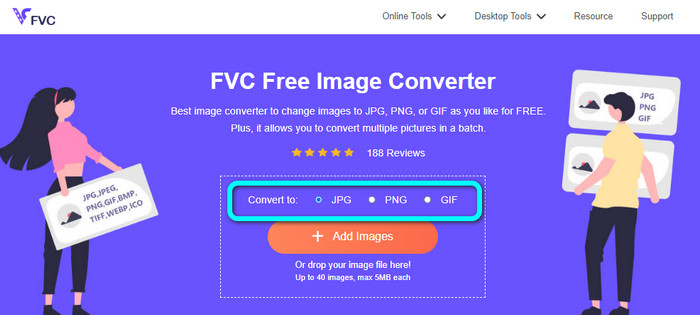
שלב 1: פתח את הדפדפן ועבור לאתר הראשי של FVC Free Image Converter. עבור לאפשרות Convert to ובחר בפורמט JPG.
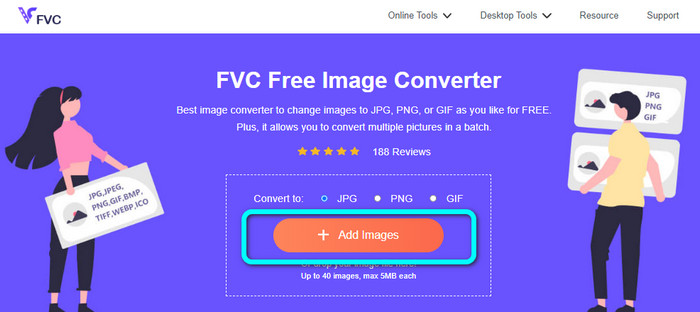
שלב 2: לאחר שבחרת בפורמט הקובץ JPG, לחץ על כפתור Add Images. לאחר מכן תיקיית הקבצים שלך תופיע על מסך המחשב. הוסף את תמונת ה‑JPEG שברצונך להמיר.
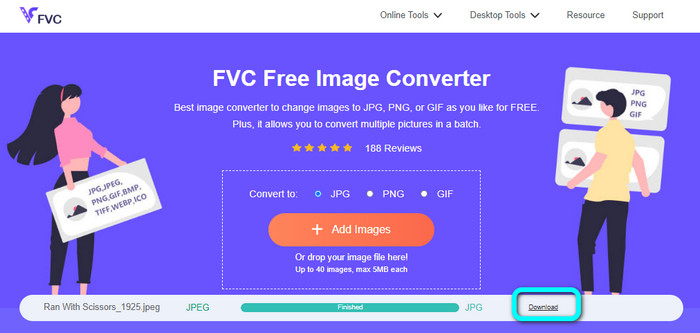
שלב 3: אחרי שתוסיף את קובץ ה‑JPEG, תראה שהתמונה תומר אוטומטית. מ‑JPEG היא תהפוך ל‑JPG. כשההמרה תסתיים, לחץ על כפתור Download. כך תוכל לשמור את תמונת ה‑JPG במחשב.
כיצד להמיר JPEG ל-JPG ב-Convertio
ממיר נוסף מ‑JPEG ל‑JPG שאתה יכול להשתמש בו הוא Convertio. ממיר תמונות זה יכול להמיר את קובץ ה‑JPEG שלך ל‑JPG בשיטה פשוטה מאוד. הוא מציע גם ממשק ידידותי, מה שהופך אותו למובן לשימוש. כך גם משתמשים מקצועיים וגם לא‑מקצועיים יכולים להפעיל את הממיר המקוון הזה. בנוסף, התוכנה מאפשרת המרה באצווה, כך שניתן להמיר מספר פורמטי תמונה בו‑זמנית. תהליך ההמרה גם מהיר, ותוכל להמיר תמונות בתוך כמה שניות. Convertio זמין בדפדפנים פופולריים כמו Google, Firefox, Explorer ועוד. נוסף על כך, ל‑Convertio יש עוד תכונות להציע: מעבר להמרת תמונות, ניתן להמיר גם וידאו, אודיו, מסמכים ועוד.
עם זאת, לגרסה הנגישה של תוכנית זו יש הגבלות. ניתן להעלות תמונות עד 100MB בלבד. לאחר מכן, אתה לא יכול להמיר תמונות יותר. לכן, אם אתה רוצה לחוות את התכונות המלאות שלו, רכוש תוכנית מנוי. כמו כן, יש צורך בחיבור אינטרנט חזק כדי לראות את הביצועים הגבוהים שלו.
שלב 1: גש לאתר הראשי של Convertio. לחץ על כפתור Choose files. בחר את קובץ התמונה בפורמט JPEG מתיקיית המחשב ופתח אותו.

שלב 2: לאחר שפתחת את קובץ התמונה בפורמט JPEG, בחר את פורמט JPG מבין אפשרויות הפורמט.
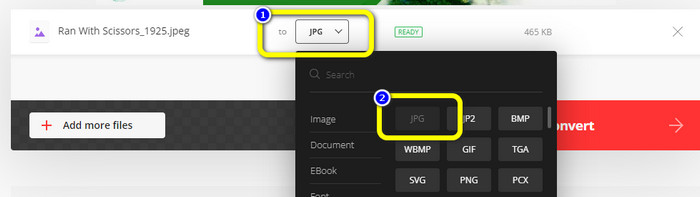
שלב 3: לאחר שפתחת את קובץ התמונה בפורמט JPEG, בחר את פורמט JPG מבין אפשרויות הפורמט. תוכל גם ללחוץ על כפתור Add more files כדי לבצע המרה באצווה.
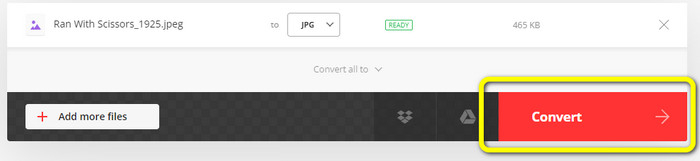
שלב 4: לחץ על כפתור Convert כדי להתחיל בתהליך ההמרה. לאחר מכן, כשתהליך ההמרה יסתיים, לחץ על כפתור Download.
כיצד להמיר JPEG ל-JPG ב-CloudConvert
CloudConvert הוא כלי מקוון להמרת JPEG ל‑JPG. בעזרת ממיר זה תוכל להמיר במהירות JPEG ל‑JPG. כמו כן, הכלי מציע ממשק אינטואיטיבי עם הוראות בסיסיות להמרה. לכן קל להמיר JPEG ל‑JPG, בין אם אתה משתמש מנוסה ובין אם אתה מתחיל. בנוסף, CloudConvert זמין במגוון דפדפנים, כולל Mozilla, Explorer ו‑Firefox, מה שהופך אותו לנגיש יותר. החלק הטוב ביותר בכלי זה הוא שניתן לבצע שינויים בתמונות: אפשרויות המאפשרות לשנות את הרזולוציה, גודל הקובץ והאיכות של התמונה. אחד התחומים שהיישום שם עליהם דגש, מלבד ההמרה עצמה, הוא הפרטיות של המשתמש. CloudConvert מבטיח שהמידע שלך מאובטח, ואינו משתף את הנתונים שלך עם אחרים. לאחר תהליך ההמרה הוא מוחק את התמונה שלך אוטומטית לאחר 24 שעות.
עם זאת, לממיר התמונות מבוסס האינטרנט הזה יש חסרונות. אם אתה משתמש רק בגרסה החינמית, תוכל להמיר רק 25 תמונות מדי יום. עליך לרכוש תוכנית מנוי כדי להמיר תמונות נוספות. כמו כן, אחת הדרישות של ממיר זה היא גישה לאינטרנט. מכיוון שזהו כלי מקוון, יש צורך בחיבור לאינטרנט.
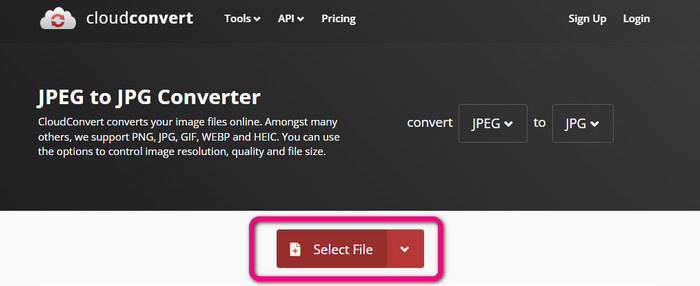
שלב 1: לחץ על כפתור Select File. לאחר מכן פתח את תמונת ה‑JPEG מתוך הקבצים שלך.
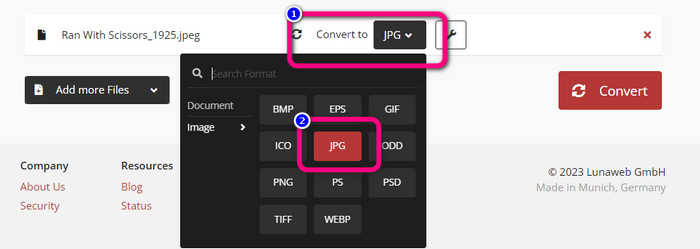
שלב 2: עבור לאפשרות Convert to. בחר את הפורמט הרצוי, שהוא JPG.
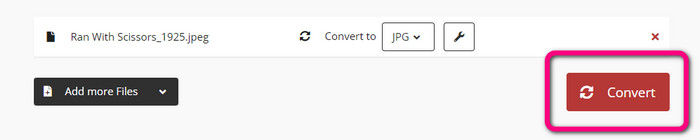
שלב 3: כשתבחר בפורמט JPG, לחץ על כפתור Convert. המתן לסיום תהליך ההמרה ושמור את התמונה הסופית על שולחן העבודה שלך. תוכל גם להשתמש בכלי זה כדי להמיר JPG ל‑PNG.
חלק 2. כיצד להמיר JPEG ל-JPG באמצעות אנדרואיד ואייפון
כיצד להמיר JPEG ל-JPG ב- Image Converter
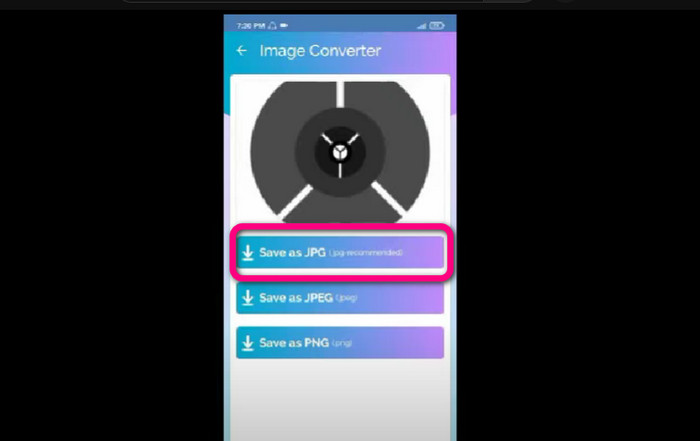
אם אתה רוצה להמיר JPEG ל‑JPG במכשיר אנדרואיד, השתמש באפליקציה Image Converter. יישום זה זמין במכשירי אנדרואיד. הוא מציע תהליך פשוט להמרת תמונות, מה שהופך אותו מתאים למשתמשים לא‑מקצועיים. בנוסף, אפשר להוריד את האפליקציה בחינם. הממשק שלה קל להבנה, כך שאף אחד לא יתבלבל בעת השימוש בממיר. יתרה מזאת, ל‑Image Converter יש תהליך המרה חלק: לאחר בחירת הפורמט, האפליקציה תמיר ותשמור את התמונה בטלפון שלך ללא מאמץ. עם זאת, היא תומכת רק במספר פורמטי פלט מוגבלים, כגון PNG, JPG ו‑JPEG. לכן לא תוכל להשתמש באפליקציה אם תרצה להמיר את התמונה ל‑GIF, SVG, BMP ועוד.
שלב 1: פתח את אפליקציית Play Store והורד את היישום Image Converter. לאחר מכן הפעל את האפליקציה לאחר סיום ההתקנה.
שלב 2: לחץ על כפתור Select Photo כדי לצרף את תמונת ה‑JPEG מספריית התמונות שבטלפון.
שלב 3: לחץ על האפשרות Save as JPG לשלב הסופי. המתן לתהליך ההמרה. לאחר סיום התהליך, התמונה תישמר אוטומטית בגלריה שלך.
כיצד להמיר JPEG ל-JPG ב-JPG Image Converter & Resizer
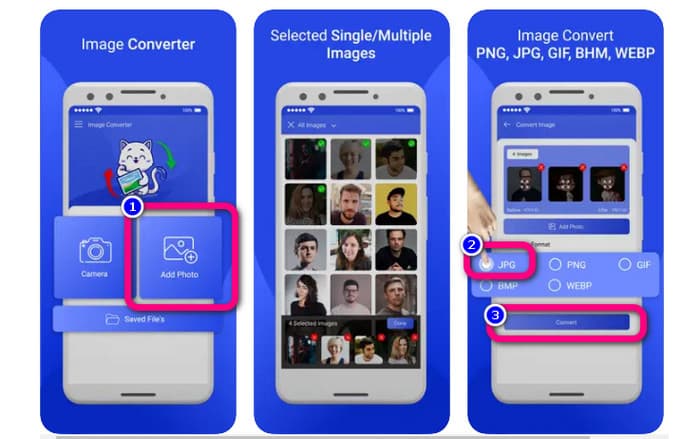
אם תרצה להמיר JPEG ל‑JPG באמצעות iPhone, השתמש ב‑JPG Image Converter & Resizer. תוכנה זו זמינה ב‑Apple Store וניתן להוריד אותה בחינם. בנוסף, תהליך ההמרה פשוט, והממשק האינטואיטיבי הופך את השימוש לבלתי מסובך. באפליקציה זו זמין תהליך המרה באצווה, כך שניתן להמיר מספר פורמטי תמונה בבת אחת. כמו כן, היא תומכת במגוון פורמטי תמונה, כולל PNG, BMP, GIF, WebP ועוד. עם זאת, ניתן להשתמש באפליקציה רק אם גרסת ה‑iPhone שלך היא iOS 12.0 ומעלה.
שלב 1: עבור אל Apple Store והורד את JPG Image Converter & Resizer. לאחר מכן הפעל את האפליקציה.
שלב 2: לחץ על סמל Add Photo כדי להוסיף את תמונת ה‑JPEG שברצונך להמיר. אפשר להוסיף כמה תמונות שתרצה.
שלב 3: בחר את פורמט JPG מתוך אפשרויות הפורמט. לאחר מכן לחץ על כפתור Convert כדי להתחיל בתהליך ההמרה.
חלק 3. שאלות נפוצות על המרת JPEG ל-JPG
1. איך אני ממיר תמונות מ-PNG ל-JPG?
תוכל להשתמש ב‑FVC Free Image Converter. ממיר תמונות מקוון זה תומך בפורמטי קלט כמו PNG. כך תוכל להפוך את תמונת ה‑PNG שלך לפורמט JPEG. פשוט עבור לאפשרות הפורמט ובחר JPG. לאחר מכן לחץ על כפתור Add Images להוספת תמונת ה‑PNG. לאחר מכן לחץ על כפתור ההורדה.
2. מדוע קבצי ה-JPEG שלי לא עובדים ב-Mac שלי?
ישנן שתי סיבות אפשריות לכך שתמונת ה-JPEG שלך לא עובדת. אולי ה-MacOS שלך לא מעודכן. סיבה נוספת היא שתמונת ה-JPEG עלולה להיות פגומה עקב זיהום מהווירוס. עליך לתקן את תמונת ה-JPEG שלך או לעדכן את ה-macOS שלך.
3. איך שומרים תמונה שנשלחה במייל בפורמט .jpg?
תיבת דיאלוג תשאל היכן ברצונך לשמור את התמונה בעת הורדת התמונה. בשלב זה, תוכל לשמור את התמונה שלך בפורמט הרצוי מתוך אפשרות הפורמט.
סיכום
לסיכום, מאמר זה הציג בפניך את הדרכים היעילות ביותר להמיר JPEG ל‑JPG באמצעות ממירי תמונה שונים. אולם מרבית המשתמשים מעדיפים שיטות פשוטות להמרת קובצי תמונה. במקרה כזה, באפשרותך להשתמש ב‑FVC Free Image Converter, שיכול להמיר קבצים שונים בקלות ובמהירות.
-
 מהו קובץ PNG: כיצד לפתוח ולהמיר? [פרטים מלאים]
 האם אתה יודע מה זה פורמט PNG? אתה יכול ללמוד את כל הפרטים החיוניים של קובץ זה. קרא את פוסט המדריך הזה וקלוט את כל המידע שאתה יכול לקבל.
-
 פרטים מלאים על ההבדלים בין JPEG לעומת JPG לעומת PNG
 פוסט זה ייתן לך מספיק מידע על ההבדלים בין JPEG לעומת JPG לעומת PNG. בנוסף, תלמדו כיצד להמיר תמונות לקבצים אלו.
-
 שיטות כיצד להמיר תמונות ל-JPG באופן מקוון ולא מקוון
 האם אתה רוצה להמיר את הקובץ לפורמט JPG מסיבה כלשהי? אז המאמר הזה הוא בשבילך. אנו נלמד אותך את השיטה הטובה ביותר להמיר את התמונה שלך ל-JPG
