


 ממיר וידאו אולטימטיבי
 מקליט מסך
 תיקון וידאו
למד כיצד להמיר AMV ל-MOV מבלי לפגוע באיכות
פורמט AMV הוא פורמט וידאו קנייני המשמש לאחסון קטעי וידאו בנגני מדיה מסוג S1 MP3 ו‑MP4. סיומת הקובץ .amv היא ברזולוציה נמוכה ודחוסה כדי שהקובץ יתאים לנגן המדיה הנייד הזה. למרות שהפורמט עדיין קיים, קשה למצוא נגן מדיה תואם בטלפון משום שזהו פורמט ישן. במקום לחפש נגן מדיה תואם, מדוע שלא תהפכו את קובצי ה‑AMV לפורמט חדש הנהנה מתמיכה רחבה, כמו MOV. לכן, אם אתם רוצים לדעת מהי הדרך הטובה ביותר להמיר AMV ל‑MOV, הבה נתחיל לבדוק.

חלק 1. מבוא קצר על AMV ו-MOV
הרעיון של Action Media Video או AMV הוא להחליף את MP4 כפורמט אוניברסלי מכיוון שהפורמט הזה טוב יותר ודחוס הרבה יותר. כמו כן, פורמט זה הוא הגרסה הטובה יותר של פורמט AVI. אבל הפורמט התעלם מהתקופה החדשה הזו מכיוון שהוא לא מקבל שום עדכון לשיפור איכות הרזולוציה. ועכשיו, אם אתה מאחסן את הפורמט הזה במכשירים הניידים שלנו ותשחק בו, צפה שלא תוכל לנגן אותו כי הפורמט אינו נתמך. אז אם אתה רוצה להפעיל סרטון בפורמט זה, עליך להוריד נגן מדיה של צד שלישי עבור AMV. בעוד MOV, פורמט זה זוכה לתמיכה רבה מכיוון שזהו פורמט הקובץ המקורי ש-QuickTime מפתחת.
חלק 2. המר AMV ל-MOV עם תוכנת שולחן העבודה האולטימטיבית
ממיר וידיאו אולטימטיבי
המירו AMV ל‑MOV בעזרת ממיר הווידאו המקצועי שמספק תוצאות מדהימות שאין להן מתחרים, FVC Video Converter Ultimate. ממיר זה זמין למחשב אישי ול‑Mac, ובשניהם קיימות אותן יכולות מתקדמות שהכלי מציע. בנוסף, המרה מהירה והאצת חומרה הזמינות במחשב האישי זמינות גם ב‑Mac. משתמשים רבים כבר בחרו בתוכנה הזו כממיר הראשון שלהם כדי לפתור בעיות המרה. לפני שתוכלו להשתמש בכלי, תצטרכו לרכוש אותו מ‑FVC. אף שהוא בתשלום, לא תצטרכו להוציא מאות דולרים, והמחיר בהחלט מצדיק את עצמו. כעת, בלי להכביר במילים, נבדוק את הכלי הזה ונראה אם נוכל להגיע להמרה האולטימטיבית, כפי שהשם מבטיח.
שלבים כיצד להמיר AMV ל‑MOV בעזרת FVC Video Converter Ultimate:
שלב 1. הורידו את FVC Video Converter Ultimate למחשב השולחני שלכם בלחיצה על הכפתור למטה; התקינו את התוכנה לאחר סיום ההורדה.
הורדה חינמיתל-Windows 7 ומעלההורדה מאובטחת
הורדה חינמיתל-MacOS 10.7 ומעלההורדה מאובטחת
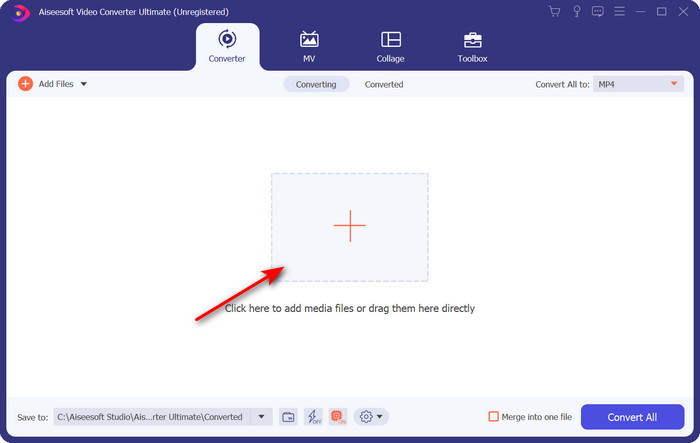
שלב 2. פתחו את התוכנה כדי להשתמש בה, ולשם העלאת קובץ .amv לחצו על סימן ה‑+. מצאו את הקובץ בתיקייה ולחצו על Open כדי להוסיף אותו.
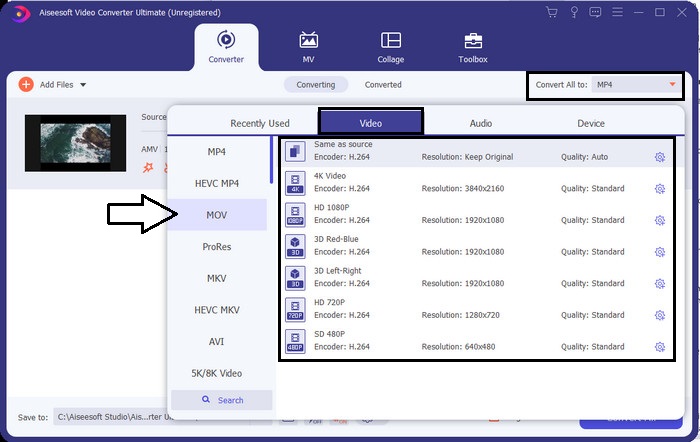
שלב 3. כדי לשנות את הפורמט ל‑MOV, לחצו על Convert All to: ובחרו MOV או כל פורמט אחר שאתם מעוניינים בו.
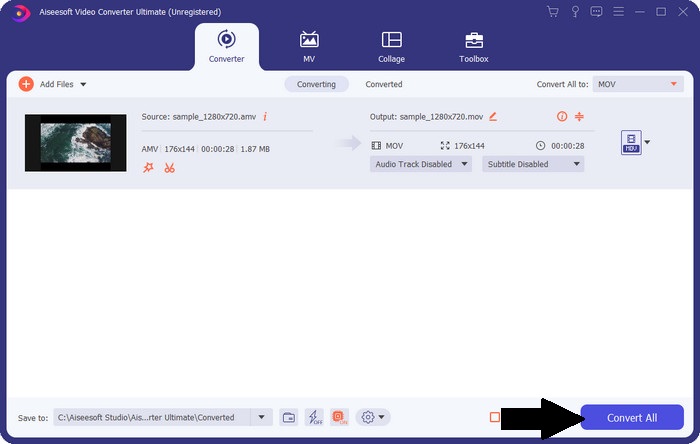
שלב 4. כדי להפוך את קובץ ה‑AMV ל‑MOV, לחצו על Convert All כדי להתחיל בתהליך ההמרה.
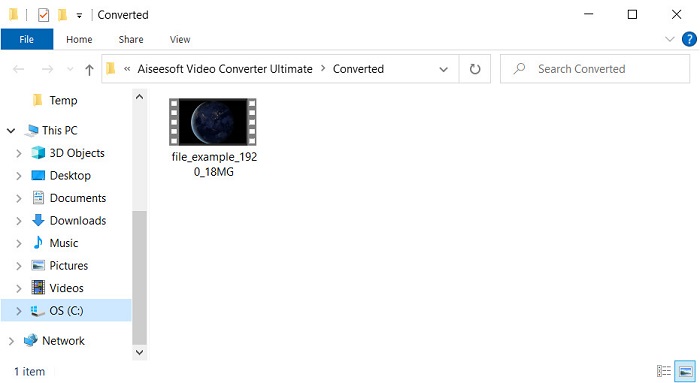
שלב 5. המרת הקובץ תיקח רק מספר שניות. לאחר מכן חכו שיופיע החלון עם קובץ ה‑.mov שיצרתם קודם; לחצו על הקובץ כדי לצפות בו בנגן המדיה המובנה שלכם.
חלק 3. המר AMV ל-MOV עם ממיר 2 שירותים מקוונים זמין
1. ConvertFiles
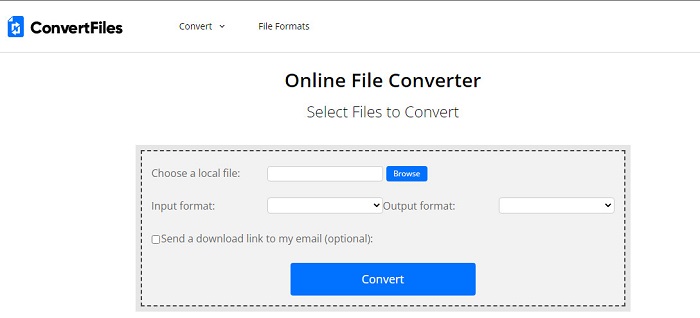
אחד מממירי האונליין הטובים ביותר שניתן לגשת אליהם דרך הדפדפן המועדף עליכם הוא ConvertFiles. כלי אונליין זה יכול להמיר את הפורמט שלכם לפורמט חדש ללא קושי. כמו כן, הכלי תומך במערכת פורמטים מצומצמת לבחירה. עם זאת, הורדת הקובץ שהומר לוקחת כאן הרבה זמן, משום שאין תמיכה בהמרה מהירה. חיסרון נוסף הוא הפרסומות – יש מהן הרבה בממשק. למרות בעיות ההורדה וכמות המודעות, הכלי הזה מתפקד היטב כאמצעי אונליין חינמי.
שלבים כיצד להמיר AMV ל‑MOV בעזרת ConvertFiles:
שלב 1. פתחו את הדפדפן המועדף עליכם וחפשו את ConvertFiles.
שלב 2. לאחר שהאתר נפתח, לחצו על Browse כדי לאתר את הקובץ בתיקייה; בשדה Output Format מצאו את MOV, ואז לחצו על Convert.
שלב 3. לאחר סיום ההמרה, לחצו על הקישור הכחול המודגש כדי להוריד את הקובץ למחשב שלכם.
2. MConverter
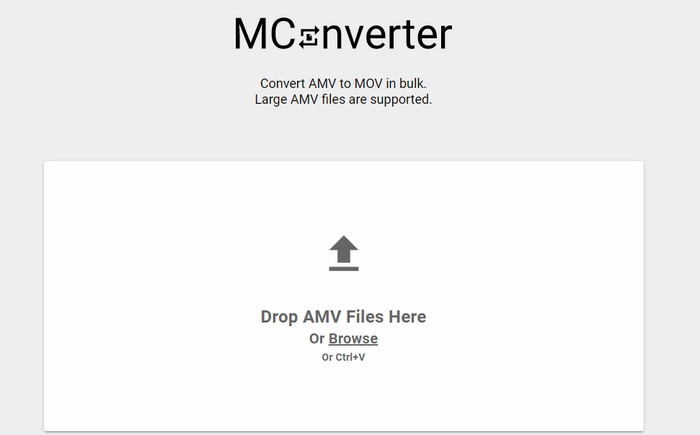
לא רוצים מודעות בממשק כדי להמיר AMV ל‑MOV בשקט? נסו להשתמש ב‑MConverter הזמין בדפדפן שלכם. כלי זה גם תומך בהמרה באצווה כדי להפוך את תהליך ההמרה ליעיל, בדומה ל‑FVC Video Converter Ultimate. עם זאת, החיסרון של כלי אונליין זה הוא שאינכם יכולים לחרוג מגודל קובץ של 200MB. לכן, אם ברצונכם להמיר וידאו ארוך וגודל הקובץ חורג מהמוגבל, זה אינו הכלי המתאים עבורכם. אבל אם תרצו ליהנות מחוויית המרה טובה יותר מאשר ב‑ConvertFile, עקבו אחר השלבים שלהלן.
שלבים כיצד להמיר AMV ל‑MOV בעזרת MConverter:
שלב 1. חפשו את MConverter במנוע החיפוש שלכם ופתחו אותו.
שלב 2. לחצו על כפתור Upload כדי להעלות את הקובץ, המתינו מעט לטעינת הכלי המקוון, חפשו את MOV ולחצו עליו. ההמרה תתחיל לאחר שתלחצו על פורמט MOV.
שלב 3. לחצו על Download All כדי לשמור את הקובץ.
חלק 4. שאלות נפוצות על AMV ו-MOV
האם אוכל להפוך את ה-MP4 שלי ל-AMV?
באפשרותכם להפוך MP4 ל‑AMV כדי להעביר את הקובץ מהר יותר אונליין. במיוחד אם הווידאו באורך של שעה, אנו ממליצים לכם להמיר את קובצי ה‑.mp4 ל‑.amv, משום שגודלם קטן בהרבה בהשוואה בין שני הפורמטים.
האם VLC תומך ב-AMV?
לשמחתכם, ניתן להשתמש ב‑VLC Media Player כדי לנגן קובצי .amv גם אם מדובר בפורמט מיושן. אך האם ידעתם שיש נגני מדיה שעולים על VLC? אם כן ברצונכם לדעת מהו נגן המדיה הזה, עליכם ללחוץ על קישור זה כדי להכיר את 5 נגני המדיה האלטרנטיביים ל‑VLC.
כיצד אוכל להפוך את ה-AMV שלי ל-AVI?
AMV הוא הגרסה המשופרת של AVI; עם זאת, אם מדברים על איכות, AVI מספק ביצועים מרשימים בהרבה לעומת הפורמט הישן הזה. נוסף על כך, AVI תואם מאוד לכל הפלטפורמות. לכן, אם אתם רוצים לצפות בקובץ ה‑AMV שלכם בגרסה טובה יותר ועל כל הפלטפורמות, עליכם ללמוד כיצד להמיר AMV ל‑AVI.
סיכום
הדיון חייב להסתיים כאן; למרות שאנו רוצים לאחסן קובץ AMV בדיסק שלנו, בעיית התאימות היא אחת הסיבות שאנו צריכים להמיר אותו. אחרי הכל, אומרים ש-AMV היה פופולרי בעבר בגלל האופן שבו המיכל הזה דוחס את הקובץ. עם זאת, היום עליך לשקול להמיר אותו לפורמט חדש כדי להשתמש בו עדיין. יתר על כן, הפתרונות הניתנים כאן ממירים ביעילות. ובכל זאת, FVC Video Converter Ultimate מתפקד בצורה פנומנלית בהשוואה לשני הכלים האחרים. לכן, אם אתה רוצה לחוות את הכלי הטוב ביותר, אז זה חובה להוריד את זה למחשב שלך ולהעתיק את השלבים שצוינו למעלה.
-
 4 השיטות הטובות ביותר להמיר MOV ל- MP3 בקלות ב- Windows ו- Mac
 כשרוצים לחלץ את קבצי האודיו MP3 מקבצי MOV, תוכלו ללמוד עוד על 4 ממירי ה- MOV ל- MP3 היעילים ביותר כדי לקבל את הקבצים הרצויים מהמאמר.
-
 MKV ל- MOV - כיצד להמיר MKV ל- MOV
 כיצד ניתן להמיר MKV ל- MOV ב- Mac? האם iMovie יכול לקרוא MKV? מה הפירוש של פורמט MOV? פוסט זה מספר שתי דרכים פשוטות לעזור לך להמיר MKV ל- MOV עם ממירי וידאו מקוונים ומקצועיים בחינם.
-
 FLV ל- MOV - כיצד להמיר FLV ל- MOV ב- Mac / PC / מקוון חינם
 כיצד להמיר FLV ל- MOV? כיצד ניתן להמיר FLV ל- MOV ב- Mac? האם יש דרך חופשית להמיר את YouTube FLV ל- MOV באופן מקוון? פוסט זה משתף 3 ממירי FLV ל- MOV כדי לשנות קבצי FLV ל- MOV.
