


 ממיר וידאו אולטימטיבי
 מקליט מסך
 תיקון וידאו
וריאציה רחבה של ממירים שונים עבור MOV ל- AVI מקוון ולא מקוון
פורמט MOV הוא פורמט שפותח על‑ידי חברת Apple Inc. כדי שיופעל בנגן המדיה המובנה שלה, QuickTime Player. במצב כזה, אם תעביר את קובץ ה‑MOV שלך לתוכנת מחשב אחרת כמו Windows וכדומה, יש סיכוי גדול שהוא לא ייתמך, משום שהוא ייעודי בעיקר למשתמשי Mac. לכן, אם אתה אחד המשתמשים שנתקלים בקשיים בהפעלת קבצי MOV על שולחן העבודה שלך, עליך להמשיך לקרוא מאמר זה כדי להחליט במה לבחור. זה יהיה הממיר האישי שלך, שילמד אותך כיצד להמיר MOV ל‑AVI מבלי לאבד מאיכות הקובץ או מאבטחתו.

חלק 1. המר MOV ל- AVI Online ללא הגבלה
ממיר וידאו מקוון בחינם
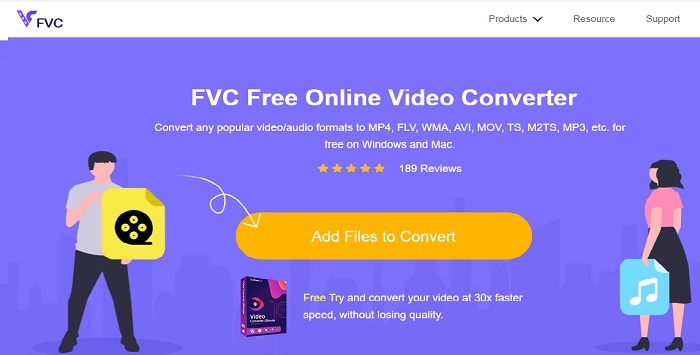
אחד מממירי הווידאו הטובים ביותר ברשת הוא FVC Free Video Converter. אם אתה רוצה לחוות רמה חדשה של המרת וידאו או אודיו אונליין, זה הכלי בשבילך. זהו אחד מממירי ה‑MOV ל‑AVI החינמיים הטובים ביותר. עם זאת, החיסרון הוא שהוא אינו מציע פונקציות מתקדמות כמו בגרסאות בתשלום, ומגוון פורמטי הפלט מוגבל. אף שאתה יכול להמיר ללא הגבלה בכמות, אי‑אפשר לבצע מספר המרות בו‑זמנית. בהיותו כלי חינמי, הוא עדיין טוב יותר מ‑VLC כממיר. רוצה לדעת איך להשתמש בכלי המקוון הזה? עקוב אחר השלבים הבאים כדי ללמוד כיצד להמיר ללא מאמץ.
שלב 1. לחץ על קישור זה כדי לעבור לאתר הראשי. אין צורך לדאוג, האתר מאובטח ובטוח לשימוש.
שלב 2. לחץ על Add Files to Convert כדי להפעיל את התוכנית.
הורד את גרסת הדסקטופ כדי להמיר קבצים במצב אצווה.
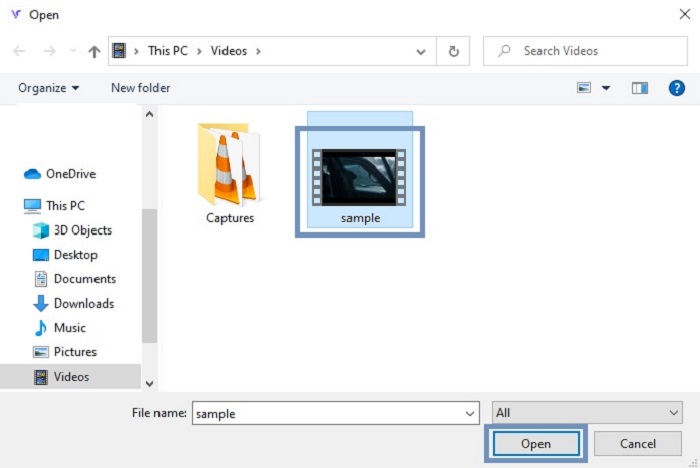
שלב 3. בחר את קובץ ה‑MOV שברצונך להמיר ולחץ על OK כדי להמשיך.
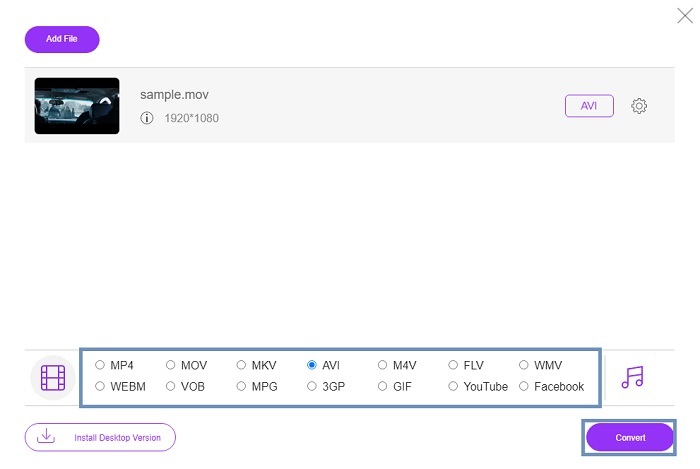
שלב 4. לאחר שבחרת את פורמט ה‑AVI או כל פורמט אחר שברצונך להשתמש בו, לחץ על Convert כדי להתחיל את תהליך ההמרה.
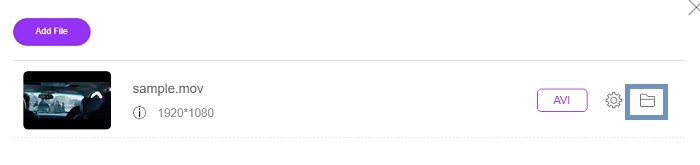
שלב 5. המתן מספר דקות עד לסיום. לאחר מכן לחץ על folder זה כדי לבדוק את קובץ הפלט הסופי שם.
חלק 2. המר MOV ל- AVI Desktop App Offline
אם המרה מקוונת אינה הצד החזק שלך, עליך לשקול שימוש בכלים המפוארים המבוססים על שולחן העבודה. בחר את הממיר הטוב ביותר לביצוע העבודה.
1. ממיר וידאו FVC Ultimate
אם אתה רוצה ליהנות מחוויית המרה, עריכה ושיפור מרשימה של וידאו ואודיו, אז FVC Video Converter Ultimate הוא הכלי המתאים ביותר למשימה. המר את קבצי ה‑MOV ל‑AVI מבלי להתאמץ. בזכות הממשק הידידותי למשתמש והמשקל הקל שלו, הוא הפך לבחירה הראשונה של משתמשים רבים ברשת. נכון להיום מספר המשתמשים שהורידו את הכלי הזה גדל מאוד, הן בכמות והן ברמת הידע. בניגוד לכלים אחרים המוצגים כאן וברשת, עצם השימוש בכלי הזה דומה לכך שיש לך “סכין שווייצרית” משלך. אף שהוא מציע סט תכונות מלא, התוכנה פועלת במודל תשלום תחילה. כלומר, אם תרצה להשתמש בה, תצטרך לרכוש רישיון. אך אין סיבה לדאגה, המחיר נמוך ושיטות התשלום מאובטחות ונתמכות על‑ידי PayPal, העברה בנקאית, Visa ועוד. אם אתה מתלבט האם זהו הכלי המתאים לך, קרא את השלבים הבאים כדי לבדוק אם זה הממיר הטוב ביותר עבורך.
שלב 1. הורד את התוכנה לכונן המחשב שלך ובחר את הגרסה המתאימה ביותר למערכת שלך. לאחר מכן התאמה את ההעדפות במידת הצורך ולחץ על סיום כדי להתקין את התוכנה על הכונן.
הורדה חינמיתל-Windows 7 ומעלההורדה מאובטחת
הורדה חינמיתל-MacOS 10.7 ומעלההורדה מאובטחת
שלב 2. לאחר סיום ההתקנה, התוכנה תיפתח אוטומטית. זהו ממשק הדוגמה שלה.
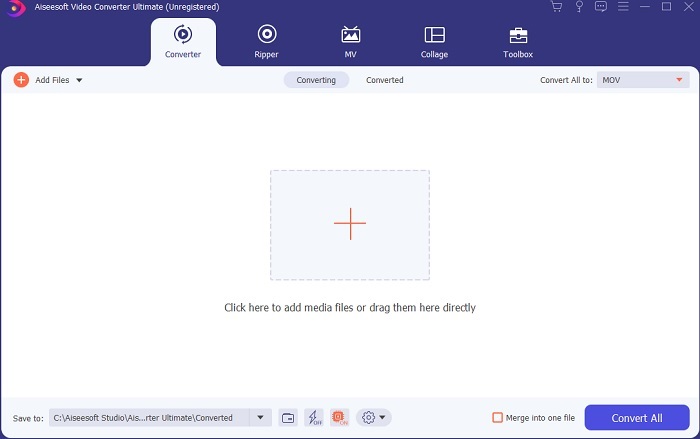
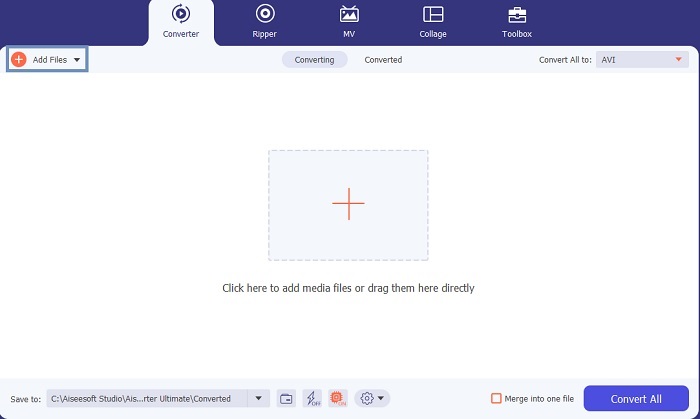
שלב 3. לחץ על כפתור Add Files ובחר את קובץ ה‑MOV שברצונך להמיר. אם תרצה להמיר מספר קובצי MOV, תוכל לגרור ולשחרר אותם אל ממשק הכלי.
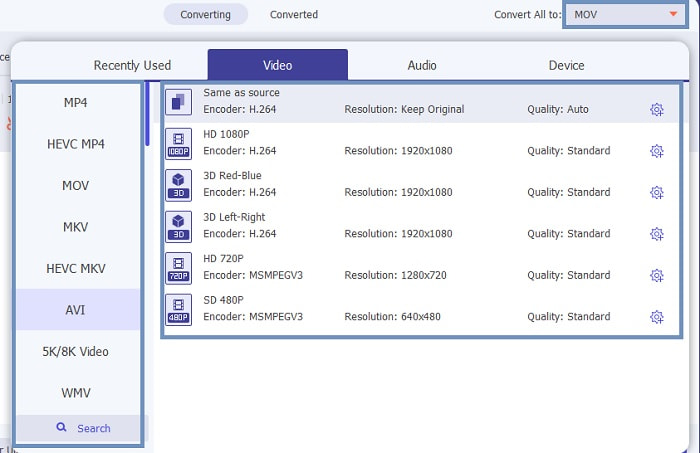
שלב 4. בחר את הפורמט הרצוי מהרשימה שבתפריט המשנה של Convert All to. קיימות וריאציות רבות לבחירה. כדי להתחיל בפעולה לחץ על Convert All.
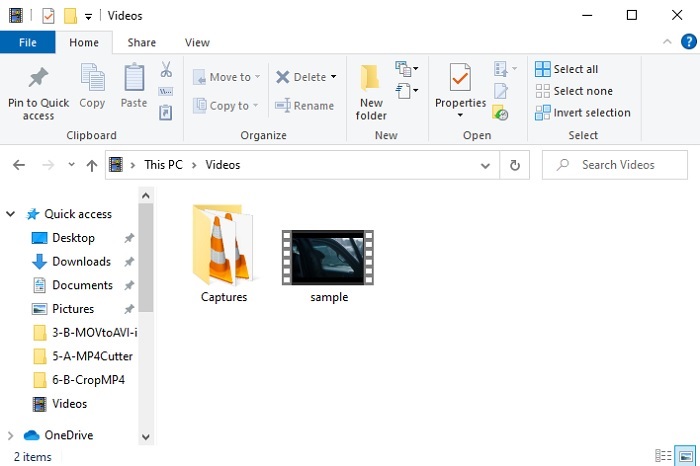
שלב 5. תהליך זה יימשך רק מספר שניות, וכשיסתיים, חלון סייר הקבצים יופיע על המסך. לחץ על הקובץ שהמרת כדי לצפות בו כעת במחשבך. אם תרצה להוסיף, לשפר או לבצע פעולה מיוחדת אחרת על הווידאו, תוכל לעבור לחלק ה‑Toolbar ולבדוק את האפשרויות הזמינות לשדרוג הווידאו או האודיו שלך.
2. נגן מדיה VLC
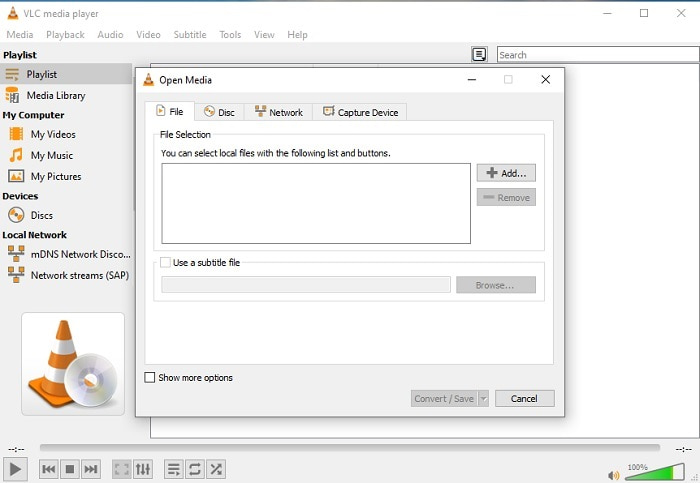
האם ידעת שאפשר להמיר MOV ל‑AVI באמצעות VLC? אכן, ניתן להשתמש בנגן המדיה הזה גם כממיר. אף שהוא יודע להמיר פורמטים, הוא אינו הבחירה הטובה ביותר כממיר: הוא פחות ידידותי למשתמש, ממשק ההוראות פחות ברור, ומגוון הפורמטים הנתמכים קטן יותר. גם אם זהו אחד מנגני המדיה הטובים ביותר, המרה אינה הצד החזק שלו. עם זאת, אם תרצה לנסות, תוכל לבדוק זאת בעצמך ולהשתמש בו להמרת הפורמט.
3. פזרה
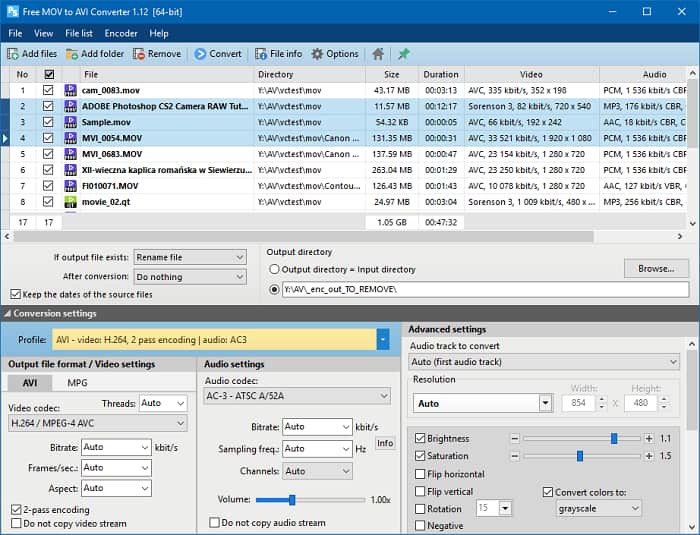
באפשרותך להוריד בחינם את Pazera MOV to AVI Converter. כלי זה קל לשימוש, ולמרות פשטותו הוא מספק יכולת המרה טובה. אך החלק המרתיע הוא שהוא אינו ממיר רב‑פורמטי. בניגוד לכלים שהוזכרו קודם, הממיר מעניק לך חוויית המרה בתבנית יחידה בלבד. כדי להבהיר: אם תוריד ממיר MP4 ל‑AVI, זו תהיה ההמרה היחידה שתוכל לבצע. לכן, אם אתה מחפש ממיר “הכול‑באחד”, זה צריך להיות המוצא האחרון שלך. בנוסף, אם תנסה לגשת לדף האינטרנט של הכלי כדי להוריד אותו, תיתקל בהרבה חלונות קופצים מעצבנים. עליך להיזהר כאשר אתה ניגש לכלי הזה.
לקריאה נוספת
MOV לעומת AVI
ניתן להשתמש בפורמט MOV לאחסון סרט, תוכנית טלוויזיה, וידאו קליפ קצר או סרט ביתי. הוא נשמר למעשה בפורמט הקובץ QuickTime (QTFF), אשר הוצג על ידי אפל בשנת 1991. קבצי MOV משמשים לעתים קרובות כאשר אנשים רוצים לשמור סרטון וידאו באיכות גבוהה.
בהתבסס על Resource Interchange File Format (RIFF), פורמט AVI הוצג על ידי מיקרוסופט בשנת 1992. הוא יכול לשמור וידאו/אודיו באיכות גבוהה מכיוון שהוא משתמש בפחות דחיסה. אבל זה גם גורם לגודל הקובץ הגדול של קובץ AVI, מה שעלול להוות בעיה כאשר יש מקום מוגבל.
חלק 3. שאלות נפוצות בנושא MOV ל- AVI
האם QuickTime יכול להמיר MOV ל- AVI?
למרות ש- QuickTime ידועה בהיותה נגן המדיה המוגדר כברירת מחדל של Mac. המרה באמצעות QuickTime אפשרית. תוכל לבדוק את הקישור הזה אם אתה רוצה לדעת כיצד להמיר MOV ל- AVI באמצעות QuickTime.
מה ההבדלים בין MOV ל- AVI?
ההבדל העיקרי הראשון בין השניים הוא הבעלים שלהם. כפי שנאמר מלכתחילה, MOV יוצר על ידי אפל בע"מ כפורמט הייחודי שלהם לשחקני QuickTime. MOV הפך לפופולרי בזכות היותו אחד הפורמטים הטובים ביותר בהם תוכל להשתמש מכיוון שהוא מאחסן גם קבצי אודיו, וידאו וטקסט שונים. AVI פותחה על ידי מיקרוסופט כדי להתחרות ב- MOV. למרות שהפורמט הזה אינו דחוס. לכן, אם אתה מקליט או מוריד קובץ לפורמט זה צפה לגודל קובץ גדול. לכן, אם אתה רוצה להקטין את גודל הקובץ, יהיה עליך לדחוס אותו. אבל הדבר הטוב בכך שהוא מייצר פלט וידאו ושמע סופר איכותי.
היכן אוכל לשחק את ה- MOV שהוסב ל- AVI?
אם תרצה לצפות בקובץ ה‑AVI החדש שהמרת או בקובץ ה‑MOV שלך, תוכל להשתמש ב‑FVC Free Video Player כדי לצפות בו. כך שאפילו אם אינך ממיר קובץ MOV ל‑AVI ב‑Mac או במחשב האישי, עדיין תוכל לצפות בו מאוחר יותר.
סיכום
לסיכום המסע שעברנו, כעת ברור לנו שהמרת פורמטים היא אחת המשימות הפשוטות שכל אחד יכול לבצע. הידע שנרכש מן המאמר הזה מהווה שינוי משמעותי עבור כולנו, משום שהוא מציע פרטים, שלבים ואלטרנטיבות. אם אתה עדיין מבולבל באיזה ממיר לבחור כממיר העיקרי שלך, הרי שכאן הדברים מתבהרים: FVC Video Converter Ultimate הוא ממיר רב‑תכליתי שכל הזמן חיפשת. הרעיון של המרה, עריכה, שיפור ויצירה נמצא כולו בכלי אחד. אז למה אתה מחכה? אין צורך לדאוג, משום ש‑FVC Video Converter Ultimate הוא הממיר הבלתי‑מנוצח.
-
 4 השיטות הטובות ביותר להמיר MOV ל- MP3 בקלות ב- Windows ו- Mac
 כשרוצים לחלץ את קבצי האודיו MP3 מקבצי MOV, תוכלו ללמוד עוד על 4 ממירי ה- MOV ל- MP3 היעילים ביותר כדי לקבל את הקבצים הרצויים מהמאמר.
-
 8 נגני ה- MOV הטובים ביותר להשמעת קבצי MOV של QuickTime באיכות מקורית
 פשוט למד עוד על 8 נגני ה- MOV הטובים ביותר הזמינים עבור Windows ו- Mac. אתה יכול לבחור את אחד הרצוי והמתאים להפעלת קבצי MOV באיכות המקורית.
-
 MKV ל- MOV - כיצד להמיר MKV ל- MOV
 כיצד ניתן להמיר MKV ל- MOV ב- Mac? האם iMovie יכול לקרוא MKV? מה הפירוש של פורמט MOV? פוסט זה מספר שתי דרכים פשוטות לעזור לך להמיר MKV ל- MOV עם ממירי וידאו מקוונים ומקצועיים בחינם.

