


 ממיר וידאו אולטימטיבי
 מקליט מסך
 תיקון וידאו
 הורדה מאובטחת
המר להפליא MOV ל-DivX בחינם באמצעות הממירים הטובים ביותר
Many file formats have emerged nowadays, and it is hard to choose what type of file you will use on your platform. And every file has different functions, codecs, file size. This article will focus on knowing these two files and how you can convert your MOV file to a DivX file format. So, read this article until the end to convert MOV to DivX for free on Mac and Windows.

חלק 1. למה להמיר MOV ל-DivX
קובץ ה-MOV הוא פורמט קובץ מדיה שנשמר בפורמט קובץ QuickTime (QTFF). זהו פורמט נפוץ מכיוון שהוא יכול לאחסן סרטים, תוכניות טלוויזיה ווידאו קליפים. בנוסף, אפל פיתחה את פורמט הקובץ הזה, מה שהופך אותו לנגן בכל נגני המדיה שבהם Mac תומך. לכן, אם ברצונך להפוך את קובץ ה-MOV לנגן על נגני מדיה אחרים של מערכת ההפעלה של Windows, עליך להמיר MOV לפורמט קובץ DivX.
חלק 2. כיצד להמיר MOV ל-DivX ב-Mac באמצעות הממיר האולטימטיבי
One of the most used and probably the best offline converters you will find on the market is FVC Video Converter Ultimate. This converter has fantastic features that you can use like, adding effects on your file, cropping and rotating, and has a 3D maker. Moreover, this converter supports a vast amount of file formats like MOV, DivX, XviD, AVI, MP4, MKV, FLV, WMV, and 1000+ file formats. Although this converter can convert MOV to DivX file with professional-like output, it has an easy-to-use interface, making it a user-friendly tool. Read the descriptions below to know more about FVC Video Converter Ultimate.
תכונות:
◆ זה יכול להמיר קבצים בתהליך המרה במהירות ברק.
◆ הוא תומך ב-1000+ פורמטים של קבצים, כולל MOV, DivX, XviD, MP4, AVI, WebM, M4V ועוד רבים.
◆ הוא מציע המרת אצווה למיזוג פורמטי קבצים מרובים לאחד.
◆ בעל תכונות מתקדמות כמו עריכה, שיפור ודחיסת הקובץ שלך.
◆ ניתן להורדה בכל הפלטפורמות חוצות מדיה, כולל Mac ו-Windows.
להלן השלבים הפשוטים להמרת MOV ל-DivX באמצעות FVC Video Converter Ultimate.
Step 1. Kindly download FVC Video Converter Ultimate by clicking the Download button below for Mac. And then follow the installation process.
הורדה חינמיתל-Windows 7 ומעלההורדה מאובטחת
הורדה חינמיתל-MacOS 10.7 ומעלההורדה מאובטחת
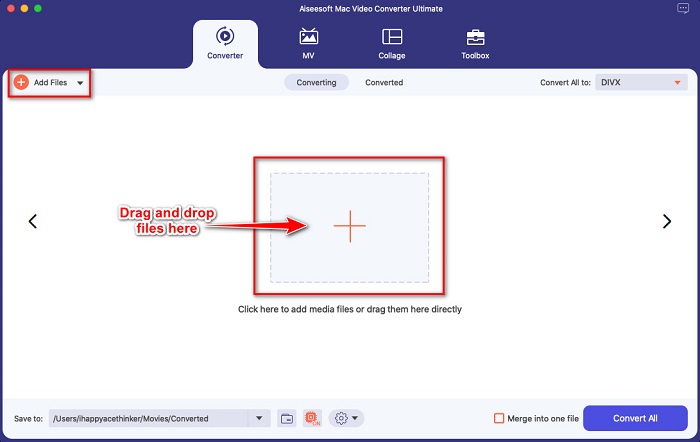
Step 2. Then on the software’s main interface, click the Add Files button or drag and drop your MOV file on the + sign button.
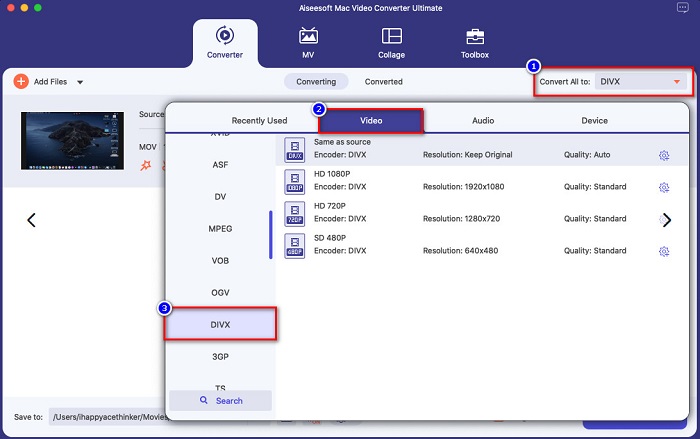
Step 3. Then choose your output file format by clicking the Convert All to button, then select the Divx file format.
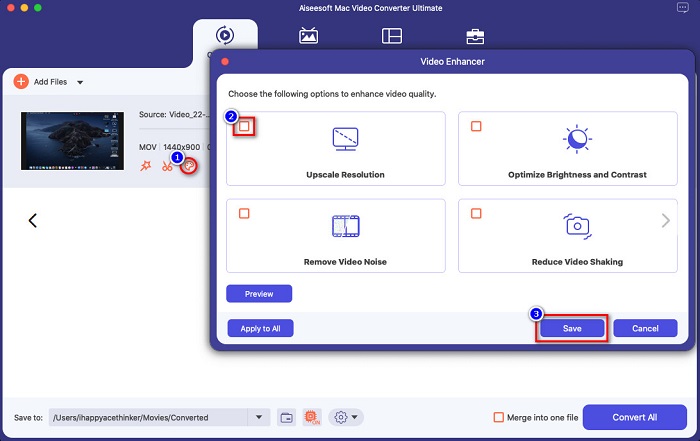
Optional. If you want to enhance your video file, click the paint-like icon. And then, tick the box of each option you want to enhance on your file. Click Save to apply. But if you do not wish to do so, proceed to the next part.
Step 4. Lastly, click the Convert All button to start transcoding your MOV to DivX file format.
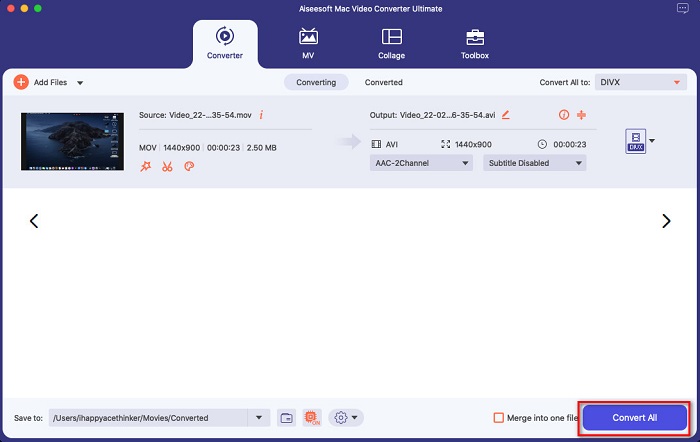
רק המתן כמה שניות, וזהו! אתה יכול להמיר את קובץ ה-MOV שלך לקובץ DivX פשוט כמו ABC.
חלק 3. 2 אפשרויות להמרת MOV ל-DivX באינטרנט
אם אתה לא צריך להוריד שום דבר בעת המרת קובץ ה-MOV שלך ל-DivX, יש לנו שתי אפשרויות לשימוש. ניסינו ממירים מפורסמים שניתן למצוא באינטרנט ובחרנו את שני הטובים מביניהם.
אפשרות 1. Convertio
Probably, you will see this converter on the search page result when you search MOV to DivX converters. Convertio is an online converter that allows you to convert MOV to DivX for free online. It supports many file formats like MOV, DivX, MPG, WebM, M4V, and more. Moreover, it has an easy-to-use software interface, making it a beginner-friendly tool. However, since it is an internet-reliant tool, you may experience having a slow conversion process.
Step 1. Search Convertio on your browser. On the main interface of the tool, click the Choose Files button. Your computer files will appear, then select your MOV file.

Step 2. Next, click the drop-down button to select the file output format that you want. Click on the Video panel, then click the DivX file format.

Step 3. Click the Convert button to start the conversion process for the last step.

אפשרות 2. Evano
You probably have seen this online converter if you are a Mac user. Evano is an online converter that allows you to convert MOV to DivX. This online converter has a simple user interface and supports various audio and video formats. Moreover, it does not contain any ads, unlike other online converters.
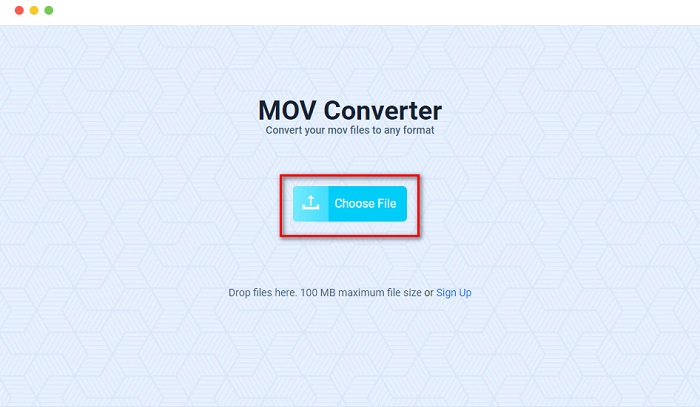
Step 1. On your trusted browser, search Evano online converter. And on the software's main interface, click the Choos File button, then your computer folders will appear where you will select your MOV folder to upload.
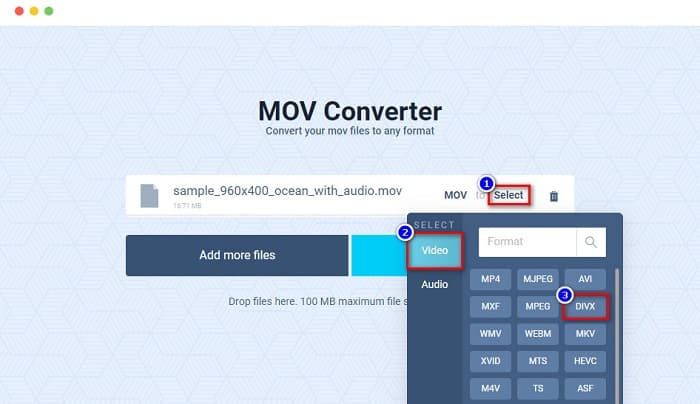
Step 2. After uploading your file, click the Select option to choose the file output format that you want. And then click the DivX format.
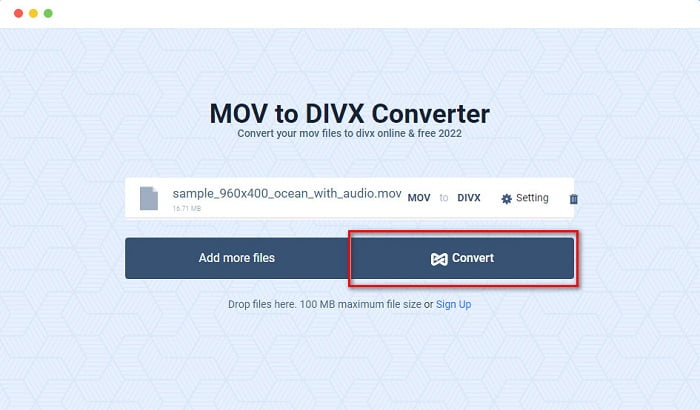
Step 3. And then, click the Convert button to convert MOV to DivX.
חלק 4. כיצד להמיר באמצעות ממיר תוכנה חופשית
Another way to convert your MOV file to a DivX file is by using a freeware converter. One of the most used freeware converters is Prism Video File Converter. This converter is free to download and available on Windows and Mac. It is also safe to use, so many people convert files using this app. However, other people have difficulty using this converter because its interface is somehow hard to understand. Nonetheless, it is still an excellent way to convert MOV to DivX for free.
Step 1. Download Prism Video File Converter on your Mac device. Follow the installation process, then open the app. Click the Add File(s) button to upload your MOV file on the software's main interface.
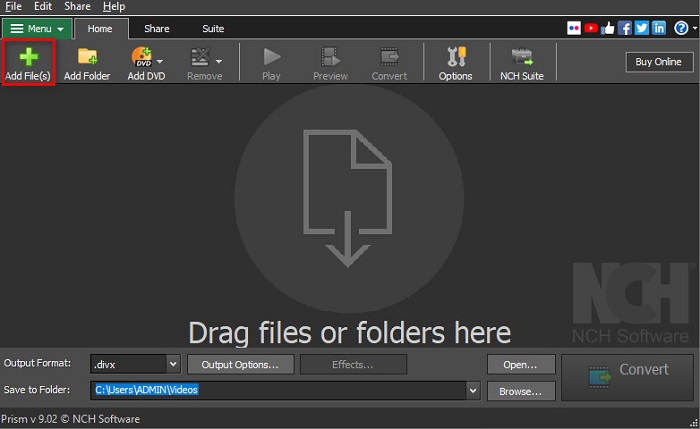
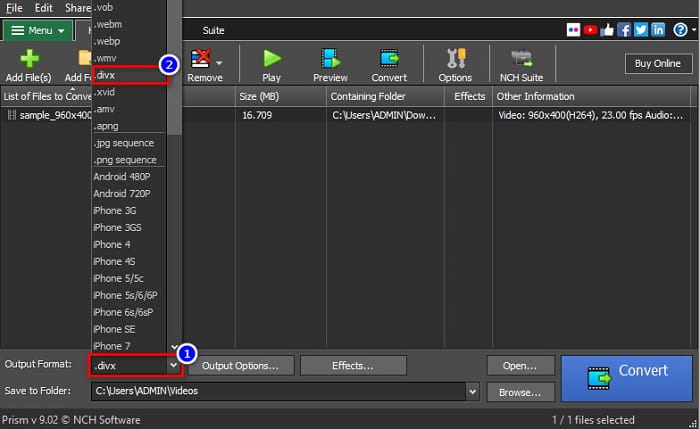
Step 2. Then on the drop-down button beside Output Format, click the DivX file format.
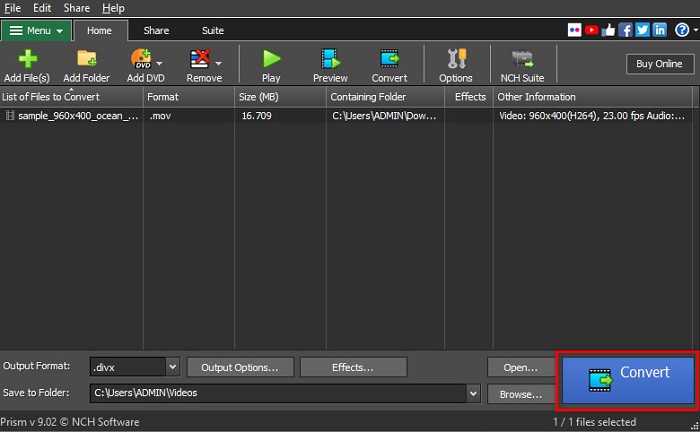
Step 3. To finish, click the Convert button located at the bottom right corner of the software’s interface.
חלק 5. השוואה בין MOV ו-DivX
| MOV | לעומת | DivX |
| נתמך רק על ידי מכשירי אפל | מכשיר נתמך | נתמך על ידי כמעט כל המכשירים כולל Mac ו-Windows |
| לא דחוס | דחוס/לא דחוס | דָחוּס |
| מכיל גודל קובץ גדול | גודל הקובץ | בעל גודל קובץ קטן |
| MOV הוא השימוש הטוב ביותר עבור עריכת וידאו | השימוש הטוב ביותר עבור | DivX הוא השימוש הטוב ביותר לדחיסת גודל קובץ עד שתים עשרה מגודל הקובץ המקורי שלו |
| וִידֵאוֹ | Codec | וִידֵאוֹ |
חלק 6. שאלות נפוצות לגבי המרת MOV ל-DivX
האם אתה יכול לשחק MOV ב-Windows Media Player?
Unfortunately, no. Windows Media Player cannot support MOV file formats. But if you want to play a MOV file to Windows Media Player, you can convert MOV to WMV format. To know more about converting MOV to WMV, click this link.
האם המרת MOV ל-DivX משפיעה על גודל הקובץ?
כן. גודל הקובץ יקטן מכיוון שקובץ DivX יכול לדחוס עד שתים עשרה מהגודל המקורי.
האם QuickTime תומך בקבצי DivX?
No. QuickTime is a built-in media player for mac that does not support DivX file formats. However, you can convert DivX files to MKV, which QuickTime supports.
סיכום
Well, that’s it! You do not need to search for solutions to convert MOV to DivX because that is all you need. The offline, online, and freeware converters shown above are the best ways to convert your MOV file to DivX. It is in your hands on what converter you will use, but if you want to use the top-performing converter, download FVC Video Converter Ultimate now.
-
 2 דרכים קלות להמיר קבצי MOV ל- FLV ב- Windows / Mac
 כיצד להמיר MOV ל- FLV בחינם? להלן ממירי הווידאו הטובים ביותר בשולחן העבודה ובאינטרנט כדי להמיר את קובץ ה- MOV שלך ל- FLV תוך שניות מבלי לשלם שקל.
-
 MOV ל- GIF - כיצד להמיר MOV ל- GIF מונפש ב- Mac, PC ובחינם באינטרנט
 מהו GIF? כיצד להמיר וידאו ל- GIF? כיצד לשנות MOV ל- GIF מונפש באינטרנט? פוסט זה מספר 3 דרכים להמיר MOV ל- GIF מקוון, ב- Mac/PC.
-
 4 דרכים יעילות להמיר MOV ל-AVI במחשב וב-Mac [2021]
 האם אתה רוצה לדעת מהו ממיר ה- MOV ל- AVI הטוב ביותר באינטרנט? ולמה ממיר הווידאו Ultimate FVC עשוי להיות זה בשבילך.
