


 ממיר וידאו אולטימטיבי
 מקליט מסך
 תיקון וידאו
3 דרכים שונות להפוך קבצי MPG ל-MOV בשולחן העבודה או באינטרנט
המרת פורמט היא חיונית, במיוחד אם אנחנו עומדים לדבר על תאימות ועל מטרת הפורמט. כמו MPG, פורמט זה מאחסן נתונים מ-DVD כגון שילוב מטא-דטה, אודיו ווידאו. אבל חילוץ (ripping) של פורמט זה מ-DVD והפעלה שלו ב-QuickTime או עריכה שלו ב‑iMovie לא ניתן להעלאה, משום שהפורמט אינו נתמך. עם זאת, אפשר להמיר את קובץ ה-.mpg שלך לפורמט נתמך כמו פורמט MOV. במאמר זה נציע כמה מתוכנות ההמרה הטובות ביותר שבהן תוכל להשתמש כדי להמיר MPG ל‑MOV ב‑Mac בחינם מבלי לפגוע באיכות.

חלק 1. כיצד להמיר MPG ל-MOV ב-Mac ו-Windows
ראשונה ברשימה היא הקרם‑דה‑לה‑קרם של כל ממירי הווידאו שתוכל להשתמש בהם כדי ללמוד כיצד להמיר MPG ל‑MOV ב‑Mac או במחשב אישי. FVC Video Converter Ultimate מספקת את האיכות הגבוהה ביותר ומהירות ההמרה המהירה ביותר, שניתן לבצע בפחות מדקה. יתר על כן, הורד אותה אם אין לך ניסיון בהמרת קבצים ואינך רוצה להתאכזב בניסיון הראשון. אבל אם אתה משתמש שרוצה להוסיף אפקטים מיוחדים, לחתוך, למזג ולעשות עוד הרבה יותר, בדוק את ארגז‑הכלים (Toolbox) של ממיר זה. מעבר לכך, אם אתה מחפש תוכנה אמינה וקלה לשימוש ולהשגת תוצאות יוצאות מן הכלל באופן מיידי, פעל לפי ההוראות שלהלן.
שלב 1. הורד בחינם את ממיר ה‑MPG ל‑MOV ב‑Mac או במחשב האישי שלך. לאחר מכן התקן את הקובץ ובצע הגדרה מהירה.
הורדה חינמיתל-Windows 7 ומעלההורדה מאובטחת
הורדה חינמיתל-MacOS 10.7 ומעלההורדה מאובטחת
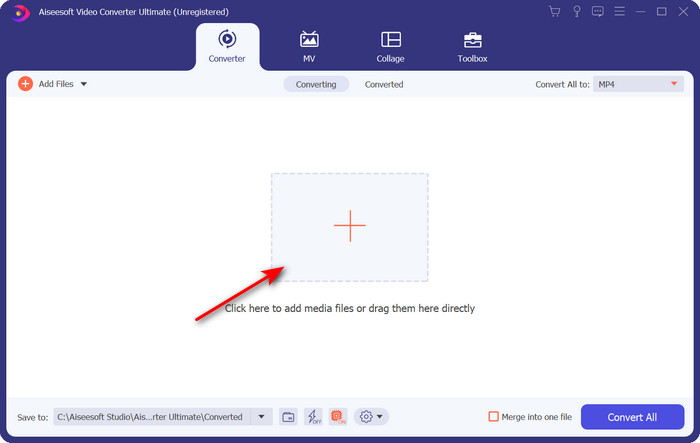
שלב 2. כדי להוסיף את הקובץ, לחץ על סימן ה‑+ הממוקם במרכז הממשק. מצא את קובץ ה‑.mpg בתיקייה שתופיע אחר כך, לחץ על Open והמשך.
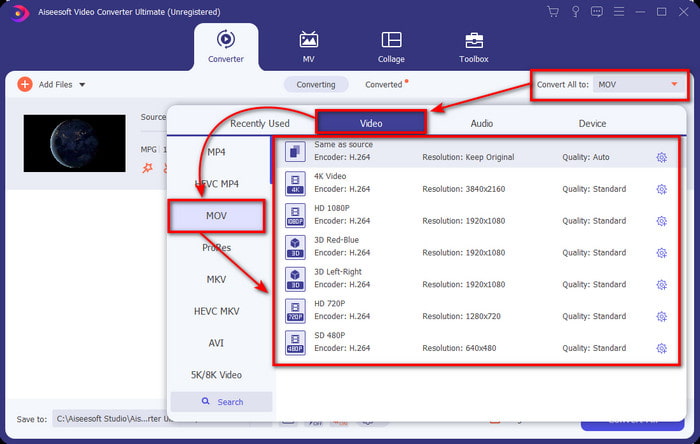
שלב 3. לחץ על כפתור ה‑drop-down ובחר את פורמט MOV או כל פורמט אחר הזמין ברשימה.
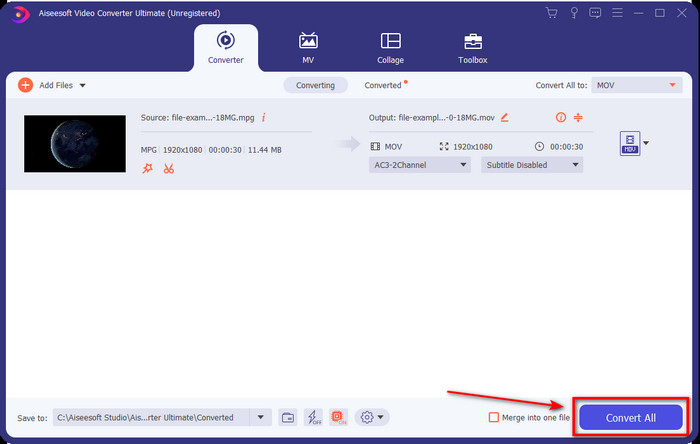
שלב 4. כשתהיה מוכן להתחיל בתהליך ההמרה, לחץ על Convert All.
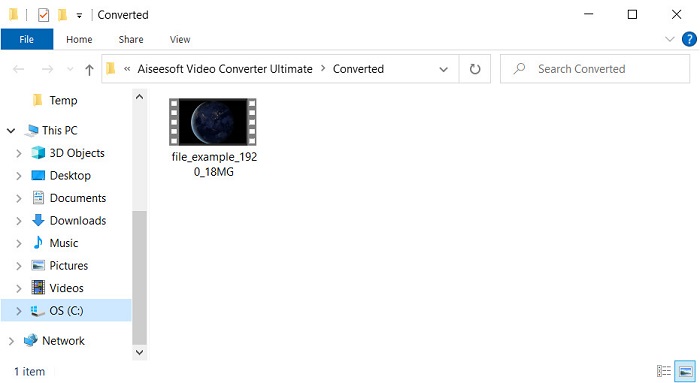
שלב 5. קובץ ה‑.mov שלך יהיה מוכן לאחר כמה שניות, ואם התיקייה תיפתח על המסך שלך, לחץ על הקובץ הראשון כדי לצפות בו או לערוך אותו במכשיר ה‑Apple שלך.
חלק 2. המר MPG ל-MOV באמצעות Quicktime
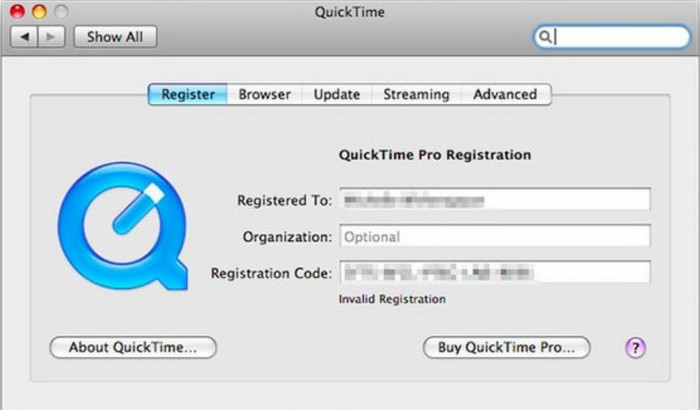
QuickTime Player הוא נגן מדיה מובנה שיועד למכשירי Apple כדי לנגן כמעט כל פורמט וידאו ואודיו. אבל האם ידעת שאפשר להשתמש בו גם כממיר? עם זאת, יכולת ההמרה שהכלי הזה מציע אינה מפורטת כמו זו של הממיר הראשון שהוזכר לעיל. ובכל זאת, אם יש לך מכשיר Apple ואתה רוצה להמיר MPG ל‑MOV בעזרת QuickTime Player, פעל לפי השלבים שלהלן.
שלב 1. פתח את QuickTime Player ב‑Mac, לחץ על File שמתחתיו, לחץ על Open File, אתר את קובץ ה‑.mkv בתיקייה ולחץ על Open.
שלב 2. לחץ שוב על File, אך הפעם לחץ על Export As ובחר את רזולוציית הפיקסלים הזמינה ברשימה.
שלב 3. כדי להתחיל להמיר את הקובץ ב‑QuickTime, לחץ על Save.
חלק 3. המר MPG ל-MOV באמצעות ממיר MPG ל-MOV בחינם
רוצה לדעת מהו ממיר MPG ל‑MOV המקוון החינמי הטוב ביותר אם אינך רוצה להסתכן בהורדת תוכנה? אז FVC Free Video Converter Online הוא בשבילך. הוא פשוט, זמין בכל הדפדפנים, נקי מתוכנות זדוניות, והוא כלי מקוון אמין. כל מה שממיר פשוט צריך לכלול קיים כאן. בנוסף, תוכנה זו תומכת בפורמטים רבים של מדיה וממירה ללא צורך להתחבר לחשבון. רוצה להשתמש בכלי הזה? פעל לפי השלבים הפשוטים להלן.
שלב 1. לחץ על קישור זה כדי לעבור לאתר הרשמי של FVC Free Video Converter Online.
שלב 2. לאחר שתהיה כעת בממשק האינטרנט, לחץ על Add Files to Convert. מצא בתיקייה את קובץ ה‑.mpg שברצונך להמיר, ואז לחץ על Open.
הורד את גרסת הדסקטופ כדי להמיר קבצים במצב אצווה.
שלב 3. לאחר העלאת הקובץ, בחר את פורמט MOV בתפריט המשני.
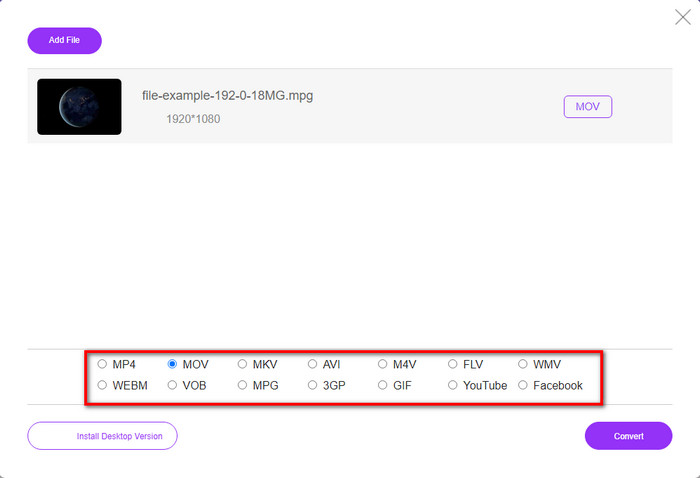
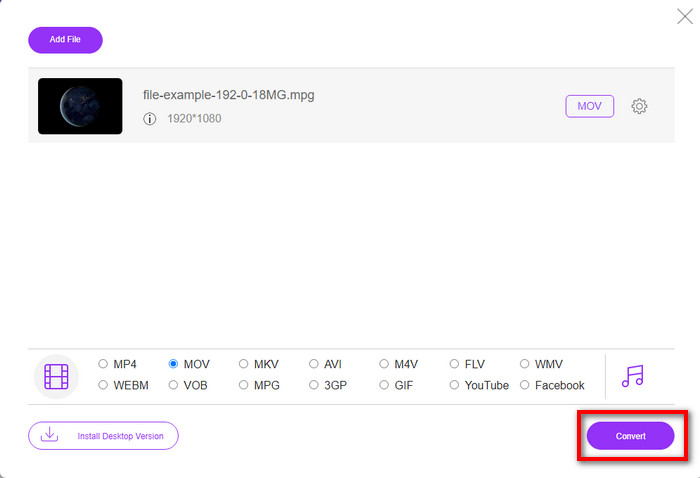
שלב 4. מאחר שכבר לחצת על MOV, כעת נוריד אותו על ידי לחיצה על Convert.
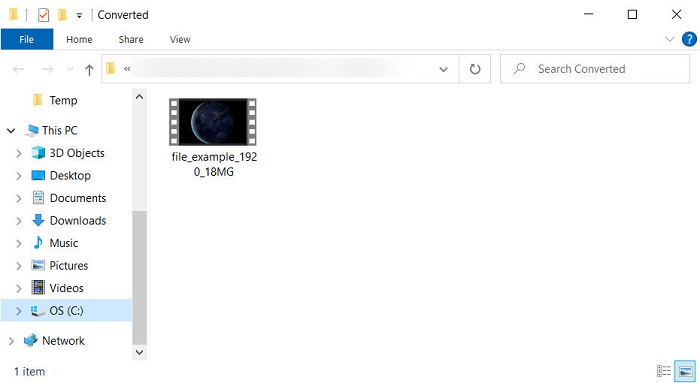
שלב 5. לאחר ההמרה, תופיע תיקייה עם קובץ .mov.
חלק 4. ידע נרחב על MPG ל-MOV ומדוע אנחנו צריכים להמיר אותו
MPG הוא פורמט מדיה ידוע המשתמש ב-MPEG כפורמט וידאו סטנדרטי דיגיטלי. קובץ מסוג זה משתמש בדרך כלל ב-MPEG-1 וב-MPEG-2 כמקודד קבצי מדיה. הוא משתמש בשני המדחסים הללו כדי לתמוך בכל חסרון של המדחס, במיוחד לאחסון סרטונים ברזולוציה גבוהה יותר. כפי שנאמר קודם לכן, פורמט זה יכול להכיל שלושה אלמנטים: אודיו, וידאו ומטא נתונים בזרם אחד להפצה מהירה יותר של סרטים באינטרנט.
אבל MOV יכול לאחסן וידאו באיכות גבוהה ואודיו צלול המשמש בדרך כלל לעריכת הווידאו. שלא כמו MPG, פורמט מדיה מרובה זה יכול לעקוב אחר נתוני מדיה שונים כגון וידאו, אודיו וכתוביות. אבל המקודד והמפענח של פורמט זה הנפוץ הוא MPEG-4.
עדיף להפוך את ה-MPG ל-MOV מכיוון שכאשר אתה מעביר את הקובץ למכשירי אפל, הוא לא יופעל ב-Quicktime או יערוך ב-iMovie. למרות שה-Quicktime Player ו-iMovie תומכים ב-MPEG-1 ו-MPEG-4, שאר ה-MPEGs, כמו MPEG-2 ש-.mpg משתמש בהם, אינם נתמכים. כדי להפוך אותו לתואם במכשירי אפל היא הסיבה שבגללה אתה צריך להמיר את הקובץ ל-MOV.
MPG לעומת MOV
מיוצר על ידי Moving Picture Experts Group (MPEG), MPG הוא פורמט וידאו דיגיטלי נפוץ לאחסון מידע וידאו, אודיו ומטא נתונים. זה די שימושי בעת יצירת סרטים לשיתוף באינטרנט. קבצים אלה ב-MPG מכילים בדרך כלל דחיסת וידאו/שמע MPEG-1 או MPEG-2.
ניתן להשתמש בפורמט MOV לאחסון סרט, תוכנית טלוויזיה, וידאו קליפ קצר או סרט ביתי. הוא נשמר למעשה בפורמט הקובץ QuickTime (QTFF), אשר הוצג על ידי אפל בשנת 1991. קבצי MOV משמשים לעתים קרובות כאשר אנשים רוצים לשמור סרטון וידאו באיכות גבוהה.
חלק 5. שאלות נפוצות לגבי המרת MPG ו-MOV
כמה זמן ייקח להמיר MPG?
ישנם שני גורמים שעשויים להשפיע על תהליך ההמרה שלך. ראשית, אם אתה משתמש בממיר מקוון זה יהיה תלוי באיזו מהירות האינטרנט שלך. תהליך זה ייקח זמן רב יותר בהשוואה לממיר הלא מבוסס האחר. והאחרון, ככל שגודל הקובץ גדול יותר כך ייקח זמן רב יותר להמיר אותו. לכן, אם גודל קובץ ה-.mpg שלך גדול, בדרך כלל היית מחכה עד שהוא יסתיים.
האם אני יכול לנגן קבצי mpg ב-VLC?
VLC הוא אחד מנגני המדיה העיקריים שתוכל להוריד בכל המכשירים כדי להפעיל סרטונים בפורמט שאינו ניתן להשמעה בנגן המדיה המקומי שלך. אתה יכול גם לשחק כאן, את כל הפורמטים MPEG-1, MPEG-2, MPEG-3 ו-MPEG-4.
האם דחיסת MPG משפיעה על האיכות?
דחיסת קובץ לא אמורה לפגוע באיכות, משום שמה שעשית הוא רק להקטין אותו. אבל כאשר אתה דוחס את ה‑.mpg יותר מדי, האיכות שלו תשתנה מעט. לכן, כדי להימנע מכך, עליך לקרוא את 7 מדחסי הווידאו המובילים שתוכל להשתמש בהם.
סיכום
כדי לסכם את כל המידע המפורט שהוזכר לעיל, אתה יכול להמיר את ה-MPG שלך ל-MOV אם אתה רוצה להשתמש בסרטון במכשירי אפל. למרות שתוכנות כמו Quicktime ו-iMovie תומכות ב-MPEG-1 ו-MPEG-4, עדיין ה-MPEG-2 וה-MPEG-3 אינם נתמכים. לכן, כדי להפוך אותו לתואם במכשירי Apple שלך, אידיאלי להמיר אותו. כל הכלים המוזכרים כאן יעילים מאוד וקלים לשימוש אם אתה ממיר את הקובץ.
-
 FLV ל- MPG - כיצד להמיר FLV ל- MPG במחשב Mac, PC ובאינטרנט בחינם
 כיצד להמיר FLV ל- MPEG? האם אוכל להמיר FLV ל- MPG בחינם? פוסט זה משתף 3 ממירי וידאו בחינם שיעזרו לך להמיר FLV ל- MPG ללא אובדן איכות.
-
 כיצד להמיר פורמט MPG לפורמט GIF [מקוון ולא מקוון]
 רוצה להביע רגש הרבה יותר טוב? לאחר מכן עליך להשתמש ב- GIF במקום זאת. מאמר זה ילמד אותך כיצד להמיר קובץ MPG ל- GIF כדי להביע את הרגשתך הרבה יותר טוב.
-
 [2022] בחירות חמות של ממיר MPG ל-AVI שיעזור לך להמיר MPG ל-AVI
 האם אי פעם תהיתם על המרת MPG לקובץ וידאו AVI רק כדי להפעיל אותו בנגן הווידאו שלכם? הנה המאמר הטוב ביותר שתוכל למצוא שמדבר על הנושא שלמעלה.

