


 ממיר וידאו אולטימטיבי
 מקליט מסך
 תיקון וידאו
דרכים שונות להמיר RMVB ל-MOV לא מקוון ומקוון
בגלל השפע של פורמטי וידאו מבלבלים הזמינים באינטרנט, משתמשים רבים מתקשים לבחור באיזה נגן מדיה להשתמש עבור הווידאו הספציפי שהם מקבלים. תאמין או לא, ניגון וידאו לא תמיד פשוט כמו הורדתו. חלק מהפורמטים הם בלעדיים רק ליוצר שלהם, ויש כאלה שמשתמשים יכולים לנגן כמעט בכל מקום. עם זאת, חיוני לדעת אילו פורמטי וידאו לחפש שתומכים בהם הנגנים שברשותך. אבל לא כדאי לנו להסתפק רק בזה. לדעת כיצד להמיר פורמטי קבצים שאינך רואה בכל יום היא הדרך הטובה ביותר. לכן אנו מספקים לך את כל הדרכים האפשריות להמיר RMVB ל‑MOV לנוחיותך.
חלק 1. סקירה כללית: RMVB ו-MOV
RMVB ו-MOV הם שני פורמטי וידאו שונים של שתי חברות אחרות שפיתחו אותם. כדאי לדעת על קבצי RMVB, קיצור של RealMedia Variable Bitrate, הרחבה שפותחה על ידי RealNetworks בקצב משתנה לפורמט RealMedia מולטימדיה מיכל דיגיטלי. יש אנשים שמשתמשים ב-RMVB עבור חומר מולטימדיה שנשמר באופן מקומי. מכיוון שהם כוללים גדלי קבצים קטנים יותר וקצבי סיביות נמוכים יותר, אך עם איכות מעולה יותר, קבצי RMVB הפכו לפורמט פופולרי עבור כותרי אנימה וסרטי אסיה. סיומת הקובץ '.rmvb' משמשת עבור פורמט זה.
מצד שני, MOV הוא פורמט קובץ מולטימדיה שפותח על ידי אפל שנשמר בפורמט הקובץ QuickTime (QTFF). פורמט המכולה יכול להתמודד עם פורמטי מדיה שונים כדי להקל על העברת מולטימדיה בין מכשירים, מערכות הפעלה ויישומים. קובצי מולטימדיה QTFF מאחסנים קבצי mov. עם זאת, הם יכולים גם לשמור כקבצי qt.
| סיומת קובץ | RMVB | MOV |
| סוג קובץ | קובץ קצב סיביות משתנה של RealMedia | סרט Apple QuickTime |
| מפתח | RealNetworks | תפוח עץ |
| יתרונות | RMVB הוא פורמט לאחסון ושיתוף מידע מולטימדיה. והוא מפורסם בעיקר בהפצת תוכן אסיאתי, כמו פרקי טלוויזיה וסרטים סיניים. | קובץ MOV עשוי לכלול מסלולי נתונים רבים, שכל אחד מהם מכיל זרם מדיה דיגיטלי או קשור לזרם בקובץ אחר. כתוצאה מכך, אתה יכול פשוט לשנות קבצים מבלי שתצטרך לבצע מחדש את הנתונים לאחר מכן. |
| חסרונות | הם אינם נפוצים, בגלל חוסר ההתאמה שלהם עם נגני מדיה אחרים. | כל קובץ MOV עשוי לכלול כל אחד מכמה קודקים שונים, מה שהופך אותו למאתגר לשחק. |
| תוכניות תומכות בקובץ | RealPlayer VLC Media Player iOrgSoft Video Converter | Microsoft Windows Media Player נגן המדיה של Apple QuickTime Player VideoLAN VLC |
חלק 2. השיטה הנגישה והטובה ביותר בהמרת RMVB ל-MOV [לא מקוון]
לעתים יש צורך בהמרת וידאו מ-RMVB ל-MOV בשעה וביום בלתי צפויים. התהליך כולו דורש בעיקר חיבור לאינטרנט שלא תמיד זמין בכל מקום. אז, Video Converter Ultimate היא הדרך ללכת אם אתה רוצה להמיר את הסרטון שלך לפורמט המתאים למצב שבו אתה נמצא. זה אפילו מאפשר לך להמיר מספר סרטונים בו זמנית, חוסך את הטרחה של תהליכים חוזרים ונשנים. זה אפילו מספק לך אפשרויות שונות כמו בחירת רזולוציה מסוימת, קצב פריימים וקצב סיביות עבור הסרטון שלך. תן שם רזולוציה ו-Video Converter Ultimate ייתן לך אותה.
שלב 1: עבור לאתר, ותראה כפתור שעליו כתוב Free Download ו‑For Mac OS. לחץ עליו כדי להוריד את קובץ ה‑.exe. עליך להתקין את התוכנה ולהמתין לסיום. לאחר שהפעולה הסתיימה, פתח את הקובץ כדי להמשיך בתהליך ההתקנה.
הורדה חינמיתל-Windows 7 ומעלההורדה מאובטחת
הורדה חינמיתל-MacOS 10.7 ומעלההורדה מאובטחת
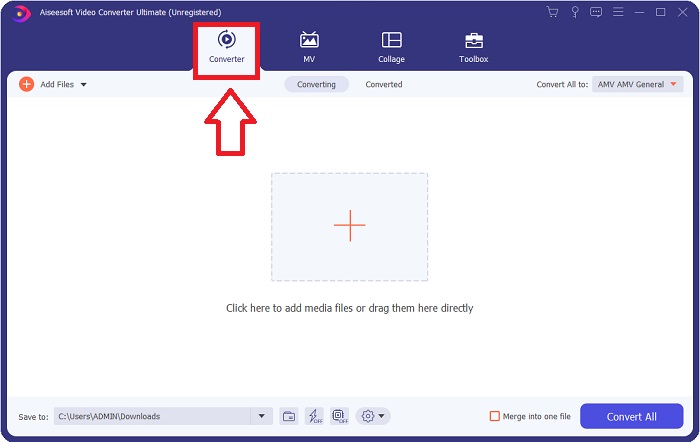
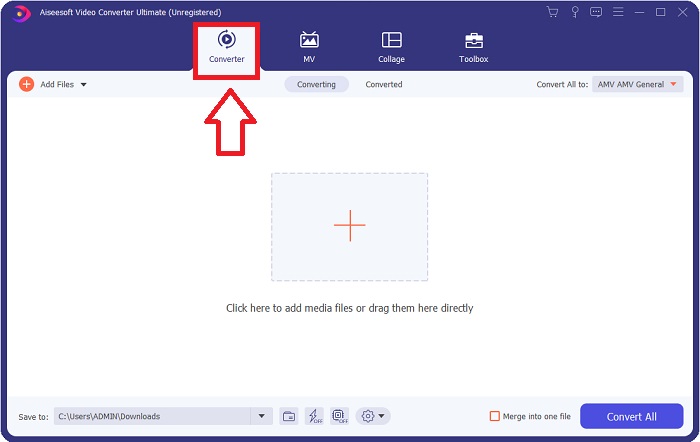
שלב 2: לאחר סיום ההתקנה, הפעל את התוכנה, וחלון ייפתח. יוצג בפניך ממשק עם לשוניות בחלק העליון. בתחילה תימצא בלשונית Converter, ואם לא – פשוט בחר בה.
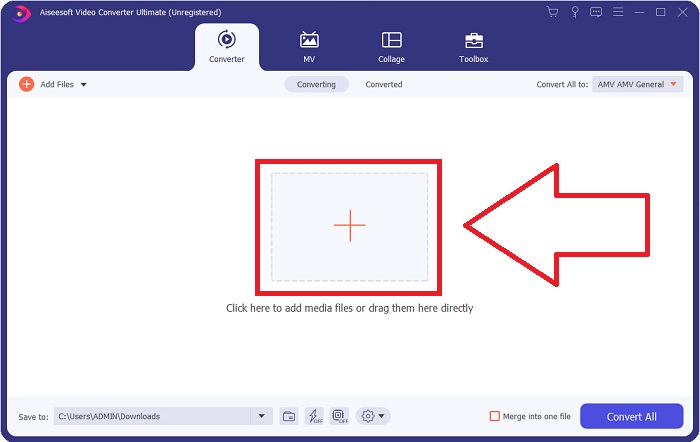
שלב 3: בממשק תראה כפתור מרובע עם סמל + במרכז. לחץ עליו כדי לייבא את קובץ הווידאו שברצונך להמיר, או שפשוט תוכל לגרור ולשחרר ללא כל מאמץ.
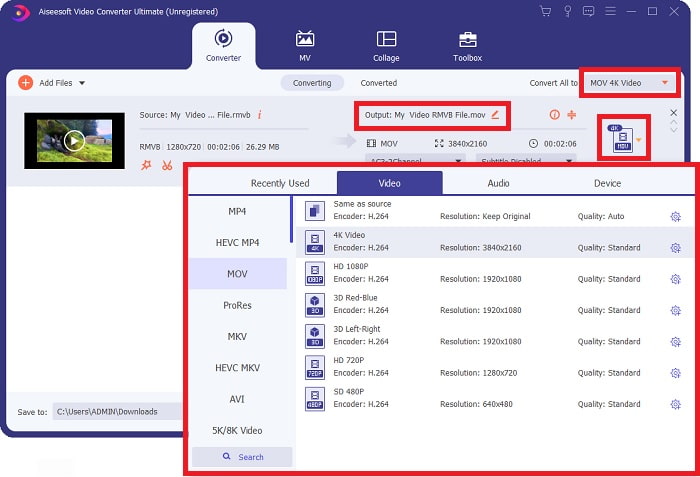
שלב 4: יופיע ממשק חדש המציג את כל האפשרויות לעריכת הווידאו שלך. בצד הימני ביותר תבחר את הפורמט הרצוי לווידאו המומר שלך. פשוט לחץ על החץ הנפתח, ותוצג בפניך רשימה של כל הפורמטים הזמינים.
במקרה זה, בחר MOV. בנוסף, באפשרותך ללחוץ על סמל גלגל השיניים שליד הרזולוציה שבחרת כדי לערוך הגדרות כמו קצב פריימים לווידאו וקצב דגימה לאודיו. כדי לשמור את השינויים, לחץ על Create New.
שלב 5: אם סיימת את העבודה עם כל השינויים שביצעת בווידאו, תוכל כעת להתחיל בתהליך ההמרה על‑ידי לחיצה על הכפתור Convert All בפינה הימנית‑תחתונה של החלון.
חלק 3. שיטה מצוינת נוספת להמרת RMVB ל-MOV [מקוון]
אם הורדה והתקנה של תוכנה על שולחן העבודה אינן לטעמך, ואתה צריך המרה חד‑פעמית בלבד עבור הסרטים שלך, הנה אפשרות מקוונת מלאה שתוכל לנסות. FVC Free Video Converter Online, כלי אינטרנט, מציע מגוון אפשרויות להגדרות וידאו ואודיו, תוך שהוא חוסך לך את הזמן של התקנת התוכנה עצמה. התהליך כולל שלושה שלבים פשוטים בלבד כדי לבצע את המשימה:
שלב 1: תחילה, עבור לאתר, שבו תמצא כפתור צהוב במרכז הדף שעליו כתוב Add Files to Convert. לחץ על הכפתור כדי לייבא את קובץ הווידאו שברצונך להמיר.
הורד את גרסת הדסקטופ כדי להמיר קבצים במצב אצווה.
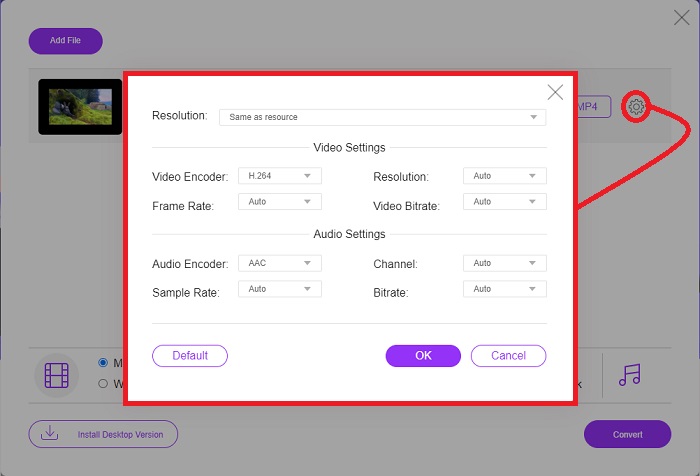
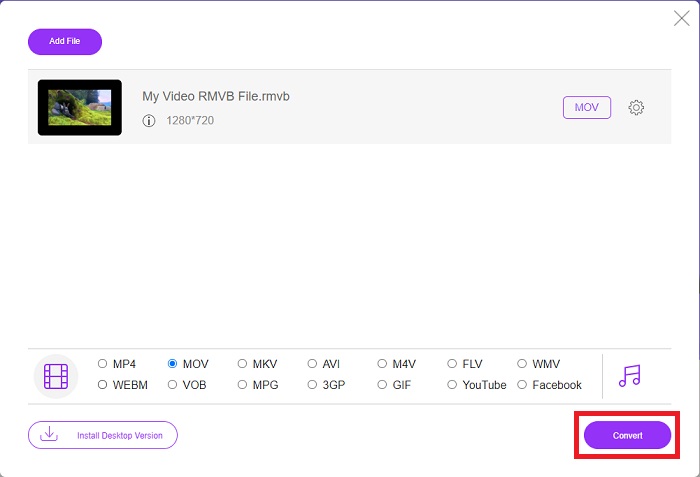
שלב 2: חלון קופץ יופיע, המציג את קובץ הווידאו שייבאת בחלק העליון ואת כל הפורמטים הזמינים בחלק התחתון. מכיוון שברצונך להמיר את קובץ ה‑RMVB שלך ל‑MOV, בחר MOV. עבור אפשרויות נוספות, לחץ על סמל גלגל השיניים בקצה הימני כדי לערוך הגדרות וידאו ואודיו עבור האפשרויות הנוספות. כדי לשמור את השינויים, לחץ על OK.
שלב 3: אם כל השינויים שבוצעו עונים על הצרכים שלך מהווידאו, תוכל כעת להתחיל להמיר את הווידאו שלך על‑ידי לחיצה על כפתור Convert בפינה הימנית‑תחתונה של החלון. בחר באיזו תיקייה תרצה שקובץ ההמרה המלא ייוצא והמתן לסיום.
RMVB לעומת MOV
RMVB, גרסה חדשה יותר של פורמט Real Media (.RM) הסטנדרטי, הוא פורמט קובץ וידאו של Real Media דחוס באמצעות קצב סיביות משתנה. זהו פורמט פופולרי לסרטים אסייתיים ואנימה. קבצי RMVB קטנים יותר בגודלם וקצב סיביות נמוך יותר אך באיכות טובה יותר.
ניתן להשתמש בפורמט MOV לאחסון סרט, תוכנית טלוויזיה, וידאו קליפ קצר או סרט ביתי. הוא נשמר למעשה בפורמט הקובץ QuickTime (QTFF), אשר הוצג על ידי אפל בשנת 1991. קבצי MOV משמשים לעתים קרובות כאשר אנשים רוצים לשמור סרטון וידאו באיכות גבוהה.
חלק 4. שאלות נפוצות לגבי המרת RMVB ל-MOV
מהו בעצם קובץ RMVB?
כל קובץ RMVB הוא קובץ וידאו Real Media דחוס באמצעות קצב סיביות משתנה אופטימלי לתוכן הסרטון. זוהי גרסה חדשה יותר של פורמט הקובץ הבסיסי של Real Media (.RM) המציעה דחיסה טובה יותר.
מה יכול לנגן קבצי RMVB?
מכיוון שיישומים שונים משתמשים בקבצים בעלי הסיומת RMVB מסיבות שונות, תזדקק לתוכנה שתתאים בדיוק לקובץ שאליו אתה מנסה לגשת. RealNetworks RealPlayer (Windows), VLC media player (רב‑פלטפורמי) ו‑GRETSCH GOM Player (Windows) הם כולם נגני מדיה חינמיים שיכולים לנגן קבצי RMVB.
האם יש שגיאות אפשריות בקבצי rmvb?
אם אין לך Real Media Player או כל כלי מתאים אחר לפתיחת קבצים, אתה עלול להיתקל בבעיה בפתיחת קבצי rmvb אם הקובץ פגום עקב סקטורים פגומים בכונן הקשיח או הורדה שגויה. אם מתעוררות בעיות ברישום המערכת של Windows, שבו מאוחסן פרטי שיוך הקבצים עבור קובץ rmvb, עלולה להתרחש שגיאה שלישית.
סיכום
הבחירה אם לשמור על תוכנה או רק להשתמש בכלי מקוון להמרת סרטון אינה לדאוג אם יש להשתמש ב-FVC. הן התוכנה והן הגרסה המקוונת שלה מציעות את האפשרויות הטובות ביותר לצרכי ההמרה שלך. עם זאת, אנו ממליצים בחום להוריד את Video Converter Ultimate עבור ארגז הכלים הנוסף שהוא מספק לך כשאתה מחפש עריכות נוספות עבור הסרטון שלך מלבד ההמרה בלבד. אתה אף פעם לא יודע מתי אתה צריך תוכנה ידידותית למתחילים, אז עדיף להחזיק אותה תמיד ליד המחשב שלך.
-
 מדריך כיצד להמיר RMVB ל- MP4 ב- Windows / Mac (3 דרכים חינם)
 רוצה להמיר RMVB ל MP4 להפעלה קלה במחשב או בטלפון הנייד? תוכלו למצוא דרכים פשוטות להמיר את קבצי ה- RMVB שלכם ל- MP4 במדריך זה.
-
 למעלה 4 יישומי RMVB ל FLV ממירים בחינם בשולחן העבודה או באינטרנט
 מאמר זה יספר לכם את תוכנות הממיר RMVB ל- FLV ויישומי האינטרנט הטובים ביותר שיכולים להמיר קבצי RMVB (RealMedia Variable Bitrate) לקבצי FLV.
-
 כיצד להמיר MP4 ל- MOV ב- Mac / PC / Online
 כיצד להמיר MP4 ל- MOV ב- Mac? האם יש דרך חופשית להמיר MP4 ל- MOV ללא אובדן איכות? פוסט זה משתף 4 דרכים פשוטות לעזור לך לבצע את המרת הווידאו מ MP4 ל- MOV ב- Mac, Windows PC ומקוון.

