


 ממיר וידאו אולטימטיבי
 מקליט מסך
 תיקון וידאו
מדריך מהיר וקל להבנה כיצד להמיר TRP ל-MOV
פורמט TRP אינו נפוץ במיוחד לשימוש בנגני מדיה או לעריכה בתוכנות עריכה. חלק מהמשתמשים ניסו לשנות את הסיומת .trp ל‑.ts, .mpg, .mp4 ולהפעיל שוב את הקובץ בנגן המדיה. אך רבים כבר נכשלו בניסיון הזה; למרות שניתן לשנות את הסיומת, המבנה הפנימי עדיין נשאר אותו דבר. כדי להימנע מהטעות הזו, למה שלא תנסו להמיר TRP ל‑MOV? כך תוכלו לפתור את הבעיה בהצלחה. בהמשך תלמדו מהו פורמט TRP וכיצד להפוך אותו לפורמט MOV שניתן לנגן.

חלק 1. מה הם TRP ו-MOV
TRP ידוע בשל ריבוי הזרמים הדיגיטליים שלו עבור וידאו ואודיו, ולאחר מכן מנגן אותם באופן סינכרוני. יתר על כן, פורמט זה משמש לעתים קרובות לתיקון שגיאות בכל שידור וידאו דיגיטלי או DVB. כמו כן, .trp משתמש בשני קודקים נפרדים כדי לקודד את הווידאו לתוך H.263 או H.264 ו-AC3 עבור שמע. לאחר הקידוד, קבצי האודיו החזותיים המאוחסנים כאן מוכנים לשידור לכל האינטרנט ללא הגבלה למרחקים. למרות שהפורמט נראה מצוין, אחסון קבצים תוך שמירה על האיכות הגבוהה. עם זאת, תוכנות מסוימות אינן מתאימות בפורמט הזה.
להיפך, פורמט ה-MOV מעדיף לשמור על וידאו ואודיו באיכות גבוהה בכל נגן Quicktime. למרות שהפורמט מיועד לאפל, אתה עדיין יכול להפעיל את הסרטון גם אם אין לך Mac או iOS מכיוון שהפורמט הזה תומך במספר רב של נגני מדיה ועורכי מדיה.
אז עכשיו, הפתרון האידיאלי לבעיית ה-TRP הזו הוא להמיר אותו, במיוחד אם אתה רוצה להעביר את הקובץ ל-Mac או iPhone, ואז לשחק או לערוך אותו מאוחר יותר. ללא עיכובים נוספים, בואו נמשיך אל הממיר שבו תוכלו להשתמש באופן אידיאלי כדי להמיר קבצי TRP ל-MOV.
חלק 2. כיצד להמיר TRP ל-MOV עם התוכנה הפנומנלית ב-Windows/Mac
ממיר ה‑TRP ל‑MOV הזה מוצג בראש הרשימה מפני שהוא הכלי הטוב ביותר להמרת קבצי TRP, FVC Video Converter Ultimate. זהו הכלי המושלם לחוות את הדרך המהירה והפשוטה ביותר לפענוח (decode) וקידוד (encode) של קבצי TRP. מעבר ליכולות הקידוד והפענוח, בעזרת תוכנה זו תוכלו גם לערוך וידאו, למזג, לגזור, לחתוך ועוד. כל זאת בזכות המשתמשים שנתנו אמון בכלי הזה להמרת הקבצים שלהם ורכשו אותו.
יתרונות
- ממיר TRP המהיר ביותר שאתה יכול להשתמש בו כדי להמיר TRP ל-MOV, AVI, MP4, MKV ועוד רבים.
- אין הגבלה להמרה, והמרת אצווה מתפקדת היטב.
- זמין להורדה בכל שולחן העבודה של PC או Mac.
- תכונות מתקדמות נמצאות בתוך ארגז הכלים המובנה.
חסרונות
- אתה צריך לקנות את התוכנה לפני שאתה משתמש בה.
- יש צורך להוריד את הקובץ בכונן שלך.
ללא הסבר נוסף, בואו נתחיל להשתמש בממיר המומלץ ביותר על ידי ביצוע השלבים הבאים.
שלב 1. לפני שתפעילו את התוכנית, עליכם להוריד אותה תחילה לכונן, להתקין אותה לאחר מכן, וללחוץ על "Start Now" כדי לפתוח את התוכנית.
הורדה חינמיתל-Windows 7 ומעלההורדה מאובטחת
הורדה חינמיתל-MacOS 10.7 ומעלההורדה מאובטחת
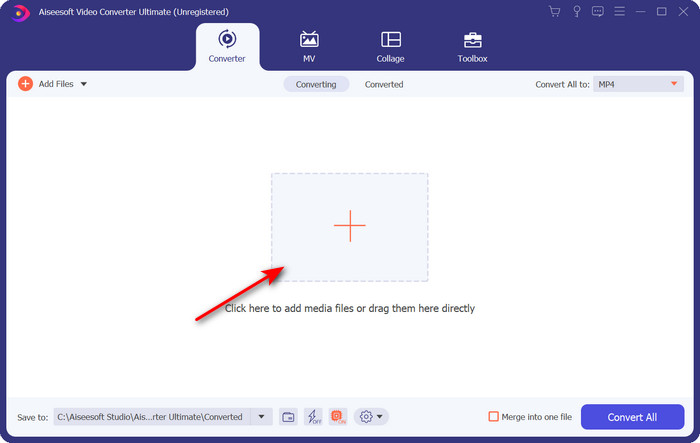
שלב 2. לחצו על כפתור ה‑+ במרכז ממשק התוכנה; תיקייה תופיע על המסך, מצאו את קובץ ה‑.trp ולחצו על Open כדי להעלות אותו.
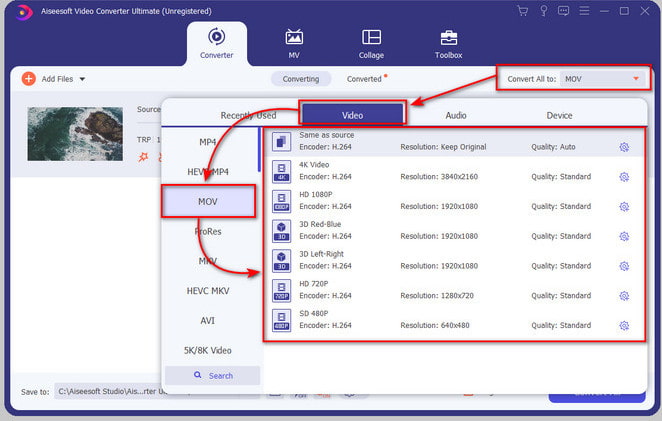
שלב 3. לחצו על Convert All ומצאו את פורמט MOV, ואז בחרו את הרזולוציה המועדפת עליכם.
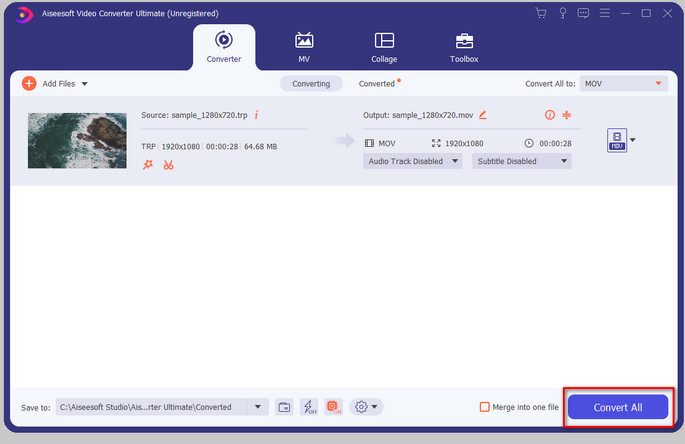
שלב 4. כאשר אתם מוכנים להתחיל להמיר את הפורמט ל‑.mov, לחצו על Convert All.
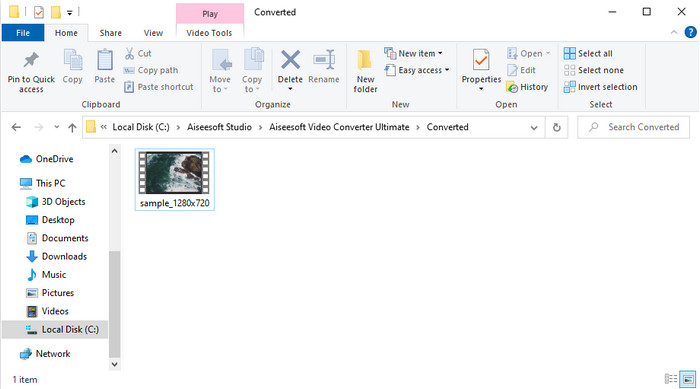
שלב 5. המתינו עד לסיום התהליך, ולאחר מכן תופיע תיקייה חדשה עם הפורמט המומר שביצעתם קודם. כדי לצפות בקובץ ב‑Mac או בכל מכשיר iOS, פשוט לחצו עליו.
חלק 3. כיצד להמיר TRP ל-MOV בחינם בכל הדפדפנים באינטרנט
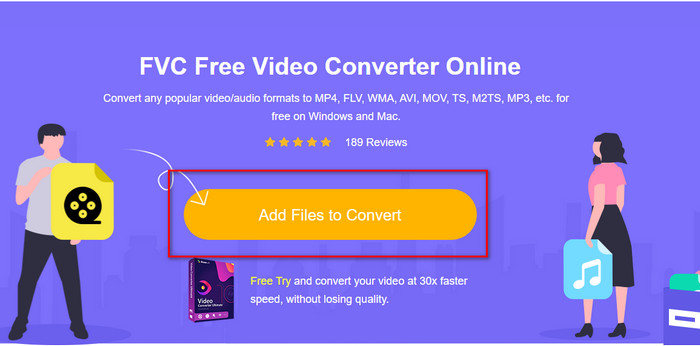
אין לכם רצון להוריד תוכנה כדי להמיר TRP ל‑MOV? במקרה כזה אנו ממליצים להשתמש ב‑FVC Free Video Converter Online כדי להמיר את הקובץ ישירות ברשת. בניגוד לכלי הראשון שהוצג לעיל, ממיר מקוון זה זמין דרך הדפדפן. והוא כמובן בטוח מפני תוכנות זדוניות, ואין בו כלל פרסומות בממשק. עם זאת, החיסרון של כלי אינטרנט זה הוא שלא תוכלו להשתמש בו ללא חיבור לאינטרנט. נוסף על כך, כלי זה תומך במספר פורמטים ממוצע בהשוואה ל‑FVC Video Converter Ultimate. מעבר לזה, תוכלו להשתמש בו בחינם וללא מגבלות. כעת, אם ברצונכם לנסות את הממיר המקוון הזה, עברו לשלבים הבאים כיצד להשתמש בו.
יתרונות
- תואם בכל מנועי החיפוש.
- אין הגבלה על המרת TRP ל-MOV, MP4, AVI וכו'.
- אין פרסומת מטרידה בממשק.
חסרונות
- אתה לא יכול לבצע המרת אצווה כמו הכלי האולטימטיבי.
- גישה לכלי האינטרנט דורשת אינטרנט מכיוון שהוא כלי מבוסס אינטרנט.
שלב 1. כדי להפעיל את כלי האינטרנט, לחצו על קישור זה.
שלב 2. סמנו את Add Files to Convert, ותיקייה תיפתח; מצאו את הקובץ בתיקייה ולחצו על Open.
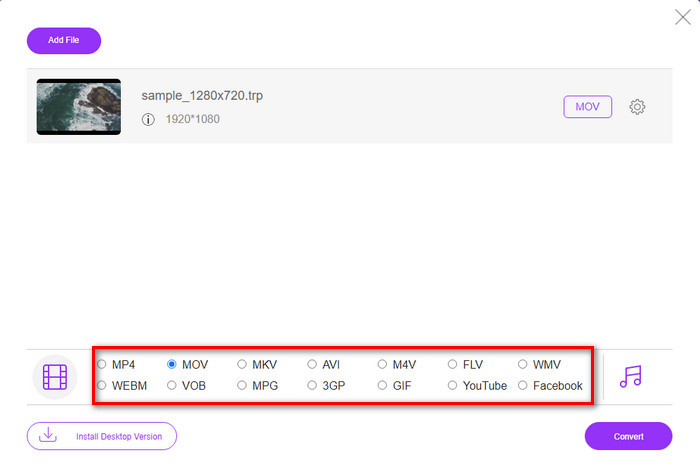
שלב 3. בחרו את MOV מהרשימה למטה, או כל פורמט אחר שתרצו.
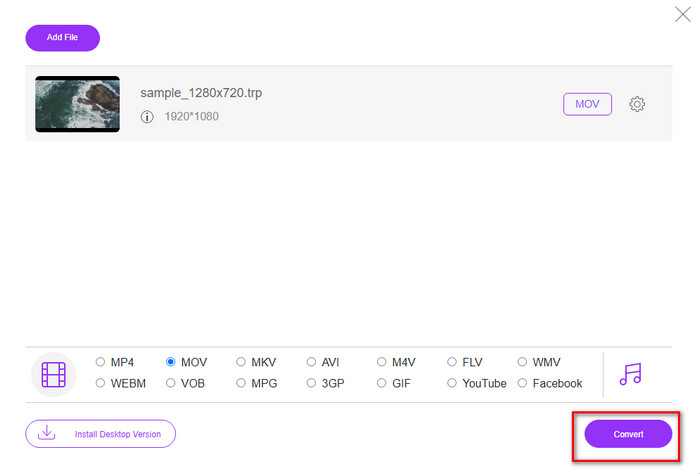
שלב 4. לבסוף, כדי להתחיל להמיר את הקובץ, לחצו על Convert.
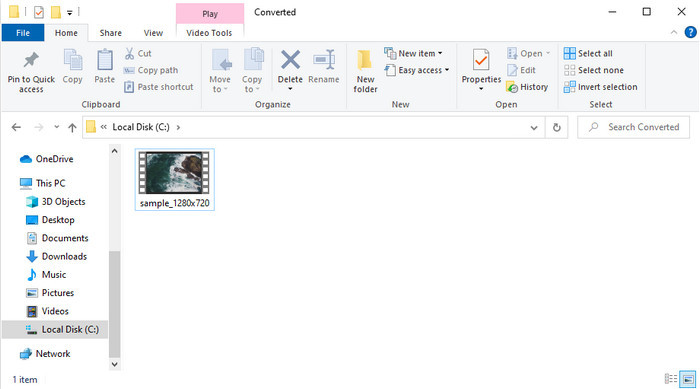
שלב 5. לאחר שההמרה מסתיימת, תיקייה תופיע על המסך עם הקובץ.
חלק 4. שאלות נפוצות לגבי המרת TRP ל-MOV
האם אוכל למזג קובצי .trp לסרטון אחד?
כן, ניתן לאחד שני קבצי .trp או יותר ולהוריד אותם כקובץ אחד באמצעות מיזוג. זה קל מאוד לביצוע אם משתמשים ב‑FVC Video Converter Ultimate. רוצים ללמוד איך? לחצו על קישור זה והקדישו 5 דקות כדי ללמוד איך למזג קבצי TRP או אפילו קבצים אחרים כמו MP4, MOV, AVI ועוד.
כמה זמן ייקח להמיר TRP ל-MOV?
זה תלוי כמה זמן הסרטון שאתה ממיר, או אם אתה משתמש בכלי אינטרנט, זה יהיה תלוי כמה מהר האינטרנט שלך. התהליך ישתנה בהתאם למה שאתה משתמש. ובכל זאת, הצלחה בטוחה אם אתה משתמש בממירים שהוצגו לעיל.
האם גודל קובץ ה-TRP משתנה לאחר ההמרה?
גודל הקובץ אמור להשתנות מעט, אך הוא לא אמור להכפיל או לשלש את עצמו. בנוסף, אם לדעתכם קבצי ה‑.trp שהומרו גדולים מדי, תוכלו לקרוא מאמר זה וללמוד איך לדחוס קבצי TRP.
סיכום
לסיום, אם ברצונכם להמיר את קבצי ה‑TRP שלכם ל‑MOV אונליין, אנו ממליצים בחום להשתמש ב‑FVC Free Video Converter Online. זהו הממיר המקוון הטוב ביותר שיעזור לכם להמיר את הפורמט לפורמט חדש. אך אם אתם מעוניינים להמיר את הקבצים לפורמט חדש בצורה קלה יותר ולבצע המרה באצווה, השתמשו ב‑FVC Video Converter Ultimate. כלי זה מספק איכות פלט מעולה, פונקציות מתקדמות ומגוון רחב של פורמטים – חוו המרה מקיפה בעזרת שני הכלים שלעיל. אין בחירה לא נכונה, באיזה ממיר שלא תבחרו.
-
 המדריך הקל ביותר כיצד להמיר TRP ל-AVI ב-Windows ו-Mac
 אולי אתה לא מכיר את פורמט הווידאו TRP ותוהה איך אתה הולך להמיר TRP ל-AVI? קרא עוד מאמר זה כדי לדעת את הפרטים הנוגעים לנושא.
-
 שיטות מצוינות לשימוש בהמרת VOB ל-MOV
 הורדות וידאו מקוונות הן נוחות, אבל מה אם הסרטון הוא בפורמט VOB והנגן שלך לא תומך בו? פוסט זה ילמד אותך כיצד להמיר VOB ל-MOV.
-
 טיפים מהירים וקלים להמרת WMV ל-MOV [מוכח]
 האם אתה רוצה לדעת מהם הממירים הטובים והקלים לשימוש הממירים WMV ל-MOV? המשך לקרוא מאמר זה כיוון שהוא דן בכל האפשרויות האפשריות שאתה צריך לשקול להשתמש בהן.
