


 ממיר וידאו אולטימטיבי
 מקליט מסך
 תיקון וידאו
 הורדה מאובטחת
נגן ARF של WebEx - הפעל והמיר קבצי ARF ב- Windows ו- Mac
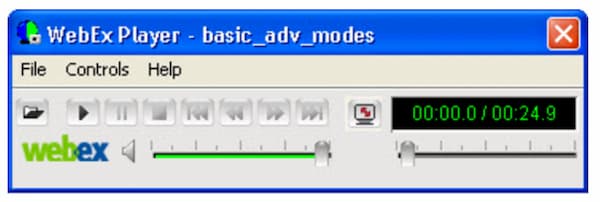
אם אתה מארח הפגישות של WebEx, אתה רשאי להוריד את קובץ הווידאו המוקלט מ- WebEx. סרטון ההקלטה שלך ב- WebEx יישמר בסיומת הקובץ .arf כברירת מחדל. הפורמט של Cisco WebEx ARF אינו נתמך באופן נרחב על ידי נגני מדיה רבים של צד שלישי. אם ברצונך לפתוח קובץ הקלטה של ARF, יש צורך בנגן ARF של WebEx. מאמר זה מדבר בעיקר כיצד להשיג ולהשתמש בנגן WebEx להפעלת ARF. פשוט קרא ותעקוב.

חלק 1: כיצד לפתוח ולהמיר קובץ ARF באמצעות נגן ה- ARF של WebEx
סיסקו WebEx הוא כלי ועידה בווידאו ופגישות מקוונות לסמינרים אינטרנטיים אינטראקטיביים ולאירועים וירטואליים רחבי היקף. למרחקים ארוכים כבר לא שאלה קשה עבור עמיתים לעבודה בכל רחבי העולם.
לאחר הפגישה המקוונת תוכלו לקבל אימייל עם קישור להקלטת WebEx. אתה יכול ללחוץ על הקישור ולצפות ישירות בפגישת ה- WebEx שהוקלטה. אין צורך בנגן קבצים מסוג ARF כזה.
אם אתה מוריד קובץ WebEx לצפייה לא מקוונת, עליך להשתמש בנגן .ARF להפעלה נוספת של WebEx. כך אתה מנגן וממיר קבצי ARF באמצעות תוכנת נגן ARF של WebEx.
שלב 1: היכנס לפלטפורמת WebEx שלך. בחר My WebEx, My Files ולאחר מכן My Recordings. בחר בקובץ ההקלטה שלך. לאחר מכן לחץ על More ואחר כך על Download. באפשרותך להוריד קובץ WebEx עם סיומת קובץ .ARF..
שלב 2: עבור אל Meeting Center של WebEx. בחר Support ואז Downloads. עבור אל Recorder and Players ואז אל Recording and Playback.
שלב 3: בסעיף for .ARF בחר Download כדי להוריד בחינם ולהתקין את נגן WebEx עבור Windows או Mac. תוכל להשתמש בנגן ARF זה כדי לפתוח קובצי ARF במחשב מיד. לחץ על Pause כדי להשהות ולהמשיך את ניגון קובץ ה‑ARF.
שלב 4: לאחר גישה לנגן ה‑ARF לשולחן העבודה, באפשרותך לשנות את פורמט הקובץ מ‑ARF ל‑MP4. מתפריט הנפתח File ניתן לבחור .MP4 מתוך רשימת Convert Format.
שלב 5: ציין את שם קובץ הפלט והתיקייה. לחץ על OK כדי לאשר ולהתחיל להמיר ARF לווידאו MP4. באפשרותך גם להמיר ARF לפורמט MP4 בתוך WebEx ARF Player עצמו.
חלק 2: החלופה הטובה ביותר ל- WebEx ARF Player עבור Windows ו- Mac
אם אתה מחפש נגני ARF נוספים, תוכל להציץ בFVC Free Video Player. הוא מסוגל לנגן קובצי ARF אונליין בחינם. לאחר התקנת משגר (launcher), תוכל לקבל ניגון ARF של WebEx בכמה קליקים. הודות לטכנולוגיית קידוד האודיו העדכנית, תוכל לצפות בווידאוים בפורמט ARF עם אפקטי סאונד ללא אובדן איכות. נוסף על כך, באפשרותך להתאים באופן גמיש פרמטרים של ניגון וידאו ואודיו. במילים אחרות, FVC Free Video Player יכול להיות אחד מנגני ה‑ARF הטובים ביותר עבורך ל‑Windows 10/8/7 ול‑Mac.
- 1. הפעל סרטונים שהורדת.
- 2. תמיכה רחבה בפורמטי קלט וידאו ושמע, כולל WebEx ARF, MP4, MOV, AVI, FLV, ועוד.
- 3. שפרו את איכות השמע בעזרת טכנולוגיית קידוד השמע האחרונה של DTS-HD ו- Dolby TrueHD.
- 4. התאם את הבהירות, הניגודיות ופרמטרים אחרים בעזרת אפשרויות ומחליקים הניתנים להתאמה אישית.
- 5. קבל תמיכה בהפעלה של סרטון תלת-ממדי וצילום מסך.
שלב 1: בקר באתר הרשמי של FVC Free Video Player בדפדפן שלך. לחץ על Play Now ועל Download כדי להתקין תחילה את משגר FVC.

שלב 2: בחלון נגן קובצי ה‑WebEx הקופץ, לחץ על Open File בממשק הראשי. עיין וייבא את פגישת ה‑WebEx ARF שהורדת.
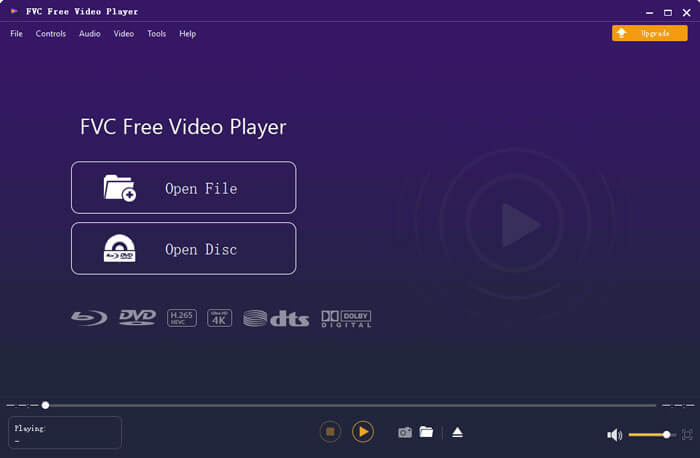
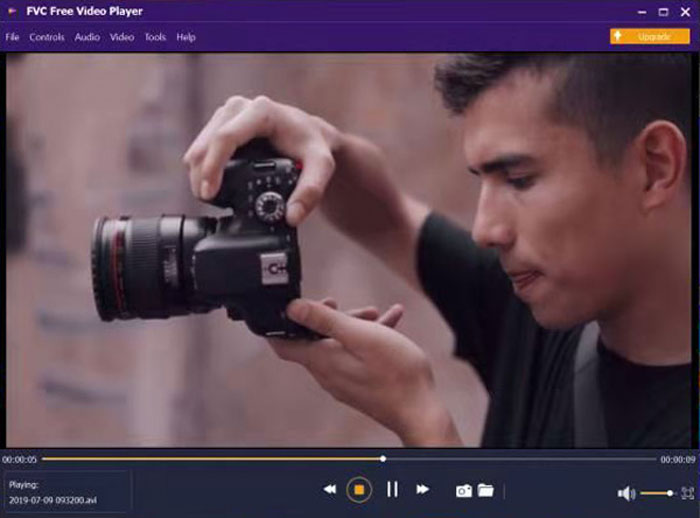
שלב 3: סרטון ה‑ARF מתחיל להתנגן אוטומטית לאחר הייבוא. באפשרותך לשלוט במהירות הניגון ואפקטי הווידאו באמצעות הפס העליון והתחתון.
חלק 3: שאלות נפוצות על נגני קבצים של ARF
היכן ניתן להשיג נגן ARF לתוסף Chrome?
תוכל להוריד ישירות את תוסף Cisco WebEx מחנות האינטרנט של Chrome. אך עדיין אין תוסף כרום של נגן ARF כזה.
האם יש נגן ARF לאפליקציה לנייד?
אם ברצונך לנגן קובצי ARF ו‑WRF ב‑iPhone או ב‑Android, VLC for Mobile יכולה להיות הבחירה שלך. במקום אפליקציות נגן ARF ניידות, באפשרותך להמיר ARF לפורמט MP4. היא יכולה לשמש גם בתור נגן ARF לאפליקציית Android ו‑iPhone שלך. בנוסף, היא יכולה להיות אפליקציית נגן מוזיקה מעולה.
כיצד אוכל להמיר ARF ל MP4?
ישנם ממירי ARF ל‑MP4 רבים, אונליין ואופליין, הזמינים בשוק. לדוגמה, באפשרותך להמיר קובץ ARF ל‑MP4 באמצעות FVC Free Online Video Converter, Video Converter Ultimate ועוד.
מדוע אינך יכול להוריד הקלטת WebEx?
רק מנהל ה- WebEx יכול להוריד קבצי הקלטה של WebEx. בינתיים, מנהל ה- WebEx צריך להפעיל את אפשרות הניהול עבור WebEx להורדת קבצי הקלטה מראש.
מדוע ההמרה של WebEx נכשלת ב- Mac?
שים לב שהמרת WebEx ARF ל- MP4 דורשת יישום מבוסס Windows. עליך להתקין ממיר ARF ל- MP4 במחשב Windows שלך. כרגע אין תמיכה בהמרת ARF ל- MP4 ב- Mac. באופן כללי, אתה יכול לנגן הקלטות WebEx ב- Mac. אך אינך יכול להמיר קבצי .arf ל- MP4 ולפורמטים אחרים ב- Mac.
זה הכל על מדריך הנגן של WebEx ARF ואלטרנטיבה. אתה יכול לנגן קבצי ARF של WebEx במחשב Windows ו- Mac שלך בקלות. יתר על כן, ניתן להמיר את WebEx ARF ל- MP4 ולפורמטים תואמים אחרים. אם עדיין יש לך שאלות לגבי נגני ARF, תוכל להשאיר הודעות למטה או להרגיש חופשי ליצור איתנו קשר.
-
 11 התוכנות הטובות ביותר עבור נגן MP4 עבור Windows ו- Mac (חינם ומשולם)
 קרא וקבל את נגן ה- MP4 הטוב ביותר שלך מההמלצות של 10 תוכנות נגן הווידאו MP4 האחרונות. אתה יכול לנגן קבצי וידאו MP4 ב- Windows ו- Mac בצורה חלקה ללא השהיה.
-
 8 נגני ה- SWF הטובים ביותר לפתיחת קבצי וידאו Flash ב- Windows ו- Mac
 כאשר אתה רוצה ליהנות מסרטי SWF ומשחקים במחשב ו- Mac, תוכל ללמוד עוד על התכונות המצוינות של 8 נגני הקבצים הטובים ביותר מתוך המאמר.
-
 10 נגני הווידאו הטובים ביותר של FLV עבור Windows 10/8/7, Mac, iOS ו- Android אתה חייב לנסות (2021 האחרונה)
 נגן FLV עוזר לך לגשת בקלות לקבצי ה- FLV שלך במכשיר Windows, Mac, Android, iOS. בדוק את נגני הקבצים הטובים ביותר FLV שאתה יכול להוריד עכשיו.
