


 ממיר וידאו אולטימטיבי
 מקליט מסך
 תיקון וידאו
 הורדה מאובטחת
100% דרכים חופשיות לדחיסת גודל קובץ M4V מ- GB ל- MB
פורמט קובץ M4V, בדומה ל- MP4, הוא מיכל וידאו נהדר המיוצר על ידי אפל. אתה יכול לנגן קבצי M4V כמעט בכל הנגנים הפופולריים, כמו iTunes, QuickTime, VLC Media Player, RealPlayer ועוד. אך לפעמים, יתכן שתגלה שהווידאו M4V שלך גדול מדי לאחסון או לשיתוף. במצב זה, עליכם להקטין את גודל הקובץ.
אם אינך יודע כיצד לדחוס קובץ M4V, תוכל לנסות את האפשרויות שלהלן.

חלק 1. כיצד לדחוס את M4V באופן מקוון בחינם
כפי שציינו, יכול להיות שקשה קצת לערוך ולשתף קובץ וידאו גדול ב- YouTube, Facebook, Instagram או באתרי סטרימינג אחרים. מכיוון שלרוב באתרים אלה יש מגבלת גודל קפדנית לסרטון שאתה מעלה. חוץ מזה, קבצים גדולים יכולים לתפוס מקום רב במחשב, בכונן הדיסק, בטלפון, בכונן ההבזק, בכרטיס הזיכרון וכו '.
לכן, כאשר יש לך קובץ M4V גדול, עדיף להקטין את הגודל בעזרת תוכנת דחיסת וידאו מקצועית. אם אתה מחפש תוכנה חינמית, למה שלא תנסה את FVC Free Video Compressor? היא חינמית לחלוטין לשימוש. מעבר לכך, זהו כלי דחיסה מקוון, מה שאומר שתוכל לדחוס כל סרטון לגודל הרצוי בלי להתקין תוכנה כבדה על המחשב שלך.
אתה יכול להשתמש בו בכל דפדפן רגיל כגון Google Chrome, Mozilla Firefox ו- Microsoft Edge. ולסרטון הדחוס לא יתווסף סימן מים. אתה יכול אפילו ליהנות מהווידאו באיכות תמונה גבוהה.
להלן השלבים כיצד לדחוס קבצי M4V גדולים באופן מקוון.
שלב 1. היכנס לאתר של FVC Free Video Compressor בדפדפן שלך. תראה כפתור Add Files to Compress בבאנר. לחץ עליו ופעל לפי ההוראות כדי להוריד ולהתקין את המשגר של FVC במחשב שלך.
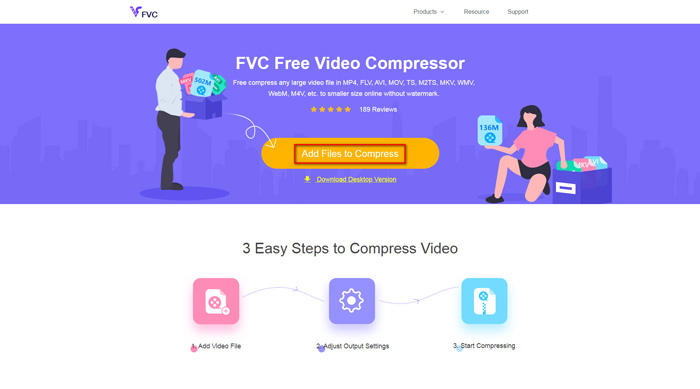
שלב 2. לאחר מכן עליך לבחור את קובץ ה‑M4V שברצונך לדחוס. כעת באפשרותך להזיז את המחוון מאחורי תיבת Size כדי לכוונן ולמצוא בקלות את גודל הקובץ המדויק שאתה רוצה. תוכל גם לשנות את הרזולוציה ואת קצב הסיביות (bitrate) בנפרד בהתאם לצרכים שלך.
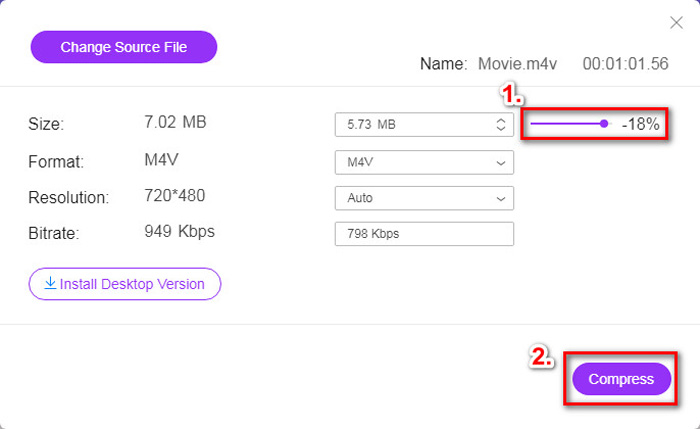
שלב 3. אם ברצונך לדחוס M4V ל‑MP4, עליך לבחור כאן ב‑MP4 כפורמט הפלט. אם לא, תוכל פשוט ללחוץ על Compress בפינה הימנית. בחר תיקייה לשמירת הסרטון הדחוס והמתן כמה שניות לקבלת הסרטון המבוקש.
חלק 2. כיצד להפחית את גודל הקובץ M4V ב- Mac / Windows
מכיוון ש‑M4V הוא פורמט שפותח על‑ידי אפל, באפשרותך גם להשתמש בנגן ברירת המחדל של אפל, QuickTime Player, כדי לדחוס קובצי M4V ב‑Mac. בנוסף, QuickTime Player מציע גרסת Windows למשתמשי PC. אך שים לב שהגרסה העדכנית ל‑Windows היא QuickTime 7.7.9, שיצאה בשנת 2016. לכן, אם מה שאתה מחפש הוא תוכנה עדכנית יותר, תוכל לנסות את FVC Free Video Compressor שיכול אפילו לטפל בסרטוני 4K.
בכל מקרה, אנא עקוב אחר השלבים הבאים כדי להפחית את גודל הקובץ M4V ב- QuickTime.
שלב 1. פתח את קובץ ה‑M4V שממתין לדחיסה באמצעות QuickTime.
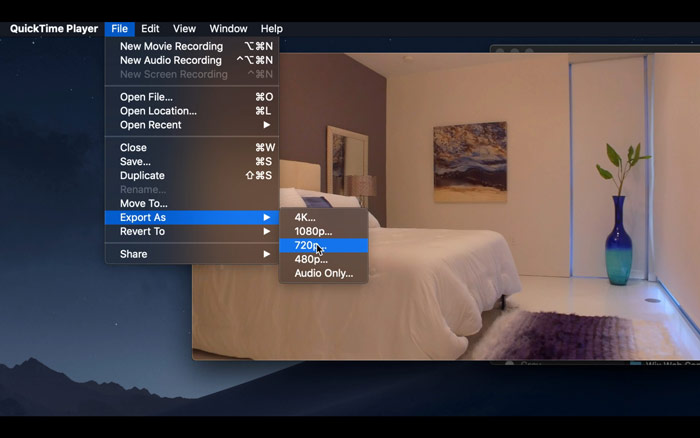
שלב 2. אתר את תפריט File בפינה השמאלית העליונה. לחץ עליו ומצא את האפשרות Export As מהרשימה. לאחר מכן בחר רזולוציה הנמוכה מזו של הסרטון המקורי כדי לדחוס את הסרטון. אחרי הכול, איננו רוצים להגדיל כאן את הגודל.
שלב 3. אם אינך רוצה לשנות את נתיב השמירה, באפשרותך פשוט ללחוץ על Save. אנא המתן בסבלנות לייצוא הסרטון.
חלק 3. שאלות נפוצות על דחיסת M4V
1. האם אני יכול פשוט לשנות את שם M4V ל- MP4?
לא, אם הכוונה שלך היא להמיר M4V ל‑MP4 רק על‑ידי שינוי הסיומת ל‑.mp4. משום שהקידוד שלהם אינו זהה. עליך להסתמך על כלי מקצועי יותר כדי להמיר M4V ל‑MP4.
2. האם YouTube מקבל את הפורמט M4V?
למרבה הצער, YouTube תומך רק במספר מוגבל של פורמטים של קבצים שאינם כוללים M4V. לכן, אם ברצונך להעלות את סרטון ה- M4V שלך ל- YouTube, עליך להמיר אותו לפורמט הנתמך ב- YouTube כמו MP4.
3. כיצד למזג מספר סרטוני M4V לכדי אחד?
אם יש לך כמה קובצי וידאו בפורמט M4V שצריך לאחד לקובץ אחד, תוכל לנסות את FVC Free Online Video Merger כדי למזג קובצי וידאו שונים.
סיכום
כעת יש לך 2 דרכים פשוטות וחינמיות לדחיסת קובץ M4V. אם אתה משתמש Mac, תוכל להשתמש ב‑QuickTime Player כדי להקטין את גודל הסרטון. אך אם אינך מרוצה מהרזולוציות הקבועות ש‑QuickTime מציע או שאתה משתמש במחשב Windows, תוכל לתת צ'אנס ל‑FVC Free Video Compressor.
-
 ממיר M4V ל- MP3 - 4 השיטות הטובות ביותר לחילוץ MP3 מקבצי M4V
 כשרוצים לחלץ את אודיו MP3 מסרטוני M4V בקלות, תוכלו ללמוד עוד על 4 הממירים הטובים ביותר ל- M4V ל- MP3 כדי לקבל את קבצי האודיו הרצויים מהמאמר.
-
 4 דרכים להמיר סרטי QuickTime ל MP4 בחינם בטלפון / במחשב
 קרא וקבל 4 דרכים להמיר את QuickTime לסרטוני MP4 בחינם בטלפון או במחשב שלך. אתה יכול לשנות את פורמט הקובץ מ- MOV ל- MP4 ב- Windows / Mac / iPhone / Android / online בקלות.
-
 4 ממירי ה- MP4 הטובים ביותר ל- M4V כדי להפוך קטעי וידאו MP4 ל- M4V בקלות
 כאשר עליך לשנות קבצי MP4 לקבצי M4V, עליך ללמוד פרטים נוספים על ההבדלים בין שני הפורמטים, כמו גם על ממירי MP4 ל- M4V הטובים ביותר מתוך המאמר.
