


 ממיר וידאו אולטימטיבי
 מקליט מסך
 תיקון וידאו
סקירה על עורכי FLV Metadata לעריכת FLV Metadata [ללא מאמץ]
פורמט FLV הוא פורמט פופולרי המשמש להעברת תוכן דיגיטלי באמצעות Adobe Flash Player המשובץ בקובצי SWF. למרות שהכי מומלץ להעביר קבצים עם הסיומת .flv, חלק מהתוכן עלול ללכת לאיבוד, במיוחד אם התהליך נקטע. אז אם זה קורה, מה כדאי לעשות? למרבה המזל, קיימים בשוק כלים למטא־דאטה. רוצים לדעת אילו כלים ל‑Windows, ל‑Mac ובאינטרנט תוכלו להשתמש? המשיכו לקרוא כדי ללמוד את הדרכים הטובות ביותר לשנות בקלות את פורמט המטא־דאטה של FLV.

חלק 1. 3 של עורך המטא-נתונים הטוב ביותר לווידאו הזמין ב-Windows/Mac/Online
ממיר וידאו אולטימטיבי
Video Converter Ultimate הוא אחד מעורכי המטא־דאטה החזקים ביותר ל‑FLV, שבעזרתו ניתן לעדכן ולשנות בקלות את תגי ה‑FLV. הכלי זמין לשימוש בכל מערכת Windows או Mac OS. בעת שימוש בכלי האולטימטיבי הזה, תוכלו להוסיף, להסיר או לעדכן במהירות מטא־דאטה ביותר מ‑1000 פורמטים בעזרת הכלי הזה, ולא רק ב‑FLV. שלא כמו עורך מטא־דאטה אחר, הכלי הזה מציע מגוון רחב של אפשרויות המתאימות לכל בעיית וידאו, כגון המרה, האצה או האטה, הפיכה לאחור וסטים נוספים של פילטרים מדהימים שהופכים את הסרטון שלכם לייחודי מאוד – אפשרויות שעורכי תגיות אחרים לא מציעים לכם.
יתר על כן, תכנן לבצע עריכה מסוימת בסרטון ה-FLV שלך, כמו הוספת אפקטים, פילטרים, חיתוך, מיזוג, הוספת טקסט או סימן מים. כלי זה יכול לעזור למלא את המשימה בקלות בכל משתמש. כל הדברים הללו אפשריים בעזרת הכלי האולטימטיבי. תצטרך לחפש כלום עם ה-GUI והתכונות הטובות ביותר. אם אתה תוהה וברצונך לנסות להשתמש בכלי זה, תוכל לבצע את השלבים שלהלן כדי לדעת כיצד להשתמש בכלי.
שלב 1. לחצו על כפתור ההורדה כדי לקבל את מזריק המטא־דאטה ל‑FLV על שולחן העבודה שלכם; בחרו Windows או Mac. התקינו את הכלי על‑ידי לחיצה על הקובץ, עקבו אחרי ההנחיות והפעילו אותו.
הורדה חינמיתל-Windows 7 ומעלההורדה מאובטחת
הורדה חינמיתל-MacOS 10.7 ומעלההורדה מאובטחת
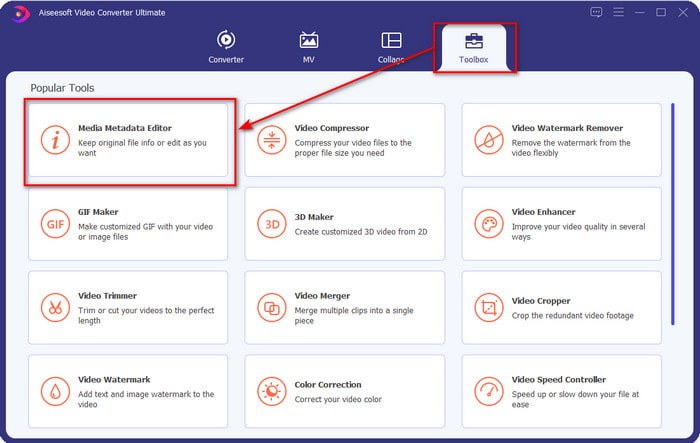
שלב 2. לאחר שפתחתם את התוכנה, עברו אל Toolbox ובחרו Media Metadata Editor כדי לערוך את התגים בקובצי ה‑FLV שלכם.
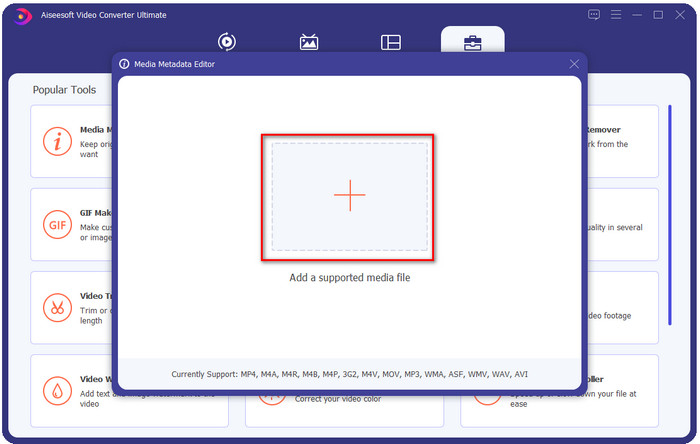
שלב 3. הוסיפו את קובצי ה‑FLV על‑ידי לחיצה על הסמל +, מצאו את הקובץ בחלון סייר הקבצים שיופיע על המסך ולחצו על Open.
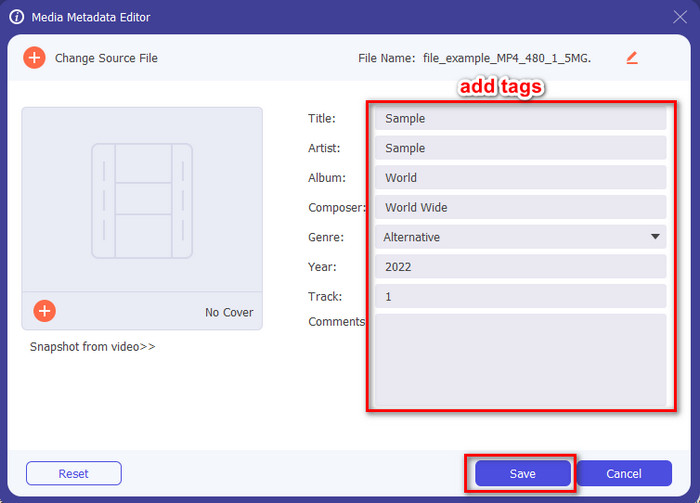
שלב 4. הוסיפו, שנו או הסירו את המידע בתוך תיבת הטקסט ולחצו על Save. בכך הוספתם כעת תגיות לקובץ ה‑FLV שלכם בפשטות רבה.
FLVMeta - עורך FLV Metadata
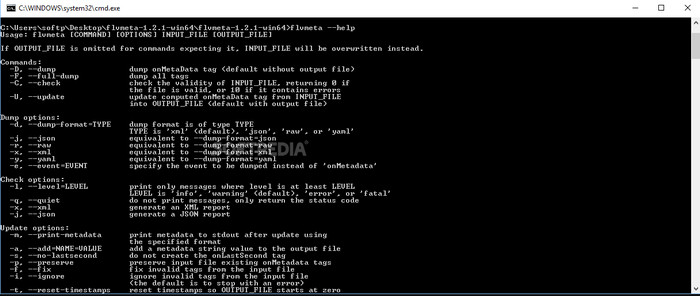
אם אתם משתמשים מתקדמים ורוצים לנסות עורך מטא־דאטה ייעודי ל‑FLV שניתן להוריד, אנו רוצים להציג בפניכם את FLVMeta – FLV Metadata Editor. הכלי הזה אינו העורך הטיפוסי שכבר פגשתם, מפני שהוא כלי שורת פקודה. כלומר, כדי להפעיל את הכלי תצטרכו להזין קוד מסוים. בדומה ל‑FFmpeg, תצטרכו להזין את המיקום, שם הקובץ, הנתונים ועוד הרבה פרטים מורכבים. אף שזה אינו הבחירה הטובה ביותר למתחילים שצריכים לערוך את המטא־דאטה של קובצי ה‑FLV שלהם, שווה להזכיר אותו כי הוא מבצע את העבודה בצורה מושלמת.
יתרה מכך, התוכנה לא עובדת עם הפורמטים האחרים; אתה יכול להשתמש בו רק ב-FLV אם אתה רוצה להשתמש בכלי. אם יש לך קבצי FLV רבים ואתה רוצה לשנות את התגים שלהם ויש לך ידע בסיסי על מניפולציה של כלי שורת פקודה, אנו מציעים לך להשתמש בזה. אם לא, תצטרך זמן ללמוד את הכלי כדי לבצע משימה פשוטה כמו הוספת מטא נתונים.
עורך FLV Metadata מקוון
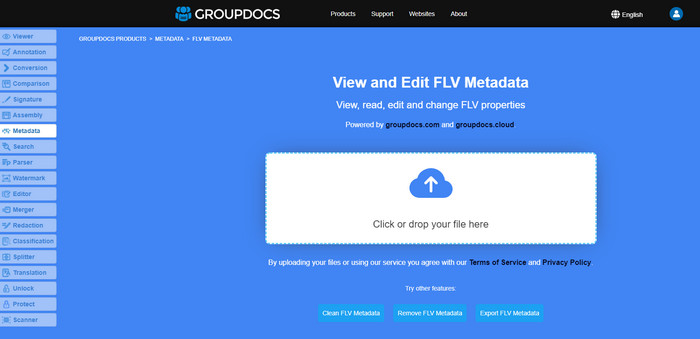
לא רוצים להוריד כלי כדי לערוך את פורמט המטא־דאטה של FLV? במקרה כזה תוכלו להשתמש ב‑Online FLV Metadata Editor. בעזרת הכלי הזה תוכלו לערוך את המטא־דאטה בקובצי ה‑FLV שלכם ללא התקנת תוכנה, ובחינם, משום שזהו כלי מבוסס־אינטרנט. למרות שהכלי חינמי ברשת, הוא לא יעבוד אם אין לכם חיבור לאינטרנט, והתהליך עלול להיקטע אם חיבור האינטרנט שלכם איטי.
שלא כמו FLVMeta, כלי זה תומך ביותר פורמטים ולא רק FLV; זה לא תומך באופן נרחב כמו הכלי האולטימטיבי. לכן, אם ברצונך לסיים את עריכת המשימה מבלי להוריד את התוכנה, אנו מציעים לך להשתמש בזה, מכיוון שהיא גם בטוחה לגישה. אבל זכור להימנע מבעיות בלתי צפויות, ודא שיש לך חיבור אינטרנט יציב.
חלק 2. תרשים השוואה על עורך 3 המטא נתונים של FLV המובילים
| מאפיינים | ממיר וידאו אולטימטיבי | FLVMeta - עורך FLV Metadata | עורך FLV Metadata מקוון |
| בטוח לשימוש |  | | |
| ידידותי למשתמש | |  | |
| תלוי באינטרנט | | | |
| תכונות עריכה, כגון חיתוך, חיתוך, חיתוך, מיזוג וכו'. | | | |
| ממשק המשתמש הגרפי הטוב ביותר | | | |
חלק 3. שאלות נפוצות על FLV Metadata Editor
האם FLV ו-F4V זהים?
למרות ששניהם קשורים ל‑Adobe Flash, המטרה שלהם שונה. לדוגמה, FLV משתמש באותו מקודד (encoder) כמו קובצי SWF, ומשמש בעיקר להעברת נתונים דרך האינטרנט. לעומתו, F4V הוא פורמט מבוסס ISO הדומה ל‑MP4. אף ששניהם טובים בהעברת קבצים דרך האינטרנט, המבנה והמאפיינים שלהם שונים. אם אתם רוצים להמיר את קובצי ה‑F4V שלכם ל‑FLV, לחצו כאן ולמדו כיצד להמיר את הפורמט ל‑FLV.
איפה אני יכול לשחק FLV?
לא כל נגן מדיה מסוגל להפעיל פורמט FLV בשל התמיכה המוגבלת בו. ובכל זאת, יש לכם מזל: ריכזנו עבורכם את ניגני ה‑FLV הטובים ביותר שתוכלו להשתמש בהם במכשיר שלכם כדי להפעיל קובצי FLV בלי לדאוג אם הם נתמכים. הכלים האלה נבדקו כדי להבטיח שהם יכולים להפעיל קובצי FLV ב‑Windows, Mac, Android ו‑iPhone. כדי לדעת עוד, לחצו על הקישור הזה.
האם FLV הוא פורמט שיתוף הווידאו הסטנדרטי?
לפני שחשבנו שזהו פורמט שיתוף הווידאו הטוב ביותר שתוכל להשתמש בו באינטרנט כדי להפעיל וידאו באיכות גבוהה; עם זאת, ישנם פורמטים טובים אפילו יותר בעידן החדש הזה, כמו MP4. מכיוון שהוא תואם יותר למכשירים שונים שיש למשתמשים, זה ידוע בתור פורמט הווידאו הסטנדרטי. למרות שאתה עדיין יכול לשתף את קבצי FLV באינטרנט, עדיין תצטרך לשקול מחדש את ההתקן של המקלט של הקובץ הזה. ואם אתה המקלט, תצטרך להוריד כלי של צד שלישי כדי להפעיל אותו או להמיר אותו לפורמט שניתן לשחק בו.
סיכום
למרות שיש כלים מוגבלים התומכים ב-FLV, עדיין יש לנו מזל; כי אנחנו עדיין יכולים לערוך את המטא נתונים של FLV בגלל הכלים שלמעלה. אבל זה מעציב את ליבנו שאנחנו צריכים לבחור אחד להשתמש בו, למרות שהם יכולים לעזור לנו. אם לא החלטתם במה להשתמש, עליכם ללכת עם הכלי האולטימטיבי במקום זאת. זוהי הבחירה הבטוחה ביותר מכיוון שהיא פשוטה אך יכולה לעזור לך בקלות להתמודד עם המשימה. עדיין לא מאמין מה היכולות של הכלי הזה? במקרה זה, עליך להוריד אותו על שולחן העבודה שלך כדי להשתמש בו ולבדוק אותו בעצמך כדי לראות אם הוא אכן מבצע את המשימה. נשמח אם תוכל לשלוח לנו הודעה לגבי ההצעה, ההמלצה שלך ועוד באפליקציה.
-
 מה זה מטא נתונים: למד את המידע הבסיסי על מטא נתונים
 מה זה מטא נתונים? האם זה חשוב? מהם החלקים של מטא נתונים? יש לך את אותה שאלה? במאמר זה, תלמד את המידע הבסיסי על מטא נתונים.
-
 4 מצופי המטא נתונים הטובים ביותר באינטרנט ובאופן לא מקוון [עודכן 2025]
 האם אני יכול לבדוק את המטא נתונים של הקובץ שלי? כן, אתה יכול, בעזרת הפוסט הזה נציג בפניך את צופי המטא נתונים השונים שבהם תוכל להשתמש.
-
 6 מסנני Snapchat מונפשים של Snapchat ב-Snapchat
 רוצה לדעת מהן הדרכים הטובות ביותר להוסיף מסננים לסרטוני Snapchat? ובכן, אתה יכול ללחוץ על זה וללמוד את המסננים השונים שבהם אתה יכול להשתמש כדי להחיל על סרטוני Snapchat.
