


 ממיר וידאו אולטימטיבי
 מקליט מסך
 תיקון וידאו
 הורדה מאובטחת
סקירה על ה-Pitch Changer ב-Windows, Mac, Online וטלפונים
לעיתים קרובות, באמצעות משנה גובה צליל (pitch changer), אפשר להעלות או להוריד במהירות את גובה הצליל המקורי. רוב המפיקים משתמשים במשנה גובה צליל כדי להוסיף אפקטים מלודיים ולהפוך את השיר לטוב יותר מהגרסה הגולמית. מצד שני, רכישת חבילת כלים לשינוי גובה הצליל תעלה לך לא מעט כסף ותדרוש זמן כדי ללמוד איך להשתמש בה. יקר וקשה להבנה. במקום להוציא כסף על סטים שתשתמש בהם, מדוע שלא תנסה תוכנה שיכולה לעזור לך לשנות את גובה הצליל של הווידאו או האודיו שכבר יש לך?.
עם סקירה זו, אספנו ארבע מהאפליקציות והתוכניות הטובות ביותר בהן תוכלו להשתמש כדי לשנות את גובה השמע מבלי להוציא כסף עצום. המשיכו לקרוא את המאמר הזה כדי לדעת על מה אנחנו מדברים.

חלק 1. 4 מחליפי הפיצ'רים המובילים הזמינים במכשירים שולחניים, מקוונים וניידים
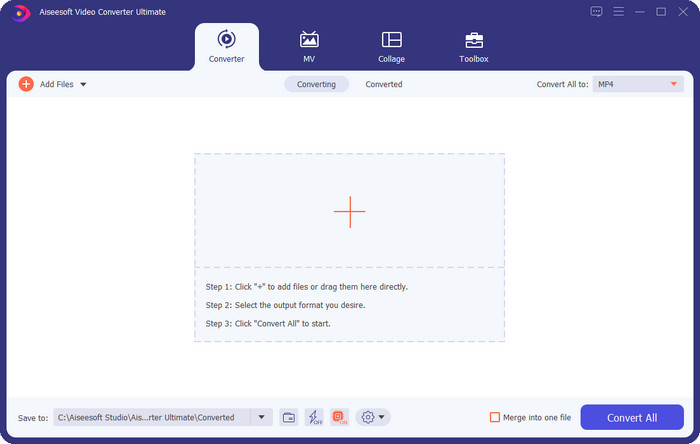
Video Converter Ultimate - מחליף גובה הווידאו הטוב ביותר ב-Windows וב-Mac
הורדה חינמיתל-Windows 7 ומעלההורדה מאובטחת
הורדה חינמיתל-MacOS 10.7 ומעלההורדה מאובטחת
תוכנה זמינה: Windows ו‑Mac
בראש הרשימה שלנו נמצא משנה גובה הצליל הטוב ביותר לווידאו עבור מערכות ההפעלה Windows ו‑Mac שלך. Video Converter Ultimate הוא כלי חזק שתוכל להשתמש בו כדי לשלוט בגובה הצליל באודיו על‑ידי העלאה או הורדה של מהירות הווידאו שברשותך. בניגוד לתוכנות אחרות שתוכל להוריד למחשב שעושות את אותה פעולה, הכלי הזה לא יבזבז לך הרבה זמן בלימוד, משום שהוא כלי אינטואיטיבי ופשוט מאוד. תוכל לשפר את גובה הצליל של האודיו בפחות מדקה, כך שישמע טוב יותר מהגרסה המקורית שהקלטת.
לצד היכולת לשנות גובה הצליל, אתה יכול גם להרחיב את עוצמת השמע עד לפוטנציאל המקסימלי שלו על ידי שימוש ב- Volume Booster מתחת לארגז הכלים. בתכונה זו, אתה יכול להגדיל או להקטין במהירות את המשרעת או הרווח של האודיו בסרטון שלך באמצעות המחוונים. למרות שאתה לא מפיק שרוצה לעשות דברים מהסוג הזה, זה עדיין מהנה ונעשה במהירות בעזרת הכלי האולטימטיבי הזה הזמין ב-Windows וב-macOS. לכן, אם אתה רוצה להשתמש בכלי האולטימטיבי הזה, אנו מציגים בחלק השני כיצד להשתמש בכלי זה עם שלבים מפורטים שתוכל לבצע כדי לסיים אותו תוך פחות מדקה.
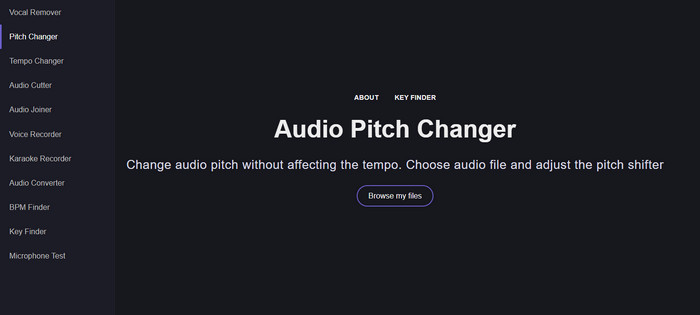
Vocal Remover.org
תוכנה זמינה: אונליין
אם אתה צריך משנה גובה צליל אונליין, אז ללא ספק Vocal Remover.org הוא הכלי המתאים ביותר לביצוע המשימה. בשונה מהכלי הראשון, הכלי הזה מצטיין בשיפור אודיו. בעזרתו תוכל לשנות בקלות את גובה הצליל של האודיו ולקבוע באיזו סולם (key) משתמש השיר. ישנו גם מחוון שיכול לעזור לך לבחור את חצי הטון (semitone) של האודיו. תוכל להחליט אם לכוון ידנית או לשנות צעד‑צעד באמצעות הזזת הסליידר. רוב המשתמשים שכבר ניסו אותו נהנים ממנו ומרוצים מהתוצאה של אפקט שינוי גובה הצליל שהוא מספק.
הכלי עובד מצוין על זה, אבל אתה יכול להעלות רק קובץ בפורמט שמע מוגבל לכאן, ופורמט וידאו אינו נתמך. העלאת הקובץ עלולה להיות מעט נוקשה לכלי, מכיוון שהוא תומך רק בכמה פורמטי שמע. למרות שזו עלולה להוות בעיה עבור כולם, אנחנו עדיין רואים בזה את אחד הכלים המקוונים הטובים ביותר שאתה יכול לגשת אליהם באינטרנט. אבל ודא שאתה ניגש לאתר הנכון כדי למנוע סיבוכים ובעיות אחרות. כמו כן, זכור שיהיה לך חיבור אינטרנט יציב מכיוון שהכלי עובד הכי טוב אם האינטרנט שלך חזק.
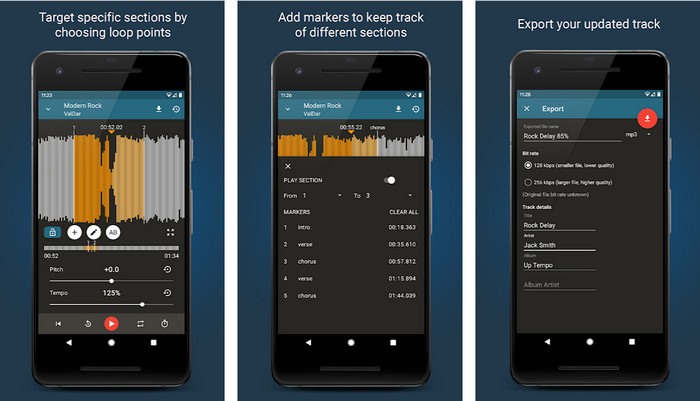
קצב עלייה: גובה גובה, מחליף מהירות
תוכנה זמינה: Android
אתה יכול להוריד את משנה גובה הצליל לאודיו הזה למכשירי Android כדי לבצע את המשימה אפילו כשאין לך מחשב בהישג יד. עם Up Tempo: Pitch, Speed Changer, מלאכת שינוי מהירות ההשמעה וגובה הצליל נעשית מהירה וקלה לכל אחד. ממשק המשתמש שלו מציג צורת גל (waveform), שיכולה לעזור לך לזהות איזה חלק אתה רוצה לשפר או לשנות. כמו הכלי המקוון, גם האפליקציה הזו מטפלת במוזיקה, ויכולה להיות שימושית מאוד כשאתה זקוק לה.
למרות שהאפליקציה ניתנת להורדה בחינם, יש דברים שעליך לקחת בחשבון אם אתה רוצה להשתמש באפליקציה הזו. רוב המשתמשים חווים שהאפליקציה לא יכולה לזהות את קבצי האודיו החדשים שהורדת לטלפון שלך. אם אתה נתקל בבעיה זו, ייתכן שהיא לא תומכת בקובץ האודיו באפליקציה זו, או שעלולה להתרחש באג. עם זאת, אם יש לך טלפון אנדרואיד בידך, הורד את האפליקציה הזו כדי לנסות ולראות אם זו האפליקציה לפתור את הבעיה.
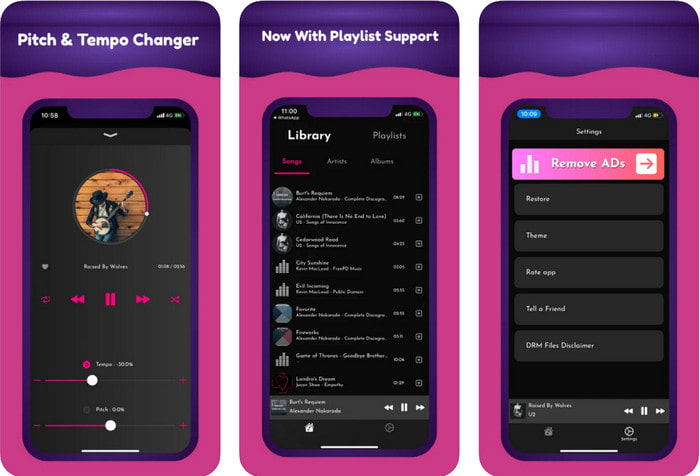
TimePitch-Pitch, Speed Changer 4+
תוכנה זמינה: iOS
אם אתה משתמש iOS, עליך לדעת שאפליקציית משנה גובה הצליל הזו יכולה להציע לך פתרון לבעיה. TimePitch-Pitch, Speed Changer 4+ היא נגן מוזיקה, ספרייה ומשנה גובה צליל שתוכל להשתמש בה במכשיר ה‑iOS שלך במקרה הצורך. האפליקציה הזו פועלת בצורה שונה מהאחרות, משום שאתה יכול לשנות את גובה הצליל של האודיו שאתה שומע בזמן אמת, כלומר כשהתאמת את גובה הצליל – השינוי אינו נשמר. אבל זה דווקא יכול להיות יתרון, מפני שאין צורך להמתין לעיבוד; ברגע שאתה מזיז את השליטה, תוכל לשנות בקלות את גובה הצליל לפי ההעדפה שלך.
עם זאת, זו יכולה להיות גם חולשתו; אם תעביר את הקובץ במכשירים אחרים, הגובה ששינית באמצעות האפליקציה הזו לא יחול על המקלט. כמו כן, תצטרך לזכור שאם אתה רוכש את המוזיקה ב-iTunes או ב-Apple Music, לא תוכל להשתמש באפליקציה הזו כדי לשנות את גובה הצליל. למה? מכיוון שהקבצים המוגנים לא יאפשרו לאף אפליקציה של צד שלישי כמו זו לקבל גישה לקובץ. ללא קשר להעלאת קובץ המוזיקה, אנו עדיין כוללים את האפליקציה הזו במאמר זה מכיוון שהיא פועלת בצורה הטובה ביותר בכל מכשיר iOS.
חלק 2. כיצד לשנות את הגובה של סרטון באמצעות תוכנת ה-Ultimate Pitch Changer
עקוב אחר השלבים שלהלן כדי לדעת כיצד להשתמש במחליף גובה המוזיקה והמהירות שבשולחן העבודה שלך. אז, המשך לקרוא את הפרטים הבאים אם אתה צריך הדרכה פשוטה אך יעילה לשימוש בתוכנה האולטימטיבית.
שלב 1. לחץ על כפתור ההורדה כדי לקבל את התוכנה האולטימטיבית על שולחן העבודה שלך, ובחר אם אתה משתמש ב‑Windows או ב‑Mac. המתן לסיום תהליך ההורדה, לחץ על הקובץ שהורדת ולאחר מכן התקן אותו. לאחר סיום כל תהליך ההגדרה וההתקנה, הפעל את התוכנה כדי להתחיל להשתמש בכלי האולטימטיבי הזה.
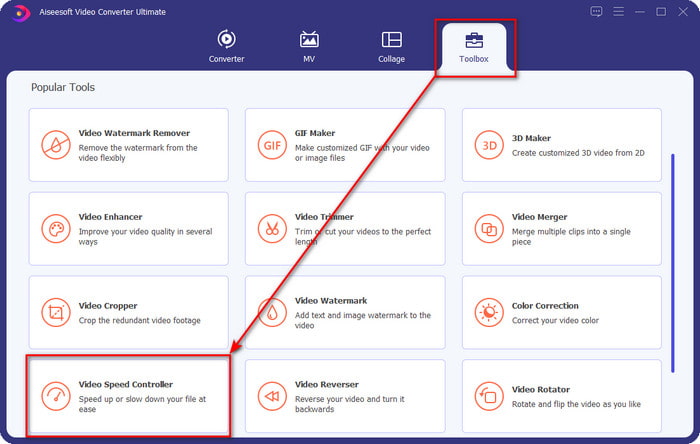
שלב 2. פתח את תפריט ה‑Toolbox, ומתחתיו מצא את Video Speed Controller; לחץ עליו כדי לפתוח אותו. גלול למטה אל הפיצ’רים שנמצאים קרוב לחלק התחתון.
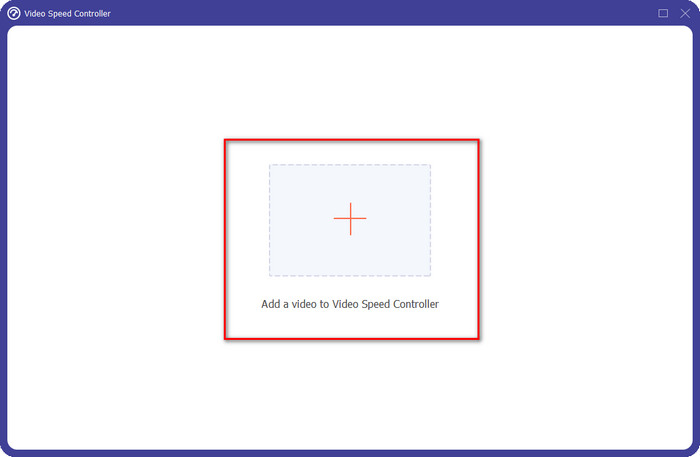
שלב 3. חלון קטן חדש יופיע על המסך שלך. לחץ על כפתור ה‑+, אתר את קובץ הווידאו שבו תרצה לשנות את גובה הצליל, ואז לחץ על Open כדי להעלות את קובץ הווידאו.
שלב 4. בשלב זה תוכל כבר לשנות את מהירות האודיו. תבחין שגם גובה הצליל ישתנה בהתאם. תוכל לשמוע ולראות את התצוגה המקדימה באופן אוטומטי במסך התצוגה.
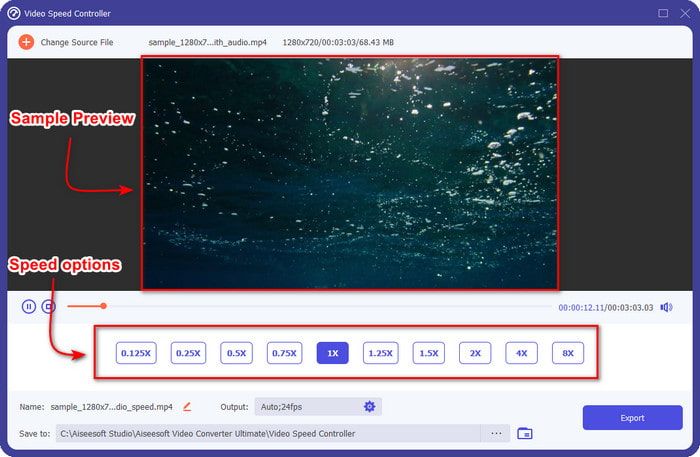
אתה יכול רק להפעיל את התצוגה המקדימה של הסרטון במהירות פי 2; תשים לב שה-4x וה-8x לא יאפשרו לך לצפות בתצוגה מקדימה של הסרטון כדי למנוע התנגשות, אבל זה לא יפגע באיכות הווידאו והשמע.
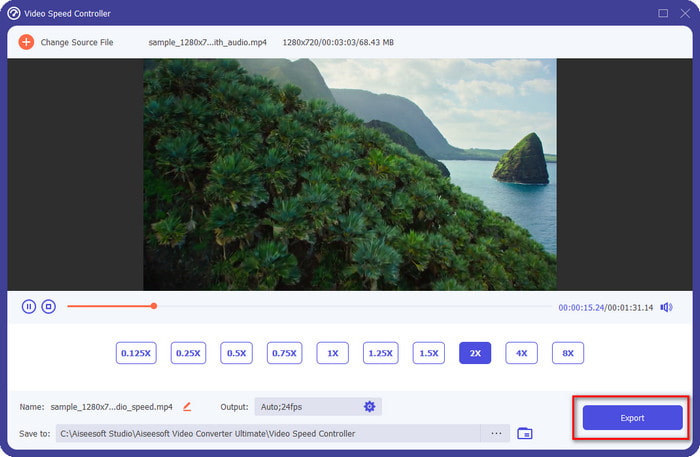
שלב 5. אם אתה מרוצה מגובה הצליל שהשגת, לחץ כעת על כפתור ה‑Export. קל, נכון? בעזרת תוכנה כזו תוכל לטפל בקלות בבעיות שונות בווידאו ובאודיו בתוך דקות.
קשור:
חלק 3. שאלות נפוצות על ה-Pitch Changer
מה זה מגרש?
הוא מעריך את האיכות המהדהדת עם הסאונד שלך על ידי מדידת הטווח שלהם, בין אם הם גבוהים יותר או נמוכים יותר. זהו גל קול הדומה לתדר, אבל הם אינם זהים.
כמה גבוה יכול לשמוע גובה צליל אנושי?
ככל שה-Hz נמוך יותר, אתה עדיין יכול לשמוע אותו במודע, אבל כמה אנשים שומעים אותו רק כאשר ה-Hz עולה. לדברי חוקרים, כולם יכולים להאזין ל-8000 הרץ, ואם אתה יכול לשמוע 12,000 הרץ, אז האוזניים שלך טובות כמו אנשים מתחת לגיל 50. ומתחת לגיל 40 אתה עדיין יכול לשמוע 15,000 הרץ, אבל מתחת ל-30 בן שנים, 16,000 הרץ, אתה עדיין יכול להאזין לו. עבור כל גיל 25 ומטה, אתה עדיין יכול לשמוע 17,000 הרץ, ועבור מתחת לגיל 20, אתה יכול לשמוע 20,000 הרץ. ככל שאנו מתבגרים, הגובה שאנו שומעים הופך פחות יעיל מדי פעם. לכן, אם אינך יכול לשמוע את התדירות שאנו מזכירים, עליך לפנות לרופא כדי לבדוק אם יש בעיה.
כיצד נוכל לחשב את טווח הגובה?
טווח הגובה משתמש באוקטבות לחישוב, מה שמאפשר לזמר ולכלי לקבוע אם זה הגובה הנכון בשיר. עם הרטט, אתה יכול להבחין בתדר הגבוה והנמוך שגל קול מצטבר.
סיכום
בעזרת משנה גובה הצליל לווידאו ולדיבור שהצגנו למעלה, אפשר כעת להתאים בקלות את גובה הצליל של הסאונד שבידינו. במקום לרכוש טכנולוגיה ייעודית לביצוע המשימה, תוכל להשתמש בתוכנות שהוזכרו. אף על פי שהן שונות מבחינת הפיצ’רים והפונקציות, עדיין ניתן לראות מה הופך כל אחת מהן לטובה בדרכה. אבל אם אתה משתמש במחשב, כדאי מאוד להוריד את Video Converter Ultimate לשולחן העבודה שלך, משום שהכלי הזה עוזר לך לא רק לשנות את גובה הצליל אלא גם לעשות דברים “קסומים” נוספים כדי לשפר עוד יותר את הווידאו והאודיו שלך. רוצה לדעת מהן היכולות הקסומות של הכלי הזה? אז הורד אותו עכשיו בלחיצה על כפתור ההורדה למעלה.
-
 3 דרכים להאיץ וידאו באייפון [מוכח]
 מתקשה להתאים את מהירות ההפעלה של הסרטון שלך בגלל שאתה משתמש באייפון? זה מאמר מצוין שיעזור לך בבעיה שלך.
-
 Windows Media Player | למד כיצד להאיץ סרטונים [מוכח]
 אתה רוצה להאט את הווידאו קליפ שלך באמצעות Windows Media Player, אבל אתה מתקשה כיצד לעשות זאת? מאמר זה הוא אידיאלי לקריאה והוא יכול להאיר את נקודת המבט שלך כיצד להאיץ סרטונים באמצעות Windows Media Player.
-
 כיצד לשנות סרטון בהילוך איטי למהירות רגילה [שלבים קלים]
 רוצה לדעת איך להחזיר סרטון בהילוך איטי שהורדת מהאינטרנט או שהקלטת בטעות בהילוך איטי? למד כיצד להמיר וידאו בהילוך איטי למהירות רגילה ב-Mac, Windows, iOS ו-Android.
