


 ממיר וידאו אולטימטיבי
 מקליט מסך
 תיקון וידאו
 הורדה מאובטחת
שיטות לא מאתגרות כיצד להסיר את לוגו iSkysoft מווידאו
iSkysoft היא אפליקציה מצוינת עם הרבה תכונות נפלאות, מה שהופך אותה לבולטת בהשוואה ליישומים אחרים. זו אפליקציה פשוטה המאפשרת להמיר פורמט וידאו לפורמט אחר ולבצע עריכת וידאו בסיסית. עם זאת, החיסרון העצוב בתוכנה הזו הוא שלאחר השימוש בה מופיע סימן מים גדול של iSkysoft על הסרטונים שלך. צפייה בסרטון שעליו מופיע סימן מים/לוגו גדול אינה מספקת כלל. למרבה המזל, קיימות אפליקציות אמינות שבעזרתן ניתן להסיר אובייקטים מפריעים כמו לוגו/סימן המים של iSkysoft. אם אתה להוט לגלות את השיטות הטובות ביותר להסרת לוגו iSkysoft מהווידאו שלך, עליך לקרוא פוסט זה.

חלק 1: הסר את לוגו iSkysoft מהווידאו בשולחן העבודה
הלוגו של iSkysoft על המסך שלך ממש מעצבן, במיוחד כשאתה צופה בסרטונים האהובים עליך. אבל אין צורך לדאוג יותר. אפשר להיפטר מהלוגו באמצעות Video Converter Ultimate. התוכנה האמינה הזו יכולה לעזור לך להסיר את לוגו iSkysoft מהסרטונים שלך בשתי דרכים פשוטות: כלי להסרת סימן מים מהווידאו וכלי חיתוך הווידאו (Video Cropper). בעזרת כלים אלה אפשר להסיר בקלות את לוגו iSkysoft מהווידאו. אם לוגו iSkysoft נמצא בפינה של הסרטון, מומלץ להשתמש בכלי Video Cropper. אבל אם הלוגו ממוקם במרכז, אפשר להשתמש בכלי להסרת סימן מים מהווידאו. כך תוכל לצפות בסרטים או בסרטונים האהובים עליך בלי שהלוגו ירגיז אותך.
יתר על כן, מלבד הסרת סימני מים מהסרטונים שלך, ל-Video Converter Ultimate יש יותר תכונות. יש לו משפר וידאו, מיזוג וידאו, cropper, trimmer, rotator, ממיר ועוד. בנוסף, אחת הפונקציות העיקריות של יישום זה היא להמיר פורמטים שונים של קבצי וידאו. משתמשים לא מקצועיים יכולים גם להשתמש ביישום זה מכיוון שיש לו ממשק פשוט. אם אתה רוצה ללמוד כיצד להסיר את הלוגו של iSkysoft מהסרטון שלך, אנו נראה לך את שתי הדרכים הקלות שהיישום הזה מספק.
שימוש במסיר סימני מים לווידאו
שלב 1: תחילה עליך להוריד את Video Converter Ultimate למחשב השולחני שלך כדי להשתמש בתוכנה הנהדרת הזו. לאחר ההורדה, עקוב אחר תהליך ההתקנה והפעל את האפליקציה.
הורדה חינמיתל-Windows 7 ומעלההורדה מאובטחת
הורדה חינמיתל-MacOS 10.7 ומעלההורדה מאובטחת
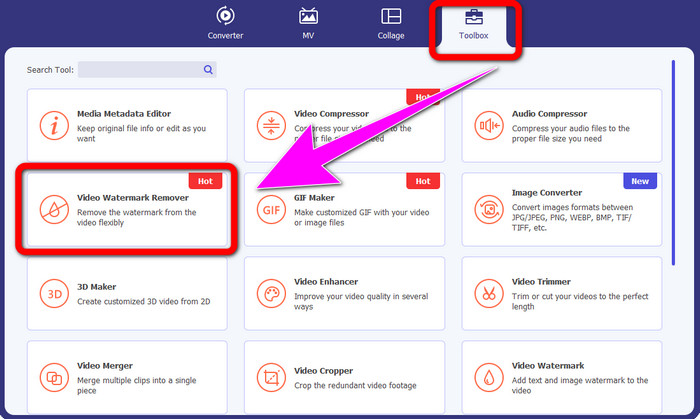
שלב 2: לאחר שהפעלת את התוכנה, עבור ללשונית ה-Toolbox ובחר בכלי Video Watermark Remover. צפה לכך שממשק נוסף יופיע על המסך.
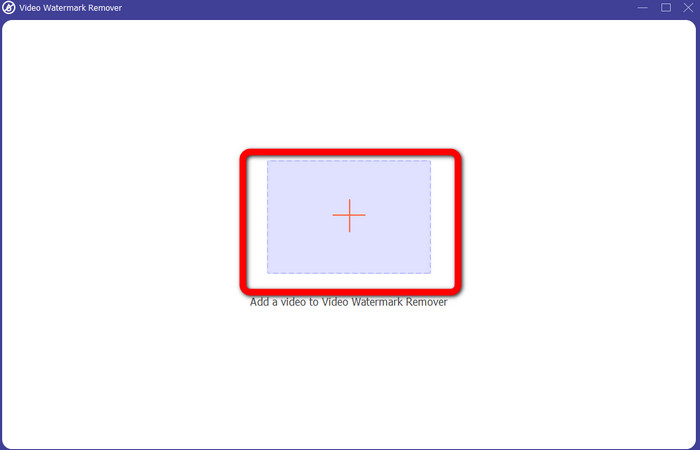
שלב 3: כאשר הממשק החדש מופיע, לחץ על סמל הפלוס וצרף את הווידאו עם לוגו iSkysoft שברצונך להסיר.
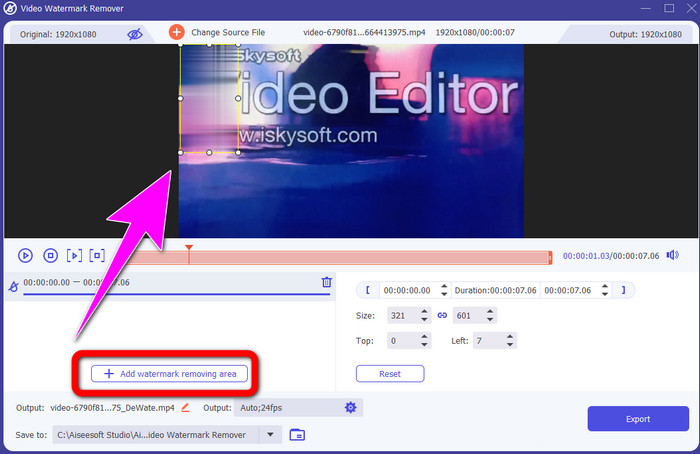
שלב 4: לאחר מכן, לחץ על הכפתור Add Watermark Removing Area. הזז את התיבה על גבי הווידאו וכסה את לוגו iSkysoft.
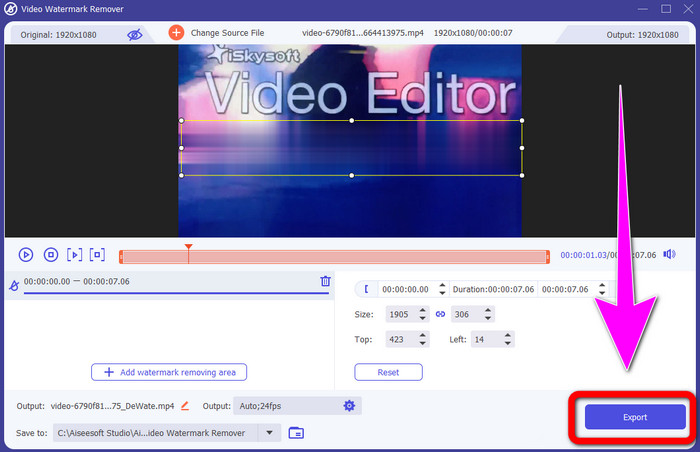
שלב 5: לבסוף, לחץ על כפתור Export כדי לשמור את הווידאו הסופי.
שימוש ב-Video Cropper
בחלק זה, נראה לך כיצד להסיר את הלוגו של iSkysoft מהסרטון שלך באמצעות הכלי Video Cropper.
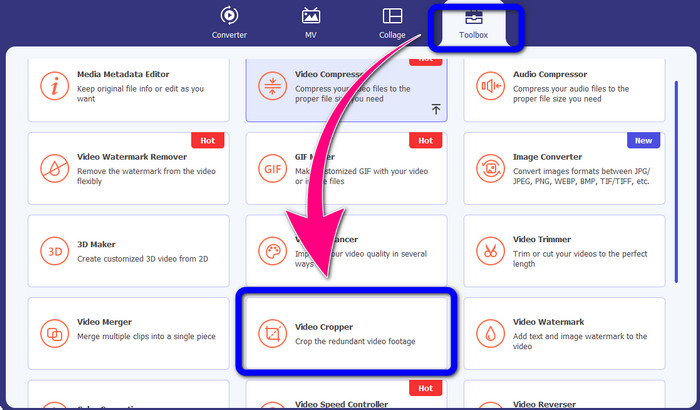
שלב 1: הפעל את האפליקציה על המחשב השולחני שלך. תחת לשונית ה-Toolbox עליך ללחוץ על כלי Video Cropper. כמו בכלי הקודם, צפה לכך שממשק נוסף יופיע על המסך.
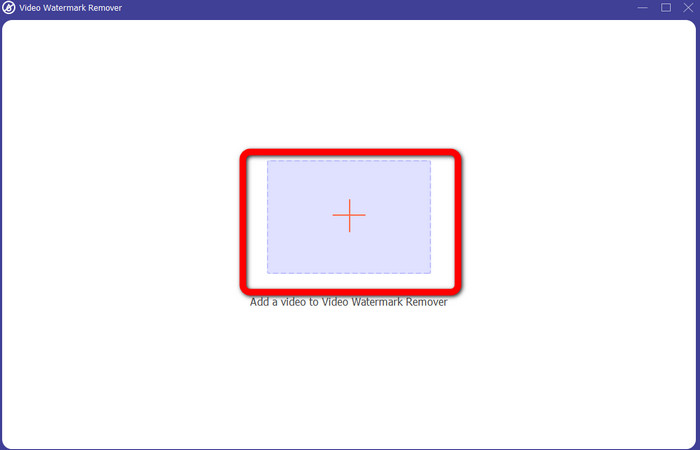
שלב 2: לחץ על כפתור Plus כדי לייבא את הווידאו שלך עם לוגו iSkysoft.
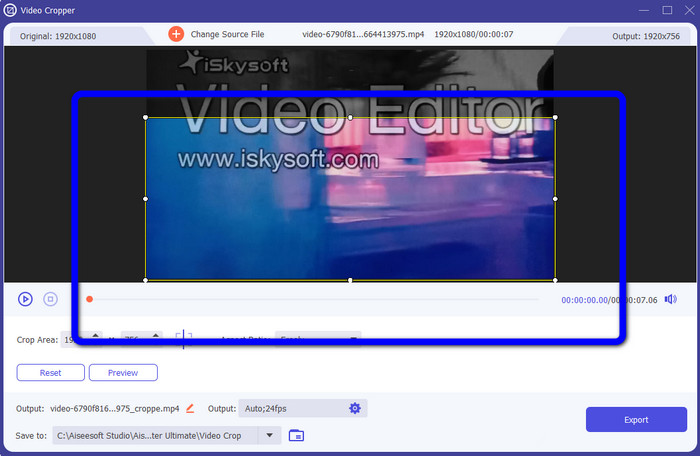
שלב 3: בשלב זה תוכל כבר לחתוך את הווידאו כדי להסיר את לוגו iSkysoft מהסרטון שלך. השתמש בעכבר כדי להזיז את קצוות אזור הווידאו.
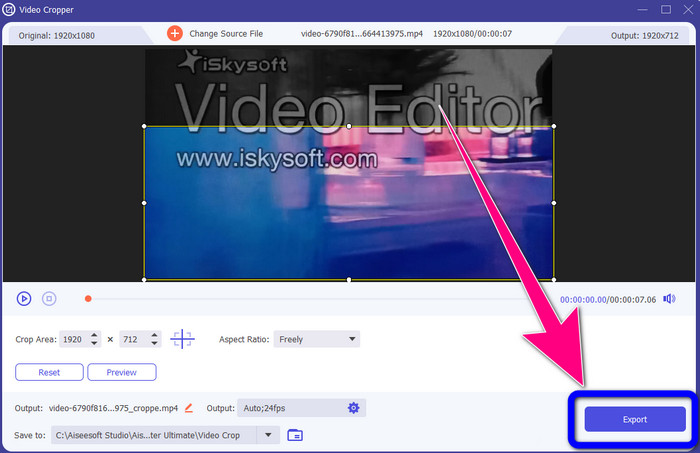
שלב 4: בשלב הסופי, לחץ על כפתור Export ושמור את הקובץ הסופי על המחשב השולחני.
חלק 2: כיצד להסיר את לוגו iSkysoft מ-Video Online
שימוש ב-HitPaw
באפשרותך גם להסיר את לוגו iSkysoft באופן מקוון. אחד הכלים הטובים ביותר שניתן להשתמש בהם הוא HitPaw. האפליקציה המקוונת הזו יכולה להסיר את הלוגו מהווידאו שלך בקלות. ניתן להשתמש בה גם על מחשב שולחני וגם ברשת, מה שהופך אותה לנוחה לכל אחד. בנוסף, HitPaw בטוחה לשימוש. היא מבטיחה שרק אתה תוכל לערוך ולצפות בסרטונים שלך. נוסף על כך, אינך צריך לדאוג למגבלות של התוכנה הזו – אין לה מגבלה במספר הפעמים שניתן להסיר לוגואים מהווידאו שלך. אינך צריך לרכוש את האפליקציה משום שהיא בחינם. עם זאת, אם תסיר לוגו או כל
אלמנטים מיותרים מהסרטון שלך, עליך לחכות עוד קצת. לאפליקציה זו יש הליך הסרה איטי, שגוזל זמן רב עבור המשתמשים. כמו כן, זה תלוי בחיבור האינטרנט שלך. זה יפעל היטב אם יש לך חיבור מהיר. אבל, אם יש לך חיבור איטי, צפה לעיכוב מסוים. בצע את השלבים הפשוטים שלהלן כדי להסיר את הלוגו של iSkysoft מהסרטונים שלך.
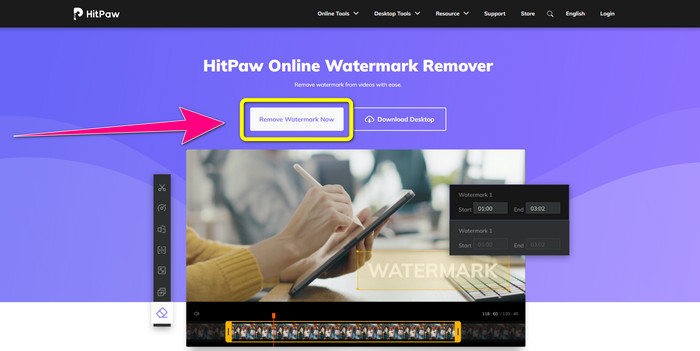
שלב 1: בקר באתר HitPaw. לחץ על כפתור Remove Watermark Now - Choose File כדי להכניס את הווידאו שלך עם לוגו iSkysoft שברצונך להסיר.
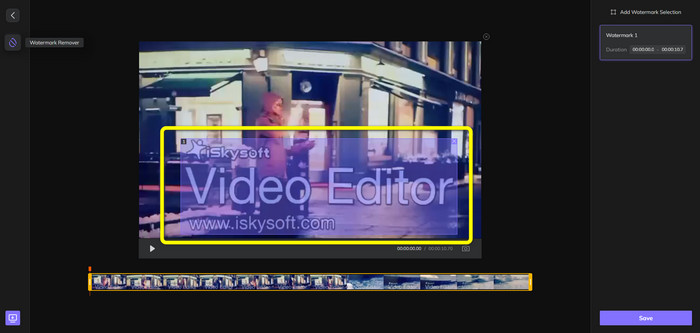
שלב 2: לאחר שצירפת את קובץ הווידאו, תופיע על המסך תיבה בצבע כחול. השתמש בתיבה זו כדי לכסות את לוגו iSkysoft. אפשר לשנות את גודל התיבה.
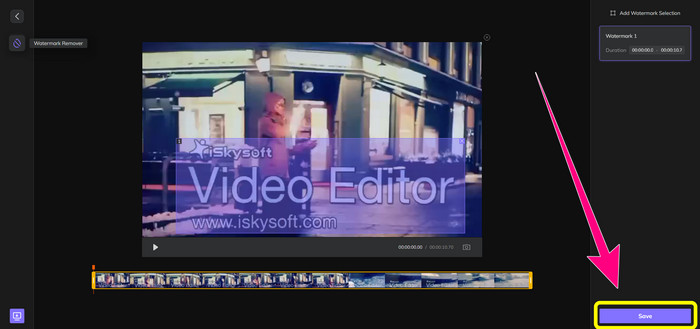
שלב 3: כאשר סיימת לכסות את לוגו iSkysoft בווידאו שלך, לחץ על כפתור Save. המתן לסיום תהליך ההסרה ושמור את הווידאו.
שימוש במסיר סימני מים באינטרנט
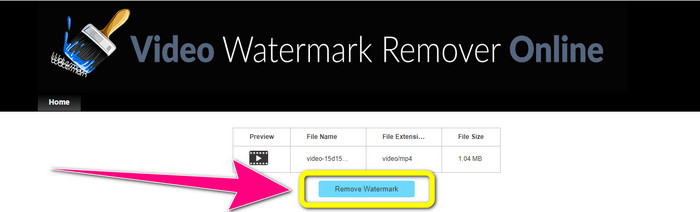
כלי מקוון נוסף שבו ניתן להשתמש הוא Video Watermark Remover Online. באמצעות אפליקציה זו ניתן להסיר את לוגו iSkysoft מהסרטונים שלך. זוהי גם תוכנה קלה לשימוש, המתאימה למשתמשים שאינם מקצועיים. ניתן גם להסיר כל אלמנט מעצבן מהסרטונים שלך מבלי לאבד את איכות הווידאו. עם זאת, בשימוש בגרסה החינמית קיימת מגבלה במספר הלוגואים שניתן להסיר מהווידאו. ניתן להסיר לוגואים או סימני מים רק מחמישה סרטונים. אם ברצונך לעבד עוד סרטונים באמצעות Video Watermark Remover Online, עליך לרכוש מנוי. בנוסף, אינך יכול לשמור את הפלט בפורמט אחר – אפשר לשמור אותו רק באותו פורמט, וזה חיסרון. לבסוף, זמן עיבוד הקבצים איטי. עקוב אחר ההנחיות הפשוטות להלן כדי להסיר את לוגו iSkysoft מהסרטונים שלך.
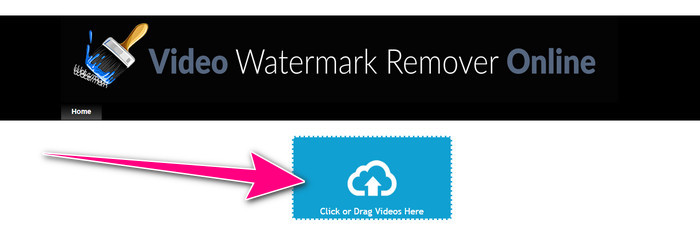
שלב 1: עבור לאתר Video Watermark Remover Online. בחר בכפתור Click or Drag Videos Here כדי לייבא את קובץ הווידאו עם לוגו iSkysoft שברצונך למחוק.
שלב 2: לאחר מכן, לחץ על כפתור Remove Watermark והמתן עד לסיום תהליך ההסרה.
קשור אל:
הדרך המהירה ביותר להסרת לוגו מסרטון ב‑Adobe Premiere Pro
כיצד להסיר לוגו מסרטון באמצעות Windows Movie Maker
חלק 3: שאלות נפוצות לגבי הסרת הלוגו של iSkysoft
האם אתה יכול להסיר לוגו מתמונה?
כן, אפשר להשתמש ב-FVC Free Watermark Remover כדי למחוק את הלוגו מהתמונה שלך בקלות ובמהירות.
האם הסרת סימן המים אינה חוקית?
על פי חוק זכויות היוצרים האמריקאי, סעיף 1202, הסרת סימני מים ללא רשות הבעלים אינה חוקית.
איך אני מסיר את הלוגו בחינם?
אתה יכול להשתמש בגרסת הניסיון החינמית של Video Converter Ultimate כדי להסיר לוגו מהסרטון שלך בחינם.
סיכום
מאמר זה הציג שיטות מצוינות להסרת לוגו iSkysoft מהווידאו שלך באמצעות כלים למחשב שולחני ומקוונים. אבל אם אתה מחפש מסיר לוגו מצוין לשימוש, תוכל להוריד את Video Converter Ultimate. האפליקציה הזו מציעה תהליך הסרה מהיר. היא גם נגישה לכל סוגי המשתמשים.
-
 8 מסירי סימני מים מצטיינים ברשת ובאופן לא מקוון
 אם אתה מחפש את תוכנת הסרת סימני המים החינמית הטובה ביותר שבה תוכל להשתמש בטלפונים של Windows, Mac, iPhone ואנדרואיד שלך, מאמר זה מיועד לך
-
 השיטות הטובות ביותר כיצד להסיר סימן מים שניתן לנשוך מהווידאו
 מאמר זה יראה לך מסיר סימני מים אמין ופנטסטי ביותר. יישומים נפלאים אלה יעזרו לך לפתור בעיה מסוג זה
-
 נהלים קלים ללמידה להסרת לוגו מהווידאו
 האם אתה מחפש את מסיר לוגו הווידאו הטוב והקל? אז, המאמר הזה טוב בשבילך. נצל את ההזדמנות כדי ללמוד על הסרת לוגו מסרטון.
