


 ממיר וידאו אולטימטיבי
 מקליט מסך
 תיקון וידאו
הגבר את המומחיות שלך בהושטת יד בנושא כמו איך להאט את הסרטון
אתה אמן בתחילת הדרך ורוצה לצפות במדריך לעיצוב אמנותי כדי לשפר את כישוריך באמנות. עם זאת, לרוב המדריכים האלה יש מהירות מהירה מספיק כדי לצבור זמן כולל קצר ולהעלאת קובץ קטן. לכן אתה חושב על פתרון שדורש להאט את מהירות הווידאו. אבל אתה לא יודע איך להאט סרטון טיים־לאפס כמו רוב מדריכי האמנות. קרא מאמר זה כדי להעשיר את הידע שלך לגבי הבעיה הזו שרבים מהאמנים המתחילים מתמודדים איתה.

חלק 1. 3 שלבים פשוטים להאטת סרטון [מחשב/מחשב נייד]
יש הרבה גישות שהרשת מציעה, עורך מקוון או לא מקוון. יש להוריד חלק מהם, במיוחד כאשר אתה משתמש במחשב שולחני או מחשב נייד בעריכה. יש הבדל משמעותי בין שימוש במחשב שולחני מבחינת פרטים בשימוש; זו הסיבה שמאמר זה בוחר את הדרך הטובה ביותר להאט סרטון במצב לא מקוון או מקוון על שולחן העבודה. להלן הגישות עם הצעדים שלהן:
גישה 1. השתמש ב-Video Converter Ultimate
ניתן להוריד ולהשתמש בממירים רבים גם כשהם אינם מקוונים. כדי להאט וידאו, באפשרותך להשתמש ב־Video Converter Ultimate, אחד החלופות הטובות ביותר. הוא נוח לשימוש, וניתן להורידו בחינם. אינך צריך לדאוג שהאינטרנט יאט סרטון באופן מקוון, משום שהתוכנה הזו מאפשרת לערוך את הווידאו שלך ללא טרחה. בזכות הכלי המרשים שלה, Video Speed Controller, באפשרותך כעת להתאים את מהירות הניגון של הסרטונים שלך בפחות מדקה. כעת, משסיקרן אותך איך זה עומד לקרות, הנה כמה שלבי הדרכה שעליך לעקוב אחריהם:
שלב 1: פשוט לחץ על כפתור Free Download כדי להוריד את התוכנה לשולחן העבודה של המחשב שלך. התקנת התוכנה והתאמת ההגדרות מושלמות לאחר מכן בשלבים הבאים.
הורדה חינמיתל-Windows 7 ומעלההורדה מאובטחת
הורדה חינמיתל-MacOS 10.7 ומעלההורדה מאובטחת
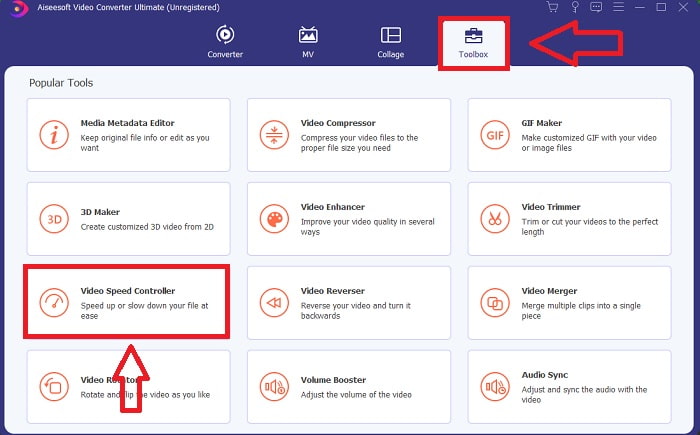
שלב 2: כדי להשתמש ב־Video Speed Controller, הפעל את התוכנה מיד לאחר ההתקנה ובחר בו מתוך תפריט Toolbox.
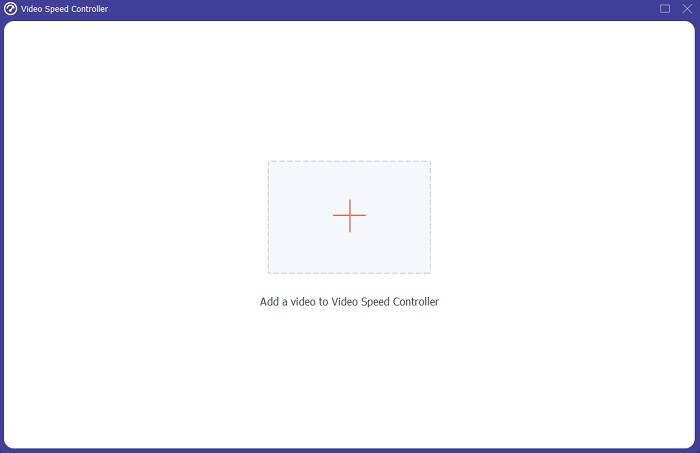
שלב 3: הממשק של Video Speed Controller יופיע לאחר שתלחץ עליו. כדי להעלות קובץ, לחץ על סמל ה־+.
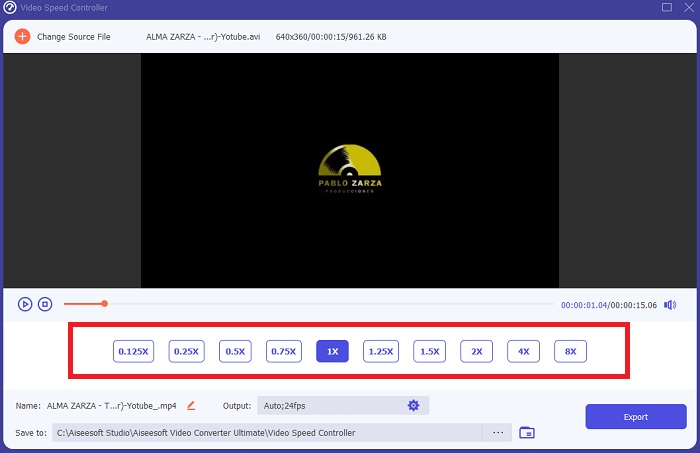
שלב 4: כעת תוכל להתחיל להאט את הסרטון שלך על‑ידי בחירת ערכים מספריים נמוכים יותר מהמהירות הרגילה. רוב המספרים יופיעו בצדו השמאלי של מהירות הווידאו בפועל.
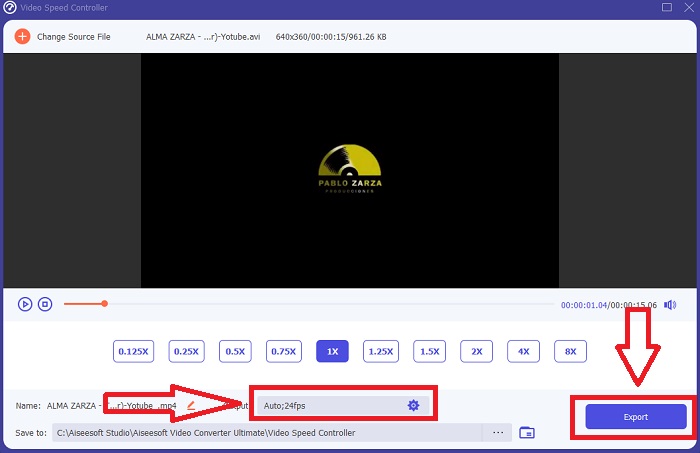
שלב 5: לאחר שסיימת לשנות את מהירות הניגון של קטע הווידאו שלך, תוכל לבחור את פורמט הפלט, הרזולוציה, האיכות ופרמטרים נוספים שבהם תרצה להשתמש. כאשר סיימת, לחץ על Export ובחר היכן ברצונך לשמור את הקובץ לאחר שהכול הושלם.
גישה 2. השתמש ב-VEED
יוצרי תוכן ברחבי העולם מסתמכים על VEED וכלי הקוד הפתוח שלו להפקת סרטונים עבור מדיה חברתית ושימושים אחרים. מדובר באפליקציית אינטרנט שדורשת חיבור מוצק כדי לעבוד בצורה נכונה, אך ניתן להעלות ישירות ולשנות את מהירות ההשמעה בממשק המשתמש שלה. בנוסף, יש לו מאפיינים שונים, אחד מהם הוא ירידה במהירות ההשמעה של הסרטון. כעת תוכל להאט סרטון מבלי להוריד דבר לשולחן העבודה שלך. אתה צריך רק מנוע חיפוש וחיבור חזק כדי לגשת לכלי המקוון הזה. יש לו ממשק משתמש פשוט וידידותי שיכול להועיל לרוב המשתמשים המתחילים שצריכים להאט את הסרטון מבלי ללמוד שלבים מסובכים. להלן נהלים לדוגמה לעיכול כדי להשיג את ההתאמות הרצויות לסרטון שלך.
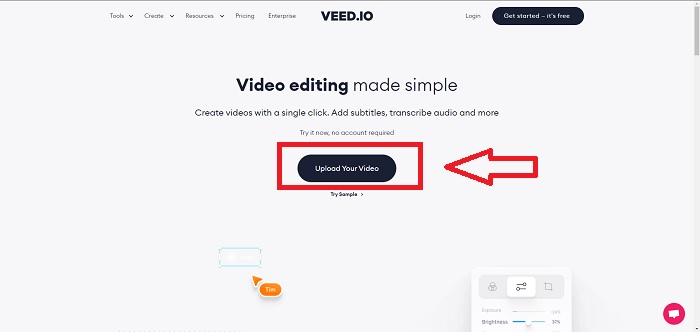
שלב 1: לחץ על כפתור Upload Your Video כדי לשלוח קובץ וידאו מהמחשב שלך לשרת.
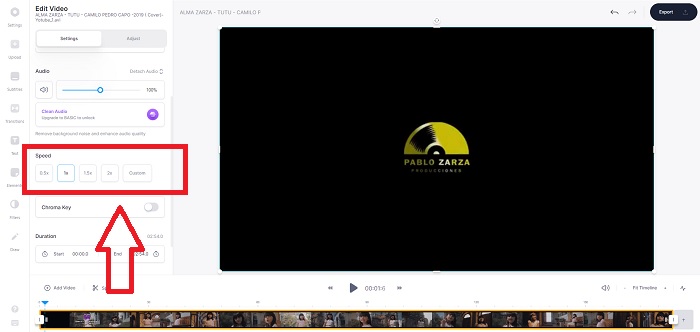
שלב 2: ניתן לגשת לממשק העריכה של כלי‑הרשת על‑ידי לחיצה על Video Track בפינה השמאלית העליונה. בחר מהירות ניגון מהירה יותר על‑ידי חיפוש האפשרות Speed ולחיצה עליה. אם המהירות המועדפת עליך אינה מוצעת כאפשרות, תוכל לבחור Custom כדי לעקוף את ברירות‑המחדל ולהפעיל את קטע הווידאו שלך במהירות מותאמת אישית.
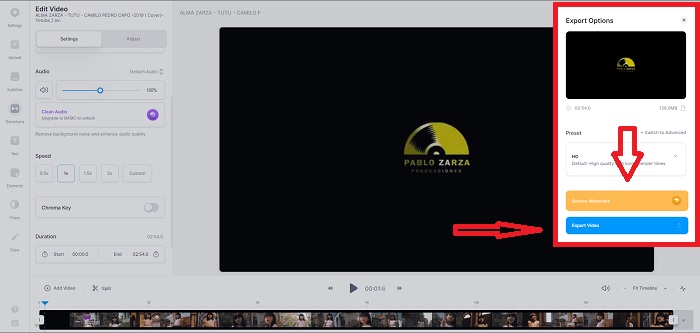
שלב 3: לאחר שתערוך את מהירות הווידאו הרצויה, המשך בלשונית הייצוא על‑ידי לחיצה על Export. בינתיים, תוכל לבחור איזו איכות אתה מעדיף עבור הווידאו שלך ולהסיר את סימן המים על‑ידי רכישת גרסת הפרימיום של כלי‑הרשת. אם הכול מוסדר, העבר את הווידאו שהומר למחשב שלך באמצעות Exporting Video.
חלק 2. 3 שלבים פשוטים להאטת סרטון [טלפון נייד]
נמאס לכם לחשוב על פתרון שיענה איך להאט סרטון באייפון או באנדרואיד? יש הרבה אפליקציות וכלים זמינים באינטרנט לשימוש כדי להצדיק שיש תשובה לבעיה הנתונה. אבל הנה הכלים הטובים והנגישים ביותר שאנו ממליצים להשתמש בהם אם אתה עורך טלפונים ניידים ורוצה ליצור יצירת מופת מהמכשיר הקטן שברשותך.
גישה 1. השתמש ב-iMovie
כעת באפשרותך לשלוט במהירות הניגון או להאט את הסרטון שלך ב־iPhone וב־iPad בעזרת היישום החינמי והשימושי הזה שנקרא iMovie. זוהי אחת האפליקציות המהימנות הזמינות למכשירי מערכת iOS שיכולה לערוך את הווידאו שלך, ובעיקר לערוך את מהירות הניגון של וידאו. כדי לדעת עוד על האפליקציה האמורה, הנה השלבים שעליך לבצע כדי לפתור את הבעיה שהוצגה לעיל:
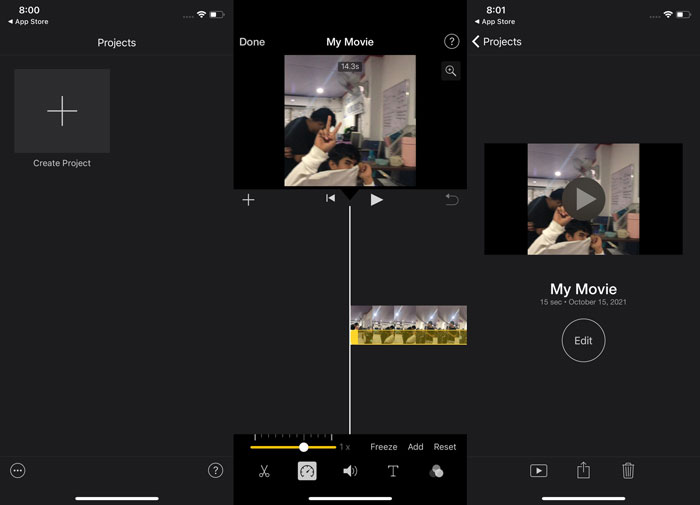
שלב 1: התחל לערוך את הסרט ב־iMovie ב־iPhone או ב־iPad שלך. ייתכן שיוצג לך סקירה קצרה של ממשק המשתמש לפני שתמשיך. בדף Projects, לחץ על סימן הפלוס כדי להוסיף קליפ וידאו חדש, ולאחר מכן בחר Movie מתפריט New Projects.
שלב 2: עליך לבחור וידאו מגלילת המצלמה לפני המעבר לחלק של Create Movie. ניתן למצוא את כלי המהירות, הדומה למד מהירות, על‑ידי הקשה על קליפ הווידאו בציר הזמן והמתנה עד שיופיעו כלי העריכה. הרץ אחורה או קדימה את חומר הגלם של הווידאו שלך על‑ידי הזזת המחוון הצהוב בתחתית. בהשוואה למהירות המקורית, ניתן להאיץ את הדברים עד פי שניים או להאט אותם עד שמינית מהמהירות המקורית.
שלב 3: לחץ על Done בפינה השמאלית העליונה של הטלפון לאחר שסיימת את התהליך. תוכל לשמור את הסרטון המוגמר שלך על‑ידי בחירתו מתפריט Share ואז להחליט היכן ברצונך לשמור אותו.
גישה 2. השתמש ב-VideoFX Music Video Maker
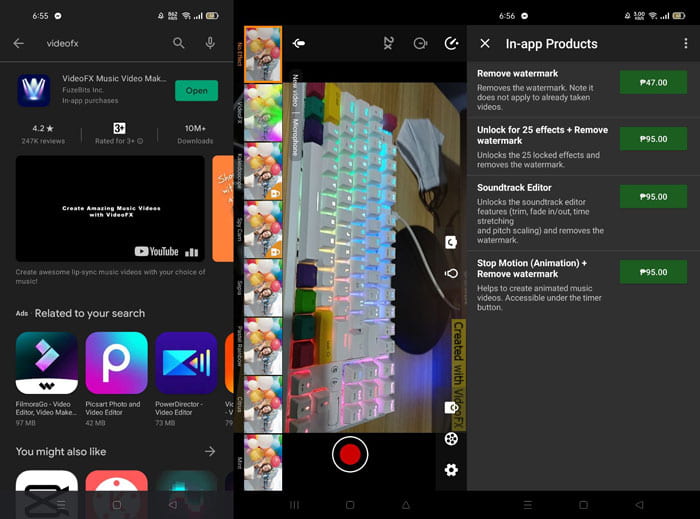
צור את קליפי המוזיקה שלך בתוך שניות בעזרת הכלי VideoFX Music Video Maker. כל שעליך לעשות הוא להקליט וידאו באמצעות אחד מהאפקטים הרבים הזמינים, לבחור שיר ולשמור אותו בזיכרון הפנימי של טלפון האנדרואיד שלך. מאחר שניתן להחיל מסננים לפני הקלטת הווידאו, השימוש בו קל מאוד. לטוב ולרע, עריכה לאחר הצילום אינה אפשרית; ניתן לבצע שינויים רק לפני שהווידאו מצולם. לפני שתתחיל להקליט, בחר שיר שיתאים היטב לסרטון שלך. ניתן להאיץ או להאט את המוזיקה, אך יש לבצע את השינויים לפני הקלטת הווידאו. הנה השלבים שיש לעקוב אחריהם:
שלב 1: הורד והתקן את VideoFX לטלפון האנדרואיד שלך.
שלב 2: מאחר שהתכונות של אפליקציה זו חלות רק לפני שינויי הווידאו, התחל להקליט על‑ידי לחיצה על כפתור Record.
שלב 3: לאחר מכן לחץ על 2x כדי להתאים את מהירות הווידאו שאתה מקליט. לפני שתפתח את כל תכונות האפליקציה, עליך לרכוש גישה מלאה תחילה.
חלק 3. שאלות נפוצות לגבי האטת סרטון
איך להאט סרטון באייפון?
ליוצרי תוכן ווידאוגרפים עומד ארסנל עשיר של כלים, והילוך‑איטי הוא אחד הטובים שבהם. וידאו עם מספר גבוה יותר של פריימים לשנייה יספק חוויית צפייה מהנה יותר. עם זאת, סרטונים מואטים אינם תמיד הגישה הטובה ביותר בכל וידאו שאתה יוצר. במקרים מסוימים, הילוך‑איטי פשוט אינו מתאים או אפילו מיותר. כתוצאה מכך, האופציה היחידה שלך היא להחזיר סרטון ההילוך‑האיטי של האייפון למהירות רגילה.
איך מאטים סרטון בגלריה?
לטלפונים אנדרואיד ו-iOS יש סמלי הגדרות להקיש עליהם כדי להפעיל מצב slo-mo או הילוך איטי לפני הקלטת וידאו. עליך להקליט את הסצנות בהילוך איטי שלך ברצפים של חמש עד עשר שניות כדי למנוע יותר מדי קטעים.
האם אני מאבד את האיכות אם אני מאט סרטון?
לא, לא תאבד את האיכות של סרטון, אבל תראה את הרזולוציה וקצב הפריימים של הסרטון שלך יורדים בכל שנייה שתפחית במהירות הממוצעת. כאשר מהירות ההפעלה של הסרטון שלך מוגברת או מופחתת, רק המסגרת תחולק. הגדלת זה תקבל את האפקט הרצוי. פי חמישה מהר יותר, כלומר 60 פריימים לכל 1/120 שניה. במילים אחרות, אלא אם לסרטון יש קצב פריימים נמוך, זה לא ישפיע.
סיכום
לכן, באמצעות מאמר זה, אתה לומד הכול על השיטות השונות שלכל מערכת הפעלה יש כדי להתמודד עם הנושא של כל האפליקציות להאטת וידאו. ישנם גם שלבים המיועדים לחובבים מתחילים שאין להם כל רקע בעריכת וידאו. בהמלצה על אפליקציה שעוזרת לך במהירות הניגון של הווידאו שלך וגם בכלי העריכה האחרים שיש לעורך, הורד את התוכנה Video Converter Ultimate כדי לחוות את המיטב שבלהיות עורך מקצועי.
-
 ארבעת שחקני VOB הטובים ביותר למכשירי אנדרואיד לשימושים שונים
 כאשר אתה מוריד סרטוני VOB ורוצה לצפות בהם באנדרואיד, תוכל לבחור את המתאים ביותר מבין 4 שחקני ה- VOB המובילים הבאים במאמר זה.
-
 חמשת החלופות הטובות ביותר של Windows Media Player למכשירי אנדרואיד
 מכיוון שאינך יכול להוריד את Windows Media Player עבור Android, עליך לקרוא מאמר זה וללמוד על 5 החלופות הטובות ביותר ל- Windows Media Player.
-
 5 נגני הווידאו הטובים ביותר לאייפון שאסור לכם לפספס בשנת 2021
 כדי להפעיל קטעי וידאו בכל הפורמטים ולחווית צפייה טובה יותר באייפון שלך, עליך לקרוא מאמר זה וללמוד על 5 נגני הווידאו הטובים ביותר לאייפון 12/11/X/8/7/6.
