


 ממיר וידאו אולטימטיבי
 מקליט מסך
 תיקון וידאו
6 בקרי מהירות הווידאו הטובים ביותר עבור Windows/Mac/Android/iOS
האצה או האטה של סרטון יכולה ליצור אשליה מדהימה אם נמאס לך להשתמש רק באפקטים. טכניקת עריכת וידאו זו פשוטה אך יעילה. כשאתה מחפש באינטרנט, תמצא אפשרויות רבות של בקרי מהירות בשוק, ואנחנו יודעים שקשה לבחור. אך אם תקרא את המאמר הזה, נסקור את אפליקציית בקר המהירות שתוכל להשתמש בה כדי לשנות את מהירות הנגינה. מתעניין באפליקציות הטובות ביותר לבקרת מהירות? אם כך, המשך לקרוא כדי ללמוד עוד על הבקר מהירות וידאו הזמין בפלטפורמות שלך.

חלק 1. 6 בקרי מהירות הווידאו המובילים עבור Windows, Mac, Chrome, iOS ו-Android
מוביל 1. Video Converter Ultimate (Windows ו-Mac)
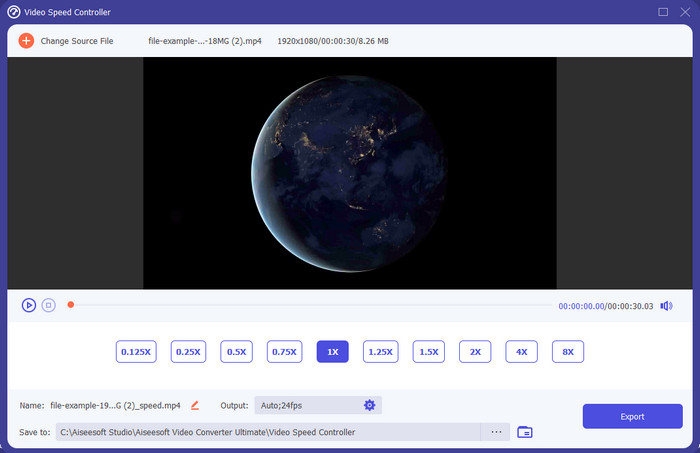
אתה צריך בקר מהירות וידאו שהוא יעיל וחסכוני במיוחד בהאצה ובהאטה של הסרטון? במקרה כזה, Video Converter Ultimate הוא העזר המתאים לבעיה הזו. זהו הכלי הנגיש ביותר שתוכל להשתמש בו כדי לשנות בקלות את מהירות הווידאו, בין אם אתה צריך מהירות גבוהה או הילוך איטי. למרות שאתה משנה את המהירות, איכות הווידאו המקורית תישמר, אך תנועת הווידאו לא, משום ששינית את המהירות.
מלבד זאת, אתה יכול לעשות דברים רבים כמו המרה, מיזוג, חיתוך ועוד; בעיקרון, זהו כלי הכל-באחד. רוצה לדעת את ההצעות האחרות שאתה יכול לקבל עם אפליקציית הווידאו המואצת הזו? אם כן, קרא את תכונות הכלי כדי ללמוד עוד, או שאתה יכול להוריד את התוכנה על שולחן העבודה שלך כבר עכשיו כדי לבדוק אותה.

ממיר וידאו אולטימטיבי
5,689,200+ הורדות- זה יכול לשנות במדויק את מסגרות הווידאו למעלה או למטה במהירות בכל פורמט וידאו, כגון MP4.
- תכונות ואפקטים של עריכת וידאו זמינים בשפע.
- זה גמיש בכל הפלטפורמות כמו Windows או macOS.
- התהליך המהיר במיוחד גורם לתהליך ההורדה או הייצוא להתבצע בהרף עין.
- לייצוא או הורדה של הסרטון שאתה עורך לא יהיה סימן מים.
הורדה חינמיתל-Windows 7 ומעלההורדה מאובטחת
הורדה חינמיתל-MacOS 10.7 ומעלההורדה מאובטחת
יתרונות
- שנה את המסגרת לפריים של הסרטון גם אם אתה מקצוען או לא.
- קל להבין אפשרויות השמעת וידאו.
- יכולת שיתוף מדיה חברתית יוצאת דופן.
- זה בחינם להורדה, אבל הוא מציע רכישות בתוך האפליקציה.
חסרונות
- צריך לרכוש אם אתה רוצה לקבל את מלוא היכולת של הכלי.
למעלה 2. Clipchamp (Windows)
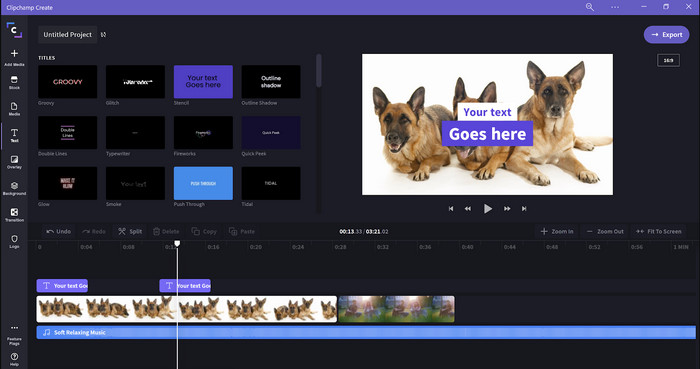
Clipchamp הוא עורך מהירות וידאו שניתן להשתמש בו ב-Windows. לכלי זה עקומת למידה מתונה יותר, כך שאם אתה חדש בעריכה אולי תרצה לבדוק אותו. הוא גם תומך בכמה תכונות נוספות שתהנה להשתמש בהן. עם זאת, החיסרון העיקרי של הכלי הזה הוא איכות הווידאו ביצוא. ניתן לייצא את הקובץ רק באיכות 480p, שנחשבת נמוכה ביחס לכלים חינמיים אחרים. אך אם אתה צריך לייצא באיכות 720 או 1080, תוכל להירשם כמנוי בתשלום. מעבר לכך, הכלי מצוין, אבל עדיין לא טוב כמו עורך הווידאו הראשון שהוזכר.
יתרונות
- GUI פשוט וקל לשימוש.
- הוא מציע תכונות נוספות לעריכה.
- שליטה בהפעלת הווידאו בקלות.
חסרונות
- עבור הגרסה החינמית, הפלט הסופי הוא 480.
- לפעמים הכלי הפך לבלתי גמיש עם המשימה.
3 מובילים. בקר מהירות וידאו (Chrome)

רוצה להשתמש בהרחבה של בקר מהירות וידאו בכרום? אז אתה יכול להשתמש ב-Video Speed Controller. הכלי הזה זמין בכל דפדפן כרום כדי להאיץ או להאט את הסרטון שאתה צופה בו. הוא קל לשימוש עבור כולם וגם בטוח לשימוש, מפני שהוא הרחבה לכרום. עם זאת, אם תייצא את הסרטון, מהירות הנגינה תישאר כפי שהייתה גם אם שינית אותה. זאת משום שהכלי פועל רק על הסרטון שאתה צופה בו כרגע בכרום ולא מחוצה לו. מידע נוסף: לאחר שהאצת את הווידאו באמצעות ההרחבה הזו, כל הסרטונים שתנגן בכרום יתנגנו באותה מהירות.
יתרונות
- בקר מהירות נקודתי אתה יכול להשתמש ב-Chrome.
- מסוגל להריץ אחורה או לאפס את מהירות הפעלת הווידאו ב-Chrome בקלות.
- זה תומך בפקודת מקשי הקצר.
חסרונות
- לוח בקר הווידאו אינו גלוי.
- אינך יכול לשנות את מהירות הסרטון מחוץ לכרום.
למעלה 4. Accelerate עבור Safari (iOS ו-Mac)
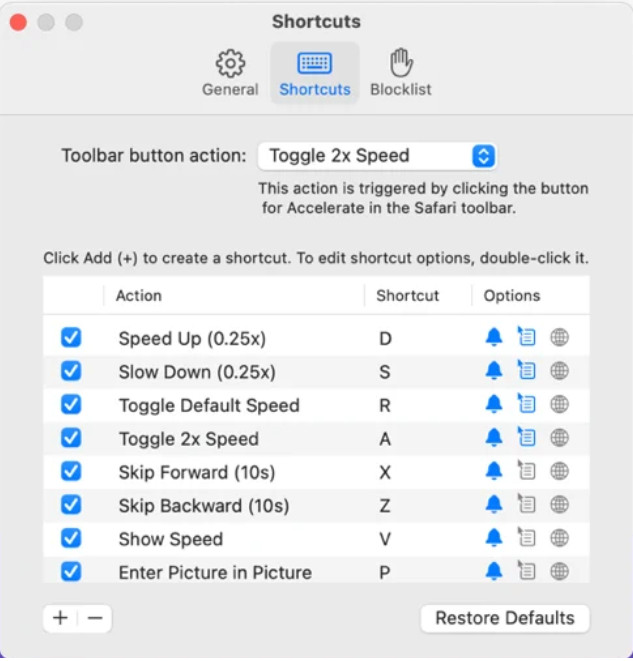
צריך בקר מהירות וידאו בספארי? Accelerate for Safari זמין בכל דפדפן Safari במכשירי אפל. הכלי הזה יכול לשנות את מהירות הנגינה של כל וידאו ב-HTML5 בספארי. בדומה להרחבה של כרום שהוזכרה למעלה, גם זה מוגבל למכשירי אפל בלבד. אז אם אתה משתמש אפל, ייתכן שתרצה להשתמש בהרחבת בקר המהירות הזו כדי להאיץ או להאט את הווידאו. בנוסף, ניתן להשתמש במקשי המקלדת שלך כדי לפקד על הכלי לשנות את מהירות הנגינה.
יתרונות
- זה בטוח לשימוש בכל ספארי.
- זה תומך גם ב-Picture-in-Picture וב-AirPlay.
- מקשי קיצור זמינים כדי להשתלט על הכלי.
חסרונות
- הוא אינו תומך בדפדפן אינטרנט אחר מלבד Safari.
- מוגבל לסרטוני HTML 5.
למעלה 5. לאט מהר לאט - שלוט במהירות הסרטונים שלך (iOS)
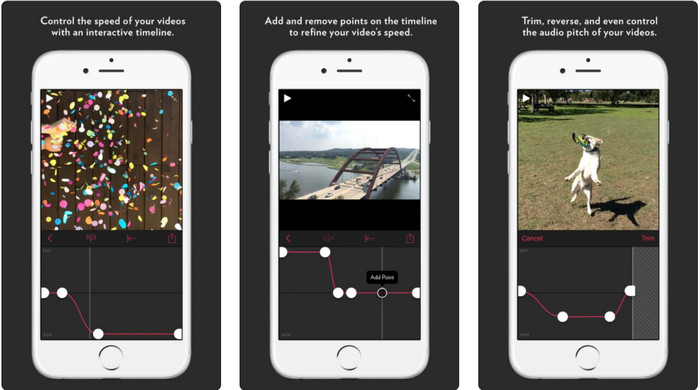
עבור בקר מהירות וידאו באייפון, באפשרותך להשתמש באפליקציה Slow Fast Slow. הכלי הזה עוזר למשתמשי iOS לשלוט באופן מיידי במהירות הנגינה של הווידאו, והוא עובד מצוין בהילוך איטי. בנוסף, יש לו ציר זמן מובנה ואינטראקטיבי במיוחד להתאמת המהירות. הוא גם תומך בתכונות אחרות כמו שינוי גובה הצליל (pitch-bent) והיפוך הקליפ. עם זאת, הכלי דורש מערכת iOS 10, כך שלא ניתן להשתמש בו אם המערכת שלך היא מתחת לגרסה 10.
יתרונות
- זה תומך בתכונות אחרות עבור הסרטון שלך.
- ידידותי למשתמש.
- יכול להאט סרטונים עד 1/16 מהירות.
חסרונות
- זה לא תומך בפלט 4k ובבחירת FPS.
- זה לא עובד בחלק ממכשירי iOS החדשים.
6 המובילים. Video Speed Controller Pro (אנדרואיד)
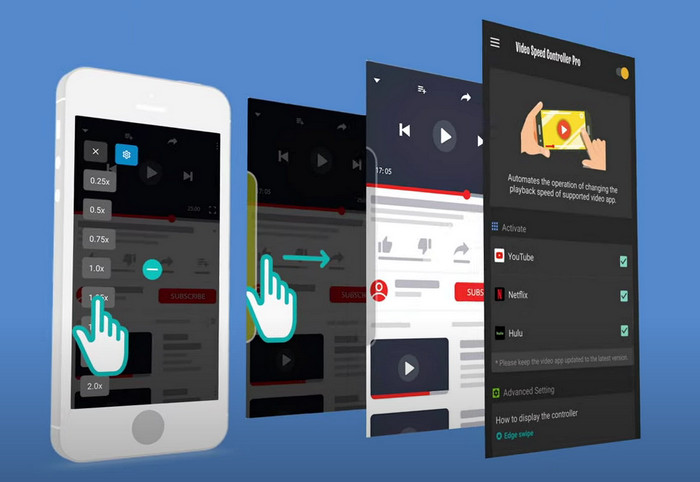
אם אתה צריך בקר מהירות וידאו באנדרואיד, נחש מה? תוכל להשתמש ב-Video Speed Controller Pro על ידי התקנתו מחנות Play. בעזרת הכלי הזה תוכל להאיץ בקלות כל וידאו שמתנגן באנדרואיד שלך. יתרה מזאת, הכלי הזה דומה להרחבת בקר מהירות על גבי אנדרואיד. למרות שהוא יכול להאיץ את הווידאו, המהירות המרבית היא פי 2 בלבד. עם זאת, אם אתה צריך להאיץ את הצפייה בסרטונים, תוכל להשתמש בו ב-YouTube, Netflix ופלטפורמות וידאו אחרות באנדרואיד.
יתרונות
- זה פשוט לשימוש.
- הכלי עצמו נמצא בנקודה.
- שורת תפריטים זמינה כדי לחשוף את האפשרויות בהשמעה שלך.
חסרונות
- אפשרויות מהירות ההשמעה מוגבלות.
- לפעמים זה לא עובד טוב.
חלק 2. טבלת השוואה
| מאפיינים | Video Converter Ultimate (Windows ו-Mac) | Clipchamp (Windows) | בקר מהירות וידאו (Chrome) | Accelerate עבור Safari (iOS ו-Mac) | איטי מהר איטי - שלוט במהירות הסרטונים שלך (iOS) | Video Speed Controller Pro (אנדרואיד) |
| בקרת מהירות |  | | | | | |
| פלט וידאו באיכות גבוהה | |  | | | | |
| תכונות עריכה | | | | | | |
| תהליך ייצוא מהיר במיוחד | | | | | | |
חלק 3. שאלות נפוצות על בקר מהירות וידאו
למה אני צריך להשתמש בבקר מהירות?
במקרים מסוימים, תצטרך לצפות בסרטון במהירות גבוהה או להאט. דוגמה מצוינת לצפייה בסרטון מהירות היא לסיים את הסרטון שבו אתה צופה באופן מיידי, או כאחד. האצת סרטונים היא עזרה גדולה למשתמשים אלה. בזמן איטי, זה משמש בדרך כלל בשידור חוזר מיידי של ענפי ספורט בקצב מהיר כמו מירוץ, כדורסל, כדורעף ועוד. בין מהשניים, תזדקק לבקר מהירות יעיל כדי לעקוף את המהירות הרגילה לצרכים שלך באופן ידני.
האם אני יכול להאיץ סרטונים בטיקטוק?
כן, ניתן לצלם סרטונים במהירות גבוהה בטיקטוק. אך אי אפשר לצפות בסרטונים בטיקטוק במהירות מוגברת. לכן, אם אתה צריך כלי טוב שיסייע לך להאיץ, לחץ וקרא את המאמר הזה כדי ללמוד איך להאיץ וידאו בטיקטוק.
איך להאט סרטונים?
בניגוד להאצת סרטונים, באפשרותך ליצור הילוך איטי בסרטונים בעזרת עורכים הזמינים בשוק. באיזה כלי כדאי להשתמש? אין סיבה לדאגה, כי אנו מציגים את תוכנות הווידאו הטובות ביותר להילוך איטי שתוכל להשתמש בהן כדי ליצור אפקט סלו-מו. אם אתה צריך לדעת יותר, תוכל ללחוץ על קישור זה.
סיכום
היום אתה כבר מצויד בידע על אפליקציות בתשלום וחינמיות להאצת וידאו על פני פלטפורמות שונות. בקרי המהירות מספקים מערך ייחודי של יכולות המסייעות למשתמשים שונים להאיץ סרטונים. אם נקרא בעיון, נוכל לראות שFVC Video Converter Ultimate מספק הכל עבור המשתמשים הזקוקים לעזרה. אז אם אתה רוצה להוריד את הכלי האולטימטיבי למחשב השולחני שלך, תוכל ללחוץ על כפתור ההורדה וליהנות מחוויית שימוש מלאה בכלי.
-
 כיצד להאיץ סרטון עם 5 התוכנות המובילות הזמינות [Windows/Mac/Linux]
 רוצה לדעת איך להאיץ וידאו בקלות? לאחר מכן קרא את הכתבה הזו בזמן שאנו מסבירים כיצד להאיץ ביעילות ב-Windows, Mac ולינוקס.
-
 הדרכים הקלות ביותר כיצד להאיץ סרטון במכשירי האנדרואיד שלך [2021]
 האם ידעת שאתה יכול להאיץ סרטון באנדרואיד שלך? אז אם אתה רוצה לדעת איך להאיץ סרטון בטלפון אנדרואיד שלך, קרא את הכתבה הזו.
-
 טיפים מצוינים של 2021: כיצד להאיץ סרטון ב-iMovie
 חבר שלך מציע את iMovie כדי לעזור לך עם הבעיה שלך איך להאיץ סרטון באמצעות מערכת ההפעלה iOS, אבל אתה לא יודע מה לעשות? ראה עוד על זה כפי שאתה קורא עוד דרך מאמר זה.
