


 ממיר וידאו אולטימטיבי
 מקליט מסך
 תיקון וידאו
למד עוד על 5 עורך הווידאו הטוב ביותר למחשב האישי והשווה
בימינו אנשים רבים אוהבים לצלם סרטונים כדי לשמור רגעים בלתי‑נשכחים, ורובם משתמשים בהם גם כדי להרוויח כסף. וולוגרים ומשפיענים, למשל, מצלמים את עצמם כל הזמן במה שהם עושים עבור המעריצים שלהם, וגם כדי להשיג יותר פופולריות ממשפיענים או וולוגרים אחרים. לכן, אם אתה וולוגר או משפיען מתחיל שאוהב לצלם את עצמו, עליך לשקול להשתמש ב־עורך וידאו ל־Windows 10 ברמה הגבוהה ביותר, כדי לשפר וליצור סרטונים מרשימים, להשיג יותר לייקים, צפיות, מנויים וגם רווח לאורך זמן. לפני שנתחיל, נאחל לך מזל טוב – כבר עשית את הצעד הראשון בדרך להפוך לוולוגר או משפיען מצליח. אך בחירת הכלי הנכון שבו תשתמש היא אחד החלקים הקריטיים שתיתקל בהם. לכן ריכזנו עבורך למטה מגוון עורכי וידאו יעילים במיוחד שתוכל לבחור מתוכם.

חלק 1. 5 עורכי הווידאו המובילים של Windows באופן מקוון ולא מקוון
למעלה 1. Video Converter Ultimate
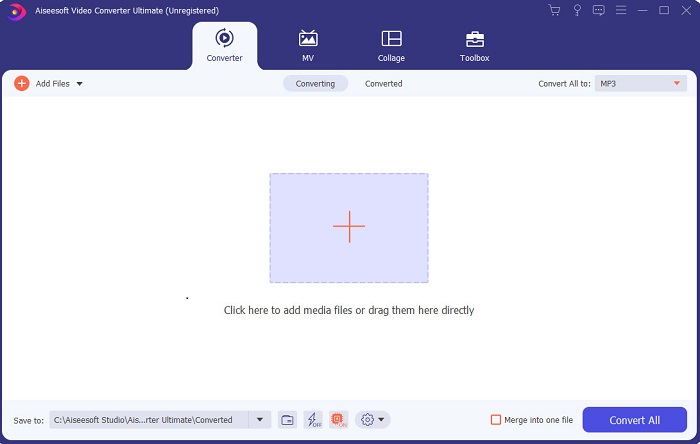
אם אתה רוצה יתרון על פני אחרים וליצור סרטונים ברמה של האלילים שלך, השתמש ב־FVC Video Converter Ultimate. ממיר זה ועורך וידאו ל־Windows כבר עזר לרבים מלקוחותיו להפוך לפופולריים ברחבי העולם, ואולי אתה הבא בתור. רבים מהמשפיענים, הוולוגרים ועורכי הווידאו המוכרים משתמשים בו כעורך, כמחזק, כמגביר ביצועים ועוד. אם אתה רוצה תוצאה מקצועית כמו של האלילים שלך ולהרוויח ממנה כסף אמיתי, עליך להוריד את התוכנה מיד, להפוך לסנסציית האינטרנט החדשה וגם לגרסה הטובה ביותר של עצמך. בנוסף, צירפנו יתרונות וחסרונות כדי שתוכל להבין את הכלי הזה לעומק.
הורדה חינמיתל-Windows 7 ומעלההורדה מאובטחת
הורדה חינמיתל-MacOS 10.7 ומעלההורדה מאובטחת
יתרונות
- למתחילים, כלי זה הוא הבחירה הנכונה עבורם. מכיוון שהוא מספק הוראות פשוטות לביצוע וקלות יותר להבנה. בעיקרון, זה על הנקודה.
- למקצוענים, שלא כמו כל אחד אחר עורך וידאו למחשב לכלי זה יש הרבה תכונות עתידניות. לדוגמה, אם אתה רוצה לשפר את איכות השמע שלך ולשפר את הווידאו, אתה יכול להשתמש בכלי זה. כמו כן, אם האודיו שלך לא מסונכרן עם וידאו, יש לו תכונת סינכרון אודיו לתקן את זה.
- בסך הכל, זהו הממיר והעורך הפנומנליים שאתה יכול לסמוך עליו. במיוחד אם אתם רוצים לעשות כניסה מפתיעה לעולמם של הוולוגים והמשפיענים.
- תוכנת העורך ניתנת להורדה ואין כלי עורך שיש להם את אותן תכונות כמו זה.
חסרונות
- כלי זה אינו חינמי אך הוא נמוך במחיר. במילים אחרות, הוא זול ומפיק תפוקה באיכות גבוהה.
למעלה 2. Windows Movie Maker
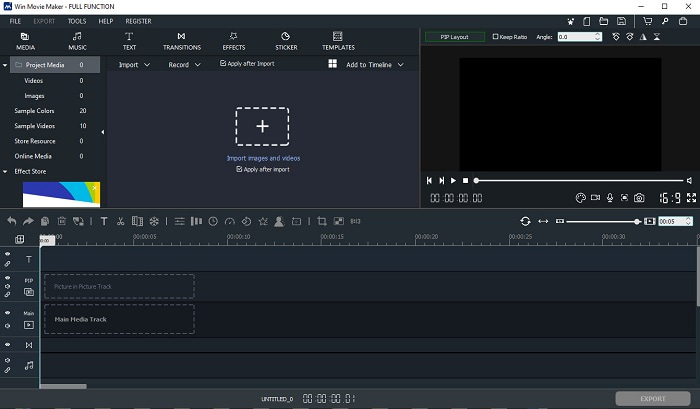
עורך הווידאו ל־Windows 7, 8, 10 ו־XP הזה הוא מהטובים ביותר ליצירה ועריכה. רבים כבר הורידו את Windows Movie Maker כדי לערוך את הסרטונים שלהם, והוא מציע יכולות עריכה מתקדמות. עם זאת, הכלי עלול להיות מכביד ומבלבל למי שחדש בעריכה. אם אתה מקצוען, או לפחות בעל ניסיון בעריכה, כדאי לך לנסות את הכלי הזה. לכלי יש גרסת פרימיום, והיא דומה מאוד לגרסה החינמית, אך ביצוא הקובץ הסופי לא מופיע סימן מים.
יתרונות
- למתחילים, הכלי הזה אינו אידיאלי אבל הוא נהדר לעשות עריכה מסובכת.
- עבור אנשי מקצוע, התכונות המוצגות כאן ניתנות לביצוע אם יש לך ניסיון.
- זה מספק מעבר, אפקטים ומדבקות וכו'.
חסרונות
- הכלי קצת מטריד בגלל פונקציות הכלי שאתה יכול לעשות כאן. כמו כן, הוא מהמם ואין לו הנחיות כיצד להפעיל אותו.
- אם אתה משתמש בגרסה החינמית של הכלי הזה, צפה לקבל סימן מים בסרטון עצמו לאחר ייצוא שלו.
למעלה 3. OpenShot
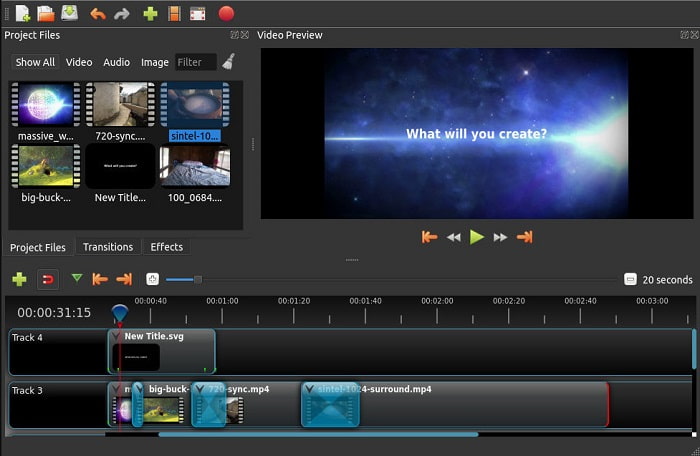
עוד תוכנת עריכת וידאו חינמית ללא סימן מים היא Openshot. היא מציעה פונקציות פשוטות יותר להבנה מאשר Windows Movie Maker. לאחר התקנת הכלי תעבור סיור קצר בפונקציות הבסיסיות. עם זאת, מוסברים רק הכלים הבסיסיים, והכלי עצמו מספק רק יכולות עריכה בסיסיות – דבר שמגביל את היצירתיות שלך. נוסף על כך, הממשק החד‑גוני קצת משעמם לעין.
יתרונות
- למתחילים, זוהי גרסה פשוטה יותר של Windows Movie Maker. ניתן להוסיף אפקטים, מעברים ועוד.
- לאנשי מקצוע, זה בסדר שהם משתמשים בזה אבל זה לא הכי טוב.
- התוכנה בסדר אם היא מגיעה עם עריכה פשוטה.
חסרונות
- אי אפשר לשנות את הממשק המשעמם שלו וזה פחות אינטראקטיבי.
- כמה באגים גדולים וקטנים עדיין קיימים כאן גם לאחר העדכון.
למעלה 4. Lightworks
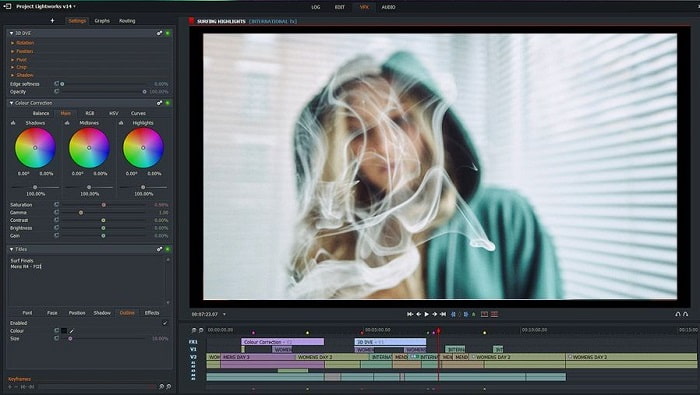
Lightworks הוא עורך וידאו חינמי ל־Windows, אך יש לו גם גרסת פרימיום. כשניסינו להוריד את הכלי, הופיעה הודעה שקובץ ה־.exe עלול להזיק למחשב, ולכן לא התקנו אותו וביצענו עליו מחקר מעמיק. אם תתקין את הכלי בכונן שלך, תידרש תחילה להירשם לפני שתוכל להשתמש בו. יכולות העריכה שהוא מציע רבות ומורכבות, ואם אתה מתחיל זה עלול להיות מכביד; אפילו למקצוענים הוא מעט מאתגר. עם זאת, אין סיבה לחשוש – אפשר ללמוד להשתמש בו על ידי תרגול וניסוי.
יתרונות
- למתחילים, הכלי מסובך מדי וזה יכול להיות יותר מדי לטפל בו. במיוחד אם אתה רוצה לנסות ופשוט לעשות עריכה פשוטה.
- עבור אנשי מקצוע, אתה יכול להשתמש בתכונות העריכה בזמן אמת שהכלי הזה מספק. למרות שחלק מהתכונות חדשות ורובם בתשלום.
- הביצועים הכוללים של הכלי מסווגים כמחלקה-A בעריכה ויצירת סרטונים.
חסרונות
- אם אתה רוצה לקבל פלט של 1080px אתה חייב לקנות את הכלי. ועוד לפני שתוכל להשתמש בו תצטרך להירשם.
- לתוכנה יש קובץ exe מזיק אז הורד אותו על אחריותך בלבד.
למעלה 5. ClipChamp
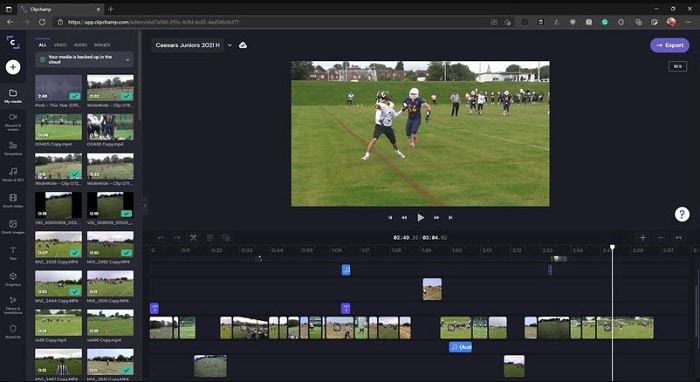
לכלי מקוון זה יש אפשרויות נוספות אם תשדרג את התוכנית. הוא גם אחד הכלים הנגישים והקלים ביותר לשימוש לעריכת וידאו בלי צורך בהורדת תוכנה ייעודית. Clipchamp הוא כלי מצוין, אך עליך להירשם לפני שתוכל להשתמש בו. עורך הווידאו ל־Windows 10 ברשת זה מציע תכונות הדומות ל־Lightworks, אך פועל באופן מקוון. עם זאת, כאשר מייבאים אליו קובצי וידאו לעריכה, יש לצפות שתהליך הייבוא יהיה איטי. היתרון הוא שאינך צריך להוריד ולהתקין את הכלי על המחשב.
יתרונות
- למתחילים, הכלי הזה הוא חובה לנסות אבל תהליך העריכה והכנסת הסרטון כאן הוא קצת יותר איטי.
- עבור אנשי מקצוע, זה בסדר להשתמש ולערוך סרטונים פשוטים עם משאבים מוגבלים.
- בסך הכל, הכלי קל יותר להבנה מאשר Windows Movie Maker.
חסרונות
- תלוי באינטרנט כלומר אם יש לך אינטרנט איטי אז צפה לתהליך לא יציב.
- צריך טופס הרשמה לפני שתוכל להשתמש בכלי האינטרנט.
חלק 2. טבלת השוואה עבור 5 עורכי הווידאו עבור Windows
| מאפיינים | ממיר וידאו אולטימטיבי | Windows Movie Maker | OpenShot | עבודות אור | קליפשאמפ |
| עריכת וידאו כמו חיתוך, חיתוך, מיזוג וכן הלאה. |  | | | | |
| משפר וידאו | |  | | | |
| סימן מים | | | | | |
| תוכנית נתמכת | כלי מבוסס שולחן עבודה | כלי מבוסס שולחן עבודה | כלי מבוסס שולחן עבודה | כלי מבוסס אינטרנט | כלי מבוסס אינטרנט |
| טווח מחירים | לחודש אחד: $25.00 לשנה: $31.20 | $39.95 תשלום חד פעמי | חינם אבל אתה יכול לתרום | QScan Pro QScan Pro - הפעלת מנוי חודשי $59.99 | יוצר- $9/חודשי עסקים- $19/ חודשי |
| עבור רישיון לכל החיים: $55.20 | QScan Max QScan Max - הפעלת מנוי חודשי $119.99 | פלטינום עסקית – $39/ חודשי |
חלק 3. שאלות נפוצות על Windows Video Editor
מהו עורך הווידאו של Mac הטוב ביותר שאני יכול להשתמש בו?
אף שהכלים שהוצגו כאן הם כולם עורכי וידאו ל־Windows, פרט ל־Video Converter Ultimate, אם ברצונך להכיר עורכי וידאו נוספים ל־Mac עליך ללחוץ על קישור זה ולבחור מהרשימה.
מדוע לא ניתן להפעיל את הסרטונים שלי באנדרואיד?
יש הרבה סיבות לכך שסרטונים אינם ניתנים להפעלה במכשיר האנדרואיד שלך. כדי לדעת מהן הסיבות, חשוב לבדוק אותן מיד ולפתור את הבעיה על ידי קריאה במדריך איך לתקן סרטונים שלא פועלים בטלפוני אנדרואיד.
איך לדחוס את הסרטונים הארוכים שלי ולשתף אותם ביוטיוב?
כרגע ניתן להעלות קבצים בגודל מרבי של 256, ולכן הדרך הטובה ביותר לפתור את הבעיה היא לדחוס אותם. אם אתה רוצה לשתף את הסרטונים שלך ביוטיוב, למד יחד איתנו איך להקטין את גודל הקובץ ולהעלות אותו ליוטיוב.
סיכום
לפני שתהפוך לאחד מהוולוגרים או המשפיענים שאתה תמיד מעריץ, עליך לפתח את היכולת לערוך בעצמך. היום זו ההזדמנות שלך להשתמש בעורך יוצא דופן המציע יכולות עריכה ואיכות בסגנון הוליוודי. כך תוכל להרשים את הצופים, העוקבים ואפילו את עצמך. זה הזמן לזרוח כמו יהלום, ולאפשר לקרן האור לסלול עבורך את הדרך להצלחה בעזרת FVC Video Converter Ultimate.
-
 עורך MP4 הטוב ביותר עבור Windows ו-Mac בשנת 2025
 בין אם אתה משתמש במחשב שלך לעריכת וידאו MP4 או סתם עובד על הטלפון שלך, תוכל למצוא כמה אפשרויות נהדרות כאן, כולל עורך MP4 הטוב ביותר עבור Windows ו-Mac.
-
 כיצד להוסיף שמע ומוזיקה לווידיאו בחינם במחשב / טלפון
 מאמר זה מציג 4 דרכים קלות להוסיף אודיו לווידיאו בחינם. לא משנה איזה רצועת שמע תרצו להוסיף לסרטון שלכם, תוכלו לקבל תוצאות מספקות כאן.
-
 כיצד לגזור ולמזג שירים ברשת - 4 הדרכים הטובות ביותר שכדאי להכיר
 כשרוצים לחתוך ולמזג שירים באופן מקוון ליצירת קטע מוסיקה, תוכלו ללמוד עוד על 4 הכלים המקוונים הטובים ביותר לקליפ השירים ולשלב קבצים מתוך המאמר.
