


 वीडियो कनवर्टर अंतिम
 स्क्रीन अभिलेखी
 वीडियो मरम्मत
पीसी के लिए 5 सर्वश्रेष्ठ वीडियो संपादक के बारे में अधिक जानें और तुलना करें
A lot of people nowadays love to take videos to save memorable moments and most of them use it to make money. Like vloggers and influencers, they always took a video of themselves on what they are doing for their fans. Also, to gain more popularity than the other influencers or vloggers. So, if you are an aspiring vlogger or influencer who loves to take videos of yourself. Then you must consider having the best Windows 10 video editor to enhance and create an impressive video, gain more likes, views, subscribers, and also profit in the long run.So, before we start, we would like to congratulate you because you already take the first step on becoming a successful vlogger or influencer. But choosing the right tool you're supposed to use is one of the crucial parts you will encounter. So now, we gathered different video editors and as effective as ever for you to choose below.

भाग 1. शीर्ष 5 विंडोज वीडियो संपादक ऑनलाइन और ऑफलाइन
शीर्ष 1. वीडियो कनवर्टर अल्टीमेट
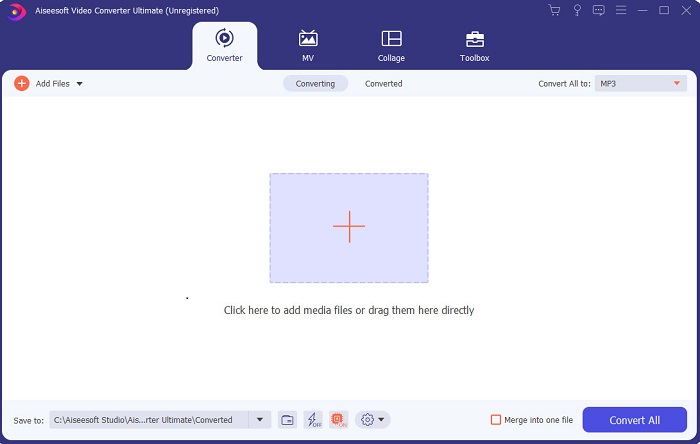
If you want to have the upper-hand and have the best videos like your idols have, then use the FVC Video Converter Ultimate. This converter and Windows video editor already helped a lot of its customers to become popular worldwide and maybe you're next. Most of the known influencers, vloggers, and video editors use this as their editor, enhancer, booster, and more. So, if you want to have a professional output like your idols and make some real cash on it. Then you must download this software immediately to become the new internet sensation and also the best version of yourself. Also, we provided pros and cons for you to understand this tool more.
फ्री डाउनलोडWindows 7 या बाद के संस्करण के लिएसुरक्षित डाउनलोड
फ्री डाउनलोडMacOS 10.7 या बाद के संस्करण के लिएसुरक्षित डाउनलोड
पेशेवरों
- शुरुआती लोगों के लिए, यह उपकरण उनके लिए सही विकल्प है। चूंकि यह आपको अनुसरण करने और समझने में आसान के लिए सरल निर्देश प्रदान करता है। मूल रूप से, यह ऑन-पॉइंट है।
- पेशेवरों के लिए, किसी अन्य के विपरीत पीसी के लिए वीडियो संपादक इस टूल में बहुत सारी फ्यूचरिस्टिक विशेषताएं हैं। उदाहरण के लिए, यदि आप अपनी ऑडियो गुणवत्ता को बढ़ावा देना चाहते हैं और वीडियो को बढ़ाना चाहते हैं तो आप इस टूल का उपयोग कर सकते हैं। साथ ही, यदि आपका ऑडियो वीडियो के साथ समन्वयित नहीं है, तो इसे ठीक करने के लिए इसमें एक ऑडियो सिंक सुविधा है।
- कुल मिलाकर, यह अभूतपूर्व कनवर्टर और संपादक है जिस पर आप निर्भर हो सकते हैं। खासकर यदि आप व्लॉगर्स और प्रभावित करने वालों की दुनिया में एक आश्चर्यजनक प्रवेश करना चाहते हैं।
- संपादक सॉफ्टवेयर डाउनलोड करने योग्य है और ऐसे कोई संपादक उपकरण नहीं हैं जिनमें इस तरह की समान विशेषताएं हों।
विपक्ष
- यह टूल फ्री नहीं है लेकिन कीमत में कम है। दूसरे शब्दों में, यह सस्ता है और उच्च गुणवत्ता वाला उत्पादन करता है।
शीर्ष 2. विंडोज मूवी मेकर
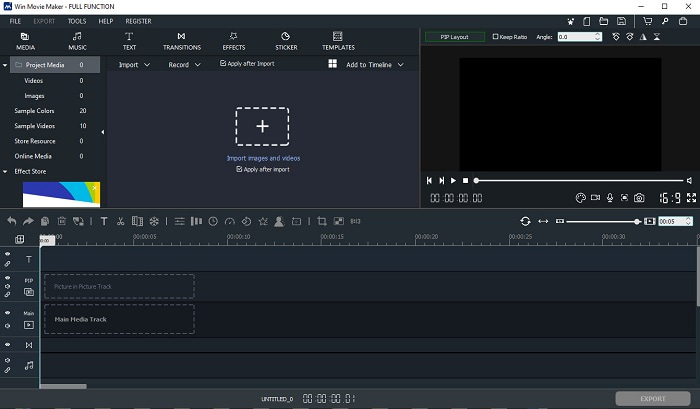
This video editor for Windows 7, 8, 10 and XP is one of the best at creating and editing. The Windows Movie Maker has already been downloaded by many users to edit their own videos. As it provides complicated editing features. But the tool is too overwhelming for those who are new in making and editing. But if you are a pro or should we say you have the experience of editing then you must try to use this tool. This tool has a premium version and it is a lot similar to the free tool it provides but the output has no watermark if you export.
पेशेवरों
- शुरुआती लोगों के लिए, यह उपकरण आदर्श नहीं है लेकिन जटिल संपादन करना बहुत अच्छा है।
- पेशेवरों के लिए, यदि आपके पास अनुभव है तो यहां प्रस्तुत की जाने वाली सुविधाएं संभव हैं।
- यह संक्रमण, प्रभाव और स्टिकर आदि प्रदान करता है।
विपक्ष
- टूल फंक्शन के कारण टूल थोड़ा परेशान करने वाला है जो आप यहां कर सकते हैं। साथ ही, यह भारी है और इसे संचालित करने के बारे में कोई निर्देश नहीं है।
- यदि आप इस उपकरण के मुफ्त संस्करण का उपयोग करते हैं तो वीडियो को निर्यात करने के बाद ही वॉटरमार्क होने की उम्मीद है।
शीर्ष 3. ओपनशॉट
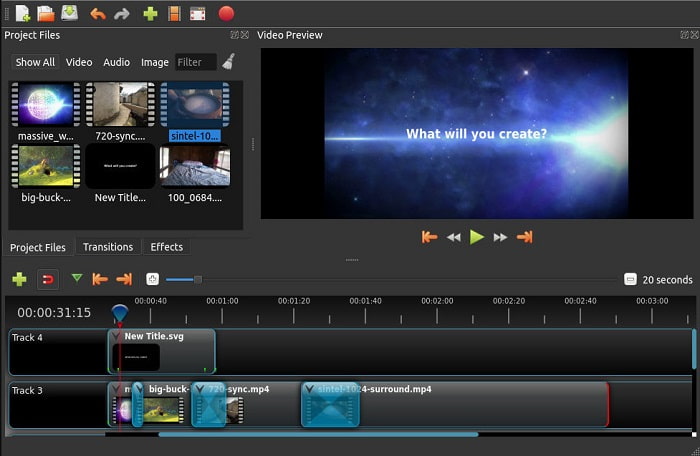
Another free video editing software with no watermark is the Openshot. As it provides simpler to understand functions than the Windows Movie Maker. Moreover, after you installed the tool there will be a simple tour on the tool functions. Although, it is explained but the basic features are only explained. But this tool only provides the basic editing features only which means you can't be creative. Also, if you install this tool, it is a bit boring to look at because of the monochrome color of the interface.
पेशेवरों
- शुरुआती लोगों के लिए, यह विंडोज मूवी मेकर का एक सरल संस्करण है। आप प्रभाव, संक्रमण और बहुत कुछ जोड़ सकते हैं।
- पेशेवरों के लिए, उनके लिए इसका उपयोग करना ठीक है लेकिन यह सबसे अच्छा नहीं है।
- सॉफ्टवेयर ठीक है अगर यह साधारण संपादन के साथ आता है।
विपक्ष
- इसका उबाऊ इंटरफ़ेस नहीं बदल सकता है और यह कम इंटरैक्टिव है।
- कुछ बड़े और छोटे बग अपडेट के बाद भी यहां मौजूद हैं।
शीर्ष 4. लाइटवर्क्स
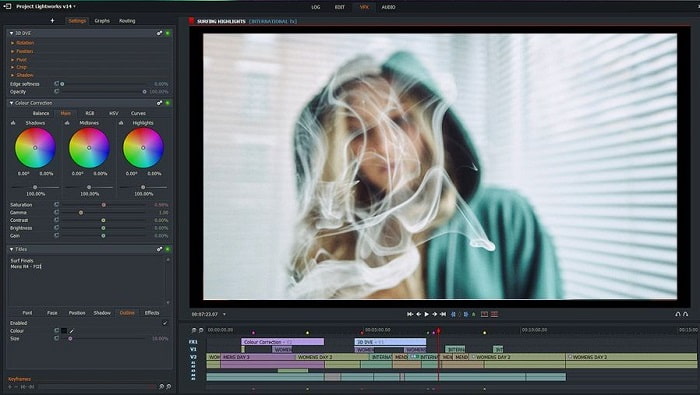
Lightworks is a free video editor for Windows but it also has a premium version. But when we tried and downloaded the tool it said that it has a .exe file that can harm our computer. So, we didn't download the tool and we did deep research about this tool. So, if you install the tool into your drive you will need to register first before you can use it. The editing features this tool provides is a lot to take in if you are a beginner but for pro it is a bit hard also. But no need to worry because you can learn how to use it by trying it.
पेशेवरों
- शुरुआती लोगों के लिए, उपकरण बहुत जटिल है और इसे संभालना बहुत अधिक हो सकता है। खासकर यदि आप कोशिश करना चाहते हैं और केवल साधारण संपादन करना चाहते हैं।
- पेशेवरों के लिए, आप इस टूल द्वारा प्रदान की जाने वाली रीयल टाइम संपादन सुविधाओं का उपयोग कर सकते हैं। हालाँकि कुछ सुविधाएँ नई हैं और उनमें से अधिकांश देय हैं।
- टूल के समग्र प्रदर्शन को संपादन और वीडियो बनाने में क्लास-ए के रूप में वर्गीकृत किया गया है।
विपक्ष
- यदि आप 1080px का आउटपुट चाहते हैं तो आपको टूल खरीदना होगा। और इससे पहले कि आप इसका उपयोग कर सकें, आपको पंजीकरण करना होगा।
- सॉफ़्टवेयर में एक हानिकारक .exe फ़ाइल है, इसलिए इसे अपने जोखिम पर डाउनलोड करें।
शीर्ष 5. क्लिपचैंप
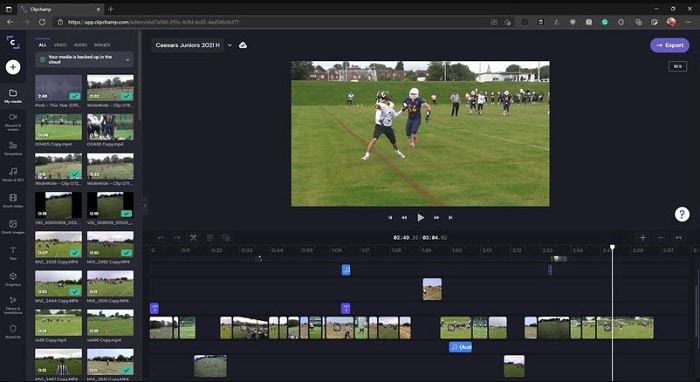
This online tool has if you upgrade the plan. Also, it is one of the easy to access tools you can use to edit the videos without downloading a specific software. Clipchamp is a great tool to use but you will need to register before you can access it. This Windows 10 video editor online has similar features with Lightworks but it is online. Nevertheless, if you import video files here to be edited you must expect a slow process of importing it. But the advantage of it is that you won't need to download the tool to function.
पेशेवरों
- शुरुआती लोगों के लिए, इस टूल को आज़माना ज़रूरी है लेकिन यहाँ वीडियो को संपादित करने और डालने की प्रक्रिया थोड़ी धीमी है।
- पेशेवरों के लिए, सीमित संसाधनों के साथ सरल वीडियो का उपयोग और संपादन करना ठीक है।
- कुल मिलाकर, विंडोज मूवी मेकर की तुलना में टूल को समझना आसान है।
विपक्ष
- इंटरनेट पर निर्भर जिसका अर्थ है कि यदि आपके पास धीमा इंटरनेट है तो एक अस्थिर प्रक्रिया की अपेक्षा करें।
- इससे पहले कि आप वेब टूल का उपयोग कर सकें, पंजीकरण फॉर्म की आवश्यकता है।
भाग 2. विंडोज़ के लिए 5 वीडियो संपादकों के लिए तुलना चार्ट
| विशेषताएं | वीडियो कनवर्टर अंतिम | विंडोज़ मूवी मेकर | ओपनशॉट | Lightworks | क्लिपचैंप |
| वीडियो एडिटिंग जैसे ट्रिमिंग, कटिंग, मर्जिंग वगैरह। |  | | | | |
| वीडियो एन्हांसर | |  | | | |
| वाटर-मार्क | | | | | |
| कार्यक्रम समर्थित | डेस्कटॉप-आधारित टूल | डेस्कटॉप-आधारित टूल | डेस्कटॉप-आधारित टूल | वेब आधारित उपकरण | वेब आधारित उपकरण |
| मूल्य सीमा | 1 महीने के लिए: $25.00 एक साल के लिए: $31.20 | $39.95 एकमुश्त भुगतान | नि: शुल्क लेकिन आप दान कर सकते हैं | क्यूस्कैन प्रो QScan Pro - मासिक सदस्यता सक्रियण $59.99 | क्रिएटर- $9/मासिक व्यवसाय- $19 / मासिक |
| लाइफटाइम लाइसेंस के लिए: $55.20 | क्यूस्कैन मैक्स QScan Max - मासिक सदस्यता सक्रियण $119.99 | व्यापार प्लेटिनम - $39 / मासिक |
भाग 3. Windows वीडियो संपादक के बारे में अक्सर पूछे जाने वाले प्रश्न
सबसे अच्छा मैक वीडियो एडिटर कौन सा है जिसका मैं उपयोग कर सकता हूं?
Although, the tools presented here are all Windows editors except for the Video Converter Ultimate. So, to know what the other Mac video editors are then you must click this link and choose in the list.
मेरे वीडियो Android पर क्यों नहीं चलाए जा सकते?
There are a lot of reasons why videos can't be played on your Android. So, to know what the reasons are then it is a must to know it immediately and fix the problem by reading on How to Repair Videos Not Playing on Android Phones.
मेरे लंबे वीडियो को कैसे कंप्रेस करें और उन्हें YouTube पर कैसे शेयर करें?
As for now you can upload 256 file sizes maximum so the best way to fix this is to compress it. If you want to share your videos on YouTube then let's learn how to deduce the file size and post on YouTube.
निष्कर्ष
Before you become one of the vloggers or influencers you always look up, you will need to have the ability to do your own editing. As of today, this is your chance to use the phenomenal editor that provides Hollywood-like editing features and quality. In that way, you will impress your viewers, followers and even yourself. So, shine bright like a diamond and let the ray of light create a way to succeed with the help of FVC Video Converter Ultimate.
-
 2025 में विंडोज और मैक के लिए सर्वश्रेष्ठ MP4 संपादक
 चाहे आप MP4 वीडियो एडिटिंग के लिए अपने कंप्यूटर का उपयोग कर रहे हों या सिर्फ अपने फोन पर काम कर रहे हों, आपको यहां कुछ बेहतरीन विकल्प मिलेंगे, जिनमें विंडोज और मैक के लिए सर्वश्रेष्ठ MP4 एडिटर भी शामिल है।
-
 कैसे अपने कंप्यूटर / फोन पर मुफ्त में वीडियो के लिए ऑडियो और संगीत जोड़ें
 यह लेख मुफ्त में वीडियो में ऑडियो जोड़ने के 4 आसान तरीके दिखाता है। कोई फर्क नहीं पड़ता कि आप अपने वीडियो में कौन सा ऑडियो ट्रैक जोड़ना चाहते हैं, आप यहाँ संतोषजनक परिणाम प्राप्त कर सकते हैं।
-
 गाने ऑनलाइन कैसे कट और मर्ज करें - 4 बेहतरीन तरीके जो आपको जानना चाहिए
 जब आप संगीत का एक टुकड़ा बनाने के लिए गीतों को ऑनलाइन काटना और मर्ज करना चाहते हैं, तो आप गीतों को क्लिप करने और लेख से फ़ाइलों को संयोजित करने के लिए 4 सर्वश्रेष्ठ ऑनलाइन टूल के बारे में अधिक जान सकते हैं।
