


 वीडियो कनवर्टर अंतिम
 स्क्रीन अभिलेखी
 वीडियो मरम्मत
[पूर्ण समीक्षा] 5 नवीनतम एमपी3 कटर विंडोज/मैक/ऑनलाइन पर उपलब्ध हैं
हम अक्सर जिस ऑडियो को सुनते हैं, उसे काटकर रिंगटोन बनाना चाहते हैं, ताकि उसके अहम हिस्से को हाईलाइट किया जा सके या फिर आवाज़ के बेकार हिस्सों को हटाकर उसे ट्रिम किया जा सके। हालांकि हर प्लेटफ़ॉर्म पर आप कई तरह के कटर्स का इस्तेमाल कर सकते हैं, फिर भी कुछ टूल भरोसेमंद नहीं होते। इसलिए आज हम आपको वे कटर्स दिखाने जा रहे हैं, जिन पर आप भरोसा कर सकते हैं, क्योंकि हमने खुद इन सभी टूल्स को आज़माया है ताकि यह सुनिश्चित हो सके कि ये मालवेयर-फ्री और भरोसेमंद हैं। इन्हें चुनने से पहले, हमने उन उपयोगकर्ताओं के लिए बहुत सख्त मानक अपनाए, जिन्हें एक भरोसेमंद कटर चाहिए। आपकी इंटरनेट ब्राउज़िंग को तेज़ और आसान बनाने के लिए, नीचे हमने पाँच ऐसे MP3 कटर्स प्रस्तुत किए हैं, जो किसी भी ऑडियो फ़ॉर्मेट को काटने का काम संभालने के लिए तैयार हैं।.

भाग 1. 2 ऑफलाइन एमपी3 कटर सॉफ्टवेयर्स विंडोज और मैक
1. वीडियो कन्वर्टर अल्टीमेट - सर्वश्रेष्ठ एमपी 3 कटर [जोरदार अनुशंसित]
इस सूची में सबसे बेहतरीन ऑडियो MP3 कटर है Video Converter Ultimate, जो उपयोगकर्ताओं को किसी भी ऑडियो को बेहद आसानी से काटने की सुविधा देता है। इस अल्टीमेट टूल की मदद से आप अनचाहे हिस्सों को हटाने के लिए साउंड को ट्रिम कर सकते हैं, कई कट किए गए ऑडियो फ़ाइलों को एक ही फ़ाइल में मर्ज कर सकते हैं और अगर आवाज़ कम लग रही हो तो उसे बूस्ट भी कर सकते हैं। इसके अलावा, यह सॉफ़्टवेयर बेहद तेज़ प्रोसेस प्रदान करता है और साथ ही ऑडियो की मूल गुणवत्ता का भी ध्यान रखता है।.
किसी भी कटर के विपरीत, यह टूल न केवल MP3 बल्कि FLAC, M4R, M4A, OGG, MKA, WAV, WMA, और भी बहुत कुछ प्रारूपों के व्यापक स्पेक्ट्रम का समर्थन करता है, और वास्तव में आपकी ऑडियो फ़ाइल को काटने के लिए यहां समर्थित है। हो सकता है कि आप नहीं जानते कि अपनी ऑडियो फ़ाइल को कैसे काटें और अभी अपनी आवश्यकताओं के लिए इसका उपयोग करें। आज आपका भाग्यशाली दिन है क्योंकि हम आपको नीचे दिए गए ट्यूटोरियल का अनुसरण करके एमपी3 कटर और रिंगटोन मेकर का मुफ्त में उपयोग करना सिखाएंगे।
स्टेप 1. नीचे दिए गए डाउनलोड बटन पर क्लिक करके अपने डेस्कटॉप पर ऑडियो कटर डाउनलोड करें। चुनें कि आप Windows इस्तेमाल कर रहे हैं या Mac, तुरंत सॉफ़्टवेयर इंस्टॉल करें और उसे लॉन्च करें। ध्यान रखें, आगे वाले स्टेप्स आसानी से फॉलो करने के लिए आपको टूल के इंटरफ़ेस से थोड़ा परिचित होना ज़रूरी है।.
फ्री डाउनलोडWindows 7 या बाद के संस्करण के लिएसुरक्षित डाउनलोड
फ्री डाउनलोडMacOS 10.7 या बाद के संस्करण के लिएसुरक्षित डाउनलोड
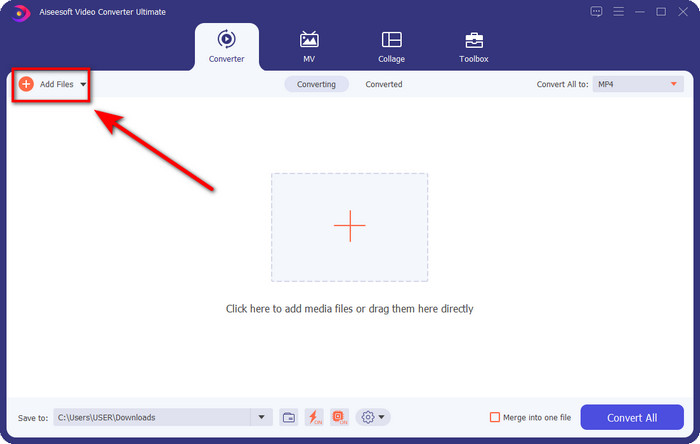
स्टेप 2. जिस ऑडियो फ़ाइल को आप काटना चाहते हैं उसे इंटरफ़ेस पर ड्रैग करें, या फिर Add Files पर क्लिक करें और कंप्यूटर के फ़ोल्डर से ऑडियो को ढूंढें जो खुलकर सामने आएगा। आगे बढ़ने के लिए Open पर क्लिक करें।.
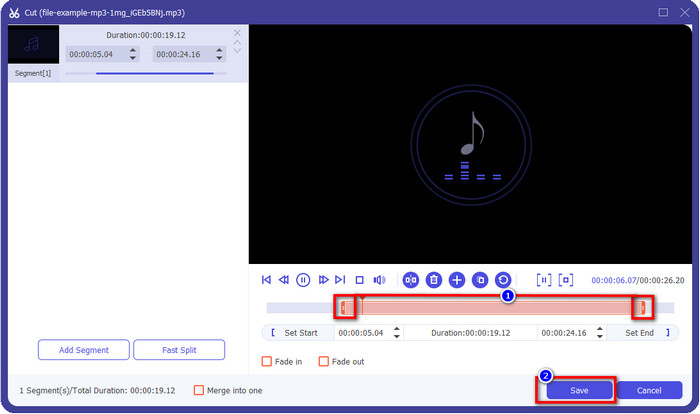
स्टेप 3. ऑडियो फ़ाइल डालने के बाद अब कैंची जैसे बटन पर क्लिक करने का समय है। play in और play out मार्कर को खींचकर ऑडियो की मनचाही लंबाई तय करें। ध्यान रखें कि play in और play out के बीच में जो हिस्सा हाईलाइट होगा, वही हिस्सा रखा जाएगा। इसके बाद ऑडियो को काटने के लिए Save दबाएँ।.
ऑप्शनल. क्या आपको अपना ऑडियो बूस्ट करना है? अगर हाँ, तो जादू की छड़ी (wand) जैसा बटन क्लिक करें, वॉल्यूम स्लाइडर को ऊपर की ओर खींचकर एडजस्ट करें और सेव करने के लिए OK दबाएँ।.
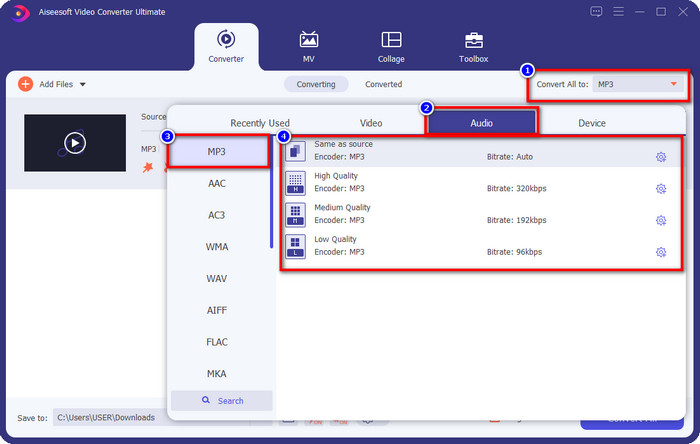
स्टेप 4. Convert All to, Audio में जाएँ और फ़ॉर्मेट को MP3 पर सेट करें। भले ही आप कन्वर्ज़न नहीं कर रहे हों, फिर भी यह ज़रूर जाँच लें कि Convert All to के तहत लिखा नाम MP3 ही हो, कोई और फ़ॉर्मेट न हो, ताकि आपका फ़ॉर्मेट गलती से न बदले।.
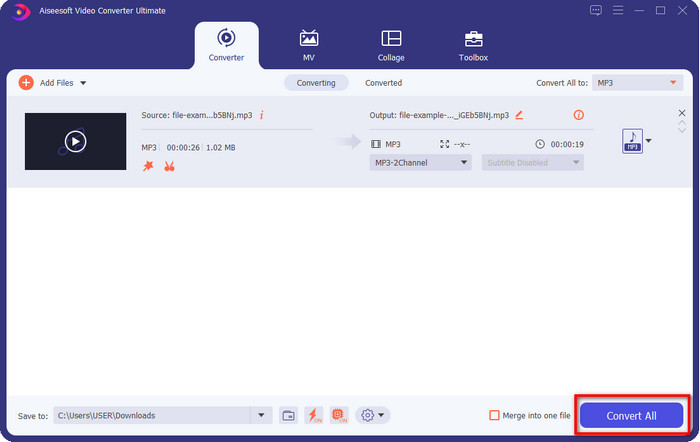
स्टेप 5. Convert All पर क्लिक करते ही ऑडियो कट को सेव करने की प्रक्रिया शुरू हो जाएगी। अब आपके पास सबसे बेहतर फ्री MP3 कटर से तैयार किया गया ऑडियो कट मौजूद है, वह भी इतनी आसानी से।.
पेशेवरों
- यह आपके ऑडियो को जितनी जल्दी हो सके काट सकता है और इसे एक सेकंड के भीतर प्रोसेस कर सकता है।
- वॉल्यूम पावर बढ़ाने के लिए उन्नत सुविधाएँ उपलब्ध हैं।
- यह विंडोज या मैक जैसे सभी ऑपरेटिंग सिस्टम को सपोर्ट करता है।
- इस टूल के ऑडियो मर्जर से कई ऑडियो फाइलों को मर्ज करना संभव है।
विपक्ष
- उपकरण खरीदना आवश्यक है।
2. दुस्साहस
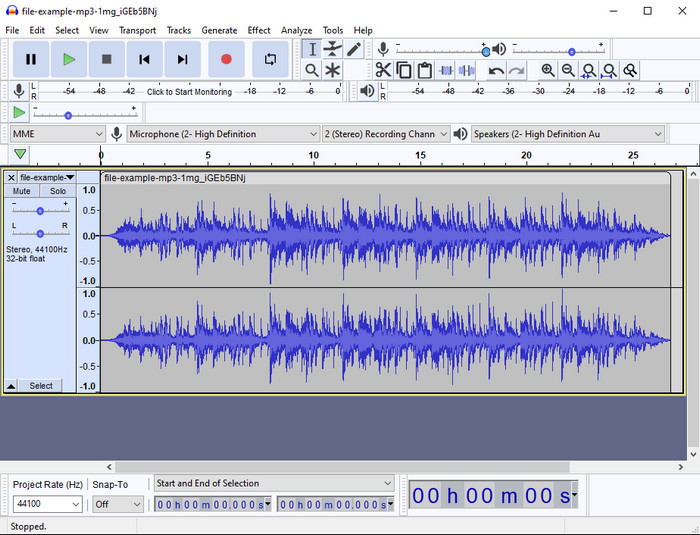
Audacity ने सालों से आपके ऑडियो के लिए प्रो-लेवल एडिटिंग फीचर्स उपलब्ध कराए हैं। यह ऐप फ्री डाउनलोड के लिए उपलब्ध है और उपयोगकर्ताओं को मल्टी-ट्रैक मिक्सिंग करने का विकल्प देता है। पॉडकास्टर इसे आम तौर पर पॉडकास्ट रिकॉर्ड और एडिट करने के लिए इस्तेमाल करते हैं, क्योंकि यह काम आसान बना देता है। हालांकि, इसके कुछ फीचर्स समझना मुश्किल हो सकते हैं, खासकर तब, जब आप इस तरह के स्पेशलाइज़्ड सॉफ़्टवेयर का इस्तेमाल करने के आदी न हों।.
यद्यपि आप अभी भी इसका उपयोग करना सीख सकते हैं, इस एमपी3 ऑडियो ट्रिमर की पूरी क्षमता का उपयोग करने में समय लगेगा, और ऑडियो काटने के लिए, यह कहना उचित होगा कि यदि आपको इसकी आवश्यकता है तो यह तुरंत और आसानी से कट जाता है।
पेशेवरों
- विंडोज और मैक जैसे सभी कार्यक्रमों में डाउनलोड करने के लिए नि: शुल्क।
- आपके ऑडियो को शानदार बनाने के लिए उन्नत और पेशेवर ऑडियो संपादक उपलब्ध हैं।
- यह पॉडकास्ट और बहुत कुछ रिकॉर्ड करने के लिए सबसे अच्छा है।
विपक्ष
- कई प्रतियोगी उपयोगकर्ता के अनुकूल UI प्रदान करते हैं।
- काटने और अन्य संपादन उद्देश्यों के तत्काल परिणाम के लिए शुरुआती लोगों के लिए सबसे अच्छा विकल्प नहीं है।
- कुछ रिपोर्ट बताती हैं कि यदि आप इस टूल का उपयोग करते हैं तो आपका डेटा एकत्र किया जाता है, लेकिन अभी तक कोई पुख्ता सबूत नहीं है।
भाग 2. 3 वेब पर सुलभ ऑनलाइन एमपी3 कटर
1. mp3cut.net
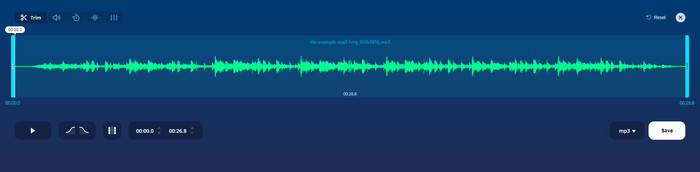
यदि आपको नौकरी के लिए ऑनलाइन एमपी3 कटर की आवश्यकता है तो आप mp3cut.net का उपयोग कर सकते हैं। इस ऑनलाइन कटर में फाइल को अपलोड करने के बाद अब आप अपनी ऑडियो फाइल में जो आवाज निकालना चाहते हैं उसे हटा सकते हैं। इसके अलावा, यदि आवश्यक हो तो ऑडियो की गति और पिच को बदलने के लिए टूल में कुछ मामूली संपादन सुविधाएं भी हैं।
यद्यपि इसमें इस प्रकार की क्षमता है, उपकरण अधिकांश समय क्रैश हो जाता है और यदि आप इसे सही ढंग से काटते हैं तो सुनने के लिए ऑडियो नहीं चला सकते हैं। इसलिए, इसे फिर से उपयोग करने के लिए, आपको अपने ब्राउज़र को रीफ़्रेश करना होगा और आपके द्वारा किए गए समायोजन को फिर से दोहराना होगा।
पेशेवरों
- उपयोगकर्ता के अनुकूल और इंटरनेट के माध्यम से सुलभ।
- बिंदु पर, आपको ऑडियो काटने में मदद करने के लिए सुविधाएँ।
- बुनियादी संपादन सुविधाएँ उपलब्ध हैं।
विपक्ष
- इसमें वेब इंटरफेस पर विज्ञापन हैं।
- कभी-कभी यह क्रैश हो जाता है और इसका उपयोग करने के लिए इसे फिर से लोड करने की आवश्यकता होती है।
2. audiotrimmer.com
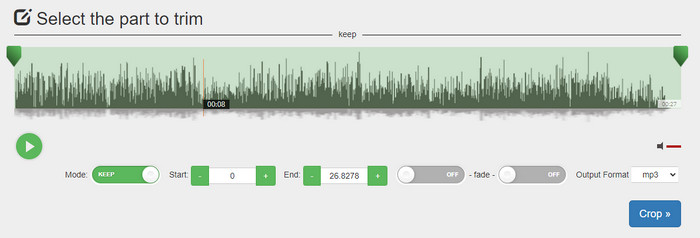
एक और फ्री ऑनलाइन mp3 कटर है audiotrimmer.com। यह टूल आसान और सीधी-सादी ट्रिमिंग सुविधाएँ देता है; इसके सारे फ़ंक्शन बिल्कुल स्पष्ट हैं। इसकी मदद से आप चुन सकते हैं कि ऑडियो को रखना है या ऑडियो के किसी हिस्से को हटाना है। इसके अलावा, इसमें दूसरे यहाँ बताए गए ट्रिमर की तरह फेड-इन और फेड-आउट इफ़ेक्ट भी मौजूद है। लेकिन जब हमने फेड-इन और फेड-आउट इफ़ेक्ट का इस्तेमाल करके देखा, तो यह काम नहीं किया; हमारे ऑडियो में कोई अतिरिक्त इफ़ेक्ट नहीं जुड़ा। फिर भी, अगर आप केवल आसान कटिंग करना चाहते हैं, तो यह एक ज़रूर आज़माने लायक वेब टूल है।.
पेशेवरों
- निःशुल्क और सभी ब्राउज़रों में उपयोग के लिए उपलब्ध है।
- ऑडियो ट्रिम करने के लिए उपयोग में आसान।
- इसका फीका-इन और आउट प्रभाव पड़ता है।
विपक्ष
- फेड-इन और आउट अच्छी तरह से काम नहीं कर रहे हैं।
- यदि आप उन तक पहुँचते हैं तो कई pesky विज्ञापन हैं। इसलिए, सावधान रहें कि उन्हें क्लिक न करें।
3. क्लिडियो

सबसे अच्छे ऑनलाइन MP3 कटर और जॉइनर में से एक है Clideo। ज़्यादातर उपयोगकर्ता इसकी एडिटिंग क्षमताओं के कारण इस टूल का इस्तेमाल करना पसंद करते हैं। इसके अलावा, अगर ज़रूरत हो तो आप अपने ऑडियो फ़ाइल पर फेड-इन और फेड-आउट भी जोड़ सकते हैं। लेकिन फ़ाइल एक्सपोर्ट करने और सुनने के बाद हमें पता चला कि हमारे ऑडियो फ़ाइल पर कोई फेड-इन या फेड-आउट जुड़ा ही नहीं था। इस टूल के साथ हमें एक छोटी सी दिक्कत का सामना करना पड़ा: फ़ाइल अपलोड और डाउनलोड करने में। पहले बताए गए टूल के मुकाबले, इसमें ऑडियो को कटर पर अपलोड करने में ज़्यादा समय लगता है, और कई बार तो अज्ञात कारणों से हम यहाँ ऑडियो फ़ाइल अपलोड करने में असफल रहे।.
हालाँकि हमें कुछ समस्याओं का सामना करना पड़ता है, फिर भी यह ऑनलाइन सबसे अच्छा कटर है, और यह उपयोग करने के लिए सुरक्षित भी है।
पेशेवरों
- सर्वश्रेष्ठ ऑनलाइन कटर ऑनलाइन।
- पेशेवर यूजर इंटरफेस।
- प्रयोग करने में आसान।
विपक्ष
- अपलोड करने और डाउनलोड करने की प्रक्रिया में आपका बहुत अधिक समय लगेगा।
- फीका अंदर और बाहर काम करता है लेकिन अच्छी तरह से नहीं।
भाग 3. एमपी3 कटर के बारे में अक्सर पूछे जाने वाले प्रश्न
मैक पर सबसे अच्छा एमपी3 ट्रिमर कौन सा है?
FVC Video Converter Ultimate Mac पर भी उपलब्ध है। तो अगर आपको Mac पर अपना ऑडियो ट्रिम करना है, तो बेहतर होगा कि आप इस अल्टीमेट टूल को डाउनलोड करें, ताकि आपका ऑडियो फ़ाइल सही तरह से हैंडल हो सके। यह अल्टीमेट टूल न सिर्फ़ ऑडियो काटने में बेहतरीन है, बल्कि आप इसमें ऑडियो को बूस्ट करके उसे बेहतर भी बना सकते हैं। इसके अलावा, अगर आपको कन्वर्ट करना, मर्ज करना, ऑडियो सिंक करना आदि जैसे कामों में मदद चाहिए, तो यह अल्टीमेट टूल हमेशा तैयार है। अगर आपको इस अल्टीमेट टूल के बारे में और जानना है, तो ऊपर दिए गए विवरण ज़रूर पढ़ें।.
क्या ऑडियो को ट्रिम करने से उसका आकार कम हो जाता है?
ऑडियो को ट्रिम करने के बाद उसका फ़ाइल आकार कम हो जाता है। जब हमने मूल ऑडियो फ़ाइल की तुलना कट फ़ाइल से की, तो हमने ऊंचाई में कुछ बदलाव देखे। तो, इसका मतलब है कि ऑडियो फ़ाइल जितनी छोटी होगी, उसका आकार उतना ही छोटा होगा, लेकिन अगर आपकी ऑडियो फ़ाइल बहुत लंबी है, तो उम्मीद करें कि आकार भी महत्वपूर्ण है।
क्या मैं कई ऑडियो को मर्ज करने के लिए ऑडेसिटी का उपयोग कर सकता हूं?
हाँ, आप कर सकते हैं, Audacity कई ऑडियो ट्रैक्स को एक ही फ़ाइल में मर्ज करने का समर्थन करता है। लेकिन यह थोड़ा मुश्किल हो सकता है, खासकर तब जब आपके पास कोई सही ट्यूटोरियल न हो जिसे आप फ़ॉलो कर सकें। इसलिए, अगर आपको Audacity के ज़रिए ऑडियो मर्ज करना है, तो आप इस लिंक पर क्लिक करें और वहाँ से सीखें।.
निष्कर्ष
यहाँ जो MP3 कटर प्रस्तुत किए गए हैं, वे पहले से ही हमारे द्वारा तय किए गए मानकों पर खरे उतरे हैं, ताकि हम आपको केवल सबसे अच्छे ट्रिमर ही दे सकें। इस लेख में यह दिखाया गया है कि आपकी ज़रूरतों के हिसाब से सही और उपयुक्त कटर चुनना कितना ज़रूरी है। भले ही यहाँ बताए गए सभी ट्रिमर लगभग एक जैसा काम करते हों, लेकिन FVC Video Converter Ultimate ऑडियो कटिंग के मामले में कहीं ज़्यादा कुशल साबित होता है। हमारे शोध के अनुसार, यह अल्टीमेट टूल हमारे तय सभी मानकों से आगे निकल गया है। इसलिए, अगर आप अपने पास एक टॉप-लेवल कटर रखना चाहते हैं, तो यह बाज़ार में उपलब्ध बाकी सभी कटर्स के बीच सबसे अच्छा विकल्प है। यक़ीन करना मुश्किल लग रहा है? तो बेहतर है कि आप खुद यह टूल डाउनलोड करें और इसे आज़माकर देख लें।.
-
 गाने ऑनलाइन कैसे कट और मर्ज करें - 4 बेहतरीन तरीके जो आपको जानना चाहिए
 जब आप संगीत का एक टुकड़ा बनाने के लिए गीतों को ऑनलाइन काटना और मर्ज करना चाहते हैं, तो आप गीतों को क्लिप करने और लेख से फ़ाइलों को संयोजित करने के लिए 4 सर्वश्रेष्ठ ऑनलाइन टूल के बारे में अधिक जान सकते हैं।
-
 प्रक्रिया और जानकारी के साथ सर्वश्रेष्ठ MP4 ट्रिमर की खोज करें
 क्या आप सीखना चाहते हैं कि आपके द्वारा देखे जाने वाले व्लॉगर्स जैसे वीडियो कैसे काटें? फिर यह जानने के लिए इस पोस्ट को पढ़ना जारी रखें कि आप किन MP4 ट्रिमर का उपयोग कर सकते हैं।
-
 MP3 प्लेयर डाउनलोड करें – 2025 के 10 सर्वश्रेष्ठ मुफ्त MP3 म्यूजिक प्लेयर
 सबसे अच्छा एमपी 3 संगीत खिलाड़ी क्या है? मैं एक एमपी 3 प्लेयर पर संगीत कैसे डालूं? एमपी 3 म्यूजिक प्लेयर डाउनलोड कैसे करें? यह पोस्ट आपको विंडोज पीसी और मैक के लिए 10 सर्वश्रेष्ठ मुफ्त एमपी 3 खिलाड़ियों की विस्तृत समीक्षा देता है।
