


 वीडियो कनवर्टर अंतिम
 स्क्रीन अभिलेखी
 वीडियो मरम्मत
कैसे एमटीएस को मुफ्त में एमकेवी में त्वरित रूप से परिवर्तित करें
संक्षेप में, MPEG ट्रांसपोर्ट सिस्टम के लिए MTS फ़ाइल एक मानक फ़ाइल फ़ॉर्मेट है जो 720p और 1080i वीडियो को सपोर्ट करता है। हालाँकि, इस फ़ॉर्मेट की आउटपुट फ़ाइल का आकार काफ़ी बड़ा हो सकता है। इसलिए आपको इसे ऐसे फ़ाइल फ़ॉर्मेट में कनवर्ट करना चाहिए, जो व्यापक रूप से समर्थित हो और जिसका फ़ाइल आकार छोटा हो, जैसे कि MKV फ़ॉर्मेट। और इस लेख में, हम आपके लिए MTS को मुफ़्त में MKV में कनवर्ट करने के बेहतरीन तरीक़े प्रस्तुत करते हैं।.

भाग 1. 2 सर्वश्रेष्ठ मुफ्त ऑनलाइन उपकरण जो एमटीएस को एमकेवी में परिवर्तित करते हैं
FVC फ्री वीडियो कन्वर्टर ऑनलाइन
आजकल लोग सॉफ़्टवेयर कनवर्टर इंस्टॉल करने की बजाय ऑनलाइन कनवर्टर का इस्तेमाल करना ज़्यादा पसंद करते हैं। FVC Free Online Video Converter एक ऑनलाइन कनवर्टर है, जो आपको MTS को MKV, MP4, WMV, AVI, FLV और अन्य फ़ॉर्मेट में कनवर्ट करने की सुविधा देता है। मुफ़्त ऑनलाइन कनवर्टर होने के बावजूद, यह कन्वर्ज़न के दौरान आपकी फ़ाइल की गुणवत्ता से समझौता नहीं करता। इसके अलावा, इसमें रेज़ोल्यूशन और वीडियो या ऑडियो बिटरेट एडिट करने की सुविधाएँ भी मौजूद हैं।.
इस मुफ्त ऑनलाइन टूल का उपयोग करके आप अपनी फ़ाइल एमटीएस को एमकेवी में कैसे परिवर्तित करेंगे, इसके चरण यहां दिए गए हैं:
स्टेप 1. इस कनवर्टर का उपयोग करने के लिए, इस लिंक पर क्लिक करें, जो आपको उनकी वेबपेज पर ले जाएगा।.
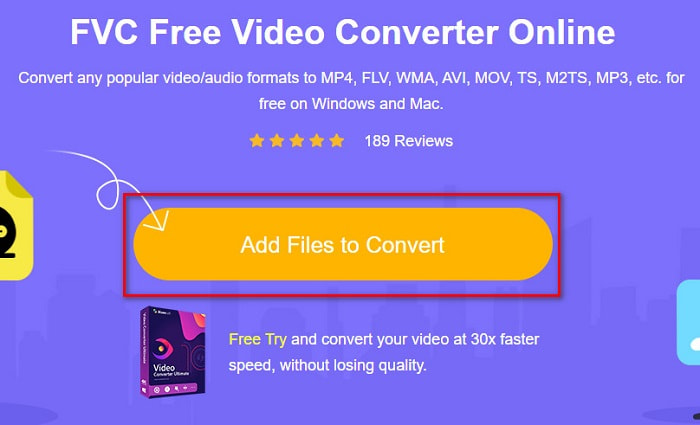
स्टेप 2. अगला चरण है Add Files to Convert बटन पर क्लिक करना, ताकि लॉन्चर डाउनलोड हो सके। लॉन्चर डाउनलोड होने के बाद, आपके कंप्यूटर की फ़ाइलें दिखाई देंगी, फिर अपनी MTS फ़ाइल चुनकर अपलोड करें।.
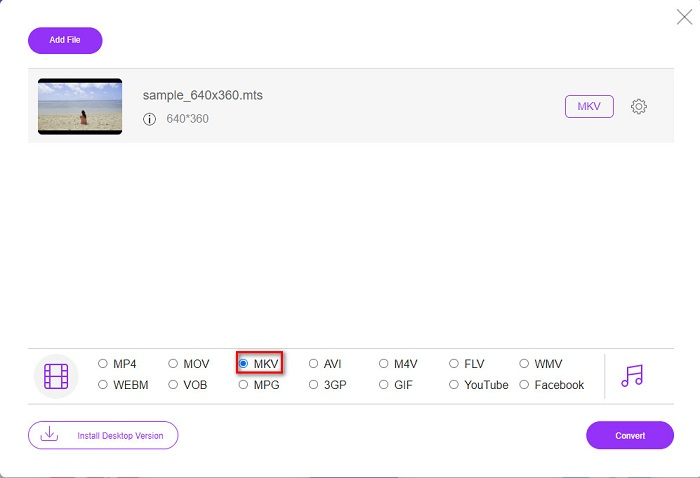
स्टेप 3. अपनी MTS फ़ाइल चुनने के बाद, सॉफ़्टवेयर के इंटरफ़ेस के नीचे मौजूद MKV फ़ाइल विकल्प पर क्लिक करें।.
स्टेप 4. अंत में, Convert बटन पर क्लिक करें ताकि आपकी MTS फ़ाइल MKV फ़ाइल में कनवर्ट हो जाए। इसके बाद अपनी फ़ाइल के कन्वर्ट होने तक प्रतीक्षा करें।.
इन सरल चरणों का पालन करके, आप एमटीएस को एमकेवी में मुफ्त और ऑनलाइन रूपांतरित कर सकते हैं।
कोई भी बातचीत
एक और ऑनलाइन कनवर्टर जिसका उपयोग आप बिना गुणवत्ता खोए फ़ाइलों को कनवर्ट करने के लिए कर सकते हैं, वह है AnyConv File Converter। यह कनवर्टर भी अनेक फ़ाइल फ़ॉर्मेट को सपोर्ट करता है, जिनमें MTS से MKV, AVI, MP4, MOV, MPEG आदि शामिल हैं। हालाँकि, इसकी सुविधाएँ सीमित हैं। आप अपनी फ़ाइल का रेज़ोल्यूशन एडिट या बदल नहीं सकते। यह वेब-आधारित भी है; इसलिए संभव है कि आपको कन्वर्ज़न की गति धीमी लगे। फिर भी, इसकी सुविधा के कारण बहुत से लोग इसका उपयोग करते हैं।.
AnyConv फ़ाइल कन्वर्टर का उपयोग करने के तरीके:
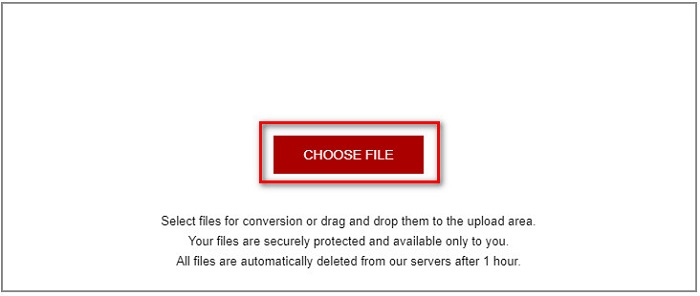
स्टेप 1. अपने ब्राउज़र पर AnyConv File Converter खोजें। उनकी वेबसाइट पर जाने के बाद, Choose Files बटन पर क्लिक करें, और अपने कंप्यूटर की फ़ाइलों में से MTS फ़ाइल चुनें।.
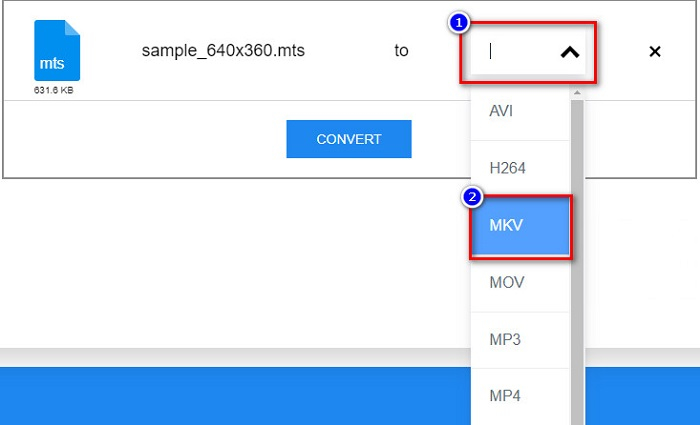
स्टेप 2. अपनी MTS फ़ाइल चुनने के बाद, ड्रॉप‑डाउन बटन पर क्लिक करें और MKV फ़ाइल फ़ॉर्मेट चुनें।.
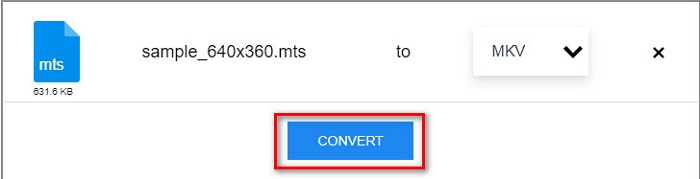
स्टेप 3. अंत में, Convert बटन पर क्लिक करें ताकि आपकी MTS से MKV फ़ाइल कन्वर्ज़न प्रक्रिया शुरू हो सके।.
भाग 2. MTS को Windows 10/11 पर दोषरहित रूप से MKV में बदलें
यदि आप अपने विंडोज 10/11 के लिए एक कन्वर्टर की तलाश कर रहे हैं, तो एफवीसी वीडियो कन्वर्टर अल्टीमेट आपके लिए सबसे अच्छा टूल है। यह विभिन्न फ़ाइल स्वरूपों का समर्थन करता है और MTS को MKV, MP4, WebM, VOB, MPG, AVI और कई अन्य में परिवर्तित कर सकता है। इसके अलावा, इस कनवर्टर में एक विशेषता है जहां आप जीआईएफ बना सकते हैं, और यहां तक कि एक 3डी वीडियो भी बना सकते हैं। आप अपनी फ़ाइल की गुणवत्ता खोए बिना एमटीएस को एमकेवी में जल्दी और आसानी से परिवर्तित कर सकते हैं।

FVC वीडियो कन्वर्टर अंतिम
5,689,200+ डाउनलोड- आप इस कन्वर्टर से अपनी फाइलों को बैच में बदल सकते हैं।
- आपको विभिन्न फ़ाइल स्वरूपों जैसे MTS, MKV, MP4, WMV, आदि को परिवर्तित करने की अनुमति देता है।
- एक सुविधा है जो आपको एक अति-तेज रूपांतरण करने देती है।
फ्री डाउनलोडWindows 7 या बाद के संस्करण के लिएसुरक्षित डाउनलोड
फ्री डाउनलोडMacOS 10.7 या बाद के संस्करण के लिएसुरक्षित डाउनलोड
यहां बताया गया है कि आप इन सरल चरणों के साथ एफवीसी वीडियो कन्वर्टर अल्टीमेट का उपयोग कैसे कर सकते हैं:
स्टेप 1. सबसे पहले, Windows के लिए नीचे दिए गए Download बटन पर क्लिक करके ऐप डाउनलोड करें। फिर अगले चरण पर बढ़ने के लिए सॉफ़्टवेयर एप्लिकेशन रन करें।.
फ्री डाउनलोडWindows 7 या बाद के संस्करण के लिएसुरक्षित डाउनलोड
फ्री डाउनलोडMacOS 10.7 या बाद के संस्करण के लिएसुरक्षित डाउनलोड
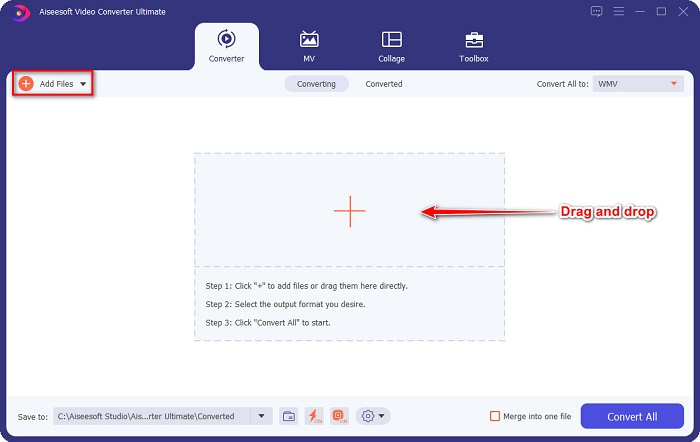
स्टेप 2. कनवर्टर खोलने के बाद, Add Files बटन पर क्लिक करें, या आप अपनी फ़ाइल को + चिन्ह वाले बटन पर ड्रैग और ड्रॉप करके अपनी MTS फ़ाइल अपलोड कर सकते हैं। इसके बाद आपकी फ़ाइल सूची में अपलोड हो जाएगी।.
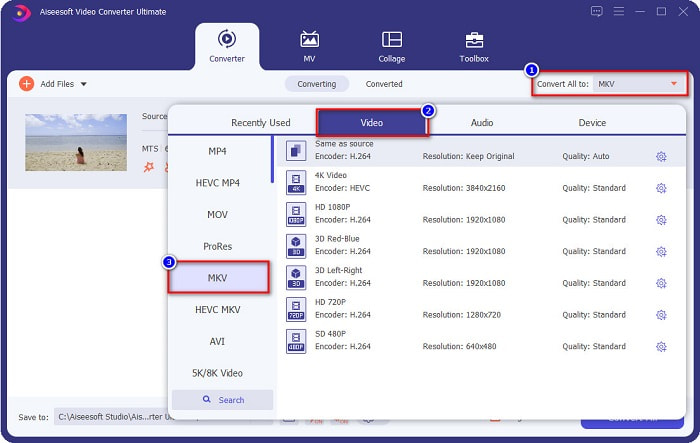
स्टेप 3. अपनी MTS फ़ाइल को जिस फ़ॉर्मेट में कनवर्ट करना चाहते हैं, उसे चुनने के लिए Convert All to बटन पर क्लिक करें और MKV फ़ाइल चुनें।.
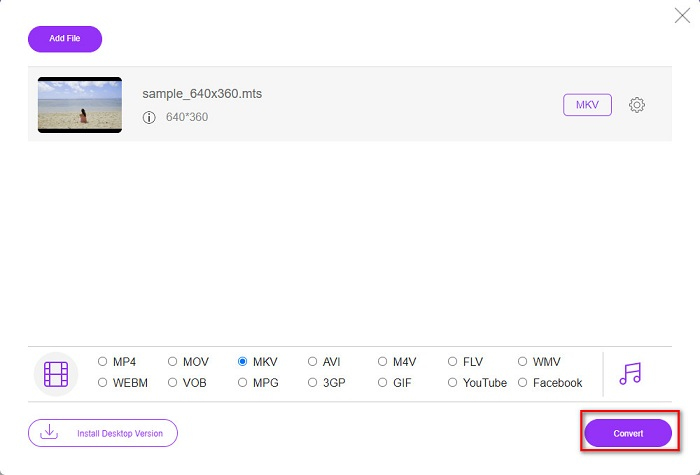
स्टेप 4. समाप्त करने के लिए, Convert All बटन पर क्लिक करें ताकि आपकी MTS फ़ाइल को MKV फ़ाइल में कनवर्ट करने की प्रक्रिया शुरू हो जाए। और लीजिए! कुछ ही सेकंड में आपकी कनवर्ट की हुई फ़ाइल तैयार हो जाएगी।.
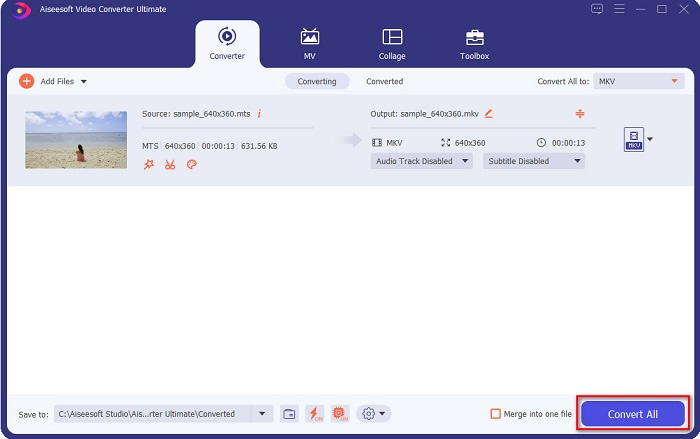
उन सरल चरणों का पालन करके, आप MTS को 1-2-3 जितनी जल्दी हो सके MKV में बदल सकते हैं!
भाग 3. एमटीएस फ़ाइल को एमकेवी फ़ाइल स्वरूप में क्यों बदलें
एमटीएस फ़ाइल, संक्षेप में एमपीईजी ट्रांसपोर्ट सिस्टम के लिए, एक मानक फ़ाइल प्रारूप है जो मुख्य रूप से सोनी और पैनासोनिक एचडी कैमकोर्डर द्वारा उपयोग किया जाता है। यह एक फ़ाइल है जो MPEG4/H.264 वीडियो संपीड़न का उपयोग करती है। इसके अलावा, यह 720p और 1080i वीडियो का समर्थन करता है, जो अन्य फ़ाइल स्वरूपों का समर्थन नहीं करते। चूँकि पैनासोनिक और सोनी ने इस फ़ाइल को विकसित किया है, यह AVCHD फ़ाइल स्वरूप से संबंधित एक उन्नत ऑडियो कोडिंग फ़ाइल का उपयोग करता है। दूसरी ओर, MKV फ़ाइल या Matroska एक मानक फ़ाइल स्वरूप है जो कई ऑडियो और वीडियो कोडेक का समर्थन करता है। इसका उपयोग आमतौर पर लघु वीडियो क्लिप और फिल्मों को संग्रहीत करने के लिए किया जाता है।
इसके अलावा, यह सबटाइटल ट्रैक्स को भी सपोर्ट करता है। यही कारण है कि बड़ी संख्या में फैन-सबबिंग लोग इस फ़ाइल प्रारूप का उपयोग करते हैं। तो एमटीएस को एमकेवी में क्यों बदलें? केवल इसलिए कि एमकेवी का फ़ाइल आकार एमटीएस फ़ाइल प्रारूप से छोटा है।
भाग 4. ऑनलाइन और ऑफलाइन कन्वर्टर्स के बारे में तुलना चार्ट
| विशेषताएं | FVC फ्री ऑनलाइन कन्वर्टर | AnyConv फ़ाइल कनवर्टर | FVC वीडियो कन्वर्टर अंतिम |
| रूपांतरण की गति | साधारण | साधारण | बहुत तेज |
| कनवर्ट करने के लिए फ़ाइल स्वरूप | MKV, MP4, MTS, MPG, MOV, AVI, WMV, FLV, और अन्य फ़ाइल स्वरूप | एमटीएस, एमकेवी, एवीआई, एमओवी, एमपी4, एमपीईजी और अन्य प्रारूप | 1000 से अधिक फ़ाइल स्वरूपों का समर्थन करता है |
| संपादन सुविधाएँ | – | – |  |
| बैच रूपांतरण | – | – | |
| इंटरनेट कनेक्शन | जरूरत है | जरूरत है | जरूरत नहीं |
भाग 5. एमटीएस को एमकेवी में बदलने के बारे में अक्सर पूछे जाने वाले प्रश्न
क्या आप एमटीएस फ़ाइल का फ़ाइल आकार कम कर सकते हैं?
हाँ। आप किसी ऑनलाइन या ऑफ़लाइन उपलब्ध कंप्रेसर टूल, जैसे Free Video Compressor, का उपयोग करके MTS फ़ाइल के आकार को कंप्रेस कर सकते हैं।.
आप MKV फ़ाइल स्वरूपों को कहाँ चला सकते हैं?
आप MKV फ़ाइलों को Windows Media Player, VLC Media Player, DivX Player, MX Player और अन्य में चला सकते हैं। आप मीडिया फ़ाइलों को एन्कोड और डिकोड करने के लिए मीडिया कोडेक्स का भी उपयोग कर सकते हैं। या फिर आप अपनी MKV फ़ाइल को MP4 फ़ाइल फ़ॉर्मेट में कनवर्ट कर सकते हैं, जो कि व्यापक रूप से इस्तेमाल किया जाने वाला फ़ॉर्मेट है।.
क्या आप एमटीएस को हैंडब्रेक में एमकेवी में बदल सकते हैं?
हाँ। यह कन्वर्टर आपको अपनी एमटीएस फाइल को एमकेवी फाइल फॉर्मेट में बदलने की सुविधा भी देता है। हालाँकि, यह एकाधिक फ़ाइलों का समर्थन नहीं करता है और उन्हें एक में संयोजित नहीं कर सकता है।
निष्कर्ष
आजकल बाज़ार में बहुत से ऑनलाइन और ऑफ़लाइन कनवर्टर उपलब्ध हैं। और ऊपर जिन कनवर्टरों की सूची हमने दी है, वे उन फ़ाइल कनवर्टरों में से हैं जिन्हें बहुत लोग इस्तेमाल करते हैं और जिन्हें उपयोग के लिए बेहतरीन कनवर्टर साबित किया गया है। इसके अलावा, इन कनवर्टरों में MTS को मुफ़्त में ऑनलाइन MKV में कनवर्ट करने की अलग‑अलग विशेषताएँ और क्षमताएँ हैं। लेकिन अगर आप एक सुविधाजनक और प्रभावी कनवर्टर की तलाश में हैं, तो हम FVC Video Converter Ultimate का उपयोग करने की सलाह देते हैं। यह बिजली‑सी तेज़ स्पीड वाला कनवर्टर आपकी उम्मीदों पर खरा उतरेगा। तो, अगर आप फ़ाइलें कनवर्ट करने के लिए तैयार हैं, तो इसे अभी डाउनलोड करें!
-
 [मुफ्त और ऑनलाइन] एमटीएस को उच्च गुणवत्ता में एमपी4 में बदलने के 6 तरीके
 MTS फ़ाइल को MP4 में बदलने का तरीका नहीं जानते? इस गाइड में, आपको एमटीएस प्रारूप को एमपी 4 में विंडोज या मैक पर गुणवत्ता के नुकसान के बिना बदलने के 6 स्वतंत्र और आसान तरीके मिलेंगे।
-
 गुणवत्ता खोए बिना MTS को WMV में कैसे बदलें
 क्या आप अपने पसंदीदा शो को देखने के लिए संघर्ष कर रहे हैं क्योंकि आपका मीडिया प्लेयर एमटीएस वीडियो प्रारूप का समर्थन नहीं करता है? इस लेख में मौजूद इन नए और बेहतरीन कन्वर्टर्स के साथ इसे WMV में बदलने की कोशिश करें।
-
 गुणवत्ता हानि के बिना एमपीटी को एमपी 3 में कैसे बदलें (AVCHD को MP3)
 एमटीएस फ़ाइल से एमपी 3 ऑडियो निकालने की आवश्यकता है लेकिन पता नहीं कैसे? एमपी 3 कनवर्टर के लिए सबसे अच्छा एमटीएस क्या है? यह पोस्ट उच्च ऑडियो गुणवत्ता के साथ MTS / M2TS को MP3 में बदलने में आपकी सहायता के लिए 2 आसान तरीके साझा करता है।
