


 वीडियो कनवर्टर अंतिम
 स्क्रीन अभिलेखी
 वीडियो मरम्मत
 सुरक्षित डाउनलोड
विंडोज और मैक के लिए 8 सर्वश्रेष्ठ वेब कैमरा रिकॉर्डर
वेबकैम रिकॉर्डर आपके चेहरे के भावों के साथ‑साथ वीडियो कैप्चर करने के लिए एक बेहतरीन टूल हैं। हालाँकि आजकल कई लैपटॉप में इनबिल्ट वेबकैम होता है, लेकिन उनमें ऐसे ज्यादा फ़ीचर नहीं होते जो आपकी वीडियो रिकॉर्डिंग को बेहतर बना सकें। इसी वजह से बहुत से लोग ऐसे बेहतरीन वेबकैम रिकॉर्डर ढूँढ रहे हैं जिनमें अच्छे एडिटिंग फ़ीचर्स भी हों। तो अगर आप जानना चाहते हैं कि सबसे अच्छे वेबकैम रिकॉर्डर कौन‑कौन से हैं, तो यह लेख पढ़ें।.

भाग 1. विंडोज के लिए 5 सर्वश्रेष्ठ वेब कैमरा रिकॉर्डर
आप बहुत सारे टूल पा सकते हैं जो वेबकैम रिकॉर्डिंग करने में आपकी मदद करेंगे। हालांकि, सभी टूल में बेहतरीन सुविधाएं नहीं होती हैं और वे उच्च गुणवत्ता वाले वीडियो का उत्पादन कर सकते हैं। इस भाग को पढ़ने के बाद, आप पांच सर्वश्रेष्ठ वेबकैम रिकॉर्डर के बारे में जानेंगे जिन्हें आप अपने विंडोज डिवाइस पर डाउनलोड कर सकते हैं।
Aiseesoft स्क्रीन रिकॉर्डर
कीमत: $47.20 (आजीवन कीमत)
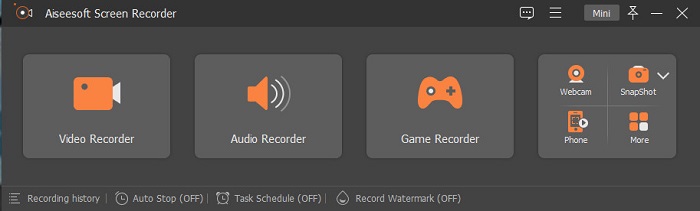
Aiseesoft Recorder एक वेबकैम वीडियो रिकॉर्डर टूल है जिसे आप Windows पर डाउनलोड कर सकते हैं। यह स्क्रीन रिकॉर्डर आपको कुछ आसान चरणों में वेबकैम रिकॉर्डिंग करने में मदद कर सकता है। इसके अलावा, इसका इंटरफ़ेस सहज है और इसे मुफ़्त में इस्तेमाल किया जा सकता है। और यदि आप ऐसा स्क्रीन रिकॉर्डर खोज रहे हैं जो आपको केवल स्क्रीन के खास हिस्सों को कैप्चर करने देता है, तो इस टूल में वह सुविधा मौजूद है। साथ ही, इसमें एडवांस्ड फ़ीचर्स हैं जिनकी मदद से आप इसके इनबिल्ट गेम रिकॉर्डर का उपयोग करके अपने गेम‑विनिंग हाइलाइट रिकॉर्ड कर सकते हैं। इस स्क्रीन रिकॉर्डर में टास्क शेड्यूलर भी है, जहाँ आप अपने कंप्यूटर से दूर रहते हुए भी रिकॉर्डिंग के लिए समय निर्धारित कर सकते हैं। बहुत से उपयोगकर्ता इस स्क्रीन रिकॉर्डर का इस्तेमाल करते हैं क्योंकि इसमें वीडियो और ऑडियो, दोनों रिकॉर्ड करने की सुविधा है।.
पेशेवरों
- इसमें उपयोग में आसान सॉफ्टवेयर इंटरफेस है।
- यह आपको अपनी स्क्रीन, ऑडियो और अपने गेम को रिकॉर्ड करने की अनुमति देता है।
- यह आपको वॉटरमार्क रिकॉर्ड करने और अपनी रिकॉर्डिंग के लिए शेड्यूल बनाने की अनुमति देता है।
- विंडोज और मैक सहित सभी मीडिया प्लेटफॉर्म पर डाउनलोड करने के लिए उपलब्ध है।
विपक्ष
- इसकी अनूठी विशेषताओं का उपयोग करने से पहले आपको ऐप को खरीदना होगा।
बांदीकैम
कीमत: $39.95
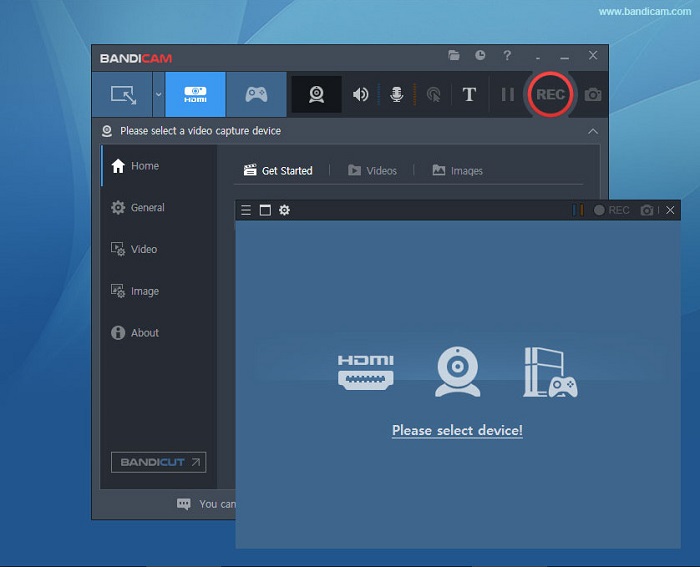
Bandicam एक वेबकैम रिकॉर्डिंग सॉफ़्टवेयर है जिसका इस्तेमाल कई पेशेवर करते हैं। Bandicam आपको वेबकैम और आपके डिवाइस की ऑडियो, दोनों रिकॉर्ड करने की सुविधा देता है। साथ ही, आप दो वीडियो फ़ाइलों को मर्ज कर सकते हैं और अपनी स्क्रीन के केवल चुने हुए हिस्सों को रिकॉर्ड कर सकते हैं। इसके अलावा, यह उच्च गुणवत्ता वाले वीडियो तैयार करता है जो .avi और .mp4 फ़ाइल एक्सटेंशन में सेव होते हैं। और अगर आप साउंड मिक्सर वाला स्क्रीन रिकॉर्डर ढूँढ रहे हैं, तो Bandicam सबसे अच्छा टूल है। हालाँकि, इसका इंटरफ़ेस चलाना थोड़ा मुश्किल है, इसलिए यह शुरुआती उपयोगकर्ताओं के लिए ज़्यादा अनुकूल नहीं है। फिर भी, इसे सीखना फायदेमंद है क्योंकि यह आपको प्रोफ़ेशनल स्तर के वीडियो आउटपुट दे सकता है।.
पेशेवरों
- अन्य सॉफ़्टवेयर की तुलना में रिकॉर्डर फ़ाइलों का फ़ाइल आकार बहुत छोटा होता है।
- यह आपको उच्च गुणवत्ता वाले 2D और 3D वीडियो रिकॉर्ड करने की अनुमति देता है।
- इसमें एक बिल्ट-इन वेबकैम रिकॉर्डर और ऑडियो रिकॉर्डर है।
विपक्ष
- इसमें हार्ड-टू-यूज़ सॉफ़्टवेयर इंटरफ़ेस है।
- यह लाइव स्ट्रीम वीडियो पर काम नहीं कर सकता।
Schoology
कीमत: $7.5-$10
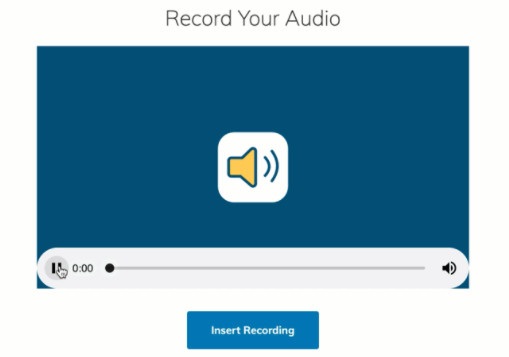
Schoology एक HTML5 वेबकैम रिकॉर्डर है, यानी आप अपने HTML5 वीडियो रिकॉर्ड कर सकते हैं। यह वेबकैम रिकॉर्डर ज़्यादातर लेक्चर, प्रेज़ेंटेशन और स्कूल से संबंधित वीडियो के लिए इस्तेमाल किया जाता है। इसके अलावा, यह टूल आपको आपके डिवाइस की ऑडियो और वीडियो, दोनों रिकॉर्ड करने देता है। इस टूल की और भी खास बात यह है कि यह एक कम्युनिकेशन हब के रूप में भी काम करता है और छात्रों के लिए ऑनलाइन इंटरैक्शन का प्लेटफ़ॉर्म प्रदान करता है। इसका इंटरफ़ेस सरल है, जिससे यह एक उपयोगकर्ता‑अनुकूल टूल बन जाता है।.
पेशेवरों
- आप इंटरनेट एक्सेस के बिना भी अपना रिकॉर्डिंग आउटपुट डाउनलोड कर सकते हैं।
- इसमें एक साधारण जीयूआई है।
- यह छात्रों और शिक्षकों के लिए एक संचार केंद्र है।
विपक्ष
- इसमें उपयोग करने के लिए सीमित संपादन सुविधाएँ हैं।
कईकैम
कीमत: $99 (प्रीमियम संस्करण)
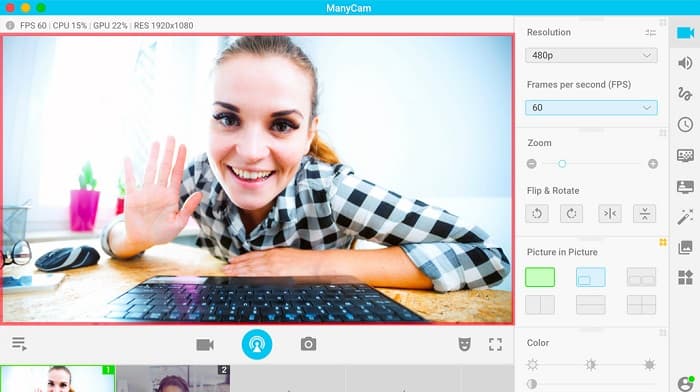
ManyCam Windows 10 के लिए एक स्क्रीन और वेबकैम रिकॉर्डर है। यह आसानी से स्मूद और अच्छी गुणवत्ता वाले वीडियो रिकॉर्ड करता है। इसका इंटरफ़ेस सरल होने के कारण यह एक उपयोगकर्ता‑अनुकूल टूल है। लोग इस वेबकैम रिकॉर्डर का इस्तेमाल लाइव स्ट्रीमिंग वीडियो, लेसन और लेक्चर के लिए करते हैं। इसके अलावा, यह 4K वीडियो भी स्ट्रीम कर सकता है और इसमें स्क्रीनकास्टिंग फ़ीचर भी मौजूद है। यदि आप ऐसा टूल ढूँढ रहे हैं जिसमें रियल‑टाइम कैमरा कंट्रोल सेटिंग्स हों, तो इस टूल में यह सुविधा है। हालाँकि, इसके फ़ीचर्स का उपयोग ज़्यादातर मैनुअल रूप से करना पड़ता है।.
पेशेवरों
- यह आपको 4K वीडियो स्ट्रीम करने और उनकी उच्च गुणवत्ता रिकॉर्ड करने की अनुमति देता है।
- नि: शुल्क परीक्षण संस्करण का उपयोग करते समय भी इसमें वॉटरमार्क नहीं होता है।
- यह उपयोग में आसान उपकरण है।
विपक्ष
- इसकी विशेष सुविधाओं तक पहुँचने से पहले आपको ऐप को खरीदना होगा।
YAWCAM
कीमत: मुफ़्त
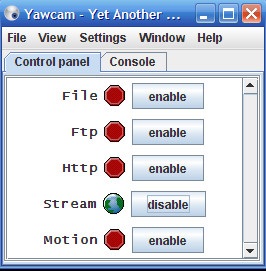
आख़िरी वेबकैम रिकॉर्डर जिसे आपको ज़रूर जानना चाहिए वह है YAWCAM। यह वेबकैम रिकॉर्डर निजी उपयोग के लिए वीडियो स्ट्रीम और रिकॉर्ड कर सकता है और PNG, JPG, GIF और MJPEG सहित ज़्यादातर मानक फ़ाइल प्रारूपों को सपोर्ट करता है। यह टूल वेबकैम रिकॉर्डर के लिए सबसे सरल इंटरफ़ेस के लिए जाना जाता है। तो अगर आप एक शुरुआती उपयोगकर्ता हैं और सबसे आसान सॉफ़्टवेयर एप्लिकेशन का इस्तेमाल करना चाहते हैं, तो आपको इस टूल को ज़रूर आज़माना चाहिए।.
पेशेवरों
- यह पीएनजी, जेपीजी, जीआईएफ, और एमजेपीईजी जैसे सबसे आम फ़ाइल स्वरूपों का समर्थन करता है।
- इसमें एक साधारण जीयूआई है।
- यह कोई वॉटरमार्क आउटपुट नहीं देता है।
विपक्ष
- इसमें कुछ संपादन सुविधाएँ और संक्रमण प्रभाव हैं।
भाग 2. मैक के लिए 3 सर्वश्रेष्ठ वेब कैमरा रिकॉर्डर
पिछले कुछ वर्षों में, मैक के लिए वीडियो एडिटिंग सॉफ्टवेयर में इतना बदलाव नहीं आया है। हालांकि, मैक में बिल्ट-इन वेबकैम रिकॉर्डर नहीं है। लेकिन इस भाग में, आप मैक उपयोगकर्ताओं के लिए सर्वश्रेष्ठ वेबकैम रिकॉर्डर जानेंगे।
iMovie
कीमत: मुफ़्त (Mac)
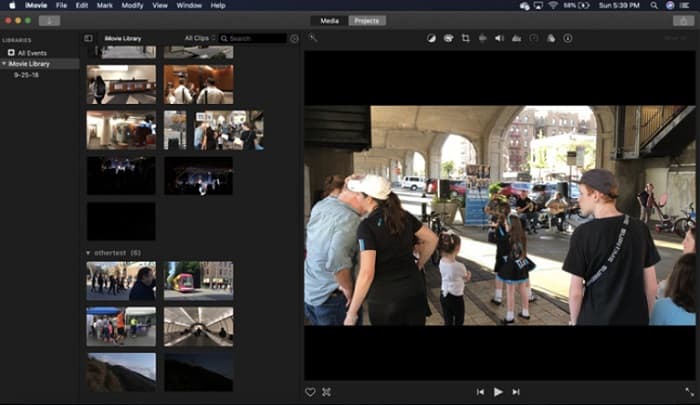
iMovie Mac के लिए इनबिल्ट वीडियो एडिटिंग सॉफ़्टवेयर है। यह एप्लिकेशन Mac उपयोगकर्ताओं के बीच सबसे लोकप्रिय वीडियो एडिटिंग सॉफ़्टवेयर है क्योंकि इसमें कई शानदार फ़ीचर्स हैं। और अगर आप Mac पर वेबकैम रिकॉर्ड करने का तरीका ढूँढ रहे हैं, तो iMovie आपके लिए बिल्कुल सही एप्लिकेशन है। इसका इंटरफ़ेस भी साफ‑सुथरा है, जिससे आप इसे आसानी से चला सकते हैं। इसके अलावा, इसमें कई सुविधाएँ हैं, जैसे साउंडट्रैक जोड़ना, वीडियो/ऑडियो को काटना या क्रॉप करना, टेक्स्ट ओवरले इत्यादि।.
पेशेवरों
- इसमें एक सहज यूजर इंटरफेस है।
- इसमें कई संपादन सुविधाएँ हैं, जिनमें स्प्लिट, ट्रिम, क्रॉप आदि शामिल हैं।
- यह HD और 4k वीडियो को सपोर्ट करता है।
विपक्ष
- यह कम वीडियो आउटपुट का समर्थन करता है और MP4 संगतता के साथ समस्या है।
- केवल मैक पर संगत।
कैमविज़ वेब कैमरा रिकॉर्डर
कीमत: $9.99 (प्रो संस्करण)
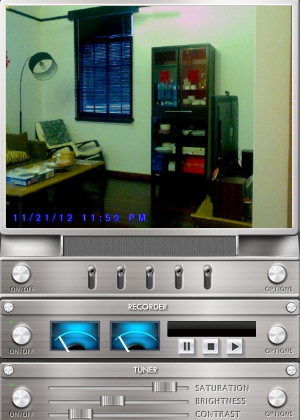
CamWiz Webcam Recorder एक वेबकैम वीडियो रिकॉर्डर है जिसे आप Mac पर डाउनलोड कर सकते हैं। यह वेबकैम रिकॉर्डर आपको आपके ऑडियो सिस्टम को भी रिकॉर्ड करने की सुविधा देता है। इसके अलावा, आप इस टूल का उपयोग वेबकैम वीडियो को देखने, रिकॉर्ड करने और प्लेबैक करने के लिए कर सकते हैं। और यदि आप आउटपुट के लिए क्वालिटी सेलेक्शन वाला टूल चाहते हैं, तो यह वही टूल है जिसकी आपको तलाश है। साथ ही, अगर आप किसी अँधेरे कमरे में या रात के समय रिकॉर्डिंग कर रहे हैं, तो इस सॉफ़्टवेयर एप्लिकेशन में नाइट विज़न मोड है, जो आपको अँधेरे स्थान पर भी अपनी वेबकैम रिकॉर्डिंग साफ़‑साफ़ देखने में मदद करेगा।.
पेशेवरों
- इसमें वीडियो कंट्रास्ट और ब्राइटनेस को एडजस्ट करने के लिए बिल्ट-इन ट्यूनर मॉड्यूल है।
- इसमें नाइट विजन मोड है।
- इसमें उपयोग में आसान सॉफ्टवेयर इंटरफेस है।
विपक्ष
- इसमें उपयोग करने के लिए सीमित संपादन सुविधाएँ हैं।
- इसमें बग मुद्दे हैं।
ओबीएस स्टूडियो
कीमत: मुफ़्त
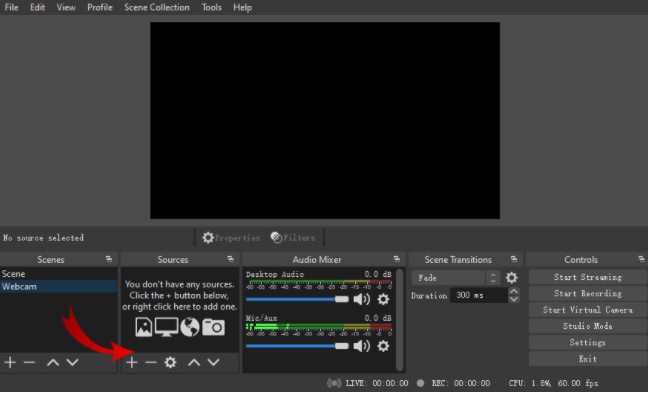
एक और स्क्रीन और वेबकैम रिकॉर्डर जो आप इस्तेमाल कर सकते हैं वह है OBS Studio। यह ओपन‑सोर्स वेबकैम रिकॉर्डर Mac के लिए एक लोकप्रिय सॉफ़्टवेयर एप्लिकेशन है। बहुत से लोग इस टूल का इस्तेमाल इसलिए करते हैं क्योंकि इसे मुफ़्त में डाउनलोड किया जा सकता है। इसके अलावा, यह आपको अपनी स्क्रीन के किसी खास हिस्से को रिकॉर्ड करने की सुविधा देता है। साथ ही, बहुत से पेशेवर इस रिकॉर्डर का उपयोग इंडस्ट्री‑स्टैंडर्ड वीडियो तैयार करने के लिए करते हैं।.
पेशेवरों
- इसमें उपयोग करने के लिए उन्नत संपादन सुविधाएँ हैं।
- इसमें एक सहज यूजर इंटरफेस है।
विपक्ष
- चूंकि यह एक ओपन-सोर्स ऐप है, इसलिए इसके क्रैश होने का खतरा है।
संबंधित:
भाग 3. वेब कैमरा रिकॉर्डर के बारे में तुलना चार्ट
अभी भी तय नहीं है कि आप किस वेबकैम रिकॉर्डर का उपयोग करेंगे? हम आपको यह तय करने में मदद करेंगे कि किस एप्लिकेशन का उपयोग करना है। इस भाग में, आप अधिक विस्तृत विशेषताओं और विशेषताओं को जानेंगे जो प्रत्येक उपकरण में होती हैं। व्यापक रूप से पढ़ें, और हम आशा करते हैं कि आप यह तय कर सकते हैं कि अंत में उपयोग करने के लिए कौन सा टूल सबसे अच्छा है।
| विशेषताएं | Aiseesoft स्क्रीन रिकॉर्डर | बांदीकैम | Schoology | कईकैम | YAWCAM | iMovie | कैमविज़ वेब कैमरा रिकॉर्डर | ओबीएस स्टूडियो |
| आपको अपना ऑडियो सिस्टम रिकॉर्ड करने की अनुमति देता है |  | | | | | | | |
| उपयोग में आसान सॉफ्टवेयर इंटरफ़ेस | |  | | | | | | |
| समर्थित प्रणाली | विंडोज, मैक और लिनक्स सहित सभी मीडिया प्लेटफॉर्म पर उपलब्ध है | विंडोज़ पर उपलब्ध | विंडोज और मैक . पर उपलब्ध है | विंडोज सिस्टम पर उपलब्ध | विंडोज और मैक . पर उपलब्ध है | Mac . पर उपलब्ध है | विंडोज और मैक . में उपलब्ध है | विंडोज, मैक और लिनक्स पर उपलब्ध है |
| संपादन सुविधाएँ हैं | | | | | सीमित | | सीमित | |
| उच्च गुणवत्ता वाले आउटपुट का उत्पादन करें | | | | | | | | |
भाग 4. सर्वश्रेष्ठ वेब कैमरा रिकॉर्डर के बारे में अक्सर पूछे जाने वाले प्रश्न
यदि आप वेबकैम रिकॉर्डिंग कर रहे हैं, तो क्या यह ऑडियो सिस्टम को रिकॉर्ड करता है?
हाँ। यदि आप वेबकैम रिकॉर्डिंग कर रहे हैं, तो यह आपके वेबकैम के ऑडियो के साथ आता है। हालाँकि, यदि आप स्क्रीन रिकॉर्डिंग कर रहे हैं, तो कुछ टूल ऑडियो को एक साथ रिकॉर्ड नहीं करते हैं।
वेबकैम रिकॉर्डिंग के लिए आमतौर पर किस प्रारूप का उपयोग किया जाता है?
अधिकांश वेबकैम रिकॉर्डर एक MP4 आउटपुट स्वरूप के साथ एक वेबकैम रिकॉर्डिंग का उत्पादन करते हैं।
एक लैपटॉप वेबकैम कितनी दूर तक पहुंच सकता है?
एक लैपटॉप वेबकैम की उच्चतम सेटिंग पर जो 10 मेगापिक्सेल है, यह 10-15 फीट की सीमा देख सकता है।
निष्कर्ष
जैसा कि आप देख सकते हैं, ऐसे कई वेबकैम रिकॉर्डर हैं जिनका उपयोग आप वेबकैम रिकॉर्डिंग करने के लिए कर सकते हैं। हालांकि, सभी वेबकैम रिकॉर्डर में समान विशेषताएं और कीमत नहीं होती है। इसलिए, यदि आप कीमत के लिए एक वेबकैम रिकॉर्डर की तलाश कर रहे हैं और आपके पास उपयोग करने के लिए सबसे अच्छी सुविधाएं हैं, तो Aiseesoft Screen Recorder डाउनलोड करें और इस टूल द्वारा प्रदान की जाने वाली बेहतरीन गुणवत्ता का अनुभव करें।
-
 शानदार वॉयस रिकॉर्डर में से 7 सभी प्लेटफार्मों में सुलभ
 क्या आप सीखना चाहते हैं कि ऑडियो रिकॉर्डिंग कैसे करें? फिर इस लेख पर जाएं क्योंकि हम सबसे अच्छे ऑडियो रिकॉर्डर के बारे में बात करते हैं जो आपकी आवश्यकताओं के अनुरूप हो सकता है।
-
 विंडोज और मैक पर उपलब्ध 4 नवीनतम ऑडियो रिकॉर्डिंग सॉफ्टवेयर
 अपने डेस्कटॉप पर ऑडियो रिकॉर्डिंग सॉफ़्टवेयर की आवश्यकता है? उस स्थिति में, यह लेख सर्वोत्तम और अधिक के बारे में विचारों से भरा है। तो अगर आपको किसी की जरूरत है तो इस लेख को पढ़ें।
-
 Android और iOS पर 5 सर्वाधिक पिक ऑडियो रिकॉर्डर ऐप्स [2022 अपडेट किया गया]
 आपको नहीं पता कि आपको किस ऑडियो रिकॉर्डर ऐप का उपयोग करना चाहिए? यदि हां, तो यह लेख आपको यह चुनने में मदद करेगा कि कौन सा ऐप आपके ऑडियो रिकॉर्डिंग कार्य में आपकी सहायता करेगा।
