


 वीडियो कनवर्टर अंतिम
 स्क्रीन अभिलेखी
 वीडियो मरम्मत
 सुरक्षित डाउनलोड
जानिए एफपीएस क्या है और सभी जानकारी जो आपको जानना जरूरी है
When you hear about the acronym FPS, it sounds too technical. And you will hear this word mostly in gamers who talk about their PCs. And if you are one of the people who does not know what FPS means, we will break down the meaning and all the information you need to know about it. So, without further ado, let us dig deep into all the information regarding what is FPS.

भाग 1. एफपीएस का क्या अर्थ है?
FPS का अर्थ है फ्रेम्स प्रति सेकेंड, एक तकनीकी शब्द जिसका उपयोग कंप्यूटर ग्राफिक्स में किया जाता है यदि आप पूछते हैं कि FPS का क्या अर्थ है। हालाँकि, यह न केवल कंप्यूटर ग्राफिक्स पर बल्कि किसी भी मोशन कैप्चर सिस्टम पर भी लागू होता है। अगर आपको आश्चर्य है कि फिल्मों में सुंदर और चिकने ग्राफिक्स क्यों होते हैं, तो वह फ्रेम प्रति सेकंड के कारण होता है। FPS को कभी-कभी "बर्स्ट रेट" और "अपडेट रेट" के रूप में जाना जाता है। इसके अलावा, FPS छवियों की एक क्रमागत श्रृंखला में फ़्रेम की संख्या है। और क्या आप जानते थे? हम जो वीडियो देख रहे हैं वह हिल नहीं रहा है। यह तेज़ चरण में चलाई जाने वाली छवियों की एक श्रृंखला मात्र है।
यदि आपके वीडियो या मूवी क्लिप का FPS अधिक है, तो आपका वीडियो स्मूथ है। इसके विपरीत, यदि आपके वीडियो में कम एफपीएस है तो आपके वीडियो ग्राफिक्स मोटे हैं। और यदि आप एक पेशेवर गेमर हैं, तो संभवतः आप अपना पसंदीदा ऑनलाइन गेम खेलते समय सहज ग्राफिक्स रखना चाहते हैं, और एफपीएस या फ्रेम प्रति सेकंड एक महत्वपूर्ण भूमिका निभाता है।
हम आशा करते हैं कि FPS का क्या अर्थ है, इस बारे में आपके प्रश्न का अब उत्तर मिल गया है। एफपीएस के बारे में अधिक जानकारी जानने के लिए आगे पढ़ें।
भाग 2. विभिन्न स्थितियों में एफपीएस
मानक फ्रेम दर प्रति सेकंड 24 है। लेकिन विभिन्न वीडियो क्षेत्रों में, अलग-अलग एफपीएस मानक हैं। यह हिस्सा अलग-अलग एफपीएस को जानेगा जो हर स्थिति में होता है।
यूट्यूब वीडियो में एफपीएस
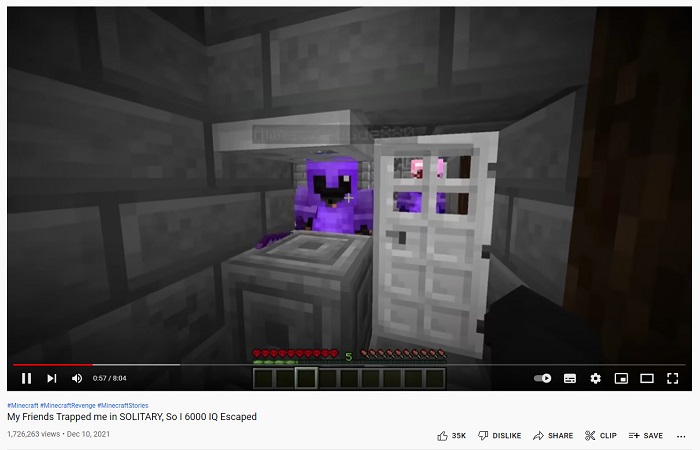
Youtube 24-60 fps को सपोर्ट कर सकता है। हालांकि, यूट्यूब वीडियो के लिए अनुशंसित एफपीएस 24 एफपीएस है। लेकिन इस भाग में, आप जानेंगे कि Youtube वीडियो पर सबसे अधिक साझा की जाने वाली सामग्री की विभिन्न प्राथमिकताएँ क्या हैं।
◆ Video Podcasts - Video Podcasts or TV talk shows usually have 30 fps. When you watch this kind of content on Youtube, you will normally observe that the movements are mostly hand gestures and do not involve any exaggerated movements.
◆ Make-up tutorials - Make-up tutorials usually have 60 fps because this type of content must have clear and smooth video graphics to know every detail of the tutorial.
◆ Learning Video Materials - This content usually has 24-30 fps because this type of content has a decent type of animation and does not include excessive movements.
◆ Game Highlights - When it comes to gaming or gaming highlights, the recommended fps is 60 fps. This type of content needs 60 fps so that the video will not look choppy or rough.
गेमिंग में एफपीएस
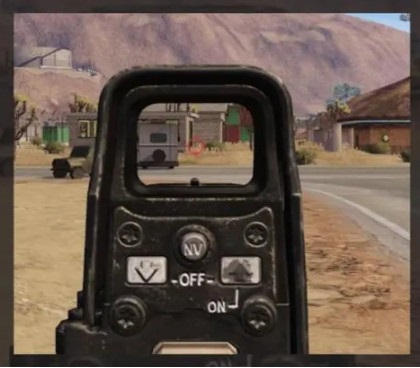
गेमिंग में, आपके पास एक उच्च एफपीएस होना चाहिए। लेकिन यह ग्राफिक कार्ड की क्षमता और आपके डिवाइस की समग्र प्रणाली पर निर्भर करता है। यदि आप एक प्रथम-व्यक्ति शूटिंग गेम खेल रहे हैं, तो यह एक फायदा है कि आपके पास एक उच्च एफपीएस है क्योंकि आप आसानी से लक्ष्य कर सकते हैं। गेमिंग में आमतौर पर 60-240 एफपीएस होता है। हालाँकि, एक 144 Hz मॉनिटर केवल 144 fps और उससे कम प्रदर्शित कर सकता है। फिर भी, आप 144 Hz मॉनिटर पर 240 fps खेल सकते हैं, लेकिन 96 fps व्यर्थ हो जाएगा क्योंकि यह केवल 144 fps प्रदर्शित करेगा। तो, यह आपके सिस्टम के डिवाइस और आपके गेम की ग्राफिक कार्ड क्षमता पर निर्भर करता है।
सिनेमाघरों में एफपीएस

मूवी थिएटरों में प्रदर्शित सिनेमा या फिल्मों में आमतौर पर 24 एफपीएस होता है। यदि आपने शूटिंग एक्शन के बारे में एक फिल्म देखी है, और बुलेट का एक निश्चित हिस्से पर धीमा-मो प्रभाव पड़ता है, जहां गोलियां प्रतिपक्षी को मारने वाली थीं, तो वह एफपीएस का काम है। जब ऐसा होता है, तो एफपीएस आमतौर पर गिर जाता है, फिर फिल्म के अन्य हिस्सों में फिल्म की सामान्य गति होती है।
भाग 3. अपने वीडियो की गति संपादित करना चाहते हैं?
FPS आपके गेमप्ले या वीडियो की सुगमता में बहुत बड़ी भूमिका निभाता है। लेकिन एक निश्चित तत्व एक सुगम संक्रमण वीडियो बनाने में भी प्रमुख भूमिका निभाता है, जो कि आपके वीडियो की गति है। और यदि आप अपने वीडियो की गति को समायोजित करना चाहते हैं, तो आप इस उपकरण का उपयोग कर सकते हैं जिसे हम सर्वश्रेष्ठ वीडियो गति परिवर्तक उपकरण के रूप में सुझाते हैं।
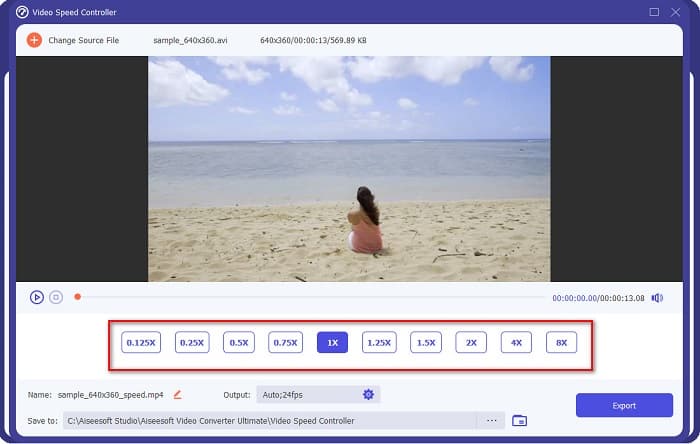
FVC Video Converter Ultimate is a popular software application for changing the speed of a video. It has an easy processing user interface, making it a beginner-friendly tool. You can change your video speed by 0.125x, 0.25x, 0.5x, 0.75x, 1.25x, 1.5x, 2x, 4x, and 8x speed presets. In addition to that, you can change the fps of your Output with this ultimate tool. This software application enables you to change the fps of your video file from 12 fps to 60 fps.
इसके अलावा, FVC वीडियो कन्वर्टर अल्टीमेट अद्भुत संपादन सुविधाएँ प्रदान करता है, जैसे रंग सुधार, वीडियो रिवर्सर, वीडियो रोटेटर, आदि। यह MP4, WMV, FLV, MPEG, WebM, MKV, M4V, और 1000+ अधिक प्रारूपों सहित कई फ़ाइल स्वरूपों का भी समर्थन करता है। . इसलिए अगर आप अपने वीडियो की स्पीड बदलने और अपने वीडियो का एफपीएस बदलने के लिए इस टूल का इस्तेमाल करना चाहते हैं तो नीचे दिए गए स्टेप्स को फॉलो करें।
Step 1. Download FVC Video Converter Ultimate by clicking the Download button below for Windows or Mac. Follow the installation process, then open the app.
फ्री डाउनलोडWindows 7 या बाद के संस्करण के लिएसुरक्षित डाउनलोड
फ्री डाउनलोडMacOS 10.7 या बाद के संस्करण के लिएसुरक्षित डाउनलोड
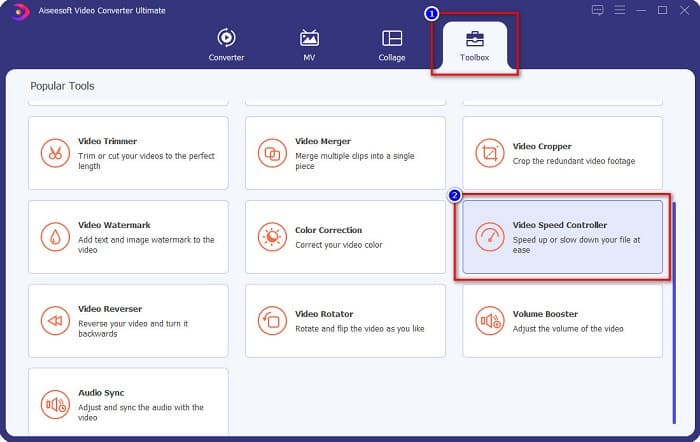
Step 2. And then, on the software’s main interface, select the Toolbox option, then click the Video Speed Controller.
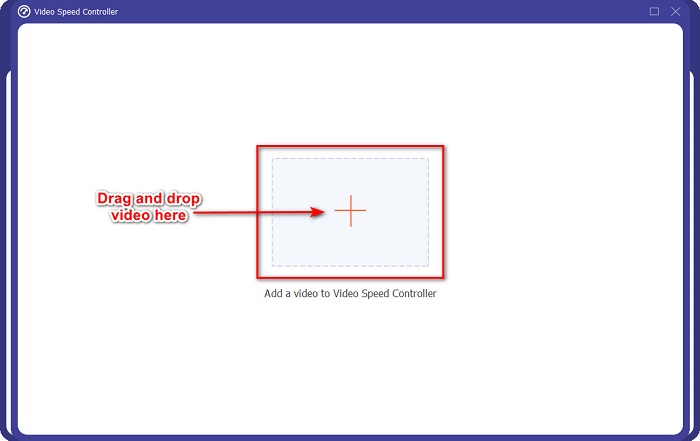
Step 3. Next, click the + sign button, or drag and drop your video into the + sign.
Step 4. Then, select the video speed preset you want your video to have. You can also see the preview of your video above the presets.
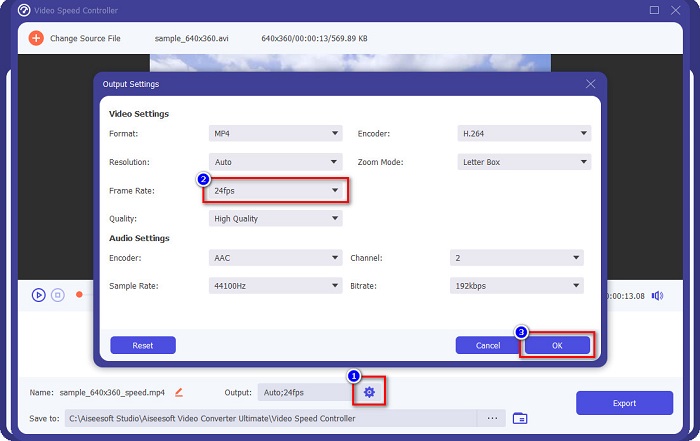
To change the fps of your video output, click the gear button beside Output, click the drop-down button beside frame rate, and select the fps you want for your output. Then click OK to save changes.
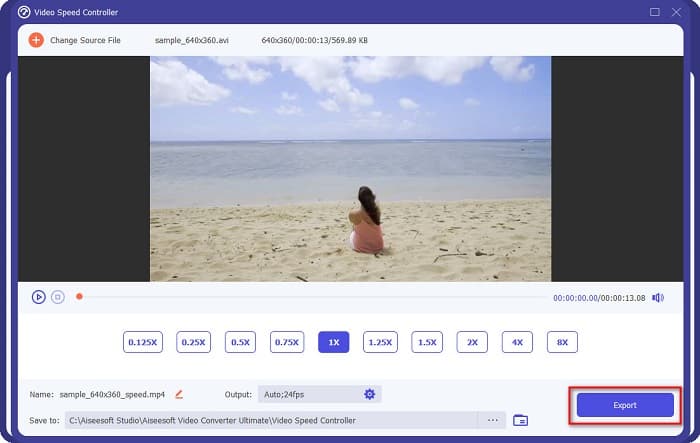
Step 5. Lastly, click the Export button to update the changes to your video. Just wait for a few seconds, then your video will automatically be saved on your computer files.
आसान है ना? ऊपर दिए गए सरल चरणों का पालन करके, आप आसानी से अपने वीडियो की गति और fps को बदल सकते हैं।
संबंधित:
भाग 4. एफपीएस क्या है के बारे में अक्सर पूछे जाने वाले प्रश्न
मानव आँख क्या एफपीएस देख सकती है?
पेशेवरों का कहना है कि मानव आंख 30 एफपीएस से 60 एफपीएस के बीच देख सकती है। और अन्य यह भी कहते हैं कि मानव आंख 60 एफपीएस से अधिक नहीं देख सकती है।
क्या 60 एफपीएस एक सहज गेम रिकॉर्डिंग शूट कर सकते हैं?
हाँ। क्योंकि गेम रिकॉर्ड करने के लिए मानक एफपीएस 30 एफपीएस से 60 एफपीएस है। इसलिए, यदि आप एक आसान गेम रिकॉर्डिंग चाहते हैं, तो 60 एफपीएस होना उचित है।
क्या आपके वीडियो का एफपीएस बदलने से गुणवत्ता प्रभावित होती है?
Changing the fps of a video will not necessarily affect the quality of your video. However, fps changing tools ruin the quality after changing the fps. So if you are searching for a tool that will not affect the quality of your video, use FVC Video Converter Ultimate.
निष्कर्ष
Your question about what is FPS is now answered. All the information above are factual and has been researched. And if you want to change the speed or the fps of your video, use FVC Video Converter Ultimate, which many people use to change the fps of their video.
-
 विंडोज मूवी मेकर में स्लो मोशन वीडियो बनाने का आसान तरीका
 क्या आप अपने वीडियो पर जोर देने के लिए नाटकीय प्रभाव डालना चाहते हैं या कम से कम एक क्लिप को धीमी गति से बाकी हिस्सों से अलग करना चाहते हैं, और आप नहीं जानते कि कैसे? अधिक जानने के लिए इस लेख को पढ़ना जारी रखें।
-
 फाइनल कट प्रो का उपयोग करके धीमी गति कैसे करें [हल]
 आप अपना स्लो-मोशन वीडियो बनाने के लिए फाइनल कट प्रो का उपयोग करने जा रहे हैं, लेकिन आप नहीं जानते कि कैसे शुरू करें? फाइनल कट प्रो के बारे में अधिक जानने के लिए इस लेख को पढ़ें।
-
 शीर्ष तथ्य जो आपको क्विकटाइम स्लो मोशन के बारे में जानना चाहिए
 क्या आपने धीमी गति में वीडियो चलाने के लिए क्विकटाइम मीडिया प्लेयर का उपयोग करने की कोशिश की है? इस मीडिया प्लेयर की उत्कृष्ट सेवा के बारे में अधिक जानने के लिए इस लेख को पढ़ें।
