


 वीडियो कनवर्टर अंतिम
 स्क्रीन अभिलेखी
 वीडियो मरम्मत
 सुरक्षित डाउनलोड
हम Xbox One पर संगीत कैसे चला सकते हैं: गेमिंग के दौरान या CD पर
क्या गेम के शानदार दृश्य ने आपके सिर को जोशीले संगीत से भर दिया है? जबकि कई Xbox गेम में अपने आप में बेहतरीन साउंडट्रैक होते हैं, हमें यकीन है कि हर किसी के पास अपने पसंदीदा गानों की अपनी सूची होती है। जीत हासिल करने या इमर्सिव एक्शन के लिए कौन परफ़ेक्ट साउंडट्रैक नहीं चाहेगा?
खुशकिस्मती से, हमारे पास निश्चित रूप से एक तरीका है जिससे हम Xbox One पर म्यूज़िक चला सकते हैं! आप Apple Music, Spotify और Pandora जैसे प्लेटफ़ॉर्म से गाने सुनने की कोशिश कर सकते हैं, और यहाँ तक कि गेम खेलते समय CD से भी म्यूज़िक चला सकते हैं। यह सब बिल्कुल कठिन नहीं है – हमारे पास आपके लिए सबसे विस्तृत निर्देश हैं। और आपके लिए बेहतरीन मल्टीमीडिया प्लेयर भी सुझाए जाएँगे।.

भाग 1. गेमिंग के दौरान Xbox One पर संगीत कैसे बजाएँ
क्या आप Xbox One पर संगीत चला सकते हैं? अच्छी खबर यह है कि Xbox One पहले से ही इस प्लेटफ़ॉर्म पर संगीत चलाने के लिए उपयोगकर्ताओं का समर्थन करता है। हमने आपके लिए तीन विकल्प तैयार किए हैं जो आपको विभिन्न प्लेटफ़ॉर्म के माध्यम से गाने खोलने की अनुमति देते हैं। आप अपनी वास्तविक ज़रूरतों के आधार पर कौन सा रास्ता अपनाना चाहते हैं, यह चुन सकते हैं।
संगीत ऐप्स का उपयोग करना
आपको इस ऑपरेशन को सपोर्ट करने वाले म्यूजिक सॉफ्टवेयर को चुनने में सावधानी बरतनी होगी, जैसे कि Groove, Pandora, VLC Media Player, iHeartRatio, Spotify, SoundCloud, इत्यादि। ये Xbox One के ऐप स्टोर में मिल सकते हैं।
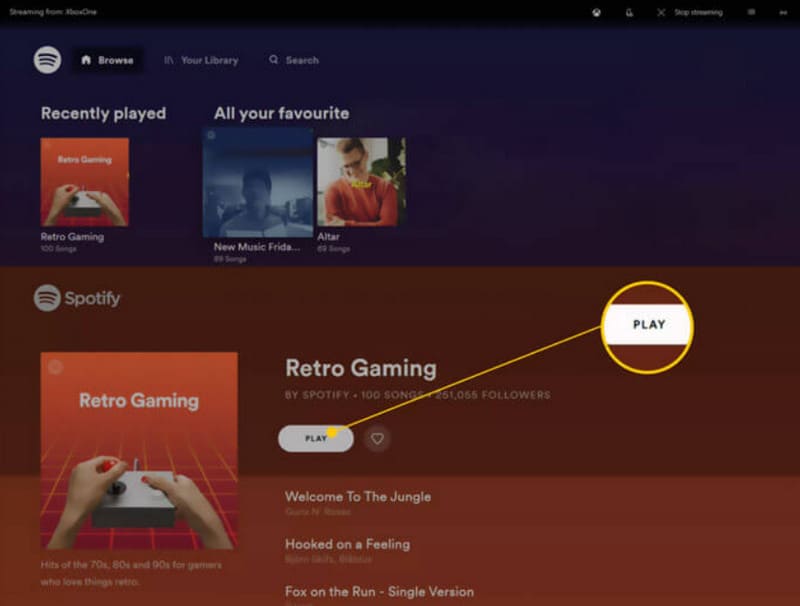
यहां बताया गया है कि गेमिंग के दौरान म्यूजिक ऐप के साथ Xbox One पर संगीत कैसे चलाया जाए।
चरण 1. Xbox One चालू करें। Xbox Store पर जाएँ और Spotify या Pandora जैसे किसी म्यूज़िक ऐप को डाउनलोड करें।.
चरण 2. म्यूज़िक ऐप खोलें। अपने अकाउंट से साइन इन करें।.
चरण 3. वह म्यूज़िक चलाएँ जिसे आप सुनना चाहते हैं। फिर अपना गेम शुरू करें। म्यूज़िक बैकग्राउंड में चलता रहेगा।.
अगर आपने वे म्यूज़िक फ़ाइलें तैयार कर ली हैं जिन्हें आप चलाना चाहते हैं, तो हम एक प्रोफेशनल प्लेयर – Aiseesoft Blu-ray Player – इस्तेमाल करने की सलाह देते हैं। चाहे आपका म्यूज़िक DVD, Blu-ray डिस्क पर हो या Xbox One से जुड़े कंप्यूटर में लोकल तौर पर सेव हो, यह बहुउद्देशीय प्लेयर आपकी मदद कर सकता है! इसे इस्तेमाल करें और फिर अपने म्यूज़िक को सबसे बढ़िया तरीके से प्रस्तुत करें।.
Aiseesoft Blu-ray Player लगभग सभी लोकप्रिय फ़ॉर्मेट को सपोर्ट करता है। अगर आप एक से ज़्यादा म्यूज़िक सुनना चाहते हैं, तो आप इस प्लैटफ़ॉर्म पर प्लेलिस्ट बना सकते हैं। आप अपने ऑडियो के प्लेबैक इफ़ेक्ट को एडजस्ट करने के लिए पैरामीटर भी सेट कर सकते हैं।
फ्री डाउनलोडWindows 7 या इससे बाद के लिएसिक्योर डाउनलोड
फ्री डाउनलोडMacOS 10.7 या इससे बाद के लिएसिक्योर डाउनलोड
यहां बताया गया है कि Aiseesoft ब्लू-रे प्लेयर के साथ गेम खेलते समय Xbox One पर संगीत कैसे चलाएं।
चरण 1. अपने डिवाइस पर Aiseesoft Blu-ray Player डाउनलोड और इंस्टॉल करें। Open File पर क्लिक करें। ब्राउज़ करके वह ऑडियो चुनें जिसे आप चलाना चाहते हैं।.
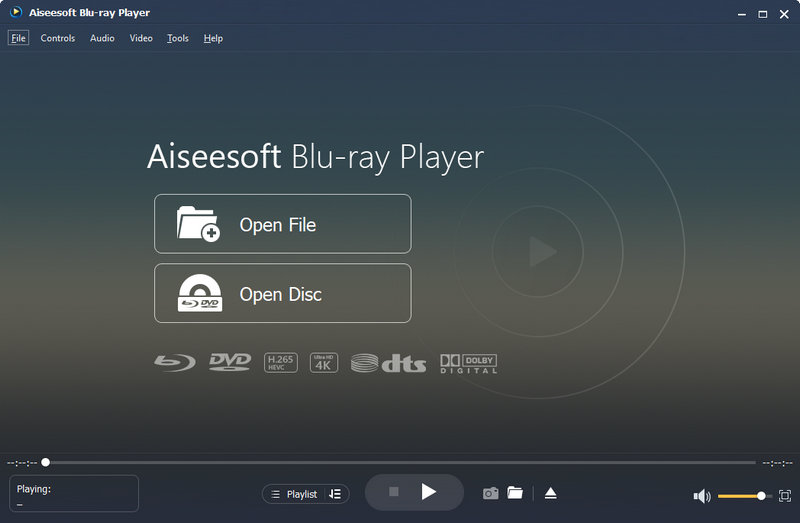
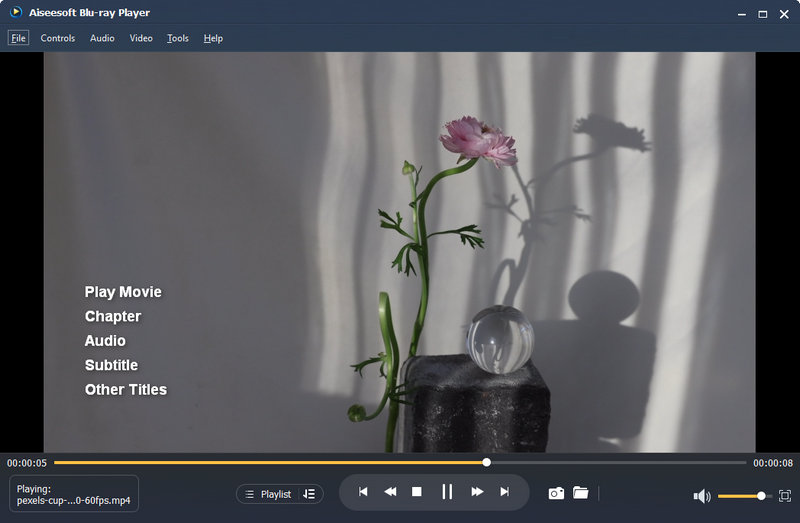
चरण 2. प्रोग्राम चुने हुए ऑडियो को लोड करेगा और प्ले करना शुरू कर देगा। इंटरफ़ेस पर, आप वॉल्यूम एडजस्ट कर सकते हैं या प्ले
USB या बाहरी डिवाइस से संगीत बजाना
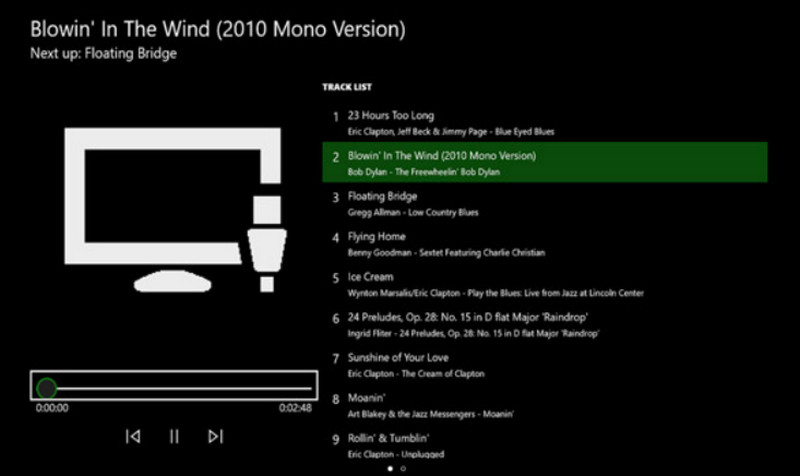
Xbox One ऐप स्टोर में सिंपल बैकग्राउंड म्यूजिक प्लेयर नामक एक टूल है। यह टूल आपको USB फ्लैश डिस्क के माध्यम से Xbox One पर संगीत चलाने की अनुमति देता है।
इस विधि को लागू करने का तरीका यहां बताया गया है।
चरण 1. सबसे पहले, अपने USB फ़्लैश ड्राइव को FAT32 या NTFS में फ़ॉर्मैट करें। फिर इसे खोलें और Xbox One Library नाम का एक नया फ़ोल्डर बनाएँ।.
चरण 2. जिस गाने को आप सुनना चाहते हैं उसे Xbox One Library फ़ोल्डर में जोड़ें। ऑडियो फ़ॉर्मैट MP3, WMA, FLAC या AAC होना चाहिए।.
अगर आपका ऑडियो किसी दूसरे फ़ॉर्मैट में है, जैसे WAV, तो कृपया प्ले करने से पहले WAV को MP3 में कन्वर्ट करें।.
चरण 3. Xbox Store से Simple Background Music Player डाउनलोड करें। इंस्टॉल होने के बाद, इसे बंद कर दें।.
चरण 4. अपना USB डिवाइस Xbox One में लगाएँ। अब Simple Background Music Player खोलें।.
चरण 5. अपने Xbox कंट्रोलर पर Y बटन दबाएँ। आपकी म्यूज़िक फ़ाइलें चलना शुरू हो जाएँगी।.
भाग 2. Xbox One पर संगीत CD कैसे चलाएँ
क्या आप Xbox One पर संगीत CD चला सकते हैं?
पसंदीदा एल्बम सीडी खरीदी है, क्या मैं अपने Xbox One पर इसकी सामग्री चला सकता हूँ? बिलकुल। आपको Xbox One पर ग्रूव म्यूजिक जैसे अन्य उपकरणों के माध्यम से सीडी के अंदर की सामग्री को पढ़ना होगा। ये उपकरण ऐप स्टोर से उपलब्ध हैं।
Xbox One पर CD कैसे चलायें
चरण 1. सुनिश्चित करें कि आपके Xbox One का डिस्क ड्राइव खाली है। उसे इजेक्ट करें और वह CD डालें जिसे आप प्ले करना चाहते हैं।.
चरण 2. अगर आपके Xbox One पर Groove Music इंस्टॉल नहीं है, तो आपको App Store पर ले जाया जाएगा। फिर इसे अपने डिवाइस पर डाउनलोड करें।
अगर यह पहले से इंस्टॉल है, तो CD डालने पर यह अपने आप लॉन्च हो जाएगा।.
चरण 3. Launch चुनें और म्यूज़िक ऐप खोलें। My Music पर क्लिक करें।.
चरण 4. अब Audio CD चुनें। Play all पर क्लिक करें।.
भाग 3. Xbox One पर Spotify न चलना: समाधान
Spotify Xbox One पर संगीत नहीं बज रहा है? कई उपयोगकर्ता भी इसी समस्या का सामना कर रहे हैं। हमने इस समस्या के कारण की जांच की है और निम्नलिखित समाधान आज़माने की सलाह दी है।
• नेटवर्क कनेक्शन की जाँच करना
अगर आपकी मौजूदा इंटरनेट स्पीड बहुत धीमी है या आपका कनेक्शन अस्थिर है, तो Spotify संगीत चलाते समय त्रुटियाँ कर सकता है। आप कोई दूसरा WiFi या डेटा नेटवर्क कनेक्शन आज़मा सकते हैं।
• Xbox One कैश साफ़ करें
बहुत ज़्यादा कैश आपके सिस्टम में कई तरह की गड़बड़ियाँ पैदा कर सकता है। आप नियमित रूप से कैश साफ़ करने की कोशिश कर सकते हैं। अपने Xbox One के पावर बटन को तब तक दबाकर रखें जब तक डिवाइस बंद न हो जाए। फिर, पावर कॉर्ड को अनप्लग करें। दस सेकंड तक प्रतीक्षा करें, और फिर इसे फिर से चालू करें।
• Xbox और Spotify को रीबूट या अपडेट करें
अपने डिवाइस या ऐप को रीस्टार्ट करना किसी अस्थायी गड़बड़ी को ठीक करने का सबसे तेज़ तरीका है। सबसे पहले Spotify को बंद करें और अपने Xbox One को रीस्टार्ट करें। फिर, फिर से संगीत चलाने की कोशिश करें। अगर ऐप के नए वर्शन हैं, तो उन्हें अपडेट करें।
• Spotify को पुनः स्थापित करें.
अपने Xbox One पर My games & apps मेनू पर जाएँ। See all चुनें। वहाँ Spotify ढूँढें और Uninstall पर क्लिक करें। फिर ऐप स्टोर पर जाएँ और इसे फिर से डाउनलोड करें।
यदि उपरोक्त में से कोई भी तरीका आपकी समस्या का समाधान नहीं करता है, तो Spotify या Xbox One तकनीकी सहायता टीम से संपर्क करने का प्रयास करें।
भाग 4. Xbox One पर संगीत चलाने के अक्सर पूछे जाने वाले प्रश्न
क्या आप Xbox One पर संगीत चला सकते हैं?
हाँ, बिलकुल कर सकते हैं। Xbox App Store के ज़रिए Spotify या Pandora जैसे म्यूज़िक ऐप ले आइए। फिर इन म्यूज़िक प्लेयर्स पर Xbox One में अपने पसंदीदा गाने ढूँढें और प्ले करें।.
कौन से संगीत ऐप्स Xbox के साथ काम करते हैं?
स्पॉटिफाई, एप्पल म्यूजिक, पेंडोरा, अमेज़न म्यूजिक, साउंडक्लाउड, वीवो, डॉल्बी एक्सेस और टनलन रेशियो ऐसे संगीत ऐप हैं जो अब एक्सबॉक्स वन के साथ संगत हैं।
क्या आप Xbox One पर Apple Music चला सकते हैं?
हाँ, आप कर सकते हैं। 2022 से, उपयोगकर्ता Xbox ऐप स्टोर से Apple Music प्राप्त कर सकते हैं। वे इसे अपने डिवाइस पर डाउनलोड कर सकते हैं और अपने पसंदीदा गाने चला सकते हैं।
निष्कर्ष
Xbox One पर म्यूज़िक चलाना पूरी तरह संभव है। चाहे आप Music ऐप के अंदर म्यूज़िक सुन रहे हों या USB फ़्लैश ड्राइव, CD आदि से गाने प्ले कर रहे हों, हमने इसे करने के हर तरीके को आपके सामने रखा है। हमें उम्मीद है कि यहाँ दिया गया कंटेंट आपकी मदद करेगा। अभी आज़माएँ और अपने गेमिंग सफ़र को और ज़्यादा रोमांचक बनाएँ।.
-
 विभिन्न प्लेटफार्मों पर संगीत फ़ाइलों का आनंद लेने के लिए शीर्ष 10 संगीत प्लेयर ऐप्स
 कंप्यूटर और मोबाइल डिवाइस पर अपने पसंदीदा गाने और एल्बम को सुचारु रूप से सुनने के लिए, आप शीर्ष 10 सर्वश्रेष्ठ म्यूजिक प्लेयर ऐप्स में शामिल हो सकते हैं।
-
 विंडोज, मैक और मोबाइल उपकरणों पर 7 लोकप्रिय संगीत टैग संपादक
 संगीत टैग आपकी लाइब्रेरी में मौजूद डेटा के अनुसार संगीत को व्यवस्थित करने के लिए लोकप्रिय हैं। यदि आप इसे बदलना चाहें तो क्या होगा? अधिक जानने के लिए नीचे दिए गए विवरण पढ़ें।
-
 Xbox One S 2025 पर MKV फ़ाइलें बनाने के प्रभावी तरीके
 कुछ बेहतरीन कन्वर्टर्स का उपयोग करके अपने Xbox One S पर MKV फ़ाइलों को चलाने में आपकी मदद करने वाले तरीकों की खोज करें।
