


 वीडियो कनवर्टर अंतिम
 स्क्रीन अभिलेखी
 वीडियो मरम्मत
 सुरक्षित डाउनलोड
विंडोज / मैक / ऑनलाइन पर iPad संगत प्रारूपों के लिए M2TS कन्वर्ट करने के लिए कैसे
Can you play M2TS on iPad directly? Sadly, the answer is No. M2TS is not compatible with iPad. If you want to get M2TS playback on iPad, you need to install an M2TS player app on iPad, or you can convert M2TS to iPad format. Obviously, this article chooses the latter solution. Just read and learn how to change video format on iPad from M2TS.

भाग 1: विंडोज और मैक पर M2TS को iPad में कैसे बदलें
IPad किन स्वरूपों का समर्थन करता है? दरअसल, iPad H.264, MP4, M4V, MOV, MPEG-4 और M-JPEG आम वीडियो प्रारूपों को स्वीकार करता है। IPad पर M2TS लगाने के लिए, आपको सबसे पहले M2TS को iPad वीडियो फॉर्मेट में बदलना होगा।
कैसे मुक्त करने के लिए विंडोज पर iPad के लिए M2TS कन्वर्ट करने के लिए
FVC Free M2TS Converter is a M2TS to iPad batch converter totally free to use. You can batch convert M2TS files to iPad with 50x speed faster than common M2TS converters. Thus, it does not matter if you need to convert large M2TS video files to iPad in bulk. The M2TS to iPad converter free can handle it perfectly.
Moreover, you can merge M2TS files and add themes before the M2TS to iPad conversion. The real-time preview window can show you video effects instantly. In a word, you can edit and convert AVCHD M2TS to iPad on Windows for free in one stop.

मुफ्त M2TS कनवर्टर
113,456+ डाउनलोड- M2TS को H.264, MP4 में परिवर्तित करें, MOV, MPEG-4 और अन्य संगत प्रारूप।
- बैच रूपांतरण समर्थन के साथ 50x तेज गति।
- सभी HD कैमकोर्डर से iPad में कनवर्ट करते समय उच्च स्तर की गुणवत्ता बनाए रखें।
- M2TS to iPad कनवर्टर विंडोज 10/8/7 कंप्यूटर के साथ काम करता है।
मुफ़्त डाउनलोडWindows 7 या बाद के संस्करणों के लिएसुरक्षित डाउनलोड
मुफ़्त डाउनलोडMacOS 10.7 या बाद के संस्करणों के लिएसुरक्षित डाउनलोड
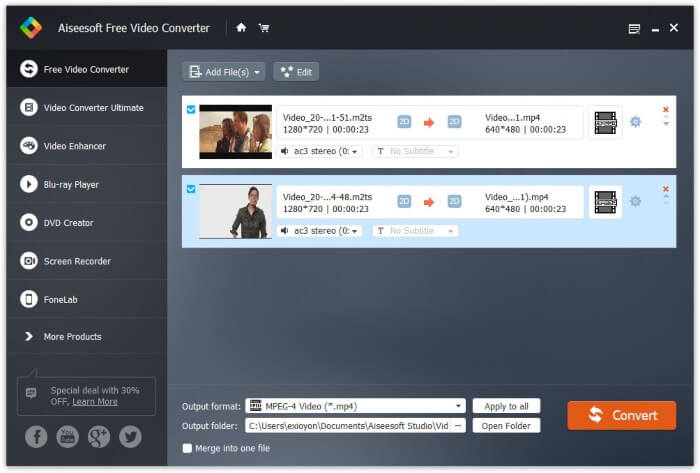
Step 1: Free download, install and launch FVC Free M2TS Converter. Drag and drop M2TS files into the main interface.

Step 2: Unfold the Output format list near the bottom. To convert M2TS to iPad on Windows, you can set the output format from the Apple iPad category directly.

Step 3: Click the gear Settings icon to adjust video encoder, frame rate and more. At last, click Convert to convert video from M2TS to iPad format.
कैसे मुक्त करने के लिए मैक पर iPad के लिए M2TS कन्वर्ट करने के लिए
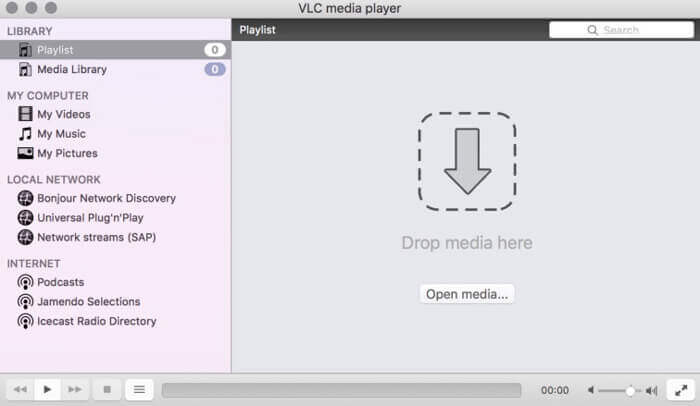
अगर आप M2TS वीडियो को मुफ्त में मैक पर iPad में बदलना चाहते हैं, तो VLC Media Player आपका अच्छा विकल्प हो सकता है। यह एक स्वतंत्र और खुला स्रोत M2TS प्लेयर और मल्टीप्लाइटर के लिए कनवर्टर है।
Step 1: Open VLC Media Player on Mac. Choose Convert/Save from the Media drop-down list.
Step 2: Click Add to import a M2TS file. Then select the file and click Open below to continue the process.
Step 3: Click Convert/Save at the bottom to move on to the next window.
Step 4: Choose iPad format from the Profile drop-down list. You can click the Tools icon besides to adjust video settings.
Step 5: Click Start to start converting M2TS file to iPad on Mac via VLC.
भाग 2: M2TS को iPad ऑनलाइन में कैसे बदलें
मोबाइल उपयोगकर्ताओं के लिए, iPad कनवर्टर के लिए एक ऑनलाइन M2TS का उपयोग करना भी एक अच्छा विकल्प है। आप डाउनलोड, इंस्टॉलेशन या पंजीकरण की आवश्यकता के बिना मुफ्त में iPad के लिए एक M2TS फ़ाइल परिवर्तित कर सकते हैं।
Step 1: Open an M2TS to iPad online converter, such as FVC Free Online Video Converter.

Step 2: Download FVC launcher through clicking Add Files to Convert and install.

Step 3: Find the M2TS file in your computer to convert. And don’t forget to choose the format.

Step 4: Click Start Converting to convert M2TS to iPad free online.
भाग 3: iPad के लिए M2TS परिवर्तित करने के अक्सर पूछे जाने वाले प्रश्न
क्या होता है कि iMovie में M2TS फ़ाइलों में अचानक कोई ऑडियो नहीं है?
M2TS मूल रूप से Apple उपकरणों द्वारा समर्थित नहीं है। समस्या को हल करने के लिए आपको M2TS को मैक फॉर्मेट में बदलना होगा।
मैं iPhone और iPad पर M2TS फाइलें कैसे खोलता हूं?
AVCHD M2TS iOS उपकरणों के साथ संगत नहीं है। यदि आप iPad पर M2TS वीडियो चलाने पर जोर देते हैं, तो आप वीडियो प्लेबैक प्राप्त करने के लिए VLC Media Player ऐप का उपयोग कर सकते हैं।
IPad के लिए कोई अच्छा वीडियो प्लेयर ऐप?
आप iPhone की तुलना में iPad में एक बड़ी डिस्प्ले स्क्रीन पा सकते हैं। तो वीडियो देखने का अनुभव भी बेहतर होगा। अनुशंसित वीडियो खिलाड़ियों में प्लेयरएक्सट्रीम मीडिया प्लेयर, केएमपीलेयर, वीएलसी, एयरप्लेयर और बहुत कुछ शामिल हैं। आप लचीले ढंग से वीडियो नियंत्रण प्राप्त करने के लिए कोई भी चुन सकते हैं।
That's all to convert M2TS to iPad with online and offline tools. Those M2TS video converters are free and safe to use. No matter how many M2TS files you want to convert to iPad compatible formats, you can get the fastest speed here.
-
 कैसे कम गुणवत्ता के बिना MP4 करने के लिए M2TS कन्वर्ट करने के लिए
 HD कैमकॉर्डर से वीडियो को आम MP4 में बदलना चाहते हैं? विंडोज और मैक पर एम 2 टी फ़ाइल को एमपी 4 में बदलने के 4 सरल और मुफ्त तरीके हैं।
-
 कैसे खो गुणवत्ता के बिना MKTS के लिए M2TS कन्वर्ट करने के लिए
 मूल गुणवत्ता को बनाए रखते हुए M2TS को MKV में बदलना चाहते हैं? यह पोस्ट आपको M2TS को MKV में दोषरहित रूप से बदलने के लिए स्वतंत्र और ऑनलाइन तरीके दिखाता है।
-
 एमटीएस और एम 2 टी के बीच अंतर क्या है
 MTS या M2TS फ़ाइल क्या है? M2TS और MTS में क्या अंतर है? मैं रिकॉर्ड किए गए एमटीएस या एम 2 टीएस फ़ाइल को कैसे देख सकता हूं? इस पोस्ट में सभी उत्तरों का पता लगाएं।
