


 वीडियो कनवर्टर अंतिम
 स्क्रीन अभिलेखी
 वीडियो मरम्मत
 सुरक्षित डाउनलोड
MTS को तुरंत M4V में बदलने के असाधारण तरीके
क्या आप अपने डिवाइस के लिए एक प्रभावी कनवर्टर चाहते हैं? तो, इस लेख में दी गई जानकारी पढ़कर आपको एक अच्छा अंदाज़ा हो जाएगा। हम आपको Mac और Windows का उपयोग करके MTS को M4V में बदलने के विभिन्न तरीके दिखाएंगे। साथ ही, आप एक ऑनलाइन टूल के बारे में भी जानेंगे, जिसकी मदद से आप और भी अधिक फ़ाइलें कनवर्ट कर सकते हैं।.

भाग 1: MTS और M4V के बीच अंतर
इन दो फ़ाइल स्वरूपों के बीच अंतर देखने के लिए, नीचे दी गई तालिका में विवरण देखें।
| एमटीएस | M4V | |
| दस्तावेज़ विस्तारण | एक उन्नत वीडियो कोडिंग हाई डेफिनिशन (AVCHD) वीडियो फ़ाइल का फ़ाइल नाम एक्सटेंशन MTS है। इसमें .mts फाइलनेम एक्सटेंशन है और इसमें JVC, Sony, Canon, और Sanyo सहित विशिष्ट कैमकॉर्डर मेक और मॉडल के साथ रिकॉर्ड किया गया HD MPEG वीडियो शामिल है। यह कई सॉफ्टवेयर पर खुल सकता है और 1080i x 720p तक एचडी वीडियो का समर्थन कर सकता है। | Apple Inc. ने M4V डिजिटल वीडियो कंटेनर प्रारूप बनाया। संरचना के संदर्भ में, यह प्रसिद्ध MP4 के साथ तुलनात्मक रूप से तुलनीय है, लेकिन M4V फाइलें DRM के साथ आ सकती हैं। आईट्यून्स स्टोर पर आजकल वीडियो के लिए मुख्य वीडियो प्रारूप एम4वी है, जो कई ऑडियो और वीडियो डेटा को एक साथ मल्टीप्लेक्स कर सकता है। |
| द्वारा विकसित | सोनी/पैनासोनिक | एप्पल इंक. |
| संबद्ध कार्यक्रम | VLC मीडिया प्लेयर ऐप्पल फाइनल कट प्रो एक्स रॉक्सियो क्रिएटर एनएक्सटी प्रो 7 | मीडिया प्लेयर क्लासिक KMPlayer VLC मीडिया प्लेयर ज़ूम प्लेयर |
| माइम प्रकार | वीडियो/mp2t | वीडियो/x-m4v |
भाग 2: मैक का उपयोग करके एकाधिक MTS को M4V में बदलने की उत्कृष्ट विधियाँ
यदि आप मैक का उपयोग करके MTS को M4V में बदलना चाहते हैं, तो आप FVC वीडियो कन्वर्टर अल्टीमेट को आज़मा सकते हैं। यह ऑफ़लाइन टूल फ़ाइलों को तुरंत रूपांतरित कर सकता है क्योंकि इसकी रूपांतरण गति 30 गुना तेज़ है। इसके अलावा, यह उपकरण बैच रूपांतरण प्रदान करता है, जो एक बार में कई फ़ाइल स्वरूपों को परिवर्तित करना संभव बनाता है। साथ ही, इस एप्लिकेशन में लगभग सभी वीडियो प्रारूपों को अपलोड किया जा सकता है क्योंकि यह MKV, MOV, MP4, FLV, AVI, SWF और अन्य सहित कई फ़ाइल स्वरूपों का समर्थन करता है। आप अपनी MTS वीडियो फ़ाइल को संपादित भी कर सकते हैं। यदि आपके पास एकाधिक MTS फ़ाइलें हैं और आप उन्हें संयोजित करना चाहते हैं, तो आप इस उपकरण पर भरोसा कर सकते हैं क्योंकि यह एक वीडियो विलय उपकरण प्रदान करता है। इस तरह, आप कई एमटीएस वीडियो को एक टुकड़े में मर्ज कर सकते हैं। साथ ही, यदि आप अपने MTS वीडियो का वॉल्यूम समायोजित करना चाहते हैं, तो आप वॉल्यूम बूस्टर टूल का उपयोग कर सकते हैं। इस ऑफलाइन एप्लिकेशन की मदद से आप अपने वीडियो का वॉल्यूम आसानी से बदल सकते हैं। वीडियो कन्वर्टर अल्टीमेट का उपयोग करके आप और अधिक सुविधाओं का आनंद ले सकते हैं।
विशेषताएँ
◆ यह 100+ वीडियो फ़ाइल स्वरूपों को परिवर्तित कर सकता है।
◆ कई मुफ्त थीम के साथ संगीत वीडियो निर्माता प्रदान करता है।
◆ फ्री टेम्प्लेट और फिल्टर के साथ कोलाज बनाना उपलब्ध है।
◆ यह एडिटिंग टूल्स प्रदान करता है, जैसे वीडियो स्पीड कंट्रोलर, कंप्रेसर और क्रॉपर।.
◆ यह वीडियो से वॉटरमार्क हटा सकता है।
अपने मैक पर FVC वीडियो कन्वर्टर अल्टीमेट का उपयोग करके अपनी MTS वीडियो फ़ाइल को M4V प्रारूप में बदलने के लिए नीचे दिए गए मूल चरणों का पालन करें।
चरण 1: अपने Mac का उपयोग करते हुए, नीचे दिए गए Download बटन पर क्लिक करके FVC Video Converter Ultimate डाउनलोड करें। फिर एप्लिकेशन लॉन्च करें।.
फ्री डाउनलोडWindows 7 या बाद के संस्करण के लिएसुरक्षित डाउनलोड
फ्री डाउनलोडMacOS 10.7 या बाद के संस्करण के लिएसुरक्षित डाउनलोड
चरण 2: इंटरफ़ेस के बीच में स्थित Plus आइकन पर क्लिक करके अपनी MTS वीडियो फ़ाइल जोड़ें। आप फ़ाइल को सीधे बॉक्स में ड्रैग और ड्रॉप भी कर सकते हैं।.
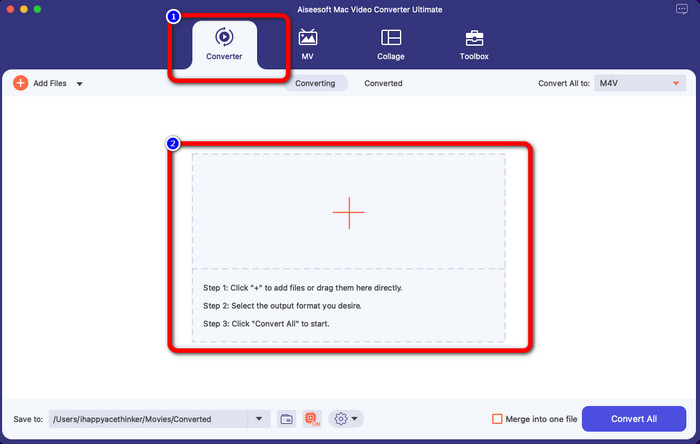
चरण 3: अगले चरण के लिए, आपको इंटरफ़ेस के ऊपरी दाएँ भाग में Convert All to बटन दिखाई देगा। फ़ॉर्मेट विकल्प देखने के लिए इस पर क्लिक करें, फिर M4V फ़ाइल फ़ॉर्मेट चुनें। एक से अधिक MTS फ़ाइलें जोड़ने के लिए, इंटरफ़ेस के ऊपरी बाएँ भाग में स्थित Add Files बटन दबाएँ।.
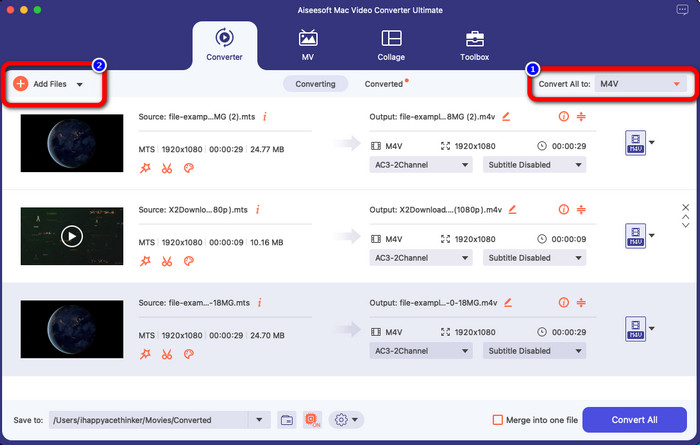
चरण 4: सभी MTS फ़ाइलों को M4V फ़ॉर्मेट में कनवर्ट करने के बाद, Convert All बटन पर क्लिक करें और अपनी अंतिम आउटपुट फ़ाइल को मनचाही लोकेशन पर सेव करें।.
भाग 3: विंडोज पर मल्टीपल एमटीएस फाइलों को मुफ्त में एम4वी में कैसे कन्वर्ट करें
इस भाग में, आप जानेंगे कि Windows पर कई MTS फ़ाइलों को एक ही M4V में कैसे कनवर्ट करें। MTS फ़ाइलों को कनवर्ट करने के लिए, आप FVC Free TS Converter का उपयोग कर सकते हैं। यह आपके वीडियो फ़ाइलों को सामान्य कनवर्ज़न स्पीड से 10 गुना तेज़ कनवर्ट कर सकता है। यह बैच कनवर्ज़न प्रदान करता है, जिसके ज़रिए आप कई फ़ाइलों को एक ही बार में कनवर्ट कर सकते हैं। इस तरह, आपको एक–एक करके फ़ाइलें कनवर्ट करते हुए बोर नहीं होना पड़ेगा। इसके अलावा, इसका इंटरफ़ेस सहज और सरल तरीक़ों वाला है, जो उपयोगकर्ताओं के लिए और भी उपयुक्त बनता है। यदि आप Windows पर FVC Free TS Converter का उपयोग करके कई MTS फ़ाइलों को M4V फ़ॉर्मेट में कनवर्ट करना चाहते हैं, तो नीचे दिए गए आसान चरणों का पालन करें।.
विशेषताएँ
AVI, MOV, MPEG, MP4, DIVX, XVID, आदि जैसे वीडियो फ़ाइल स्वरूपों को परिवर्तित करें।
◆ एक वीडियो एन्हांसर प्रदान करता है।
◆ स्क्रीन रिकॉर्डिंग में सक्षम।
◆ कोई भी ब्लू-रे डिस्क चला सकते हैं।
◆ बैच रूपांतरण प्रदान करता है।
चरण 1: अपने Windows पर नीचे दिए गए Download बटन पर क्लिक करके FVC Free TS Converter डाउनलोड करें। इंस्टॉलेशन प्रक्रिया के बाद एप्लिकेशन लॉन्च करें।.
मुफ्त डाउनलोड (Windows 7 या उससे बाद के संस्करण के लिए) सुरक्षित डाउनलोड
मुफ्त डाउनलोड (MacOS 10.7 या उससे बाद के संस्करण के लिए) सुरक्षित डाउनलोड
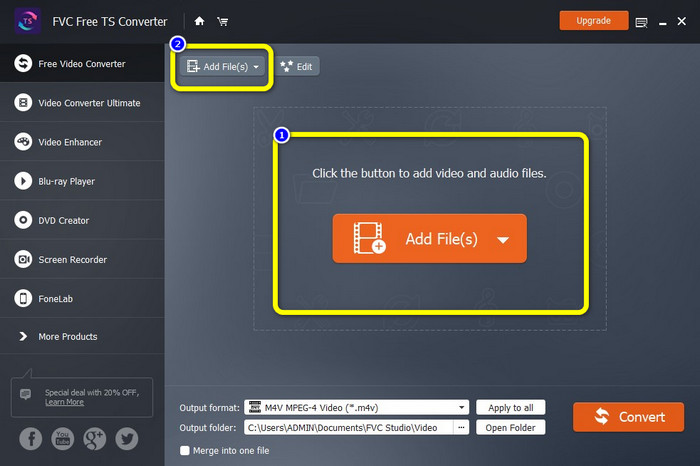
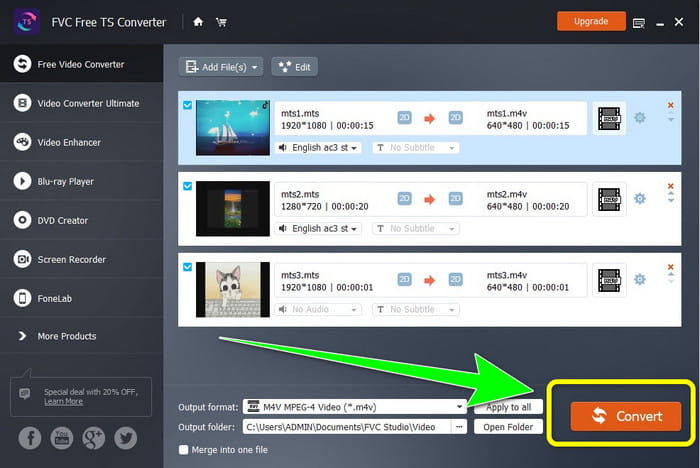
चरण 2: एप्लिकेशन लॉन्च करने के बाद, MTS फ़ाइलें अपलोड करने के लिए बीच में स्थित Add Files बटन दबाएँ। आप इंटरफ़ेस के ऊपरी भाग में स्थित दूसरे Add Files बटन पर क्लिक करके और अधिक MTS फ़ाइलें भी जोड़ सकते हैं, जिन्हें आप कनवर्ट करना चाहते हैं।.
चरण 3: इंटरफ़ेस के दाएँ भाग में फ़ॉर्मेट विकल्पों पर क्लिक करें। फिर अपने आउटपुट फ़ॉर्मेट के रूप में M4V फ़ाइल फ़ॉर्मेट चुनें। शेष MTS फ़ाइलों के लिए भी यही प्रक्रिया दोहराएँ।.
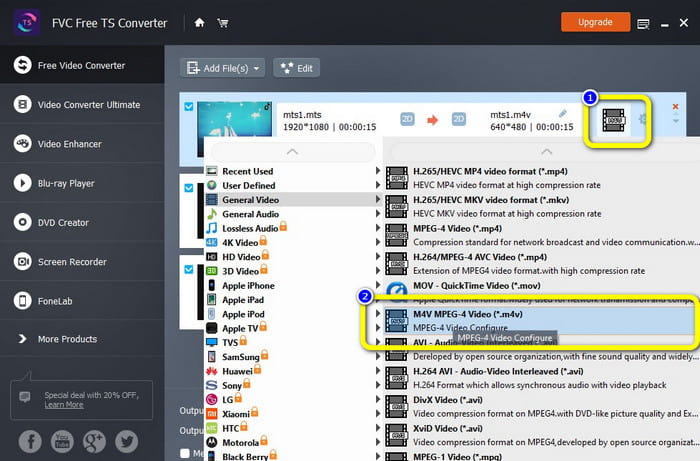
चरण 4: कई MTS फ़ाइलों को M4V फ़ॉर्मेट में कनवर्ट करने के लिए Convert बटन दबाएँ।.
भाग 4: ऑनलाइन आवेदन का उपयोग करके MTS को M4V में बदलने के सर्वोत्तम तरीके
जब आप किसी ऑनलाइन टूल का उपयोग करके MTS को M4V में कनवर्ट करते हैं, तो आपके लिए सबसे अच्छा कनवर्टर है FVC Free Video Converter Online। इस टूल की मदद से आप आसानी से अपनी MTS फ़ाइल को M4V में कनवर्ट कर सकते हैं। फ़ाइलों को कनवर्ट करने में केवल तीन चरण लगते हैं। साथ ही, यह ऑनलाइन टूल पूरी तरह से 100% मुफ़्त है। तो, देर किस बात की, चलिए आपकी MTS को M4V फ़ाइल फ़ॉर्मेट में कनवर्ट करते हैं। हमारे द्वारा दिए गए चरणों का पालन करें!
विशेषताएँ
MP4, FLV, WMA, MOV, MTS, M4V, आदि जैसी कई फाइलों को कनवर्ट करें।
◆ बैच रूपांतरण की अनुमति देता है।
◆ मैक और विंडोज दोनों पर पहुंच योग्य।
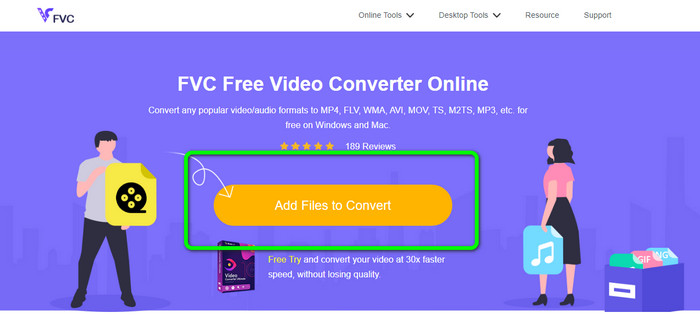
चरण 1: FVC Free Video Converter Online वेबसाइट पर जाएँ। फिर अपनी MTS वीडियो अपलोड करने के लिए Add Files to Convert बटन पर क्लिक करें।.
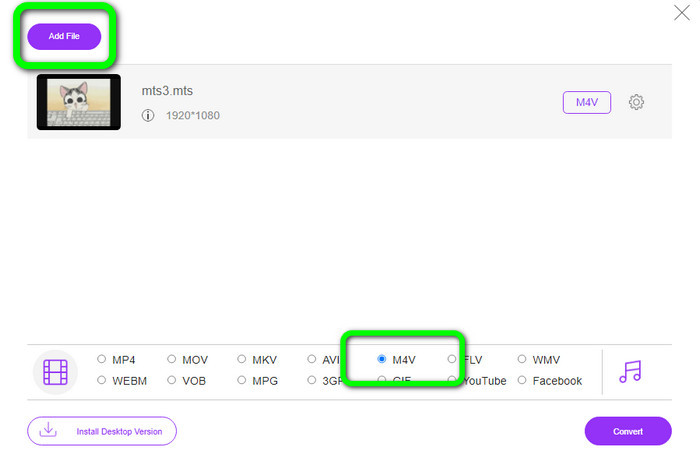
चरण 2: अगला चरण है इंटरफ़ेस के निचले भाग में फ़ॉर्मेट विकल्पों में से M4V फ़ॉर्मेट चुनना। आप कई फ़ाइलों को कनवर्ट करने के लिए Add File बटन पर भी क्लिक कर सकते हैं।.
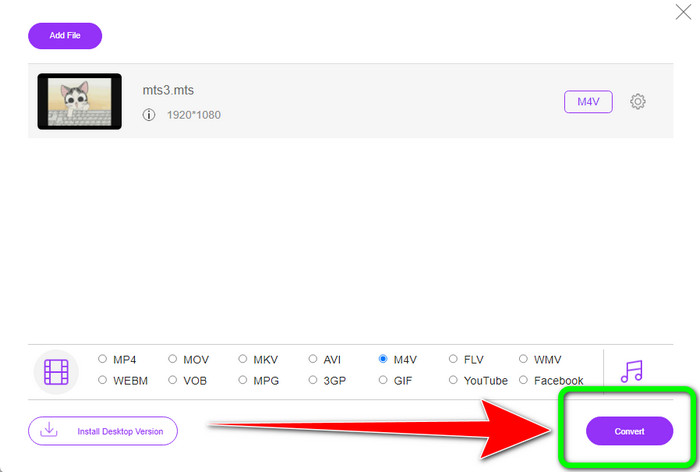
चरण 3: अपनी मनचाही फ़ॉर्मेट चुनने के बाद, आप Convert बटन पर क्लिक करके अपनी वीडियो को M4V फ़ाइल फ़ॉर्मेट में सेव कर सकते हैं।.
भाग 5: एमटीएस को एम4वी में बदलने के बारे में अक्सर पूछे जाने वाले प्रश्न
1. क्या एमटीएस एक अच्छा प्रारूप है?
हाँ। 720p और 1080i HD वीडियो कोडेक MTS, एक उच्च-परिभाषा MPEG, और H.264 ट्रांसपोर्ट स्ट्रीम वीडियो प्रारूप द्वारा समर्थित हैं। लोग अक्सर एमटीएस फाइलों को एवीसीएचडी के रूप में संदर्भित करते हैं, जिसे सोनी और पैनासोनिक द्वारा संयुक्त रूप से बनाया गया था और 2006 में उच्च गुणवत्ता वाले प्रारूप में जारी किया गया था।
2. मैं MTS को MP4 में कैसे बदल सकता हूँ?
आप ऊपर बताए गए एप्लिकेशन का उपयोग कर सकते हैं। ये कनवर्टर MTS को MP4 में कनवर्ट करने और अन्य फ़ाइल फ़ॉर्मेट में बदलने के लिए प्रभावी और उपयोगी हैं।.
3. आप M4V का उपयोग क्यों करेंगे?
M4V फ़ाइलों में पायरेसी को रोकने के लिए सॉफ्ट उपशीर्षक और DRM सुरक्षा हो सकती है और उपभोक्ताओं के लिए उपकरणों के बीच फ़ाइलों को वितरित करना कठिन बना सकती है।
निष्कर्ष
ऊपर बताए गए ये तीनों एप्लिकेशन आपके डिवाइस पर उपयोग करने के लिए बेहतरीन कनवर्टर हैं। यदि आप Windows उपयोगकर्ता हैं, तो आप FVC Video Converter Ultimate का उपयोग कर सकते हैं। यदि आप Mac का उपयोग कर रहे हैं, तो आप FVC Free TS Converter आज़मा सकते हैं। अंत में, यदि आप ऑनलाइन एप्लिकेशन पसंद करते हैं, तो आप FVC Free Video Converter Online का उपयोग कर सकते हैं। ये कनवर्टर MTS को M4V में बड़े ही सुगमता से कनवर्ट कर सकते हैं।.
-
 MTS VS M2TS - MTS और M2TS के बीच अंतर
 MTS या M2TS फ़ाइल क्या है? M2TS और MTS में क्या अंतर है? मैं कैमकॉर्डर द्वारा रिकॉर्ड की गई MTS या M2TS फ़ाइल को कैसे देख सकता हूँ? इस पोस्ट में सभी उत्तर खोजें
-
 विंडोज / मैक / एंड्रॉइड / आईओएस के लिए शीर्ष 5 एम 4 वी प्लेयर आपको पता होना चाहिए
 जब आप अपने M4V वीडियो को QuickTime प्लेयर पर नहीं चला सकते हैं, तो आपको इस लेख से Windows, Mac, Android और iOS के लिए 5 उत्कृष्ट M4V प्लेयर से अधिक सीखना चाहिए।
-
 [हल] एमटीएस को मूल गुणवत्ता में एमकेवी में कैसे बदलें
 क्या आप सोच रहे हैं कि आप एमटीएस को मुफ्त में एमकेवी में कैसे बदल सकते हैं? इस लेख में, हमने एमकेवी कन्वर्टर्स के लिए सर्वश्रेष्ठ मुफ्त एमटीएस को सूचीबद्ध किया है
