


 वीडियो कनवर्टर अंतिम
 स्क्रीन अभिलेखी
 वीडियो मरम्मत
 सुरक्षित डाउनलोड
MTS को MOV में बदलने के लिए टॉप 4 फ्री तरीके
मैंने अपने Sony कैमकॉर्डर के साथ कुछ वीडियो कैप्चर किए हैं जो एमटीएस फ़ाइलों का निर्यात करते हैं। मुझे लगता है कि MTS को मेरे मीडिया प्लेयर और iMovie द्वारा समर्थित नहीं किया जा सकता है। मैं एक मैक का उपयोग कर रहा हूं और इन कैप्चर किए गए एमटीएस वीडियो को संपादित करना चाहता हूं। कोई मदद? क्या एमटीएस को एमओवी में बदलने का कोई सरल तरीका है, विशेष रूप से मुफ्त तरीका?
MTS एक हाई-डेफिनिशन वीडियो फ़ॉर्मेट है, जिसका Sony और Panasonic कैमकोर्डर में व्यापक रूप से उपयोग किया जाता है। यह AVCHD (Advanced Video Coding High Definition) की फ़ाइल एक्सटेंशन के रूप में जाना जाता है। जब आप अपनी डिजिटल कैमरा से वीडियो रिकॉर्ड करते हैं, तो आपको अधिकतर MTS फ़ाइल ही मिलती है। इसमें 720p/1080i HD होता है और यह उच्चतर वीडियो क्वालिटी प्रदान कर सकता है। लेकिन, MTS इतना लोकप्रिय फ़ॉर्मेट नहीं है जिसे ज़्यादातर मीडिया प्लेयर या एडिटर सपोर्ट करते हों।.

जब आपको iMovie में MTS को एडिट करने या किसी मीडिया प्लेयर में चलाने की ज़रूरत हो, तो आपको बेहतर संगतता के लिए MTS को MOV या MP4 में बदलना चाहिए। इस पोस्ट में हम आपको 4 मुफ्त MTS कन्वर्टर दिखाएँगे जो आपको आसानी से MTS को MOV में कन्वर्ट करने में मदद करेंगे।.
भाग 1. एमटीएस को गुणवत्ता हानि के बिना एमटीएस में परिवर्तित करने का सबसे अच्छा मुफ्त तरीका
इंटरनेट पर बहुत सारे MTS कन्वर्टिंग टूल उपलब्ध हैं जो आपको उच्च गुणवत्ता के साथ MTS को MOV में बदलने में मदद कर सकते हैं। यहाँ पहले भाग में, हम आपके लिए सबसे अच्छा मुफ्त MTS से MOV कन्वर्टिंग सॉफ़्टवेयर, Free MTS Converter की सिफ़ारिश करना चाहते हैं।.
यह विशेष रूप से सभी प्रकार के रूपांतरणों से निपटने के लिए डिज़ाइन किया गया है। यह MP4, MOV, MKV, MTS, AVI, FLV, WMV, MP3, AAC, FLAC, और अधिक जैसे लगभग सभी वीडियो और ऑडियो प्रारूपों के साथ संगत है। आप इसे मुफ्त डाउनलोड कर सकते हैं और एमटीएस को एमओवी मुक्त करने के लिए निम्नलिखित गाइड ले सकते हैं।
फ्री डाउनलोडWindows 7 या बाद के वर्ज़न के लिएसुरक्षित डाउनलोड
फ्री डाउनलोडMacOS 10.7 या बाद के वर्ज़न के लिएसुरक्षित डाउनलोड
चरण 1. सबसे पहले, आपको अपने कंप्यूटर पर MOV कनवर्टर करने के लिए इस मुफ्त एमटीएस को स्थापित और चलाने की आवश्यकता है। यह आपको डाउनलोड करने के लिए विंडोज और मैक दोनों संस्करण प्रदान करता है।
स्टेप 2. जिस MTS फ़ाइल या फ़ाइलों को आप कन्वर्ट करना चाहते हैं, उन्हें इम्पोर्ट करने के लिए Add File(s) पर क्लिक करें। आप एक बार में एक या एक से अधिक MTS फ़ाइलें कन्वर्ट कर सकते हैं।.
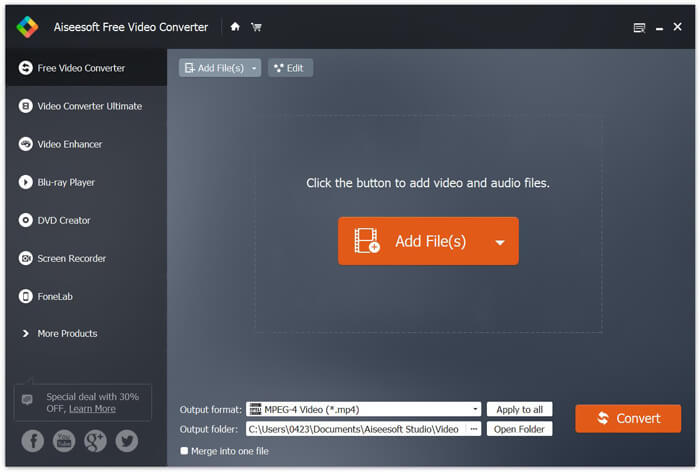
स्टेप 3. Output format की सूची में से अपने लक्ष्य फ़ॉर्मेट के रूप में MOV चुनें। फिर MTS से MOV में कन्वर्ज़न शुरू करने के लिए Convert बटन पर क्लिक करें।.
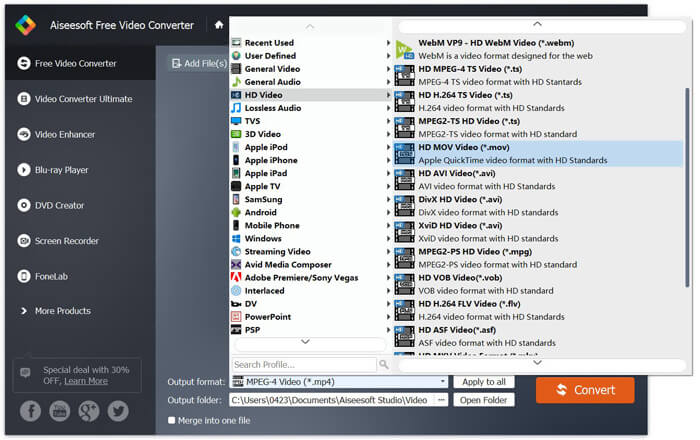
जैसा कि आप ऊपर से देख सकते हैं, यह मुफ़्त एमटीएस से एमओवी कनवर्टर भी कुछ बुनियादी संपादन सुविधाओं को वहन करता है। अंतिम रूपांतरित करने से पहले, आप अपनी एमटीएस फ़ाइल को कस्टम करने के लिए उनका उपयोग कर सकते हैं। ऑनलाइन कन्वर्टर्स के साथ तुलना में, यह फ्री वीडियो कन्वर्टर आपको तेजी से परिवर्तित गति और उच्च आउटपुट वीडियो की गुणवत्ता प्रदान कर सकता है। इसलिए हम इसे अपनी पहली सिफारिश बनाते हैं।
भाग 2। मुफ्त ऑनलाइन कन्वर्टर आसानी से वीडियो परिवर्तित करने में आपकी सहायता करता है
जब आप Google पर यह सर्च करते हैं कि MTS को MOV में कैसे बदलें, तो आपको कई मुफ्त ऑनलाइन कन्वर्टर के परिणाम मिलेंगे। यहाँ हम आपको एक आसान-से-उपयोग होने वाला मुफ्त ऑनलाइन MTS से MOV कन्वर्टर, FVC Free Online Video Converter से परिचित करा रहे हैं। बिना कोई सॉफ़्टवेयर इंस्टॉल किए, आप किसी भी लोकप्रिय वीडियो फ़ॉर्मेट को मुफ्त में MP4, AVI, MOV आदि में कन्वर्ट कर सकते हैं। और आपको किसी चीज़ की चिंता करने की ज़रूरत नहीं है क्योंकि कन्वर्ज़न सुरक्षित और स्थिर है। कन्वर्ज़न प्रक्रिया के दौरान कोई डेटा नहीं खोएगा।.
स्टेप 1. ऊपर दिए गए लिंक को खोलें और Add Files to Convert बटन पर क्लिक करें। कन्वर्ट करने से पहले, कृपया FVC launcher डाउनलोड करके इंस्टॉल करें। इसमें केवल कुछ सेकंड लगते हैं।.

स्टेप 2. लॉन्चर को इंस्टॉल और अपडेट करने के बाद, बस वह वीडियो चुनें जिसे आप कन्वर्ट करना चाहते हैं। फिर ज़रूरी फ़ॉर्मेट चुनें और Convert दबाएँ।.

स्टेप 3. ऊपर दिए गए लिंक को खोलें और Add Files to Convert बटन पर क्लिक करें। कन्वर्ट करने से पहले, कृपया FVC launcher डाउनलोड करके इंस्टॉल करें। इसमें केवल कुछ सेकंड लगते हैं।.
भाग 3. ZAMZAR के साथ MOV मुफ्त ऑनलाइन में एमटीएस कन्वर्ट करने के लिए कैसे
ZAMZAR सबसे लोकप्रिय ऑनलाइन वीडियो परिवर्तित सॉफ्टवेयर में से एक है जो आपको MTS को MOV में बदलने में मुफ्त मदद कर सकता है। यह संक्षिप्त इंटरफ़ेस और सरल परिवर्तित करने की सुविधा के साथ बनाया गया है। एमटीएस वीडियो रूपांतरण करने के लिए आप निम्नलिखित गाइड ले सकते हैं।
चरण 1. अपना ब्राउज़र खोलें और ZAMZAR की आधिकारिक साइट पर नेविगेट करें। यहां आप सीधे https://www.zamzar.com/convert/mts-to-mov/ पेज पर जा सकते हैं। यहां आपको अन्य सेटिंग्स किए बिना एमटीएस को सीधे एमओवी में बदलने की अनुमति है।
चरण 2। जिस एमटीएस फ़ाइल को आप कनवर्ट करना चाहते हैं उसे लोड करने के लिए फ़ाइलें जोड़ें बटन पर क्लिक करें। आप एमटीएस फ़ाइल अपलोड करने के लिए ड्रैग और ड्रॉप कर सकते हैं। एक बात जो आपको पता होनी चाहिए, वह यह है कि यह मुफ्त ऑनलाइन एमटीएस कन्वर्टर आपको केवल एमटीएस फाइल को 150 एमबी से कम में बदलने की अनुमति देता है।
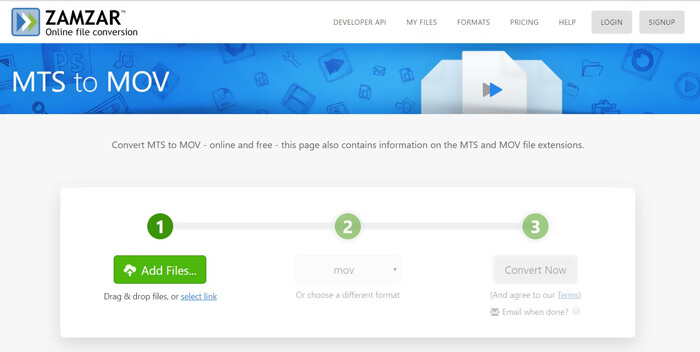
स्टेप 3. अपलोड करने के बाद, MTS को MOV में मुफ्त ऑनलाइन कन्वर्ट करना शुरू करने के लिए आप Convert Now बटन पर क्लिक कर सकते हैं।.
भाग 4. एमओटी को एमओवी को फ्रीकॉनवर्ट के साथ कन्वर्ट करने का ऑनलाइन तरीका
FreeConvert एक और लोकप्रिय ऑनलाइन वीडियो कन्वर्टर है जो MTS से MOV वीडियो कन्वर्ज़न को मुफ्त में करने की सुविधा देता है। यह मुफ्त MTS से MOV कन्वर्टर MTS और M2TS को उच्च स्तर पर सपोर्ट करता है। यह आपको 1GB तक की MTS फ़ाइल अपलोड करने की अनुमति देता है। इसके अलावा, यह एक बार में 20 MTS फ़ाइलों तक को कन्वर्ट करने के लिए अपलोड करने की सुविधा भी देता है। अब आप नीचे दिए गए चरणों का पालन कर के अपनी MTS फ़ाइलों को MOV में बदल सकते हैं।.
स्टेप 1. सबसे पहले, आपको अपने ब्राउज़र पर FreeConvert.com पर जाना होगा। यहाँ आप सीधे कन्वर्ज़न के लिए https://www.freeconvert.com/mts-to-mov पर जा सकते हैं।.
स्टेप 2. जिस MTS फ़ाइल को आप MOV में कन्वर्ट करना चाहते हैं, उसे अपलोड करने के लिए बड़े नीले रंग वाले Choose MTS Files बटन पर क्लिक करें। जैसा कि ऊपर उल्लेख किया गया है, यहाँ आप कन्वर्ज़न के लिए एक या अधिक MTS फ़ाइलों को अपलोड कर सकते हैं।.
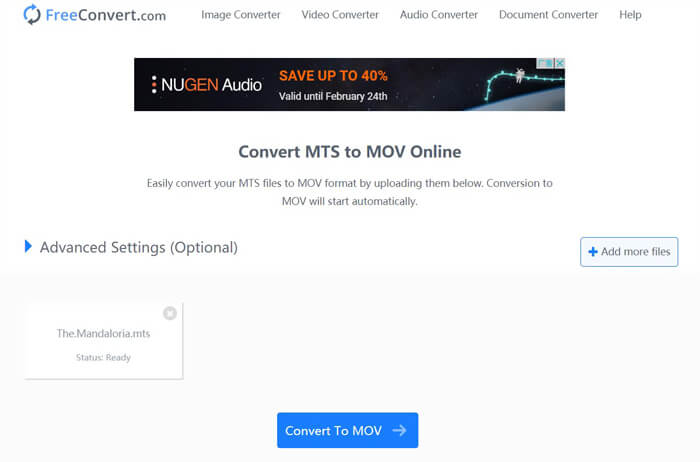
स्टेप 3. अपलोडिंग और कन्वर्टिंग प्रक्रिया शुरू करने के लिए Convert To MOV बटन पर क्लिक करें। इसके बाद, कन्वर्ट की गई फ़ाइल को अपने कंप्यूटर पर सेव करने के लिए आपको Download बटन पर क्लिक करना होगा।.
जब आप MTS को MOV में कन्वर्ट करने के लिए मुफ्त ऑनलाइन कन्वर्टर चुनते हैं, तो अपलोडिंग और कन्वर्टिंग में अपेक्षाकृत ज़्यादा समय लग सकता है। इसलिए ऑनलाइन कन्वर्टिंग सॉफ़्टवेयर के साथ बेहतर होगा कि आप छोटे आकार की MTS फ़ाइल को ही कन्वर्ट करें। अगर आप किसी बड़ी MTS या M2TS वीडियो को कन्वर्ट करना चाहते हैं, तो आपको अत्यधिक अनुशंसित Free Video Converter पर निर्भर होना चाहिए।.
-
 विंडोज / मैक पर AVI / MKV / MOV / WMV में टीएस कन्वर्ट करने के 6 आसान तरीके
 TS फ़ाइलों को AVI / MKV / MOV / WMV में जल्दी से परिवर्तित करना चाहते हैं? यह लेख पूरी गाइड के साथ ऑनलाइन और ऑफलाइन वीडियो कन्वर्टर्स दिखाता है। हो सकता है कि आपको यहां बेस्ट टीएस कन्वर्टर मिल जाए।
-
 MOV VS MP4 - कौन सा बेहतर है
 MOV VS MP4, कौन सा बेहतर है? यह पोस्ट MP4 और MOV के बीच के अंतर को बताता है, ताकि आप अपनी वीडियो फ़ाइलों के लिए उपयोग करने के लिए बेहतर विकल्प पा सकें।
-
 मुफ्त के लिए MOV (क्विकटाइम) फाइलें कैसे जुड़ें
 शुरुआती लोगों के लिए कई MOV वीडियो क्लिप को एक साथ जोड़ना मुश्किल हो सकता है। तो, क्या MOV फ़ाइलों को संयोजित करने का एक सरल और तेज़ तरीका है? यदि है, तो इसका उपयोग कैसे करें? यह पोस्ट आपको इन उत्तरों को प्राप्त करने में मदद करेगी।
