


 वीडियो कनवर्टर अंतिम
 स्क्रीन अभिलेखी
 वीडियो मरम्मत
 सुरक्षित डाउनलोड
इन शानदार उपकरणों के साथ पेशेवर रूप से शूटप्रूफ वॉटरमार्क हटाएं
Shootproof एक क्लाइंट फोटो गैलरी और पोर्टफोलियो वेबसाइट है। अगर आप ऑनलाइन बेहतरीन तस्वीरें खोज रहे हैं, तो Shootproof इसमें आपकी मदद कर सकता है। यह वेबसाइट उन विक्रेताओं द्वारा बनाई गई ढेर‑सारी सुन्दर तस्वीरें प्रदान करती है। Shootproof फ़ोटोग्राफ़रों के लिए एक प्रसिद्ध गैलरी‑शेयरिंग बिज़नेस है। इसके अलावा, यह फ़ोटोग्राफ़रों को अपनी तस्वीरों के लिए एक ऑनलाइन स्टोर बनाने की सुविधा भी देता है। लेकिन, कई विक्रेता अपनी तस्वीरों पर वॉटरमार्क जोड़ते हैं ताकि दूसरे लोग आसानी से उन तस्वीरों को अपना न बना सकें। इसलिए, यदि आप उन यूज़र्स में से एक हैं जो यह जानना चाहते हैं कि Shootproof वॉटरमार्क कैसे हटाएँ, तो इस पोस्ट को आगे पढ़ते रहें।.

भाग 1। शूटप्रूफ वॉटरमार्क को आसानी से हटाने के तरीके पर 2 तरीके
यदि आपके पास उपयुक्त वॉटरमार्क रिमूवर है तो शूटप्रूफ वॉटरमार्क हटाना कठिन नहीं है। और आपको सबसे अच्छा वॉटरमार्क रिमूवर चुनने में मदद करने के लिए, हमने ऑनलाइन सबसे अधिक उपयोग किए जाने वाले फ्री वॉटरमार्क रिमूवर की खोज की। इस टूल को जानने के लिए इस भाग को पूरा पढ़ें।
FVC फ्री वॉटरमार्क रिमूवर
FVC Free Watermark Remover प्रसिद्ध ऑनलाइन वॉटरमार्क हटाने वाले टूल्स में से एक है। यह ऑनलाइन एप्लिकेशन इस्तेमाल के लिए मुफ़्त और सुरक्षित है। इसके अलावा, यह सभी वेब ब्राउज़र, जैसे Google, Firefox और Safari पर उपलब्ध है। यह PNG, JPEG, JPG, BMP आदि जैसे सामान्य इमेज फ़ॉर्मैट को सपोर्ट करता है। और इसके वॉटरमार्क रिमूवर फ़ीचर में, आप अपनी इमेज से वॉटरमार्क हटाने के लिए अलग‑अलग सिलेक्शन टूल्स चुन सकते हैं।.
इसके अलावा, कई शुरुआती लोग इस वॉटरमार्क रिमूवर का उपयोग कर सकते हैं क्योंकि इसका उपयोग करना आसान है। साथ ही, जब आप अपनी छवि निर्यात करते हैं, तो उसका मूल फ़ाइल स्वरूप होगा। इस टूल के लिए आपको साइन इन या रजिस्टर करने की भी आवश्यकता नहीं है।
FVC फ्री वॉटरमार्क रिमूवर का उपयोग करके शूटप्रूफ वॉटरमार्क कैसे निकालें:
चरण 1. सबसे पहले, अपना ब्राउज़र खोलें और सर्च बॉक्स में FVC Free Watermark Remover खोजें।.
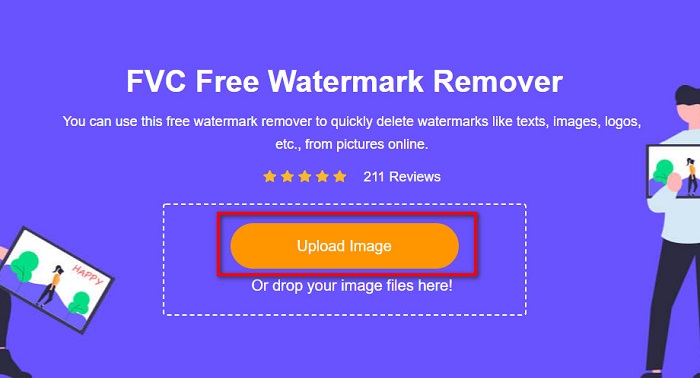
चरण 2. फिर, मुख्य यूज़र इंटरफ़ेस पर Upload Image बटन पर क्लिक करें और वह इमेज अपलोड करें जिससे आप वॉटरमार्क हटाना चाहते हैं।.
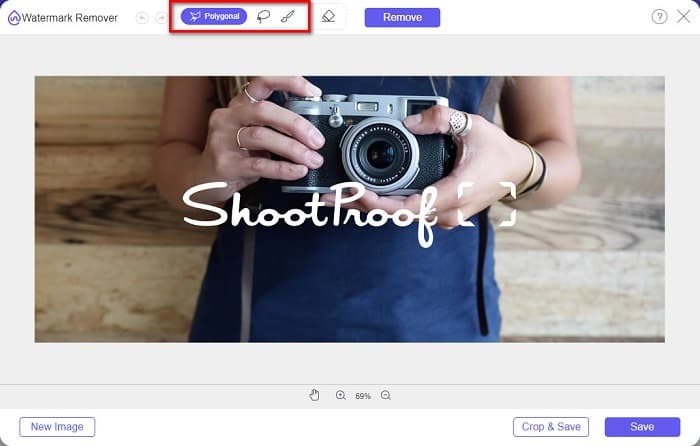
चरण 3. अगला, वह सिलेक्शन टूल चुनें जिसका उपयोग आप अपनी इमेज से वॉटरमार्क हटाने के लिए करना चाहते हैं। आप Polygonal, Lasso और Brush में से चुन सकते हैं।.
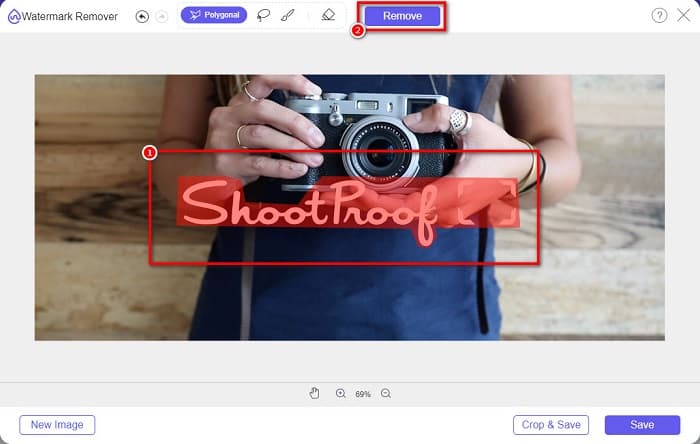
चरण 4. फिर, अपनी इमेज पर वॉटरमार्क वाले क्षेत्र को ट्रेस करें। उसके बाद, चयन हो जाने पर Remove बटन पर क्लिक करें। आप देखेंगे कि वॉटरमार्क अब गायब हो गया है।.
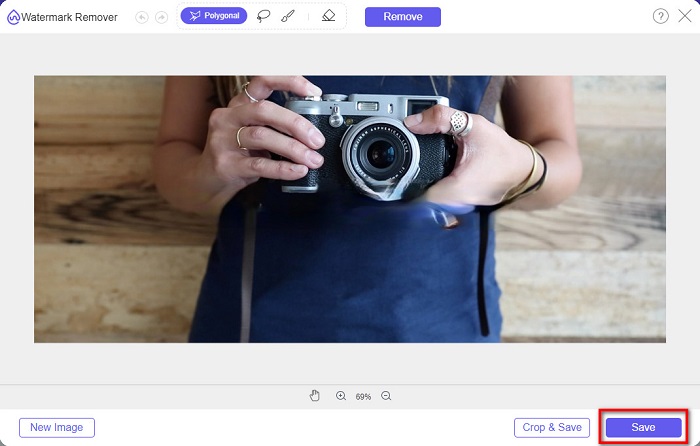
चरण 5. अंत में, Save बटन पर क्लिक करके अपना आउटपुट अपने डिवाइस पर सेव करें। बस इतना ही! इन आसान चरणों के साथ, आप Shootproof की वॉटरमार्क‑रहित इमेज प्राप्त कर सकते हैं।.
एपॉवरसॉफ्ट ऑनलाइन वॉटरमार्क रिमूवर
Apowersoft Online Watermark Remover आपकी इमेज से किसी भी प्रकार का वॉटरमार्क हटाने के लिए एक प्रसिद्ध ऑनलाइन ऐप है। यह एक उपयोगकर्ता‑अनुकूल ऑनलाइन एप्लिकेशन है क्योंकि इसका इंटरफ़ेस सहज और आसान है। इसके अतिरिक्त, यह PNG और JPG जैसे अधिकांश सामान्य इमेज फ़ॉर्मैट को सपोर्ट करता है। आपको अपनी फ़ाइलों की सुरक्षा को लेकर भी चिंतित होने की ज़रूरत नहीं है क्योंकि यह ऑनलाइन टूल इस्तेमाल के लिए सुरक्षित है। इसमें वीडियो से वॉटरमार्क हटाने की सुविधा भी मौजूद है। हालाँकि, अगर आपका इंटरनेट कनेक्शन धीमा है, तो अपलोड और एक्सपोर्ट की प्रक्रिया भी धीमी हो सकती है।.
Apowersoft ऑनलाइन वॉटरमार्क रिमूवर का उपयोग करके शूटप्रूफ वॉटरमार्क कैसे निकालें:
चरण 1. अपने ब्राउज़र पर Apowersoft Online Watermark Remover सर्च करें, फिर उनकी मुख्य वेबसाइट पर जाएँ। और मुख्य इंटरफ़ेस पर Remove Watermark From Image विकल्प पर क्लिक करें।.
चरण 2. फिर, अगली इंटरफ़ेस पर आपको एक watermark remover box दिखाई देगा और उसे वॉटरमार्क वाले क्षेत्र पर रखें।.
चरण 3. अपनी इमेज से वॉटरमार्क हटाने के लिए Erase बटन पर क्लिक करें।.
भाग 2. शूटप्रूफ वॉटरमार्क फ़ीचर का उपयोग करने के बारे में सुझाव
शूटप्रूफ की वॉटरमार्क सुविधा का उपयोग करके, आप अपनी छवि पर वॉटरमार्क जोड़ और हटा सकते हैं। यदि आप अन्य उपयोगकर्ताओं को अपनी तस्वीर के मालिक होने से बचाना चाहते हैं, तो आप अपनी छवि पर टेक्स्ट जोड़ सकते हैं जो वॉटरमार्क के रूप में कार्य करता है।
शूटप्रूफ पर वॉटरमार्क कैसे जोड़ें:
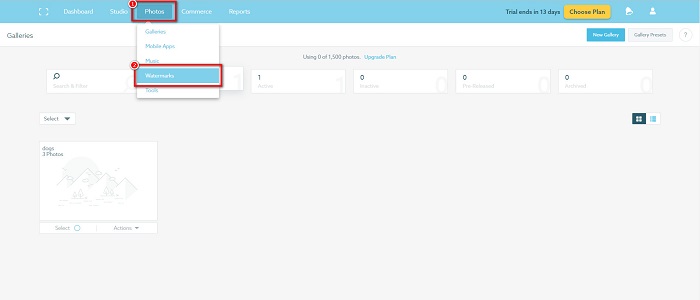
चरण 1. Photos पर जाएँ, फिर Watermarks विकल्प पर क्लिक करें।.
चरण 2. फिर, text या image वॉटरमार्क में से चुनें।.
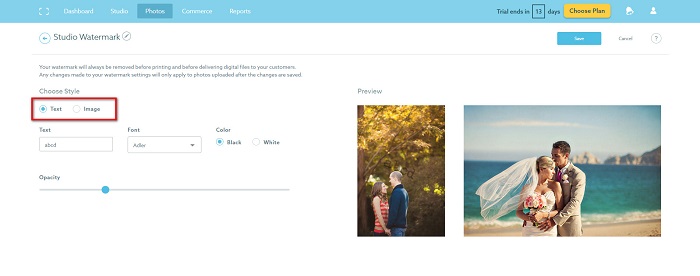
यदि आप छवि वॉटरमार्क का उपयोग करना चाहते हैं, तो यह अनुशंसा की जाती है कि आपको पारदर्शी पृष्ठभूमि वाली एक उच्च-रिज़ॉल्यूशन पीएनजी फ़ाइल अपलोड करनी होगी। आप जेपीजी फाइलों का भी उपयोग कर सकते हैं।
चरण 3. अगला, Watermark Settings समायोजित करें। Watermark Settings में, आप अपनी फ़ोटो पर वॉटरमार्क की पोज़िशन चुन सकते हैं। आप वॉटरमार्क के आकार और अपारदर्शिता (opacity) को भी समायोजित कर सकते हैं।.
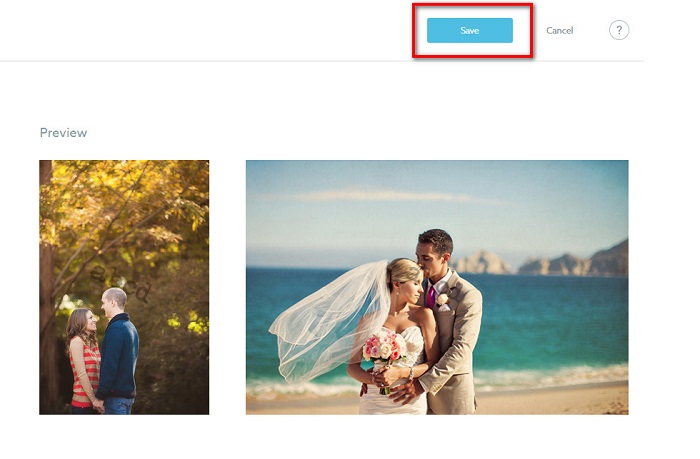
चरण 4. अंत में, Save बटन पर क्लिक करके अपने द्वारा किए गए सेटिंग बदलावों को लागू करें।.
आपके द्वारा अपलोड की गई छवियों पर वॉटरमार्क लागू करें।
वॉटरमार्क पृष्ठ पर, आप एक डिफ़ॉल्ट वॉटरमार्क चुन सकते हैं। आप अपने भविष्य के सभी अपलोड के लिए वॉटरमार्क भी चालू कर सकते हैं। नई छवियों को अपलोड करने से पहले आप इसे बदल सकते हैं।
और जब आप वेब-आधारित अपलोडर या डेस्कटॉप अपलोडर के माध्यम से अपनी गैलरी में नई तस्वीरें अपलोड करते हैं, तो आप उस वॉटरमार्क का चयन कर सकते हैं जिसे आप अपलोड स्क्रीन पर उपयोग करना चाहते हैं।
शूटप्रूफ में वॉटरमार्क कैसे हटाएं
हमेशा याद रखें कि मौजूदा वॉटरमार्क को संपादित करने या जोड़ने से केवल आपके भविष्य के अपलोड प्रभावित होंगे। आपके द्वारा किए गए परिवर्तन आपकी गैलरी में पहले से मौजूद छवियों को प्रभावित नहीं करेंगे। लेकिन अगर आप वॉटरमार्क बदलना चाहते हैं या शूटप्रूफ वॉटरमार्क हटाना चाहते हैं, तो आप वॉटरमार्क को अपनी गैलरी में अपडेट करने के लिए रीफ्रेश कर सकते हैं। यहां बताया गया है कि आप शूटप्रूफ वॉटरमार्क को कैसे हटा या बदल सकते हैं।
चरण 1. Photos > Galleries पर जाएँ, फिर अपनी गैलरी पर क्लिक करें।.
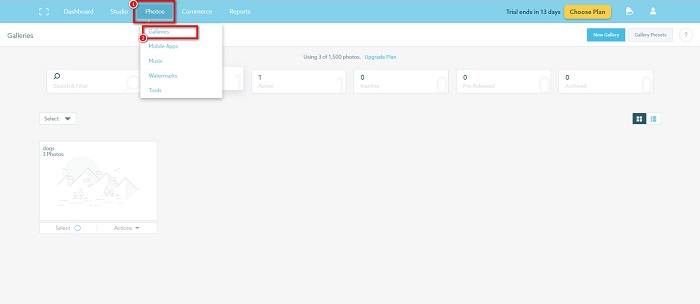
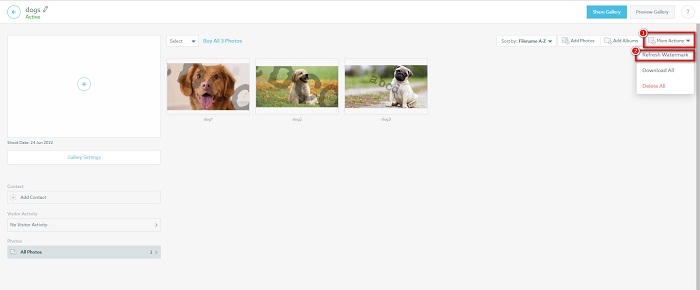
चरण 2. गैलरी में, इंटरफ़ेस के ऊपर दाएँ कोने पर More Actions बटन पर क्लिक करें।.
चरण 3. फिर, Refresh Watermark चुनें ताकि आप जो भी इमेज अपलोड करें, उन सभी से वॉटरमार्क हटा सकें।.
चरण 4. वॉटरमार्क हटाने के लिए, स्लाइडर बार को ऑफ कर दें। और यदि आप केवल वॉटरमार्क बदलना चाहते हैं, तो New Watermark चुनें।.
चरण 5. अंत में, Apply Change पर क्लिक करके अपने किए गए बदलावों को सेव करें।.
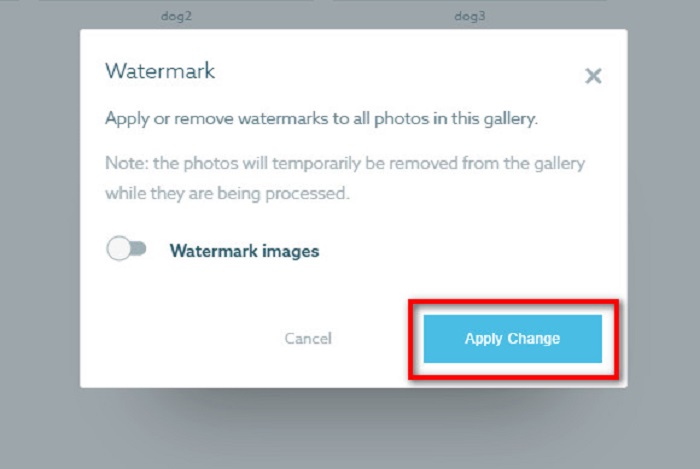
आप देखेंगे कि तस्वीरें स्वचालित रूप से प्रसंस्करण के रूप में प्रदर्शित होंगी। जब परिवर्तन लागू होते हैं, तो आप देखेंगे कि छवियां आपकी गैलरी में वापस आ जाएंगी।
संबंधित:
ऐसे बेहतरीन Arnold Maya वॉटरमार्क रिमूवर्स जिन्हें आप मिस नहीं कर सकते
123rf वॉटरमार्क रिमूवर्स – सर्वोत्तम टूल्स की विस्तृत समीक्षा
भाग 3. शूटप्रूफ वॉटरमार्क निकालें के बारे में अक्सर पूछे जाने वाले प्रश्न
क्या आप डिजिटल वॉटरमार्क हटा सकते हैं?
अदृश्य डिजिटल वॉटरमार्क हटाना कठिन है। उदाहरण के लिए, जिन्हें Digimarc Photoshop प्लग-इन द्वारा एम्बेड किया गया है, उन्हें निकालना मुश्किल है। क्रॉपिंग, आकार बदलना, शोर जोड़ना और मध्यम धुंधलापन डिजिटल वॉटरमार्क के साथ काम नहीं कर सकता है।
क्या आप किसी वीडियो से लोगो वॉटरमार्क हटा सकते हैं?
हाँ। आपके वीडियो पर लोगो वॉटरमार्क हटाना संभव है। कई वॉटरमार्क रिमूवर आपको अपने वीडियो पर लोगो को हटाने की अनुमति देते हैं। यदि आप अपने वीडियो पर लोगो हटाना चाहते हैं, तो वीडियो कन्वर्टर अल्टीमेट का उपयोग करें।
यदि आप स्क्रीनशॉट लेते हैं तो क्या शूटप्रूफ दिखाई देता है?
शूटप्रूफ विक्रेता की तस्वीरों की सुरक्षा के लिए कई उपाय करता है। हालांकि, शूटप्रूफ लोगों को आपकी गैलरी में आपकी छवि के स्क्रीनशॉट लेने से नहीं रोक सकता।
निष्कर्ष
बस इतना ही! ऊपर बताए गए तरीकों का पालन करके, अब आप अपनी इमेज से Shootproof वॉटरमार्क हटा सकते हैं। हालाँकि Shootproof पर वॉटरमार्क हटाना मुफ़्त है, लेकिन प्रक्रिया का पालन करना कुछ लोगों को कठिन लग सकता है। तो, यदि आप अपनी इमेज से Shootproof वॉटरमार्क आसानी से हटाना चाहते हैं, तो FVC Free Watermark Remover का उपयोग करें।.
-
 बकाया Photobucket वॉटरमार्क रिमूवर ऑनलाइन और ऑफलाइन
 इन अद्भुत Photobucket वॉटरमार्क रिमूवर का उपयोग करके अपनी तस्वीरों से Photobucket वॉटरमार्क हटाने का तरीका जानें। तरीके जानने के लिए इस लेख को पढ़ें।
-
 आसान चरणों के साथ पीडीएफ से वॉटरमार्क आसानी से निकालें
 इन सरल चरणों का पालन करके पीडीएफ से वॉटरमार्क निकालें। इन अद्भुत टूल का उपयोग करके अपनी पीडीएफ फाइल से वॉटरमार्क को आसानी से हटाने का तरीका जानें।
-
 ग्रेजुएशन पिक्चर्स से वॉटरमार्क हटाने के आसान तरीके
 स्नातक चित्रों से वॉटरमार्क हटाने के सर्वोत्तम तरीके जानना चाहते हैं? इस लेख को पढ़कर, आप आसानी से ग्रेड पिक्स पर वॉटरमार्क हटाने का तरीका जान पाएंगे।
