


 वीडियो कनवर्टर अंतिम
 स्क्रीन अभिलेखी
 वीडियो मरम्मत
अनब्लर फोटो ऐप्स और टूल्स: धुंधली तस्वीरों का समाधान
एक ऐसी दुनिया में जहाँ यादों को फ़ोटोग्राफ़ के ज़रिए सहेजा और दोबारा जिया जा सकता है, वहाँ धुंधली तस्वीरें मिलना – जो धुंधली यादों के बराबर है – से ज़्यादा परेशान करने वाली बात और कुछ नहीं। सौभाग्य से, तकनीक ने नवोन्मेषी समाधानों के साथ हमारी मदद की है, और इस क्षेत्र में आपके भरोसे के लिए थर्ड-पार्टी ऐप्स और ऑनलाइन टूल सबसे आगे खड़े हैं, जो हमारी कीमती यादों को बचाने और निखारने के तरीके में क्रांति ला रहे हैं। चाहे वह ज़िंदगी में सिर्फ़ एक बार होने वाला कोई ख़ास अवसर हो या अचानक खिंची कोई धुंधली तस्वीर, यह ऐप सादगी को केंद्र में रखकर स्पष्टता लौटाने का वादा करता है। इस लेख को पढ़कर अपना ज्ञान बढ़ाना शुरू करें, जिसमें हमारे थर्ड-पार्टी ऐप्स और ऑनलाइन टूल शामिल हैं जो आपकी तस्वीरों को ऑनलाइन मुफ़्त में unblur photos online free करके साफ़ करते हैं। बस कुछ टैप्स में निराशा को अलविदा कहें और तस्वीर जैसी परफ़ेक्ट क्वॉलिटी का स्वागत करें।.

भाग 1. ऐप जो फ़ोटो का धुंधलापन दूर करता है
रेमिनी
कीमत (Pricing)
मासिक सब्सक्रिप्शन: $3.99/माह
प्रो वर्ज़न: $6.99/माह
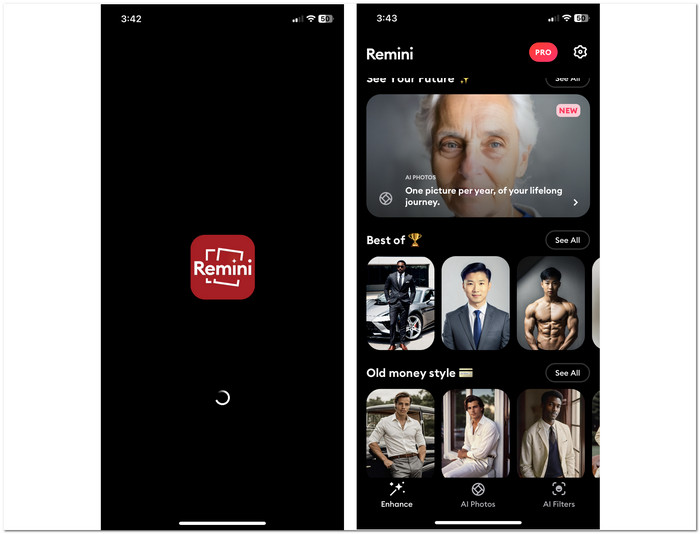
Remini धुंधली तस्वीरों को बेहतर बनाने और unblur photos करने के लिए डिज़ाइन किए गए मशहूर मोबाइल ऐप्स में से एक है। पिछले कुछ वर्षों में जब बहुत से यूज़र अपनी धुंधली फ़ोटो को साफ़ करने के तरीक़े ढूँढ़ रहे थे, तब यह ऐप अपनी लोकप्रियता की ऊँचाई पर पहुँचा। यह ऐप AI photo unblur तकनीक का इस्तेमाल कर सटीक और स्पष्ट परिणाम देता है। इसके बाद से यह ऐप धुंधली तस्वीरों की समस्या हल करने के लिए बहुतों का पसंदीदा ऐप बन गया है। ऐप की एक और ख़ासियत यह है कि यह आपके चेहरे वाली तस्वीरों को हाई-डेफ़िनिशन रेज़ोल्यूशन में बदल सकता है, जिससे यह आपके आईडी फ़ोटो एडिट करने का बेहतरीन तरीक़ा बन जाता है।.
सबसे उपयुक्त
◆ पोर्ट्रेट और ग्रुप फ़ोटो। Remini सेल्फ़ी, पोर्ट्रेट और ग्रुप फ़ोटो को शानदार, हाई-रेज़ोल्यूशन इमेज में बदलने का आपका भरोसेमंद समाधान है, जो अद्भुत चेहरे के विवरण दिखाती हैं। अपनी उन्नत तकनीक के साथ, Remini आपकी तस्वीरों में सबसे अच्छा उभार कर लाता है, यह सुनिश्चित करते हुए कि हर भाव और हर फीचर बिल्कुल साफ़ नज़र आए।.
◆ धुंधली फ़ोटो की मरम्मत। AI प्रोसेसिंग के साथ अपनी धुंधली तस्वीरों को बेहद आसानी से बदलें। यह इनोवेटिव टूल केवल कुछ क्लिक में फ़ोकस से बाहर सब्जेक्ट्स को साफ़, शार्प और unblur कर देता है।.
◆ फ़ोटो एन्हांसमेंट। यह टूल AI की शक्ति का इस्तेमाल करके आपकी तस्वीरों में नई जान फूँकता है। अपनी उन्नत एल्गोरिद्म की मदद से यह टूल आपके पुराने फ़ोटो में स्पष्टता और चमक दोबारा लौटाता है, और सिर्फ़ कुछ क्लिक में कीमती यादों को फिर से जीवंत बना देता है।.
पेशेवरों
- उपयोगकर्ता-अनुकूल ऐप.
- उन्नत एआई प्रौद्योगिकी का उपयोग करता है।
- महान धुंधलापन दूर करने की क्षमता.
- आपके किसी भी मोबाइल डिवाइस पर डाउनलोड करने के लिए उपलब्ध है।
विपक्ष
- मूल्य निर्धारण महंगा हो सकता है।
- सदस्यता-आधारित ऐप.
- यह एक निःशुल्क संस्करण प्रदान करता है, लेकिन विज्ञापनों के साथ।
रेमिनी ऐप एक शक्तिशाली टूल है जो फ़ोटो को बेहतर बनाने, धुंधलापन दूर करने और पुनर्स्थापित करने के लिए बहुत बढ़िया है। कोई भी आपको अपनी फ़ोटो को पुनर्स्थापित करने और धुंधलापन दूर करने से नहीं रोक सकता। ऐप का उपयोग करके आप गारंटी दे सकते हैं कि कोई स्मृति हमेशा जीवंत और स्पष्ट रहेगी।
ब्लरबस्टर
कीमत (Pricing)
मासिक सब्सक्रिप्शन: $4.99/माह से शुरू
1-वर्षीय सब्सक्रिप्शन: $29.99 स्थिर
साप्ताहिक सब्सक्रिप्शन: $9.99/सप्ताह
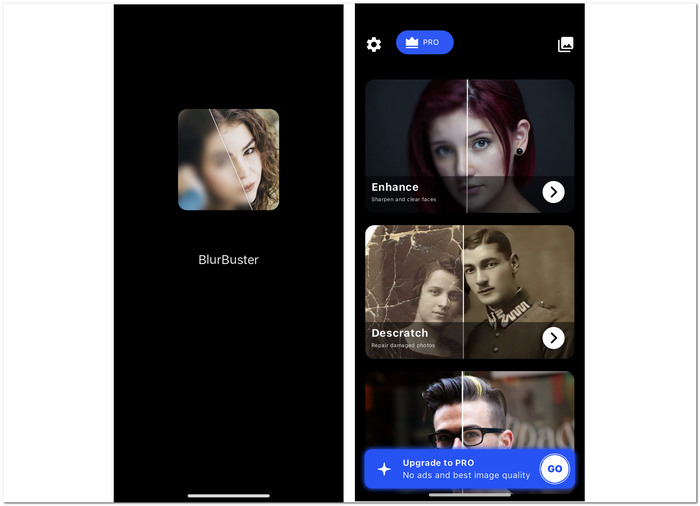
BlurBuster अपनी उन्नत तकनीक और सरल इंटरफ़ेस के ज़रिए धुंधली तस्वीरों को हल करने का एक इनोवेटिव तरीका प्रदान करता है, जिससे पूरी प्रक्रिया स्मूद हो जाती है। यह photo enhancer आपकी तस्वीरों को आसानी से बेहतर बनाता है, जिससे आप सिर्फ़ ऐप का इस्तेमाल करके प्रोफेशनल नतीजे हासिल कर सकते हैं। ऐप में फ़ोटो एन्हांसर, कलराइज़र और एनीमेशन जैसे कई फ़ीचर भी मौजूद हैं।.
सबसे उपयुक्त
◆ एडवांस स्पेशलाइज़्ड डीब्लरिंग। यह AI का इस्तेमाल कर इमेज को unblur करता है। इससे यह टूल न सिर्फ़ आपकी धुंधली तस्वीरों को, बल्कि पुरानी और ख़राब हो चुकी फ़ोटो को भी आसानी से बहाल कर देता है।.
◆ फ़ोटो एन्हांसमेंट। पुरानी और क्षतिग्रस्त तस्वीरों को बहाल करने के लिए बिल्कुल उपयुक्त। इसकी रीमास्टरिंग तकनीक आपकी बहुत पुरानी यादों को फिर से ज़िंदा कर देती है।.
◆ फ़ोटो शार्पन करना। इमेज को शार्प करना उसे कम धुंधला बनाने का एक तरीक़ा है। यह ऐप शार्पनिंग तकनीक का इस्तेमाल सही मात्रा में करता है ताकि ओवरडू होने से बचा जा सके।.
पेशेवरों
- परिणाम तुरन्त.
- एक पूर्वावलोकन उपलब्ध है.
- धुंधलापन दूर करने वाला उपकरण प्रभावशाली है।
- सटीक परिणाम के लिए AI के साथ एकीकृत।
विपक्ष
- सदस्यता-आधारित.
- ऐप नेविगेशन को बेहतर बनाया जा सकता है
- इसके मुफ़्त संस्करण में विज्ञापन हैं.
ब्लरबस्टर अपनी उन्नत तकनीक और उपयोगकर्ता के अनुकूल इंटरफ़ेस की बदौलत धुंधली तस्वीरों को हल करने के लिए एक शीर्ष-स्तरीय समाधान के रूप में सामने आता है। यह आसानी से आपकी छवियों को बढ़ाता है और धुंधलापन दूर करता है, जिससे आसानी से पेशेवर-स्तर के परिणाम मिलते हैं। हालाँकि इसका सब्सक्रिप्शन-आधारित मॉडल हर किसी को पसंद नहीं आ सकता है, लेकिन तुरंत परिणाम और प्रभावशाली धुंधलापन हटाने की क्षमता इसे किसी भी उपयोगकर्ता के लिए एक बेहतर टूल बनाती है।
पिक्सेलअप
कीमत (Pricing)
प्रो: $3.99/माह
लाइफ़टाइम: $29.99
1 सप्ताह प्रीमियम: $3.99
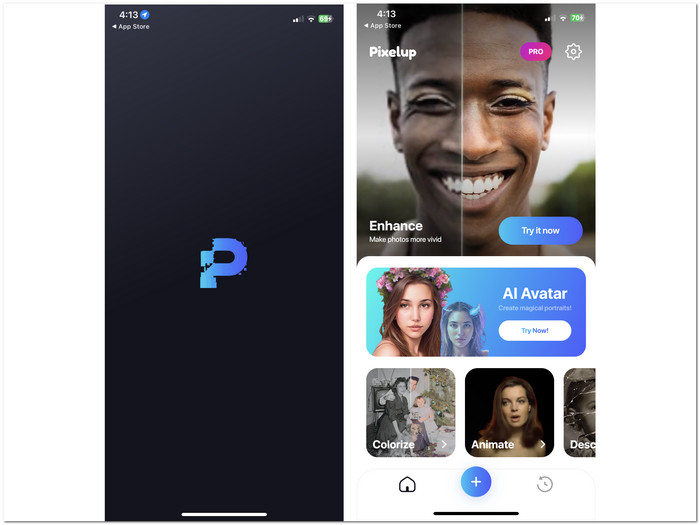
यह ऐप क्रिस्टल-क्लियर फोटो परिणामों के लिए पिक्सल जोड़ता है और उन्हें लक्षित करता है। आपकी तस्वीरों में धुंधले पिक्सल को चमकाने के लिए डिज़ाइन किया गया यह ऐप हमारी सूची में शामिल है। पिक्सेल उन ऐप्स में से एक है जो पुरानी, धुंधली, क्षतिग्रस्त तस्वीरों को तुरंत बदलने के लिए AI फोटो एन्हांसर का उपयोग करता है। यह ऐप iOS और Android दोनों के लिए उपलब्ध है, जिससे यह उन उपयोगकर्ताओं की एक विस्तृत श्रृंखला को छूता है जो अपनी तस्वीरों को धुंधला करने का तरीका खोज रहे हैं।
सबसे उपयुक्त
◆ फ़ोटो कलराइज़र। Pixelup आपके फ़ोटो को सिर्फ़ deblur करने के अलावा कई तरह की सुविधाएँ देता है। फ़ोटो कलराइज़र इसकी मुख्य विशेषताओं में से एक है, जो आपकी बेरंग और फीकी तस्वीरों में जान डाल देता है।.
◆ फ़ोटो एनीमेट करना। ये फ़ीचर यूज़र्स को अपनी तस्वीरों को एनीमेट करने की सुविधा देते हैं, जिससे उन्हें ज़िंदा और अनोखे इफेक्ट मिलते हैं, जो आपकी फ़ोटो देखने के कुल अनुभव को बेहतर बनाते हैं।.
◆ फ़ोटो डीब्लरिंग/एन्हांसमेंट। फ़ोटो को deblur करना उन्हें एन्हांस करने का एक तरीक़ा है, जिसमें आपकी तस्वीरों को AI प्रक्रिया से गुज़ारा जाता है, जो विश्लेषण कर उन हिस्सों की पहचान करती है जिन्हें सुधारकर आपकी फ़ोटो को बेहतर बनाया जा सके।.
पेशेवरों
- एआई-एकीकृत डीब्लरिंग और शार्पनिंग टूल।
- रंग सुधार।
- सोशल मीडिया साझाकरण.
- सुविधाजनक एवं उपयोगकर्ता-अनुकूल इंटरफ़ेस.
विपक्ष
- सीमित संपादन सुविधाएँ।
- सदस्यता-आधारित ऐप.
- मुफ़्त संस्करण में देखने के लिए विज्ञापन हैं।
Pixelup AI फोटो एन्हांसर आपकी तस्वीरों को आसानी से बेहतर बनाने और धुंधला करने के लिए सबसे बढ़िया विकल्प है। इसकी कुशल कार्यक्षमता आपके डिवाइस की स्टोरेज क्षमता पर बोझ डाले बिना सुचारू संचालन सुनिश्चित करती है। साथ ही, किसी भी इन-ऐप खरीदारी के बावजूद, Pixelup हल्का रहता है, जिससे आपको स्टोरेज सीमाओं के बारे में चिंता करने की ज़रूरत नहीं पड़ती। Pixelup के साथ, सहज फोटो एन्हांसमेंट के लिए प्रदर्शन और न्यूनतम स्टोरेज फ़ुटप्रिंट का सही मिश्रण अनुभव करें।
भाग 2. ऑनलाइन निःशुल्क फ़ोटो का धुंधलापन दूर करने के लिए उपकरण
FVC फ्री इमेज अपस्केलर
FVC Free Image Upscaler आपकी इमेज को deblur करने के लिए आसान वेब समाधानों में से एक है। यह टूल आर्टिफ़िशियल इंटेलिजेंस (AI) तकनीक का इस्तेमाल कर हर आउटपुट को बेहतर और परिष्कृत बनाता है, जिससे यह तेज़, सुरक्षित और प्रभावी बन जाता है। इसकी क्षमताओं का उपयोग करने के लिए आपको अकाउंट बनाने की ज़रूरत नहीं है, और आप इस प्रोग्राम को मुक्त रूप से इस्तेमाल कर सकते हैं। सरल UI इन वेब-आधारित टूल की मुख्य विशेषताओं में से एक है, क्योंकि आपको बस इमेज अपलोड करनी है, मैग्निफ़िकेशन सेटिंग चुननी है और फिर अपनी फ़ोटो डाउनलोड कर लेनी है। नीचे इस टूल का इस्तेमाल करके अपनी तस्वीरों को unblur करने के विस्तृत स्टेप दिए गए हैं।.
सबसे उपयुक्त
◆ स्मार्ट फ़ोटो अपस्केलर। इसकी क्वॉलिटी अन्य समान सेवाएँ देने वाले टूल्स की तुलना में 8x बेहतर क्वॉलिटी प्रदान करती है। इसका AI उन्नत है, और तेज़ नतीजों के लिए यह आपके फ़ोटो को अपलोड करते ही अपने-आप प्रोसेस और विश्लेषण करना शुरू कर देता है।.
◆ पोस्टर प्रिंट। इस टूल द्वारा तैयार की गई क्वॉलिटी आपको हाई-क्वॉलिटी फ़ोटो प्रिंट करने देती है, जिससे धुंधलापन जैसी सारी समस्याएँ दूर हो जाती हैं।.
◆ सोशल मीडिया शेयरिंग। यह सुविधा यूज़र्स को हमेशा अपने Facebook और अन्य सोशल मीडिया पर हाई-क्वॉलिटी फ़ोटो अपलोड करने देती है।.
पेशेवरों
- सभी प्रकार के ब्राउज़रों तक मुफ्त पहुंच।
- वेब-आधारित उपकरणों का उपयोग निःशुल्क है।
- आपकी तस्वीरों को संसाधित करने के लिए AI का उपयोग करता है।
- तेज़, सुरक्षित, सटीक परिणाम के साथ।
- छवि अपस्केल से 8 गुना बेहतर गुणवत्ता प्राप्त की जा सकती है।
विपक्ष
- इसका उपयोग करने के लिए इंटरनेट कनेक्शन की आवश्यकता है।
स्टेप 1. अपनी इमेज को FVC Free Image Upscaler वेबसाइट पर दिए गए अपलोड इमेज फ़ील्ड में अपलोड करें।.
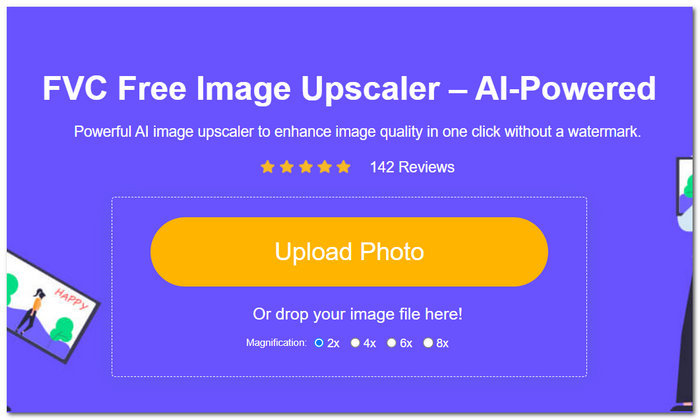
स्टेप 2. जैसे ही आपकी इमेज टूल में लोड हो जाए, टूल इंटरफ़ेस के ऊपरी हिस्से में स्थित 2x से 8x तक की पसंदीदा Magnification सेटिंग चुनें।.
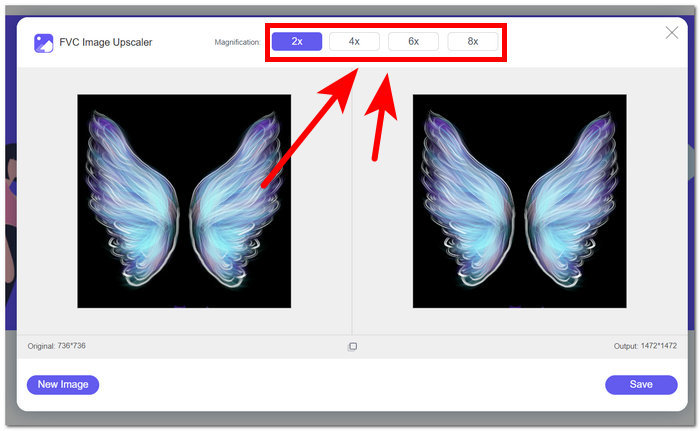
स्टेप 3. जैसे ही आप ऊपर दी गई मैग्निफ़िकेशन सेटिंग्स पर क्लिक करेंगे, अपस्केलिंग प्रक्रिया अपने-आप शुरू हो जाएगी।.
स्टेप 4. प्रक्रिया पूरी होने पर आप अपनी फ़ोटो का प्रीव्यू देख पाएँगे, और अपनी फ़ोटो को डेस्कटॉप पर डाउनलोड करने के लिए Download बटन पर क्लिक करें।.
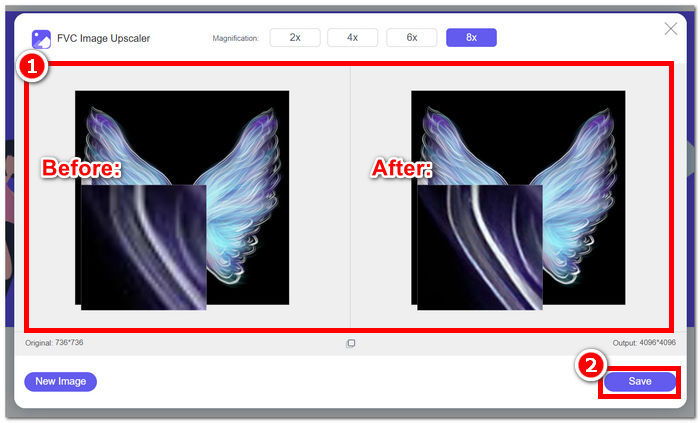
FVC फ्री इमेज अपस्केलर निश्चित रूप से उपयोगकर्ताओं को आसानी और सटीकता के साथ अपनी तस्वीरों को धुंधला करने में मदद करता है। यह ऐप अपनी सुविधाओं के लिए बिना किसी छिपे हुए शुल्क के मुफ़्त उपयोग प्रदान करता है, जो इसे सबसे अच्छा ऑनलाइन टूल बनाता है। यह टूल न केवल आपकी तस्वीरों को धुंधला करता है, बल्कि आप हर बार टूल का उपयोग करने पर पिक्सेल-परफेक्ट गुणवत्ता की गारंटी दे सकते हैं।
अपस्केलर
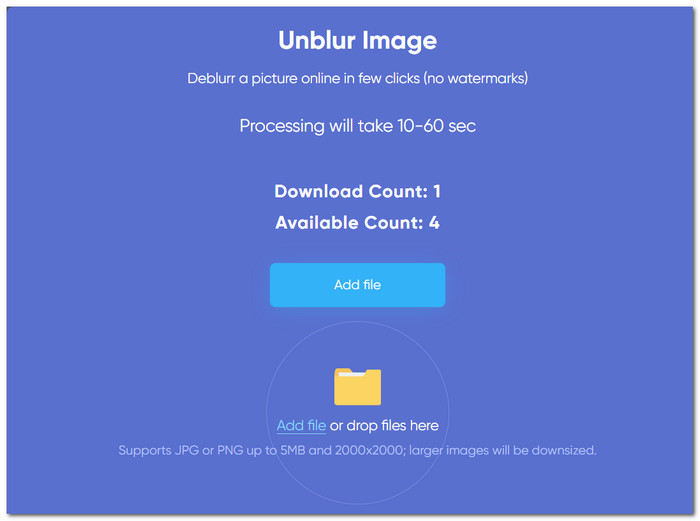
यह वेब-आधारित टूल ऑनलाइन उपलब्ध विश्वसनीय टूल में से एक है। यह आपकी धुंधली तस्वीरों की समस्या को तुरंत, निःशुल्क हल करता है। यह टूल न केवल उपयोग में आसान है, बल्कि इसका यूजर इंटरफेस भी सरल है, जिसे हर उपयोगकर्ता उपयोग कर सकता है। इस प्रकार, यह टूल आपको मोशन ब्लर के साथ अपनी तस्वीरों को आसानी से धुंधला करने की सुविधा देता है।
सबसे उपयुक्त
◆ लाइट इंटेंसिटी बढ़ाना। यह टूल आपकी फ़ोटो की खराब लाइटिंग को अपने-आप एडजस्ट कर देता है, ताकि उन्हें एन्हांस करने की प्रक्रिया में बेहतर बनाया जा सके।.
◆ कलर एन्हांसमेंट। डीब्लरिंग प्रक्रिया के दौरान यह टूल कलर एन्हांसमेंट भी इस्तेमाल करता है, जिससे हर प्रोसेस्ड इमेज में थोड़ी और चमक और जान आ जाती है।.
◆ इमेज जेनरेटर। यह टूल आर्टिफ़िशियल इंटेलिजेंस की मदद से टेक्स्ट प्रॉम्प्ट में सिर्फ़ एक नाम दर्ज करके इमेज बनाने (क्राफ़्ट करने) की सुविधा भी देता है।.
पेशेवरों
- उपयोग करने के लिए नि: शुल्क।
- सीधा इंटरफ़ेस.
- वेब-आधारित उपकरण.
विपक्ष
- टूल में आपकी छवि अपलोड करने में कुछ समय लग सकता है।
- इसमें चुनने के लिए आवर्धन सेटिंग्स नहीं हैं।
- धुंधलापन दूर करने के लिए फ़ोटो का फ़ाइल आकार 5MB तक सीमित है।
इसकी सभी प्रमुख विशेषताओं में से, UpScaler एक आशाजनक वेब-आधारित उपकरण साबित होता है जिस पर आप अपनी तस्वीरों को धुंधला करने के लिए भरोसा कर सकते हैं। फिर भी, इसका एकमात्र नकारात्मक पहलू प्रक्रिया का समय है, जिसमें कुछ समय लग सकता है, और उपयोगकर्ताओं को अपनी छवियों को धुंधला करने की गुणवत्ता चुनने देने के लिए सेटिंग उपकरण में कहीं नहीं मिलती है; इसके अतिरिक्त, यह यहाँ सबसे सरल और सबसे सीधा उपकरण साबित होता है।
टिनीवॉ
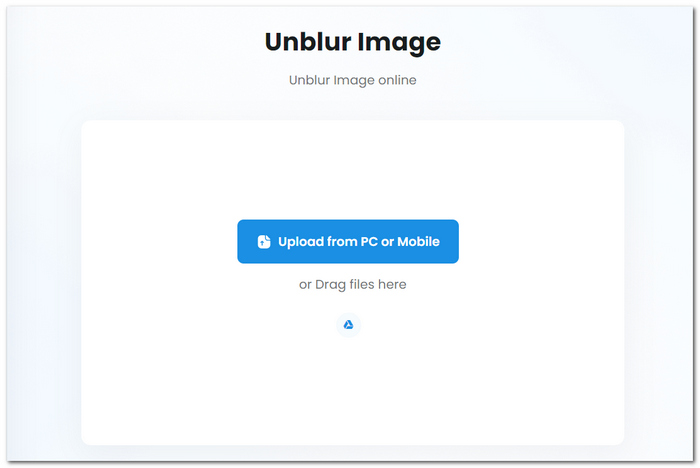
TiniWow भी एक वेब-आधारित टूल है जो आपके स्थानीय ब्राउज़र में उपलब्ध है। यह टूल उपयोगकर्ता को अपनी धुंधली तस्वीर को तुरंत संपादित करने की अनुमति देता है; इसकी विशेषताओं के साथ, यह टूल पीडीएफ फाइल संपादन के लिए भी खुला है, जो इसे सबसे बहुमुखी टूल में से एक बनाता है। इसका एक सुव्यवस्थित इंटरफ़ेस है जिससे उपयोगकर्ता धुंधलापन दूर कर सकते हैं, पृष्ठभूमि हटा सकते हैं, संपीड़न कर सकते हैं और अन्य बुनियादी संपादन कार्य कर सकते हैं।
सबसे उपयुक्त
◆ फ़ाइल कन्वर्टर। इस टूल की बहुमुखी विशेषताएँ इसे सिर्फ़ आपकी धुंधली तस्वीरों को ठीक करने के लिए ही नहीं, बल्कि उन्हें किसी और उपलब्ध फ़ाइल फ़ॉर्मेट में कन्वर्ट करने के लिए भी आदर्श बनाती हैं।.
◆ फ़ोटो Unblurring। इस टूल की deblurring क्षमता बहुत अच्छी है; इसके नतीजे दूसरे टूल्स जितनी ही उच्च क्वॉलिटी का आउटपुट देते हैं।.
◆ इमेज से टेक्स्ट एक्सट्रैक्टर। यह स्मार्ट टेक्स्ट एक्सट्रैक्टर यूज़र्स को फ़ोटो में मौजूद टेक्स्ट को बिना किसी दिक़्क़त के कॉपी या एक्सट्रैक्ट करने देता है।.
पेशेवरों
- उपयोग हेतु निःशुल्क सुविधाएँ.
- अद्वितीय एवं आसान नेविगेशन इंटरफ़ेस.
- उन्नत और सटीक परिणामों के लिए AI का उपयोग करता है।
- पीडीएफ, वीडियो और फोटो के लिए एक बहुमुखी उपकरण।
विपक्ष
- इंटरनेट कनेक्शन की आवश्यकता है.
- आपको अपनी धुंधली तस्वीरों को मैन्युअल रूप से समायोजित और शार्प करना होगा।
- धीमी अपलोडिंग गति.
TinyWow आपकी तस्वीरों को धुंधला करने के लिए सरल सुविधाएँ प्रदान करता है और PDF कनवर्टर और बुनियादी वीडियो संपादन के रूप में अच्छी तरह से काम करता है। दूसरी ओर, आपको अपनी धुंधली चिंताओं को ठीक करने के लिए अपनी तस्वीरों को मैन्युअल रूप से समायोजित करने के साथ-साथ धीमी अपलोड गति से निपटना होगा। यह एक बढ़िया टूल है, लेकिन इसकी सेवा बेहतर हो सकती है।
भाग 3. ऐप का उपयोग करके फ़ोटो को धुंधला करने के बारे में अक्सर पूछे जाने वाले प्रश्न
क्या किसी चित्र को पुनः फोकस करने का कोई तरीका है?
हां, अनब्लर फोटो ऐप आपकी तस्वीरों के फोकस और स्पष्टता को समायोजित करने के लिए उपकरण प्रदान करता है। वांछित स्तर का फोकस प्राप्त करने के लिए विशिष्ट क्षेत्रों या संपूर्ण तस्वीर को शार्प करने के लिए बस ऐप की रीफोकसिंग सुविधा का उपयोग करें।
क्या बहुत धुंधली फोटो को ठीक किया जा सकता है?
अनब्लर फोटो ऐप धुंधली तस्वीरों की स्पष्टता में काफी सुधार कर सकता है। फिर भी, सुधार की सीमा इस बात पर निर्भर करती है कि आपकी तस्वीरें कितनी धुंधली हैं और छवि की गुणवत्ता कैसी है। हालांकि यह बेहद धुंधली तस्वीरों को पूरी तरह से बहाल नहीं कर सकता है, लेकिन यह अक्सर उन्हें अधिक प्रस्तुत करने योग्य और उपयोग करने योग्य बना सकता है।
क्या मैं किसी फोटो से धुंधला टेक्स्ट हटा सकता हूँ?
हां, अनब्लर फोटो ऐप से आप फोटो में धुंधले टेक्स्ट को बेहतर बना सकते हैं, जिससे यह अधिक पठनीय और स्पष्ट हो जाएगा। धुंधलापन कम करने और टेक्स्ट की तीक्ष्णता बढ़ाने के लिए ऐप के उन्नत एल्गोरिदम का उपयोग करें, जिससे पठनीयता और समग्र छवि गुणवत्ता में सुधार होगा।
निष्कर्ष
यादों की फ़ोटोग्राफ़ी का महत्व शब्दों में बयान से परे है; धुंधली तस्वीरों की झुंझलाहट उन ख़ास पलों को याद रखना मुश्किल बना सकती है। सौभाग्य से, unblur photo apps इन अनमोल यादों को सहेजने और सुधारने के लिए अनिवार्य बन गए हैं। ये यूज़र्स को अपनी तस्वीरों को आसानी से बेहतर बनाने, unblur करने और बहाल करने की सुविधा देते हैं, यह सुनिश्चित करते हुए कि हर याद सालों तक जीवंत और स्पष्ट बनी रहे। वे यह सब विविध ज़रूरतों को पूरा करने वाली ढेरों सुविधाएँ, आसान इंटरफ़ेस और अत्याधुनिक AI तकनीक के ज़रिए करते हैं।.
-
 फेसबुक पर बिना किसी परेशानी के उच्च गुणवत्ता वाली तस्वीरें कैसे अपलोड करें
 उच्च गुणवत्ता वाली Facebook फ़ोटो अपलोड करने की युक्तियों के साथ क्रिस्टल-क्लियर छवियों के साथ अपनी Facebook उपस्थिति को बढ़ाएँ। आज ही अपनी Facebook अपलोड गुणवत्ता बढ़ाएँ!
-
 स्पष्ट छवि पाने के लिए iPhone पर फ़ोटो को धुंधला कैसे करें
 iPhone पर धुंधली तस्वीरों में महारत हासिल करके फोटो पूर्णता प्राप्त करें। पोर्ट्रेट मोड, ऑनलाइन टूल और तृतीय-पक्ष एप्लिकेशन के साथ प्रभावशाली परिणाम बनाएं।
-
 इमेज का आकार ऑनलाइन और ऑफलाइन कैसे बढ़ाएं
 गुणवत्ता खोए बिना छवि का आकार बढ़ाने का सबसे आसान तरीका खोजें। अपने चित्रों की इष्टतम गुणवत्ता सुनिश्चित करने के लिए हमारे आकार बदलने वाले टूल और सॉफ़्टवेयर देखें।
